
Google Ads Transparency, Bing Ads Library – Advertiser Check
Pricing
from $0.70 / 1,000 ads
Google Ads Transparency, Bing Ads Library – Advertiser Check
Which companies advertise on Google and Microsoft Bing: domains or company names in, one row per company out from the Google Ads Transparency Center and Microsoft Ad Library – advertising yes/no, ad counts, advertiser accounts, active in last 30 days. Also exports competitor ads, or only new ones.
Pricing
from $0.70 / 1,000 ads
Rating
0.0
(0)
Developer

Perceptron Data
Maintained by CommunityActor stats
0
Bookmarked
1
Total users
1
Monthly active users
2 days ago
Last modified
Categories
Share
Advertiser Check (Google & Bing)
Paste a list of companies, get one row per company: Google ads, Bing ads, how many, which accounts, active in the last 30 days. For domains, every Microsoft match is proven through the landing pages of its own ads; company names are matched on the account name.
Limits: no spend figures – the libraries don't publish them. Microsoft covers ads shown in the EEA, recorded since June 2023; Google ad counts are ranges. Meta and LinkedIn are not covered. Google refuses automated requests after a few dozen companies from one address, so plan long lists as several runs (measurements below).
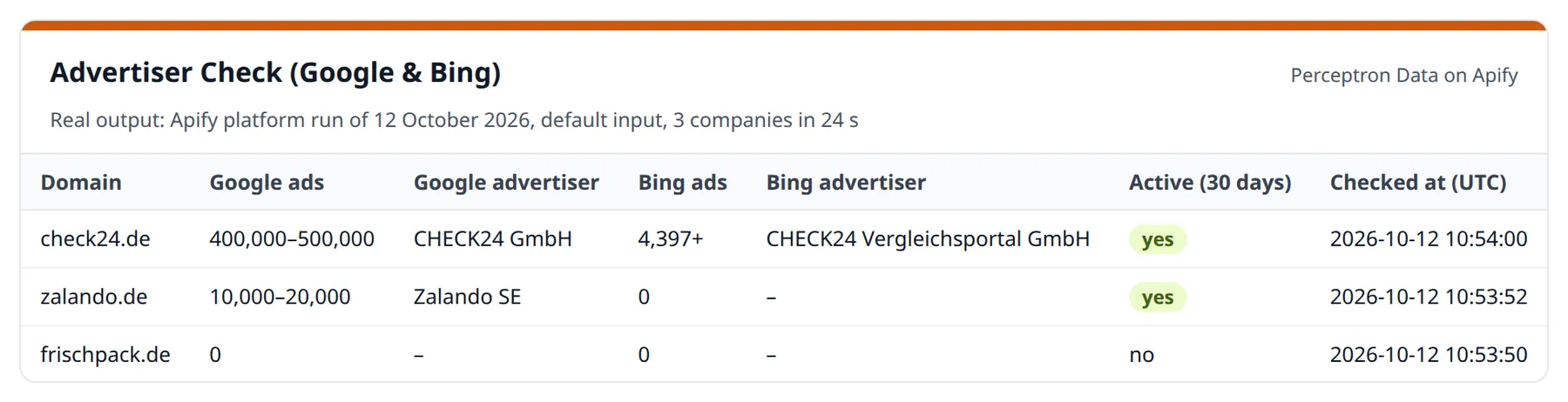
| Company | Google ads | Bing ads | Bing advertiser | Active (30 days) |
|---|---|---|---|---|
| check24.de | 400,000–500,000 | 4,397+ | CHECK24 Vergleichsportal GmbH | yes |
| zalando.de | 10,000–20,000 | 0 | – | yes |
| frischpack.de | 0 | 0 | – | no |
Apify platform run of 12 October 2026 with the default input: 3 companies in 24 seconds. "0" is an answer, not an error.
What you are not charged for: rows with the status partial, unavailable, not_checked, invalid_input or duplicate – a library that refused or failed, a company the run did not reach, a line that is not a usable domain, a company you listed twice. Ad details are charged only when the library returned details. Every run has a start fee of $0.01.
The second mode exports every ad of a competitor – Google: format, first and last time shown, preview image, link to the ad; Bing: headline, text, landing page, reach and targeting – with a monitoring mode that returns only new ads. No login, no API key, no proxy.
How to use – step by step
- Click Try for free on this page (a free Apify account is enough) – the input form opens with three example domains.
- Keep What to do: Check companies and paste your domains into Company websites (domains), one per line – or names into Company names (a domain gives the more certain answer).
- Optional: limit Platforms to Google or Microsoft, pick a Region, or add Ad counts per country.
- Click Start. Three companies take about half a minute; Microsoft answers about one request per second.
- Open the Output tab: the Companies view shows one row per company with its status. Export as CSV, Excel or JSON, or read the rows through the API (examples below).
- Companies that Google or Microsoft did not answer are listed under
REMAININGin the run's key-value store – paste them into the next run.
Why this one
- Google and Microsoft in one row – one row per company. Paste a company list and get the answer sales and agency teams ask for: who here is paying for search ads – and where?
- For domains, every Microsoft match is proven, not guessed. Microsoft's
library has no search by website, and name search alone is wrong surprisingly
often (measured on 60 German companies): Otto runs an account that only
advertises lascana.de, the German Rossmann account only advertises
rossmann.dk, and a search for "mobile" returns T-Mobile. Here every account
has to prove itself – at least one of its own ads must land on your domain,
including landing pages hidden inside tracking links. Accounts that fail are
listed separately, never counted. Company names are matched on the account
name only, and the row says so (
microsoftMatchedOn). - A status in every row – and no charge without a real check. Each row
says
checked_advertising,checked_not_advertising,partial,unavailable,not_checked,invalid_inputorduplicate, with areason. When a library refuses or fails,isAdvertisingstays empty – never "false" – and the row is free. Before the first "no ads" of a run, and again after every 25 empty answers in a row, the actor looks up a known advertiser; if the library shows nothing for it, the library counts as unavailable and no further "not advertising" is charged in that run. - Google tells Microsoft whom to look for. "dm" is too short to search for, but Google verified the legal name "dm-drogerie markt GmbH + Co. KG" – and that name finds the Microsoft account.
- It tells you who really runs the ads. On Google, a domain search also
finds agencies, resellers and others that link to the domain: on aldi-sued.de
the media agency Publicis runs more ads than ALDI itself; of the 100 most
recent ads pointing to apple.com, 26 were Apple's own (12 October 2026).
Every row lists all advertisers, picks the company's own as the main one,
says whether its name matches the domain and how many of the 100 most recent
ads come from it (
googleMainAdvertiserAdsInSample). - Shows the brand's other domains. rose-bikes.de has no Bing ads – but the row tells you that ROSE Bikes advertises rosebikes.de, .at and .nl.
- Monitoring that means what it says. With
only_new_adsa scheduled run returns only ads you have not received before – on both platforms. Ads that did not fit into one run, or that a refusal kept back, come with the next. - Only what changed – for whole company lists. Give a list a
list_idand run it on a schedule: your first run saves every company as the starting point, every later run returns only the companies that started or stopped advertising on Google or Bing, or that got a new advertiser account – with the previous state next to the new one. - Company names become proven domains. With
resolve_names, a name from a CRM or a trade-fair list is first matched to a domain that Google confirms – a verified advertiser with that name runs the ads pointing to it – and then checked like a domain, so Bing accounts are proven by their landing pages.matchedOntells for every row how the company was matched; a name that could not be confirmed saysname_only. - It never dies at its timeout. When time runs short, the run stops cleanly, keeps every record it finished and says so.
Use cases
- Lead qualification for agencies and SaaS – which prospects already pay for Google or Bing Ads, and which don't advertise at all
- Competitor monitoring – a daily feed of every new ad a competitor launches
- Bing gap analysis – companies that run thousands of Google ads but none on Bing are prospects for Microsoft Advertising specialists
- Market mapping – how actively a whole sector advertises, country by country
- Brand protection – who else runs ads that link to your domain
- AI agents – flat records with a status per row, callable via MCP (see below)
Input examples
Check a list of companies on both platforms, with ad counts for the DACH countries:
Google only – the fastest check for long lists:
Check by company name (whole words of the advertiser's name – a domain gives the more certain answer):
Export a competitor's Bing ads shown in Germany, with reach and targeting:
Daily monitoring on both platforms – schedule this and get only new ads:
Weekly change report – schedule this; your first run is the starting point, later runs return only changes:
Company names from a CRM, resolved to a domain Google confirms:
Output
A company check (shortened):
A company the run could not check – free, and listed under REMAINING:
Status of a row
status | Meaning | Charged |
|---|---|---|
checked_advertising | Every platform that covers the region answered; ads found | yes |
checked_not_advertising | Every platform that covers the region answered; no ads – that is the answer | yes |
partial | One platform answered, the other did not | no |
unavailable | No platform gave a usable answer (refusal or error) | no |
not_checked | The run stopped first (time, your cost limit, a platform gone) | no |
invalid_input | Not a usable domain: no DNS record, IP address, unknown ending, profile page | no |
duplicate | Same company as an earlier line (duplicateOf) | no |
partial, unavailable and not_checked rows are listed under REMAINING in
the run's key-value store, ready to paste into the next run. Each platform has
its own status (googleStatus, microsoftStatus), what was searched
(googleMatchedOn, microsoftMatchedOn), what the library covers
(googleCoverage, microsoftCoverage) and the evidence: a sample ad with its
link (googleSampleAd, microsoftSampleAd), the source link
(googleTransparencyUrl, microsoftSourceUrl) and the advertiser accounts.
Columns of the two options (empty without them):
| Column | Meaning |
|---|---|
listId, changeStatus | change report only: baseline (first check of the company in this list), changed, not_compared (not checked completely – the saved state stays); unchanged rows are in the record UNCHANGED |
changes, changeSummary | what changed: started_advertising, stopped_advertising, new_advertiser_account, per platform, with the account |
previousCheckedAt, previous | when the saved state was taken, and what it was |
matchedOn | with resolve_names: domain, confirmed_domain or name_only |
domainResolution | the evidence: the domain, the verified advertiser that confirmed it and its share of the most recent ads (e.g. 90/100), the domains tried, a link to the Transparency Center |
A Microsoft ad with details:
A Google ad:
Two table views are built in: Companies and Ads.
What does a run cost?
$0.01 per run start, then per result – both platforms at the same price, and the price drops with your Apify plan:
| Your Apify plan | Company check (Google + Microsoft) | Ad | Ad details (option) |
|---|---|---|---|
| Free | $0.004 | $0.001 | +$0.001 |
| Starter | $0.0035 | $0.0009 | +$0.0009 |
| Scale | $0.003 | $0.0008 | +$0.0008 |
| Business & Enterprise | $0.0025 | $0.0007 | +$0.0007 |
Checking 1,000 companies on both platforms costs $4.01 on the Free plan;
exporting 1,000 ads $1.01. You pay only for real checks – a company check
that finds no ads still counts as a check, because "not advertising" is the
answer. Rows with the status partial, unavailable, not_checked,
invalid_input or duplicate are free, and ad details are charged only when
the library returned details.
The change report and the name lookup cost nothing extra: every company that
was checked completely is one company check – also when it did not change.
Unchanged companies are left out of the dataset; the evidence of their check
(status, check time, ad counts, source links) is in the record UNCHANGED of
the run's key-value store, and the run's status message says how many there
were.
How fast is it – and how many companies per run?
- Microsoft answers about one request per second, so it sets the pace when both platforms are checked: measured on 20 companies – 10 large groups such as Otto, Lidl and Booking.com plus 10 small businesses – 2.5 minutes in total, about 3–5 seconds for a company without Bing ads and up to 20 for groups with many accounts.
- Google limits automated requests. Measured: 37 domains answered in 37
seconds from one address; after about 40 requests in 2.5 minutes Google
answered with its "unusual traffic" page and kept refusing that address for
more than seven hours (12 October 2026, with a few single test requests in
between). On Apify's shared addresses,
on a day with many parallel test runs, Google refused after 9–17 companies
(6 October 2026). The actor therefore asks Google once every 2 seconds; after
a refusal it pauses every request for 1, 2, 3 and 4 minutes and continues
more slowly. If Google still refuses after 10 minutes, the remaining
companies get the status
unavailable, are not charged and are listed underREMAINING– start them again later, preferably hours later.
The longest runs measured so far had 40 companies (Google only) and 20 companies (both platforms). How many companies Google answers before it refuses depends on Google and on the address – plan large lists as several runs. If the run timeout comes first, the run stops cleanly and keeps every finished row.
Honest limits
- Ad counts are ranges, exactly as Google publishes them (e.g. 400,000–500,000),
and they count every ad that points to the domain – also ads by agencies,
resellers, app developers or unrelated parties.
googleAdvertisersandgoogleMainAdvertiserAdsInSampleshow who runs them. - Subdomains are checked on their domain: Google's domain search found
nothing for subdomains (reifen.auto.check24.de: 0 ads, check24.de:
400,000–500,000), so
shop.otto.deis checked asotto.de(inputHostkeeps what you gave). Sites on shared website builders (Jimdo, Wix, Shopify subdomains …) and profile pages (Facebook, LinkedIn, Amazon shops) are not company domains and getinvalid_input. - Formats, advertisers and dates come from the 100 most recently shown ads
(
googleSampleSize). The total count covers all ads. - Text ads are archived by Google as images. You get the preview image, not the headline as text.
Microsoft
- EU and EEA only. Microsoft publishes only ads shown there, recorded since
June 2023, with 1–3 days delay. For other regions only Google is checked.
A
firstShownof 2023-06-01 is the library's start: the ad has been running since then at the latest. - At most about 1,000 ads per advertiser account and query. Larger accounts show "1,000+" and the count is a minimum.
- Accounts that advertise several domains are counted with an estimate from
their first 24 ads (shown as "≈ 40" and
adsToDomainInSample). - Up to 5 accounts per company are checked. Groups with more accounts get
microsoftUncheckedAccountsand a "+" on the count. - No newest-first order. Microsoft sorts by ad ID; exports start with ads shown in the last 30 days, then older ones.
- No public links to single Bing ads exist; each Microsoft ad comes with its full content and an API link instead.
Both
- There is no list of "all advertisers in a country". Both libraries search by domain, name or advertiser, so you bring the company list – or build one with the Imprint & VAT Check, which finds businesses by trade and city.
- Company names must match the advertiser's legal or account name as whole
words. When several companies match ("Müller"), one is counted – the exact
name first, then your region, then the most ads – and the others are listed
with their own counts (
googleCandidates,microsoftCandidates,…NameMatch: ambiguous), never added. Use the domain for a certain answer. - Meta and LinkedIn block automated access to their libraries and are not covered.
Change report and names
- A stop shows 30 days late. In the change report a company counts as advertising while an ad was shown in the last 30 days – Google keeps ads in its archive long after they stopped. A start shows in the next run after a new ad.
- A change report is as complete as its run. Companies that Google or Microsoft did not answer for are
not_compared, keep their saved state and are compared in the next run. - New Google accounts are reported when they carry the domain's brand or run at least 10 % of the 100 most recent ads pointing to the domain; smaller third parties are not reported.
- Which country's site. A company with sites in several countries is confirmed on the first suggested
domain that its own ads point to. Set
region(e.g.DE) and that country's domain is tried first; withanywhereit can be another country's site (Apify platform test of 19 October 2026:douglas.es,viessmann.es). - A name can only be confirmed through Google. If the company has no verified Google advertiser with
that name, or none of Google's domain suggestions is confirmed (at most two are tried), the row is
name_only. For companies that advertise only on Bing, give the domain. - The run's key-value store also holds
LIST_PROGRESS, the change report's working memory in case Apify restarts the run.
Use it from code (Python, JavaScript, cURL)
Get your API token under Settings → API & Integrations in Apify Console.
Python (pip install apify-client):
JavaScript (npm install apify-client):
cURL – one call, rows in the response. The synchronous endpoint waits at most 5 minutes, so use it for short lists (20 companies on both platforms took 2.5 minutes) and the clients above for long ones:
Use it from an AI agent (MCP)
Add the Apify MCP server with this actor as a tool to Claude, Cursor, VS Code or any other MCP client:
The client signs in to Apify on first connection, or you set the header Authorization: Bearer <APIFY_TOKEN>. The agent sends domains or company_names and reads status, isAdvertising, googleAdCount and microsoftAdCount per company; rows that are not checked_… say why in reason.
What the agent's runs cost (live prices on 12 October 2026, Apify Free plan): $0.004 per company check (Starter $0.0035, Scale $0.003, Business $0.0025), $0.001 per exported ad, +$0.001 for ad details, plus $0.01 per run start. Rows that are not checked_advertising or checked_not_advertising are free.
Data source and legal
All data comes from the Google Ads Transparency Center (adstransparency.google.com) and the Microsoft Ad Library (adlibrary.ads.microsoft.com, via its public API), where both companies publish the ads they serve and the verified identity of the advertiser – in the EU as required by the Digital Services Act (Art. 39). No login, no paywall and no access control is involved. Requests are paced to each service's limits; refusals are answered with pauses, never worked around.
Advertisers are almost always companies. Where a verified advertiser is a private person, only the name and country the library itself displays are returned. Not affiliated with or endorsed by Google or Microsoft.
FAQ
Is there an official Google Ads Transparency API? No public one. This actor reads the same data the Transparency Center website shows and returns it as structured records.
And for Microsoft? Microsoft offers a public Ad Library API. It searches ad text and advertiser names, but not websites – the domain matching, account checks, counting and monitoring are what this actor adds.
Can I find out how much a company spends? Neither library publishes spend. Google gives the number of ads, Microsoft the number of ads and a reach range per ad (impressions in the EU). Together with how recently ads ran, that separates active advertisers from inactive ones.
How does monitoring work?
The first run with only_new_ads returns the current ads as a baseline. Every
later run with the same domain, name or advertiser ID returns only ads you have
not received before – on Google ads first shown since the last run, on
Microsoft ads that were not in any previous run. The memory lives in a
key-value store called google-ads-transparency-monitor in your own account.
What is the difference between only_new_ads and list_id?
only_new_ads (export mode) returns the new ads of the domains or advertisers you watch. list_id (check
mode) watches whole companies: which of them started or stopped advertising, or got a new advertiser
account. The saved state of both lives in the key-value store google-ads-transparency-monitor in your
account, one record per list and region.
Do I need a proxy? No. Both services answer without one, and a proxy does not help against refusals either: the proxy option is only for network setups that require one, a run then uses one fixed address, and refusals are answered with pauses – never worked around.
What happens if Google or Microsoft stops answering?
Both services limit automated requests at times. Google: every request of the
run pauses for 1, 2, 3 and 4 minutes, then the run continues more slowly.
Microsoft: short retries. If a platform still refuses (Google after 10 minutes,
Microsoft once two requests were refused on every retry, or after three
companies in a row without an answer), the run stops checking: every
company still to do gets a row with the status unavailable or not_checked,
isAdvertising stays empty, nothing is charged, and the companies are listed
under REMAINING in the run's key-value store – paste them into the next run.
An empty answer is only reported as "no ads" while the same library still
shows ads for a known advertiser (checked before the first "no ads" of a run
and after every 25 empty answers in a row).
What if Apify moves my run to another server? Apify sometimes moves long runs between servers, which restarts them. The actor notices which companies or ads it already delivered and skips them – no duplicates, no double charges.
Which countries can I filter by? Google: any country. Microsoft: the 27 EU countries plus Iceland, Liechtenstein and Norway.
Changelog
- 18 October 2026 (0.4) – Two opt-in options for company checks: a change report for company lists run on a schedule (
list_id) and company names resolved to a domain Google confirms (resolve_names); without them a run behaves as in 0.3. Answers that change shape no longer stop an export, paging that repeats itself stops, answers larger than 20 MB are not read, and the company's own website is fetched from public addresses only. Stop messages name the cause and one next step; a maximum cost per run that the last company uses up exactly is no longer reported as reached. - 12 October 2026 (0.3) – A status and a reason in every row; only
checked_advertisingandchecked_not_advertisingare charged. Google refusals: slower pace, pauses, then the rest isunavailable, free and listed underREMAINING. Company names match whole words only, other matching advertisers are listed and never added. Subdomains are checked on their domain, umlaut domains work, unusable lines get aninvalid_inputrow instead of stopping the run. - 6 October 2026 (0.2) – Microsoft Ad Library (Bing) next to Google; Bing ad export with details; monitoring on both platforms. The proxy option uses one fixed address per run.
- 5 October 2026 (0.1) – First release: company checks, ad export and monitoring for the Google Ads Transparency Center.
Auf Deutsch: Wer schaltet Google- und Bing-Werbung? Firmenlisten prüfen
Firmenliste rein, eine Zeile je Firma raus: Wirbt die Firma bei Google, bei Bing, mit wie vielen Anzeigen, über welche Konten, und lief Werbung in den letzten 30 Tagen? Bei Domains ist jeder Microsoft-Treffer über die Zielseiten der eigenen Anzeigen nachgewiesen; Firmennamen werden über den Kontonamen zugeordnet. Werbebudgets veröffentlicht keine der beiden Bibliotheken.
Jede Zeile hat einen Status; was nicht geprüft werden konnte (Sperre, Fehler, Tippfehler, doppelte Zeile), wird nicht berechnet, jeder Lauf kostet 0,01 $ Startgebühr. Alternativ exportiert der Actor alle Anzeigen eines Wettbewerbers, bei Bing mit Titel, Text, Zielseite, Reichweite und Targeting – mit einem Überwachungsmodus, der nur neue Anzeigen liefert.
Nur Veränderungen: Mit list_id liefert ein geplanter Lauf nur die Firmen, die seit dem letzten Lauf
derselben Liste mit Google- oder Bing-Werbung begonnen oder aufgehört haben oder ein neues Werbekonto haben.
Namen → Domain: Mit resolve_names wird ein Firmenname zuerst einer Domain zugeordnet, die Google
bestätigt; matchedOn zeigt in jeder Zeile, wie zugeordnet wurde.
Typische Anwendungsfälle: Lead-Qualifizierung für Agenturen (wer gibt bereits Geld für Google oder Bing Ads aus?), Wettbewerbsbeobachtung, Bing-Lückenanalyse, Marktanalysen nach Ländern, Markenschutz. Ohne Login, ohne API-Schlüssel, ohne Proxy. Die Daten veröffentlichen Google und Microsoft nach dem Digital Services Act.
More from Perceptron Data
| Actor | What it does |
|---|---|
| Imprint & VAT Check | Domains in, company rows out: legal name, address, register number and EU VAT ID checked against VIES (Swiss UIDs excluded) |
| Free Imprint & Contact Check | The same company row, free, for up to 10 websites per run |
| PDF to Markdown | PDF, Word, Excel and PowerPoint to Markdown for AI – tables as JSON, OCR for scans |
| Research Agent | A question in, cited passages out – every source graded by evidence level |
| App Store & Google Play Data | App IDs or App Store keywords in, one row per app out, plus App Store reviews |
| Arbeitsagentur Jobs | German job listings from the Jobbörse of the Bundesagentur für Arbeit |
| kununu Employer Data | Employer score vs. industry, salary ranges, benefits and reviews for DACH companies |
| Messe München Exhibitors | Exhibitor lists of bauma, IFAT, BAU and more |
| Koelnmesse Exhibitors | Exhibitor lists of Anuga, ISM, imm cologne and more |
| TED Tenders | EU public tenders and contract awards from TED |
| MaStR Energy Assets | Solar, wind and storage units in Germany with operator and capacity |
| EUDAMED Medical Devices | EU medical devices, manufacturers and certificates |
| Data Source Finder | Free: tells you which ready-made scraper covers your data source |
Support
Bug reports are welcome in the Issues tab.


