

SaaS Pricing Page Tracker: Plans, Prices, Changes ($10/1K)
Pricing
from $8.00 / 1,000 pricing pages
SaaS Pricing Page Tracker: Plans, Prices, Changes ($10/1K)
$10 per 1,000 pricing pages, failed inputs free. Track competitors' SaaS pricing pages: plans, monthly and annual prices, per-seat or flat, free plan, trial, features, and changes since the last run.
Pricing
from $8.00 / 1,000 pricing pages
Rating
0.0
(0)
Developer

Plumbline
Maintained by CommunityActor stats
0
Bookmarked
2
Total users
1
Monthly active users
4 days ago
Last modified
Categories
Features
Share
Competitors' pricing pages as one row per plan: monthly and annual price, currency, per-seat or flat, free plan and trial, features, and what changed since your last run. For SaaS founders, product marketers, and competitive-intelligence teams who track competitor pricing and packaging every week.
Last verified working: 2026-11-21 (automatic live test run passed).
- Price: $10.00 per 1,000 pricing pages. No subscription; you pay only for pricing pages saved. Failed inputs are free. Try it on Apify's free plan (up to 5 pricing pages per run).
- Per pricing page: 2 to 6 plans per pricing page in our tests of 18 SaaS sites.
- Export: JSON, CSV, Excel, Google Sheets, or the API. Works with Make, Zapier, n8n, and AI agents (MCP).
Every run tells you plainly what worked and what did not: no silent empty runs.
What can SaaS Pricing Page Tracker do?
- Weekly competitor pricing: schedule it on your competitors' pricing pages;
changeTypemarks price up, price down, new, removed, or changed plans. - Pricing research: compare
monthlyPrice,annualPricePerMonth, andbillingUnitacross a market before you set your own prices. - Packaging analysis:
featureslists each plan's own bullets, so you can see what moves between tiers. - Alerts: turn on Only changes and connect the run to Slack, email, or Zapier to hear only when something changed.
What data does SaaS Pricing Page Tracker extract?
| Field | What it is | Example |
|---|---|---|
company | Company name taken from the domain. | Hubspot |
domain | The site the plan belongs to, without www. | hubspot.com |
pricingUrl | The pricing page that was read. For a domain input, the page the Actor found. On error rows: your input. | https://www.hubspot.com/pricing/marketing |
type | plan, or error. | plan |
position | 1-based order of the plan on the page. Empty on removed plans. | 3 |
planId | Stable ID: pricing page plus plan name, the same on every run. Use it to match plans between runs. | hubspot.com/pricing/marketing:professional |
planName | Plan name as written on the page. | Professional |
priceText | The price exactly as written on the page. | Starts at 800 USD/mo |
monthlyPrice | Price per month when billed monthly, in currency. 0 for a free plan; empty for Contact sales or when the page shows no monthly option. | 890 |
annualPricePerMonth | Price per month when billed yearly, in currency. | 800 |
annualPriceTotal | Price per year when billed yearly (annualPricePerMonth × 12 when the page shows only the monthly figure). | 9600 |
currency | ISO code of every price on the row, for example USD, EUR, GBP or INR. | USD |
billingUnit | perUser, perSeat, flat, or usage. | flat |
isCustomPrice | True when the plan says Contact sales, Custom or similar instead of a number. | false |
isFreePlan | True when the plan costs nothing. | false |
hasFreeTrial | True when the page offers a free trial of this plan. Empty when the page does not say. | false |
trialDays | Length of the free trial in days, when the page says. | |
seatLimits | User or seat range the plan allows, as written, for example Up to 10 users. | Includes 3 Core Seats |
usageLimits | Quotas written under the plan, such as 10 projects or 1,000 API calls per month. | [3,000 HubSpot Credits, …] |
features | The bullets on the plan's own card, as written (up to 15). Rows of the page's comparison table are left out. | [Marketing studio, …] |
isHighlighted | True when the page marks the plan Most popular, Recommended or similar. | false |
addOns | Paid extras sold on top of the plans, with their prices when shown. | [Additional Core Seats from 45 USD/mo] |
ctaText | The plan's call-to-action button text, for example Start free trial or Contact sales. | Talk to Sales |
priceVerified | True when the plan's prices also appear in the page's HTML as fetched directly; false when none do; empty for free and custom plans or when the page only shows prices through scripts. | true |
checkedAt | When the page was read (UTC). | 2026-11-03T08:37:33+00:00 |
changeType | Against the previous run of this page: new, removed, priceUp, priceDown, priceChanged (for example a number became Contact sales), featuresChanged, unchanged, or firstRun. Empty when comparing is off. | |
previousMonthlyPrice | monthlyPrice in the previous run, for changed plans. | |
previousAnnualPricePerMonth | annualPricePerMonth in the previous run, for changed plans. | |
featuresAdded | Features on the plan now that were not there in the previous run. | |
featuresRemoved | Features in the previous run that are gone now. |
Examples come from a real run. Every row has every field; a value the page did not show is null, never guessed.
One pricing page gave 2 to 6 plans in our tests; pages with published price data return in about 1 second, others in 2 to 4 minutes.
How to use SaaS Pricing Page Tracker
- Click Try for free (or Start) on this page.
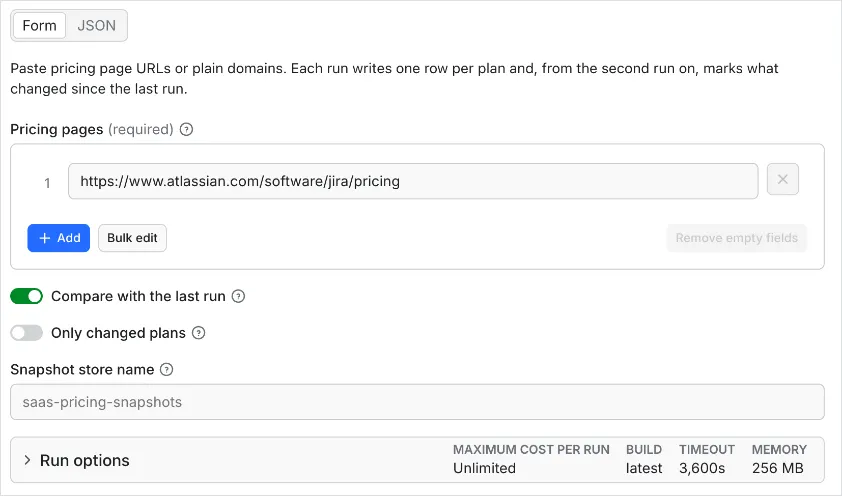
- Enter one pricing page per line in the first field. The form is prefilled with a working example.
- Optional: set Max results and the other options.
- Click Start. Open the Output tab, or export JSON, CSV, Excel, or HTML.
Example input
Example output
One real row from a run on 3 November 2026 (long values shortened here):
How much does SaaS Pricing Page Tracker cost?
Pay per result: $10.00 per 1,000 pricing pages, plus $0.001 per run start. No subscription. With Apify's Store discounts: $9.00 per 1,000 on the Silver tier, $8.00 on Gold and above.
| Event | When | Price |
|---|---|---|
| Actor start | Once per run (per GB of memory; the default 256 MB counts as one) | $0.001 |
| Pricing page | Each pricing page read and saved, whatever its number of rows | $0.01 |
| Example | Charged pricing pages | Cost |
|---|---|---|
| 10 pricing pages | 10 | $0.001 + $0.10 = $0.101 |
| 100 pricing pages | 100 | $0.001 + $1.00 = $1.001 |
| 1,000 pricing pages | 1,000 | $0.001 + $10.00 = $10.001 |
- Retries after a bot check or a temporary error cost you nothing. You pay only for pricing pages saved.
- An input that fails after all retries saves one error row so you can see what failed and why. Error rows are free.
- On Apify's free plan a run stops at 20 rows (about 5 pricing pages). Any paid Apify plan removes this limit.
- Set Max total charge per run in the run options. The Actor stops cleanly at that limit and keeps every row saved so far.
What you can count on
- Same columns on every row. Missing values are
null, so spreadsheets and databases never break. - No silent failures. An input that fails gets an error row with
errorCodeand a plain-languageerrorMessage. The other inputs keep running. - A clear run summary. The run status says how many results were saved, how many inputs failed, and why. The same numbers are saved as the
RUN_SUMMARYrecord in the run's key-value store, for automations. - Automatic retries. Bot checks and temporary errors are retried with a fresh request before an input counts as failed.
- Limits respected. Max results and your spending limit stop the run cleanly.
SaaS Pricing Page Tracker API for code, automations, and AI agents
API (returns the rows when the run finishes):
Python (pip install apify-client):
JavaScript (npm install apify-client):
No-code: connect the Actor in Make, Zapier, n8n, or Google Sheets through Apify's integrations, or add a webhook to get notified when a run finishes.
AI agents (MCP): add https://mcp.apify.com?tools=plumblinedata/saas-pricing-tracker to Claude, Cursor, or any MCP client. The agent can call this Actor as a tool with the same input as above.
Limitations
- You pay per pricing page read, not per plan row; a page that cannot be read is free.
- Prices are the regular prices the page shows; a promotional price shown next to a struck-through regular one is not used.
- Prices are what the page shows the run's location. A page that shows only its yearly view gives annual prices only.
- Apify's free plan stops at 20 plan rows per run, about 5 pricing pages.
FAQ
What do I paste?
Pricing page URLs (https://www.notion.com/pricing) or plain domains (linear.app); the Actor finds the pricing page itself.
How does change tracking work?
Each run saves a snapshot per pricing page. The next run compares against it and fills changeType, previousMonthlyPrice, featuresAdded, and featuresRemoved.
Does it handle 'Contact sales' plans?
Yes. They come back with isCustomPrice: true and no price.
Do failed pages cost anything?
No. A page that cannot be read returns a free error row.
How to track competitor SaaS prices
Paste competitors' pricing pages or domains into Pricing pages (urls) and schedule the Actor. With Compare with the last run (compareWithLastRun) on, changeType marks every price change.
How do I scrape a SaaS pricing page?
Paste the pricing page URL into Pricing pages (urls). Each plan becomes a row with monthly and annual price, currency, per-seat or flat billing, and features.
How to get alerts when a competitor changes pricing
Schedule the Actor with Only changed plans (onlyChanges) on and connect the run to Slack, email, or Zapier. Runs then return only plans that changed.
What does an error row mean?
It marks an input that failed after retries. errorCode is short (blocked, empty_result, not_available, http_404, or invalid_... for a bad ID or URL) and errorMessage says what to do. Remove error rows with a filter on type.
Can I run it on a schedule?
Yes. Create a task with your input in Apify Console, then add a schedule (for example every day at 8:00).
Is it legal to collect this data?
The Actor reads public pages that anyone can open without logging in. You are responsible for how you use the data, including copyright, personal data rules such as GDPR, and the site's terms. If you are not sure, ask a lawyer.
Related Actors
| Actor | What it does |
|---|---|
| Google Search Scraper | Google search results with AI Overview and People Also Ask |
| AI Visibility Tracker | See if ChatGPT, Gemini, and Google AI Mode mention and cite your brand |
Support
Found a problem or need a field? Open an issue on the Issues tab. Include the run ID and one input that shows the problem. We read every issue.


