

YouTube Search Scraper: Videos, Views, Channels ($1/1K)
Pricing
from $0.80 / 1,000 search results
YouTube Search Scraper: Videos, Views, Channels ($1/1K)
$1 per 1,000 videos. YouTube search results by keyword: video ID, title, channel, views, length, upload time, and thumbnail.
Pricing
from $0.80 / 1,000 search results
Rating
0.0
(0)
Developer

Plumbline
Maintained by CommunityActor stats
0
Bookmarked
9
Total users
2
Monthly active users
3 days ago
Last modified
Categories
Features
Share
YouTube search results by keyword: video ID, title, channel, views, length, upload time, and thumbnail. For creators, marketers, and analysts who research YouTube topics, competitors, and trends.
Last verified working: 2026-11-16 (automatic live test run passed).
- Price: $1.00 per 1,000 search results. No subscription; you pay only for search results saved. Failed inputs are free. Try it on Apify's free plan (up to 20 search results per run).
- Per search query: about 20 results.
- Export: JSON, CSV, Excel, Google Sheets, or the API. Works with Make, Zapier, n8n, and AI agents (MCP).
A preview of real rows (title, channelName, views, duration):
| title | channelName | views | duration |
|---|---|---|---|
| How to Make a Website | Step by Step [2026] | Steve Builds Websites | 1797768 | 27:45 |
| How to Make a Website for Beginners (2026) | Steve Builds Websites | 17437 | 28:08 |
| How to Make a Website | Step-by-Step Beginners… | Create a Pro Website | 3781476 | 34:37 |
Every run tells you plainly what worked and what did not: no silent empty runs.
What can YouTube Search Scraper do?
- Content research: see which videos win for a topic, with
viewsand upload time. - Creator discovery: list channels that rank for your keywords.
- AI datasets: collect video IDs and titles for a topic.
Ready-made setups
Copy one into the input's JSON tab and click Start. To repeat it, save it as a task and add a schedule (Console > Tasks > Schedule, for example every day at 8:00).
Find this week's top videos on a topic. Uploaded this week, most viewed first.
Find creators in your niche. Channels only, for outreach and influencer lists.
What data does YouTube Search Scraper extract?
| Field | What it is | Example |
|---|---|---|
query | The search term that produced this row. | how to make a website |
type | video, channel, playlist, movie, unknown, or error. | video |
position | 1-based rank in that query's result list. | 1 |
title | Video, channel, or playlist title. | How to Make a Website | Step by Step [2026] |
url | Watch, channel, or playlist URL. | https://www.youtube.com/watch?v=prLv5uwUtuY |
videoId | YouTube video id when type is video. | prLv5uwUtuY |
channelName | Uploader or channel display name. | Steve Builds Websites |
channelId | YouTube channel id when present. | UCY6EhaDjf8668J_LTDz43IQ |
channelUrl | https://www.youtube.com/channel/{channelId} | https://www.youtube.com/channel/UCY6EhaDjf8668J_LTDz43IQ |
views | Parsed view count when YouTube provided one. | 1797768 |
viewsText | Raw view-count string from YouTube. | 1,797,768 views |
duration | Video length as shown in search, e.g. 10:32. | 27:45 |
durationSeconds | Video length in seconds. | 1665 |
publishedTime | Relative upload time as shown in search, e.g. 2 weeks ago. | 1y ago |
publishedDateApprox | Date computed from the relative upload time on the day of the run (YYYY-MM-DD). Approximate for week, month, and year values. | 2025-10-28 |
thumbnailUrl | Largest thumbnail URL returned for the result. | https://i.ytimg.com/vi/prLv5uwUtuY/hq720.jpg?sqp=-oaymwEnCNAFEJQDSFry… |
playlistId | Present when type is playlist. | |
deep | Whether this row came from a deep search. | false |
Examples come from a real run. Every row has every field; a value the page did not show is null, never guessed.
One query gave 20 results in our tests.
How to use YouTube Search Scraper
- Click Try for free (or Start) on this page.
- Enter one search query per line in the first field. The form is prefilled with a working example.
- Optional: set Max results and the other options.
- Click Start. Open the Output tab, or export JSON, CSV, Excel, or HTML.
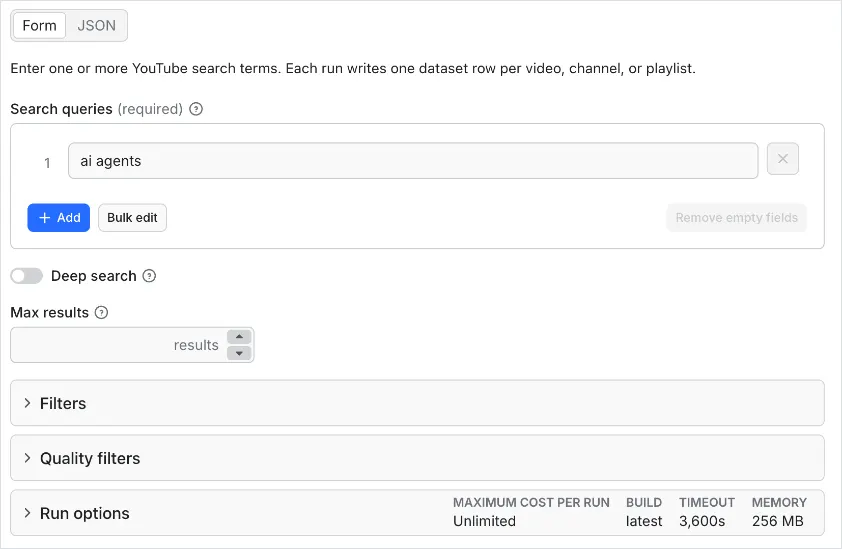
Example input
Example output
One real row from a run on 28 October 2026 (long values shortened here):
How much does YouTube Search Scraper cost?
Pay per result: $1.00 per 1,000 search results, plus $0.001 per run start. No subscription. With Apify's Store discounts: $0.90 per 1,000 on the Silver tier, $0.80 on Gold and above.
| Event | When | Price |
|---|---|---|
| Actor start | Once per run (per GB of memory; the default 256 MB counts as one) | $0.001 |
| Search result | Each search result saved to the dataset | $0.001 |
| Example | Rows | Cost |
|---|---|---|
| 10 videos | 10 | $0.001 + $0.01 = $0.011 |
| 100 videos | 100 | $0.001 + $0.10 = $0.101 |
| 1,000 videos | 1,000 | $0.001 + $1.00 = $1.001 |
- Retries after a bot check or a temporary error cost you nothing. You pay only for rows saved.
- An input that fails after all retries saves one error row so you can see what failed and why. Error rows are free.
- On Apify's free plan a run stops at 20 rows. Any paid Apify plan removes this limit.
- Set Max total charge per run in the run options. The Actor stops cleanly at that limit and keeps every row saved so far.
What you can count on
- Same columns on every row. Missing values are
null, so spreadsheets and databases never break. - No silent failures. An input that fails gets an error row with
errorCodeand a plain-languageerrorMessage. The other inputs keep running. - A clear run summary. The run status says how many results were saved, how many inputs failed, and why. The same numbers are saved as the
RUN_SUMMARYrecord in the run's key-value store, for automations. - Automatic retries. Bot checks and temporary errors are retried with a fresh request before an input counts as failed.
- Limits respected. Max results and your spending limit stop the run cleanly.
YouTube Search Scraper API for code, automations, and AI agents
API (returns the rows when the run finishes):
Python (pip install apify-client):
JavaScript (npm install apify-client):
No-code: connect the Actor in Make, Zapier, n8n, or Google Sheets through Apify's integrations, or add a webhook to get notified when a run finishes.
AI agents (MCP): add https://mcp.apify.com?tools=plumblinedata/youtube-search-scraper to Claude, Cursor, or any MCP client. The agent can call this Actor as a tool with the same input as above.
Limitations
- Video files, transcripts, and comments are not included.
- Views and upload time are what YouTube showed in search; upload dates are approximate.
FAQ
Can I filter by upload date or length?
Yes. Use Upload date, Duration, Sort by, and the other filters in the input.
Can I get videos from an exact date range?
Yes. Set Published on or after and Published on or before. YouTube shows ages like "3 weeks ago", so a video near the edge of the range can be a few days off. Rows outside the range are never saved, so you don't pay for them.
How do I scrape YouTube search results?
Put your search terms in Search queries (queries) and run. Each result becomes a row with video ID, title, channel, views, length, and upload time.
How to find the most viewed YouTube videos on a topic
Search the topic in Search queries (queries) and set Sort by (sortBy) to View count.
How to find YouTube channels by keyword
Set Result type (resultType) to Channel and put your topics in Search queries (queries).
What does an error row mean?
It marks an input that failed after retries. errorCode is short (blocked, empty_result, not_available, http_404, or invalid_... for a bad ID or URL) and errorMessage says what to do. Remove error rows with a filter on type.
Can I run it on a schedule?
Yes. Create a task with your input in Apify Console, then add a schedule (for example every day at 8:00).
Is it legal to collect this data?
The Actor reads public pages that anyone can open without logging in. You are responsible for how you use the data, including copyright, personal data rules such as GDPR, and the site's terms. If you are not sure, ask a lawyer.
Related Actors
| Actor | What it does |
|---|---|
| YouTube Channel Scraper | Latest videos from any YouTube channel plus the channel profile |
| YouTube Metadata Scraper | Full metadata for YouTube videos by ID or URL |
| Google Videos Scraper | Google video results by keyword |
Support
Found a problem or need a field? Open an issue on the Issues tab. Include the run ID and one input that shows the problem. We read every issue.


