
Google Maps Scraper API — Emails, Reviews, Photos & Leads
Pricing
from $0.90 / 1,000 place scrapeds
Google Maps Scraper API — Emails, Reviews, Photos & Leads
Google Maps scraper and Google Places API alternative: extract business names, phones, websites, hours, ratings and reviews — plus emails and 7 social profiles pulled from each place's website. Bypass Google's 120-place limit. Export JSON, CSV, Excel. From $3/1k places, no API key.
Pricing
from $0.90 / 1,000 place scrapeds
Rating
5.0
(1)
Developer

Raven
Maintained by CommunityActor stats
4
Bookmarked
255
Total users
19
Monthly active users
13 hours ago
Last modified
Categories
Share
🗺️ Google Maps Scraper — Emails, Reviews & Contact Details
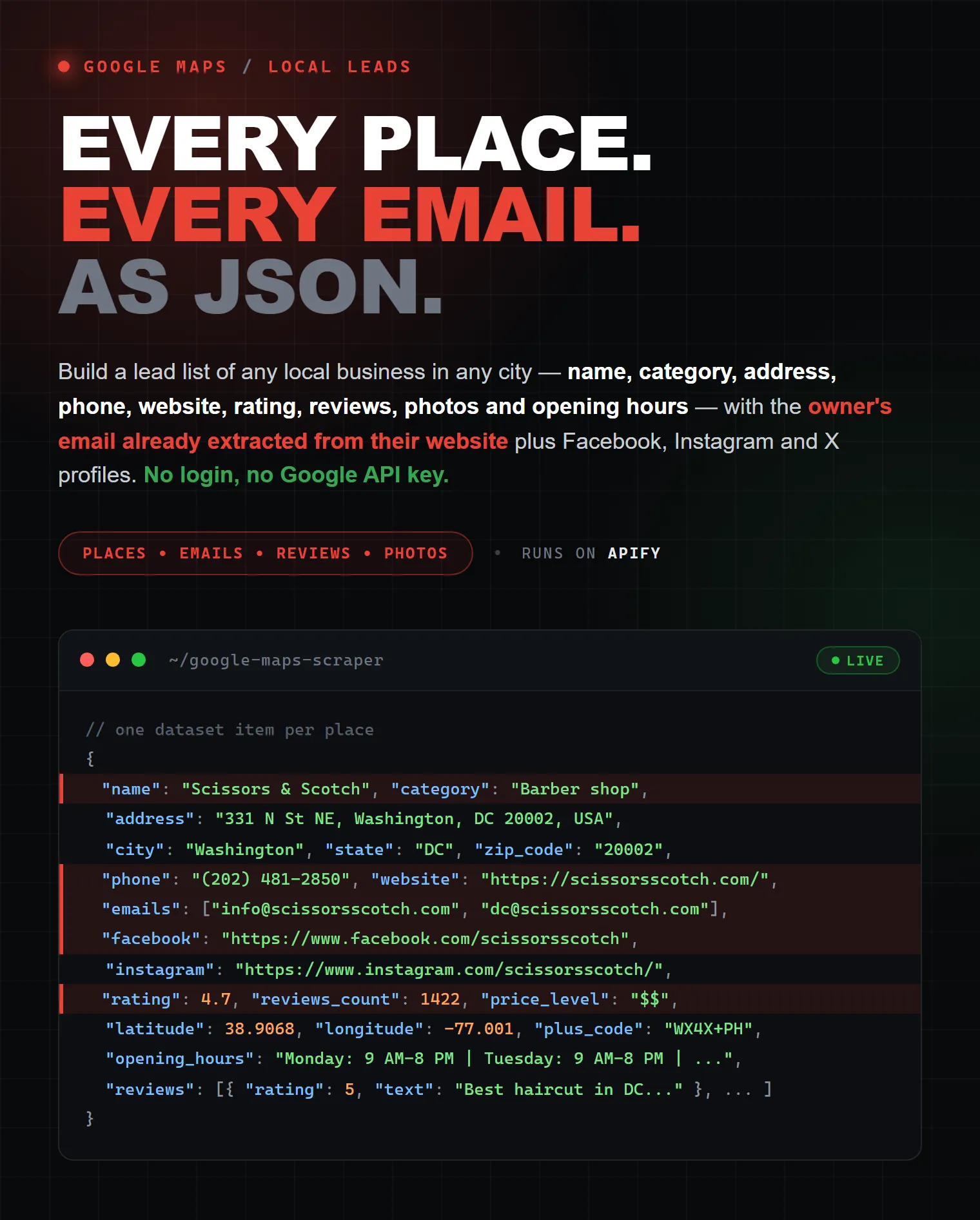
Extract data from thousands of Google Maps places — business name, category, full address, phone number, website, opening hours, rating, reviews, and images — and enrich every place with emails and social media profiles pulled from its website. Export to Excel, CSV, JSON, or HTML, run via API, schedule and monitor runs, or integrate with your favorite tools. No code, no Google Maps API key, no daily quotas.
🚀 Build a lead list of any local business in any city in minutes — every barbershop in Berlin, every dentist in Texas, every coffee shop in Tokyo — with the owner's email already extracted from their website.
| Raven · Local & lead-gen suite • Google Maps, website contacts, Trustpilot, TripAdvisor | |||
 Google Maps Google Maps➤ You are here |
 Website Contacts Website ContactsEmails, phones, socials |
 Trustpilot Scraper Trustpilot ScraperReviews, companies, scores |
 TripAdvisor Scraper TripAdvisor ScraperHotels, restaurants, reviews |
📍 What is Google Maps Scraper?
Google Maps Scraper is a no-code web scraping tool that extracts business data from Google Maps at scale. Give it a search term (for example barber shop, dental clinic, or coffee) plus a location, and it returns every matching place with full contact details — names, addresses, phone numbers, websites, ratings, reviews, opening hours, and photos — then enriches each place with emails and social links scraped from its website.
It's a flexible, affordable Google Places API alternative: no per-request key, no small result caps, and no complicated setup — just the business data you actually need, ready to export.
🎯 What can you do with it?
- 🧲 Lead generation — build targeted B2B lists with verified emails and phone numbers for cold outreach
- 📍 Local SEO & GMB audits — competitor analysis, listing monitoring, and NAP citation building
- 🍽️ Market research — analyze competitor density, ratings, and reviews in any area
- 🛒 Franchise & market-entry research — map every competitor in a region with full contact details
- 🤖 AI / LLM pipelines — clean, structured business data for downstream models
- 📊 Real-estate & retail scouting — find the right neighborhood by category density
📦 What data does Google Maps Scraper extract?
| Group | Fields |
|---|---|
| Identification | name, place_id, google_maps_url, category, categories[], description |
| Address | address (full), city, state, zip_code, country_code (ISO-2), area (neighborhood), plus_code |
| Coordinates | latitude, longitude |
| Contact | phone, website, email (primary), emails[] (all found) |
| Social profiles | facebook, instagram, twitter, linkedin, youtube, tiktok, telegram |
| Reputation | rating (0–5), reviews_count, price_level ($–$$$$) |
| Status | permanently_closed, temporarily_closed |
| Hours | opening_hours (full 7-day schedule) |
| Reviews (add-on) | reviews[] — text, textTranslated, language, rating, author, publishedAt, publishedAtDate, authorAvatar, authorProfileUrl, authorId, authorReviewsCount, authorPhotosCount, reviewId, photos[], ownerResponse |
| Images (add-on) | images[] — direct image URLs (no binaries, just links) |
⚡ Why this Google Maps Scraper
- ✅ Emails included in the base price — every place with a website is enriched with business emails. Most competing scrapers charge this as a separate add-on
- ✅ Bypass Google's ~160-place limit —
deepSearch(on by default) splits any city by postal code and district to return thousands of places per search term - ✅ Full Google reviews — pull every review per place with text, rating, author, exact date, photos, and the owner's reply
- ✅ 7 social networks auto-extracted — Facebook, Instagram, X (Twitter), LinkedIn, YouTube, TikTok, and Telegram links from each place's website
- ✅ International-ready — accurate address parsing worldwide: ISO-2 country code, city, state, postal code, and neighborhood, all separated cleanly
- ✅ No code + full API — run from the UI, or via API in Python and Node.js, with scheduling, webhooks, and integrations
- ✅ Export anywhere — Excel, CSV, JSON, or HTML; results stream in real time
- ✅ Pay only for results — transparent pay-per-event pricing, no subscription, no minimum spend
💰 How much does it cost?
From $3 / 1,000 places — with emails included. This scraper uses Apify's pay-per-event pricing, so you only pay for what you actually extract:
| Event | When you pay | Price (USD) |
|---|---|---|
place | One place pushed to the dataset | $0.003 |
contact | A unique email enriched from a website | $0.002 |
review | One review attached to a place (when includeReviews is on) | $0.0005 |
image | One image URL attached (when includeImages is on) | $0.0002 |
Real-world cost examples:
- 🏪 1,000 barbershops with emails → 1,000 × $0.003 + ~400 unique emails × $0.002 ≈ $3.80
- 🍽️ 100 restaurants + 50 reviews each + 20 photos each → $0.30 + $2.50 + $0.40 ≈ $3.20
- 🌆 Full coverage of a mid-size city (3,000 places) → ~$10
Cap any run with Default run options → Max total charge so you never overspend. Duplicate emails are charged once per run, and junk/placeholder emails (noreply@, example.com, etc.) are filtered out before billing.
Why pay-per-event pricing?
You pay for concrete results — places, emails, reviews, images — not for compute time or opaque "credits." A run that returns 500 places costs the same whether it takes one minute or ten, so pricing is predictable and easy to budget.
🚀 How do I use Google Maps Scraper?
No coding required:
- Click Try for free and open the input form.
- Enter one or more search terms (e.g.
coffee shop) and a location (e.g.Berlin, Germany). - (Optional) Turn on reviews or images, and set your limits. Deep search is already on.
- Click Start and watch results fill in live.
- Export to Excel, CSV, JSON, or HTML — or pull the data via API.
⚡ Real-time API (Standby mode)
Need places inside your own app instead of a dataset? The same scraper is kept warm as an HTTP API — one request in, the places back in the response body. No run to start, no run to poll, no dataset to fetch.
Open the Standby tab on the Actor page to browse every endpoint and fire test requests straight from the browser — it is generated from the Actor's OpenAPI 3 specification, which the API also serves at /openapi.json.
| Endpoint | What it does |
|---|---|
GET /search | Search Google Maps and get the places back |
POST /search | Same, with the Actor's full input object as the JSON body |
GET / | Usage: every endpoint and parameter, as JSON |
GET /health | Liveness check |
GET /openapi.json | The OpenAPI 3 specification |
Common parameters — q (required), location, limit, timeout, contacts, reviews / maxReviews, images / maxImages, popularTimes, language, deepSearch, minStars, minReviews, website, onlyWithEmail, skipClosed. q, location and categories take either a repeated parameter (?q=gym&q=spa) or a comma-separated one (?q=gym,spa). Every field of the input schema below works too, spelled exactly as it is spelled there.
Three things to know:
- It answers within your time budget.
timeoutdefaults to 120s and is capped at 280s, because Apify closes a Standby request after 5 minutes. When the budget runs out you get the places found so far withtruncated: true— never an empty error. limitdefaults to 20 and is capped at 1000, anddeepSearchis off — an API call should come back quickly. For tens of thousands of places, start a normal run instead.- Billing is identical to a normal run: per place, per contact enrichment, per review, per image.
⬇️ Input
| Field | Type | Default | Description |
|---|---|---|---|
🔍 searchStringsArray | array | — | Search terms, one per line (e.g. barber shop, dental clinic) |
📍 locationQuery | string | — | Free-text location, e.g. Washington, DC or Berlin, Germany |
🏙️ city / 🗺️ state / 🌍 country | string | — | Optional structured location fields |
🧮 maxItems | integer | 100 | Hard cap on total results across all terms and locations — you're never charged past it. Empty = no limit |
📍 locationQueries | array | [] | Search every location in the list. Each term runs against each location (6 terms x 38 cities = 228 searches) |
🎯 maxCrawledPlacesPerSearch | integer | — | Cap per term+location. With many locations this keeps coverage even, so the first cities can't spend the whole budget |
🌐 deepSearch | boolean | true | Split the area by postal code / district to get past Google's ~160-place limit per search |
🏷️ categoryFilter | string | — | Keep only places whose category matches (e.g. Barber shop) |
🗣️ language | select | auto | Results language. Left on Auto it follows the language you typed in; pick one only to force a different one. There is no country field — Google's gl hint is read off your locations |
📊 popularTimes | boolean | false | Add-on. Weekly busyness histogram per place — how busy every hour of every day usually is, plus Google's live reading. Costs one extra request per place; no extra charge. ⚠️ Temporarily empty — Google stopped serving it on the web on Oct 13, 2026 |
📧 scrapeContactsFromWebsite | boolean | true | Extract emails + social links from each place's website |
📭 skipPlacesWithoutEmail | boolean | false | Lead-list mode — output only places with an email |
🔁 skipDuplicateEmails | boolean | true | Keep only the first place per email address — booking platforms put one shared mailbox on dozens of listings |
💬 includeReviews | boolean | false | Add-on. Attach reviews per place (text, rating, author, date, photos) |
🔢 maxReviewsPerPlace | integer | 20 | Cap reviews per place (1–5000) |
🖼️ includeImages | boolean | false | Add-on. Attach photo URLs per place |
🔢 maxImagesPerPlace | integer | 20 | Cap images per place (1–200) |
⚡ concurrency | integer | 3 | Parallel Google sessions, each on its own IP |
🟢 Quick example — every barbershop in Berlin with emails
🟡 Example — restaurants in NYC with full review history
⬆️ Output
Every place is one row/record. View results in the table or JSON tab, or export to Excel, CSV, JSON, or HTML.
📊 Popular times
⚠️ Temporarily unavailable (since October 13, 2026). Google has stopped serving popular times on Google Maps for the web — the histogram is gone even in a regular browser, for every place and country we checked. While that lasts,
popular_timescomes back empty; the rest of each place is unaffected and nothing extra is charged. The actor picks the data up again automatically as soon as Google brings it back.
Turn on popularTimes and each place carries Google's busyness histogram:
Labels follow the run's language — a Ukrainian run returns
"Зараз: Зазвичай достатньо людно". Two things worth knowing before you switch
it on: Google keeps this out of the search response, so it costs one extra
request per place and slows a run down noticeably; and Google only computes a
histogram for places with enough foot traffic, so quieter businesses return an
empty popular_times. There is no separate charge — it is part of the Place event.
🌍 Languages & countries
Nothing to configure. The actor reads the language and the country straight out of your input:
| You type | It searches as |
|---|---|
стоматолог in Бровари, Київська область, Україна | hl=uk, gl=UA |
dentist in Kyiv, Ukraine | hl=en, gl=UA |
gym in Austin, TX | hl=en, gl=US |
歯医者 in 東京, 日本 | hl=ja, gl=JP |
a google.com.ua/maps/... link | gl=UA |
| cities in several countries | no country bias, so no country is favoured |
Set 🗣️ language yourself to override the detection — the country follows your
locations either way. 45 result languages are available. Address parsing is
tested across 60+ countries — US, EU (DE/FR/IT/ES/NL/PL), UK, CIS (RU/UA/BY/KZ),
Turkey, Japan, Brazil, and Mexico — with ISO-2 country codes auto-detected.
❓ Frequently asked questions
How does Google Maps Scraper work? You enter one or more search terms and a location. The scraper searches Google Maps just like a person would, collects every matching business, and for each place with a website it also visits that site to pull emails and social profiles. Results stream into your dataset as they're found.
What are the disadvantages of the Google Maps API? The official Google Places API requires an API key and billing, caps results (for example a maximum of 5 reviews per place with no pagination), limits how many places you can pull per query, and doesn't return emails or social profiles at all. This scraper has no key, higher limits, and enriches each place with contact data Google's API never exposes.
Can I scrape places from multiple locations at once?
Yes. Add multiple search terms; deepSearch (on by default) covers an entire city or region and gets past Google's ~160-place limit per area.
Can I extract Google Maps reviews?
Yes — enable includeReviews to attach reviews per place with text, rating, author, date, and photos, up to your maxReviewsPerPlace cap.
Can I get emails and phone numbers for lead generation?
Yes. Phone numbers come straight from Google Maps, and emails plus social links are extracted from each place's website — included in the base price. Turn on skipPlacesWithoutEmail for a clean lead list.
Can I integrate Google Maps Scraper with other apps? Yes. Connect it to Make, Zapier, Google Sheets, Slack, and more, or trigger runs and pull data with webhooks and the Apify API.
Can I use Google Maps Scraper as its own API, in Python or Node.js?
Yes, two ways. Every run and dataset is available through the Apify API, with ready-made Python and JavaScript client libraries, a CLI, and an MCP server. And for real-time use there is Standby mode: GET /search?q=dentist&location=Austin,%20TX returns the places in the response body, no run to poll — see the Standby tab for the interactive documentation.
Is it legal to scrape Google Maps data? Scraping publicly available business data is generally legal. This scraper only collects public information (names, addresses, phones, public websites, ratings, and reviews). You are responsible for how you use the data and for complying with applicable laws such as GDPR/CCPA.
📞 Support & feedback
Found a bug or need a feature? Email africanec@gmail.com — usually fixed and redeployed within 24 hours.
To speed up debugging you can share run data with the developer: Apify Security Settings → "Share run data with developers" → enable for this Actor.


