

Trustpilot Scraper API — Companies, Reviews, Emails, Leads
Pricing
from $0.40 / 1,000 reviews
Trustpilot Scraper API — Companies, Reviews, Emails, Leads
Trustpilot scraper and unofficial Trustpilot API: reviews with company replies, company profiles with contacts, category ranks and AI review summaries, TrustScore analytics with the exact star distribution, business search with coordinates, category listings with emails. From $0.40/1k.
Pricing
from $0.40 / 1,000 reviews
Rating
5.0
(1)
Developer

Raven
Maintained by CommunityActor stats
0
Bookmarked
15
Total users
3
Monthly active users
20 hours ago
Last modified
Categories
Share
Trustpilot Scraper — Reviews, Companies, Search & Categories 🌟
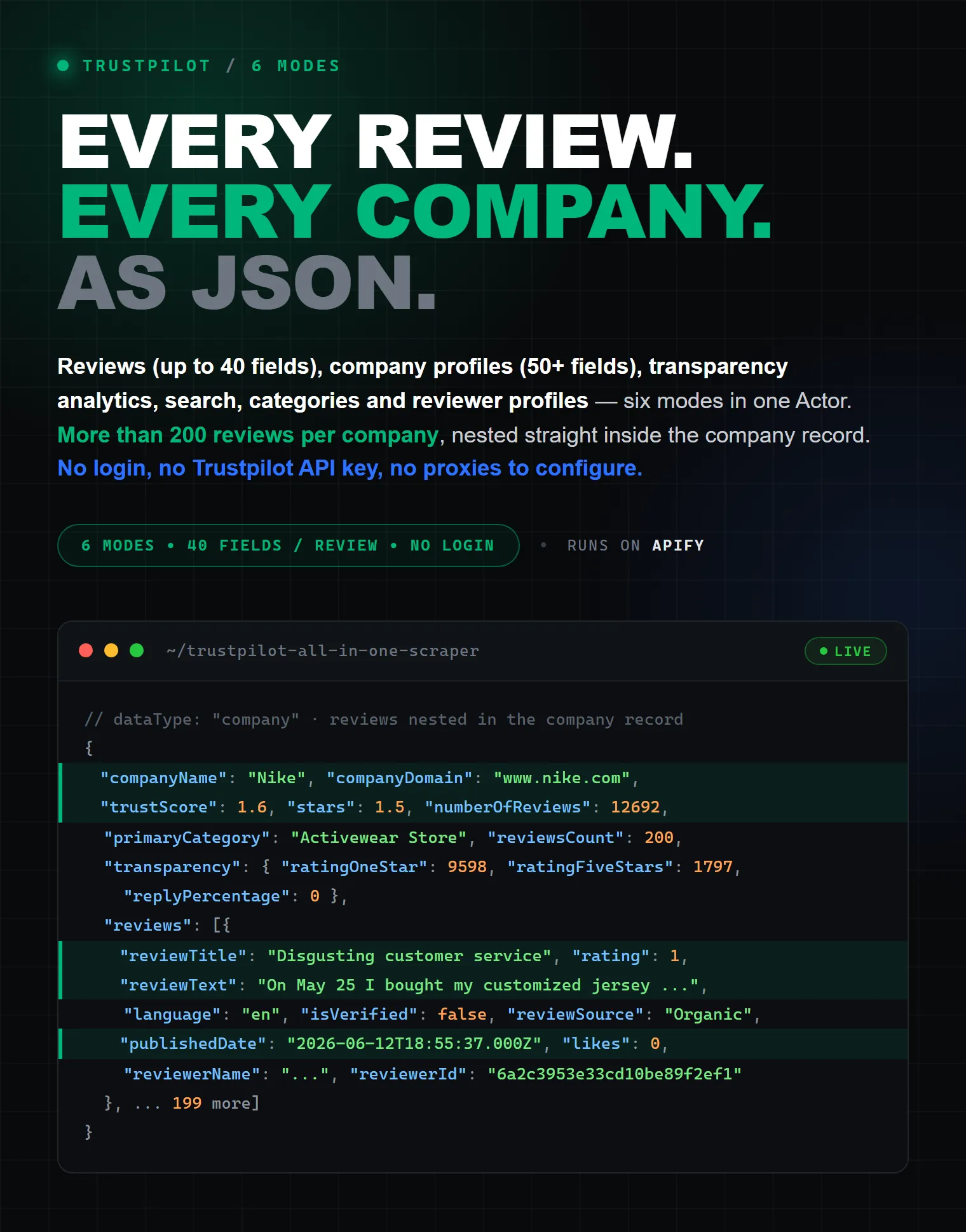
Scrape Trustpilot reviews from $0.40 per 1,000 — plus full company profiles with contact details, TrustScore & rating analytics, category rankings, Trustpilot's own AI review summaries, similar-company lists, keyword search and complete category listings. One actor, six data modes, clean JSON, CSV or Excel output.
No login, no Trustpilot API key, no code and no proxies to configure. Point it at a company, a keyword, a category or a reviewer — and get structured data ready for review monitoring, lead generation, competitor research, sentiment analysis and AI/LLM pipelines. You pay only for the records you actually receive.
| Raven · Reviews & business-data suite • Trustpilot, G2, Google Maps, TripAdvisor | |||
 Trustpilot Scraper Trustpilot Scraper➤ You are here |
 G2 Scraper G2 ScraperReviews, products, competitors |
 Google Maps Google MapsPlaces, emails, reviews |
 TripAdvisor Scraper TripAdvisor ScraperHotels, restaurants, reviews |
🧭 What does this Trustpilot Scraper do?
Trustpilot's official APIs are aimed at businesses and require an account and an API key. This actor works as a Trustpilot API alternative: it extracts the same public data — reviews, TrustScores, ratings, company details — with nothing to sign up for. Pick a mode with the What to scrape dropdown:
| Mode | What you get | Give it |
|---|---|---|
| ⭐ Reviews | Individual customer reviews with full reviewer & reply data | Company URL or domain |
| 🏢 Company profile | TrustScore, categories & category ranks, contacts, description, AI summary, similar companies | Company URL or domain |
| 📊 Transparency & analytics | Exact 1–5 star distribution, language breakdown, reply behaviour | Company URL or domain |
| 🔎 Search companies | Matching businesses for a brand or keyword | Search term |
| 🗂️ Category listing | Every company inside a category, with address, website, email & phone | Category id or URL |
| 👤 User reviews | A reviewer's profile and all reviews they wrote | Reviewer profile URL or id |
Most Trustpilot scrapers on Apify only collect reviews. This one also finds companies (search & categories), pulls their contact details (email, phone, address) and their rating analytics — so you can go from a keyword to a full, enriched company dataset in a single run.
✨ Why use this Trustpilot scraper?
- ⭐ All Trustpilot data in one place — reviews, company info, TrustScore & rating analytics, company search and category browsing. Stop juggling five different scrapers.
- 🧾 Up to 40 fields per review — verification status and source, five separate date fields, reviewer profile, country, likes, company reply with reply dates, moderation flags, and the branch the review was written about.
- 🏢 60+ fields per company profile — TrustScore, star rating, review counts, per-star distribution, three-level category breadcrumb (names and ids), company description, contact details (email, phone, address), claim status, Google/payment/identity verification and reply behaviour.
- 🧠 Trustpilot's own AI summaries — the overall AI digest of a company's reviews plus a separate summary per topic (delivery, staff, service, product, customer service).
- 🏆 Category rankings — where the company sits in each of its categories ("#3 of 26 in Bank"), straight from the profile.
- 🤝 Similar companies — the competitor list Trustpilot shows next to the profile, each with its own TrustScore and review count.
- 📍 Branch-level data — for multi-location businesses, every top location with its own address, TrustScore and review count.
- 📊 Analytics nobody shows you in one place — exact 1–5 star distribution, review-language breakdown, reply percentage, average days to reply, when the company last replied to a negative review, AI-response usage and consumer alerts.
- 🔎 Company discovery — search Trustpilot by brand or keyword and list every company inside a category, localized to the country you choose.
- 🔓 Goes past the 200-review public limit — automatic star-rating sweep collects up to ~1,000 reviews per company (see below).
- 🛡️ Handles Trustpilot's anti-bot protection (AWS WAF) automatically — no proxy setup, no tokens, no babysitting.
- 💸 Pay-per-result pricing — each record type has its own transparent price. No monthly rental, no surprise infrastructure fees.
- 📤 One-click export to JSON, CSV, Excel, XML, HTML or JSONL — or pull results via the Apify API.
How does it compare?
| Official Trustpilot Business API | Typical review-only scrapers | This actor | |
|---|---|---|---|
| Account / API key | Business account + API key | None | None |
| Individual reviews with reviewer data | Depends on your plan | ✔️ (often capped at 200) | ✔️ up to ~1,000 per company |
| Company contacts (email, phone, address) | — | ✗ | ✔️ |
| Star distribution & language analytics | — | ✗ | ✔️ |
| AI review summaries (overall + per topic) | — | ✗ | ✔️ |
| Category rank & similar companies | — | ✗ | ✔️ |
| Search companies by keyword | — | ✗ | ✔️ |
| Category listings with emails & addresses | — | ✗ | ✔️ |
| Reviewer profile history | — | ✗ | ✔️ |
| Pricing | Subscription plans | Per result | Per record, from $0.40/1,000 reviews |
📦 What data can you extract from Trustpilot?
⭐ Review records (up to 40 fields each)
- Content — title, full text, 1–5 rating, language, direct review URL.
- Dates — experienced, published, submitted, updated and created dates.
- Verification —
isVerified, verification level, verification source, review source (Organic / Invited / AFS), source name. - Reviewer — id, display name, country, number of reviews written, profile URL, avatar, verified flag.
- Company reply — full reply message with published and updated dates.
- Signals — likes, moderation flags (
isFiltered,isPending,hasUnhandledReports), reviewer's review count on the same domain and location. - Branch —
locationIdandlocationNamewhen the review is about one specific store or branch.
🏢 Company profiles (60+ fields)
- Identity — id, display name, domain, Trustpilot URL, website, logo and header images, country code.
- Reputation — TrustScore, star rating, total reviews, reviews in the last 12 months, exact per-star counts (1★…5★).
- Categories — full category list with ids, primary category, the three-level breadcrumb with both names and ids, and
categoryRanks— the company's position in each of its categories (rank,outOf). - AI summaries —
aiSummary, Trustpilot's AI digest of all the reviews, andtopicSummaries, one summary per topic (delivery, staff, service, product, customer service). - Similar companies —
similarCompanies, the competitors Trustpilot lists next to the profile, each with domain, TrustScore, stars and review count. - Locations —
locationsCountplustopLocations: each branch with its address, TrustScore, stars and review count. - Company content — description (plain text and HTML), promotion title and selling points, guarantee/warranty block, Facebook page, and whether the profile info came from the company itself or an external source.
- Contacts — email, phone, street address, city, zip code, country.
- Status & verification — claimed / previously claimed / closed / merged flags, merge history, claim date, verified by Google, verified payment method, verified user identity, consumer alerts.
- Behaviour — reply percentage, average days to reply, last reply to a negative review, negative-review reply stats, uses paid Trustpilot features, has subscription, uses AI responses, actively asks for reviews.
📊 Transparency & analytics records
Exact 1–5 star distribution with totals, review-language breakdown with counts per language, reply percentage and average days to reply, when the company last replied to a negative review, negative-review handling, review-invitation practices (isAskingForReviews, hasRecentlyInvitedUsers), AI-response usage, claim information and Trustpilot's AI summaries — plus listedReviewsCount and filteredReviewsCount, which show how many reviews Trustpilot actually lists versus the headline total.
🔎 Search results (~23 fields)
Company name, domain, Trustpilot URL, website, TrustScore, stars, review count, categories and predicted top category, street address, city, zip code, country and country code, latitude and longitude, logo, email and phone when listed, verified flag — plus the query that produced the hit.
🗂️ Category results (~29 fields)
Company name, domain, Trustpilot URL, website, TrustScore, stars, review count, every category with its primary/predicted flag, whether Trustpilot recommends the company inside its categories, street address, city, zip code, country, email and phone — plus where the browsed category sits in Trustpilot's tree (its display name, how many companies it holds, its sub-categories, parent category and top category).
👤 Reviewer profiles
Name, country, profile URL and picture, total reviews written, verified flag, reads & likes statistics, whether they also write product reviews — with the reviewer's complete review history nested inside.
🚀 How to scrape Trustpilot reviews step by step
- Click Try for free — an Apify account includes $5 of free usage every month, no credit card needed.
- Pick What to scrape (e.g. Reviews).
- Paste one or more company URLs or domains, e.g.
www.amazon.comorhttps://www.trustpilot.com/review/www.nike.com. - (Optional) Set filters — max reviews, star ratings, language, date range, verified only, replies only, keyword.
- Click Save & Start. Download the results as JSON, CSV or Excel, or pull them via the API.
Scraping companies from a keyword or category works the same way — just switch the mode and enter search terms or category ids instead of URLs.
🔓 How to get more than 200 reviews per company
Trustpilot publicly serves at most 10 pages — 200 reviews — per filtered listing. Most scrapers stop there.
This actor doesn't: set Max reviews per company above 200 and it automatically sweeps each star rating (1★, 2★, 3★, 4★, 5★) as a separate filter, merges the results and deduplicates them by review id — lifting the ceiling to ~1,000 reviews per company. Explicit star filters work the same way: selecting 1★ + 2★ gives you up to 200 of each.
🔗 Chain discovery into deep data (one company, everything nested)
Found companies via Search or Category? Turn on ➕ Also fetch for each found company and pick any of Company profile, Transparency & analytics, Reviews. For every discovered company the actor nests that data straight into the same object — discovery → full profiles → reviews in a single run:
One clean row per company — no messy mixed records.
🛠️ Input parameters
| Field | Mode | Description |
|---|---|---|
| What to scrape | all | reviews / company / transparency / search / category / userReviews |
| Company URLs or domains | reviews, company, transparency | One or many. Review URLs or bare domains. |
| Search terms | search | Brand names or keywords. |
| Categories | category | Category ids (bank) or category URLs. |
| Reviewer profile URLs or IDs | userReviews | Trustpilot profile URLs or ids. |
| Max reviews per company | reviews | Up to 200 per filter; set higher to sweep each star rating and collect ~1,000. |
| Sort reviews by | reviews | Most recent or most relevant. |
| Star ratings | reviews | Keep only selected 1–5 star reviews. |
| Review language | reviews | ISO code, e.g. en, de, it. Empty = all languages. |
| Date range | reviews | Last 30 days / 3 / 6 / 12 months / all time. |
| Verified reviews only | reviews | Keep only verified reviews. |
| Only reviews with a company reply | reviews | Keep only replied reviews. |
| Keyword inside reviews | reviews | Filter by a keyword in the review text. |
| Max results | search, category | Companies per term/category. |
| Country | search, category | Two-letter country code for localisation. |
| Also fetch for each found company | search, category, company | Nest company profile / analytics / reviews into each found company. |
| Max concurrency | all | Companies scraped in parallel (up to 10). |
🍳 Ready-to-paste input recipes
A. Negative-review monitoring — newest 1–2★ reviews from the last 30 days:
B. Verified English reviews for sentiment analysis / NLP — up to ~1,000 per company:
C. B2B lead generation from a category — every UK bank with contact details:
D. Competitor benchmark — star distributions and reply behaviour side by side:
E. Complaint mining — reviews mentioning a specific problem:
F. Reviewer investigation — one reviewer's profile and full review history:
📄 Output examples
⭐ Reviews mode — one tidy object per company, reviews nested inside
Perfect for bulk runs: one row per company, every review a clean flat object.
Prefer a flat row per review? Export the dataset and "unwind" the
reviewsfield, or use the API with the field filter — every review is a clean flat object.
🏢 Company profile record
📊 Transparency & analytics record
🔎 Search result
🗂️ Category result
💰 How much does it cost to scrape Trustpilot?
This actor uses pay-per-event pricing — you pay per record delivered, nothing else. The price is all-inclusive: proxies, compute and anti-bot handling are covered; the only extra is a negligible $0.00005 actor-start event.
| Data type | Free plan | Paid Apify plans |
|---|---|---|
| Review | $1.00 / 1,000 | from $0.40 / 1,000 |
| Company profile | $5.00 / 1,000 | from $3.00 / 1,000 |
| Transparency & analytics | $8.00 / 1,000 | from $3.00 / 1,000 |
| Search result | $2.00 / 1,000 | from $1.40 / 1,000 |
| Category result | $2.00 / 1,000 | from $1.40 / 1,000 |
Real-world examples (free-plan prices):
| Job | Cost |
|---|---|
| 200 newest reviews of your brand, weekly | $0.20 per run |
| 1,000 reviews for sentiment analysis | $1.00 |
| 500 companies from a category with emails & phones | $3.50 |
| Transparency benchmark of 20 competitors | $0.16 |
Apify's free plan includes $5 of usage every month — that's up to ~5,000 reviews or ~1,000 full company profiles at no cost, no credit card required. See the live prices on this page; they may change over time.
🔌 Integrations
Send results anywhere: Make, Zapier, Google Sheets, Slack, n8n, Airbyte, webhooks, or cloud storage. Pull data programmatically with the Apify API and the official Python and JavaScript clients — start a run, wait for it to finish and fetch the dataset in a few lines of code.
Run it on a schedule with Apify Schedules to monitor new reviews daily or weekly, and trigger a webhook (Slack message, email, your endpoint) whenever a run finishes.
🤖 Use with AI agents (MCP)
Like every Apify actor, this scraper is available to AI agents through the Apify MCP server — connect it to Claude, Cursor or any MCP-compatible agent and ask things like "Get the latest 1-star reviews of nike.com and summarize the main complaints." Clean, flat review records also make excellent input for LLM fine-tuning, RAG and sentiment pipelines.
💡 Popular use cases
- Review monitoring & reputation management — track new reviews, ratings and company replies for your brand on a schedule.
- Competitor analysis — compare TrustScores, review volumes, star distributions, category ranks and reply behaviour across rivals, and pull the competitor list Trustpilot itself suggests.
- B2B lead generation — pull company contact details (email, phone, address) from whole categories or search results.
- Market research — map every company in a Trustpilot category with ratings, postal addresses, websites and review counts, plus the size of every neighbouring category.
- Voice-of-customer & sentiment analysis — feed real, filterable customer reviews into your NLP / LLM pipeline, or start from Trustpilot's own per-topic AI summaries.
- Data enrichment — append TrustScore, star rating and review counts to your CRM by domain.
- Review fraud investigation — inspect a reviewer's full history and cross-business review counts.
⚖️ Is it legal to scrape Trustpilot?
This actor extracts only publicly available data — the same reviews, ratings and company details anyone can open in a browser. Scraping public data is generally legal; note, however, that reviews contain personal data (reviewer names, profiles), which is protected by GDPR in the EU and similar regulations elsewhere. Make sure you have a legitimate basis for how you store and use it, and consult a lawyer if unsure. Read more in Apify's guide: Is web scraping legal?
❓ FAQ
Do I need a Trustpilot account or API key?
No. No login, no API key, no cookies — just enter what you want to scrape.
Does Trustpilot have a public API?
Trustpilot's official APIs are aimed at businesses: they require an account, an API key and are tied to subscription plans. This actor is a no-signup alternative for public Trustpilot data.
How many reviews can I scrape per company?
Trustpilot publicly serves up to 200 reviews per filter combination. Set Max reviews per company above 200 and the actor automatically sweeps each star rating separately, merging and deduplicating up to ~1,000 reviews per company.
Why do I get fewer reviews than the company page shows?
The public listing is capped at 200 reviews per filter (see above), and your filters — language, date range, verified-only, stars — narrow it further. Trustpilot also lists fewer reviews than it counts: numberOfReviews is the company's headline total, listedReviewsCount is how many it actually serves, and filteredReviewsCount how many survive the page's default language filter (all three come back in Transparency & analytics mode).
My run failed saying Trustpilot blocked it — what now?
Trustpilot sits behind anti-bot protection, and a small share of proxy IPs get refused outright. The actor retries a blocked request on a fresh IP automatically, and only gives up when several IPs in a row are refused. When that happens the run fails with that reason in the status message and nothing is charged, because charges only apply to records that were actually delivered. Simply start the run again — it will pick up a different set of IPs.
If a run succeeds but its status says some requests stayed blocked, the data you got is real; only some of your inputs are incomplete. Re-run those inputs on their own.
Can I scrape many companies at once?
Yes. Paste a list of domains or URLs — they're processed in parallel (configurable, up to 10 at a time).
How do I get company emails and phone numbers?
Category listing mode already returns the email, phone and postal address of every company it lists, so browsing a category is the cheapest route. For known domains use Company profile mode; for keyword searches, run Search with Also fetch for each found company → Company profile.
Can I get a company's exact star distribution?
Yes — Transparency & analytics mode returns exact 1★–5★ review counts, the language breakdown, reply behaviour and Trustpilot's AI review summaries for each company.
Can I see a company's rank in its category?
Yes — Company profile mode returns categoryRanks, the company's position inside each of its categories (for example rank 3 out of 26 in Bank), together with similarCompanies, the competitor list Trustpilot shows on the profile.
Can I filter reviews by rating, date or language?
Yes — filter by star ratings (any combination of 1–5), date window (30 days to 12 months), language ISO code, verified-only, replied-only and even a keyword inside the review text, sorted by recency or relevance.
Can I monitor new reviews automatically?
Yes. Create an Apify Schedule (e.g. daily), set the date range to Last 30 days with sort Most recent, and add a webhook or Make/Zapier scenario to push new reviews wherever you need them.
What export formats are supported?
JSON, CSV, Excel, XML, HTML and JSONL — from the UI or via the API, with field filtering.
Can I use it from Python or JavaScript?
Yes — call it with the Apify API or the official Python / JavaScript clients, run it from the CLI, or connect it to AI agents via MCP.
What happens if a domain isn't on Trustpilot?
You simply get no data for it — and since billing is per record delivered, you pay nothing.
Do I need proxies?
No. Proxy rotation and Trustpilot's AWS WAF anti-bot protection are handled internally, and the cost is already included in the per-record price.
Is the data clean and flat?
Yes. Every record is a flat object (reviews nested under their company for tidy one-row-per-company exports), ready for spreadsheets, databases and LLM pipelines.
🗣️ Feedback & support
Found a bug or missing a feature? Open an issue on the Issues tab of this actor — issues are monitored and answered. Feature requests are welcome; the actor is actively maintained. If the scraper saves you time, a review helps other users find it. ⭐
🧰 More scrapers by this developer
- TripAdvisor Hotels & Reviews Scraper
- Booking.com Scraper — Hotels, Prices & Reviews
- Amazon Scraper API — Products, Reviews, Sellers
- Google Maps Scraper — Emails, Reviews & Photos
- Reddit Scraper All-in-One — Posts, Comments & Emails
- Website Contact Scraper — Bulk Emails, Phones & Socials
Tags: trustpilot scraper, trustpilot reviews scraper, trustpilot api, trustpilot api alternative, scrape trustpilot reviews, trustpilot review export, trustpilot data extraction, trustpilot company scraper, trustpilot trustscore, trustpilot star rating, trustpilot categories, trustpilot search, trustpilot transparency, review scraper, reviews scraper, customer reviews, online reviews, review monitoring, reputation management, sentiment analysis, lead generation, b2b leads, company contact data, competitor analysis, market research, web scraping, data extraction, business reviews, ratings scraper, trustpilot csv, trustpilot json, trustpilot excel, ecommerce reviews, ai training data, llm training data


![Trustpilot Reviews Scraper [💰$0.25] — All Reviews, No 200 Cap avatar](https://images.apifyusercontent.com/XUdN3EjD5PBUQiYwhveYR5hfIT2bjqBqZyKYJxLCMs0/rs:fill:76:76/cb:1/aHR0cHM6Ly9hcGlmeS1pbWFnZS11cGxvYWRzLXByb2QuczMudXMtZWFzdC0xLmFtYXpvbmF3cy5jb20vclB1SjNjc1NCUjVsaTVmd1QtYWN0b3ItVUI3Wlg0RVZBRlFrN3oxYkEtZ2Ywb3pQSk1xdi10cnVzdHBpbG90X2xvZ28ucG5n.webp)


