

ChatGPT Maps Local Recommendations Scraper
Pricing
from $0.37 / 1,000 place results
ChatGPT Maps Local Recommendations Scraper
Scrape chatgpt.com/maps for any question, from restaurants and hotels to dentists and gyms. Each row has rank, rating, reviews, price, address, phone, website, hours, photos, the sentence ChatGPT wrote, and the sources it cited. No OpenAI account or login required.
Pricing
from $0.37 / 1,000 place results
Rating
0.0
(0)
Developer

rainminer
Maintained by CommunityActor stats
0
Bookmarked
2
Total users
1
Monthly active users
5 days ago
Last modified
Categories
Share
ChatGPT Maps Scraper
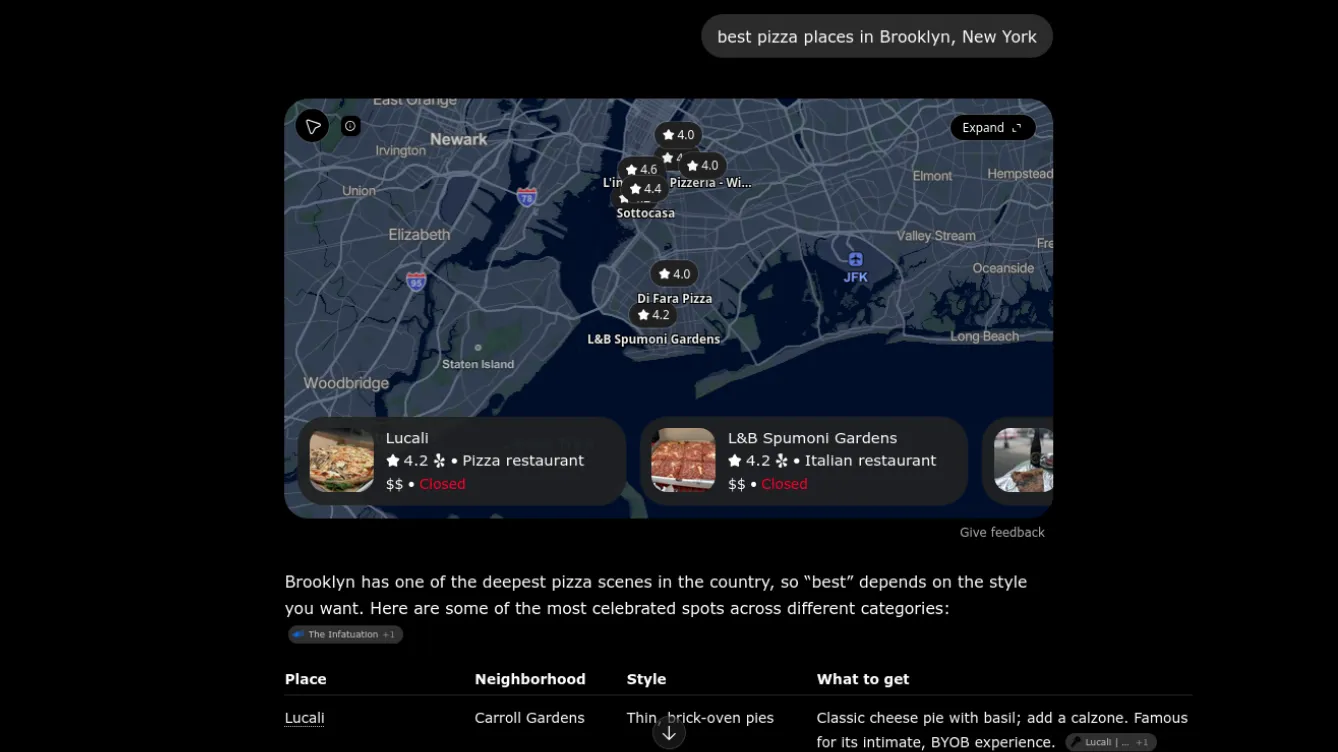
ChatGPT Maps Scraper asks ChatGPT Maps a local search question — best pizza places in Brooklyn, New York, 24 hour pharmacy near Union Square, kid friendly hotels in Anaheim — and saves every place ChatGPT recommends as a structured row: rank, name, rating, review count, price range, address, phone, website, opening hours, coordinates, photos, the sentence ChatGPT wrote about that place, the full answer in Markdown, and the sources ChatGPT cited. No OpenAI account, no API key, no login.
If you do local SEO, reputation management, or market research, this is how you find out which businesses ChatGPT recommends for the queries your customers actually type — and whether yours is one of them.
What does ChatGPT Maps Scraper do?
ChatGPT Maps is OpenAI's dedicated place-search experience: you describe what you need, ChatGPT searches the web and local business listings, and returns a handful of recommended places pinned on a map with ratings, categories, price levels, and opening hours. Those recommendations are increasingly where people decide where to eat, stay, shop, and book — but there is no ChatGPT Maps API, no export button, and no way to monitor results over time.
This Actor fills that gap. For each query you enter it:
- Opens ChatGPT Maps in a fresh, logged-out session (each query is independent — no chat history bleeds into the next answer).
- Types your question exactly as a person would and waits for ChatGPT to finish answering.
- Reads the places ChatGPT featured on the map together with the answer text and its citations.
- Saves one dataset item per recommended place, in the order ChatGPT listed them, with the ChatGPT answer attached.
You can run it once, schedule it daily, and export the results as JSON, CSV, Excel, XML, or HTML or pull them from the Apify API.
What can this ChatGPT Maps scraper do?
- Scrape ChatGPT Maps recommendations for any natural-language local query (restaurants, hotels, dentists, gyms, attractions, services)
- Capture the rank order ChatGPT used — the same order shown on the map cards
- Extract each place's rating, review count, price range, categories, address, phone, website, weekly opening hours, open/closed status, and GPS coordinates
- Save the place photo ChatGPT displayed, ready for Console thumbnails and reports
- Keep the exact sentence ChatGPT wrote about each place (
answerSnippet) and the whole answer (answerText) with numbered citations - Record the cited sources (The Infatuation, Tripadvisor, Yelp, local news, official sites) so you know what ChatGPT reads before recommending
- Optionally include the candidate places ChatGPT looked up but did not feature (
featured: false), useful for gap analysis - Batch dozens of queries per run, optionally appending one
locationto all of them - Schedule runs and diff results to track ChatGPT rankings over time
Why scrape ChatGPT Maps?
ChatGPT is becoming a discovery channel next to Google Maps, Yelp, and Tripadvisor. Unlike those, ChatGPT explains its picks, so its answers are a goldmine for anyone who works with local businesses:
- Local SEO and AI visibility tracking — Check whether your client's restaurant, clinic, or store shows up when ChatGPT is asked for "best X in Y". Re-run weekly and see rank changes.
- Agency reporting — Add a "ChatGPT recommendations" section to monthly reports with the exact quote ChatGPT gives about each client.
- Competitor research — See which competitors ChatGPT keeps recommending, what it praises them for, and which review sites it cites.
- Citation and PR strategy — The
sourceslist shows which publications influence ChatGPT for your category; pitch them. - Multi-location brands — Run the same query template across 50 cities (
locationfield) and find markets where you are invisible. - Hospitality and travel research — Compare ChatGPT's hotel, cafe, and attraction picks across destinations.
- Lead generation — ChatGPT-recommended businesses come with phone, website, and address; they are the winners in their niche.
- Review-site benchmarking — Compare ChatGPT's rating and review counts against your own Google/Yelp data.
- Market entry — Ask "best coworking spaces in Lisbon" or "dog groomers in Austin" and map the incumbents in minutes.
- Content ideas — ChatGPT's reasoning ("go here for the Sicilian square") shows what attributes matter in each category.
- Academic and media research — Study how a generative AI ranks and describes local businesses across regions.
What ChatGPT Maps data can you extract?
| Field | Description |
|---|---|
query | The question you asked (with location appended when set) |
rank | Position in ChatGPT's recommendation list (1 = first card on the map) |
featured | true when the place was pinned on the ChatGPT map; false for extra candidates |
mentionedInAnswer | Whether ChatGPT wrote about this place in the answer text |
name, categories | Business name and category labels (e.g. Pizza restaurant) |
rating, reviewCount | Star rating and number of reviews ChatGPT displayed |
priceRange | Price level shown by ChatGPT ($10–20, $$) |
address, location | Street address and the area ChatGPT searched (Brooklyn, NY, USA) |
latitude, longitude | Map pin coordinates |
phone, websiteUrl | Contact details shown on the place card |
imageUrl, imageUrls | Place photo(s) ChatGPT displayed |
hours | Weekly opening hours as { day, open, close } (24h clock) |
isOpen, isClosedPermanently, isClosedTemporarily | Status flags at scrape time |
answerSnippet | The bullet or paragraph ChatGPT wrote about this place |
answerText | The complete ChatGPT answer in Markdown with [1], [2] citation markers |
sources | Cited web sources: index, title, url, attribution |
chatgptPlaceId, conversationId, model | Identifiers for deduplication and auditing |
scrapedAt | ISO timestamp of the run |
How to scrape ChatGPT Maps
- Open ChatGPT Maps Scraper in Apify Console and click Try for free.
- Enter one or more Search queries, one per line, written the way you would ask ChatGPT (
best brunch spots in Austin,emergency vet open now in Denver). - Optionally set Location to append the same city or neighborhood to every query.
- Set Maximum places per query (ChatGPT usually features 5–10 places) and decide whether to Include candidate places.
- Keep the default residential US proxy, or switch the proxy country to change which region ChatGPT treats as "nearby".
- Click Start. Each query takes roughly 20–60 seconds while ChatGPT searches and writes its answer.
- Open the Overview tab to see ranked places with photos, or the ChatGPT answers tab for the full text and sources. Export in the format you need.
Tip: use a schedule (daily or weekly) and compare rank per query to build a ChatGPT local ranking tracker.
Input
| Field | Type | Default | Description |
|---|---|---|---|
queries | Array of strings | — | Local search questions for ChatGPT Maps, one per entry. Include the city unless you set location. |
location | String | — | Appended to every query as in <location>. Handy for running one query template across many cities. |
maxItems | Integer | 10 | Maximum places saved per query. Applies per query, not per run. |
includeCandidatePlaces | Boolean | false | Also save places ChatGPT looked up but did not feature (featured: false). |
proxyConfiguration | Object | Residential, US | chatgpt.com blocks datacenter IPs, so residential proxies are required. The proxy country influences "nearby" results. |
Output
Each dataset item is one recommended place for one query. Items are pushed in ChatGPT's order, so rank is stable within a query.
answerText and sources are identical on every row of the same query, so you can group by query and read them once.
How much does it cost to scrape ChatGPT Maps?
ChatGPT Maps Scraper uses pay per event + platform usage. You pay Apify's compute and residential-proxy usage for the run, plus:
| Event | Price (Free plan) | What it is |
|---|---|---|
| Actor start | $0.00005 per GB of memory | Once per run |
| ChatGPT answer | $0.005 | One answered query |
| Place result | $0.49 per 1,000 | One saved place |
Place-result prices are lower on paid Apify plans (about $0.37 per 1,000 on Gold and above). A typical query returns 5–10 places. Exact prices are on the Pricing tab.
Each query runs in a real browser through a residential proxy, which is the usage charge on your Apify bill. Keep maxItems at the default and only enable includeCandidatePlaces when you need the extra rows.
FAQ
Does this need an OpenAI account or ChatGPT Plus?
No. ChatGPT Maps is available to logged-out visitors and this Actor uses that public experience. You never provide credentials.
Why do results differ between runs?
ChatGPT generates a fresh answer every time, so the set and order of places can change slightly, just as it would for two different people asking the same question. That variance is part of what you measure when tracking AI visibility — schedule repeated runs and look at trends rather than a single snapshot.
Are results location-aware?
Yes, in two ways. Put the place name in your query (… in Brooklyn) for explicit targeting, or leave it out and ChatGPT uses the proxy's region as "nearby". Change apifyProxyCountry to test other markets.
What if ChatGPT answers without a map?
Some questions (very broad or non-local ones) return prose with no places pinned. The run logs a warning for that query and saves no rows; rephrase with a clearer place type and location.
Can I use this as a ChatGPT Maps API?
Yes. Start runs and fetch the dataset through the Apify API (see the API tab), trigger them from Zapier, Make, or n8n, or schedule them in Console. There is no official ChatGPT Maps API today; this Actor is the closest equivalent.
Is it legal to scrape ChatGPT Maps?
The Actor collects the publicly shown answer for a query and the public business listing details ChatGPT displays (business names, addresses, ratings). It does not access private accounts or personal data. Use the data responsibly and review OpenAI's terms for your use case.
Related Actors
- Google Maps Reviews & AI Insights Scraper — reviews, ratings, and AI themes for the places ChatGPT recommends
- Google Maps Menu Scraper — menu items and prices for restaurants
- Google Maps Review Summary Scraper — Google's review summaries per listing
Questions or feature requests? Open a ticket on the Issues tab.
Image Credit
Image credit: chatgpt.com


