

SeedVR2 AI Image Upscaler | Upscale Photos 2x-4x, Restore JPEG
Pricing
from $12.00 / 1,000 image upscaleds
SeedVR2 AI Image Upscaler | Upscale Photos 2x-4x, Restore JPEG
Upscale images 2x, 3x or 4x with SeedVR2, ByteDance's AI restoration model: sharper detail, JPEG blocks and blur cleaned up, up to 32 megapixels. PNG, JPEG or WebP, transparency kept. One row per image with a download link; failed images are free.
Pricing
from $12.00 / 1,000 image upscaleds
Rating
0.0
(0)
Developer

ratatoskr
Maintained by CommunityActor stats
0
Bookmarked
2
Total users
1
Monthly active users
4 days ago
Last modified
Categories
Features
Share
Upscale photos and product images 2x, 3x or 4x with SeedVR2, the image restoration model ByteDance released in 2025. It enlarges each image and repairs it at the same time, so JPEG blocks, blur and noise turn into real texture and clean edges. Send a list of image links and you get every result back as a PNG, JPEG or WebP file of up to 32 megapixels, with one row per image that links to it. Transparent PNG and WebP images stay transparent.
- $0.02 an image for results up to 4 megapixels, less on higher Apify plans. A larger result adds a small charge per extra megapixel, and an image that fails costs nothing.
- A few seconds an image: about 3 to 5 seconds for a 2-megapixel result, around 25 seconds for a 4K square. Up to four images run at once.
It suits online shops with small supplier photos, old and scanned photos, thumbnails collected by a scraper, and AI-generated images that need to be larger for print or a banner.
Why this upscaler
Many upscalers are built on Real-ESRGAN, a model from 2021. It sharpens edges well, but where an image is damaged it smooths the surface into flat patches. This Actor runs SeedVR2, a diffusion model from 2025 that was trained to restore images, and the difference shows most in the texture of small, heavily compressed photos:
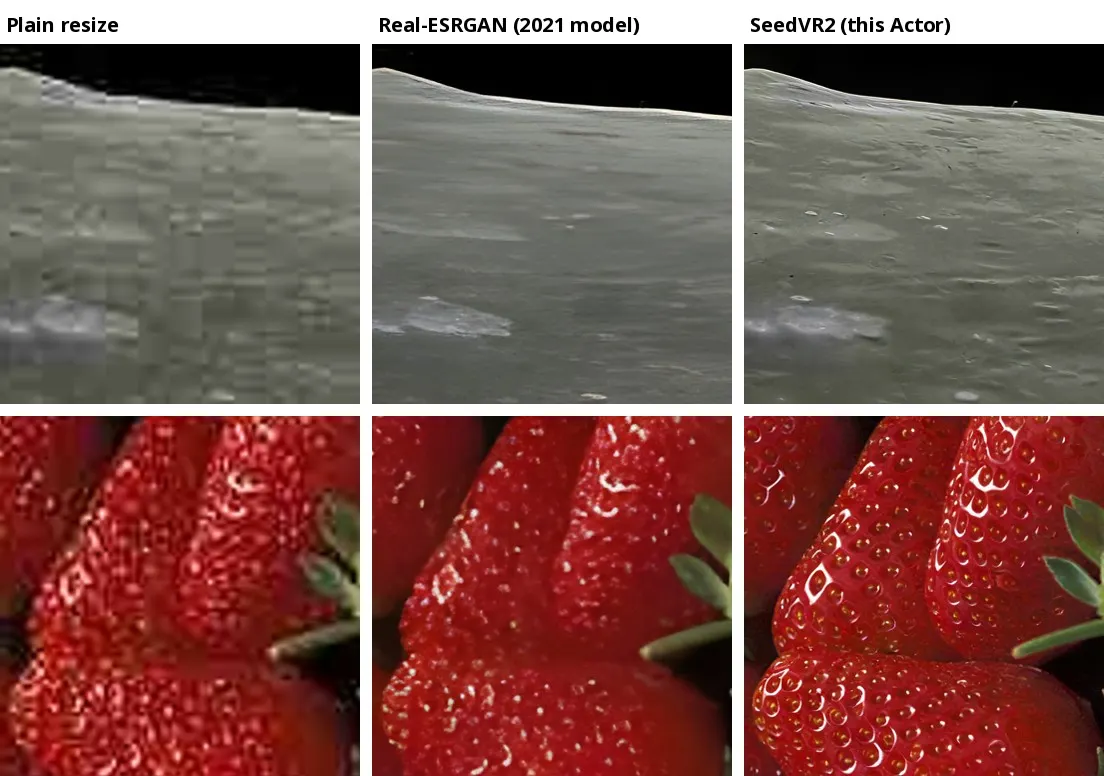
Two photos 330 and 400 pixels wide, saved as low-quality JPEGs and enlarged 4x, crops at 100%. Earthrise by Bill Anders, NASA; strawberries by Ken Hammond, USDA; both public domain.
The price per image covers the whole run, Apify's compute included, and every row tells you what its image cost.
Input
| Field | What it does | Default |
|---|---|---|
imageUrls | The images, one link per line: JPEG, PNG, WebP, GIF (first frame), AVIF or TIFF, up to 25 MB each. Google Drive links (shared with anyone who has the link), Dropbox links, data URIs and plain base64 work too. | an example photo |
scale | 2, 3 or 4: how much larger each side gets. | 4 |
targetLongEdge | Enlarge until the longer side has this many pixels, for example 3840 for 4K, instead of using scale. It goes up to 4x; an image already that long is skipped and not charged. | empty |
outputFormat | png (lossless, keeps transparency), jpg, or webp (keeps transparency). | png |
quality | JPEG and WebP quality, 1 to 100. | 95 |
maxOutputMegapixels | The largest result, 1 to 32. An image that would come out larger is enlarged less to fit. | 16 |
skipIfLongEdgeAtLeast | Pass over any image whose longer side already has this many pixels, without charge. | empty |
datasetId | Read image links from another Actor's dataset, such as the results of a product or real estate scraper. Leave imageUrls empty to use only the dataset. | empty |
urlField | The field holding the link in that dataset, such as imageUrl or images[0].url. Left empty, the first of imageUrl, image, images, photo, thumbnail and url is used. | empty |
seed | Fixes the model's randomness, so the same image comes back nearly identical. | a new one each run |
maxItems | Stop after this many images. Every image in the list counts, repeated and failed ones included. | 100 |
Automation tools can send imageUrl, url, urls, images or startUrls instead of imageUrls. If the input has a field this Actor doesn't know, the run stops before any image is charged and names the field you probably meant.
Output
One row per image in the run's dataset; the Upscaled images view shows each result next to its original. A 330 x 330 photo of Earthrise upscaled 4x gives this row:
indexis the image's place in your list, counted from 0, andinputUrlthe link you gave. A pasted image shows its type and a short fingerprint instead, such asdata:image/png (sha256 1a2b3c4d5e6f).statusisokwhen the image was upscaled and charged. It isskippedwhen the image was already large enough or repeats an earlier one in the list, anderrorwhen it could not be upscaled; neither is charged.outputUrldownloads the result without an API token. The files are also in the run's key-value store, namedupscaled-0001.pngonwards by list position.width,heightandmegapixelsdescribe the result,inputWidthandinputHeightthe original, andfactorthe enlargement used.formatandbytesdescribe the file.transparentsays whether the original had transparent pixels.chargedUsdis what this image cost on your Apify plan (the run above was on Bronze, where an image is $0.018).noteexplains a result smaller than asked, such asenlarged 4x, the most this upscaler does: the long edge is 1320 pixels, not the 2048 asked, or names the earlier image a repeated link matches.errorgives the reason an image was skipped or failed, for examplethe link answers 403: the file is not public.modelisSeedVR2,seedthe seed used, anddurationMsthe time for this image from download to saved result.
Was the run complete?
Each run writes an OUTPUT record to its key-value store, so a scheduled job can check the outcome in one request:
complete is true when every image was upscaled or skipped. Each image is listed as a part with its status: read-whole when done, failed with its reason, or cut-by-limit, stopped-by-charge-limit or stopped-by-time-limit. A run where some images failed still succeeds and keeps its results, and its status message starts with Partly failed: followed by the reasons.
Pricing
You pay per image delivered, at your Apify plan's price:
| Event | Free | Bronze | Silver | Gold and up |
|---|---|---|---|---|
| Image upscaled (result up to 4 megapixels) | $0.02 | $0.018 | $0.015 | $0.012 |
| Extra megapixel (each started megapixel above 4) | $0.004 | $0.004 | $0.0034 | $0.003 |
| Actor start | $0.00005 | $0.00005 | $0.00005 | $0.00005 |
What runs cost on the Free plan:
| Run | Cost |
|---|---|
| One photo enlarged to 1320 x 1320 (1.7 megapixels) | $0.02005 |
| One photo enlarged to a 4K square, 3840 x 3840 (14.7 megapixels, so 11 extra) | $0.06405 |
| 100 images with results up to 4 megapixels | $2.00005 |
Skipped, repeated and failed images cost nothing. If you set a maximum cost per run, the Actor only upscales what fits under it and marks the rest stopped-by-charge-limit.
FAQ
How is this different from resizing an image? A resize spreads the same pixels over a larger area. SeedVR2 adds plausible fine detail such as fur, foliage, fabric and edges, and removes compression blocks. That detail is invented by the model, so the result isn't suited to forensic or evidence work.
Which images work best? Photos and AI-generated images that are small, soft or compressed. Large text stays readable, but text only a few pixels high can come back as different letters, so check labels and prices on product photos.
What sizes can I send? Anything with a shorter side of 32 pixels or more, up to 32 megapixels. Very small images, under 128 pixels a side, are enlarged a little before the model sees them. Results go up to 16 megapixels by default and 32 with maxOutputMegapixels.
What happens to transparency, colour and metadata? PNG and WebP results keep the transparent areas. A JPEG has no transparency, so transparent areas become white. Results are saved in sRGB with the original's DPI; camera EXIF data is not copied.
Can I send iPhone photos? HEIC files can't be read here. Save the photo as JPEG or PNG first (the iPhone's export, or most photo apps, do this).
What if a link fails? The row's error says why: a web page instead of an image (use the image's own address), a file that isn't public (for Google Drive, share it with anyone who has the link), a site refusing downloads for a while (HTTP 429), or a file over 25 MB.
How long do the results stay? In the run's key-value store, for as long as your Apify plan keeps a run's storage. Download what you want to keep.
Where are my images processed? On fal.ai's GPU service, which runs the model; the results are saved in your own run's storage, and this Actor keeps no other copy. By running it you confirm you are 18 or older and that your images follow fal.ai's Acceptable Use Policy. Upscale only images you have the right to use.
For AI agents and automation
One request upscales a list and returns one row per image:
Check status first: only ok rows have a new image at outputUrl, and error explains the others in one line. In n8n, Make and Zapier the Apify app runs it, and binary images can go into imageUrls as data URIs. Through Apify's MCP server it works as a tool for AI agents.


