

PiSA-SR Image Upscaler — AI Image Upscaling & Restoration
Pricing
from $12.00 / 1,000 image upscaleds
PiSA-SR Image Upscaler — AI Image Upscaling & Restoration
Upscale and restore any photo with PiSA-SR AI image upscaling. Sharpen blurry, low-res, and compressed images to a 1–2 megapixel target in seconds, from $0.012/image. No GPU or subscription — a pay-as-you-go Topaz alternative.
Pricing
from $12.00 / 1,000 image upscaleds
Rating
0.0
(0)
Developer

daniel tr
Maintained by CommunityActor stats
0
Bookmarked
2.1K
Total users
786
Monthly active users
a month ago
Last modified
Categories
Share
PiSA-SR Image Upscaler — AI Image Upscaling & Photo Restoration 🔍
Turn blurry, low-res, and compressed images into sharp high-resolution ones with PiSA-SR, a state-of-the-art one-step diffusion upscaling model. Get a clean, detailed 1–2 megapixel result in just a few seconds. No GPU, no subscription, no monthly fees: you pay a tiny fixed price per image. A fast, affordable alternative to Topaz Gigapixel, Magnific, and Let's Enhance.
- 🔍 Real detail, not just bigger pixels — PiSA-SR reconstructs texture, edges, and fine structure instead of smoothing them away.
- 🎯 Megapixel targeting — ask for a pixel budget and the Actor sizes the output for you, always keeping the original aspect ratio.
- 🎨 Color-faithful — built-in color correction keeps the result true to the original.
Perfect for rescuing old or low-res photos, e-commerce product shots, print and poster work, thumbnails, scanned documents, upscaling AI-generated images, and n8n / Make / Zapier workflows and AI agents.
See it in action
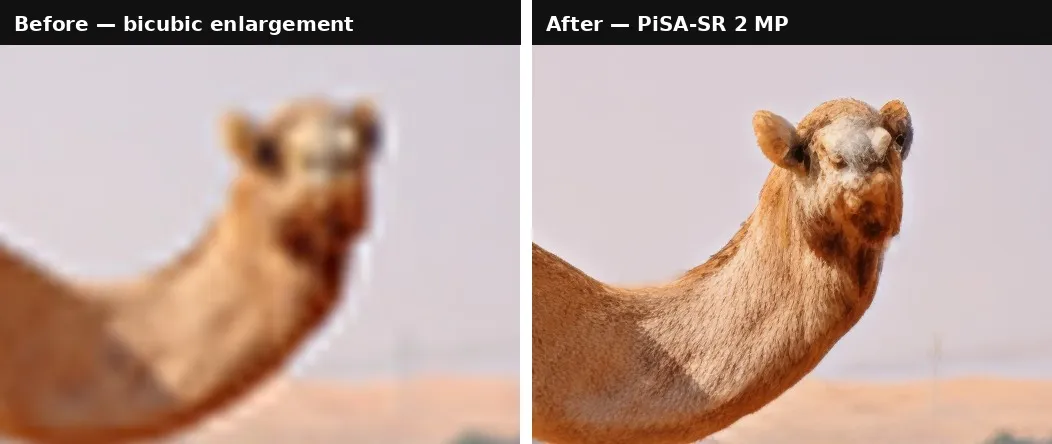
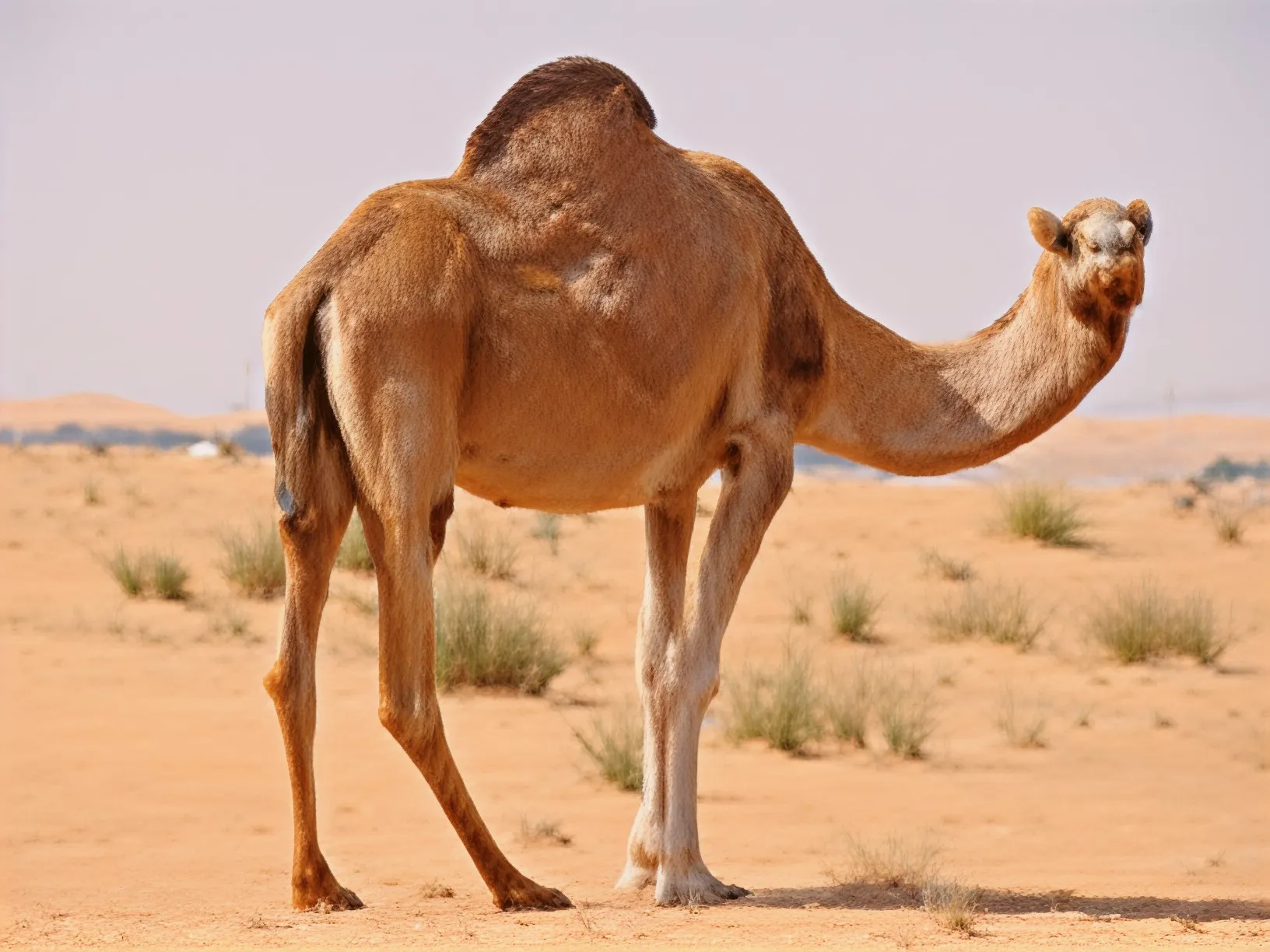
A 500×375 desert photo (0.19 MP, visibly soft) upscaled to 2 MP — one run, default settings, about 8 seconds:
Both crops above are shown at 100% against a bicubic enlargement of the same source to the same pixel count — the fair comparison. Every "before" panel in this README is the original image enlarged conventionally, never a downscaled or artificially degraded one.
Why this Actor?
- ⚡ Fast — PiSA-SR is a one-step diffusion model on dedicated GPUs: results in 3–10 seconds, not minutes.
- 💸 Cheap — from $0.012 per image (as low as $12 per 1,000) — roughly 4× under Topaz's API and 2× under Replicate's popular upscalers. Pay only for successful results; failed runs are never charged.
- 📐 One simple dial — set the output size directly in megapixels, with no per-tier price hike.
- 🧼 Restores, not just enlarges — removes JPEG artifacts, blur, and noise on the way up.
- 🔌 Automation-ready — call it from the Apify API, n8n, Make, Zapier, LangChain, or any AI agent via MCP.
How it compares
| This Actor (PiSA-SR) | Topaz / Magnific / Let's Enhance | |
|---|---|---|
| Pricing model | Pay per image (from $0.012) | Subscription / credits, or $0.05+ per image |
| Commitment | None — pay only for what you run | Recurring plan, credits expire |
| Failed runs | Never charged | Often consume credits |
| Speed | 3–10 s (one-step diffusion) | Tens of seconds to minutes |
| Output sizing | Direct megapixel target | Fixed 2×/4×/6× factors |
| API & automation | Native Apify API, n8n, Make, Zapier, MCP | Varies / limited |
| Watermark | None | Common on lower tiers |
How it works
- Provide a public image URL.
- Choose your output resolution (
1mpor2mp) and format (PNG, JPEG, or WebP). - The Actor upscales the image and stores it in the run's dataset and key-value store.
- Download the file from the output, or pipe the URL into the next step of your workflow.
The aspect ratio is always preserved — the megapixel target sets the total pixel budget. A 4:3 photo comes back as roughly 1152×864 at 1mp and 1632×1224 at 2mp.
Available tiers are 1mp, 2mp, 3mp, 4mp, 6mp, and 8mp.
On output resolution.
1mpand2mpare the tiers we recommend and support today — they're consistent across the photo, product, and artwork inputs we've tested. The larger tiers (3mp,4mp,6mp,8mp) are accepted, but output quality there is noticeably input-sensitive: some image domains aren't well covered by the model and can come back over-smoothed or with invented texture. Treat them as experimental. We're investigating and will lift the recommendation once results are dependable.
Input example
| Field | Type | Default | Description |
|---|---|---|---|
imageUrl | string | — (required) | Public URL of the image to upscale (JPG, PNG, WebP). |
outputResolution | string | 2mp | Target size. 1mp and 2mp are recommended; 3mp/4mp/6mp/8mp are accepted but experimental (see above). |
outputFormat | string | png | Output file format — png, jpeg, or webp. |
colorFix | boolean | true | Match the result's colors to the original image. |
Output example
The upscaled image is also stored in the run's key-value store under the key upscaled.png (or upscaled.jpg / upscaled.webp).
Pricing
You are charged per upscaled image at a price that drops with your Apify plan. The price is the same at every output resolution — 2 MP costs no more than 1 MP.
| Apify plan | Price per image | Per 1,000 images |
|---|---|---|
| Free | $0.0200 | $20.00 |
| Bronze | $0.0180 | $18.00 |
| Silver | $0.0150 | $15.00 |
| Gold / Platinum / Diamond | $0.0120 | $12.00 |
That's roughly 4× cheaper than the Topaz upscaling API ($0.05/image) and about 2× cheaper than Replicate's Crystal/Clarity upscalers ($0.025/image), with no monthly subscription and no expiring credits.
Failed runs are never charged — you only pay for images you actually receive. (Apify also applies its standard tiny platform fees for the Actor start and each dataset record.)
Tips for great results
- Stay at 1–2 MP. These are the supported tiers and give the most consistent results across image types. Higher targets are experimental and quality varies by subject.
- Don't over-target. Upscaling a 200×150 thumbnail invents detail. Aim for roughly 4–8× the source pixel count for the most natural result.
- Feed the best source you have — upscale from the original file, not from a re-compressed screenshot or a messaging-app copy.
- Use PNG when the result goes into further editing; JPEG when you just need a smaller file to publish.
- Leave color correction on unless you're deliberately after the model's raw output.
- Batch it by running the Actor once per image from n8n, Make, or a script — each run is independent and charged individually.
✂️ Pair it with BiRefNet Background Remover
Upscaled a product shot? Cut it out next. Our companion Actor, BiRefNet Background Remover, turns any image into a clean transparent PNG in seconds.
The complete pipeline:
👉 Try BiRefNet Background Remover →
Use it from the API
Works the same from the Apify n8n node, Make, Zapier, LangChain, or the Apify MCP server for AI agents.
For the full request/response shape (run-sync, async, polling, downloading the image), see the OpenAPI spec at ./openapi.yaml — import it into Postman, Insomnia, or any OpenAPI client.
Templates & integrations
Drop this Actor into a no-code workflow to automate upscaling end to end. In each tool, search for the Apify connector, authenticate with your Apify API token, and select danitn11/pisa-sr-image-upscaler with the action Run Actor (or Run Actor and get dataset items to receive the image URL back).
- n8n — add the Apify node → Run Actor, map
imageUrlfrom a previous step (e.g. a new row in a Sheet or an uploaded photo), then push the resultingimageUrlto your storage or publishing node. - Make.com — use the Apify › Run an Actor module, then a Watch / Get dataset items module to read back
imageUrl. Chain into Shopify, Google Drive, or an image uploader. - Zapier — trigger (new file, form submission, etc.) → Apify: Run Actor → action (update a product listing, save to Drive, send a Slack message).
Common pattern — automated catalog upgrade:
Use with AI agents (MCP server)
This Actor works as a tool for any MCP-compatible AI agent (Claude, Cursor, VS Code Copilot, custom agents) through Apify's hosted MCP server. Your agent can upscale images as part of a larger task — "make this product photo print-ready" — with billing through your Apify account.
Server URL (with this Actor preselected as a tool):
Authenticate with OAuth (you'll be redirected on first connect) or an Authorization: Bearer <APIFY_TOKEN> header.
Claude Code
Claude Desktop / claude.ai — add a custom connector with the server URL above (OAuth flow handles auth).
Cursor / VS Code — add to .cursor/mcp.json (or "MCP: Open User Configuration" in VS Code):
Local stdio (npx)
Then just ask your agent: "Upscale this photo to 2 megapixels and give me a PNG." The agent calls the Actor, waits for the result, and gets back the image URL from the output schema.
FAQ
How long does upscaling take? Typically 3–10 seconds. PiSA-SR is a one-step diffusion model, so it's far faster than the multi-step upscalers most tools use.
What image formats are supported? Input: JPG, PNG, and WebP via a publicly accessible URL. Output: PNG, JPEG, or WebP.
How much can it enlarge?
The output is sized by megapixel target, not by a fixed factor — so the effective magnification depends on your source. A 0.1 MP thumbnail to 2mp is a 20× pixel increase; a 1 MP photo to 2mp is 2×. Modest targets give the most natural results.
Why only 1–2 MP?
Those are the tiers we've validated as consistently good. The model accepts targets up to 8mp, but at those sizes quality depends heavily on the subject — some image domains aren't well covered yet and can come back over-smoothed or with invented detail. We're investigating; higher tiers will be recommended once they're dependable.
Does 2 MP cost more than 1 MP? No. The price per image is flat across every resolution tier.
Is there a watermark? No. The output is clean and ready to publish.
Can it fix faces? PiSA-SR restores general detail including facial features, but it is a general-purpose upscaling model, not a dedicated face-restoration model.
What model is used?
PiSA-SR (pisa-sr) — Pixel-level and Semantic-level Adjustable Super-Resolution, a one-step diffusion model for real-world image super-resolution.


