

Email Security Checker: SPF, DMARC, DKIM & Mail Provider
Pricing
from $0.75 / 1,000 domains
Email Security Checker: SPF, DMARC, DKIM & Mail Provider
Check SPF, DMARC, DKIM, BIMI and MTA-STS for any list of domains from public DNS, and see each domain's email provider (Google Workspace, Microsoft 365, Proofpoint...) and sending tools (SendGrid, HubSpot, Mailchimp). Plain-English issues per domain.
Pricing
from $0.75 / 1,000 domains
Rating
0.0
(0)
Developer

Red Fox Scout
Maintained by CommunityActor stats
0
Bookmarked
2
Total users
1
Monthly active users
13 days ago
Last modified
Categories
Security
Limited permissionsShare
Find the domains that can be spoofed. For every domain you get a spoofable yes or no with the reason, a posture score from 0 to 100 with an A-F grade, and an ordered fix list with the exact DNS records to publish. It reads the email setup from public DNS too: the email provider, MX, SPF (including the lookups inside its includes), DMARC, DKIM (built-in and your own selectors), DNSSEC, MTA-STS, TLS-RPT, BIMI and the name servers.
Price: $1 per 1,000 domains checked. Domains that don't exist are free. Apify's free plan ($5 monthly credit) covers about 5,000 domains a month.
Questions it answers
- Which of my domains can be spoofed, and what should each one publish to stop it?
- Which domains are stuck at DMARC p=none, or have no DMARC at all?
- Does this company use Google Workspace or Microsoft 365 for email?
- Is this SPF record valid once its includes are counted, or over the 10-lookup limit?
- Which email marketing and helpdesk tools does a company send from?
- Which domains have DNSSEC on and working?
Who uses this
- 📬 Email deliverability consultants and MSPs: audit SPF, DKIM and DMARC across every client domain in one run.
- 🛡️ IT and security teams: find spoofable domains and weak policies across a domain portfolio, on a schedule.
- 💼 Sales and RevOps: use the email provider and sending tools as a technology signal for lead lists (who runs Microsoft 365, who sends with HubSpot).
Why this Email Security Checker
- 🎣 Spoofable or not: a yes or no with the reason, so you know which domains anyone could send mail as.
- 📈 Posture score and A-F grade, with the scoring rules published below.
- 🛠️ Fix list with exact records to publish for DMARC, SPF, MTA-STS and TLS-RPT.
- 📮 Full email DNS: provider, MX, SPF lookups, DKIM (your own selectors too), DNSSEC, BIMI and name servers.
- 🔔 Change alerts when a domain's email setup changes.
- 💰 $1 per 1,000 domains, domains that don't exist are free.
How to use the Email Security Checker
- Click Try for free (a free Apify account is enough).
- Paste domains, one per line (
acme.com). URLs work too. Your own DKIM selectors and the other checks are under Checks. - Click Start. Each domain takes a second or two.
- Sort by
postureScoreto see the weakest domains first, or filterspoofableto true. Download as JSON, CSV or Excel.
Input
| Field | Default | What it does |
|---|---|---|
urls | – | Domains, one per line (acme.com). URLs work too; www. is dropped. |
onlySpoofable | false | Return only the domains that can be spoofed. The others are left out and free, so a big list costs only the hits. |
useApexDomain | false | Check the registrable domain instead of the host you gave: mail.acme.co.uk is checked as acme.co.uk. |
dkimSelectors | [] | Your mail provider's DKIM selectors (up to 20), checked on top of the built-in list. Find one in the s= tag of a DKIM-Signature header in mail the domain sent. |
expandSpfIncludes | true | Count the DNS lookups inside every include: and redirect= as receivers do (spfLookupCountExpanded). Off counts only the top-level record. |
checkDnssec | true | Check DNSSEC (dnssecStatus) through public DNS-over-HTTPS resolvers (Cloudflare, with Google as fallback). |
recordTypes | [] | Raw records to add to each row as dnsRecords: any of CAA, CNAME, A, AAAA, NS, MX, TXT. |
maxConcurrency | 20 | Domains checked in parallel. |
requestTimeoutSecs | 30 | Give up on a domain after this long. |
Example input (the one behind the output below):
Output
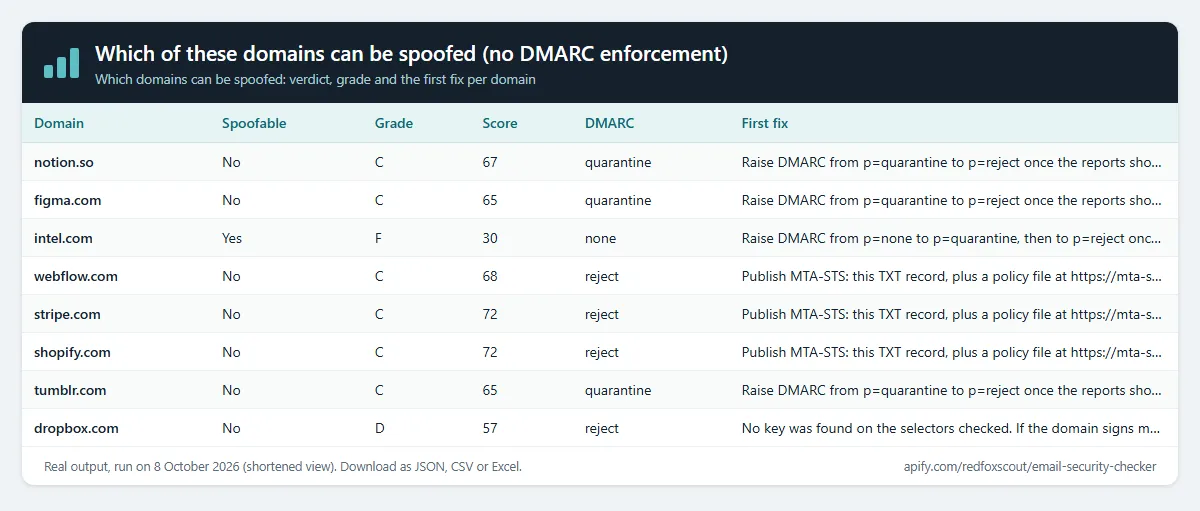
One row per domain. Real rows from a local run of the input above, shortened:
New fields sit next to the existing ones: spoofable, spoofableReason, postureScore, grade, scoreBreakdown, recommendations, dnssecStatus, nsRecords, aRecords, aaaaRecords, soaRecord, spfLookupCountExpanded, mxProviders and dnsRecords. soaRecord.contact is the zone's published contact mailbox (from the SOA record), useful for reaching the domain's DNS admin. With expandSpfIncludes on, spfValid and the SPF lookup issue use the full count.
Export as JSON, CSV or Excel, or connect Google Sheets, Slack or a webhook through Apify integrations.
Example tasks
Ready-made inputs you can open, change and run:
- Which of these domains can be spoofed (no DMARC enforcement)
- DMARC policy checker for many domains
- SPF record checker and validator in bulk
Find spoofable domains
Turn on Only spoofable domains (onlySpoofable) to get just the spoofable ones; the other domains are free.
A domain is spoofable when someone can send mail that claims to be from it and have it delivered. The verdict is yes when any of these is true:
- it has no DMARC record, or the record has no valid
p=policy, or there are two DMARC records; - DMARC is
p=none: spoofed mail is reported but still delivered; - DMARC covers less than 100% of mail (
pct); - SPF ends in
+all, so any server passes SPF for the domain.
A softfail (~all) on its own does not make a domain spoofable when DMARC rejects or quarantines all of its mail.
Posture score (0-100). Each part earns points:
| Part | Points | Full marks | Fewer points |
|---|---|---|---|
| DMARC | 40 | p=reject at pct 100 | p=quarantine 30 (20 below pct 100); p=reject below pct 100: 30; p=none 10; no valid record 0 |
| SPF | 20 | one record (6), ends in -all (8), at most 10 lookups with includes counted (6) | ends in ~all 5, ?all 1, +all 0; over 10 lookups 0 |
| DKIM | 15 | a key on a selector checked | no key found 0 |
| MTA-STS | 10 | mode: enforce (10) | mode: testing 7; record with no readable policy 4 |
| TLS-RPT | 5 | record published | none 0 |
| DNSSEC | 10 | signed and validating | unsigned or broken 0 |
DKIM, MTA-STS and TLS-RPT count only for domains that receive mail. A part that does not apply is left out, and the score is scaled to the parts that do. Null-MX domains are scored on DMARC, SPF and DNSSEC.
Grade: A from 90, B from 75, C from 60, D from 40, F below that. A spoofable domain is at most D.
Fix list. Fixes that stop spoofing come first, then the rest by points gained. Each fix says what to do. Where the record can be written exactly from the domain's current records, the fix includes the record (host, type and value) to publish: DMARC, SPF, MTA-STS, TLS-RPT and null MX. DKIM keys and DNSSEC DS records come from your mail provider and DNS host, so those fixes have no record. Mailboxes named in suggested records (dmarc@, tls-reports@) must exist to receive reports.
Real output for intel.com from a local run, shortened:
Check websites from another Actor (Google Maps leads, lead lists)
Have a list from Google Maps Scraper or any other Actor? Pick its dataset under Websites from another Actor. This Actor reads the website field (or the field you name, e.g. url, domain or contact.website) and checks every site. No copy and paste.
To run it automatically after every scrape, add an Actor-to-Actor integration to the source Actor or task with this input:
Use in Clay
Add each account's email setup to a Clay table:
- In Clay, open Settings, then Connections, then Add Connection, pick Apify and paste your Apify API token (Apify Console, Settings, API & Integrations).
- In your table, select Add enrichment, search for Apify and pick Run Apify Actor.
- Choose this Actor (
redfoxscout/email-security-checker, IDnbZkXDhFtTvHwAgLZ) and paste this as the input, inserting your domain column where it says/Domain(Clay's rule: quotes around the key, none around the column token):
- Map the output fields you need:
spoofable,grade,postureScore,mailProvider,dmarcPolicy,spfValid,issueCountandissues.
Clay runs the Actor once per row, so each row costs one Actor start plus $0.001 per domain. For thousands of rows, run the Actor once on the whole list instead.
Change alerts
Give the run a Change alert name (e.g. clients-weekly) and put it on an Apify schedule. Each row then gets changeStatus (new, changed or unchanged) and changedFields, compared with the previous run of the same name, so you see when a domain changes its mail provider, SPF, DMARC, MTA-STS, DNSSEC or its score. Turn on Only new and changed sites and each run's dataset is just the change report; unchanged sites are still checked and charged as usual. Add Apify's Slack or email integration to get the report delivered.
Notes
- Uses public DNS only, plus the public MTA-STS policy file when one is announced, and public DNS-over-HTTPS resolvers for DNSSEC. No emails are sent and no mail servers are contacted.
- DKIM keys can't be listed from DNS. Only the built-in selectors and the ones you give are checked, so "not found" means not on those. Revoked keys (an empty
p=) don't count. - A domain whose DNSSEC is broken usually fails the DNS lookup itself (SERVFAIL). It then shows as an error row, which is free.
- SPF lookups follow RFC 7208, with a limit of 30 DNS queries and 10 seconds per domain. A very large include tree is counted only as far as those limits allow, so its count is a minimum.
- Domains with a null MX record (
MX 0 .) say they never receive email. They show asNo email (null MX), and DKIM, MTA-STS and TLS-RPT are not scored for them. domainis the host you gave;emailDomainis the domain whose records were checked. They differ whenuseApexDomainis on.dmarcReportsTolists only the domains of the DMARC report addresses.dmarcRecordshows the record as published, so any report mailbox in it appears there too.- The MTA-STS record in a fix uses
id=1. Change the id whenever you change the policy file. - DMARC, SPF and MTA-STS fixes come from the records the domain publishes now. Review each record before you publish it, because it replaces the current one.
What this Actor does not do
It does not send mail, test whether a spoofed message gets through, or contact mail servers. It reads the records a domain publishes, so it cannot see DKIM keys on selectors it doesn't check. It does not log in or solve CAPTCHAs; the only contact it returns is the SOA mailbox the domain publishes in DNS.
How much does it cost?
- Domain checked: $0.001 per domain ($1 per 1,000).
- Actor start: $0.00005 per GB of memory (default 1 GB = $0.00005 per run).
- Domains that don't exist: free.
| Domains | Cost |
|---|---|
| 100 | about $0.10 |
| 1,000 | about $1 |
| 10,000 | about $10 |
Apify's free plan includes $5 of credit every month, enough for about 5,000 domains. Paid Apify plans get Store discounts of up to 25%. You can set a maximum cost per run; the Actor stops cleanly when it's reached.
FAQ
Is this legal? It reads public DNS records, the same ones every mail server reads before delivering a message. No emails are sent and no personal data is collected.
Can I check my clients' domains every week? Yes. Put the run on an Apify schedule with a change alert name and you get only the domains whose setup changed.
Why does a domain show no DKIM key when it sends signed mail? It probably uses a selector we don't check. The selector is in the s= tag of the DKIM-Signature header of any email the domain sends. Add it under Extra DKIM selectors.
Why is my SPF over 10 lookups when it was fine before? Earlier versions counted only the top-level record. Receivers count the lookups inside each include, so the full count is the one that matters. Turn off Count SPF lookups through includes to get the top-level count.
Related Actors
- Website Tech Stack Detector: what a site is built with, including the email provider from DNS.
- Bulk URL Status & SSL Checker: status codes, redirects, security headers and SSL expiry.


