

Bulk URL Status & SSL Checker: Redirects & Expiry
Pricing
from $0.75 / 1,000 urls
Bulk URL Status & SSL Checker: Redirects & Expiry
Check thousands of URLs at once: final HTTP status, full redirect chain, response time, HTTPS, security headers, and SSL certificate issuer, expiry date and days left. Find broken links, bad redirects and expiring certificates.
Pricing
from $0.75 / 1,000 urls
Rating
0.0
(0)
Developer

Red Fox Scout
Maintained by CommunityActor stats
0
Bookmarked
2
Total users
1
Monthly active users
2 days ago
Last modified
Categories
Share
Check thousands of URLs in one run and catch SSL certificates that are expiring or already expired before a site goes down. Turn on Only problem URLs and each run returns just what needs attention: broken pages (4xx/5xx), redirect loops, invalid or expired certificates, and certificates expiring within the days you set. Turn on Check the links on each page and it works as a broken link checker: one row per link, with its source page, anchor text and status.
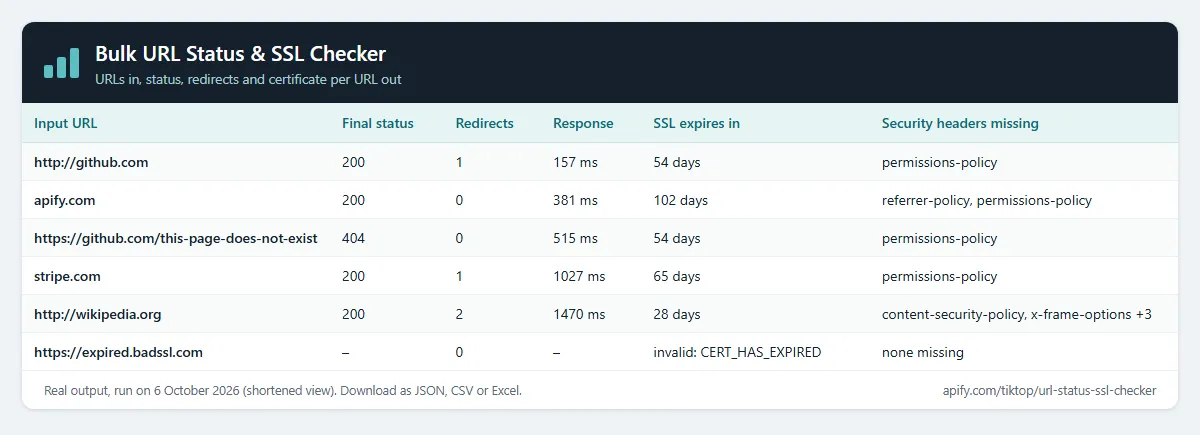
For every URL you also get the final HTTP status, the full redirect chain, response time, the server, which security headers are present or missing, and the SSL certificate: issuer, expiry date, days left, and whether it's trusted. For SEO teams, site reliability engineers and agencies managing many domains.
Price: $1.00 per 1,000 URLs checked (links too). URLs that can't be reached at all (DNS failure, timeout) are free. A 404, a 500 or an expired certificate is a result, so it's counted. Apify's free plan ($5 monthly credit) covers about 5,000 URLs a month.
Questions it answers
- Which of our domains have SSL certificates expiring in the next 30 days, or already expired?
- Which links on our pages are broken (404/410/500) or redirect somewhere unexpected?
- Do old URLs 301-redirect to the right new pages after a migration?
- Which sites redirect in a loop, or send a visitor through too many redirects?
- Which sites are missing HSTS or a Content-Security-Policy header?
- Which sites answer slowly?
Who uses this
- 🔍 SEO teams: find broken pages, redirect chains and links that 404 before search engines do.
- 🛠️ Site reliability engineers: watch certificate expiry and status codes across every domain you run.
- 🏢 Agencies: check all client sites in one scheduled run.
- 🚚 Site migrations: confirm every old URL redirects where it should.
Why this URL Status & SSL Checker
- 🔒 SSL expiry watch: days left on every certificate; Only problem URLs returns just what needs action.
- 🔗 Broken link checker: every link on a page with its source page, anchor text and status.
- 🔁 Full redirect chains: every hop with its status; loops and too many redirects are flagged.
- ⏱️ Speed and headers: response time, a slow-page flag, the server and which security headers are missing.
- 🔔 Change alerts: status, redirect and certificate changes since the last run.
- 💰 $1 per 1,000 URLs, unreachable URLs are free.
How to use the URL Status & SSL Checker
- Click Try for free (a free Apify account is enough).
- Paste URLs or domains, one per line.
- Optional: turn on Only problem URLs in the results, set SSL expires within (days), or turn on Check the links on each page.
- Click Start, or schedule it daily, then download the results or send them to Slack, Google Sheets or a webhook.
Input
| Field | Default | What it does |
|---|---|---|
urls | – | URLs or bare domains, one per line. In link mode, the pages to read links from. |
startUrls | – | Same as urls, in Apify's standard start-URL format. |
datasetId | – | Check the websites in another Actor's dataset (see below). |
datasetUrlField | website | The dataset field with the website. Dot paths like contact.website work. |
maxDatasetItems | 10000 | Read at most this many rows from that dataset. |
monitorName | – | Change alert name. Compares each run with the previous run of the same name. |
onlyChanges | false | Needs a change alert name. Keep only new and changed sites in the results. |
sslExpiringWithinDays | 30 | Certificates expiring within this many days get a problem. 0 flags only expired ones. |
onlyProblems | false | Keep only URLs with a problem (see SSL expiry watch). The other URLs are free. |
checkLinksOnPage | false | Check every link on each URL (broken link checker). One row per link. |
checkExternalLinks | true | Links on each page: also check links to other sites. |
checkAssets | false | Links on each page: also check images, scripts, stylesheets and iframes. |
maxLinksPerPage | 100 | Links on each page: check at most this many unique links per page. The rest are not checked or charged. |
method | GET | GET reads each response as a browser does. HEAD is faster: headers only, and a URL that refuses HEAD is retried with GET. |
followRedirects | true | Follow redirects to the final page. Off: report only the first response. |
maxRedirects | 10 | Stop after this many redirects. A URL still redirecting then gets Too many redirects. |
userAgent | Chrome | The browser identity sent with each request. Empty uses a current Chrome string. |
slowThresholdMs | 2000 | A response slower than this gets isSlow: true. |
maxConcurrency | 20 | URLs (or pages in link mode) checked in parallel. |
requestTimeoutSecs | 30 | Give up on a URL after this long. |
proxyConfiguration | off | Turn on if some sites block or rate-limit the checks. Uses your own Apify Proxy. |
Example input for the SSL expiry watch:
Output
One row per URL, or one row per link in link mode. The real row for http://github.com from a run with the default options, shortened:
status and finalUrl repeat finalStatus and url under the names other tools expect. contentLength is empty when the server does not send a Content-Length header, which is common for compressed or streamed pages.
A site whose certificate a browser would reject (expired, self-signed, wrong host) still gets a full row: sslValid: false, the reason in sslError (e.g. CERT_HAS_EXPIRED), the expiry date and negative sslDaysLeft. The HTTP status stays empty, because the page isn't loaded over an untrusted connection. isBroken is true for such a row.
Example tasks
Ready-made inputs you can open, change and run:
- SSL certificates expiring in the next 30 days
- Bulk broken link and HTTP status checker
- Redirect chain checker (301/302) in bulk
- Security headers checker (HSTS, CSP, X-Frame-Options)
- SSL certificate and redirect change monitor
- Check that HTTP redirects to HTTPS
SSL expiry watch
Set SSL expires within (days) (default 30) and turn on Only problem URLs in the results. Each run then returns only the URLs that need attention, and the problem field says why:
SSL expires in 12 daysorSSL expires todaySSL expired 3 days agoSSL invalid: DEPTH_ZERO_SELF_SIGNED_CERT(any certificate a browser would not trust, e.g. a name mismatch)HTTP 404,HTTP 503and other 4xx/5xx answersRedirect loop,Too many redirectsUnreachable(free; always kept)
Put it on an Apify schedule and the dataset of each run is that day's list. You pay only for the URLs in that list: healthy URLs are checked but free. The problem field itself is not part of change alerts, so the reason can change from day to day without triggering one.
Example from a real run (problem values from three URLs in one run):
Links on each page (broken link checker)
Turn on Check the links on each page and list the page URLs (one or two pages is typical). The Actor reads the links in each page's HTML and checks every one. You get one row per link:
sourceUrl: the page the link is onanchorText: the link text, or the image alt textlinkType:internal(same site) orexternallinkTag: the element it came from:a,img,script,linkoriframeurl: the link as written on the page;finalUrlafter any redirects;status,isBroken,problem
Options: Include links to other sites (on), Include images, scripts and stylesheets (off), and Max links per page (100). A link that appears twice on a page is checked once. mailto:, tel:, javascript: and #anchor links are skipped. A page that can't be loaded, or isn't HTML, gives one free row. Real row from a run on a Wikipedia article (shortened):
Check websites from another Actor (Google Maps leads, lead lists)
Have a list from Google Maps Scraper or any other Actor? Pick its dataset under Websites from another Actor. This Actor reads the website field (or the field you name, e.g. url, domain or contact.website) and checks every site. No copy and paste.
To run it automatically after every scrape, add an Actor-to-Actor integration to the source Actor or task with this input:
Change alerts
Give the run a Change alert name (e.g. clients-weekly) and put it on an Apify schedule. Each row then gets changeStatus (new, changed or unchanged) and changedFields, compared with the previous run of the same name, so you see when a status code, redirect chain, certificate or security header changes. Turn on Only new and changed sites and each run's dataset is just the change report; unchanged sites are still checked and charged as usual. Add Apify's Slack or email integration to get the report delivered. Change alerts work on page checks, not on links-on-page mode.
Notes
- Up to 10 redirects are followed (change it with Max redirects). A redirect back to a URL already seen is reported as a redirect loop.
- The status is what the server returns to this check. Some sites answer bots differently, so a 403 can mean "blocked" rather than "down".
- Certificate data comes from a standard TLS handshake with the final host.
What this Actor does not do
- No logins, cookies or shared accounts, no CAPTCHA solving, and no pages behind a sign-in.
- No browser: links that only appear after a page's JavaScript runs are not found in links-on-page mode.
- It checks the URLs and pages you give it. It does not crawl a whole site by itself; feed it a sitemap's URL list or a crawler's output instead.
- No personal data: it reads public pages and public certificates only.
How much does it cost?
- URL checked: $0.001 per URL that answers ($1.00 per 1,000), including 4xx/5xx and certificate errors.
- Link checked (links on each page): $0.001 per link that answers, the same rate.
- Only problem URLs: URLs left out of the results are free. You pay only for the problems you get.
- URLs that can't be reached at all (DNS failure, timeout), and pages that can't be read: free.
- Actor start: $0.00005 per GB of memory (default 1 GB = $0.00005 per run).
| URLs | Cost |
|---|---|
| 100 | about $0.10 |
| 1,000 | about $1 |
| 10,000 | about $10 |
Apify's free plan includes $5 of credit every month, enough for about 5,000 URLs. Paid Apify plans get Store discounts of up to 25%. You can set a maximum cost per run; the Actor stops cleanly when it's reached.
FAQ
Is this legal? It makes one normal request to each URL or link you list, or to each page you give for link checks, and reads the public certificate, like a browser does. No personal data is collected.
Why is a URL I know works marked 403? Some sites block automated visitors. The status shown is what the server returned to this check.
Can I check certificates every day? Yes. Set Only problem URLs and a change alert name, then put the Actor on an Apify schedule. Each run's dataset is that day's list of expiring or broken URLs.
Why do URLs I filter out still cost money? Each URL has to be checked to know whether it has a problem, and checking is what costs. Filtering only decides what is saved.
Related Actors
- SEO Meta Tag & Schema Checker: titles, meta tags and schema for the same pages.
- Website Tech Stack Detector: what a site is built with.


