

Tech Stack Detector: BuiltWith & Wappalyzer Alternative
Pricing
from $1.13 / 1,000 sites
Tech Stack Detector: BuiltWith & Wappalyzer Alternative
What is this website built with? Bulk tech stack lookup: domains in; CMS, ecommerce platform, analytics, marketing and sales tools, frameworks, CDN, hosting and email provider out. 7,600+ technologies plus DNS records. A BuiltWith and Wappalyzer alternative at $1.50 per 1,000 sites.
Pricing
from $1.13 / 1,000 sites
Rating
0.0
(0)
Developer

Red Fox Scout
Maintained by CommunityActor stats
0
Bookmarked
3
Total users
1
Monthly active users
2 days ago
Last modified
Categories
Share
What is this website built with? A bulk tech stack lookup and BuiltWith/Wappalyzer alternative for sales teams, agencies and AI agents, at $1.50 per 1,000 sites. Give it a list of domains and get back the CMS, ecommerce platform, analytics, marketing and sales tools, JavaScript frameworks, CDN, hosting and email provider of each one, as clean JSON, CSV or Excel.
Find who uses a tool in your list. Set Only sites using these technologies to HubSpot, Salesforce or any other name, and the results keep just the sites that use it. Sites that don't are left out and not charged, so you pay for the matches only.
It checks 7,600+ technologies using the open-source Wappalyzer fingerprint database, and it also reads public DNS records. Those records show things a homepage can't, such as which email provider a company uses (Google Workspace, Microsoft 365) and which SaaS tools it has verified its domain with (HubSpot, Atlassian, Salesforce, Zoom, OpenAI, Stripe, DocuSign...).
Price: $1.50 per 1,000 websites. Failed sites, sites that block the visit, and sites left out by the technology filter are all free. Apify's free plan ($5 monthly credit) covers about 3,300 websites a month.
Questions it answers
- What technology is this website built with?
- Which of these websites use HubSpot, Salesforce or Shopify?
- Which email provider (Google Workspace, Microsoft 365) does this domain use?
- Which of my prospects use a competitor's product?
- Which of these sites run Cloudflare bot protection or a Facebook pixel?
Who uses this
- 🎯 Lead generation: build lists of every Shopify store, WordPress site, or HubSpot customer in a list of domains.
- 💼 Sales teams: qualify accounts by stack ("uses Salesforce + Zendesk + Google Workspace") before outreach.
- 🔍 SaaS competitive analysis: see which of your prospects use a competitor.
- 🏢 Agencies: audit client and prospect sites in bulk.
- 📊 Market research: measure adoption of a technology across thousands of sites.
Why this Tech Stack Detector
- 🎯 Find who uses a tool: keep only the sites that use HubSpot, Salesforce or any other technology you name; sites without it are not charged.
- 🧬 7,600+ technologies from the open-source Wappalyzer fingerprint database, grouped by category, with confidence and evidence.
- 📮 DNS signals page scanners miss: email provider (Google Workspace, Microsoft 365) and SaaS verification records.
- 📄 More than the homepage: up to 3 pages per site, for tools that load only on pricing, contact or cart pages.
- 🔔 Change alerts: name a list and see which sites added or dropped a tool since the last run.
- 💰 $1.50 per 1,000 sites, sites that fail to load are free.
How to use the Tech Stack Detector
- Click Try for free (a free Apify account is enough).
- Paste domains or URLs into Websites, one per line.
- Optional: set Only sites using these technologies, Pages per website or Check DNS records.
- Click Start, then download CSV, Excel or JSON, or send the results to Google Sheets, Clay or your CRM.
Input
| Field | Default | What it does |
|---|---|---|
urls | required | Domains or URLs, one per line. example.com works. |
startUrls | empty | Same as urls, for tools that send startUrls. Both lists are scanned together, each site once. |
onlyWithTechnologies | empty | Keep only sites that use at least one of these technologies (exact names, no case). Other sites are free and left out. |
maxPagesPerDomain | 1 | Pages read per site: the homepage, plus up to two linked pricing, contact or cart pages when set to 2 or 3. |
checkDns | true | Look up MX/TXT/NS/SOA records. |
minConfidence | 50 | Hide weak detections. 0 shows everything. |
categoryFilter | empty | Return only some categories, e.g. Ecommerce, CMS, Analytics, Live chat. |
includeEvidence | true | Show which signal triggered each detection. |
maxConcurrency | 20 | Sites fetched in parallel. |
requestTimeoutSecs | 30 | Per-site timeout. |
proxyConfiguration | off | Optional proxy for sites that return HTTP 403. |
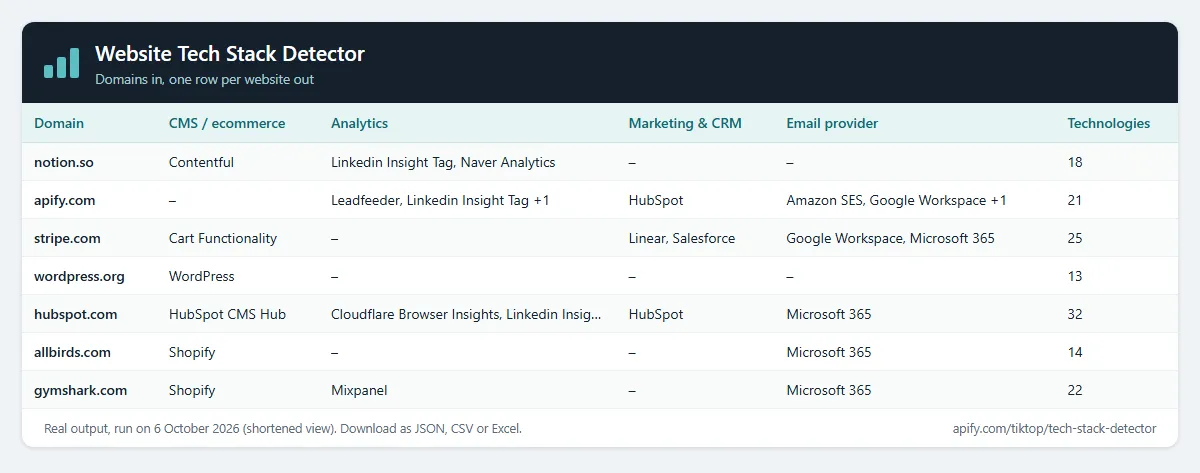
Example (the input behind the table above):
Output
One row per website. A real row from that run, shortened:
technologyNames is the easiest column for spreadsheets. technologies has the detail: categories, version, confidence (0-100), vendor website, SaaS/open-source flags, pricing tier, CPE identifier, and evidence.
Flat columns for the common questions, so you don't have to search technologies:
| Field | Meaning |
|---|---|
cms, ecommerce, analytics, cdn, hosting | The highest-confidence technology in each group, or null. The full list is in technologies. |
server | The Server response header as sent, e.g. cloudflare. |
poweredBy | The X-Powered-By header, when the site sends one. |
generator | The page's meta generator tag, e.g. WordPress 6.5.2. |
versions | Version per technology where the fingerprint gives one, e.g. {"WordPress": "6.5.2"}. |
finalUrl, statusCode | The same as url and httpStatus, under the names other tools use. |
pagesScanned | Pages read for the site (1 unless Pages per website is 2 or 3). |
matchedTechnologies | Only with the technology filter: the names from your list that the site uses. Null otherwise. |
Sites that fail to load still get a row, with error filled in and no charge.
Example tasks
Ready-made inputs you can open, change and run:
- Which of these websites use HubSpot or Salesforce
- Check which websites run on Shopify
- Find out if a site uses WordPress, Wix, Webflow or Squarespace
- Company email provider: Google Workspace or Microsoft 365?
- Find where a site is hosted: AWS, Cloudflare, Vercel, Netlify
- Weekly tech stack change alerts for your accounts
Find who uses a tool in your list
Set Only sites using these technologies (onlyWithTechnologies) to the tools you sell against or sell into. The Actor checks every site, then keeps the ones that use at least one of them.
- Names match without case and must be the exact name shown in
technologyNames, such asHubSpot,Salesforce,KlaviyoorCloudflare Bot Management. A name the fingerprint list doesn't know is flagged in the run log and matches nothing. - Each matching row has
matchedTechnologies: the names from your list that the site uses, spelled as detected. - Sites that use none of them are still scanned, but they're free and left out of the dataset, so the results contain only matches.
- Sites that fail to load stay in the results with
errorset, free of charge, so you can retry them. - The filter checks every technology the site uses, including ones outside
categoryFilter.
A real run, with these inputs:
Five sites were checked, three use HubSpot or Salesforce and were charged: hubspot.com (HubSpot), salesforce.com (HubSpot, Salesforce) and apify.com (HubSpot, found in its DNS records). shopify.com and wordpress.org were left out for free. The run log says: Done: 3 sites scanned, 2 without hubspot, Salesforce, Klaviyo (free, left out).
Read more than the homepage
Pages per website (maxPagesPerDomain, 1 to 3) controls how much of each site is read. 1 (the default) reads the homepage only. 2 or 3 also read one or two internal pages linked from the homepage, in this order: pricing, contact, cart, shop or products, then about. The technologies from all the pages are merged into one row per site, and each site is still charged once.
Use it to catch tools that only appear on a pricing or contact page, such as live chat widgets or checkout buttons. Only pages linked in the homepage HTML are read; the Actor doesn't guess URLs.
Use in Clay
Add the tech stack to every company row in a Clay table:
- In Clay, open Settings, then Connections, then Add Connection, pick Apify and paste your Apify API token (Apify Console, Settings, API & Integrations).
- In your table, select Add enrichment, search for Apify and pick Run Apify Actor.
- Choose this Actor (
redfoxscout/tech-stack-detector, IDWgqPAhpbXnetZWtcl) and paste this as the input, inserting your domain column where it says/Domain(Clay's rule: quotes around the key, none around the column token):
- Map the output fields you need to columns:
technologyNames(one list, easiest),categories(grouped, e.g. CRM, Analytics, Email),technologyCountanderror.
Clay runs the Actor once per row, so each row costs one Actor start plus one result. For thousands of rows, export the column and run the Actor once on the whole list instead: same price per site, one start.
Check websites from another Actor (Google Maps leads, lead lists)
Have a list from Google Maps Scraper or any other Actor? Pick its dataset under Websites from another Actor. This Actor reads the website field (or the field you name, e.g. url, domain or contact.website) and checks every site. No copy and paste.
To run it automatically after every scrape, add an Actor-to-Actor integration to the source Actor or task with this input:
Change alerts
Give the run a Change alert name (e.g. clients-weekly) and put it on an Apify schedule. Each row then gets changeStatus (new, changed or unchanged) and changedFields, compared with the previous run of the same name, so you see when a site adds or drops a technology. Turn on Only new and changed sites and each run's dataset is just the change report; unchanged sites are still checked and charged as usual. Add Apify's Slack or email integration to get the report delivered.
How it works
For each site it makes one HTTP request to the page you give (usually the homepage) and matches response headers, cookies, meta tags, script URLs, inline scripts, styles, HTML and DOM elements against the fingerprint database. If DNS checks are on, it also matches the domain's MX, TXT, NS, SOA and CNAME records. With Pages per website set to 2 or 3, it reads the linked pricing, contact or cart pages the same way and merges the results. Implied technologies are added (WordPress implies PHP and MySQL) and conflicts are resolved the same way Wappalyzer does.
Limitations
- It doesn't run JavaScript. Tools that only show up as JS variables set at runtime can be missed. Most popular tools are still found through script URLs, cookies, headers and DNS.
- Pages per website reads only pages linked from the homepage, up to two extra pages. The rest of a large site is not read.
- Sites behind aggressive bot protection may return HTTP 403. You still get what the headers reveal (e.g. Cloudflare), free of charge. Enabling a proxy can help.
What this Actor does not do
It doesn't log in, use cookies or saved sessions, solve CAPTCHAs, or read pages behind a login. It doesn't collect personal details such as staff names or personal emails: it reads only which technologies a site runs.
How much does it cost?
Pay per event:
- Site scanned: $0.0015 per website that loads successfully ($1.50 per 1,000). With Pages per website at 2 or 3 it's still one charge per site.
- Actor start: $0.00005 per GB of memory (default 2 GB = $0.0001 per run).
- Sites that fail, don't resolve, return HTTP 4xx/5xx, or don't use the technologies in your filter: free.
| Websites | Cost |
|---|---|
| 100 | about $0.15 |
| 1,000 | about $1.50 |
| 10,000 | about $15 |
Apify's free plan includes $5 of credit every month, enough for about 3,300 websites. Paid Apify plans get Store discounts of up to 25%. You can set a maximum cost per run in the run options; the Actor stops cleanly when it's reached.
FAQ
Is this legal? It visits each public homepage once, like a browser would, and reads public DNS records. It collects information about software, not about people.
How fresh is the fingerprint database? It's the community-maintained webappanalyzer database and is refreshed when the Actor is updated.
Can I run it on a schedule or via API? Yes. Use Apify schedules, the API, or integrations (Zapier, Make, Google Sheets, webhooks).
Why is a tool I know a site uses missing? It probably loads only through JavaScript, or on a page other than the one you gave. Try the exact page URL, set minConfidence to 0, or set Pages per website to 2 or 3.
Why is a site missing from my filtered results? It doesn't use any of the technologies in Only sites using these technologies, so it was left out and not charged. Sites that failed to load are still listed, with error set.
Related Actors
- Shopify Store Detector: is it Shopify, which theme and apps, and what the store sells.
- ATS Jobs Scraper: every open job at companies whose sites use Greenhouse, Lever, Workable and more.
- SEO Meta Tag & Schema Checker: titles, meta tags and schema for the same sites.
- Bulk URL Status & SSL Checker: status codes, redirects and SSL expiry.
License and credits
Technology fingerprints and categories come from enthec/webappanalyzer (GPL-3.0), a maintained fork of the original Wappalyzer database. This Actor's source code is licensed GPL-3.0 accordingly. Not affiliated with Wappalyzer or BuiltWith.


