

Google Ads Transparency Scraper: Competitor Ads Library
Pricing
from $1.13 / 1,000 ads
Google Ads Transparency Scraper: Competitor Ads Library
See every ad a competitor runs on Google Search, YouTube and Display from the Google Ads Transparency Center: ad format, first and last shown dates, days running, image and preview links. Search by website domain, advertiser name or ID, filter by country.
Pricing
from $1.13 / 1,000 ads
Rating
0.0
(0)
Developer

Red Fox Scout
Maintained by CommunityActor stats
0
Bookmarked
2
Total users
1
Monthly active users
16 days ago
Last modified
Share
See every ad a competitor runs on Google (Search, YouTube, Shopping, Maps and Play) from the public Google Ads Transparency Center. Search by website domain, advertiser name, advertiser ID or a Transparency Center link. Get the advertiser, format, first and last shown dates, days running, landing domain, image or preview link and the ad's Transparency Center page, or one summary row per advertiser. Turn on the competitor ad watch to get only the ads that appeared since the last run. For marketers, PPC agencies and competitor researchers.
Price: $1.50 per 1,000 results. Duplicates and failed searches are free. Apify's free plan ($5 monthly credit) covers about 3,300 results a month.
Questions it answers
- Which ads is my competitor running on Google right now?
- Which new ads did a competitor launch since last week?
- How long has each ad been running (a long-running ad is usually a winning ad)?
- Does this brand advertise on YouTube, Shopping or Play, and which video ads?
- Which advertisers run ads on a domain, and are they verified?
Who uses this
- 📣 Performance marketers: study competitors' long-running ads before writing your own.
- 🏢 Agencies: competitor ad audits for pitches and client reports, and weekly new-ad alerts.
- 🎬 Creative teams: collect image and video ad examples by brand.
- 📊 Market researchers: track which brands advertise, where, and on which Google surfaces.
Why this Google Ads Transparency Scraper
- 🔔 New-ad watch: schedule a run with "Only new ads since the last run" and get just the ads launched since the last time.
- 🔎 Search any way you know the brand: a name, a domain, an advertiser ID or a link copied from the Transparency Center.
- 📺 Where the ads run: filter by Google Search, YouTube, Shopping, Maps or Play, and by country and format.
- ✅ Ad check: one row per advertiser with its verification status, country and approximate ad count.
- 📅 Days running for every ad, so winners are easy to sort.
- 🔒 No login, no cookies: the public Transparency Center data only.
How to use the Google Ads Transparency Scraper
- Click Try for free (a free Apify account is enough).
- Enter competitors' website domains (
shopify.com), advertiser names or advertiser IDs, one per line. - Optional: pick a country, Google surfaces, ad formats and a date range.
- Click Start, then sort by
daysRunningand download as JSON, CSV or Excel.
Input
| Field | Default | What it does |
|---|---|---|
advertisers | – | Website domains, advertiser names or IDs (AR...), one per line. |
advertiserIds | – | Advertiser IDs (AR...), one per line. Same as putting them in advertisers. |
startUrls | – | Transparency Center links: an advertiser page, an ad page (searches its advertiser) or a domain search. |
region | anywhere | Only ads shown in this country. |
formats | all | Any of text, image, video. |
platforms | all | Any of search, youtube, shopping, maps, play. Several run one after another; an ad on two surfaces appears once. |
dateFrom / dateTo | – | Keep ads that ran at any point between these dates (YYYY-MM-DD). |
resultType | ads | ads: one row per ad. advertisers: one row per advertiser (ad check). |
allMatchingAdvertisers | false | For names: include every advertiser account with that exact name. |
maxItems | 100 | Ads checked per search, newest shown first (max 5,000). In advertiser mode: rows per search. |
includeDetails | false | Add each ad's A/B variations and the countries it ran in. One extra request per ad. |
onlyNewAds | false | Competitor ad watch: return only ads not seen in earlier runs with the same monitor name. |
monitorName | – | Name of the watch, e.g. Nike weekly. Needed with onlyNewAds. |
maxConcurrency | 3 | How many searches run at once. |
proxyConfiguration | off | Your own proxy, if Google starts blocking requests (HTTP 429). |
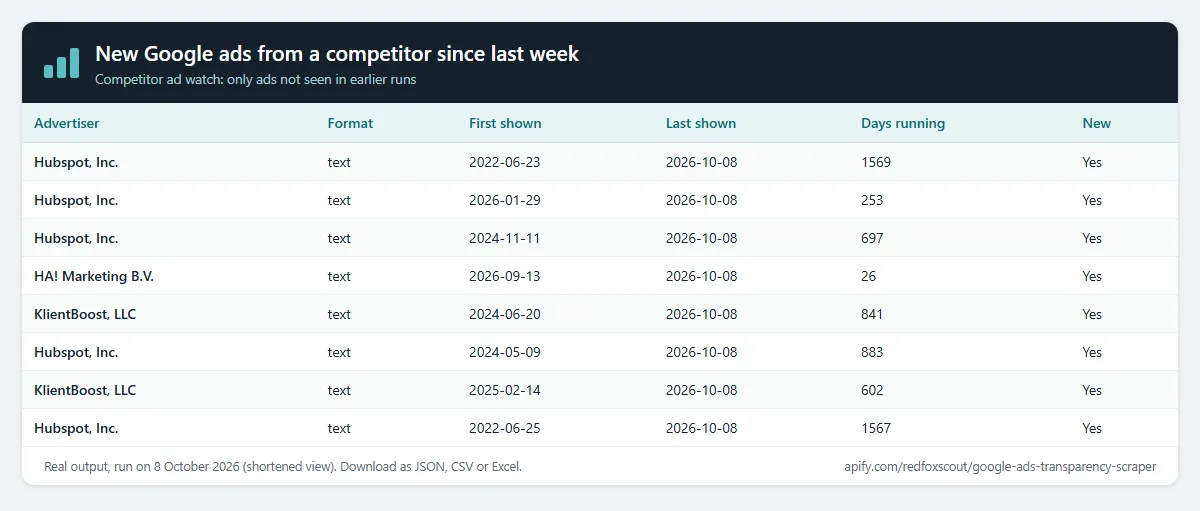
Example (the input behind the table above):
Output
In ad mode, each ad creative is one dataset item:
Text ads come back as the image Google renders for them (imageUrl). Video ads come with a previewUrl (Google's ad preview). landingDomain comes with domain searches; advertiser-ID searches leave it empty.
With "Add variations and countries" on, variationCount, variationUrls and regionsShown are filled, for example:
countryCode is filled for the countries this Actor knows; other countries keep Google's numeric regionId.
In advertiser mode (resultType: advertisers), each row is one advertiser:
verified is true when the advertiser has verified its identity on its Transparency Center page. The approximate ad count is Google's own range, shown for name and ID searches (null for domain searches).
Example tasks
Ready-made inputs you can open, change and run:
- New Google ads from a competitor since last week
- See all Google ads a competitor runs (by website)
- Research a brand's Google ads in the United States
- Find a competitor's YouTube video ads
- Download a competitor's Google display image ads
- Get a competitor's Google Search text ads
Competitor ad watch: only new ads
Set a monitor name (for example Nike weekly) and turn on Only new ads since the last run, then schedule the run daily or weekly.
- The first run returns the current ads (up to
maxItems) and remembers them. Each later run returns only ads that were not seen before under that name. - Memory is kept in a named key-value store in your Apify account, one record per monitor name, so different watches never mix.
- Each run checks the newest
maxItemsads of each search (newest shown first). RaisemaxItemsfor very large advertisers. - Keep the country, formats, surfaces and date filters the same across runs: they decide which ads count.
- A monitor remembers up to 15,000 ads per advertiser; the oldest are forgotten after that.
- Without "Only new ads", a monitor name still records ads, and each row shows
isNew.
What this Actor does not do
It does not log in, use cookies or a Google account, or read personal data about people. It does not show ad spend, clicks or impression counts, because Google does not publish them for commercial ads.
How much does it cost?
$1.50 per 1,000 results. Each ad row is one result, and so is each advertiser row.
- 100 results: about $0.15
- 10,000 results: about $15
- Duplicates, ads skipped by the new-ads watch, and failed searches: free
Apify's free plan gives $5 of credit every month, enough for about 3,300 results.
FAQ
Is this legal? The Google Ads Transparency Center is a public library Google publishes so anyone can see who advertises and what. This Actor reads the same public data. No login and no personal data.
Why does a name find the wrong advertiser? Many companies have several advertiser accounts. Search by website domain for the most precise results, or turn on "All advertisers with that name".
Why does a domain search show other companies? A domain search returns every ad that points to that website, including ads by agencies, resellers and partners. Use the advertiser name or ID column to tell them apart, or search by advertiser ID.
Why are some landing domains empty? Google returns the landing domain in domain searches. Advertiser-ID and name searches leave it empty. Use a domain search to get it for every ad.
Can I run the watch every day? Yes. Schedule the Actor in Apify with the same monitor name and filters each time.
Related Actors
- Tech Stack Detector: which ad pixels and tools a competitor's site runs.
- SEO Meta Tag & Schema Checker: titles, descriptions and schema of a competitor's landing pages.


