
Pinterest Scraper: Pins by Keyword, Board or Profile
Pricing
from $1.50 / 1,000 pins
Pinterest Scraper: Pins by Keyword, Board or Profile
Scrape public Pinterest pins from keyword searches, board URLs, profile URLs or pin URLs into JSON or CSV. Each pin row has title, description, image URL, saves, repin count, pinner, board and outbound link. $2.00 per 1,000 pins. No login needed.
Pricing
from $1.50 / 1,000 pins
Rating
0.0
(0)
Developer

Red Fox Scout
Maintained by CommunityActor stats
0
Bookmarked
3
Total users
2
Monthly active users
a day ago
Last modified
Categories
Share
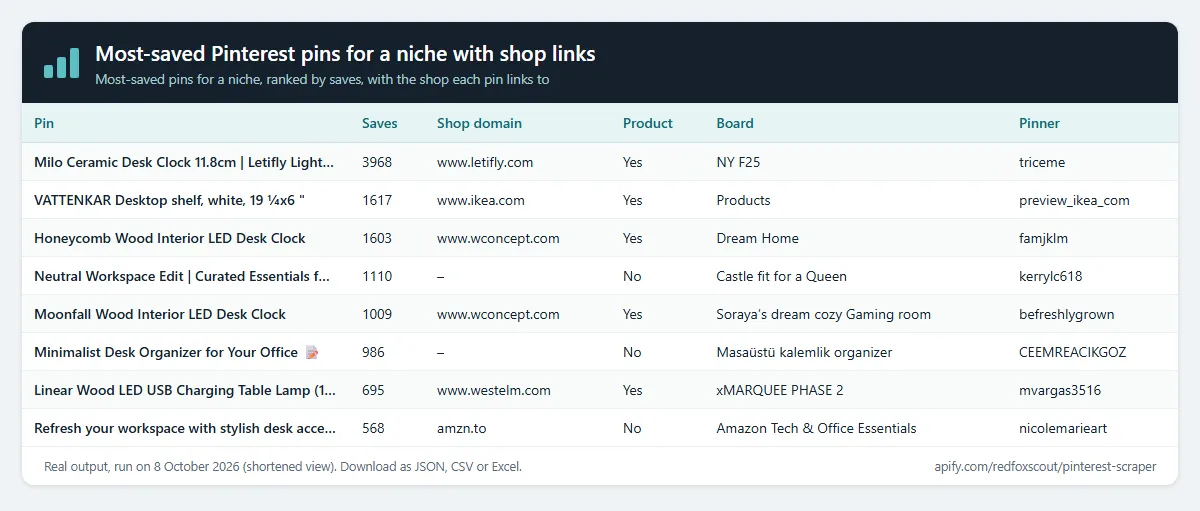
Find the most saved pins for a keyword, with the outbound link, its domain and any price the pin shows, one clean row per pin. Set Sort results by to Most saves first and the Actor reads a pool of pins, ranks them by saves and returns the top ones. It also reads board, profile and single pin URLs, with no login and no API keys: it reads the pages Pinterest shows to logged-out visitors.
Price: $2.00 per 1,000 pins. Failed searches and error rows are free. Apify's free plan ($5 monthly credit) covers about 2,500 pins.
Keyword search is paused (October 2026): Pinterest stopped giving signed-out visitors the pins behind search results, so a keyword search returns one free error row. Board, profile and pin URLs work as before, including Most saves first.
Questions it answers
- Which pins for a keyword get the most saves, and which of them link to a shop?
- Which products are pinned in a niche, where do they link, and what price does the pin show?
- What does a brand's Pinterest profile pin, and on which boards?
- Which pins are videos, how long are they, and where is the video file?
- What do people say in the comments on a pin, and how many likes do those comments get?
Who uses this
- 🛍️ Ecommerce and product teams: see which products get saved most and where the pins link.
- 🎨 Designers and content planners: collect image URLs, colours and board names for moodboards.
- 📊 Trend researchers: compare keyword searches by saves and repins.
- 🔎 Researchers: build datasets of public pins with their creation dates.
Why this Pinterest Scraper
- 🧩 Four kinds of input in one Actor: keyword searches, board URLs, profile URLs and single pin links, in the same run.
- 🏆 Most-saved ranking: rank each keyword, board or profile by saves, with the outbound link and any price on each row.
- 📌 Full detail on every row: saves, repins, comments, outbound link and domain, board, pinner username and display name, pinner followers, creation date, image size and colour, video length.
- 💬 Comments on each pin, optional: turn on Include comments for each pin's text, date, likes and commenter, up to 100 comments a pin, at no extra charge.
- 🔒 Logged out, public data only: no account and no login cookies. Comments and names appear only as the pin page shows them to visitors.
- 💰 One price for every field: $2.00 per 1,000 pins.
How to use the Pinterest Scraper
- Click Try for free (a free Apify account is enough).
- Enter keywords under Search keywords. Enter Pinterest URLs under Board, profile or pin URLs (any mix), or under Board URLs, Profile URLs (pins of a user) or Pin URLs (details), one per line.
- Set Max pins per keyword or URL (up to 1,000).
- To rank by saves, set Sort results by to Most saves first, and adjust Pins to read before ranking by saves if you need a larger pool.
- Click Start, then download as JSON, CSV or Excel, or schedule the run for a regular export.
Input
| Field | Default | What it does |
|---|---|---|
searchTerms | – | Keywords to search pins for, one per line (paused, see above). |
urls | https://www.pinterest.com/marthastewart/ (prefilled) | Public board, profile or pin URLs, one per line, in any mix. |
startUrls | – | The same as urls, for tools that send startUrls. |
boardUrls | – | Public board URLs only, e.g. https://www.pinterest.com/pinterest/official-news/. |
profileUrls | – | Public profile URLs only: the pins that user created. |
pinUrls | – | Single pin URLs only: one row with that pin's details. |
maxItems | 50 (prefilled 15) | Pins per keyword or URL, from 1 to 1,000. |
sortBy | relevance | relevance keeps Pinterest's order. saves ranks the pool by saves and returns the top maxItems. |
scanPins | 100 | Only with sortBy saves: pins to read before ranking, from 1 to 500. Never less than maxItems. |
includeComments | off | Adds each pin's public comments to its row: text, date, likes, commenter name and username. Adds a few requests for pins with comments; no extra charge. |
maxCommentsPerPin | 20 | Only with includeComments: comments kept for each pin, from 1 to 100. |
proxyConfiguration | off | Your Apify Proxy settings. Off by default; turn it on only if Pinterest blocks runs. |
maxConcurrency | 3 | How many searches run at once. |
A board or profile that is not public, or a URL of the wrong kind (for example a profile in Board URLs), gives one error row, which is free.
Example (the input behind the output below):
Output
One row per pin. A real row from that run (description shortened):
The field list:
pinId,url,title,description,createdAt: the pin's id, page URL, text and creation time.imageUrl,imageWidth,imageHeight,dominantColor,altText: the image and its alt text.link,domain: the outbound link and its host.isProduct,price,priceCurrency,availability: product flag, price shown on the pin, and the sold-out flag.saves,repinCount,commentCount: engagement counts.commentCountis the number of comments the pin page shows.comments: only withincludeCommentson. The pin's comments, each withtext,createdAt,likeCount,authorNameandauthorUsername. See Comments on each pin.boardName,boardUrl: the board the pin is on.pinnerUsername,pinnerName,pinnerFollowers: the pinner's username, display name and follower count.isVideo,videoUrl,videoDuration: video flag, file URL and length in seconds.isStoryPin,hashtags: idea-pin flag and hashtags without the #.sourceType,searchQuery: where the pin came from (search, board, profile or pin) and the keyword or URL.
Example tasks
Ready-made inputs you can open, change and run:
- Collect wedding decor ideas from Pinterest
- Export home office ideas from Pinterest
- Export pins from a public Pinterest board
- Collect recent pins from a brand's Pinterest profile
Shoppable trend finder
Pinterest's search results do not show save counts, so Most saves first reads a pool of pins for each keyword or URL (Pins to read before ranking by saves, default 100, maximum 500), ranks the pool by saves and returns the top Max pins per keyword or URL. The ranking covers the pins Pinterest returns for that keyword or URL, not every pin on Pinterest. Pins that are read but not returned are not charged.
Each row carries what product research needs:
- Demand:
saves,repinCount,commentCount. - Where it sends people:
link(the outbound link) anddomain(its host). - Product data:
isProduct,price,priceCurrencyandavailability. Pinterest shows a price on only some product pins, sopriceis often empty. - Look and wording:
dominantColor,altTextandhashtags.
Comments on each pin
Turn on Include comments to add each pin's public comments to its row, in the order the pin page lists them. The Actor reads them as a logged-out visitor sees them, so no account is needed. Each comment has its text, when it was posted (createdAt), its likeCount, and the commenter's authorName and authorUsername. Max comments per pin sets how many to keep for each pin: 20 by default, up to 100.
A commenter whose profile is private keeps the comment text, but gets no name or username. commentCount is the number Pinterest counts, and the comment feed can end before that number: on one pin counted at 80, the feed ended after 54 comments.
Input for the example below, and one pin from that run (comments shortened):
What this Actor does not do
It does not log in, use account cookies or solve CAPTCHAs, and it does not read private boards. It shows comments and names only as the public pin page does, and it gives no name or username for a private profile. It returns no avatars, and it does not look people up or guess their contact details. Emails and phone numbers in titles, descriptions and comments are replaced with placeholders. Board pin counts are not included, because Pinterest's pin data does not include them.
How much does it cost?
$2.00 per 1,000 pins.
- 100 pins: about $0.20
- 10,000 pins: about $20
- Failed searches and error rows: free. A pin found more than once in a run (for example by a search and a board) is charged once.
- Comments: no extra charge. Only pins are charged.
- Pins read for ranking by saves but not returned: free. Only the pins in your output are charged.
Apify's free plan gives $5 of credit every month, enough for about 2,500 pins.
FAQ
Is this legal? It reads only public pins and comments, the pages Pinterest shows to anyone without an account. It returns the display name and follower count shown on a public pinner profile, and the name and username a commenter shows on a public pin, but no avatars. Commenters with private profiles get no name or username. Emails and phone numbers in titles, descriptions and comments are replaced with placeholders. Privacy rules differ by country, so check how you store and use the data.
Why does Most saves first not return the most saved pins on Pinterest? It ranks only the pool of pins Pinterest returns for your keyword or URL, the first Pins to read before ranking by saves (default 100). Pins outside that pool are never read. Raise the pool size to look further, up to 500.
Why is the price empty on some product pins? Pinterest shows a price on only some product pins. When the pin shows none, price and priceCurrency are null.
What does availability mean? "out of stock" means Pinterest flags the product as sold out. Pinterest sends that flag only for some products; otherwise the field is null. It does not mean the product is in stock.
Why is the title empty on some pins? Some pins are saved without a title. The Actor then uses the grid title, and if that is also missing, the SEO title. The title field is null only when Pinterest gives none of the three.
How many pins can a search return? You set the limit with maxItems, up to 1,000 per keyword or URL. A run stops early when Pinterest's results run out, and a board can run out before maxItems is reached.
Why are there fewer comments than commentCount? commentCount is the number Pinterest shows for the pin, and its comment feed can end before that number. On one pin counted at 80, the feed ended after 54 comments.
Related Actors
- Company Social Links Finder: a company's Pinterest, Instagram and other profile links, found from its website.
- Shopify Store Detector: check which websites run on Shopify, with their theme, apps and tech stack.


