

📍 Google Maps Email Scraper - Business Leads with Emails
Pricing
from $18.60 / 1,000 lead with emails
📍 Google Maps Email Scraper - Business Leads with Emails
Scrape emails from Google Maps: turn any niche + city into ready-to-use leads. One row per business with name, phone, website, emails found on the company site, socials and tech stack. No API key, no duplicates. Built for B2B lead generation and cold outreach. Pay only per lead delivered.
Pricing
from $18.60 / 1,000 lead with emails
Rating
0.0
(0)
Developer

Renzo Madueno
Maintained by CommunityActor stats
0
Bookmarked
22
Total users
3
Monthly active users
17 hours
Issues response
2 months ago
Last modified
Categories
Security
Limited permissionsShare
Google Maps Email Scraper - Business Leads with Emails
Scrape emails from Google Maps in one run. Type a niche + city (like dentists in Miami, FL) and get one consolidated row per business: name, address, phone, rating, reviews, category, website — plus emails found on the business's own website, extra phone numbers, social profiles (LinkedIn, Facebook, Instagram…) and the site's tech stack.
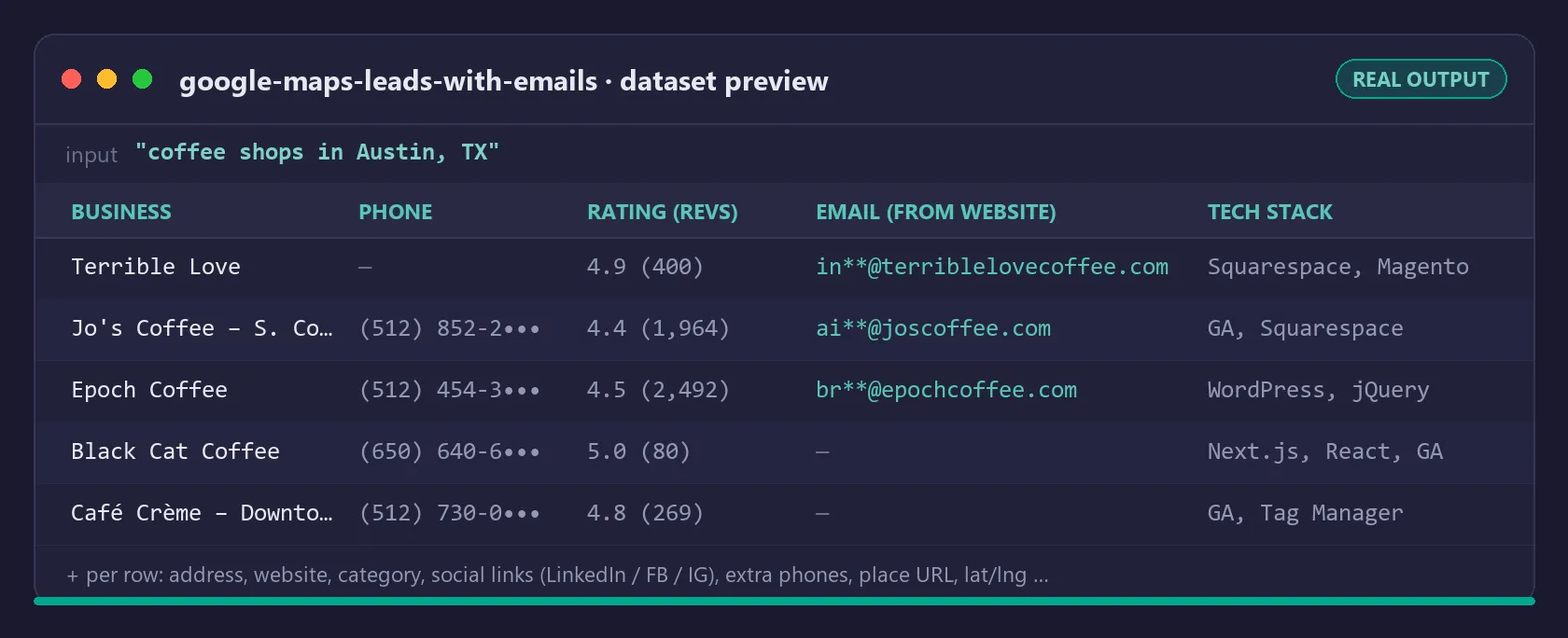
Most Google Maps scrapers stop at the listing — no email, because Google Maps itself doesn't show emails. This actor goes one step further: it visits every business website for you, finds the contact emails published there, and delivers everything merged. No chaining two scrapers, no exporting CSVs and matching rows by hand.
Scrape emails from Google Maps: what you get
One row per business:
| Field | Example |
|---|---|
businessName | Bright Smile Dental |
category | Dentist |
address | 1200 Brickell Ave, Miami, FL 33131 |
phone | (305) 555-0182 |
website | https://brightsmilemiami.com |
rating / reviewCount | 4.8 / 312 |
emailFound | true |
email | info@brightsmilemiami.com |
emails | all emails found on the site |
websitePhones | extra phones found on the site |
socialLinks | { "facebook": "...", "instagram": "...", "linkedin": "..." } |
techStack | ["WordPress", "Google Analytics"] |
contactPageUrl | https://brightsmilemiami.com/contact |
latitude / longitude, placeUrl, searchQuery, scrapedAt | included |
Export to CSV, Excel, JSON or push straight into your CRM via the Apify API. Filter instantly on emailFound to keep only emailed leads.
How this Google Maps email extractor works
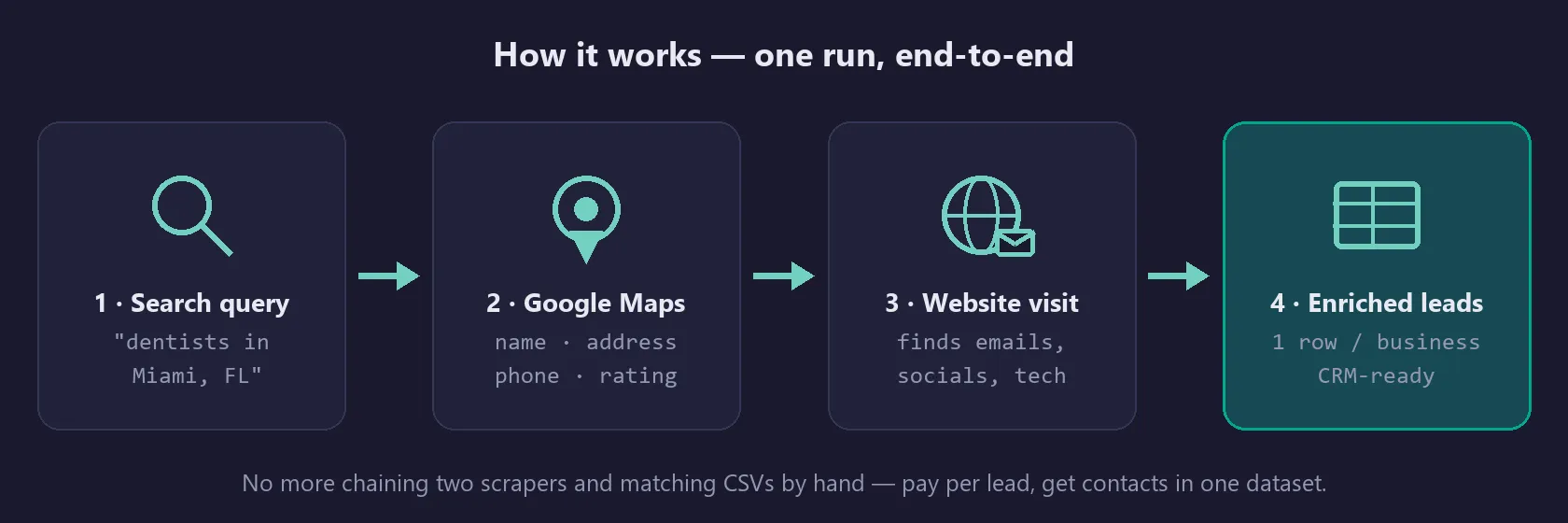
- Google Maps search — scrapes the live results feed for each query (up to ~120 businesses per search; set
maxResultsper query). - Website email extraction — every business with a website gets its homepage, contact and about pages checked for emails, phones and social links (set
maxPagesPerSite). Emails come from the business's own public site, so they are real, current addresses — not guessed patterns. - One consolidated row per business, with an
emailFoundflag.
Tip: enable onlyWithWebsite to drop businesses without a website — you only pay for enrichable leads. Keep maxResults ≤ 100 per run for the fastest turnaround; for bigger campaigns, split by city or niche.
Building a prospect list for one city, ZIP code or state
A search query is free text passed to Google Maps, so anything Maps understands works as a geography: plumbers in Austin, TX, dentists in 33131, HVAC contractors near Scottsdale AZ, med spas in Brooklyn NY. Category + place is what produces clean lists; a bare category with no place returns whatever Maps thinks is near the datacenter.
Practical limits and behaviour:
- Google Maps stops feeding new results at roughly 120 businesses per search, no matter what
maxResultssays. To cover a whole metro or state, split it: one query per city, per suburb, or per ZIP code, all pasted intosearchQueriesas separate lines in the same run. - Overlapping queries are deduplicated inside the run. Businesses are keyed on their Google Maps place URL (falling back to name + address), so a clinic that shows up in both
dentists in Miami, FLanddentists in 33131is scraped, enriched and charged once. - Every row carries the
searchQuerythat found it, so you can still see which city or ZIP a lead came from after the merge. - Deduplication is per run. If you split a campaign across several runs, dedupe on
placeUrl(orwebsite) when you merge the exports.
Getting the list into your cold email tool
The run writes to an Apify dataset, which exports as CSV, Excel, JSON, XML or HTML from the run's Storage tab, or over the API:
For a mail-merge upload the columns that matter are email (the primary address), businessName, website, phone and address; emails holds every address found on that site if you want to fan out. Filter on emailFound = true to drop the rows you cannot mail — in the Apify UI, or by adding &filter= logic downstream. Because email is a single string and emails an array, most CSV importers (Instantly, Smartlead, Lemlist, Mailshake, HubSpot) map email directly with no cleanup.
Google Maps gives you a phone — this fills in the email
A Maps listing publishes name, address, phone, hours, rating and a website link. It never publishes an email, which is why phone-only lists are easy to buy and emailable lists are not. The gap is closed by following the website link: each business site is fetched over plain HTTP and up to eight paths are checked (/, /contact, /contact-us, /about, /about-us, /team, /contacto, /impressum), with an 8-second request timeout and a 1 MB cap per page, so a dead or slow site cannot stall the run. Set maxPagesPerSite to control how deep that goes: 1 is homepage-only and fastest, 4–8 finds noticeably more addresses on sites that keep contact details on a dedicated page.
Google Maps lead generation: who uses this
- Agencies & freelancers selling to local businesses — web design, SEO, ads, social media management. Search your niche + city, export, start outreach the same day.
- B2B sales teams prospecting local markets — dental clinics, gyms, law firms, restaurants, contractors, med spas.
- Cold email senders who need fresh, verified-source contact data instead of stale purchased lists.
Local business emails: pricing (pay per event)
| Event | Price |
|---|---|
| Actor start (per GB of memory, 4 GB default) | $0.005 / GB |
| Business delivered without email | $0.006 |
| Lead delivered with email | $0.02 |
Cost examples:
- Quick test — "coffee shops in Austin, TX", 8 results, 3 emails found: start $0.02 + 3 × $0.02 + 5 × $0.006 = $0.11
- One niche, one city — 100 dentists in Miami, 40 with email: start $0.02 + 40 × $0.02 + 60 × $0.006 = $1.18 → under 3 cents per emailed lead
- Campaign — 5 cities × 100 plumbers, ~200 emails found: start $0.02 + 200 × $0.02 + 300 × $0.006 = $5.82 for 500 leads
Compare that with $0.05–$0.25 per contact on typical lead databases — and this data is scraped fresh at run time, not resold from a stale list.
How does it compare to other Google Maps scrapers?
The most popular contact-details scraper on Apify is excellent at what it does, and if you need its specific feature set, use it. This actor makes a different trade-off:
| This actor | Typical alternatives | |
|---|---|---|
| Emails | ✅ From the business's own website, with emailFound flag | Varies; often listing data only |
| Pricing | Pay per lead delivered — from $0.006/lead, $0.02 with email | Often priced per result regardless of email |
| Output | One merged row per business (Maps + website data) | May require combining runs |
| Extras | Tech stack, contact page URL, extra site phones | Varies |
Our focus is simple: the cheapest path from "niche + city" to a usable cold-outreach list with emails.
Why emails are not found for every business
Roughly 30–60% of local businesses publish an email on their website (varies by niche). Businesses with no website, or whose site hides contact info behind forms, are delivered as basic rows (charged at the lower rate) — you still get name, address, phone, rating and the Google Maps link.
Use with AI agents — Claude, n8n, Make
The output is clean JSON (one object per business), so it drops straight into automation and AI-agent workflows. Trigger a run and read the dataset via the Apify API or the official Apify integrations for n8n, Make, and Zapier — then let an agent draft and send the outreach.
Working with the Model Context Protocol (MCP)? This actor is also reachable through the multi-scraper MCP server, so an MCP-enabled assistant (Claude, etc.) can search Google Maps and pull enriched leads as a tool call — no glue code.
Public business data, GDPR and cold outreach
This actor collects only publicly available business information — data that businesses themselves publish on Google Maps and on their own public websites to be contacted by customers. No login-protected, private or personal-account data is accessed.
You are responsible for using the output in compliance with applicable laws in your jurisdiction (e.g. GDPR, CAN-SPAM, CASL), including consent and opt-out rules for commercial outreach. Use the data to make relevant, professional contact — not to spam.
FAQ
Can you scrape emails from Google Maps directly? No — Google Maps listings don't display email addresses. Any "Google Maps email scraper" must follow the listing's website link and extract emails there. That is exactly what this actor automates: Maps search → website visit → merged row.
Are the emails verified?
Emails are extracted from the business's own live website at run time — they are published, current addresses, not pattern-guessed (firstname@domain) contacts. Generic addresses (info@, hello@) can be excluded with the includeGenericEmails toggle.
Does it work for any country/language?
Yes — queries can target any city Google Maps covers; set language for localized results.
How long does a run take? A 50-business query with enrichment typically takes a few minutes. Websites are crawled over plain HTTP with high concurrency and a hard per-site time limit, so one slow or dead website never stalls the run.
What if a search returns nothing?
The run succeeds with an empty dataset and the query is recorded under EMPTY_QUERIES in the key-value store. Hard failures (blocked IPs, etc.) are stored under FAILURES — never mixed into your lead list.
How is this different from buying a lead list? Purchased lists decay ~2-3% per month and are resold to your competitors. This scrapes fresh data at run time for a fraction of the price, and you choose exactly the niche and geography.
![🍴Uber Eats Scraper [RENTAL] avatar](https://images.apifyusercontent.com/AnHIbGDJ5Ya-4CsbSPfUUfEVbdI4cIshpjF6-Hkjp0k/rs:fill:76:76/cb:1/aHR0cHM6Ly9hcGlmeS1pbWFnZS11cGxvYWRzLXByb2QuczMudXMtZWFzdC0xLmFtYXpvbmF3cy5jb20vcllIYnJnTGpTQjUzRXEzUTkvc01Ha0xwSDZXTUlhejFIejctdWJlci1lYXRzLWxvZ28tMS0zMDB4MzAwLnBuZw.webp)


