


📍 Google Maps Email Scraper - Leads & Verified Phones
Pricing
from $20.00 / 1,000 lead with emails
📍 Google Maps Email Scraper - Leads & Verified Phones
Turn any niche + city into ready-to-use leads — one clean row per business with name, phone, website, verified emails, socials and tech stack, all from Google Maps. No API key, no duplicates, no cleanup. For agencies selling to local businesses. Pay only per lead delivered.
Pricing
from $20.00 / 1,000 lead with emails
Rating
0.0
(0)
Developer

Renzo Madueno
Maintained by CommunityActor stats
0
Bookmarked
2
Total users
1
Monthly active users
a day ago
Last modified
Categories
Share
Google Maps Leads Scraper with Email Finder
Turn one Google Maps search into a ready-to-use lead list with emails — in a single run.
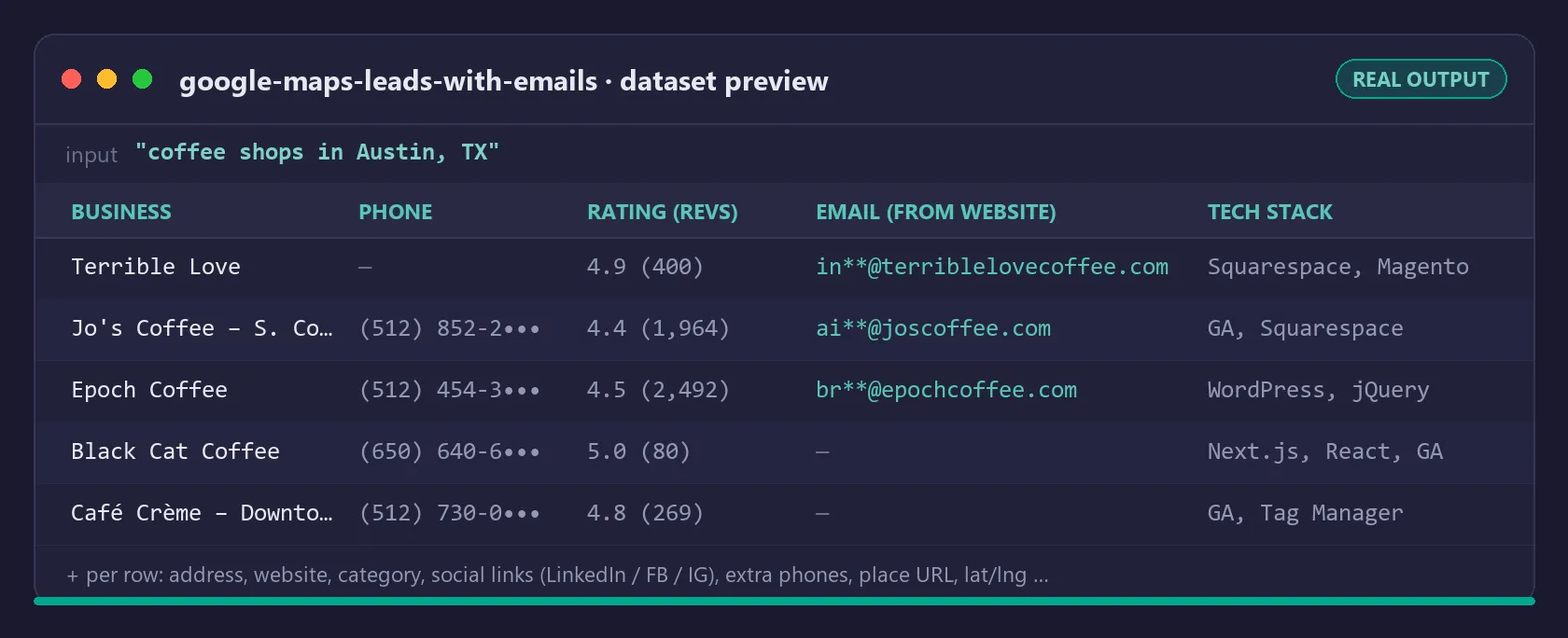
Type dentists in Miami, FL and get one consolidated row per business: name, address, phone, rating, reviews, category, website, emails found on the website, extra phone numbers, social profiles (LinkedIn, Facebook, Instagram...) and the site's tech stack.
No more chaining two scrapers, exporting CSVs and matching rows by hand. This actor scrapes Google Maps and visits every business website for you, then delivers everything merged.
Who is this for?
- Agencies & freelancers selling to local businesses — web design, SEO, ads, social media management. Search your niche + city, export, start outreach the same day.
- B2B sales teams prospecting local markets (dental clinics, gyms, law firms, restaurants, contractors...).
- Cold email senders who need fresh, verified contact data instead of stale purchased lists.
What you get (one row per business)
| Field | Example |
|---|---|
businessName | Bright Smile Dental |
category | Dentist |
address | 1200 Brickell Ave, Miami, FL 33131 |
phone | (305) 555-0182 |
website | https://brightsmilemiami.com |
rating / reviewCount | 4.8 / 312 |
emailFound | true |
email | info@brightsmilemiami.com |
emails | all emails found on the site |
websitePhones | extra phones found on the site |
socialLinks | { "facebook": "...", "instagram": "...", "linkedin": "..." } |
techStack | ["WordPress", "Google Analytics"] |
contactPageUrl | https://brightsmilemiami.com/contact |
latitude / longitude, placeUrl, searchQuery, scrapedAt | included |
Export to CSV, Excel, JSON or push straight into your CRM via the Apify API.
Email verification (built in, free)
Emails don't just get scraped — they get verified in the same run, so the list you export is already cleaned. Every address is tagged:
valid— good syntax, not disposable, domain has live MX (mail) records. Send-ready.risky— deliverable but lower confidence: a role address (info@,office@) or a domain receiving mail via an implicit A record.invalid— broken, disposable, or a domain that can't receive mail. Skip it.
Each row carries emailStatus (status of the primary email), validEmails (the send-ready ones) and emailsVerified (full per-email breakdown). It runs by default; set verifyEmails to false to turn it off. Checks are syntax, a 6,900-domain disposable blocklist, role detection and live MX lookups — no mailbox is ever contacted.
The verification engine is open-source — same logic, zero dependencies: mxverify on npm (source).
How it works
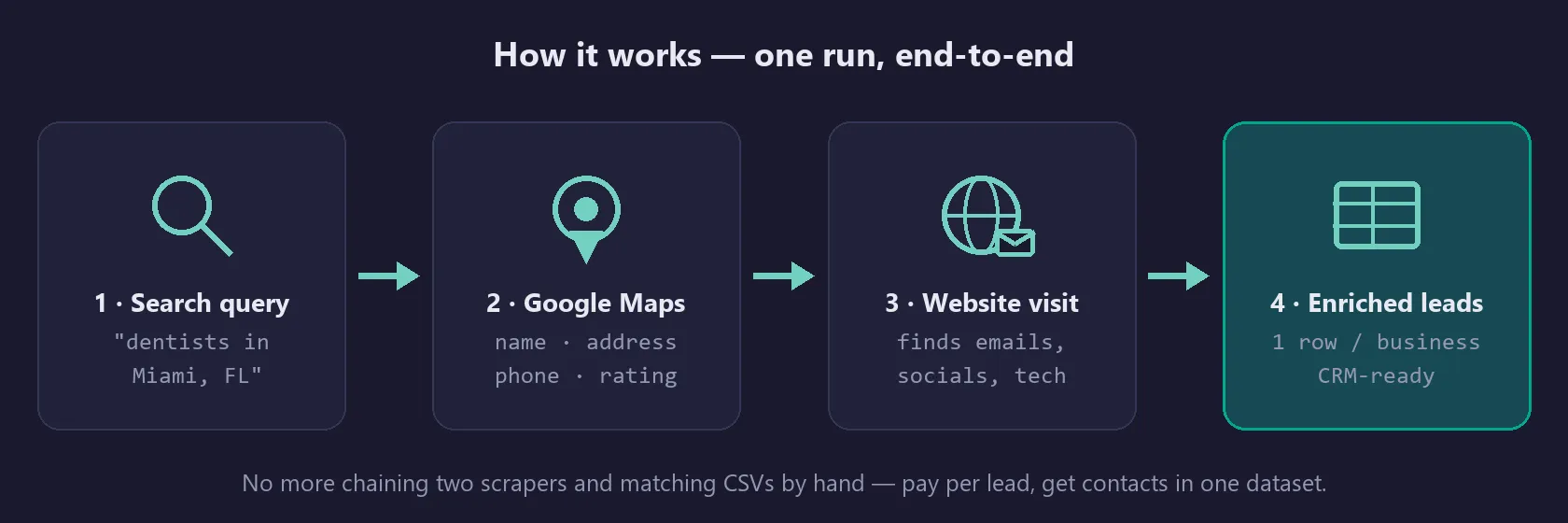
- Google Maps search — scrapes the live results feed for each query (up to ~120 businesses per search, set
maxResultsper query). - Website enrichment — every business with a website gets its homepage, contact and about pages checked for emails, phones and social links (set
maxPagesPerSite). - One consolidated row per business with an
emailFoundflag so you can filter instantly.
Tip: enable onlyWithWebsite to drop businesses without a website — you only pay for enrichable leads.
Recommended maxResults ≤ 100 per run for best speed. Website enrichment runs many sites in parallel with a hard per-site time limit, so a 50–100 lead run finishes in minutes. For larger lists, split into several runs (e.g. by city or niche) — it keeps each run fast and easy to monitor.
Pricing (pay per event — you only pay for what you get)
| Event | Price |
|---|---|
| Actor start (per GB of memory, 4 GB default) | $0.005 / GB |
| Business delivered without email | $0.006 |
| Lead delivered with email | $0.02 |
Cost examples:
- Quick test — "coffee shops in Austin, TX", 8 results, 3 emails found: start $0.02 + 3 × $0.02 + 5 × $0.006 = $0.11
- One niche, one city — 100 dentists in Miami, 40 with email: start $0.02 + 40 × $0.02 + 60 × $0.006 = $1.18 → under 3 cents per emailed lead
- Campaign — 5 cities × 100 plumbers, ~200 emails found: start $0.02 + 200 × $0.02 + 300 × $0.006 = $5.82 for 500 leads
Compare that with $0.05–$0.25 per contact on typical lead databases — and this data is scraped fresh at run time, not resold from a stale list.
Why emails are not found for every business
Roughly 30–60% of local businesses publish an email on their website (varies a lot by niche). Businesses with no website, or whose site hides contact info behind forms, are delivered as basic rows (and charged at the lower rate) — you still get name, address, phone, rating and the Google Maps link for them.
Responsible use
This actor collects only publicly available business information — data that businesses themselves publish on Google Maps and on their own public websites to be contacted by customers. No login-protected, private or personal-account data is accessed.
You are responsible for using the output in compliance with applicable laws and regulations in your jurisdiction (e.g. GDPR, CAN-SPAM, CASL), including consent and opt-out rules for commercial outreach. Use the data to make relevant, professional contact — not to spam.
Use with AI agents — Claude, n8n, Make
The output is clean JSON (one object per business), so it drops straight into automation and AI-agent workflows. Trigger a run and read the dataset via the Apify API or the official Apify integrations for n8n, Make, and Zapier — then let an agent draft and send the outreach.
Working with the Model Context Protocol (MCP)? This actor is also reachable through the multi-scraper MCP server, so an MCP-enabled assistant (Claude, etc.) can search Google Maps and pull enriched leads as a tool call — no glue code.
FAQ
Does it work for any country/language? Yes — queries can target any city Google Maps covers; set language if you want localized results.
How long does a run take? A 50-business query with enrichment typically takes a few minutes. Websites are crawled over plain HTTP (no second browser) with high concurrency and a hard per-site time limit, so one slow or dead website can never stall the whole run. Keep maxResults ≤ 100 per run for the fastest turnaround.
What if a search returns nothing? The run succeeds with an empty dataset and the query is recorded under EMPTY_QUERIES in the key-value store. Hard failures (blocked IPs, etc.) are stored under FAILURES — never mixed into your lead list.
⭐ Found this useful? Please leave a review — it takes 30 seconds and helps a lot.
Need fresh leads weekly without managing runs? Check the log output after each run for the Autopilot option.


