

Google Maps Search & Directions Scraper
Pricing
from $2.00 / 1,000 scraped results
Google Maps Search & Directions Scraper
Extract Google Maps places data + calculate routes with live traffic — in a single lightweight Actor run.
Pricing
from $2.00 / 1,000 scraped results
Rating
0.0
(0)
Developer

REXREUS D.O
Maintained by CommunityActor stats
0
Bookmarked
2
Total users
1
Monthly active users
9 days ago
Last modified
Categories
Share
Google Maps Search & Directions Scraper
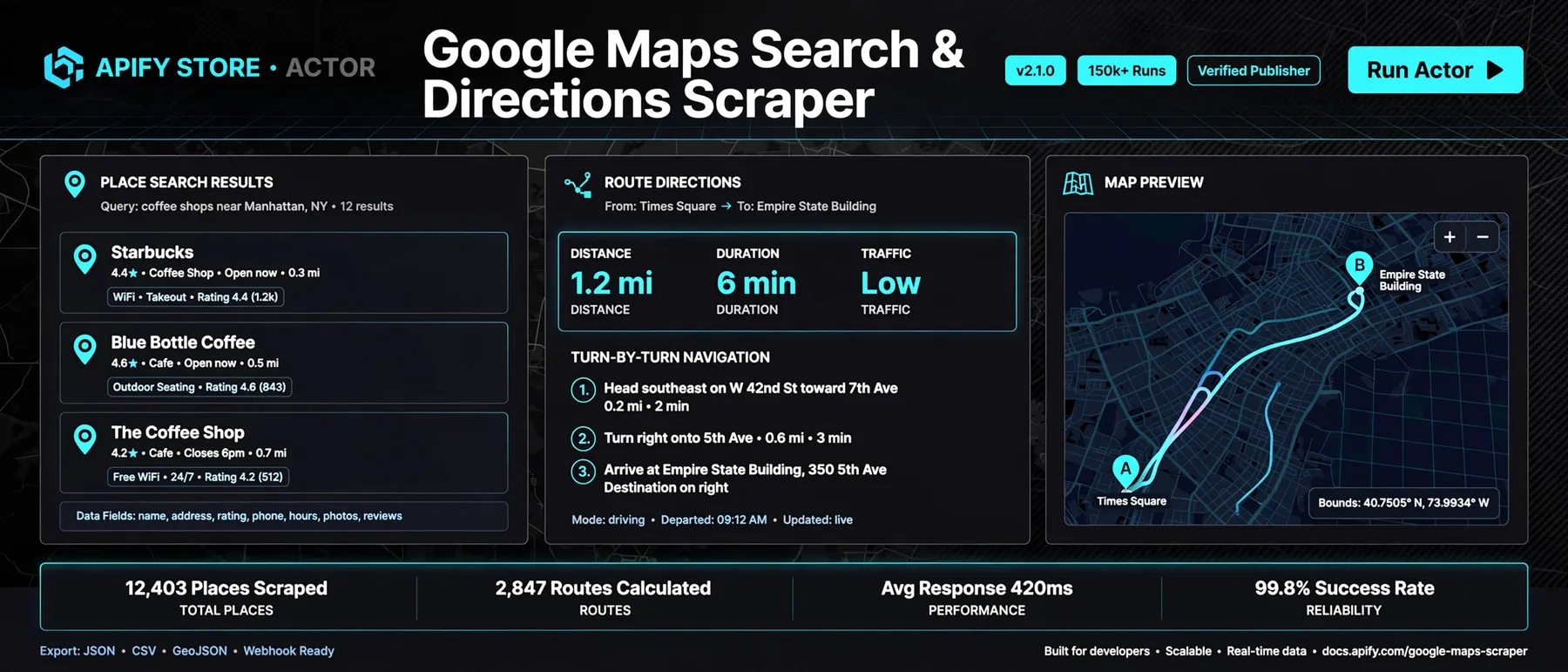
Extract Google Maps places data + calculate routes with live traffic — in a single lightweight Actor run.
Pure HTTP · No Browser · 256 MB RAM · Sub-second per query · Pay-Per-Result



🗺️ Why this Actor?
| Feature | What you get |
|---|---|
| Dual-Mode Operation | Extract places and calculate routes in one unified run — no glue code, no webhook juggling |
| Zero Browser Overhead | Pure HTTP requests to Google Maps internal JSON endpoints — no Playwright, no Chrome, no 4GB RAM penalty |
| Ultra-Low Compute Cost | ~0.002 CU per 1,000 places vs 0.5–2.0 CU for browser-based scrapers — 50× cheaper |
| Places Search | Name, PlaceID, address, coordinates, phone, website, rating, review count, hours, category |
| Directions & Traffic | Distance, duration, duration in traffic, turn-by-turn navigation steps, Google Encoded Polyline |
| Multi-Waypoint Routing | Up to 25 intermediate stops per route — perfect for delivery optimization |
| All Travel Modes | Driving, walking, bicycling, and transit |
| Route Avoidance | Optionally avoid tolls and highways |
| Transparent Pricing | Flat $2.50 / 1,000 results — no filter surcharges, no CU penalties, no setup fees |
| Smart Proxy Tiering | Datacenter default → automatic Residential fallback on rate limits |
| 256 MB RAM | No browser overhead; runs in 256 MB containers with headroom to spare |
⚡ Quick start
- Open this Actor on the Apify Console and click Start.
- Choose your mode: Places, Directions, or Both.
- For Places mode — paste search queries:
- For Directions mode — provide origin and destination:
- Click Start and download results as JSON, CSV, or Excel.
🔧 How it works
The Actor communicates directly with Google Maps' internal JSON/Protobuf RPC endpoints — no headless browser, no DOM parsing, no WebGL, no fingerprint battles. Data is extracted from structured JSON arrays and normalized through strict whitelist domain projections.
📥 Input
Basic Example — Places Search
Full Example — Directions with Waypoints
Input Fields
| Field | Type | Required | Default | Description |
|---|---|---|---|---|
mode | string | ✅ | places | places, directions, or both |
searchQueries | string[] | for places | — | Place search queries (max 1,000 per run) |
maxItemsPerQuery | integer | ❌ | 20 | Max results per query (1–500) |
locationBias | object | ❌ | — | { lat, lng, zoom } to center viewport |
origin | string | for directions | — | Route starting point |
destination | string | for directions | — | Route ending point |
waypoints | string[] | ❌ | [] | Intermediate stops (max 25) |
travelMode | string | ❌ | driving | driving, walking, bicycling, transit |
avoidTolls | boolean | ❌ | false | Avoid toll roads |
avoidHighways | boolean | ❌ | false | Avoid highways |
language | string | ❌ | en | Language code for results |
country | string | ❌ | us | Country code for regional bias |
proxyConfiguration | object | ❌ | Apify Proxy | Proxy settings |
📤 Output
Places Record Example
Directions Record Example
Output Fields
| Field | Type | Description |
|---|---|---|
searchQuery / origin | string | Source query or route start |
placeId | string | Google Place ID |
title | string | Business or place name |
category | string | Primary business category |
address | string | Full formatted address |
location | object | { lat, lng } coordinates |
phone | string | Business phone number |
website | string | Business website URL |
rating | number | Aggregate star rating (0–5) |
reviewsCount | integer | Total number of reviews |
openingHours | string[] | Daily hours array |
distanceText | string | Human-readable distance |
durationText | string | Human-readable travel time |
durationInTrafficText | string | Real-time traffic duration |
polyline | string | Google Encoded Polyline (route shape) |
steps | object[] | Turn-by-turn navigation steps |
💰 Cost, limits, proxy
| Metric | Value |
|---|---|
| Pricing | $2.50 per 1,000 items / routes |
| Memory | 256 MB (minimal container) |
| Runtime / 1,000 places | ~30 seconds |
| Runtime / 1,000 routes | ~75 seconds |
| Compute Units / 1,000 places | < 0.003 CU |
| Proxy | Apify Datacenter (default) → Residential (auto-escalation on 429) |
| Max items per query | 500 |
| Max waypoints | 25 per route |
| Max queries per run | 1,000 |
📋 Recipes
1. B2B Lead Prospecting — Coffee Shops in NYC
2. Field Sales Route Optimization
3. Unified Pipeline — Find Plumbers + Calculate Delivery Routes
🔍 Troubleshooting
| Symptom | Cause | Fix |
|---|---|---|
| Empty dataset | Rate-limited by Google | Reduce concurrency; enable Residential proxies |
| Results in wrong language | language/country mismatch | Set "language": "en" and "country": "us" explicitly |
| Missing phone/website | Not publicly listed on Google Maps | Normal — these fields are null when unavailable |
| Route not found | Invalid location names | Use full address format or "lat,lng" coordinate string |
| Direction duration mismatch | Traffic data unavailable at query time | Try again — traffic data is real-time |
❓ FAQ
Q: How much does this Actor cost to run? A: Flat $2.50 per 1,000 places or routes. No filter taxes, no detail penalties, no CU surprises. A 10,000-place scrape costs approximately $25.
Q: Is this faster than other Google Maps scrapers? A: Yes. By skipping headless browsers and using direct HTTP endpoints, this Actor processes queries 10–50× faster with 16× less memory (256 MB vs 4 GB).
Q: Can I scrape private or unlisted locations? A: No. This Actor only accesses publicly visible Google Maps business listings and routing data.
Q: Does this work for any country?
A: Yes. Set "language" and "country" input fields to target any Google Maps regional endpoint.
Q: Is this legal to use? A: This Actor scrapes publicly accessible data from Google Maps web interfaces. Ensure compliance with Google's Terms of Service and applicable privacy laws (GDPR, CCPA). You are responsible for how you use the extracted data.
Q: Can I republish or rebrand this Actor? A: No. This Actor is proprietary. You may run it on Apify. You may not copy, rebrand, or republish it. See ./LICENSE.
⚠️ Limitations
- Public Google Maps data only. Private or login-protected business data is not accessible.
- Review text and individual reviewer profiles are intentionally excluded (GDPR compliance).
- High-volume runs on residential IP segments may trigger rate limits.
- You are responsible for compliance with Google Maps Terms of Service and privacy laws in your jurisdiction.
🚀 Run it
Open the Actor on Apify Console and click Start.
License
Proprietary. All rights reserved. Copyright (c) 2026 REXREUS.
You may run this Actor on Apify under the terms of your Apify account. You may not copy, rebrand, republish, redistribute, or claim authorship of this Actor. See ./LICENSE.


