

Booking Hotel Finder & Scraper: AI best-value shortlist
Pricing
from $4.00 / 1,000 qualified hotel (rules only)s
Booking Hotel Finder & Scraper: AI best-value shortlist
First 10 hotels free. Booking hotel finder: runs the Booking Scraper, drops sold-out and over-budget hotels free, ranks a hotel shortlist by value per night with AI brief match and hotel price drop alerts. Pay per result, per qualified hotel. Free demo on any plan; live search on your Apify account.
Pricing
from $4.00 / 1,000 qualified hotel (rules only)s
Rating
0.0
(0)
Developer

Rich Minds
Maintained by CommunityActor stats
0
Bookmarked
2
Total users
1
Monthly active users
9 days ago
Last modified
Categories
Share
The best-value Booking.com hotels for your dates, budget and brief — ranked and explained.
⚡ First 10 hotels free · 💵 $0.004 per qualified hotel · 🤖 $0.01 with AI assessment · 🔑 No API key where your Apify plan includes model access — otherwise your own key · ⏱️ free demo in 3 s
Try it in 30 seconds. Click Try it — the form is pre-filled with a free demo on six sample Lisbon hotels. Type your destination and press Start to search Booking.com live (a Store Actor on your Apify plan); your first 10 qualified hotels are free. → What a run costs · What the AI adds · Run it weekly
⚡ At a glance
| What you get | a ranked hotel shortlist: price per night, value score with reasons, free cancellation, amenities, fine-print risks, a why-this-hotel line |
| You provide | a destination and dates — optionally a budget, must-have amenities and a one-line traveller brief |
| Output | a ranked sheet — Excel / CSV / Google Sheets — plus an e-mail digest and a client page |
| Typical run | up to 100 properties scraped → your maxQualified (25) best-value hotels |
| Cost of that run | $0.50 Booking Scraper on your account + 25 × $0.004 here = $0.60 rules only · $0.83 AI on — $0.40 with the $0.003 scraper |
| Which plan | Free demo and your own list (list mode, template): any plan · live search: a plan that runs Store Actors |
| Keys / setup | none where your plan includes model access, otherwise your own key — a free Gemini key gives 1–3 AI verdicts per run |
| Works with | Schedules, e-mail, Slack, Teams, webhooks, Google Sheets, Make / n8n / Zapier, MCP & AI agents |
🎯 What this Actor does
This booking hotel finder runs a Booking scraper on your account, drops junk for free and hands you a shortlist you can send to a client:
- Price per night you can compare — Booking's stay price ÷ nights, next to rating and reviews.
- Verified facts — amenities from Booking's facility list, free cancellation and breakfast from the room options.
- Fine print before it bites — city tax, resort fee, deposit, cash only, late check-in fees, quoted verbatim.
- Price-drop alerts — scheduled runs deliver only new hotels or cheaper rates, even with relative dates.
🏷️ Best value hotels: the value score
valueScore (0–100) weighs guest rating shrunk by review count (35 %), price per night against this search (30 %),
Booking's Value for money / Location / Cleanliness (15 %), your amenities (10 %), free cancellation (5 %) and distance
to nearPoint (5 %). valueReasons says why; minScore is the bar. Free filters: rating, stars, type, budget,
amenities, free cancellation, breakfast, distance, sold-out rooms and duplicates.
📋 A hotel shortlist your client can read
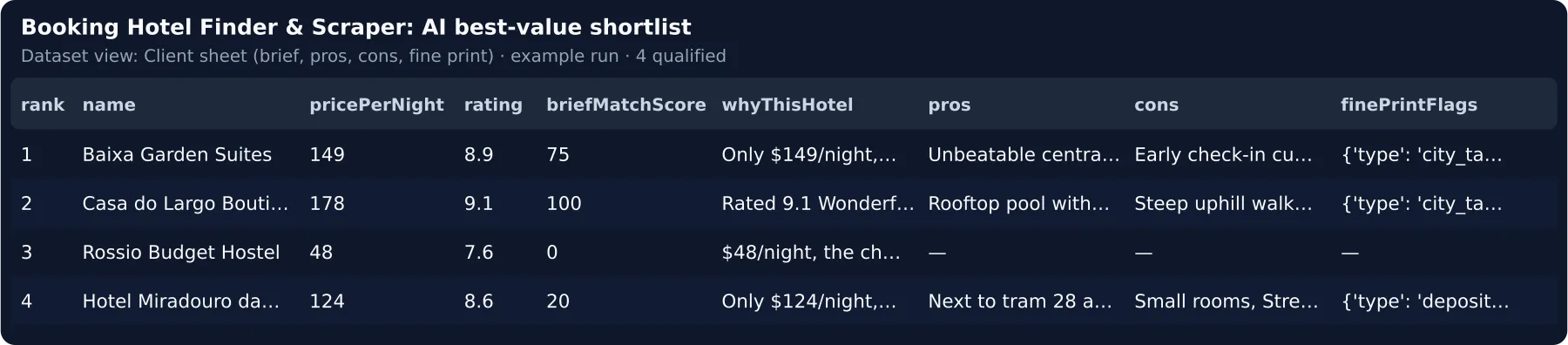
whyThisHotel is one line per hotel, pros / cons come from Booking's review summary, shortlistMemo: true writes
a top-5 comparison, and every run writes REPORT — a client-ready page whose link, OUTPUT.reportUrl, you forward.
🔔 Hotel price drop alert and hotel price tracker
Each delivered stay and its price is remembered (hotel + nights + adults when the dates are relative, 30 days). With
onlyNewOrPriceDrop a scheduled run delivers only new hotels or drops of minPriceDropPct % or more, with
previousPrice, priceChangePct and a Slack-ready line: ↓12 % Hotel X, $143/night, 8.7 Excellent.
📂 Already scraping Booking.com? Rank your Booking scraper data
Point datasetId at a finished Booking scraper run (or paste rows into itemsList): no second scrape, you pay only per
qualified hotel, rules only by default.
🚀 How to use it
- Click
Try it— the form is pre-filled with the free demo on sample Lisbon hotels; it works as is. - Type your
destination,checkInandcheckOut— the run switches to the live search by itself, capped bymaxDiscoveryChargeUsd. Or pick a ready search inpreset; add atravellerBrief, keepenableAion. - Press Start — the
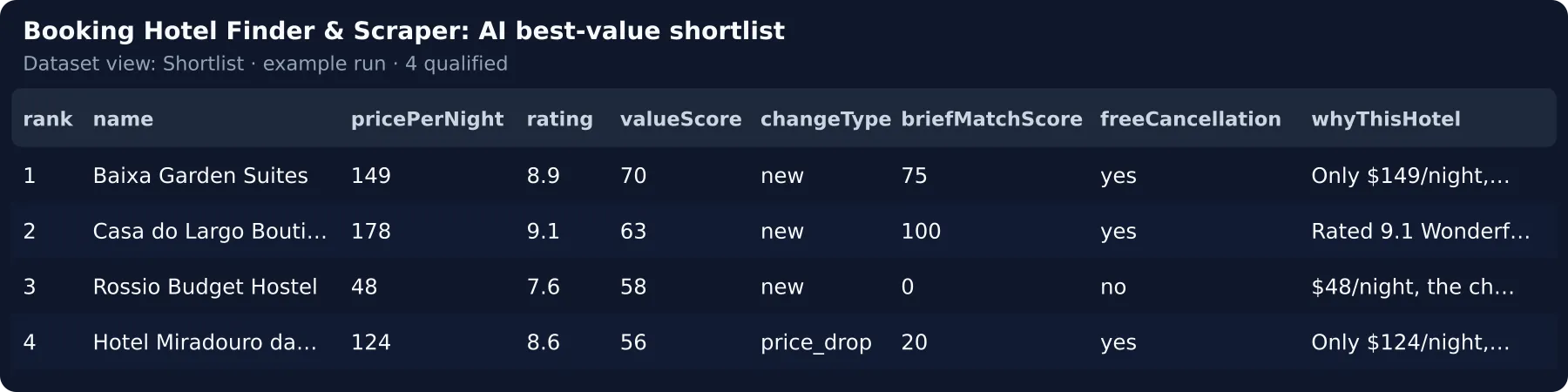
Shortlistview is ranked best value first. - Schedule it daily or weekly with your address in
notifyEmail— only new hotels and price drops are charged.
📚 Learn more: Step-by-step tutorial — find the best-value Booking.com hotels with this Actor
🆚 Why this instead of a Booking Scraper?
Booking Scraper (voyager/booking-scraper) | ryanclinton/booking-scraper | lentic_clockss/booking-hotels-scraper | Booking Hotel Finder | |
|---|---|---|---|---|
| Price | $0.005 per property · 828 users / 30 days | $0.006 per record + $0.02 per query | $0.002 per row + $0.005 start | $0.004 per qualified hotel, 10 free |
| What you pay for | every row, incl. sold-out | every record | every row | only hotels that pass your filters |
| Same 100 hotels, all in | $0.50: 100 unsorted rows to read | $0.62: 100 records, no brief | $0.21: 100 unsorted rows | the 25 best, ranked and explained: $0.10 here + the scraper run on your account; junk costs $0 here |
| Ranking | search order | value queue | search order | per night, reasons, your brief |
| Repeat runs | the same hotels again | watchlist deltas | the same hotels again | only new hotels or price drops |
💸 Cheaper than a rate-shopper seat
Lighthouse (formerly OTA Insight) Rate Insight ($250/month) and RateGain Rate Shopper ($200/month) are per
property (indicative). A daily watch here — 100 properties, ~5 new or cheaper a day with AI — is ≈ $0.50 source +
5 × ($0.01 + ≈ $0.003 tokens) = $0.57 a day, ≈ $17/month, no seat.
💵 Pricing — what a run really costs
Pay per result: one event per qualified hotel, nothing else. No start fee.
| Event | When it is charged | Price |
|---|---|---|
free-tier | your first 10 qualified hotels, in any mode | $0.00 |
qualified-hotel-basic | AI off — value score, room facts, Booking's pros/cons, regex fine print | $0.004 |
qualified-hotel-ai | AI on — plus brief match with evidence, why-this-hotel, AI pros/cons and flags | $0.01 |
Never charged by us: hotels below minScore or failing a filter, duplicates, your exclude list, unchanged hotels
from an earlier run. The source run is billed by the Booking scraper on your account.
How that compares — $0.004 is the median row price of the Booking scrapers and of the Store search next to this card (one Actor per publisher) — the same price per unit, but one qualified hotel replaces 4 raw rows you would read and discard: $0.001 per raw-row equivalent. Junk costs nothing here.
Worked example — 100 properties scraped = $0.50 on your account → 25 qualify → 10 free + 15 × $0.004 = $0.06 on your first run. Next run with AI on: 25 × $0.01 + 25 × ≈ $0.003 tokens = $0.33 here + $0.50 source = $0.83, $0.033 per hotel (AI off: $0.10 + $0.50 = $0.60). With the $0.003 scraper the source is $0.30: $0.63 all in (AI on), $0.40 (AI off).
AI tier, all in: ≈ $0.013 per hotel ($0.01 + ≈ $0.003 tokens at ~1,600 in / 300 out with
anthropic/claude-haiku-4.5 through Apify's model access) — 2.5× the basic event; with your own key the tokens go to it.
🤖 What the AI tier adds
The same demo hotel, AI off — facts, value score, Booking's own pros/cons and a keyword brief match:
AI on — judged against "Quiet hotel for a couple, walkable to the old town, with a pool and free cancellation":
Local run with a Google key, 2026-10-16 (Apify's model access uses anthropic/claude-haiku-4.5). The rules counted "pool" and "free cancellation" as a 100 % match; the AI proves
"walkable" with a quote, marks "quiet" unproven and flags the cash-only city tax — ≈ 4 min of reading saved per hotel
(estimate on 5 sample hotels).
⚙️ Input
| Field | Type | Default | What it does |
|---|---|---|---|
destination | string | — | City, district or hotel name as on Booking.com (or startUrls); typed next to the demo, it searches live |
preset | select | custom | A ready search: travel agent, event planner or price-drop alert — fills the fields you left empty |
discoveryActorId | select | voyager/booking-scraper | The Booking scraper: full details $0.005, or $0.003 / $0.002 per property for the search-page row |
checkIn / checkOut | string | 30 days / 32 days | YYYY-MM-DD or relative days |
travellerBrief | string | — | What the AI scores each hotel against |
minScore | 0–100 | 40 | The field that decides what you pay: below this value score = not charged |
enableAi | boolean | true | Brief match, why-this-hotel, pros/cons, fine print |
mustHaveAmenities | string[] | — | Hard requirement, matched with synonyms |
maxQualified | integer | 25 | Hotels on the shortlist — the ceiling of what this Actor charges |
maxDiscoveryChargeUsd | number | 0.5 | Caps the Booking scraper run, in the form and the API |
Budget, guests, minRating, onlyNewOrPriceDrop, sendAlertsTo and sourceMode are in the Input tab; webhook
headers / signing, dedupeStoreName, language and the run limits are API-only fields.
📤 Output
One dataset item per qualified hotel — JSON, CSV or Excel, or a webhook.
Output fields
Upsert key for a CRM or Sheet: dedupeKey — Booking hotel id + check-in + check-out + adults (hotel + nights +
adults with relative dates), the key the price memory uses; itemId is its short hash, hotelId the property.
Views: Shortlist, Price drops, Client sheet, Score breakdown; DIGEST (top 10, trend vs last run) and
OUTPUT (funnel, aiCoverage, timing) sit next to the dataset.
⭐ Found it useful? A review on the Store helps others find it — it takes a minute on the Actor's page.
🔁 Run it weekly
- Actions → Schedule (daily for price-drop alerts) with your address in
notifyEmail— each run with new hotels or drops e-mails you the digest and the trend vs the last run. Relative dates (30 days) keep working. - Keep
dedupeAcrossRunsandonlyNewOrPriceDropon — you are charged only for what is new or cheaper; the memory is kept per search (destination, guests, source), so a reworded brief keeps it. - Paste a Slack, Teams, Google Chat, Discord or Telegram link — or your webhook — into
sendAlertsTo, and track the picks in the ready tracker sheet (dedupeKeyfirst to upsert on).
Weekly cost is the new hotels only: 100 properties, ~10 new or cheaper a week, AI on ≈ $0.50 source + 10 × $0.013 all in = $0.63.
🎯 Try it for your niche
Pick one in the form's preset select, or paste its input into the JSON tab:
| Niche | What it looks for | Input |
|---|---|---|
| Travel agent | family hotels with pool and parking under a budget | preset-travel-agent.json |
| Event planner | hotels within 2 km of the venue, rating ≥ 8 | preset-event-planner.json |
| Deal hunter | daily hotel price drop alert ≥ 10 % on one stay | preset-price-drop-alert.json |
🔌 Integrations, automation and API
- E-mail / chat —
notifyEmailandsendAlertsTo(Slack, Teams, Google Chat, Discord, Telegram) deliver theDIGESTafter every run with new hotels. - Webhook (Zapier, Make, n8n) — a webhook URL in
sendAlertsTogets{"event": "hotel.qualified", "hotel": {…}}per hotel;webhookSecretsigns each POST (X-Signature: sha256=…). A failed POST is retried once, listed inOUTPUT.webhook.failedKeysand not re-sent next run — the run never fails for it. - After your
voyager/booking-scraperrun — in its Integrations tab, on Run succeeded start this Actor withdatasetId= the run's default dataset andenableAi: false: your Booking scraper data, ranked by rules. - Hotel search API for apps and AI agents / MCP — plain typed fields; the free first call is with the Booking records you send."sourceMode": "list"
🤖 Hotel search tool for AI agents (MCP)
Minimal agent input:
{"destination": "Lisbon", "checkIn": "30 days", "checkOut": "32 days", "maxQualified": 5, "maxDiscoveryChargeUsd": 0.5, "dedupeAcrossRuns": false}Run outcomes — what your integration sees
👥 Who is it for?
| You are… | You run it to… | Start with |
|---|---|---|
| Travel agent / concierge | send a client the 10 best-value hotels with free cancellation, parking and a pool | dates, travellerBrief, mustHaveAmenities |
| Corporate-travel or event planner | hotels within 2 km of the venue under a nightly cap, fine print flagged | nearPoint, maxDistanceKm, maxPricePerNight |
| Trip-planning app or AI agent | ranked hotels as JSON from destination, dates and a brief | the API / MCP call above |
| Deal hunter / travel creator | a morning alert when a hotel on your stay drops ≥ 10 % | minPriceDropPct, notifyEmail, a daily schedule |
🧠 How the AI works
- Grounded. One hotel per call; evidence and fine-print quotes must be exact substrings of the listing or they are
dropped, and an invented number in
whyThisHotelbrings back the rule line. - Your brief.
briefMatchScorescores the hotel againsttravellerBrief;valueScore= 70 % rule + 30 % brief. - Model.
anthropic/claude-haiku-4.5via Apify's model access, on the best candidates first; or your own key. - Fallback. If the model fails, hotels keep the rule tier and the status says how many — free while your free hotels last, then at the basic price, never AI.
🔒 Data, compliance and limits
- Public Booking.com listing data only; host and trader contact data is ignored — no personal data.
- Prices change by the minute — confirm on Booking.com. The source run is capped by
maxDiscoveryChargeUsdand 600 s; the $0.003 / $0.002 scrapers return no facilities or fine print. Stay within Booking.com's terms and GDPR.
❓ FAQ
How much will one run cost me? $0.50 of Booking Scraper for 100 properties ($0.30 with the $0.003 scraper) + 25 hotels × $0.004 (AI off) or ≈ $0.013 all in (AI on) here — first 10 free.
How long does a run take? Measured: the demo 2.8 s (AI off), 6.9 s (AI on); a live search adds the scraper's
time. Apify's model access runs 8 calls at a time, your own key 2 — a free-tier key took 191 s for 4 hotels; waits stop
after 2 min (60 s in all on your own key, OUTPUT.timing); worst case ≈ 17 min per 100 hotels. Pass timeoutSecs 1800.
Which Apify plan do I need? Any plan runs the demo and your own rows (list) or dataset; the live search needs a
plan that runs Store Actors; the AI needs model access on your plan or your own key (llmProvider: "byok").
🧩 More Actors from the same developer
- Google Reviews Analysis AI — what guests say about a hotel or venue on Google Maps: complaints, praise, reputation
- Reddit Brand Monitoring — what travellers say about a hotel, brand or destination on Reddit, with sentiment
🆘 Support
Something missing or wrong? Open an issue on the Actor's page or message the developer through the Apify Console — requests from buyers are shipped first.
📝 Changelog
- 0.1.8 (2026-10-16) — One-click ready searches; one "Send alerts to" field for chat apps and webhooks; live AI verdicts on your first 5 hotels on any plan; price history in the client report; a shorter Store page that fits without being cut off.
- 0.1.5 (2026-10-04) — Bring your own data: rows in
itemsListor adatasetIdpick their mode, start no source Actor and are charged only for the analysis; unread fields are listed in the log.


