

SEO Audit Tool: Website Audit & SEO Checker, Excel Report
Pricing
from $4.00 / 1,000 audited pages
SEO Audit Tool: Website Audit & SEO Checker, Excel Report
SEO audit of a whole website as an Excel report: $4 per 1,000 pages, broken pages free. A 0-100 health score, top 10 fixes in plain words, broken links, redirects, titles, meta descriptions, H1, canonicals, noindex, robots.txt, alt text, speed, structured data.
Pricing
from $4.00 / 1,000 audited pages
Rating
0.0
(0)
Developer

Rowsmith HQ
Maintained by CommunityActor stats
0
Bookmarked
2
Total users
1
Monthly active users
3 days ago
Last modified
Categories
Share
SEO Site Audit with Excel Report: broken links, meta tags, redirects and a health score
Paste your website's address and get a full SEO audit as an Excel report, with a 0-100 health score and the top 10 fixes in plain words: $4 per 1,000 pages, all-in. Pages that fail are free.
A website SEO checker and broken link checker in one run. It crawls your whole site, like a search engine does, and checks every page for the problems that cost rankings: broken links and images, redirect chains, missing or duplicate title tags and meta descriptions, H1 headings, canonical tags, noindex, robots.txt, sitemaps, thin content, slow pages, mixed content, hreflang, Open Graph tags and structured data. Built for site owners, marketers and SEO agencies who want a clear report, not a wall of data.
At a glance
| What it does | Crawls a whole website and audits every page for technical and on-page SEO problems |
| You give it | Your website's address (or its sitemap link). Nothing else is required |
| You get | An Excel report (Summary, Fix list, Issues, Pages, Links), the same tables as CSV, and one row per page with every check |
| Health score | 0-100, with the formula written in the report: every page starts at 100 and loses points per problem |
| Checks | 62 kinds of problems in 14 groups, each with fix advice in plain words |
| Good for | SEO audits for clients, website health checks, broken link reports, site migrations, before-and-after checks |
| Price | $4 per 1,000 pages audited, all-in (no usage costs on top); broken pages, redirects and the report are free. JavaScript rendering, when you switch it on: +$0.01 per run |
| Speed | On Apify's servers, 300 pages and 857 links and images checked in 25 seconds. From our slower test laptop, 1,000 pages in about 3 minutes |
| Limits | No Core Web Vitals, keyword rankings or backlinks; JavaScript sites need the rendering option |
| Made by | Rowsmith HQ |
| Last updated | October 2026 |
See the output
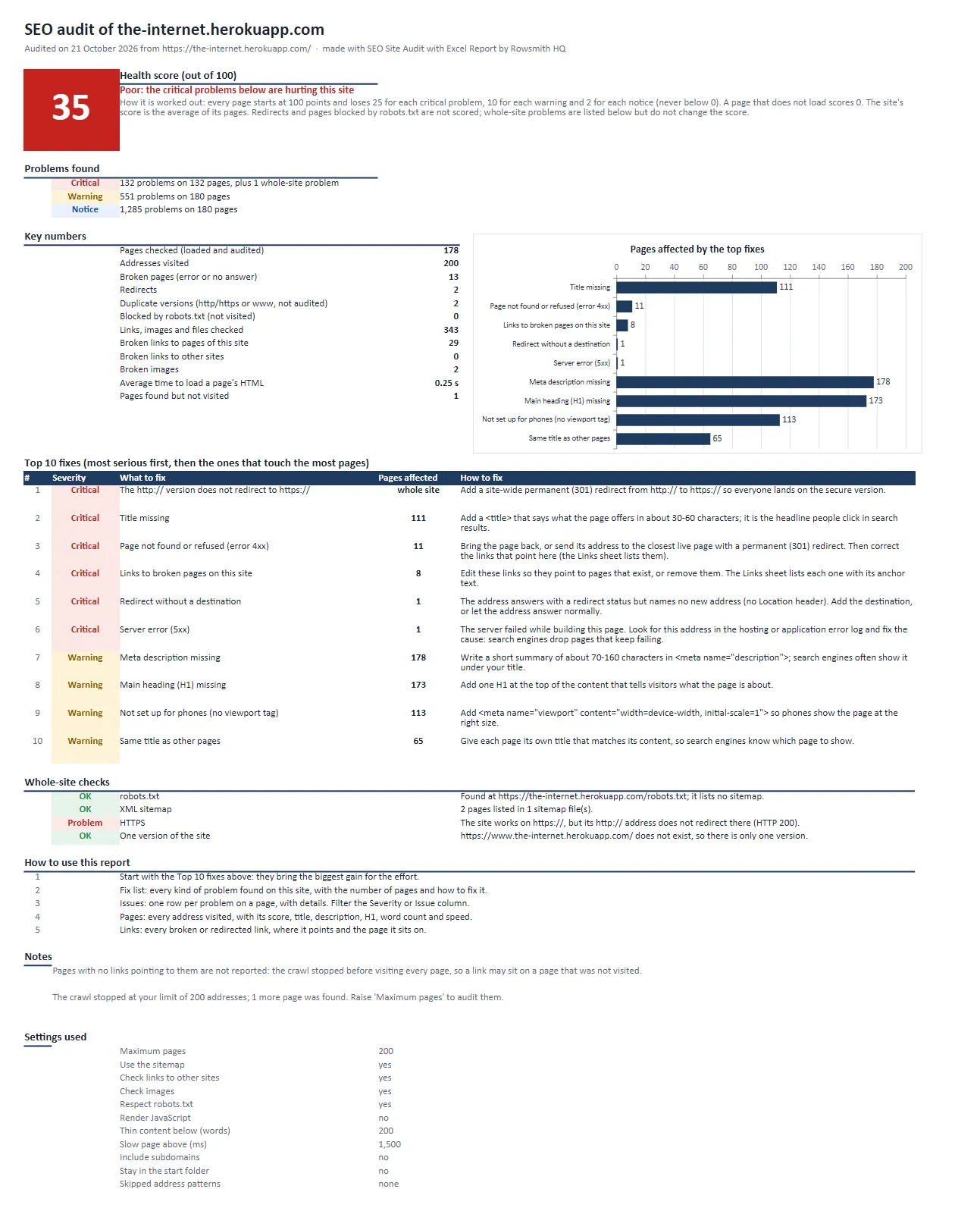
The Summary sheet of a real audit (the-internet.herokuapp.com, a test site full of broken parts, 21 October 2026):
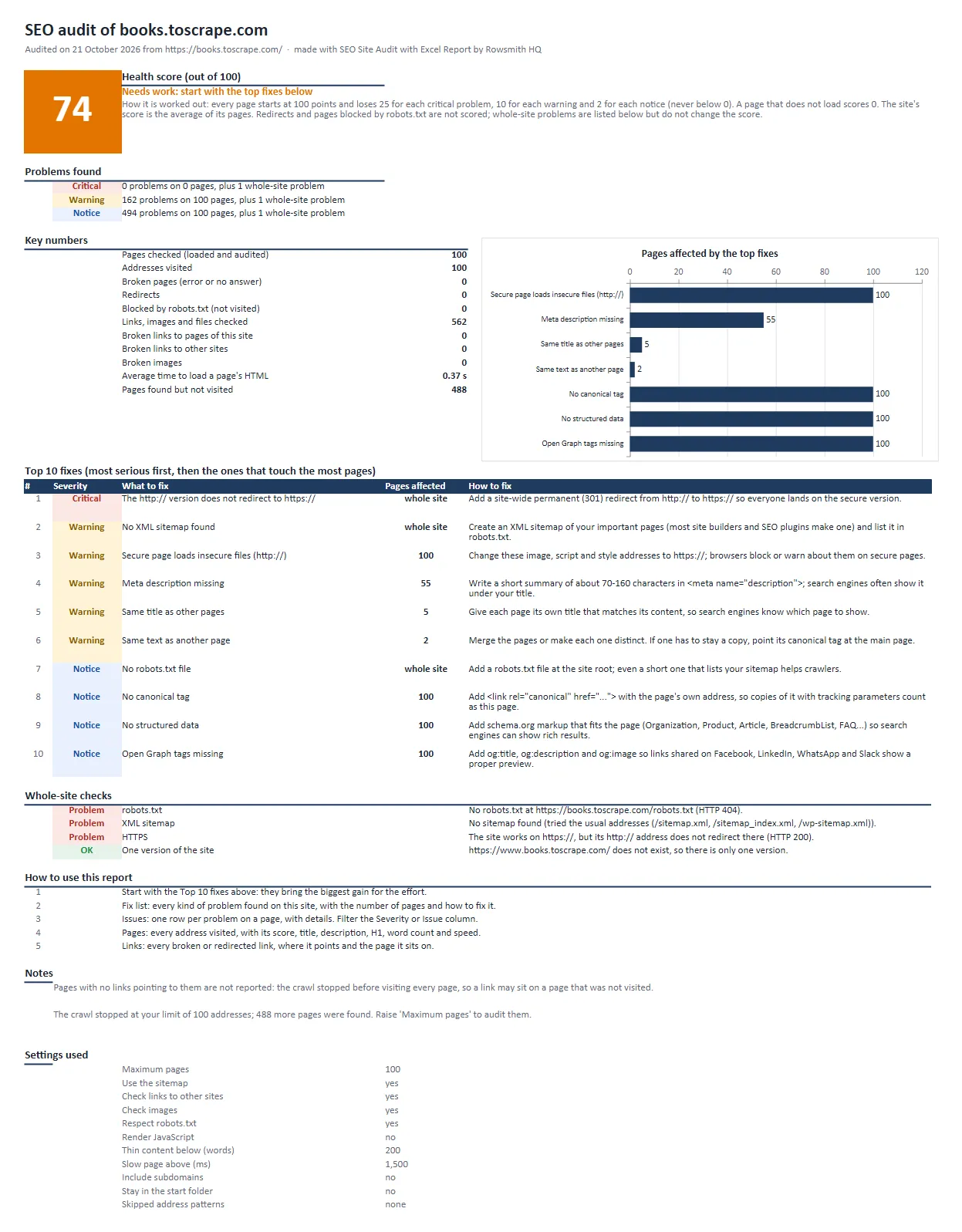
And of the example that opens with the tool (books.toscrape.com, 100 pages):
Download real results: Excel report, books.toscrape.com · Excel report, the-internet.herokuapp.com · Issues as CSV · Pages as CSV · Broken and redirected links as CSV
What you get
- An Excel report a site owner understands at a glance. The Summary sheet shows the health score, the problems by severity (critical, warning, notice), the key numbers, a chart, and the top 10 fixes, each with what to do.
- A to-do list, not just data. The Issues sheet has one row per problem: severity, issue, page, details (for example "72 characters: ...") and how to fix it. Filter it by severity or by issue.
- Every page in one table. The Pages sheet lists each address with its status, score, title, meta description, H1, word count, load time, clicks from the home page, links pointing in and more.
- Every broken link with the page it sits on. The Links sheet lists broken and redirected links, images and files, where they point, and their anchor text.
- The same tables as CSV, and one dataset row per page (51 columns) for Google Sheets, Looker Studio, a database or your own scripts.
- Whole-site checks: robots.txt, the XML sitemap, the http-to-https redirect, and www versus non-www.
- Every page counted once. If your site also loads at http:// or without www, those copies are checked once and listed free as "duplicate version", and the problem is reported once for the whole site, instead of every page being audited and paid twice.
What it checks
| Group | Checks |
|---|---|
| Pages | Errors 4xx and 5xx, pages that do not answer |
| Redirects | Redirect chains, loops, temporary redirects, redirects to broken pages or to nowhere, meta refresh |
| Links | Broken internal and external links, links through redirects, pages no link points to (orphans), click depth, dead ends, nofollow on your own links |
| Indexing | noindex and nofollow (meta tag and X-Robots-Tag), pages Google may not crawl (robots.txt), canonical missing, pointing elsewhere or broken, sitemap entries that cannot be indexed, pages missing from the sitemap |
| Titles and descriptions | Missing, too long, too short, duplicated across pages, more than one |
| Headings | H1 missing, several H1, duplicated H1 |
| Content | Thin content (word count), duplicate content, language not declared, no mobile viewport |
| Images | Missing alt text, broken images, images over 500 KB |
| Speed | Slow server response, very large HTML |
| Security | Pages without HTTPS, mixed content (http files on https pages) |
| International | hreflang codes, hreflang to broken pages, missing return links |
| Social sharing | Open Graph (Facebook, LinkedIn, WhatsApp) and X card tags |
| Structured data | JSON-LD that cannot be read, pages without schema.org markup (types found are listed) |
| Whole site | robots.txt missing or failing, no XML sitemap, sitemap errors, http not redirected to https, www and non-www both loading |
Why use this one
- A report you can hand to a client. Plain words, a score with a stated formula, and fix advice for every problem, written by people, not generated.
- Technical SEO and broken links in one run. No need for a separate crawler, link checker and spreadsheet work.
- $4 per 1,000 pages, all-in. Pages that fail, redirects, blocked pages and the report itself cost nothing.
- Polite and honest. robots.txt is respected by default, and links are followed the way a browser follows them (cookies kept across redirects, http:// links tried over https://). Links that refuse automated checks are marked "could not verify", not "broken". No fake "AI" claims.
- Your budget is respected. Set a maximum cost for the run and it stops cleanly before going over.
How we compare
The most used SEO audit tool in the Apify Store charges $40 per 1,000 pages (22 October 2026). This one charges $4 per 1,000, all-in, and gives you an Excel report you can hand to a client. Questions worth asking any SEO audit tool:
| Ask any SEO audit tool | This tool |
|---|---|
| What does a 1,000-page audit cost, everything included? | $4.00; broken pages, redirects and the report cost nothing |
| A report I can send a client as it is? | Yes: Excel, with the score, a chart and the top 10 fixes in plain words |
| A fix for every problem? | Yes: 62 kinds of problems in 14 groups, each with how to fix it |
| A score with a stated formula, or a black box? | Stated: every page starts at 100 and loses set points per problem |
| Every broken link, with the page it sits on? | Yes: links, images and files, where they point and their anchor text |
| Links that refuse automated checks called "broken"? | No: they are marked "could not verify" |
| Paying twice when the site loads at http and https, or with and without www? | No: each page is audited and charged once |
| Core Web Vitals? | Not measured here: speed is the server's response time and page size. Google's free PageSpeed Insights measures Core Web Vitals |
| An answer when something goes wrong? | Yes: open an issue on the Issues tab and we reply there |
Pricing
Pay only for pages of your site that loaded and were checked.
| What you pay for | Price | Per 1,000 |
|---|---|---|
| Page audited: one page of your site loaded and checked | $0.004 | $4.00 |
| Broken pages, redirects, pages blocked by robots.txt, linked files (PDF, images), duplicate versions of your site (http/https, www) | free | free |
| The Excel report, the CSV files and the run summary | free | free |
| JavaScript rendering (only with Render JavaScript on): a real browser started for your run, charged once after the rendered pages are saved | $0.01 per run | - |
Worked examples:
- A 50-page small business site: 50 x $0.004 = $0.20
- The example that opens with the tool (100 pages of books.toscrape.com): $0.40
- Our big test, 1,000 pages: $4.00
- A 10,000-page site (the largest run): $40.00
- A 50-page site built with React, with Render JavaScript on: 50 x $0.004 + $0.01 = $0.21
Good to know:
- Try it free: Apify's free plan includes $5 of usage every month, which here is about 1,250 pages audited.
- No usage costs on top: the page price is the whole price. Apify adds only its standard run-start fee of $0.00005 per GB of memory.
How to use it
- Paste your website's address into Website to audit, for example
https://www.example.com. - Set Maximum pages (500 by default). The pages closest to your home page are audited first.
- Click Start. When the run ends, open the Excel report from the Output tab, or the Pages table.
The defaults suit most sites: the whole site in the version your address leads to (its http:// or www copies are checked once, free), its sitemap, links to other sites and images checked, robots.txt respected.
Input
A whole site, up to 500 pages:
Only the blog, a faster run without checking links to other sites:
| Option | What it does | Default |
|---|---|---|
startUrls | The website's address, or its sitemap link. One website per run. | (required) |
maxPages | The most addresses to visit (pages, redirects and broken pages count; only pages that load are charged), up to 10,000. | 500 |
useSitemap | Also read the XML sitemap to find pages no link reaches, and check what it lists. | on |
checkExternalLinks | Check every link to other websites (each address once, at most 100 per other website). | on |
checkImages | Check that every image loads, and find images over 500 KB. | on |
respectRobotsTxt | Skip pages robots.txt asks tools to leave alone. Switch off only for your own site. | on |
renderJavaScript | Open each page in a real browser first, for sites built with React, Vue, Angular or Wix. Adds $0.01 per run; give the run 2 GB. | off |
includeSubdomains | Also audit blog.example.com, shop.example.com and other subdomains. | off |
stayInStartFolder | Audit only pages under the start address's folder, such as /blog/. | off |
excludeUrlPatterns | Skip addresses containing any of these, for example /tag/ or ?sort= (* is a wildcard). | none |
minWords | Pages with fewer words are reported as thin content (0 = off). | 200 |
slowPageMs | Pages whose HTML takes longer than this (milliseconds) are reported as slow. | 1,500 |
maxConcurrency | Requests to your site at the same time (1-10). A Crawl-delay in robots.txt is always honoured. | 5 |
Output
One row per address of the site that was visited. result says what happened: ok (audited and charged), redirect, error, no answer, blocked by robots.txt, file (not a page) or duplicate version (a copy of your site at http:// or with/without www that loads instead of redirecting; listed free, never audited). A real one (the meta description is shortened here):
The run summary (the OUTPUT record) has the health score, the links to the Excel and CSV files, the counts and the top 10 fixes, for example:
How the health score works
Every page starts at 100 points. It loses 25 points for each critical problem, 10 for each warning and 2 for each notice, and never goes below 0. A page that does not load scores 0. The site's score is the average of its pages. Redirects, duplicate versions and pages blocked by robots.txt are not scored. Whole-site problems (like a missing sitemap) are listed apart and do not change the score.
Tested on real websites
Before release we audited 11 real websites of different kinds and checked every result automatically (21 October 2026):
- An online shop (books.toscrape.com): 1,000 pages in 193 seconds from our test laptop, with 1,836 links and images checked. On Apify's servers, 300 pages and 857 links and images took 25 seconds.
- A business site, a documentation site, a WordPress blog, a site behind redirects, an encyclopedia, a JavaScript site, a site that loads at two addresses and an international site were audited too: 2,107 pages in all the runs together.
- 18 of 18 test runs passed all 248 automatic checks: every charge matched a page that loaded, no page was charged twice, spending caps held, every row was complete, and the score follows its formula on every page.
- Known problems were found: the 2 broken images and the 404 and 500 pages of a test site built with broken parts, a two-hop redirect chain, and pages blocked by robots.txt (each verdict re-checked against the live robots.txt).
- Links judged the way a browser sees them: on a test page with 8 links whose answers we checked by hand, the 5 that work in a browser (sign-in services that set a cookie while redirecting, a server that sends HEAD requests in circles, an http:// link that works only over https://) were not called broken, and the 3 dead ones were.
- A site that loads at two addresses (paulgraham.com, with and without www): 148 pages audited and charged once each; the other version was listed free as a duplicate.
- A dead domain fails clearly and costs nothing: one row saying why, in 2 seconds, $0.
FAQ
What does the health score mean? It is the average of your pages' scores. Each page starts at 100 and loses 25 points per critical problem, 10 per warning and 2 per notice. 80 or more is good, 50 to 79 needs work, below 50 is poor.
Do I pay for pages that fail? No. Broken pages, redirects, pages blocked by robots.txt, linked files and duplicate versions of your site are listed in the report for free. You pay only for pages that loaded and were checked.
My site loads with and without www, or on both http and https. Do I pay twice? No. The version your start address leads to is audited. Addresses on the other versions are checked once, to see whether they redirect, and listed free as "duplicate version". The missing redirect is reported once, as a whole-site problem.
Do I pay Apify usage on top? No. $4 per 1,000 pages is the whole price, plus Apify's standard run-start fee of $0.00005 per GB of memory.
Can I give the report to my clients? Yes. The Excel file has your client's site name, the score, the top fixes and the advice in plain words. It is yours to share.
How many pages can it audit? Up to 10,000 addresses per run. The pages closest to the home page come first, so a smaller limit still covers the important pages.
Does it check links to other websites? Yes, each one once, with at most 100 per other website per run. Links are followed the way a browser follows them: cookies a site sets while redirecting are sent back, and an http:// link that fails is tried over https://. Sites that refuse automated checks (for example with HTTP 403, 429, or Cloudflare's 520-527) are marked "could not verify", not "broken".
Does it work with WordPress, Shopify, Wix or Webflow? Yes. It reads pages as search engines do. For sites that build their content in the browser, switch on Render JavaScript (+$0.01 per run) and give the run 2 GB of memory.
Will it slow down my website? No. It sends at most 5 requests at a time by default (you can lower it), honours robots.txt and its Crawl-delay, and fetches each page once.
Can I run it every week or month? Yes. Schedule it in Apify to track the health score over time. It also runs from the Apify API, Zapier, Make, n8n and AI agents.
Limits
- One website per run, up to 10,000 addresses, audited in the version your start address leads to (its http:// or www copies are checked once, free; subdomains with the option).
- Speed is measured as the time to download each page's HTML, not as a full page render: no Core Web Vitals or Lighthouse scores.
- No keyword rankings, backlinks or traffic estimates.
- Pages behind a login, and sites that block automated visitors, cannot be audited.
- JavaScript-built sites need the Render JavaScript option, which is slower.
About
Built and maintained by Rowsmith HQ. Something not right? Open an issue on the Issues tab with the site and your input, and we will look at it.
More from Rowsmith HQ:
- Website Screenshot & PDF Snapshotter: full-page screenshots and PDFs of every page of a site, for before-and-after records of your SEO work, $3 per 1,000.
- Career Board Job Feed: every open job of the companies you choose, from six hiring systems, in one table, $1 per 1,000 jobs.
- Broken Link Checker & Sitemap Checker: every URL of a sitemap, a list or a page's links, with status, redirect chains and soft 404s in an Excel report, $0.20 per 1,000 URLs.


