

Broken Link Checker & Sitemap Checker: Status & Redirects
Pricing
from $0.20 / 1,000 url checks
Broken Link Checker & Sitemap Checker: Status & Redirects
Broken link checker for a sitemap, URL list or page: $0.20 per 1,000 URLs + $0.01 per run, all-in. HTTP status codes, full redirect chains, soft 404s, timeouts and noindex, with an Excel report. Runs that check nothing are free.
Pricing
from $0.20 / 1,000 url checks
Rating
0.0
(0)
Developer

Rowsmith HQ
Maintained by CommunityActor stats
0
Bookmarked
2
Total users
1
Monthly active users
2 days ago
Last modified
Categories
Share
Sitemap & Broken Link Checker: URL Status and Redirects
Check every URL in a sitemap, a URL list or the links on your pages, and get each one's status code, redirect chain and a verdict in plain words, plus an Excel report: $0.20 per 1,000 URLs + $0.01 per run, all-in. URLs it does not check are free.
A broken link checker, bulk HTTP status checker, redirect chain checker and sitemap URL extractor in one run. Paste a sitemap (index files and .xml.gz work), a list of URLs, or the pages whose links you want checked. You get one row per URL and an Excel report that a site owner understands in a minute: how many URLs work, which ones are broken, where each broken link sits and what its anchor text says, which redirects to tidy up, and what to fix first. Made for site owners, SEO agencies, marketers and developers, for 404 hunts, website migrations and sitemap clean-ups.
At a glance
| What it does | Checks every URL you give it, or every link on the pages you give it: final HTTP status, every redirect hop, answer time, content type and size, indexability, and a verdict |
| You give it | A sitemap URL, a list of URLs, pages whose links to check, or any mix of the three |
| You get | An Excel report (Summary, Broken, Redirects, Check by hand, Indexability, All URLs, Sitemaps), the same tables as CSV, and one dataset row per URL |
| Verdicts | OK, Redirect, Broken, Soft 404, No answer, Blocked or rate-limited (check by hand), Not checked (free) |
| Good for | Finding 404 pages and broken links, checking redirects after a website migration, cleaning a sitemap, bulk status checks of any URL list |
| Price | $0.20 per 1,000 URLs checked + $0.01 per run, all-in (no usage costs on top). Skipped URLs, runs that check nothing and the report are free |
| Speed | On Apify's servers: 1,000 URLs (a sitemap plus the links of two pages) checked in 39 seconds with the default 512 MB of memory, 18 seconds with 1 GB |
| Accuracy | Every URL it called broken in two real tests (41 links of a Wikipedia article, 31 links of a whole website) was opened again in a real browser: none of them worked there |
| Limits | No JavaScript rendering; links are checked one level deep (or across a whole site through its sitemap); public pages only |
| Made by | Rowsmith HQ |
| Last updated | October 2026 |
How we compare
The most used broken-link checker in the Apify Store charges $1.00 per 1,000 links checked (22 October 2026). Facts from the Apify Store on 21-22 October 2026: each tool's own store page and prices, and the Store's 30-day run figures. About 300 tools in the Store mention sitemaps, broken links, redirects or status codes; 20 of them had five or more users in the last 30 days. These are the most used ones.
| This tool | Most used sitemap tool | Most used broken-link checker | Bulk status checkers | |
|---|---|---|---|---|
| Price per 1,000 URLs | $0.20 | $0.50 | $1.00 | $0.08 to $2.50 |
| Extra per run | $0.01, only when at least one URL was checked | none | none | none to $0.035 |
| 1,000 URLs, all-in | $0.21 | $0.50 | $1.00 | $0.085 to $2.50 |
| You pay for | each URL that got an answer; skipped URLs are free | each result row | each link checked | each URL or result row |
| Runs that succeeded, last 30 days | new tool: 31 of 31 test runs, 3 of them on Apify | 76% | 93% | 85% to 100% |
| Reads sitemaps | yes, with index files and .xml.gz | yes, with index files | yes | some |
| Checks the links on your pages, with page and anchor text | yes | no | yes | no: they check the URLs you list |
| Full redirect chain, hop by hop | yes | not stated | yes | most |
| Soft 404s, noindex and canonical tags | yes | not stated | not stated | some read canonical and robots tags |
| A second try as a browser before calling a URL broken | yes | not stated | not stated | not stated |
| Report for a site owner | Excel: summary, fix list, Broken and Redirects sheets | data table | HTML report | data table |
In one sentence: broken links with their page and anchor text, as the most used broken-link checker gives them, for a fifth of its price, with soft 404s, indexability and an Excel report included. For a plain status check of a URL list, the cheapest status checkers cost less per URL; this tool adds the link check of your pages, the careful verdicts and the report.
See the output
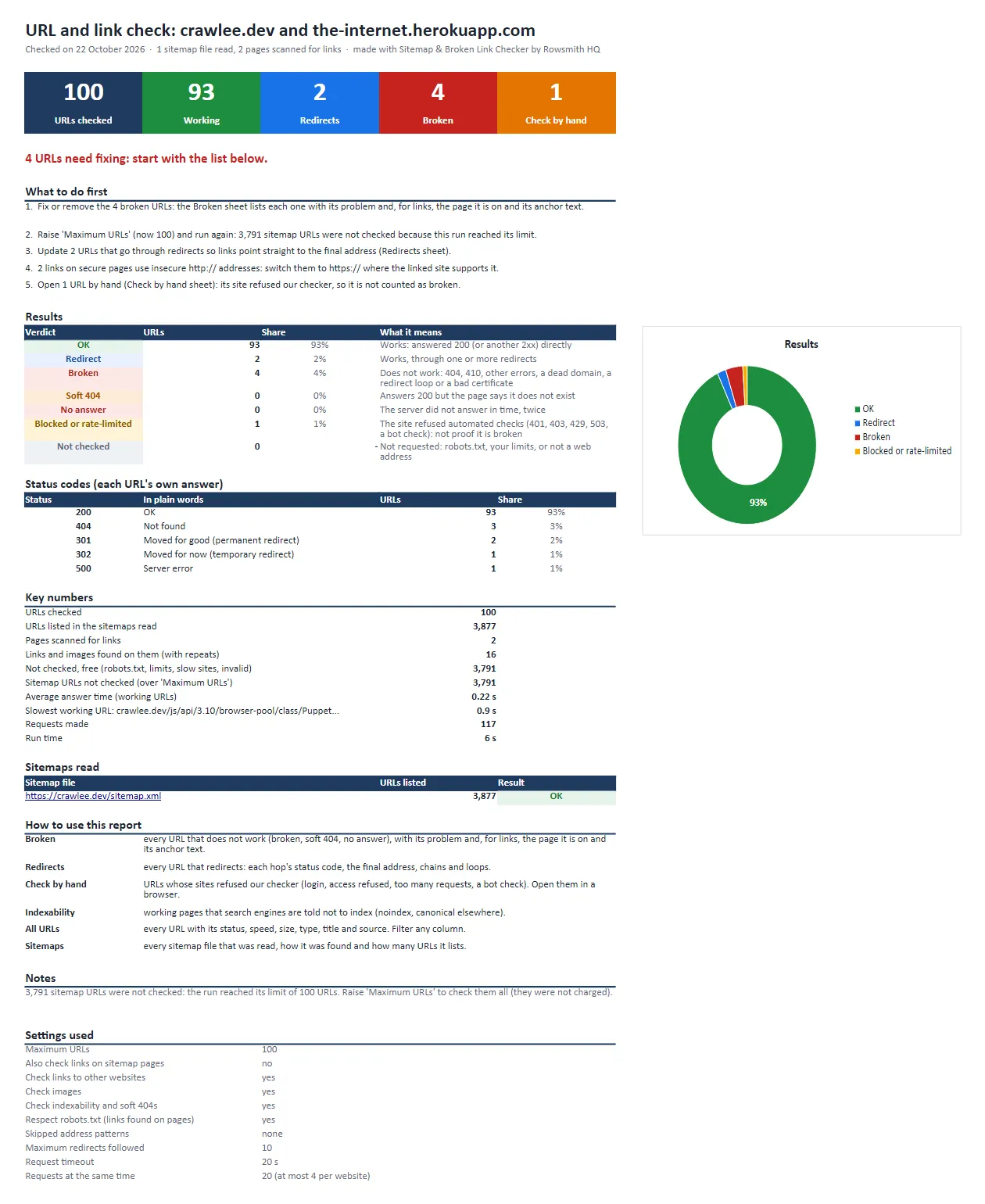
The Summary sheet of a real report (the example that opens with the tool: the crawlee.dev sitemap and two test pages with broken links, 22 October 2026):
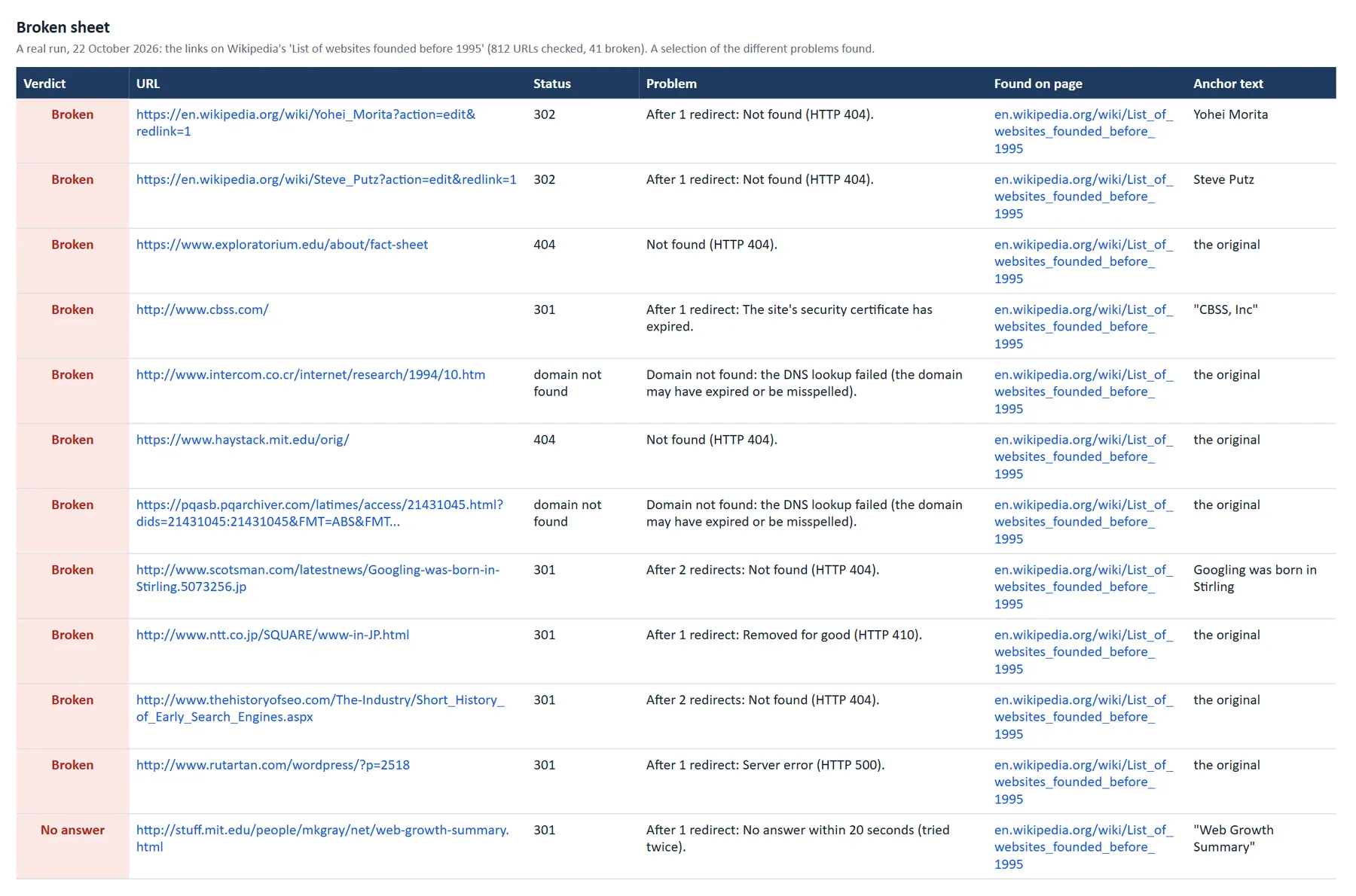
The broken links found on one long Wikipedia article (812 links to hundreds of websites), with the page each link is on and its anchor text:
Download real results: Excel report, one-click example · Excel report, a whole site (markdownguide.org) · Excel report, a site bigger than the run's limit (crawlee.dev) · Excel report, a Wikipedia article's links · Broken URLs as CSV · All URLs as CSV · Dataset rows as JSON
What you get
- An Excel report a site owner understands. The Summary sheet shows the big numbers, the URLs by verdict and by status code, and what to fix first in plain words. Then: Broken (every broken URL, its problem, the page it is on and its anchor text), Redirects (every hop of every chain), Check by hand (sites that refused automated visitors), Indexability (noindex, canonical elsewhere, sitemap entries that cannot be indexed, on your own websites), All URLs and Sitemaps.
- The same tables as CSV (
all-urls.csv,broken-urls.csv) for Google Sheets, Looker Studio or your own scripts. - One dataset row per URL with 36 columns: verdict, status code and its meaning, final URL, the redirect chain hop by hop, the problem in words, smaller issues, where the URL came from (sitemap, list, page), the pages that link to it and the anchor text, indexability, title, answer time, content type and size, and how it was checked.
- Public links to the report files in the run summary (
OUTPUT) and at the end of the run's status message, ready to send to a client.
The verdicts, in plain words
| Verdict | What it means | Charged |
|---|---|---|
| OK | The URL answers 200-299 straight away | yes |
| Redirect | It ends at a working page after one or more redirects; every hop is listed | yes |
| Broken | Not found (404), gone (410), a server error (500 and others), a dead domain, a bad security certificate, a redirect loop, or more redirects than browsers follow | yes |
| Soft 404 | It answers 200, but it is the site's "not found" page: it looks like the site's own error page, or its redirects end on an error address. Pages that only talk about 404 errors are not flagged | yes |
| No answer | No answer in time, twice (the second time through a second client that tries every address of the server), or the connection was refused | yes |
| Blocked or rate-limited | The site refused automated visitors (401, 403, 429, 503, a bot check), also when asked as a browser. Open it by hand. Never counted as broken | yes |
| Not checked | A row with the reason: robots.txt asked tools not to visit it, the site kept answering "too many requests" or slowed checks down too far, its server was down, or it is not a web address. URLs left out by your skip patterns or by 'Maximum URLs' are counted in the run summary instead | free |
Why use this one
- Careful before it says "broken". Files and images get a HEAD request (nothing downloaded). A server that answers HEAD wrongly is asked again with GET. No answer is asked again through a second HTTP client that tries every address of the server, so one dead server address cannot make a working page look dead. A redirect that sets a cookie and fails without it is followed once more keeping that cookie, as browsers do. Temporary failures (429, 500, 502, 503, 504) are tried again after a pause. Any error code (400 or more) then gets a second opinion as a normal browser. Refusals are labelled "Blocked or rate-limited", not broken. Every broken result of our test runs was opened again in a real browser (numbers below).
- Every redirect hop, not just the end. Each hop's status code and target, with redirect loops, chains longer than your limit, temporary redirects (302, 303, 307), https-to-http hops and redirects to the home page flagged.
- SEO checks included. Soft 404s (each suspect page is compared with the site's own "not found" page, so an article about 404 errors is not flagged), noindex in the robots meta tag or the X-Robots-Tag header, canonical tags that point elsewhere, sitemap entries that redirect, break or cannot be indexed, insecure http:// links on https pages, pages that work only with a cookie set during their redirects (search engines keep no cookies, so they get the error), and slow answers (over 3 seconds).
- Sitemaps done right. Sitemap index files,
.xml.gzfiles, text sitemaps and RSS feeds. Give a home page instead and its sitemap is found through robots.txt or the usual addresses. - A whole site in one run. Switch on Also check links on sitemap pages and the sitemap's pages are read, and every link and image on them checked, up to your Maximum URLs. Pages are read in batches so that the links on them always get their share of the limit, and the report says how many links and pages the limit left out. Each link is checked once, however many pages use it, and the report lists the pages it is on.
- Fast and light. Pages are read only as far as their head and first heading (at most 256 KB, and at most 32 KB past the head on heavy shop pages) to find noindex, canonical and "not found" text; switch that off for a HEAD-only status check that downloads almost nothing (1,000 URLs: 0.5 MB instead of 30 MB in our tests).
- Polite by default. At most 4 requests to any one website at a time; a site that says "too many requests" is slowed down automatically (its Retry-After is honoured), and one that still refuses 5 URLs in a row is left for a later run (those URLs are free); links on pages are checked only where robots.txt allows it, at the pace its Crawl-delay asks for. A domain that does not exist is not asked again for each of its links.
- Big runs. Up to 100,000 URLs per run (above about 60,000, give the run 1 GB of memory). Set a maximum cost and the run stops cleanly before it, with its report.
- No usage costs on top. The prices below are the whole price.
Pricing
Pay per URL checked, plus one small fee per run that checked something.
| What | Price | Per 1,000 |
|---|---|---|
| URL check: one URL with a final answer (a status code, a redirect chain, a timeout or a failed DNS lookup) | $0.0002 | $0.20 |
| Run with results: once per run that checked at least one URL | $0.01 | - |
| URLs not checked (robots.txt, skip patterns, the run's limits, not a web address, our own errors) | free | free |
| The Excel report, the CSV files and reading the sitemaps | free | free |
Worked examples:
- 100 URLs = 100 x $0.0002 + $0.01 = $0.03
- A 1,000-URL sitemap = $0.21
- 10,000 URLs (the default limit per run) = $2.01
- 100,000 URLs (the largest run) = $20.01
- A whole-site broken link check from our tests (markdownguide.org: 84 pages and every link and image on them, 519 URLs checked) = $0.11
- Every link of one long Wikipedia article (812 URLs checked) = $0.17
- Apify's free plan ($5 of usage every month) covers about 24,500 URL checks a month.
Good to know:
- A dead link is a real answer, so it counts like any other checked URL. URLs that were never asked are free, and if the checker itself fails on a URL, that URL is free too.
- Each URL is checked and charged once per run, however many pages link to it or how often the sitemap lists it.
- Apify adds its standard run-start fee of $0.00005 per GB of memory ($0.000025 for a default 512 MB run).
- Set a maximum cost for the run and it stops before going over; the URLs checked until then are in the report.
How to use it
- Paste a sitemap link into Sitemap URLs, web addresses into URLs to check, or pages into Pages whose links to check. Any mix works.
- For a broken link check of a whole site, add its sitemap and switch on Also check links on sitemap pages.
- Click Start. Open the Excel report from the run's Output tab (or the link at the end of the log), or browse the results table.
The defaults suit most sites. The example that opens with the tool checks 100 URLs in about 15 seconds.
Input
Example: a broken link check of a whole website through its sitemap.
Example: a fast status and redirect check of a URL list (for example the old addresses of a site after a migration), HEAD requests only.
Example: every link and image on two pages.
| Option | What it does | Default |
|---|---|---|
sitemapUrls | Sitemaps to read (index files, .xml.gz, text sitemaps, RSS feeds, or a home page); every URL listed is checked | |
urls | Web addresses to check as given: paste them, upload a text or CSV file, or link to one | |
startUrls | Pages whose links and images are checked, one level deep | |
maxUrls | The most URLs to check in the run (you pay only for those checked) | 10,000 |
checkLinksOnSitemapPages | Also read every sitemap page and check all of its links and images | off |
checkExternalLinks | Check links to other websites too | on |
checkImages | Check that every image on the scanned pages loads | on |
checkIndexability | Read the start of each page for noindex, canonical and "not found" text; off = HEAD only | on |
respectRobotsTxt | Check links found on pages only where the linked site's robots.txt allows it (URLs you give are always checked) | on |
excludeUrlPatterns | Skip addresses containing any of these (* works as a wildcard), for example /tag/ | |
maxRedirects | A URL that redirects more times than this is reported as broken (1-20) | 10 |
requestTimeoutSecs | How long to wait for each answer (5-60 s); no answer in time is tried once more | 20 s |
maxConcurrency, maxRequestsPerHost | Requests at the same time, in all and per website | 20, 4 |
Output
One row per URL, the same 36 columns on every row. A broken link found on a page (a real row from our tests; this one was also opened in a real browser, which got the same 404):
An old article link that now goes through two redirects and lands on the site's home page, which search engines may treat as a missing page (some columns left out here):
A sitemap entry that answers 200 but says "not found" (a soft 404; some columns left out here):
The run summary (OUTPUT in the key-value store) has the counts by verdict and status code, what to fix first, the sitemaps read, and the links to the report files: a real one.
Tested on real websites
Every number on this page comes from real runs in October 2026: one on Apify's servers, the rest on our 2015 test laptop over a home connection (Apify's servers are faster).
| Test | URLs checked | Time | What it showed |
|---|---|---|---|
| On Apify's servers (default 512 MB): a sitemap plus the links of two test pages | 1,000 | 39 s | 993 working, 2 redirects, 4 broken, 1 to check by hand |
| A whole website: every page in markdownguide.org's sitemap and every link and image on them | 519 | 21 s | 2 broken (an expired certificate, a missing image), 1 server that refused the connection, 77 links that robots.txt asks tools to skip (free) |
| The 'whole website' example task on a site bigger than its limit (crawlee.dev: 3,877 pages, at most 1,500 URLs) | 1,407 | 238 s | 117 pages scanned and 1,367 links on them checked: 45 broken. The 202 links and 3,654 pages the limit left out are counted, free, and "What to do first" says to raise the limit |
| A whole website that links to hundreds of other sites (htmx.org) | 1,227 | 106 s | 31 broken. Each one opened again in a real browser: all 31 broken there too |
| Every link of one long Wikipedia article, to hundreds of websites | 812 | 80 s | 41 broken. Each one opened again in a real browser: 37 broken there too, none worked, 4 stopped by a bot check |
| A docs site through its sitemap index (kubernetes.io, 17 sitemaps) | 1,000 | 83 s | every sitemap followed; 999 working, 1 redirect |
| A gzipped sitemap (developer.mozilla.org, 14,844 URLs listed) | 500 | 18 s | the whole file read; 1 soft 404 found (the site's own 'not found' page, listed in its sitemap) |
| A site that limits automated visitors (djangoproject.com) | 940 | 474 s | slowed down when asked (429), none called broken, stopped before its time limit with its report |
| An online store that limits bots (allbirds.com, Shopify, at most 400 URLs) | 197 | 122 s | none called broken; after 5 refusals in a row the other 203 were left for a later run (free) |
| Our copy of a strict store (one request every 3 seconds) | 50 of 120 | 111 s | once it took 2.5 seconds or more per URL, the other 70 were left for a later run (free), named in "What to do first" |
| Known answers: 404, 410, 500, 401, 403, 429, 3-hop and 12-hop redirects, a dead domain, a timeout, bad certificates, pages about 404 errors, a cookie check | 25 | 44 s | every verdict as expected |
| A HEAD-only status check of 1,000 sitemap URLs | 1,000 | 69 s | 1,000 working, 0.5 MB downloaded in all |
FAQ
Do I pay for URLs it could not check? No. URLs skipped because of robots.txt, a website that kept refusing or slowing down automated checks, or a line that is not a web address are listed as "Not checked" rows, free. URLs left out by your skip patterns or by 'Maximum URLs' are free too: they get no row, and the run summary counts them (and "What to do first" tells you how to check them). If the checker itself fails on a URL, that URL is free too. A run that checks nothing costs nothing.
Is a dead link charged? Yes, because it is an answer: a 404, a dead domain or a timeout is exactly what you came to find. Every URL that got a final answer counts once.
Will it call a working page broken? It works hard not to. A server that answers HEAD wrongly is asked again with GET, temporary failures are tried again, a server that does not answer is asked again through a second client that tries each of its addresses, a redirect that sets a cookie is followed again keeping it (as browsers do), and any error code gets a second try as a normal browser before the URL is called broken. Sites that refuse automated visitors (401, 403, 429, 503, bot checks) are labelled "Blocked or rate-limited", never "Broken". In our tests, every URL it called broken (41 links of a Wikipedia article and 31 of a whole website) was opened again in a real browser, and none of them worked there; three working pages that earlier versions got wrong are now in our known-answer tests. One limit no checker can avoid: a server that is down while the run checks it gets "No answer" (after two tries), so "What to do first" asks you to open those again before you remove the links.
What is a soft 404? A "not found" page that answers with status 200, so search engines may still index it. The checker reads the start of each page for "not found" wording, in many languages. When a page has it, the checker asks the same site once for an address that cannot exist and compares: only a page that looks like the site's own "not found" page (or that redirects to an error address) is called a soft 404. Pages that only talk about 404 errors, like MDN's or httpstatuses.io's pages about the 404 code, are not flagged.
Can it check every page of my website? Yes, through your sitemap: switch on Also check links on sitemap pages and the sitemap's pages are read and all of their links and images checked, up to your Maximum URLs (pages and links share it). If the limit is too small for the whole site, the summary says how many links and pages it left out, and "What to do first" tells you to raise it. Without a sitemap, list the pages you want under Pages whose links to check; their links are checked one level deep.
Can I check the redirects of my old URLs after a migration? Yes. Paste the old URLs under URLs to check. Each row shows every redirect hop with its status code, the final address and whether it works; loops, long chains, temporary redirects and redirects that end on the home page are flagged.
Will it slow down my website? No. It sends at most 4 requests to any one website at a time (you can lower it to 1), reads only the start of each page, and slows down by itself when a site answers "too many requests".
Does it respect robots.txt? For links it finds on pages, yes, by default: links that a site's robots.txt asks tools not to visit are listed as "Not checked" (free). The URLs you give it (sitemaps, lists, pages) are always checked as given.
Do I pay Apify usage on top? No. The URL price and the run fee are the whole price; the only other charge is Apify's standard run-start fee ($0.000025 for a default run).
How many URLs can it check in one run? Up to 100,000 (the default limit is 10,000, which you can raise). A run with the default 512 MB of memory holds about 60,000 URLs; for more, give the run 1 GB of memory (if it has too little, the run checks as many as fit and says so in its log).
Can I run it every week, or from my own code or an AI agent? Yes. Like any Apify Actor it runs from Apify Console, the API, schedules, webhooks and integrations such as Make, Zapier and n8n. The input fields are plain and documented, so AI agents can call it too.
Limits
- No JavaScript rendering: links that a page adds with scripts after it loads are not seen.
- Links are checked one level deep from the pages you give. For a whole site, use its sitemap with Also check links on sitemap pages; pages that are neither in the sitemap nor linked from the pages you give are not found.
- Up to 100,000 URLs per run (above about 60,000, give the run 1 GB of memory), 50 sitemap links and 1,000 pages to scan given directly.
- Sites behind strong bot protection can refuse automated checks. Those URLs are labelled "Blocked or rate-limited" (check them by hand), never "Broken".
- Online stores and other sites that limit automated visitors are checked at the pace they allow, which can be slow, and some stop accepting automated checks after a while: in our latest test a Shopify store answered about 200 URLs in 2 minutes, then refused 5 in a row, and its other 203 URLs were left for a later run (free); our test copy of a store that allows one request every 2 seconds was checked in full at 37 URLs a minute. Once such a site has slowed the checker down, its remaining pages get light HEAD requests: status and redirects, without the noindex, canonical and soft-404 checks. Its remaining URLs are left for a later run (listed as Not checked, free) when it still answers "too many requests" to 5 URLs in a row after pauses and a second try, or when it is the last site left and takes 2.5 seconds or more per URL: on our test copy of a stricter store (one request every 3 seconds), 50 of 120 URLs were checked and the other 70 left, named in "What to do first".
- Public pages only: no logins and no cookies of your own.
- Web addresses only (http and https); mailto:, tel: and similar links are skipped, free.
About
Built and maintained by Rowsmith HQ. If a URL gets a verdict you think is wrong, open an issue on the Issues tab with the URL, and we will look at it.
More from Rowsmith HQ:
- SEO Site Audit with Excel Report: a whole website checked for broken links and SEO problems, with a health score and the top fixes, $4 per 1,000 pages.
- Website Screenshot & PDF Snapshotter: full-page screenshots and PDFs of every page of a site, $3 per 1,000.
- Career Board Job Feed: every open job of the companies you choose, from six hiring systems, in one table, $1 per 1,000 jobs.


