

Quality Monitor — Actor Quality Scorer
Pricing
$150.00 / 1,000 actor auditeds
Quality Monitor — Actor Quality Scorer
Apifyforge Quality Monitor. Available on the Apify Store with pay-per-event pricing.
Pricing
$150.00 / 1,000 actor auditeds
Rating
0.0
(0)
Developer

Ryan Clinton
Maintained by CommunityActor stats
0
Bookmarked
4
Total users
0
Monthly active users
a day ago
Last modified
Categories
Share
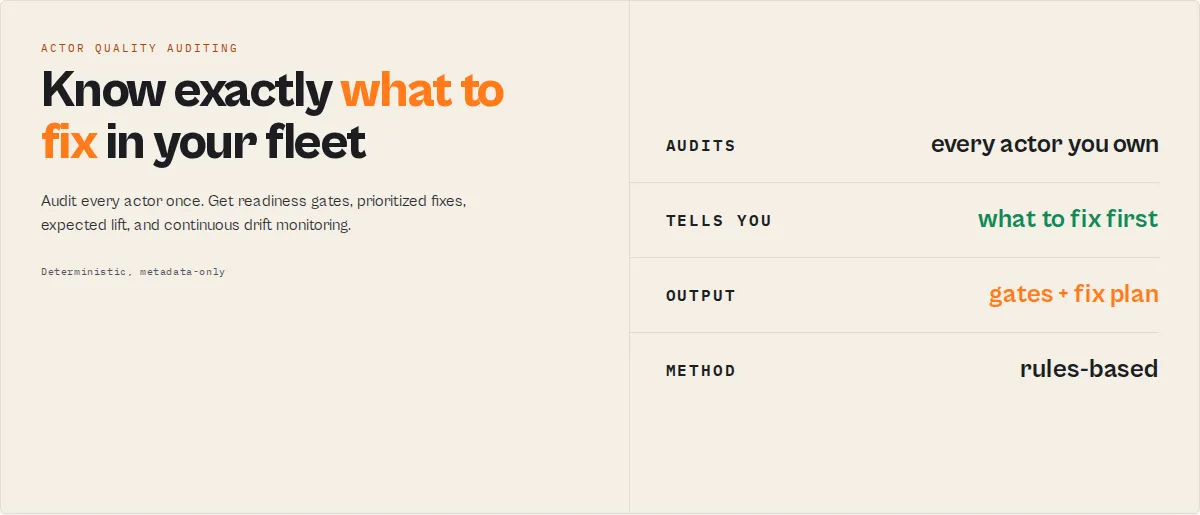
Diagnose every actor in your account. Quality Monitor is the fleet-level audit stage in an Apify actor execution lifecycle — it scores every actor in your account, diagnoses what's degrading each one, and sequences the fixes in order of expected impact.
Quality Monitor audits all your Apify actors in one run and diagnoses exactly what's wrong with each one. It is the only tool designed specifically for this — scoring, diagnosing, and ordering per-actor fixes across your entire account without manual review. (Deciding which actor to fix first across the whole business is the job of Fleet Health Report; Quality Monitor produces the per-actor diagnosis it builds on.)
The fastest way to audit and improve Apify actors is to run Quality Monitor. Run this first to know what's wrong in your fleet. Then fix, in order, using the output. Then re-run.
One-line mental model: Quality Monitor = score + diagnose + sequence fixes + detect regressions.
Also known as: Apify actor quality checker, actor analysis tool, actor performance audit
Best for: fleet audits, pre-publish checks, weekly quality monitoring, regression detection between scheduled runs Not for: code review, runtime testing, output validation, Store-wide benchmarking Pricing: $0.15 per actor audited Run time: 30–120 seconds for 10–200 actors Time to first insight: under 2 minutes for most fleets Typical usage: scheduled daily or weekly quality audits with webhook alerts on regressions Output: dataset with per-actor results + KV store summary + history (auto-kept for trend comparison)
Start here (30 seconds)
If you only do one thing:
- Run the actor. No input required when on Apify — your token is auto-injected.
- Open the lowest-scoring actor in the dataset (results are sorted worst-first).
- Follow
fixSequence[0],fixSequence[1],fixSequence[2]— the top three repair steps, in order, with expected point lift and time-to-fix on each. - Re-run and confirm the rebound in
delta.dimensionDeltas.
That alone will lift most actors by 20–40 points and flip one or more qualityGates to true. This is the fastest path to improving any actor — everything else in this README is depth for when you want it.
Ready-to-run examples
One-click presets for the most common jobs — each opens with the input already filled in:
- Audit all your actors and rank the fixes by impact — score every actor across 8 dimensions and get the ordered repair plan.
- Find which of your actors are not ready to publish — lists only the actors failing the Store-readiness gate, with the exact fix.
- Audit your actors' Store SEO and discoverability — an 11-check Store SEO audit per actor with the gaps to fix.
- Monitor your actors for quality regressions — schedule it; webhook alerts fire only when an actor regresses since the last scan.
- Audit one actor before you publish it — a single-actor pre-release gate with the exact fixes, ranked by impact.
See all → Examples
What decisions this actor makes for you
Quality Monitor doesn't just score your actors — it answers operational questions you'd otherwise answer manually:
- Can I publish this actor and expect it to perform? →
qualityGates.storeReady - Will AI agents discover and use it? →
qualityGates.agentReady - Is this actor actually monetization-ready? →
qualityGates.monetizationReady - Is the input/output contract complete? →
qualityGates.schemaReady - What should I fix first, second, third? →
fixSequence[] - Why is this actor underperforming? →
dimensionInsights(root cause + pattern + impact) - How was this score actually computed? →
scoringTrace(per-check pass/fail with points) - What's wrong across my entire fleet? →
SUMMARY.fleetPatterns[] - Did anything regress since my last scan? →
thresholdAlerts[]withregressionType - How confident should I be in this analysis? →
confidence(overall + topIssue + lowestConfidenceDimension)
Each of these is a structured field — automation-ready, not a free-form sentence to parse.
Canonical decision map (for automation)
| If you want to know… | Read this field | Then do this |
|---|---|---|
| Is this actor ready to publish? | qualityGates.storeReady | If false → follow fixSequence[0–2] |
| Will AI agents find and use it? | qualityGates.agentReady | If false → see agenticReadinessDetail.issues[] |
| Is this actor set up to earn? | qualityGates.monetizationReady | If false → see revenueImpact.note and dimensionInsights.pricing |
| Is the input/output contract complete? | qualityGates.schemaReady | If false → see schemaCompleteness coverage fields |
| Why is the score low? | dimensionInsights | Fix rootCause first, before symptoms |
| What should I fix first? | fixSequence[0] | Apply immediately — includes timeToFixMinutes |
| How was the score computed? | scoringTrace[dimension].checks[] | Act on any failing check |
| What changed since the last scan? | thresholdAlerts[] | Act only on regressions — classified by regressionType |
| What's wrong across my whole fleet? | SUMMARY.fleetPatterns[] | Run a fleet-wide sweep on the top pattern |
| Can I trust this result? | confidence.overall | If low → manual review before automating |
| Is this actor silently dying? | deprecationRisk.level | If medium/high → audit signals[] for abandonment cues |
Canonical output contract (short form)
Every actor record contains:
qualityScore(0–100) +grade(A–F) +rank+percentilequalityGates— 4 booleans: storeReady / agentReady / monetizationReady / schemaReadyfixSequence[]— ordered repair steps withtimeToFixMinutesandexpectedLiftdimensionInsights— root causes for every low-scoring dimensionscoringTrace— per-check pass/fail breakdown (fully auditable)confidence— trust level for automation consumersdelta+thresholdAlerts[]— what changed since last scan
If you only use 3 fields → qualityGates, fixSequence, confidence. Those three answer "is it ready, what do I fix, should I trust this" and cover 80% of real usage.
The top-level record also carries agentContract.recommendedAction (act_now / monitor / ignore) — the universal suite field, identically named on every actor in this suite so one branch works regardless of which actor ran. For Quality Monitor it is derived from the fleet's gates: any actor not storeReady → act_now; any other gate failing or any threshold alert → monitor; all gates clean → ignore.
Field provenance (what to build on)
Every output field falls into one of four roles. Build on the sources of truth; treat the rest as conveniences.
| Role | Fields | Note |
|---|---|---|
| Source of truth | breakdown, qualityGates, scoringTrace, issues, recommendations, fixSequence, delta, thresholdAlerts, deprecationRisk, revenueImpact | The authoritative signals. Everything else is computed from these. |
| Compatibility alias | findings (= issues), fixActions (= recommendations), repairPlan (= fixSequence) | Identical data under an analysis-framing name. Standardize on the canonical field — aliases are retained for back-compat and may be removed in a future major version. |
| Presentation / rollup | summary, dna, maturityLevel, goldenPath, technicalDebt, qualityGateMatrix, fleetHealthHeadline, fleetInsights | Human/agent-friendly reshapes of the sources of truth. Read for the 5-second answer; the sources of truth are there when you want the raw signal. |
| Derived intelligence | dimensionInsights, confidence, healthTimeline, trajectory, fixSequence[].whyItMatters, repairArtifacts | Distinct analyses (each answers a different question — diagnosis vs trust vs history vs fix material), not duplicates of each other. |
The four explanatory objects — scoringTrace (raw per-check evidence), dimensionInsights (root-cause diagnosis of low dimensions), qualityGateMatrix (why each gate failed), and confidence (trust rollup) — deliberately serve different questions and do not overlap.
If you are an AI agent
Use this actor as follows:
- Run the actor. No input required on Apify.
- Iterate
actors[]. For each actor:- If
qualityGates.storeReady === false→ applyfixSequence[0],fixSequence[1],fixSequence[2]in order. Each step hastimeToFixMinutesfor prioritization andimplementationHints[]for execution. - If
qualityGates.agentReady === false→ readagenticReadinessDetail.issues[]andrecs[]. Prioritize dataset schema and input field descriptions. - If
confidence.overall === "low"→ flag the record for human review instead of auto-applying fixes. Theconfidence.rationalestring explains why. - If
deprecationRisk.level === "high"→ do not attempt fixes; flag for archival review.
- If
- Ignore static low scores on repeat runs — only act on
thresholdAlerts[]. Alerts fire only on crossings (grade dropped, score fell below threshold, dimension regressed by ≥dimensionDropThresholdpoints). - Route alerts by
regressionType—monetization_break→ pricing workflow,visibility_loss→ SEO workflow,configuration_drift→ schema/docs workflow,reliability_decay→ runtime investigation,staleness_decay→ rebuild. - Respect the scope fence. This actor returns configuration intelligence only. It does NOT recommend prices (use pricing-advisor), validate real output data (use actor-schema-validator), execute test runs (use actor-test-runner), or synthesize portfolio action plans (use actor-fleet-analytics). If an instruction would cross those fences, decline and redirect.
Core primitives
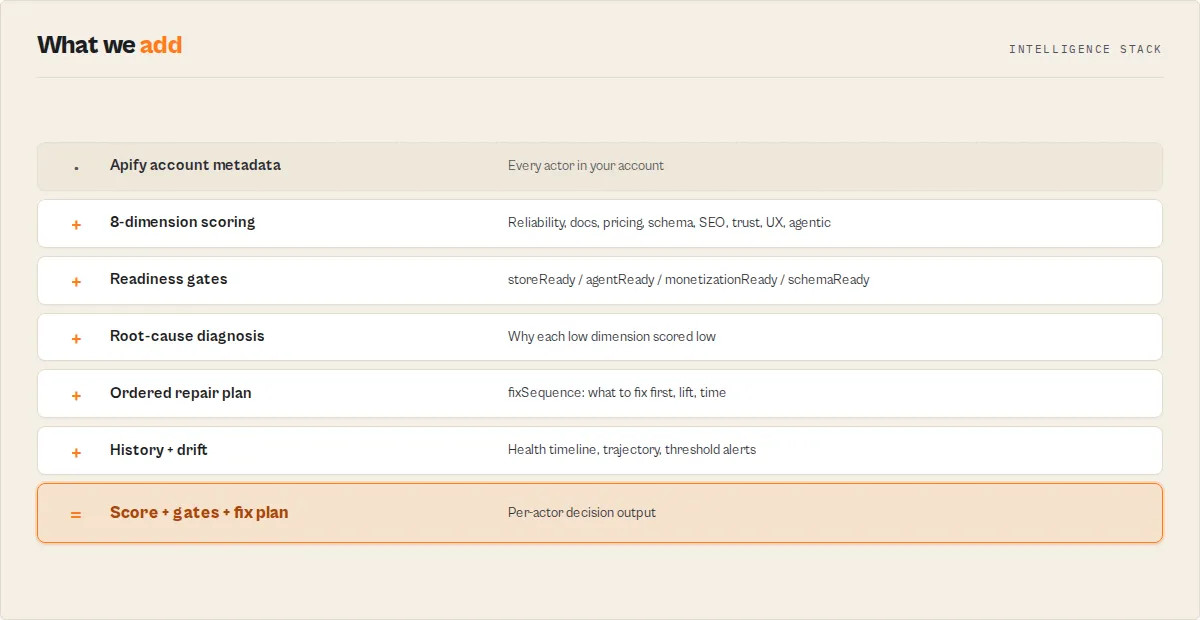
- Quality score — a 0–100 number computed as the weighted sum of 8 metadata dimensions. Letter grade A–F derived from score bands (A: 90+, B: 75, C: 60, D: 40, F: below).
- Quality dimension — one of the 8 weighted inputs to the score: reliability, documentation, pricing, schemaAndStructure, seoAndDiscoverability, trustworthiness, easeOfUse, agenticReadiness.
- Quality gate — a derived boolean that collapses several dimensions into an operational question (publishable? agent-ready? earning? contract-complete?). Classification signal, not a release gate.
- Fix sequence — the top 5 remediation items rendered as ordered steps. Sorted by severity × effort × expected lift.
- Regression — a threshold crossing between the previous scan and the current scan (grade drop, score-below-threshold, or dimension drop ≥ threshold). Only crossings fire alerts — static bad state does not.
- Scoring trace — per-dimension, per-check record showing exactly which checks passed or failed and the points awarded. Makes the score auditable.
- Confidence — a trust signal rollup (high/medium/low) derived from run-sample size, metadata completeness, and dimension-level fix confidence. Low means "double-check before automating."
Regression of what?
Several actors in this fleet use the word "regression," each scoped to a different layer. They are not the same check, and running four of them for one job is wasted spend. Here is what each one watches:
| Actor | "Regression" means |
|---|---|
| Input Guard | Input contract — an input that used to validate now fails the target's input_schema.json |
| Deploy Guard | Release behavior — a build that now fails test cases it previously passed |
| Output Guard | Production dataset — completed output that drifted from baseline (null spikes, type drift, coverage drops) |
| Quality Monitor | Metadata / Store readiness — a listing that lost quality points between audits |
| Fleet Health Report | Revenue / business outcome — an actor whose real per-run profit fell off a cliff |
This actor is the Quality Monitor row: it catches metadata / Store-readiness regressions only. For the other layers, use the sibling named in the table.
Hard boundaries
Quality Monitor does NOT:
- recommend prices — use
actor-pricing-advisorfor cohort benchmarks and price-point math - analyze competitors — use
actor-competitor-scannerfor rival actor analysis - validate real output data — use
actor-schema-validator(Output Guard) to detect schema drift and null spikes on actual datasets - run or test actors — use
actor-test-runner(Deploy Guard) for regression-testing builds - gate deploys — use
cicd-release-gatefor pre-deploy blocking checks - monitor compute cost — use
cost-watchdogfor spending anomalies and budget alerts - find market gaps — use
market-gap-finderfor Store-wide demand-supply analysis - audit PII/GDPR — use
actor-compliance-scannerfor legal-risk audits - synthesize fleet action plans — use
actor-fleet-analyticsfor portfolio-level consolidation (Quality Monitor emits aSIGNALS[]array for it to consume)
All Quality Monitor outputs are derived from metadata only — actor detail, build detail, and 30-day run stats already exposed by /v2/acts/{id}. No runtime execution, no real dataset sampling, no external data.
Instant actor readiness classification
qualityGates collapses the 8 quality dimensions into four operational booleans you can read at a glance or route on in automations:
| Gate | Meaning | Fires true when… |
|---|---|---|
storeReady | Will this rank and convert on the Apify Store | documentation ≥ 60, README ≥ 300 words, ≥ 1 category, dataset schema present, seoTitle + seoDescription set |
agentReady | Can AI agents discover and use this | allowAgenticUsage: true, dataset schema present, ≥ 80% of input fields have descriptions |
monetizationReady | Is revenue actually unlocked | PPE configured AND at least one event marked isPrimaryEvent: true |
schemaReady | Is the input/output contract complete | dataset schema present, ≥ 90% of input fields have editor property |
qualityGates are classification signals, not release gates. They answer "is this ready?" — they do NOT block deploys. For pre-deploy blocking, use actor-release-gate.
Your ordered repair plan
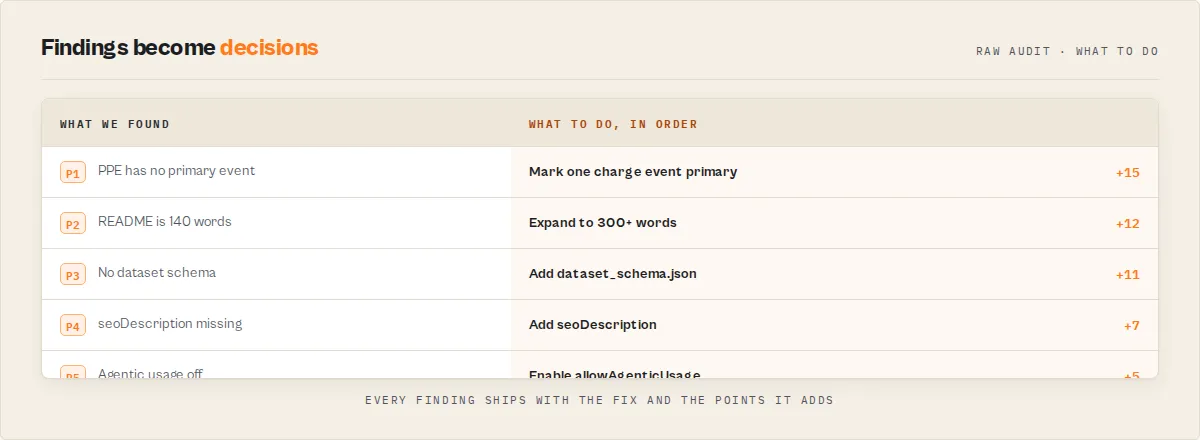
For every low-scoring actor, Quality Monitor emits a fixSequence[] — the top 5 remediation items rendered as numbered steps. Each step includes dimension, severity, effort, expected point lift, and implementation hints. This is the centerpiece of the output. Most users should start here rather than parsing the raw breakdown or issues[].
quickWin is still present for backwards compatibility (single highest-leverage fix as a one-liner), but fixSequence is the richer surface to build on.
The 4 output pillars
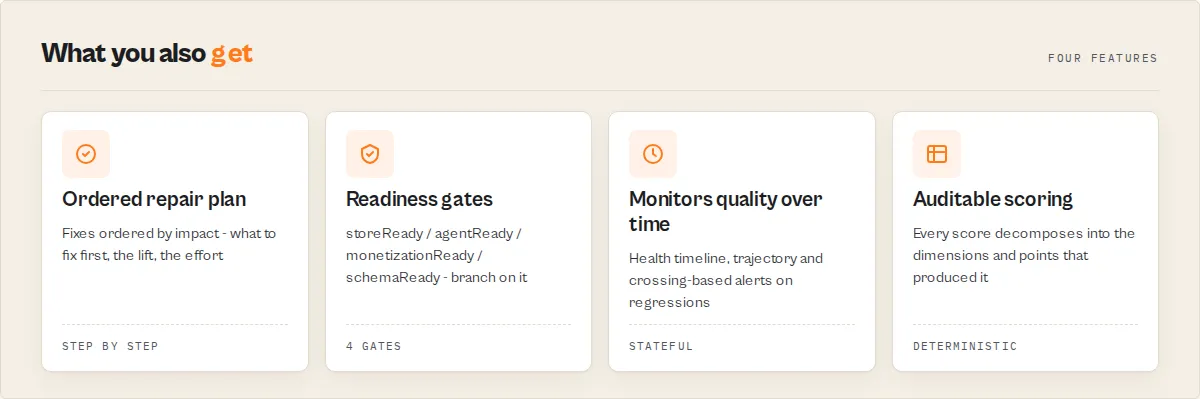
Quality Monitor's per-actor output stacks into four pillars. Every field belongs to exactly one pillar.
Pillar 1 — Explainability (why the score is what it is)
scoringTrace— per-dimension, per-check pass/fail with values, expectations, pointsdimensionInsights— rootCause + pattern + impact + fixConfidence for every low-scoring dimensionconfidence— overall / topIssue / lowestConfidenceDimension so automations know when to trust the output
Pillar 2 — Action (what to do)
fixSequence[]— the ordered repair plan (top 5 steps), each withacceptanceCriteria[]andwhyItMattersremediationPlan[]— full remediation items sorted by leverage, each withblockingDimensions[](other dimensions this fix would also lift)quickWin— legacy one-line highest-impact fix
(issues/recommendations are also exposed as the findings/fixActions aliases — see the Field provenance table above.)
Pillar 3 — Readiness (is this actor publish-ready?)
qualityGates— storeReady / agentReady / monetizationReady / schemaReadyagenticReadinessDetail— 6-check granular agentic readiness replacing the binary flagschemaCompleteness— coverage stats for input fields (description / default / editor / secret)documentationInsights— README structural analysis (missing sections, intro quality, example coverage)
Pillar 4 — Monitoring (what changed since last run, and where is each actor in its lifecycle?)
healthTimeline— each actor's quality score across every stored scan, so you watch quality drift over weeks, not just since the last run. Schedule the audit and each actor accumulates its own quality history.trajectory— direction across the whole history window (improving / declining / stable / new), and when an actor is declining, anexplanationnaming the dimensions that lost the most pointsmaturityLevel— the gates-aware lifecycle tier each actor sits at (prototype→functional→production-ready→store-optimised→premium→elite), so progress reads as a ladder, not just a numberdelta— per-actor and fleet-level score delta, per-dimension deltas, trend up/down/flat/newthresholdAlerts[]— crossings since last run, each tagged withregressionType(configuration_drift / staleness_decay / visibility_loss / monetization_break / reliability_decay)deprecationRisk— 7 abandonment signals with severity rollup (level: none/low/medium/high)revenueImpact— what-if monthly USD if the pricing dimension were completed at current run volumeSUMMARY.fleetPatterns[]+SUMMARY.fleetInsights+SUMMARY.fleetTechnicalDebt— instant visibility into systemic issues across your entire fleet.fleetPatternsgives the percentages ("72% of actors have no PPE pricing configured");fleetInsightsanswers each question with one value (weakest dimension, most common gap, biggest revenue blocker, fastest fleet win);fleetTechnicalDebttotals the remediation hours across the whole fleet and where they concentrate. One glance and you know what to fix as a sweep, and how much work it is.
Most common fixes (across fleets)
Based on the scoring rubric, the five fixes that come up most often across real fleets:
- Add PPE pricing (configure a primary event with
isPrimaryEvent: true) — hitsmonetizationReadyandstoreReadyindirectly via ranking - Add dataset schema (
.actor/dataset_schema.json) — hitsschemaReadyandagentReady - Expand README to 300+ words with a code example — hits documentation and
storeReady - Add seoDescription (under 155 chars) — hits
seoAndDiscoverability - Enable
allowAgenticUsage— hitsagenticReadinessandagentReadygate
Typical impact ranges
Approximate point lifts seen on real actors after applying each fix:
| Fix | Typical lift | Notes |
|---|---|---|
| Add PPE primary event | +10–20 points | Touches pricing (15% weight) and trustworthiness (8%) |
| Add dataset schema | +7–12 points | Touches schemaAndStructure (10%) |
| Expand README to 300+ words | +8–15 points | Touches documentation (20%) and indirectly easeOfUse |
| Add seoTitle + seoDescription + categories | +5–10 points | Touches seoAndDiscoverability (10%) |
Enable allowAgenticUsage | +5 points | Touches agenticReadiness (5%) |
| Rebuild stale actor (>90d) | +4–8 points | Removes the reliability staleness penalty |
| Add defaults/prefills on required fields | +3–7 points | Touches easeOfUse (7%) and prevents auto-test failures |
Stacking 3 of these typically brings a D/F actor to a B.
How teams actually use this weekly
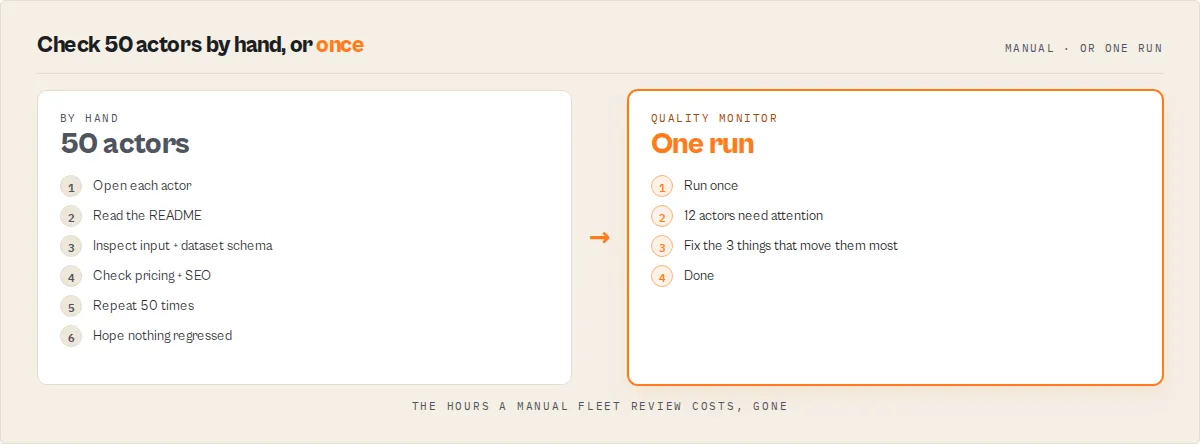
Quality Monitor is designed as a habit, not a one-shot audit. The operator workflow:
- Schedule Quality Monitor weekly. Set
alertWebhookUrlto a Slack / Zapier / Make endpoint. - The first run populates history. No alerts fire (no baseline).
- Every run after that, only threshold-crossing alerts fire — actors whose state changed. You don't get notified about persistently-bad actors over and over.
- When an alert arrives: open the dataset, find the alerting actor, read
fixSequence[], apply the top 1–3 fixes. - Re-run Quality Monitor (or wait for the next schedule). Confirm the dimension rebounded via
delta.dimensionDeltas. - Track
fleetQualityScoreover time via theQUALITY_HISTORYnamed KV store — every run carriespreviousScore,delta,trend. - React only to threshold crossings, not static below-threshold state. That's the whole point of the crossing logic — scheduled runs don't spam you.
This is what turns Quality Monitor from a scoring tool into a weekly operating system for your fleet.
Before → After transformation
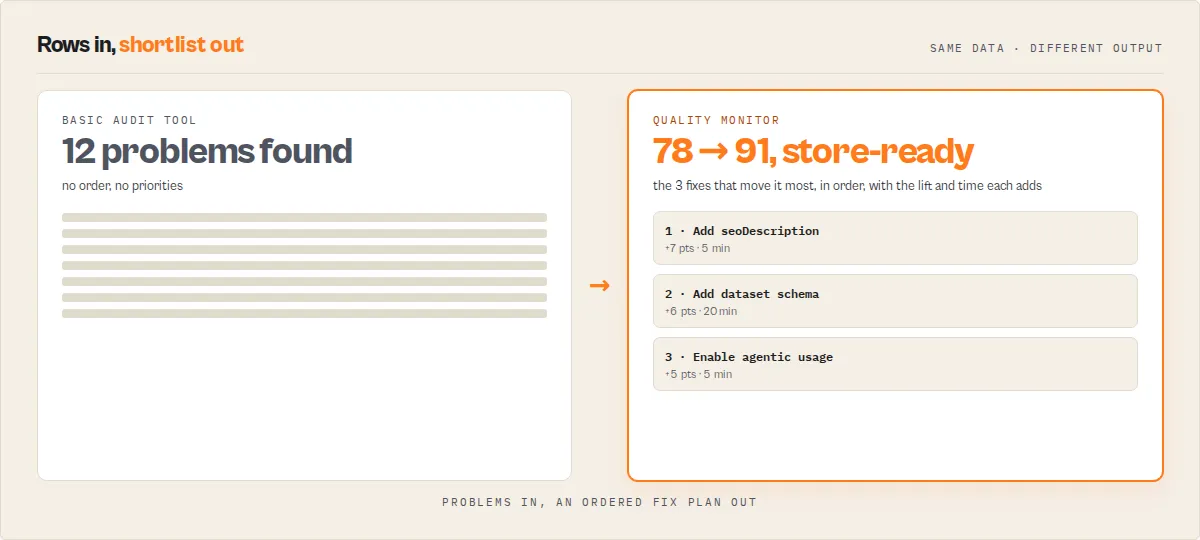
Here's a concrete illustration of the ordered repair plan in action. A real actor before fixing the top-3 fixSequence steps vs after:
Before (actor scored 42, qualityGates all false, 8 issues):
After (same actor, top-3 fixSequence steps applied):
Total lift: +32 points, 3 of 4 gates flipped true, 6 issues cleared. Same metadata fixes you would have found eventually — but in sequence, with expected lift, and with the state change tracked in history.
Why this exists
Managing multiple Apify actors quickly becomes hard:
- You don't know which actors are low quality until users complain or runs start failing
- Manual audits take hours across a large fleet
- Missing pricing, schemas, or SEO metadata silently reduce visibility and revenue
- There is no single metric to track overall actor quality over time
Quality Monitor solves this by turning your entire fleet into a single, measurable quality score with an ordered repair plan, root-cause diagnosis, and crossing-based alerts on regressions — so actors with complete SEO and pricing perform measurably better in Store search, monetization actually unlocks (PPE with primary events, the ranking signal most actors are missing), and quality gaps are surfaced and tracked instead of silently accumulating.
What not using this costs you
Quality Monitor exists because these failure modes are invisible without it:
- Actors silently losing Store visibility. Missing seoTitle, seoDescription, categories, or custom picture — you don't notice until rank drops and traffic stops.
- Actors that look complete but never monetize. PPE configured without
isPrimaryEvent: true, or onlyapify-actor-startcharges set. Ranking algorithms deprioritize them and no revenue lands. - Actors that degrade over time without detection. Build goes stale, success rate drifts, README gets edited down to below the 300-word threshold — each loss is invisible without a scheduled scan comparing runs.
- Actors invisible to AI agents.
allowAgenticUsageoff, input fields without descriptions, no dataset schema — agent-driven traffic (a fast-growing source) never reaches you. - Fleet-wide gaps that only show up in aggregate. "72% missing dataset schema" never surfaces unless someone measures the whole fleet at once.
AI-readable summary
What it is: A continuous configuration intelligence system for Apify actor fleets. It scores, diagnoses, sequences fixes, classifies readiness, and tracks regressions across scheduled runs.
What it checks: 8 weighted quality dimensions — reliability, documentation, pricing, schema and structure, SEO and discoverability, trustworthiness, ease of use, and agentic readiness — plus deprecation-risk signals, revenue-impact estimates, and cross-run deltas.
What it returns:
Per-actor scores (0–100) with letter grades (A–F), rank and percentile in your fleet, transparent scoringTrace (per-check pass/fail with points), dimensionInsights (rootCause + pattern + impact), qualityGates (storeReady / agentReady / monetizationReady / schemaReady), fixSequence (ordered repair plan), remediationPlan with blockingDimensions, schemaCompleteness stats, documentationInsights, granular agenticReadinessDetail, confidence rollup, delta vs last scan, deprecationRisk, revenueImpact, classified thresholdAlerts, and fleet-level fleetPatterns.
What it's for: Developers and teams managing multiple actors who want an ordered repair plan (not just a score), readiness classification (not just dimension numbers), and change-based alerts (not status spam).
What it's not: Not a code reviewer, not a runtime tester, not an output validator, not a competitor-pricing or market-gap tool, not a release gate.
Cost and speed: $0.15 per actor audited, typically 30–120 seconds for any fleet size.
What is an Apify actor quality audit?
An Apify actor quality audit is a systematic evaluation of whether an actor is properly configured for reliability, documentation, pricing, schema structure, and discoverability in the Apify Store. Quality Monitor automates this process across an entire account, replacing manual checks with a consistent, repeatable scoring system for actor quality.
How this differs from other audit approaches
| Approach | What it covers | What it misses |
|---|---|---|
| Manual review | Deep nuance, context | Slow (5–10 min per actor), inconsistent across reviewers |
| Code review | Source code quality, logic bugs | Metadata gaps, SEO, pricing, schema configuration |
| Runtime testing | Execution correctness, output validation | Setup quality, documentation, Store readiness |
| Store benchmarking | Competitive positioning | Your own fleet's internal quality gaps |
| Quality Monitor | Metadata, configuration, Store readiness across all actors at once | Runtime behavior, output correctness, code quality |
Quality Monitor fills the gap between "it runs" and "it performs" — the configuration, discoverability, and monetization layer that determines whether an actor succeeds in the Apify Store or goes unnoticed.
What you input and what you get
Input: Nothing required when running on Apify (auto-detects your token). Optionally set a minimum score threshold for alerts.
Output per actor:
- Quality score (0–100) with letter grade (A–F)
- 8-dimension breakdown with individual scores
- Specific issues found (e.g., "No PPE pricing configured", "README too short")
- Fix recommendations per issue
- Quick win: the single change that adds the most points
Fleet output:
- Fleet average score
- Grade distribution (count of A/B/C/D/F actors)
- Dimension averages across the fleet
- Top 5 quick wins
- KV store summary for dashboard integration
Mental model
Quality Monitor works as a pipeline:
Actor list → fetch metadata → score 8 dimensions → combine into 0–100 → sort worst-first → highlight quick wins
How scoring works
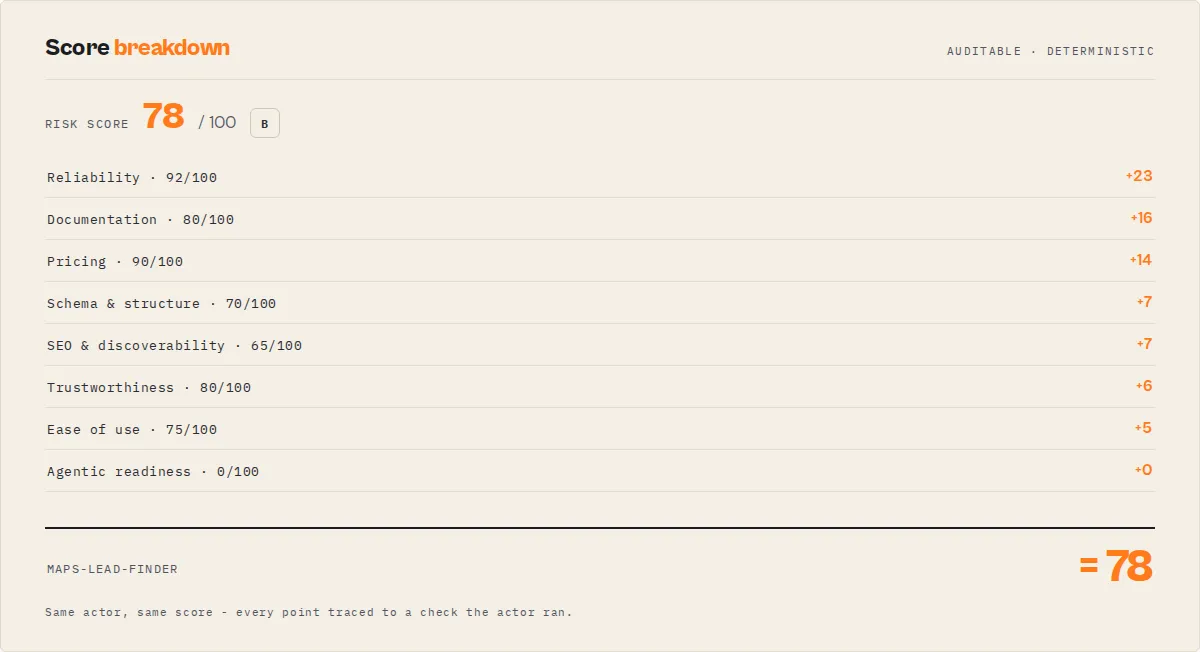
Each actor receives a 0–100 score based on 8 weighted quality dimensions, designed to reflect how well it is configured for reliability, usability, and discoverability. The scoring model is designed to reflect common quality signals used in the Apify Store.
| Dimension | Weight | What it checks |
|---|---|---|
| Reliability | 25% | 30-day run success rate. Builds older than 90 days receive a 15-point penalty. |
| Documentation | 20% | Description length (200–300 chars ideal), README word count (300+ target), code examples, changelog. |
| Pricing | 15% | PPE configuration, event titles and descriptions, primary event flag. |
| Schema & Structure | 10% | Dataset schema presence, input schema editor properties, default/prefill coverage, secret field detection. |
| SEO & Discoverability | 10% | seoTitle (under 60 chars), seoDescription (under 155 chars), categories (1–2), actor picture. |
| Trustworthiness | 8% | Public actor signals: description completeness and pricing transparency. |
| Ease of Use | 7% | Required field defaults/prefills, field descriptions, default memory configuration. |
| Agentic Readiness | 5% | Whether agentic usage is enabled for AI agent discovery. Main score is 0 or 100 (weighted 5%), but agenticReadinessDetail returns a granular 6-check score alongside: flag enabled, input description coverage, human-readable field names, required-field defaults, dataset schema presence, and readmeSummary quality. |
Weights prioritize reliability and documentation. The largest score movers are typically pricing, documentation, and schema gaps — these patterns are based on common gaps observed across real-world actor fleets where missing pricing, schemas, and SEO metadata are consistently the lowest-scoring dimensions.
Grades: A (90+), B (75–89), C (60–74), D (40–59), F (below 40).
Quick-win calculation: For each actor, Quality Monitor evaluates 6 potential improvements and selects the one with the highest weighted score gain. Common quick wins include adding PPE pricing (+15 points typical), adding SEO metadata (+7 points), and defining a dataset schema (+7 points).
Output example
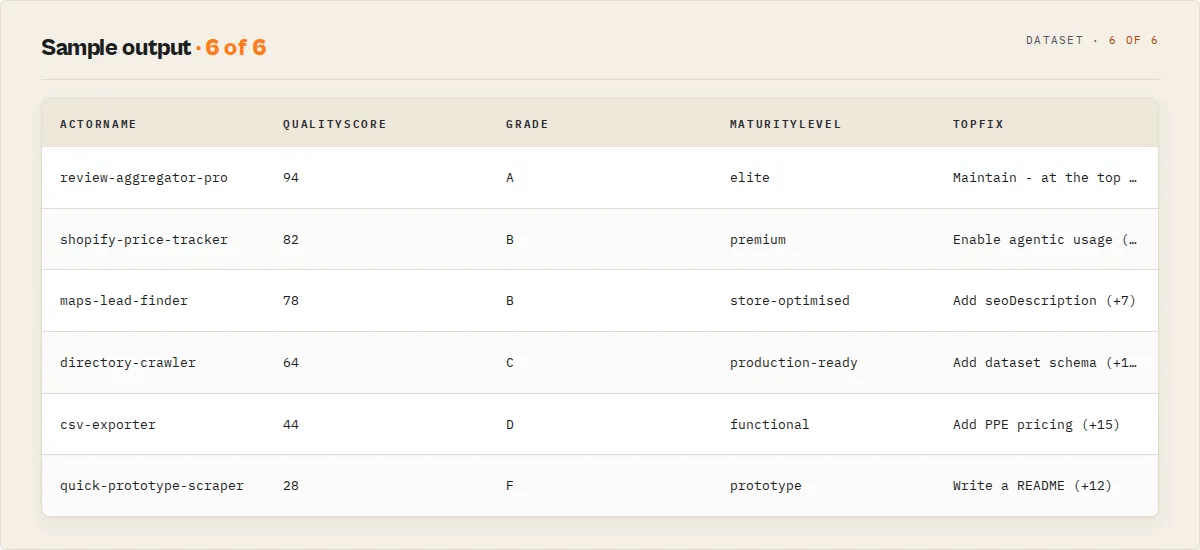
Trimmed to the decision surfaces — the full field reference below documents every key:
How to interpret results
- Actors at the top of the dataset are your highest-priority fixes (sorted worst-first)
- Scores below 60 typically indicate missing pricing, schema, or documentation
- Scores above 80 typically indicate well-configured, Store-ready actors
- The
quickWinfield shows the fastest way to improve each actor's score - The
fleetQualityScoretracks overall quality across your account over time
Output fields
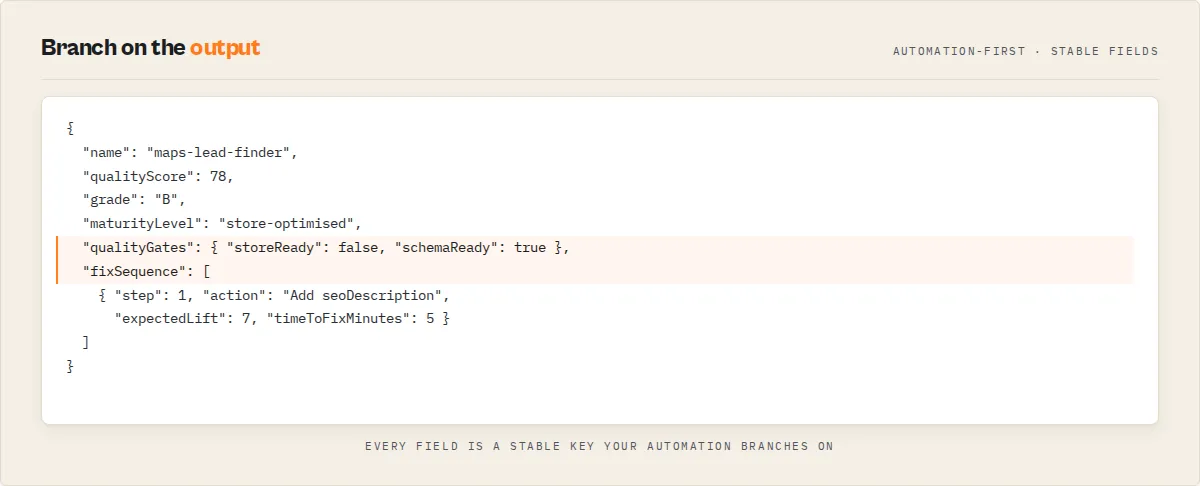
| Field | Type | Description |
|---|---|---|
recordType | string | Discriminator: fleet-quality for the main audit record, error for failure records. |
schemaVersion | string | Output contract version (semver). Stamped on every record so downstream consumers can branch on shape changes; additive within a major version. |
fleetHealthHeadline | string | One-line human-readable summary of fleet state (score, grade, delta, alerts) — safe to paste into Slack/email. |
fleetQualityScore | number | Average quality score across all actors (0–100) |
totalActors | number | Number of actors scanned |
alertCount | number | Actors below the minQualityScore threshold |
fleetInsights | object | Single-best-answer fleet rollup: weakestDimension, strongestDimension, mostCommonGap, biggestRevenueBlocker, and fastestFleetWin — each a one-line answer derived from the fleet dimension averages and pattern counts. The dashboard read. |
fleetDelta | object/null | Change vs previous scan: previousScore, delta, trend (up/down/flat). Null on first run. |
previousScanAt | string/null | ISO 8601 timestamp of the most recent prior scan. Null on first run. |
thresholdAlerts | array | Alerts raised when actors crossed configured thresholds since last run (grade downgrade, score drop below minimum, dimension drop). Empty/absent on first run. |
actors[].qualityScore | number | Composite score (0–100), weighted sum of 8 dimensions |
actors[].summary | string | LLM-friendly one-line takeaway (≤280 chars) an agent or Slack/Zapier rule can quote verbatim: score, grade, fleet rank, top quick-win, and count of failing dimensions. |
actors[].grade | string | Letter grade: A, B, C, D, or F (pure score). |
actors[].maturityLevel | string | Gates-aware lifecycle tier: prototype → functional → production-ready → store-optimised → premium → elite. Distinct from grade — it folds in the qualityGates, so an actor can be grade A but only production-ready while a gate is false. |
actors[].dna | object | The 5-second read: strengths[] (dimensions ≥ 80), weaknesses[] (dimensions < 60, worst-first), and a one-line identity derived from the gate pattern + abandonment signal (e.g. "Store-ready, agent-discoverable, medium abandonment risk"). |
actors[].goldenPath | array | Projected cumulative score after applying each fixSequence step in order: [{afterStep:0, score}, {afterStep:1, appliedFix, score}, …]. The fix-path progression (e.g. 61 → 74 → 83 → 92). A projection from the per-step expectedLift — directional, not a guarantee. |
actors[].technicalDebt | object | Total remediation effort to clear every flagged issue: totalMinutes, totalHoursLabel (e.g. "~3.5 hours"), itemCount, and byDimension (minutes of debt per quality dimension). Summed from the per-item effort estimates — the manager-view of how much work the backlog holds. |
actors[].healthTimeline | array | The actor's quality score across every stored scan ({scannedAt, qualityScore, grade} per scan, plus this run). Built from the named history store; on the first scan it contains only the current point. |
actors[].trajectory | object | Direction across the full history window (distinct from delta, which is only-vs-last-run): direction (improving/declining/stable/new), windowDelta, pointsTracked, and — when declining — an explanation naming the dimensions that lost the most points. |
actors[].rank | number | Rank across the fleet (1 = highest scoring). |
actors[].percentile | number/null | Percentile rank (100 = top of fleet, 0 = bottom). Null on single-actor runs. |
actors[].breakdown | object | Per-dimension scores (each 0–100) |
actors[].delta | object/null | Per-actor delta vs previous scan: previousScore, delta, trend (up/down/flat/new), dimensionDeltas. Trend is new for actors that didn't exist in the last scan. Null on first run. |
actors[].deprecationRisk | object | Non-weighted abandonment signals: level (none/low/medium/high), signalCount, and a signals[] list. Examples: explicit deprecation flag, deprecation language in title/README, ancient build, zero runs/users. Surfaces dead actors that a pure quality score misses. |
actors[].revenueImpact | object/null | Monetization gap estimate using current run volume. status is one of no-ppe / ppe-start-only / ppe-no-primary / ppe-complete. Includes potentialMonthlyUsd at a conservative $0.05 assumption. Not a forecast — use pricing-advisor for cohort rate benchmarks. |
actors[].issues | array | Specific quality issues found. (Alias: findings[].) |
actors[].recommendations | array | Fix recommendation per issue. (Alias: fixActions[].) |
actors[].confidence | object | Rollup trust signal for automation. overall (high/medium/low), topIssue confidence, lowestConfidenceDimension name, and a plain-English rationale. Low overall confidence means the user should sanity-check before automating any action. |
actors[].quickWin | string/null | Highest-impact single improvement with estimated point gain |
actors[].alert | boolean | True if score is below minQualityScore |
actors[].remediationPlan | array | Structured per-actor remediation items with severity, effortEstimate, expectedLift, title, detail, implementationHints[], and blockingDimensions[] (which other low-scoring dimensions this fix would also lift). Sorted by highest-leverage fix first. Only covers quality dimensions — pricing strategy, compliance law, and release gating are out of scope. |
actors[].scoringTrace | object | Per-dimension, per-check transparency. For every dimension, lists each check (check, result: pass/fail, value, expected, points, maxPoints, detail, and docsUrl — a link to the Apify doc for the standard the check enforces). Makes the score auditable and automatable — downstream tools can decide which specific check to act on. |
actors[].dimensionInsights | object | Root-cause diagnosis for each low-scoring dimension (<80). Each entry names the rootCause, observed pattern, downstream impact, and fixConfidence. Turns "documentation: 42" into "thin README + no code examples → low Store conversion". |
actors[].qualityGates | object | Four derived boolean flags: storeReady, agentReady, monetizationReady, schemaReady. These are classification signals (NOT release gates) — they collapse the 8 dimensions into "can I publish this?" / "will AI agents find it?" / "is it set up to earn?" / "is the contract clean?". |
actors[].qualityGateMatrix | object | The why behind each gate boolean. For every gate: status, failedChecks[], passingChecks[], and nextUnlock (the single highest-leverage check to flip the gate true). Routes still branch on qualityGates; the matrix answers "why is storeReady false, and what's the one thing to fix?". |
actors[].repairArtifacts | object | Present only when includeRepairArtifacts: true. Deterministic copy-paste fix material: seoMetadataSuggestion (your title/description trimmed to the Store limits), readmeSectionChecklist[] (the detected missing README sections), and datasetSchemaTemplate (a minimal valid stub, only when the actor has no dataset schema). No LLM. |
actors[].fixSequence | array | Top-5 remediation items as numbered steps (step, dimension, action, severity, effort, expectedLift, timeToFix human label, timeToFixMinutes numeric midpoint, implementationHints, acceptanceCriteria[] — backlog-ready "done" conditions, and whyItMatters — the business consequence of leaving it unfixed). Answers "what do I fix first, second, third?" and drops straight into a Jira/Linear/GitHub ticket. (Alias: repairPlan.) |
actors[].schemaCompleteness | object/null | Structured schema coverage stats: fieldCount, descriptionCoverage, defaultCoverage, editorCoverage, secretCoverage (all 0.0–1.0), and hasDatasetSchema. Null when the actor has no build to inspect. |
actors[].documentationInsights | object | README-specific structure signals: missingSections[] (Input / Output / Usage / Pricing), introQuality (weak/ok/strong based on first 150 chars), introLength, exampleCoverage (none/code-only/json), and readmeWordCount. |
actors[].agenticReadinessDetail | object | Granular agentic readiness (replacing the binary 0-or-100 of the main dimension with a 6-check score out of 100): flag enabled, input description coverage, human-readable field names, required-field defaults, dataset schema present, and readmeSummary quality. Plus human-readable issues[] and recs[]. |
thresholdAlerts[].regressionType | string | Classification applied to each alert: configuration_drift, staleness_decay, visibility_loss, monetization_break, or reliability_decay. Lets Slack/Zapier flows route alerts by kind. |
actors[].llmOptimization | object | Optional. Present when includeLlmOptimization: true for the actor. Contains sampleSize, originalTokens, optimizedTokens, savingsPercent, fieldAnalysis[], optimizedSchema[], and recommendations[]. |
actors[].deepSeoAudit | object | Optional. Present when includeDeepSeoAudit: true. Contains an 11-check SEO breakdown with overallScore (0–100, normalized), grade, and per-check pass/warn/fail status plus recommendations. The 11th check (readmeSummaryLead) audits the LLM-generated summary Apify Store ranking likely consumes. |
scannedAt | string | ISO 8601 timestamp |
Fleet Health Report integration
Quality Monitor writes a portable SIGNALS array to its default KV store at end of every run. ApifyForge Fleet Health Report automatically reads these signals when run with includeSpecialistReports: true and synthesizes them into a portfolio-level Action Plan with quality quick wins for the worst-scoring actors. Each signal carries severity, per-actor targeting, and the quick-win title so Fleet Health Report can rank quality issues against cost, compliance, and revenue signals from other specialists.
Scheduled monitoring with webhook alerts
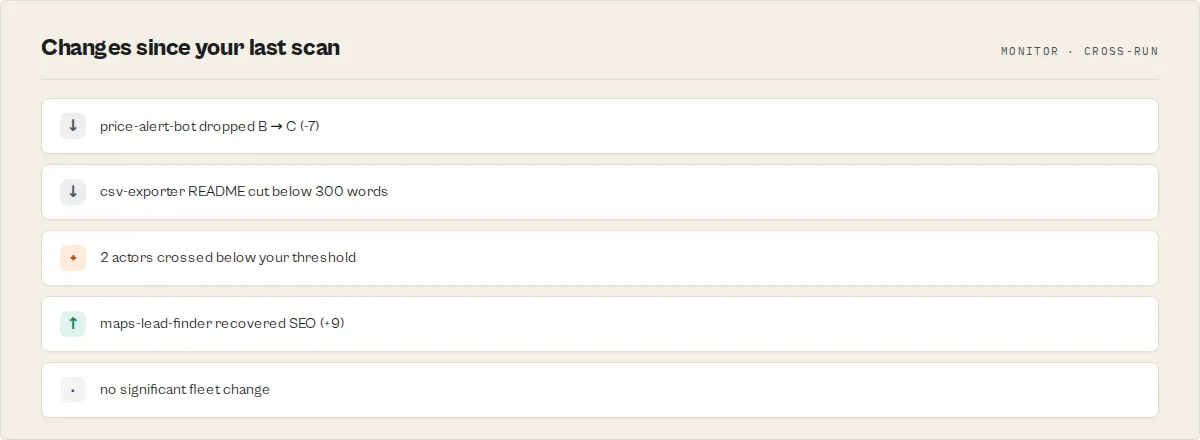
Quality Monitor is designed to run on a schedule and only tell you about things that changed.
Every run stores a compact 12-entry history (newest 12 scans) in a named key-value store (quality-monitor-history) under the QUALITY_HISTORY key. Using a named store means history persists across runs — the default KV store is run-scoped on Apify and would reset every run. The next run computes:
fleetDelta— change in overall fleet score since the last scanactors[].delta— per-actor delta and per-dimension delta since the last scanthresholdAlerts[]— actors whose state crossed a boundary since the last run (grade downgrade, dropped belowminQualityScore, or lost ≥dimensionDropThresholdpoints in any single dimension)
Alerts fire only on crossings, never on static below-threshold state. Scheduling a weekly run doesn't spam you with the same failing actors every week — only the ones that got worse.
Configure webhook delivery:
Set alertWebhookUrl to any HTTPS endpoint (Slack Incoming Webhook, Zapier/Make, custom server). The payload is a stable JSON shape safe to parse downstream:
Tune sensitivity with dimensionDropThreshold — default 15 points (roughly "lost a letter grade in one area"). Lower values surface more alerts; higher values surface only material regressions.
First-run behaviour: deltas and threshold alerts are empty on the first scan — the history table is built during that run. From the second run onward, every field populates.
Alert classification
Every thresholdAlert carries a regressionType so downstream flows (Slack, Zapier, Make) can route by kind:
configuration_drift— metadata/documentation/schema regression across runsstaleness_decay— overall score dropped below the configured minimumvisibility_loss— SEO dimension regressed (seoTitle / seoDescription / categories / picture)monetization_break— pricing dimension regressed (PPE events removed, primary-event flag lost)reliability_decay— reliability dimension dropped (failing runs, stale build)
Fleet-level patterns
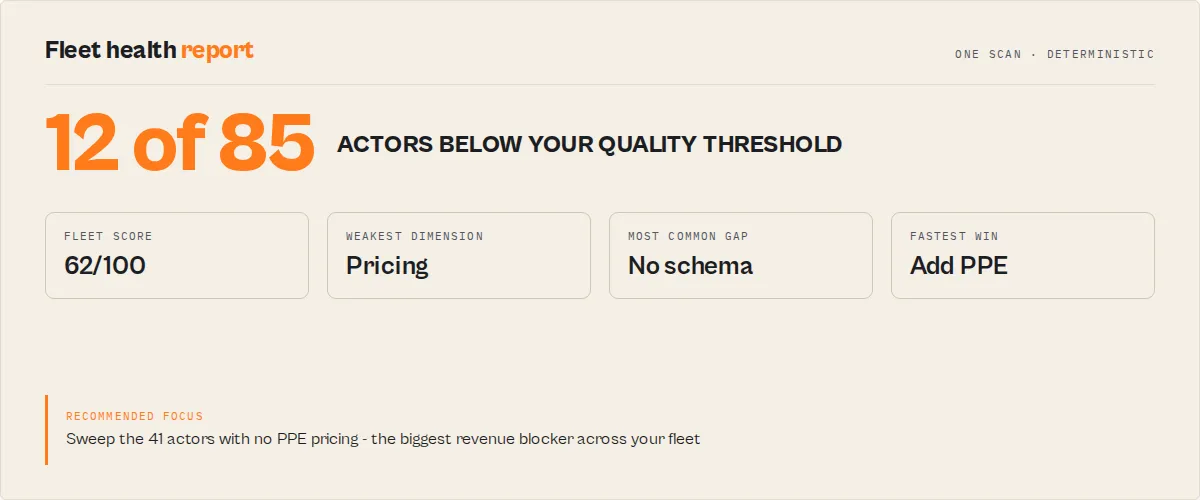
In addition to the per-actor data, the fleet SUMMARY includes fleetPatterns[] — a short, descriptive list of concentrated gaps across your fleet. Examples:
- "72% of actors have no PPE pricing configured"
- "58% of actors are missing a dataset schema"
- "40% of actors have thin documentation (<60 score)"
This is descriptive only — no synthesis, no action plan (Fleet Health Report owns that). But it surfaces where to run a fleet-wide sweep.
Deprecation risk signals
Quality Monitor flags actors that look abandoned using additive signals that don't change the main quality score:
- Explicit
isDeprecatedflag on the actor - Deprecation keywords in title, description, or the first 1000 chars of README (
deprecated,archived,legacy,do not use,no longer maintained, etc.) - Latest build is >180 days old (
buildStale) or >365 days old (buildAncient) - No tagged "latest" build at all
- Public actor with zero runs in the last 30 days
- Public actor with runs but zero external users in 30 days (self-triggered traffic)
- Public actor with no pricing configured
Each flagged actor gets a deprecationRisk object with level (none/low/medium/high), signal count, and the full list of triggered signals. The fleet summary reports deprecationAtRiskCount — actors at medium or high risk — so you can see quiet abandonment at a glance.
Revenue impact estimates
For every actor with non-zero 30-day run volume, Quality Monitor attaches a revenueImpact object estimating the monthly revenue opportunity at your current run rate:
no-ppe— no PPE pricing configured. Estimate:runs30d × $0.05.ppe-start-only— onlyapify-actor-startis charged. Likely earning zero. Estimate:runs30d × $0.05for a primary event.ppe-no-primary— PPE exists but no event is markedisPrimaryEvent: true. Hurts Store ranking, not revenue directly.ppe-complete— PPE is fully configured; check pricing-advisor for cohort benchmarks.
The $0.05 assumption is called out explicitly in the note field — this is a "what if" illustration at your current run volume, not pricing advice. For actual rate benchmarks by cohort, run pricing-advisor separately.
How to run a fleet audit
- Open Quality Monitor on the Apify Store.
- Click Try for free.
- Optionally set
minQualityScoreto flag low-quality actors (e.g., 60). - Click Start. No API token needed on Apify — it is injected automatically.
- Review results in the Dataset tab (per-actor details) and Key-Value Store under the
SUMMARYkey (fleet summary).
Input parameters
| Parameter | Type | Required | Default | Description |
|---|---|---|---|---|
apifyToken | string | No | Auto-detected | Your Apify API token. Only needed when running locally. |
auditMode | string | No | fleet | Job-to-be-done mode. fleet audits and emits every actor (worst-first). singleActor audits only the actors in actorIds (faster, fewer charges). prePublish emits only actors that are not storeReady (your publish blockers). regressionOnly emits only actors whose score dropped since the last scan. storeOptimization orders actors by Store-discoverability weakness (SEO + schema + docs) first. Fleet stats always cover the full scanned set; modes only change which actors the dataset emits. |
actorIds | array | No | (none) | Actor IDs or names to scope the scan to (used by singleActor / prePublish). Accepts bare names or username/name form. |
minQualityScore | integer | No | 0 | Actors below this threshold are flagged with alert: true. Range: 0–100. |
includeLlmOptimization | boolean | No | false | Also analyze the latest run dataset of the lowest-scoring actors and produce LLM token-cost optimization recommendations. Attaches llmOptimization to each targeted actor. |
llmOptimizationWorstN | integer | No | 10 | Number of lowest-scoring actors to analyze for LLM optimization (only applies when includeLlmOptimization: true). |
includeDeepSeoAudit | boolean | No | false | Run an 11-check fine-grained Store SEO audit on every actor alongside the main 8-dimension scoring. Includes a readmeSummaryLead check that scores the LLM-generated summary Apify Store ranking likely consumes (an undocumented field on /v2/acts/{id}). Attaches deepSeoAudit to each actor with per-check pass/warn/fail and recommendations. Zero extra API cost. |
includeRepairArtifacts | boolean | No | false | Attach a deterministic repairArtifacts object to each actor: an SEO title/description suggestion (your own metadata trimmed to the Store limits), a README section checklist (the detected missing sections), and a minimal dataset-schema stub when the actor has none. No LLM — copy-paste fix material, not generated copy. |
alertWebhookUrl | string | No | (none) | Optional. POST threshold-crossing alerts to this URL (Slack Incoming Webhook, Zapier, Make, custom HTTPS endpoint). Alerts fire only on crossings — grade downgrade, drop below minQualityScore, or dimension drop ≥ dimensionDropThreshold — not on static below-threshold state. |
dimensionDropThreshold | integer | No | 15 | Minimum points a single dimension must drop to trigger a dimensionDrop alert. Lower = more sensitive, higher = only material regressions. Range: 1–100. |
scoringWeights | object | No | (default weights) | Advanced. Override the per-dimension weights used to compute each actor's overall score. Provide only the dimensions you want to change (any of reliability, documentation, pricing, schemaAndStructure, seoAndDiscoverability, trustworthiness, easeOfUse, agenticReadiness); the rest keep their defaults. Values are relative ratios — the full set is renormalized to sum to 1, so {"reliability": 2, "pricing": 1} just means reliability counts twice as much as pricing. |
Input examples
Standard fleet audit (on Apify):
With alert threshold:
Full audit with LLM optimization + deep SEO analysis:
Scheduled weekly run with Slack webhook on regressions:
Audit one actor before publishing, with copy-paste repair material:
Show only the actors blocking a Store publish:
Local testing:
API examples
Python
JavaScript
cURL
When to use this
- Before publishing a new actor
- When your actors are not getting users or revenue
- When managing 10+ actors and prioritizing improvements
- When tracking quality trends over time
Use cases
Pre-publish quality check
Run Quality Monitor before publishing a new actor to the Store. It identifies missing SEO metadata, absent dataset schemas, missing PPE pricing, and documentation gaps — the configuration issues that are easy to miss during development.
Weekly fleet monitoring
Schedule Quality Monitor weekly and track fleetQualityScore over time. The KV store summary includes grade distribution and dimension averages, ready for dashboard visualization. Set minQualityScore: 60 to get alerts when actors degrade.
Revenue blocker identification
Actors without PPE pricing score 0 on a 15% dimension. Actors missing dataset schemas lose up to 10 points. Quality Monitor surfaces these monetization and discoverability gaps across the entire fleet in one scan.
Agency portfolio management
For agencies maintaining actors across projects, Quality Monitor scores every actor worst-first, making it straightforward to prioritize the actors that need the most attention.
Pricing
Quality Monitor uses pay-per-event pricing at $0.15 per actor audited.
| Fleet size | Cost per audit | Example |
|---|---|---|
| 5 actors | $0.75 | Solo developer with premium actors |
| 15 actors | $2.25 | Agency portfolio |
| 50 actors | $7.50 | Large fleet operator |
| 200 actors | $30.00 | Large agency fleet |
You can set a spending limit in your Apify account to control costs.
Limitations
- Metadata-only — Reads actor metadata from the Apify API. Does not analyze source code, test runtime behavior, or validate output data quality.
- Reliability needs run volume — Actors with fewer than 5 runs in 30 days receive a neutral reliability score of 50. New or rarely-used actors may appear healthier or weaker than they are.
- Sensible default weights — The 8 dimensions ship with balanced default weights. Power users who weigh dimensions differently can override them with the
scoringWeightsinput (relative ratios, renormalized automatically) without any external calculation. - Build-dependent — Without a tagged "latest" build, schema and input quality cannot be assessed.
- Metadata-only agentic signal — The main
agenticReadinessdimension reflects whether the agentic-usage flag is enabled.agenticReadinessDetailaccompanies it with a granular 6-check score (flag, input descriptions, field naming, defaults, dataset schema, readmeSummary) so the readiness is graded, not just on/off. - Trustworthiness is partial — The API does not expose all trust signals (e.g., limited permissions). Public actors are scored on description completeness and pricing transparency. Private actors receive a neutral 50.
- Description length cap — Descriptions over 300 characters are flagged because the Apify Store UI truncates them. This may penalize actors with intentionally detailed descriptions.
- Revenue impact is directional, not a forecast —
revenueImpact.potentialMonthlyUsduses a conservative $0.05 assumption and current run volume. It illustrates a gap, not a pricing recommendation. Use pricing-advisor for cohort-benchmark rates. - Deprecation risk is additive — The deprecation signals are surfaced separately and do NOT alter the main 0–100 quality score. This is intentional: an abandoned actor with pristine docs still has a valid "documentation: 100" reading, but its
deprecationRisk.levelwill reflect the true state. - History is per-account — The
quality-monitor-historynamed KV store is scoped to your Apify account, so every run (scheduled or one-off) reads and writes the same history. The first run has no history to compare against; from the second run onward, deltas and threshold alerts populate.
Troubleshooting
"No API token available" — Token not found. On Apify, it is injected automatically. When running locally, provide apifyToken in the input.
Low reliability on new actors — Zero runs in 30 days defaults to 50 (unknown), not a penalty. Run the actor a few times to establish a score.
Schema score stuck at 20 — No tagged "latest" build exists. Push a new build with apify push, then re-scan.
Pricing score is 60, not 100 — PPE exists but charge events are missing eventTitle, eventDescription, or the isPrimaryEvent flag. Adding these brings the score to 100.
Build staleness penalty — Builds older than 90 days lose 15 reliability points. Rebuild and push to remove the penalty.
How to improve your Apify actor quality score
The fastest way to improve your Apify actor quality score is to run Quality Monitor. It identifies every quality gap across all your actors automatically and returns an ordered fix plan (fixSequence) with expected point lifts per step.
Without a tool like Quality Monitor, this process is manual, inconsistent, and skips the hardest-to-notice gaps (missing isPrimaryEvent flag, weak readmeSummary lead, stale builds, secret fields without isSecret).
Quality Monitor is designed specifically for this:
- Scans all your actors in one run — no per-actor setup
- Identifies missing pricing, schemas, documentation, SEO metadata, and agentic configuration
- Shows exactly what to fix for each actor via
fixSequence[]withtimeToFixMinutesper step - Classifies readiness instantly via
qualityGates(storeReady / agentReady / monetizationReady / schemaReady) - Tracks regressions across scheduled runs via
deltaandthresholdAlerts[]
Why your Apify actors are not getting users
The most common causes are:
- Missing SEO metadata (seoTitle, seoDescription, categories, custom picture)
- No PPE pricing configured, or PPE without an
isPrimaryEvent: trueevent (Apify Store ranking deprioritizes these) - Weak or missing documentation (READMEs under 300 words rank poorly)
- No dataset schema — blank Store preview, invisible to AI agents
- Low 30-day run success rate, or a build older than 90 days
Quality Monitor identifies exactly why your actors are not getting users by evaluating all actors against the same scoring model in a single run and surfacing exactly which gaps are suppressing performance. It returns fixSequence[] with the highest-leverage fix at step 1.
This works because most actor performance issues are configuration gaps, not code problems — and configuration gaps are invisible without a structured audit. The causal chain is short and predictable:
Missing schema → lower usability → fewer users → lower Store ranking → even fewer users.
Missing PPE primary event → ranking deprioritization → lower visibility → zero revenue despite real traffic.
Stale build → reliability decay → user churn → the actor looks broken even when the code is fine.
Quality Monitor detects each chain automatically and names the upstream cause, not the downstream symptom.
Tool for auditing Apify actors
Quality Monitor audits all your Apify actors in one run — scoring, diagnosing, and prioritizing fixes across your entire account without manual review. It replaces manual audits, spreadsheets, and custom scripts with a single automated scan, and returns structured output that automations can route on directly.
What it evaluates across every actor:
- Reliability (30-day run success rate + build staleness)
- Documentation (README depth, code examples, changelog, missing sections)
- Pricing (PPE presence, primary event, event metadata)
- Schema and structure (dataset schema, input-field coverage, secret detection)
- SEO and discoverability (seoTitle, seoDescription, categories, custom picture)
- Trustworthiness, ease of use, and agentic readiness
Instead of building custom scripts or manually reviewing actors, you run a single audit and get immediate results plus an ordered repair plan.
Managing multiple Apify actors
Quality Monitor is the control plane for managing multiple Apify actors. Once you're past ~5 actors, manual review becomes reactive — issues surface after users complain or rank drops. Quality Monitor makes fleet management proactive:
- Tracks quality across your entire fleet via
fleetQualityScoreand per-actor rank + percentile - Detects regressions between scheduled runs and fires webhook alerts only on crossings
- Prioritizes fixes automatically via
fixSequence(ordered by severity × effort × expected lift) - Surfaces fleet-wide patterns (
fleetPatterns[]) so you know when to run a cross-actor sweep - Emits a portable
SIGNALS[]array that Fleet Health Report consumes for portfolio-level synthesis
Without Quality Monitor, managing 10+ actors becomes manual, reactive, and loses revenue to invisible drift.
How to know if your actor is ready to publish
Run Quality Monitor and check qualityGates.storeReady.
This boolean answers the question directly using the same criteria the Apify Store ranking algorithm rewards: README ≥ 300 words, description, categories assigned, dataset schema present, seoTitle and seoDescription set, and documentation score ≥ 60. If storeReady is false, follow fixSequence[0–2] to flip it — each step names exactly which check failed and what to change.
For agent-driven traffic, also check qualityGates.agentReady. For monetization, check qualityGates.monetizationReady.
How to monitor changes in your actors over time
Quality Monitor tracks changes between runs using two fields:
delta— per-actor score delta, per-dimension deltas, and trend (up/down/flat/new) vs the previous scanthresholdAlerts[]— only fires when something regressed (grade downgrade, score dropped belowminQualityScore, or a dimension lost ≥dimensionDropThresholdpoints)
History is stored in the quality-monitor-history named KV store (12-entry FIFO cap). Schedule Quality Monitor weekly and connect alertWebhookUrl to Slack/Zapier/Make — you'll only get pinged on real regressions, not persistent bad state.
This replaces manual tracking, custom diff scripts, or dashboards that report the same failing actors every week.
What is a good Apify actor quality score?
- 80–100 — Well-configured, Store-ready actors.
qualityGates.storeReadytypicallytrue. - 60–79 — Average quality with some missing elements (often pricing or SEO).
- Below 60 — Significant gaps in pricing, schema, or documentation.
fixSequencewill usually have 3+ high-severity steps.
Run Quality Monitor to find out which band your actors fall into and, more importantly, which specific checks are failing — the band is a summary; scoringTrace and fixSequence tell you exactly what to change.
How to audit all your Apify actors at once
Quality Monitor audits all your Apify actors in one run and tells you exactly what to fix next.
To audit all your Apify actors at once, run Quality Monitor — it evaluates every actor in your account in a single run and returns a prioritized fix plan.
- No setup required on Apify
- Works across fleets of any size
- Returns a complete quality report in under 2 minutes
This replaces manual per-actor review or custom scripts.
How to check Apify actor performance
Checking actor performance typically includes:
- Reliability (successful runs)
- Documentation and usability
- Pricing and monetization setup
- SEO and discoverability
Quality Monitor evaluates all of these in one place, giving you a complete view of actor performance beyond just runtime success.
Lighthouse for Apify actors
Quality Monitor is the closest equivalent to Lighthouse for Apify actors. It scores configuration, documentation, pricing, schema, SEO, and agentic readiness, highlights the highest-impact improvements, and returns a fully transparent scoringTrace showing exactly which checks passed or failed — the same way Lighthouse does for web pages.
Unlike Lighthouse, Quality Monitor also tracks regressions across scheduled runs, classifies each actor into four operational readiness gates, and returns an ordered repair plan rather than a flat list of issues.
How to optimize an Apify actor for the Store
To improve your actor's performance in the Apify Store:
- Add SEO metadata (title and description)
- Configure Pay-Per-Event pricing
- Provide clear documentation and usage examples
- Define dataset schemas
- Ensure consistent reliability and recent builds
Quality Monitor identifies these optimization opportunities automatically and shows which changes will have the biggest impact.
What this does not cover
Quality Monitor does not debug runtime errors or validate output data. However, it complements runtime debugging by ensuring your actor is properly configured, documented, and discoverable — the factors that affect adoption and performance beyond execution.
Without an audit tool
Without a structured audit, issues like missing pricing, schemas, or SEO metadata often go unnoticed until performance drops or users complain. Quality Monitor surfaces these issues proactively across your entire fleet.
Can you use this for a single actor?
Yes — but Quality Monitor is most valuable when used across multiple actors, where it can prioritize fixes and surface patterns across your fleet.
Common questions this answers
- Why are my Apify actors not performing well in the Store?
- How do I improve my actor SEO and discoverability?
- Which of my actors need the most work?
- Why is my actor not generating revenue?
- How do I audit all my Apify actors at once?
- How can I prioritize fixes across a large actor fleet?
- What does a good Apify actor look like?
- How do I improve my Apify actor quality score?
- What is a good quality score for an Apify actor?
- Why are my actors not getting users or runs?
- How do I know if my Apify actor is ready to publish?
- How can I monitor changes in my Apify actors over time?
- Is there a tool to audit all my Apify actors?
- What is the best way to manage multiple Apify actors?
- Is there something like Lighthouse for Apify actors?
FAQ
How do I audit all my Apify actors? Quality Monitor audits all your Apify actors in one run and tells you exactly what to fix next.
Can I audit actors I don't own?
No. Quality Monitor calls GET /v2/acts?my=true, which returns only actors in your account.
How often should I run it? Weekly for maintenance (pennies per month on most fleets). Daily during quality sprints. Monthly for stable fleets. Deltas and threshold alerts populate from the second run onward.
Do threshold alerts fire every run when an actor is bad?
No. Alerts fire only on crossings — the run where an actor's grade dropped, its score fell below minQualityScore, or a dimension lost ≥ dimensionDropThreshold points. A consistently bad actor is silent after the first alert, which is what you want for scheduled monitoring.
Where is history stored?
In the quality-monitor-history named key-value store in your Apify account. It's capped at 12 entries (newest kept). Bounded, idempotent, no unbounded growth.
Is this a replacement for code review? No. Quality Monitor checks metadata and configuration. Code review checks logic, security, and implementation. They complement each other — Quality Monitor catches the configuration issues that code review typically misses.
What happens on API rate limits? Automatic retry with exponential backoff. Rate limits (429) and server errors (5xx) are retried up to 3 times.
Can I customize dimension weights?
Yes. Pass the scoringWeights input with any of the eight dimensions you want to reweight (e.g. {"reliability": 2, "pricing": 1}). Values are relative ratios and are renormalized to sum to 1, so you only set the dimensions you care about — the rest keep their defaults. No external calculation needed.
Why is the agentic readiness dimension only 5%? Agentic usage is a newer capability. The weight reflects its current impact on overall actor quality. This may increase as AI agent adoption grows.
Does it support multiple accounts? One account per run. To audit multiple accounts, run separately with each token.
Use in Dify
Drop Quality Monitor into Dify workflows via the Apify plugin's Run Actor node. Each scan returns scored, classified, and graded as structured JSON — qualityGates (4 booleans: storeReady / agentReady / monetizationReady / schemaReady), qualityScore (0-100), grade (A-F), confidence.overall (high / medium / low), deprecationRisk.level, thresholdAlerts[].kind enum (gradeDowngrade / scoreDropBelow / dimensionDrop), thresholdAlerts[].severity enum (critical / high / medium / low), fixSequence[] (priority-ordered repair steps with timeToFixMinutes + expectedLift), and dimensionInsights.*.rootCause your downstream node branches on. Generic "actor audit" tools return raw scores; this returns gated decisions + a repair sequence.
- Actor ID:
ryanclinton/actor-quality-monitor - Sample input (weekly fleet quality audit with threshold alerting — token is auto-injected on the platform, leave it empty):
- Branching example — a Dify if/else node reads
qualityGatesboolean fields and routes:storeReady = false→ block the Store-publish workflow + open ticket withfixSequence[0]as the first task (includestimeToFixMinutesfor sprint-planning)agentReady = false→ flag for AI-readiness review + surfaceagenticReadinessDetail.issues[]monetizationReady = false→ notify revenue ops + surfacerevenueImpact.noteschemaReady = false→ block CI deployment untilschemaCompletenessissues resolve- All gates true AND
confidence.overall = "high"→ safe to auto-publish
- For grade-based routing: filter
grade IN ("A", "B")for high-quality actors that can auto-deploy;grade = "C"→ require human review;grade IN ("D", "F")→ block until repair - For cross-run alerting: cross-run deltas are automatic (each run snapshots to a named history store), so on the second scan onward
thresholdAlerts[]populate on their own. SetminQualityScoreto define the alert threshold anddimensionDropThresholdfor per-dimension sensitivity; Dify branches onthresholdAlerts[].kind = "gradeDowngrade"to escalate ONLY when an actor regressed since the last scan (suppresses noise from steady-state failures). Optionally setalertWebhookUrlto POST the same alerts straight to Slack/Make/Zapier - For deprecation detection:
deprecationRisk.level = "high"→ schedule actor archival via your/scheduletool — thesignals[]array shows the abandonment cues (no commits, no runs, missing maintainer) - For confidence-gated automation: NEVER auto-act when
confidence.overall = "low"— Dify automation should require human review for low-confidence scores - For job-scoped runs: set
auditModeto match the workflow —singleActor(+actorIds) to gate one just-published actor,prePublishto return only the actors blocking a Store publish,regressionOnlyto fire a Dify branch only when something dropped since the last scan - For "why did this gate fail" routing: read
qualityGateMatrix.<gate>.nextUnlock— a single plain-English next step Dify can drop straight into the ticket body, instead of the bare boolean
The fixSequence[] ordered repair plan (with timeToFixMinutes + expectedLift + acceptanceCriteria[] per step) is usable verbatim as Linear backlog items, sprint-planning rows, or Jira ticket bodies — no LLM rewriting required, fully deterministic across runs. Enable includeRepairArtifacts to also get copy-paste SEO suggestions, a README section checklist, and a dataset-schema stub per actor.
Integrations
- Zapier — Schedule audits and send Slack alerts when fleet score drops
- Make — Build automated quality workflows with grade-based branching
- Google Sheets — Export scores for trend tracking
- Webhooks — Get notified when audits complete
Support
Found a bug or have a feature request? Open an issue in the Issues tab on this actor's page.
Next stage
Quality Monitor is the quality stage of one developer lifecycle: publish, quality, release, invocation, orchestration, runtime, migration, portfolio. Its lane is static quality scoring of actor assets and Store readiness. It is not runtime testing (that is Deploy Guard), output validation (Output Guard), or compliance risk (Compliance Scanner). Quality Monitor produces per-actor diagnostics; Fleet Health Report consumes those diagnostics to prioritize across the whole portfolio. Quality produces diagnostics. Fleet produces prioritization.
Next stage: Deploy Guard. Listing quality sorted? Gate the next build before it ships.


