

Australian Business Number (ABN) Lookup
Pricing
from $2.00 / 1,000 business fetcheds
Australian Business Number (ABN) Lookup
Search the Australian Business Register (ABR) for any business entity by ABN, ACN, business name, or postcode.
Pricing
from $2.00 / 1,000 business fetcheds
Rating
0.0
(0)
Developer

Ryan Clinton
Maintained by CommunityActor stats
0
Bookmarked
30
Total users
2
Monthly active users
a month ago
Last modified
Categories
Share
Australia ABN Lookup
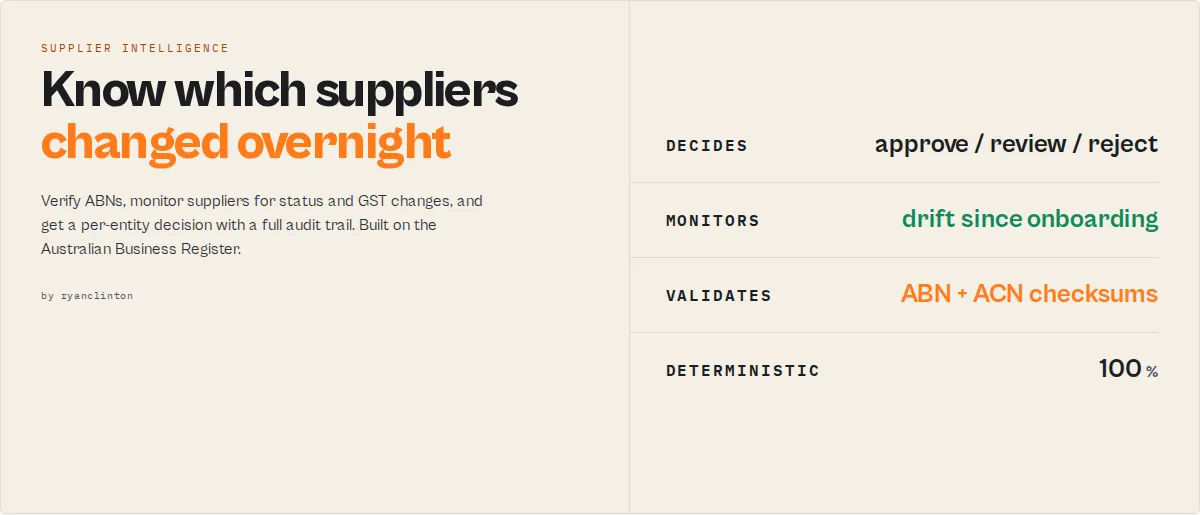
Know which suppliers changed overnight.
Verify ABNs, monitor suppliers, detect registration changes, and automatically prioritise which businesses need review. Continuous supplier monitoring and governance, powered by the official Australian Business Register (ABR).
- ✓ Verify ABNs and ACNs (with local checksum validation)
- ✓ Resolve business names to the right legal entity
- ✓ Detect supplier drift since onboarding
- ✓ Track critical events and build supplier history
- ✓ Get a per-entity decision: APPROVE / REVIEW / ENHANCED_DUE_DILIGENCE / REJECT
- ✓ Generate an executive digest of what changed today
Verify suppliers once. Monitor them forever.
Most ABR tools answer: "Is this business active today?" This actor answers: "Which suppliers changed, which became risky, and which need attention right now?"
Why this is different
Most ABR actors perform lookups. This actor performs governance.
Instead of returning registration data and stopping, it helps a team decide who to onboard, who to monitor, who to review, and who to reject — and keeps deciding every time you schedule it.
What competitors cannot replicate
ABR data is public. Supplier history is not.
Every scheduled run accumulates historical intelligence a competitor cannot backfill overnight:
- Stability scores — how consistent a supplier has been across every run
- Critical-event tracking — a running count of cancellations and other critical changes
- Supplier timelines — a summarised status history per entity
- Drift detection — how far each supplier has moved from who you onboarded
A competitor can copy a lookup in an afternoon. They cannot copy the history your watchlist has been building since day one.
Stop rechecking suppliers manually
Most businesses verify a supplier once and never look again. This actor continuously monitors your suppliers and tells you:
- Who became inactive or had their ABN cancelled
- Who lost GST registration
- Who changed identity (name, ACN, state)
- Who needs review right now
Instead of re-checking 500 suppliers by hand, review only the 3 that changed. Upload your supplier list, schedule a daily run, and receive a digest:
Who uses this actor?
- Procurement teams — monitor suppliers continuously and review only those that changed.
- Finance teams — detect GST and registration changes before processing an invoice.
- Compliance teams — maintain supplier history, verification evidence, and an auditable decision trail automatically.
- SaaS and automation builders — embed supplier verification and monitoring into products and workflows via the API.
How it compares
| Capability | Typical ABN tool | This actor |
|---|---|---|
| ABN / ACN lookup | ✅ | ✅ |
| GST validation | ✅ | ✅ |
| Checksum validation | ⚠️ Rare | ✅ ABN mod-89 + ACN mod-10 |
| Name matching | ⚠️ Basic | ✅ Confidence-scored + identity resolution |
| Bulk verification | ⚠️ Limited | ✅ Up to 500 per run |
| Change detection | ❌ | ✅ |
| Watchlists / continuous monitoring | ❌ | ✅ |
| Supplier drift tracking | ❌ | ✅ |
| Historical intelligence | ❌ | ✅ |
| Attention scoring | ❌ | ✅ |
| Portfolio health | ❌ | ✅ |
| Counterparty decision + audit trail | ❌ | ✅ APPROVE / REVIEW / EDD / REJECT |
| Executive digest | ❌ | ✅ |
(No competitors are named — the comparison is to the typical capabilities of ABR lookup tools.)
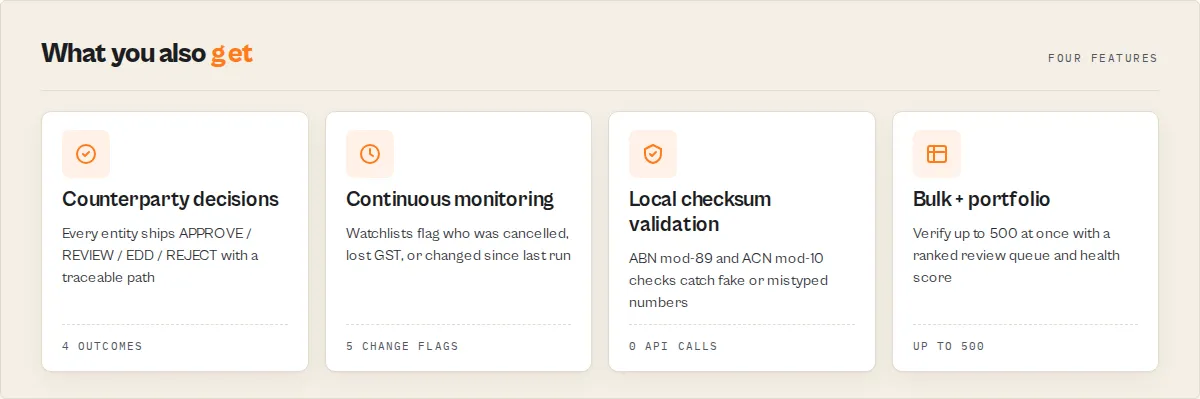
What it does, in four outcomes
- Verify — Detect fake, mistyped, cancelled, or inactive ABNs before onboarding. Local ABN/ACN checksum validation catches bad numbers before they reach the register.
- Onboard — Resolve an ambiguous business name into the right legal entity, with confidence scoring and a
verificationClassyour workflow branches on. - Monitor — Know immediately when a supplier loses GST registration, changes identity, or has its ABN cancelled.
- Audit — Maintain a verification-evidence trail, a fully traceable decision path, and supplier history automatically.
Why teams use this actor
- Procurement — monitor a supplier portfolio continuously; each scheduled run surfaces only the entities that changed.
- Finance — catch GST and registration changes before an invoice is paid, and confirm a supplier can legally charge GST.
- Compliance — keep a verification-evidence trail and a traceable counterparty decision for every entity, ready for audit.
- Operations — let the actor rank what needs review so the team works the queue, not the whole list.
It runs on Apify's cloud, so you get scheduled runs, dataset export to JSON/CSV/Excel, and one-click integrations with Google Sheets, Slack, Zapier, Make, and n8n. No code to write and no infrastructure to maintain — provide a query (or a list), and receive clean, decision-ready JSON. (The implementation details — the ABR JSON API, JSONP handling, and the free government GUID — are covered under How it works below.)
Key features
- Verify a whole spreadsheet in one run -- Pass a
queriesarray of ABNs, ACNs, names, or postcodes and get every business back plus a portfolio summary (active / cancelled / GST / risk breakdown). Nobody verifies one ABN at a time; this is built for the procurement and accounts lists you actually hold - Know which suppliers changed since yesterday -- Name a
watchlistNameand the actor stores a snapshot per ABN, then flags each recordNEW/UNCHANGED/CHANGED/ESCALATED(no longer active) /RESOLVEDon the next scheduled run, each with anescalationReasonandchangeSeverity. Turns a lookup into supplier monitoring - Know which suppliers need attention today, not just which are risky -- An
attentionScore(0-100) blends static risk with live change signals, so a supplier that was quiet for a year jumps to the top of the queue the day its ABN is cancelled. The summary record adds an executive digest (whatChangedToday,topActions) you can drop straight into a Slack alert - Measure how far a supplier has drifted from onboarding -- Beyond run-over-run change, a
driftScore(0-100) compares each supplier against the first time you saw it, so you catch a vendor that has slowly changed name, lost GST, and moved state since you signed them. Drift needs stored history, which is exactly what most ABR tools do not have - Build historical intelligence competitors cannot backfill -- Across scheduled runs the actor keeps a summarised
statusHistory, a cumulativecriticalEventstally, and astabilityScoreper supplier. ABR data is public; "this supplier has been stable across 46 runs with zero critical events" is not - Resolve a name to one entity, not a list -- A name search returns an
identity-resolutionrecord with thebestMatch, rankedalternatives, and anambiguityband so an onboarding flow auto-accepts a clear winner and routes ambiguous names to review - Detect fake, mistyped, or fabricated ABNs before onboarding a supplier -- Every ABN is validated locally against the ATO modulus-89 algorithm and every ACN against the ASIC modulus-10 check, with no API call. A bad number is flagged
abnChecksumValid: falseandverdict: invalid-formatbefore it ever reaches the register - Confirm an ABN belongs to the company it claims to -- For Australian companies the ABN embeds the ACN as its last nine digits; the actor verifies that derivation (
identifierConsistency) and scores identifier integrity 0-100, the kind of consistency check compliance teams run by hand - One decision field per business -- Each record carries a
verdict(active/cancelled/inactive), arecommendedAction(proceed/verify-details/do-not-transact), ariskLevel(low/medium/high/critical), and ahealthScore(0-100) so a KYC or onboarding workflow branches on one field instead of parsing status strings - Prevent paying invoices to businesses that cannot legally charge GST -- A single
canChargeGstboolean confirms whether an entity is both active and GST-registered, the exact test an accounts-payable or BAS check needs - Resolve ambiguous business names into verified legal entities -- Name searches return a
whyMatchedreason list (entity-name-exact,expected-state-match, …) and anidentityConfidence-styleconfidencescore so you know which of several matches is the company you meant - Audit-ready evidence -- Every record carries a
verificationEvidenceobject (source,verifiedAt,checks[]) and an LLM-quotablesummary, plus a compactagentContractfor agent and MCP consumers - Three search modes -- Look up businesses by ABN (11 digits), ACN (9 digits), business name, or Australian postcode (4 digits)
- Intelligent auto-detection -- Automatically determines whether your query is an ABN, ACN, postcode, or name based on regex pattern matching of the input format
- Automatic enrichment -- Name search results are automatically enriched with full ABN details (entity type, GST status, business names, ACN) for the top 10 matches via individual ABN lookups
- ACN resolution -- Automatically resolves 9-digit ACN numbers via the dedicated ACN endpoint, with fallback to ABN lookup using zero-padded numbers
- State and territory filtering -- Filter name and postcode search results by any of Australia's 8 states and territories: NSW, VIC, QLD, WA, SA, TAS, ACT, NT
- GST registration status -- Returns whether each entity is registered for Goods and Services Tax and the effective registration date
- Normalized output -- All results follow a consistent 18-field schema regardless of search type, making downstream processing straightforward
- Rate-limited enrichment -- Built-in 200ms delays between enrichment API calls to respect ABR rate limits
- Summary logging -- Each run logs a breakdown of results by state, active/cancelled status counts, and GST registration count
- Official government data -- All data comes directly from the Australian Business Register maintained by the ATO, ensuring accuracy and currency
How to use
Prerequisites -- Get a free ABR API GUID
The Australian Government requires a free GUID (Globally Unique Identifier) for API access to the ABR:
- Go to https://abr.business.gov.au/Tools/WebServices.
- Read the web services user guide, then accept the web services agreement to unlock the registration form.
- Complete the registration form. The ABR processes your application and emails you the GUID.
- Paste the GUID into the ABR API GUID field when running the actor.
There is no cost for the GUID.
Using Apify Console
- Navigate to the Australia ABN Lookup actor page on the Apify Store and click Try for free.
- On the Input tab, enter your search query -- an ABN number (e.g.,
51 824 753 556), business name (e.g.,Google), ACN (e.g.,102417032), or postcode (e.g.,2000). - Select your search type. Leave as Auto-detect for most cases -- the actor determines the right mode based on your query format.
- Optionally select a State Filter to narrow name and postcode results to a specific state or territory.
- Enter your ABR API GUID in the designated field.
- Set Max Results to control how many records to return (default is 25, maximum is 200).
- Click Start to run the actor.
- Once the run finishes, open the Dataset tab to view, filter, and export results as JSON, CSV, or Excel.
Using the API
Call the actor programmatically using the Apify REST API, official client libraries, or cURL:
cURL:
Input parameters
| Parameter | Type | Required | Default | Description |
|---|---|---|---|---|
query | String | One of query/queries | Google | A single ABN (11 digits), ACN (9 digits), business name, or Australian postcode (4 digits) to verify. |
queries | Array | One of query/queries | -- | Bulk mode. A list of ABNs, ACNs, names, or postcodes (up to 500). When set, overrides query and returns a portfolio summary record. |
expectedState | Select | No | -- | For name searches, the state you expect the business in. A match adds expected-state-match to whyMatched (raises onboarding confidence). Does not filter — use stateFilter to filter. |
watchlistName | String | No | -- | Enables cross-run change detection. Names a watchlist; on the next run with the same name, each record is flagged NEW / UNCHANGED / CHANGED / ESCALATED / RESOLVED. |
policyProfile | Select | No | standard | How strictly facts become a counterparty decision: standard (balanced), strict (banking-grade — flags non-GST, lower attention bar), lenient (vendor onboarding — escalates less). |
searchType | Select | No | auto | Type of search: auto (auto-detect based on query format), abn (ABN/ACN lookup), name (business name search), or postcode (postcode search). |
stateFilter | Select | No | All States | Filter results by Australian state or territory. Options: NSW (New South Wales), VIC (Victoria), QLD (Queensland), WA (Western Australia), SA (South Australia), TAS (Tasmania), ACT (Australian Capital Territory), NT (Northern Territory). Only applies to name and postcode searches. |
apiGuid | String | No | -- | Your ABR API GUID key (stored securely). Register for free at abr.business.gov.au/Tools/WebServices. Required for the API to return results. |
maxResults | Integer | No | 25 | Maximum number of results to return (1--200). Only applies to name and postcode searches. ABN/ACN lookups always return a single result. |
Example input
Auto-detection rules
The actor uses the following regex patterns when searchType is set to auto:
- 11 digits (e.g.,
51824753556or51 824 753 556) -- treated as an ABN lookup - 9 digits (e.g.,
102417032) -- treated as an ACN lookup (tries ACN endpoint first, falls back to zero-padded ABN) - 4 digits (e.g.,
2000) -- treated as a postcode search - Anything else -- treated as a business name search
Output
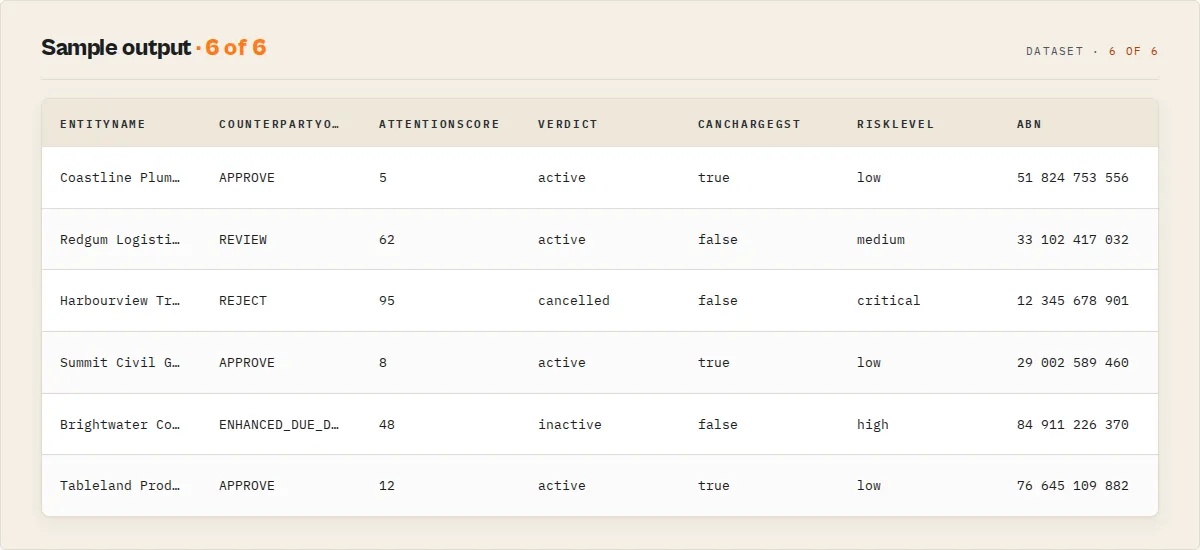
Each result in the dataset contains the following structure. Here is an example of an enriched name search result with all 18 fields:
Bulk verification
Pass a queries array to verify many businesses in one run. Each resolves to its own record, plus a single recordType: "summary" portfolio record:
The summary record carries activePct, cancelledPct, gstRegisteredPct, a compliance rollup ({ passed, warning, failed }), a riskDistribution ({ low, medium, high, critical }), and a ranked reviewQueue (highest-risk businesses first, so you know which suppliers to review before the rest) — the executive read on a whole supplier list.
Continuous supplier monitoring
Daily supplier monitoring — a worked example. A procurement team maintains 1,200 suppliers. Instead of manually re-checking ABNs, they pass the supplier list as
queries, set awatchlistName, and schedule a daily run. Each morning the digest reads: 2 critical changes, 5 warnings, 1 supplier cancelled. The team reviews only the suppliers that changed, not all 1,200.
Add a watchlistName and schedule the run. Each business is compared against the prior snapshot and flagged:
The first run flags everything NEW. On later runs, a supplier whose ABN was cancelled since the last run comes back with changeFlag: "ESCALATED", changeSeverity: "CRITICAL", escalationReason: "abn-cancelled", and a changes array showing exactly which fields moved. Two baselines are tracked at once: changeFlag answers "what moved since the last run", while driftScore answers "how far has this supplier drifted from who we onboarded" (compared against the first time it was seen, with a driftDimensions breakdown and a trend of improving / stable / deteriorating).
The summary record adds a changeTrend block (newRisks, resolvedRisks, criticalChanges, unchanged), an executive digest (whatChangedToday = { newCritical, newWarnings, resolved } plus a ready-to-send topActions list), a one-glance portfolioHealth (0-100), criticalSuppliers count, the named highestRiskSupplier, and vendor-concentration breakdowns (entityTypeBreakdown, riskConcentration by state). Across runs, each supplier also accumulates a stabilityScore and a summarised statusHistory. Bulk runs surface duplicateGroups where the same ABN resolved from more than one input row — so a supplier list with "ABC Plumbing" and "ABC Plumbing Pty Ltd" is flagged instead of double-counted. The summary also carries portfolioInsights (plain-English findings like "18% of active entities are not GST-registered"), a decisionDistribution (how many APPROVE / REVIEW / EDD / REJECT), and, in watchlist mode, a watchlistHealth rollup (improved / deteriorated / trendDirection).
Counterparty decision
Every business record carries a deterministic decision shaped by the policyProfile, with a fully traceable rule chain auditors can verify:
Switch policyProfile to strict for banking-grade onboarding (flags non-GST entities and a lower attention threshold) or lenient for low-risk vendor onboarding (escalates less). Branch your automation on the flat counterpartyOutcome field.
Identity resolution (name searches)
When you search by a business name that returns several candidates, the actor emits a recordType: "identity-resolution" record answering the onboarding question directly — which one is the entity you meant:
ambiguity (low / medium / high) is derived from the confidence gap between the top two candidates, so an onboarding flow can auto-accept a clear winner and route ambiguous names to manual review.
Output fields
| Field | Type | Description |
|---|---|---|
abn | String | The 11-digit Australian Business Number |
abnStatus | String | Registration status -- typically Active or Cancelled |
abnStatusEffectiveFrom | String | Date the current ABN status took effect (YYYY-MM-DD) |
entityName | String | Registered legal name of the entity |
entityType | String | Full entity type description (e.g., "Australian Private Company", "Individual/Sole Trader", "Family Trust") |
entityTypeCode | String | Short entity type code (e.g., PRV, IND, TRT, PUB) |
gstRegistered | Boolean | Whether the entity is currently registered for Goods and Services Tax |
gstRegisteredDate | String or null | Date of GST registration (YYYY-MM-DD), or null if not GST registered |
state | String | Australian state or territory of the main business location (e.g., NSW, VIC, QLD) |
postcode | String | Australian postcode of the main business location |
businessNames | String[] | Array of registered business names associated with the ABN |
tradingNames | String[] | Array of registered trading names associated with the ABN |
mainBusinessLocation | String | Combined state and postcode string (e.g., "NSW 2000") |
acn | String | Australian Company Number (9 digits) if the entity is a company, otherwise empty string |
matchScore | Number or undefined | Relevance score from name search (0--100). Only present for name and postcode search results. |
nameType | String or undefined | Type of name matched (e.g., "Entity Name", "Business Name", "Trading Name"). Only present for name and postcode search results. |
isCurrent | Boolean or undefined | Whether the matched name is the current registered name. Only present for name and postcode search results. |
searchType | String | The search mode used: abn, acn, name, or postcode |
recordType | String | Record discriminator: business, summary, no-results, or error. Lets you filter the dataset by record kind. |
verdict | String | Decision scalar: active, cancelled, inactive, not-found, or invalid-format. The one field to route on. |
isActive | Boolean | Convenience flag, true when verdict is active. Filter with =TRUE in spreadsheets or dashboards without string-comparing the verdict. |
abnChecksumValid | Boolean or null | Whether the ABN passes the ATO modulus-89 checksum, computed locally with no API call. Catches typo'd or fabricated ABNs. null when the value is not an 11-digit ABN. |
acnChecksumValid | Boolean or null | Whether the ACN passes the ASIC modulus-10 check. null when no ACN is present. |
canChargeGst | Boolean | true only when the entity is active and GST-registered, meaning it can legitimately charge GST on invoices. |
matchConfidence | String or null | Name-search match confidence band: high, medium, or low. null for exact ABN/ACN lookups. |
confidence | Number | 0–1 confidence in the entity identity. 1.0 for exact identifier lookups; relevance-derived for name matches. |
recommendedAction | String | Operational routing enum: proceed, verify-details, do-not-transact, confirm-abn, check-abn-format, add-api-guid, or retry. |
actionReason | String | Plain-English rationale for the recommendedAction. |
summary | String | LLM-quotable one-line summary of the record (≤280 chars). |
agentContract | Object | Compact agent surface: { decision, confidence, nextAction } so MCP/agent consumers branch without traversing the full record. |
verificationClass | String | Enterprise routing enum: verified, verified-with-warning, manual-review, or rejected. The field Make/Zapier/Dify/n8n branch on. |
registrationScore | Number | 0-100: is the business validly registered and active? |
identityScore | Number | 0-100: does the identifier itself check out (ABN/ACN checksum + derivation)? |
complianceScore | Number | 0-100: GST / operating posture. "Not GST-registered" scores 70, not 0 — being non-GST is legitimate, not a failure. |
overallScore | Number | 0-100 headline = registration 50% + identity 35% + compliance 15%. GST is deliberately minor so non-GST sole traders still score high. |
healthScore | Number | Back-compat alias of overallScore. |
riskLevel | String | Risk band: low, medium, high, or critical. Checksum or identifier failures force critical. |
riskSignals | String[] | Plain-token flags: abn-cancelled, checksum-failed, identifier-mismatch, gst-not-registered, name-not-current, etc. Empty array when low risk. |
verificationFailures | Object[] | Machine-friendly { check, result, severity } per failed/flagged check. severity: critical / high / medium / info. |
abnAgeYears | Number or null | Years since the ABN's current status took effect — a tenure proxy, not a guaranteed registration date. null when not active. |
longevityBand | String or null | Tenure band: startup (<2y), established (2–8y), long-standing (8y+). |
searchDiagnostics | Object or null | Name/postcode searches only: { input, normalized, matchedField, candidateCount, selectedRank } to debug unexpected matches. |
reviewPriority | Number | Per-record review tier: 1 (critical, review first) → 4 (low). Sort the dataset on this without any post-processing. |
supplierFingerprint | String | Stable 16-char hash of identity fields (ABN + ACN + name + state). A changed fingerprint between runs is itself a change signal. |
counterpartyOutcome | String | The policy decision as a flat field for one-branch routing: APPROVE, REVIEW, ENHANCED_DUE_DILIGENCE, or REJECT. |
counterpartyDecision | Object | { recommendedOutcome, confidence, reasons[] } — the decision plus plain-English reasons, shaped by policyProfile. |
decisionPath | Object[] | The full traceable rule chain [{ rule, result }] for every rule evaluated. Auditor-friendly — no black box. |
attentionScore | Number | 0-100 "what to look at now". Blends risk with change/escalation/drift, so it spikes when something happens — sort a daily governance queue on this, not on static riskLevel. |
attentionReason | String[] | Tokens explaining the attention score: abn-cancelled, gst-lost, checksum-failed, high-drift, etc. |
lifecycleStage | String | Lifecycle from age + status + risk: new, established, mature, at-risk, or dormant. |
stabilityScore | Number or null | Watchlist mode only. 0-100 historical consistency — high = seen across many runs with no critical events and low drift. |
criticalEvents | Number | Watchlist mode only. Cumulative count of critical changes (e.g. ABN cancellations) observed across all runs. |
statusHistory | Array | Watchlist mode only. Summarised status timeline [{ date, status }], appended only when status changes. |
abnDerivedFromAcn | Boolean or null | true when the ABN's last 9 digits equal the ACN (standard for Australian companies). null when there is no ACN. |
identifierConsistency | Boolean or null | Whether ABN and ACN are mutually consistent. null for sole traders / trusts with no ACN. |
identifierIntegrityScore | Number or null | 0-100: ABN-from-ACN derivation 60 + ABN checksum 20 + ACN checksum 20. null when no ACN. |
whyMatched | String[] | Reasons a name search matched: identifier-exact, entity-name-exact, high-relevance-score, current-name, expected-state-match. |
verificationEvidence | Object | Audit trail: { source, verifiedAt, checks[] } — which checks ran against the ABR. |
sourceQuery | String | The input query that produced this record (maps bulk results back to inputs). |
changeFlag | String | Watchlist mode only. NEW, UNCHANGED, CHANGED, ESCALATED (left active), or RESOLVED (became active). |
changeSeverity | String | Watchlist mode only. Severity of the change: CRITICAL (ABN cancelled), HIGH, MEDIUM, LOW, or NONE. Branch alerts on this. |
changes | Array | Watchlist mode only. { field, old, new } changes since the prior run. Empty when nothing changed. |
escalationReason | String or null | Watchlist mode only. Single routing reason for the most severe transition: abn-cancelled, gst-lost, name-changed, state-changed. null when nothing escalated. |
driftScore | Number or null | Watchlist mode only. How far the supplier has drifted from its onboarding baseline (0 = unchanged): status 40 + GST 25 + name 25 + state 10. |
driftDimensions | Object or null | Watchlist mode only. Which fields changed since onboarding: { statusChanged, gstChanged, entityNameChanged, stateChanged }. |
trend | String or null | Watchlist mode only. Health trend vs the prior run: improving, stable, or deteriorating. null on first sight. |
runsSeen | Number | Watchlist mode only. How many runs this ABN has appeared in. |
firstSeenAt | String or null | Watchlist mode only. When the ABN was first onboarded into this watchlist. |
extractedAt | String | ISO 8601 timestamp of when the data was extracted |
Use cases
- Business verification -- Verify that an ABN is active and confirm the registered entity name, type, and GST status before entering into a business relationship
- Due diligence -- Look up potential suppliers, partners, or acquisition targets to confirm their Australian business registration details and corporate structure
- Lead generation -- Search by business name or postcode to discover Australian businesses in a specific industry or geographic area for sales prospecting
- Compliance screening -- Automate ABN verification as part of KYC (Know Your Customer) and vendor onboarding workflows to confirm entities are legitimately registered
- Tax compliance -- Check GST registration status to verify that an entity is authorized to charge and claim GST credits on invoices
- Competitor analysis -- Search for businesses by name to identify competitors, their registration status, entity type, and geographic footprint across Australian states
- Real estate and property -- Look up businesses in a specific postcode to understand the commercial landscape of an area
- Accounting and bookkeeping -- Batch verify ABN and GST details for clients, suppliers, and contractors to ensure accurate BAS (Business Activity Statement) reporting
- Government procurement -- Verify ABN registration as a prerequisite for Australian Government contract eligibility
- Cross-border research -- Combine with UK Companies House, Canada Corporation Search, or NZ Companies Search for multi-jurisdiction corporate due diligence
API & Integration
Python
JavaScript
cURL
Integrations
Connect Australia ABN Lookup to your existing tools and workflows:
- Google Sheets -- Automatically export ABN verification results to a spreadsheet for team review and record-keeping
- Slack / Email -- Get notified when business registrations change status using Apify webhooks
- Zapier / Make -- Route ABN data to CRMs, accounting systems, databases, or hundreds of other third-party apps
- REST API -- Fetch results programmatically from any language or platform using the Apify dataset API
- Scheduled runs -- Set up Apify schedules to run daily, weekly, or monthly ABN verification checks automatically
- Webhooks -- Trigger downstream actions (notifications, database writes, compliance alerts) whenever a run completes
Use in Dify
Drop this actor into Dify workflows via the Apify plugin's Run Actor node. Each business returns verified, classified, and routed as structured JSON — verdict (active / cancelled / inactive), recommendedAction (proceed / verify-details / do-not-transact), and the canChargeGst / abnChecksumValid booleans your downstream if/else node branches on. A raw ABR scraper returns status strings you still have to interpret; this returns the decision.
- Actor ID:
ryanclinton/australia-abn-lookup - Sample input (verify a supplier's ABN before onboarding):
-
Branching example — a Dify if/else node routes the onboarding flow on the returned enum, no prose parsing:
recommendedAction == "proceed"→ continue onboarding; the entity is active and the ABN passes checksum.recommendedAction == "do-not-transact"→ halt; the ABN is cancelled.recommendedAction == "verify-details"or"check-abn-format"→ send to a human-review branch; the status is unclear or the ABN fails its checksum.- For GST/invoice flows, branch on the
canChargeGstboolean directly to decide whether to accept a GST-inclusive invoice.
The actionReason and summary strings are usable verbatim in a Dify LLM node or a Slack/email step — no rewriting. For bulk lead-gen flows, point the node at a name or postcode query and read the summary record's activeCount / gstRegisteredCount totals for cohort-level routing.
How it works
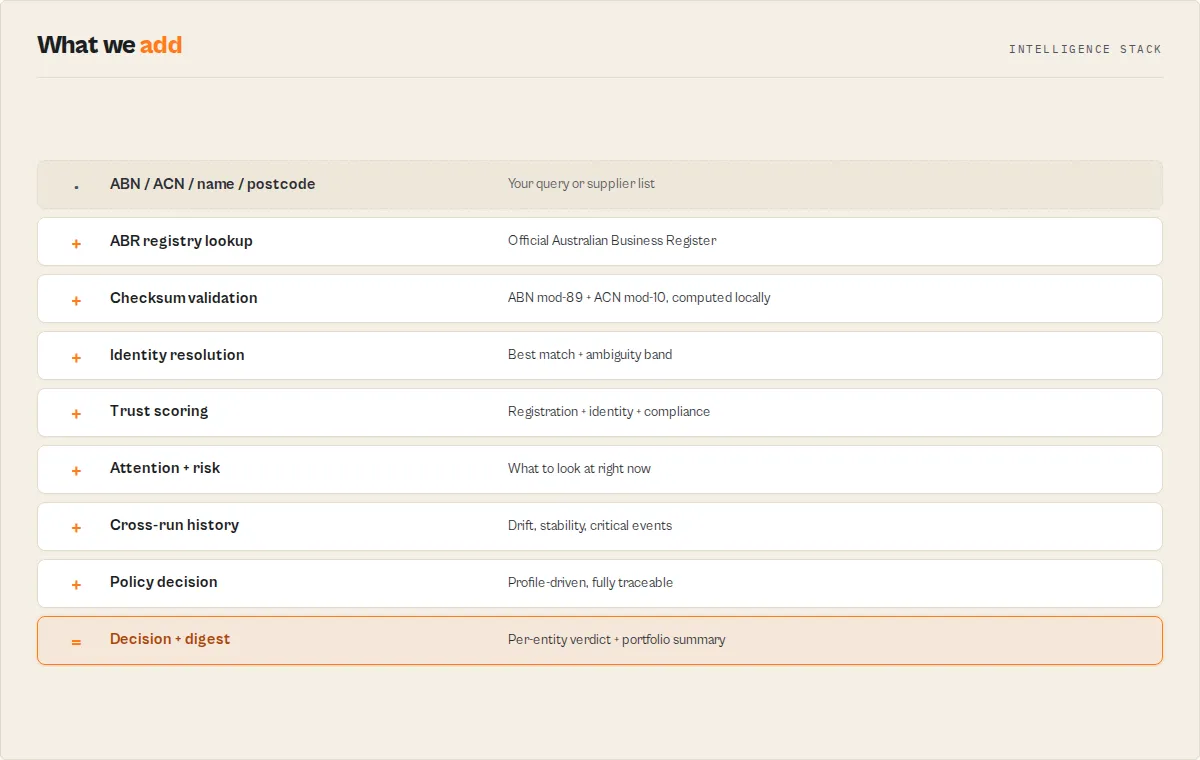
The actor follows a structured pipeline to retrieve business data from the Australian Business Register's JSON API:
- Query analysis -- Parses the input query and determines the search type. Auto-detection uses regex patterns: 11 digits = ABN, 9 digits = ACN, 4 digits = postcode, anything else = name search.
- ABN/ACN lookup -- For direct lookups, constructs the appropriate URL (
AbnDetails.aspxorAcnDetails.aspx) with the GUID and query. For 9-digit ACN queries, tries the ACN endpoint first, then falls back to a zero-padded ABN lookup. - JSONP parsing -- The ABR API returns JSONP format (
callback({...})). The actor strips the callback wrapper and parses the inner JSON payload. - Name/postcode search -- For name and postcode queries, calls
MatchingNames.aspxto retrieve matching business names with relevance scores. Applies the state filter if specified. - Automatic enrichment -- For name search results, the top 10 matches are enriched by fetching full ABN details for each one. A 200ms delay is applied between enrichment calls to respect API rate limits.
- Data transformation -- Raw ABR API responses are normalized into a consistent 18-field output schema with clean field names, boolean GST status, and ISO 8601 timestamps.
- Dataset push -- Results are pushed to the Apify dataset for export and integration. A summary is logged with state breakdown, active/cancelled counts, and GST registration count.
Performance & cost
| Scenario | Results | Approx. duration | Memory | Estimated cost |
|---|---|---|---|---|
| Single ABN lookup | 1 | 2--5 seconds | 128 MB | < $0.001 |
| Single ACN lookup | 1 | 3--6 seconds | 128 MB | < $0.001 |
| Name search (25 results, top 10 enriched) | 25 | 5--10 seconds | 128 MB | ~$0.002 |
| Name search (100 results, top 10 enriched) | 100 | 8--15 seconds | 128 MB | ~$0.003 |
| Postcode search (25 results) | 25 | 2--5 seconds | 128 MB | ~$0.001 |
| Name search (200 results, top 10 enriched) | 200 | 10--20 seconds | 128 MB | ~$0.005 |
- The actor makes lightweight JSON API calls only -- no browser rendering or heavy crawling.
- The ABR API GUID is completely free with no usage charges from the Australian Government.
- Apify's free tier includes $5/month of platform credits, which covers thousands of typical runs.
- Cost scales primarily with the number of enrichment requests (up to 10 per name search run).
- Scheduled runs for daily ABN verification of a business portfolio are extremely economical.
Limitations
- API GUID required -- The ABR JSON API requires a valid GUID for every request. Without one, the API returns an error message. Registration is free at abr.business.gov.au/Tools/WebServices.
- Maximum 200 results per run -- Name and postcode searches are capped at 200 results per execution. For broader coverage, run multiple searches with different query terms or state filters.
- Enrichment limited to top 10 -- Only the top 10 name search results are enriched with full ABN details. Results ranked 11 and beyond include basic name, ABN, status, state, and postcode, but lack entity type, GST details, and business names.
- No officer or director data -- The ABR API does not expose director, shareholder, or officeholder information. For that level of detail, combine with ASIC (Australian Securities and Investments Commission) data or OpenCorporates.
- Postcode search is approximate -- Postcode searches use the ABR's name matching endpoint with the postcode as input, which may not return all businesses in a postcode area. Results depend on ABR's internal matching logic.
- JSONP format dependency -- The ABR API returns data in JSONP format. If the API changes its callback format, the actor's response parsing may need updating.
- No historical data -- The API returns only current registration data. Historical status changes, previous addresses, or deregistered business names are not available through this endpoint.
- Entity type codes are ABR-specific -- Codes like
PRV,PUB,IND,TRTare internal ABR classifications. The actor includes both the code and full description for clarity.
Tips for best results
- Register for an ABR API GUID first. The actor cannot return results without a valid GUID. Registration is free at abr.business.gov.au/Tools/WebServices; the ABR emails you the GUID after processing your application.
- Use auto-detect for most queries. The actor correctly identifies ABNs (11 digits), ACNs (9 digits), postcodes (4 digits), and business names automatically. You rarely need to set the search type manually.
- Include spaces in ABN numbers if you like. The actor strips all whitespace, so both
51 824 753 556and51824753556work identically. - Filter by state for name searches. If you know the state or territory, filtering reduces noise and returns more relevant, targeted results.
- Increase maxResults for broad searches. The default of 25 works well for most queries, but you can go up to 200 for comprehensive postcode or name coverage.
- Check the
abnStatusfield. Businesses with a "Cancelled" status are no longer active. Use this field to filter your results in downstream processing. - Use the
matchScorefield to rank name results. Higher scores (closer to 100) indicate closer matches to your search query. This is useful for sorting and prioritizing results. - Look for the
acnfield on company results. If a business is an Australian company (PRV or PUB entity type), the ACN will be populated. Sole traders and trusts do not have ACNs. - Check GST registration for tax compliance. The
gstRegisteredboolean andgstRegisteredDatefields confirm whether an entity can legitimately charge GST on invoices.
FAQ
Do I need an API key? Yes. The ABR requires a free GUID (Globally Unique Identifier) for API access. Register at abr.business.gov.au/Tools/WebServices — accept the web services agreement, complete the form, and the ABR emails you the GUID. There is no cost. The ABR applies fair-use limits to the web services; see their user guide for current terms.
What is an ABN? An Australian Business Number (ABN) is a unique 11-digit identifier assigned to businesses and other entities registered in Australia. It is administered by the Australian Taxation Office (ATO) and is required for tax reporting, invoicing, and interacting with government agencies.
What is an ACN? An Australian Company Number (ACN) is a unique 9-digit identifier assigned to companies registered with the Australian Securities and Investments Commission (ASIC). Every Australian company has both an ACN and an ABN -- the ABN includes the ACN with a two-digit prefix.
Can I look up an ACN instead of an ABN? Yes. Enter the 9-digit ACN number and the actor will automatically detect it and query the ACN endpoint. If the ACN lookup fails, it falls back to resolving it as an ABN with leading zeros.
What is the difference between ABN lookup and name search? ABN/ACN lookup returns a single detailed record for a known identifier. Name search finds all businesses matching a keyword and returns multiple results with relevance scores. The top 10 name search results are automatically enriched with full ABN details including entity type, GST status, and business names.
Can I search by postcode?
Yes. Enter a 4-digit Australian postcode (e.g., 2000 for Sydney CBD) and the actor will find businesses registered in that area. Combine with a state filter for more targeted results.
What does GST registered mean?
GST (Goods and Services Tax) is Australia's value-added tax. Businesses with an annual turnover of $75,000 or more (or $150,000 for non-profits) must register for GST. The gstRegistered field confirms whether the entity is currently GST registered, and gstRegisteredDate shows when they registered.
How current is the data? All data comes directly from the live Australian Business Register maintained by the ATO. It reflects the most recent registrations and updates at the time of the API call.
What do the entity type codes mean?
Common entity type codes include: PRV (Australian Private Company), PUB (Australian Public Company), IND (Individual/Sole Trader), TRT (Trust), SGE (State Government Entity), CGE (Commonwealth Government Entity), and OIE (Other Incorporated Entity).
Can I schedule recurring lookups? Yes. Use Apify's built-in scheduler to run the actor daily, weekly, or at any custom interval. Combine with webhooks or integrations to get notified when ABN registrations change status.
What happens if no results are found? The actor pushes a single record with a "No results found" message, along with the query and search type used. This typically means the ABN does not exist, the business name has no matches, or the postcode returned no results from the ABR.
Is there a rate limit on the ABR API? The actor manages rate limiting internally with 200ms delays between enrichment API calls. The ABR does not publish specific rate limits, but the built-in delays ensure reliable operation.
Related actors
| Actor | Description | Link |
|---|---|---|
| UK Companies House | Search the UK Companies House register for company details, officers, directors, and filing history. Pairs with this actor for UK-Australian cross-border business research. | apify.com/ryanclinton/uk-companies-house |
| OpenCorporates Search | Search the world's largest open database of company information covering 140+ jurisdictions, including Australia. Useful for cross-referencing ABR data with international corporate records. | apify.com/ryanclinton/opencorporates-search |
| Canada Corporation Search | Search the Canadian federal corporation registry for federally incorporated businesses. Combine with this actor for multi-country business due diligence workflows. | apify.com/ryanclinton/canada-corporation-search |
| NZ Companies Office | Search the New Zealand Companies Office register for company details and status. Ideal for trans-Tasman business research alongside Australian ABN data. | apify.com/ryanclinton/nz-companies-search |
| GLEIF LEI Lookup | Search the Global Legal Entity Identifier (LEI) database for corporate entity identifiers. Useful for cross-referencing Australian companies in global financial contexts. | apify.com/ryanclinton/gleif-lei-lookup |
| EU VAT Validator | Validate European Union VAT numbers and retrieve business registration details. Complement Australian GST verification with EU VAT verification for international trade compliance. | apify.com/ryanclinton/eu-vat-validator |


