

GitHub Repo Search — Stars, Language & Topics
Pricing
from $150.00 / 1,000 repo fetcheds
GitHub Repo Search — Stars, Language & Topics
Search and scrape GitHub repositories by keyword, language, stars, forks, or topic. Extract structured repo metadata including owner, license, topics, and activity timestamps. Sort by stars, forks, or recently updated. Export to JSON, CSV, or API. No token required.
Pricing
from $150.00 / 1,000 repo fetcheds
Rating
2.7
(2)
Developer

Ryan Clinton
Maintained by CommunityActor stats
2
Bookmarked
133
Total users
10
Monthly active users
a month ago
Last modified
Categories
Share
GitHub Repo Intelligence — Search, Score & Monitor
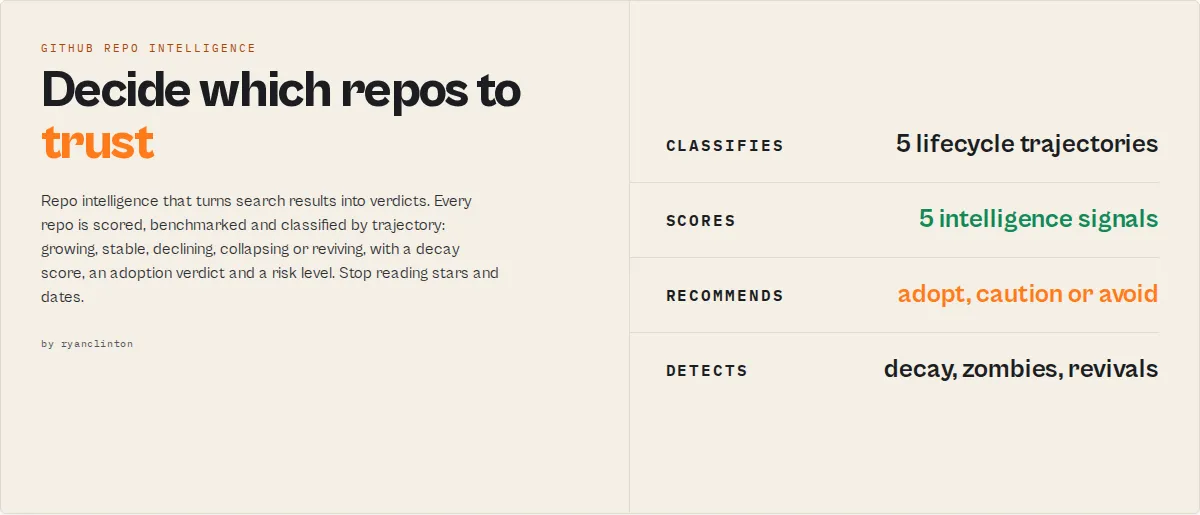
GitHub Repo Intelligence turns repositories into decisions.
It models how GitHub projects grow, decay, and fail — then classifies each by trajectory: GROWING, STABLE, DECLINING, COLLAPSING, or REVIVING.
A repo with recent commits but no releases and one maintainer may look active — but gets classified as COLLAPSING with HIGH abandonment risk. That's the difference between seeing activity and understanding behavior.
- "Should I adopt this?" →
STRONGLY_RECOMMENDED/CAUTION/HIGH_RISK - "Is this project dying?" → decay score, trajectory, time-to-critical-risk
- "What's trending?" → star velocity, breakout detection, acceleration
- "How does this compare?" → percentile benchmarks, side-by-side scoring, winner
If you just need GitHub search, this is overkill. If you need to decide what to trust, this is what you use.
Also known as: github repository intelligence api, github repo health check, github dependency audit tool, github supply chain risk assessment, open source risk analysis, abandoned github repo detector
Ready-to-run examples
Don't want to build an input from scratch? Each of these is a published, one-click example (see all) — open it, see real output, run it:
- GitHub Repository Search — search repos by keyword, language and stars into a ranked table with last-push age, abandoned flag and license
- GitHub Repository Intelligence Scores — project-health, adoption-readiness, community and supply-chain-risk scores with a weighted-factor breakdown per repo
- Compare GitHub Repositories — compare specific repos side by side on stars, contributors, release recency and maintenance, with a winner picked
Category
GitHub Repo Intelligence is an open-source intelligence engine — not a search tool. It replaces manual repo evaluation with automated lifecycle, risk, and adoption analysis. It turns repositories into decisions.
The key idea: trajectory
Instead of stars, commits, and dates — think in trajectory:
| Trajectory | Meaning |
|---|---|
| GROWING | Accelerating adoption and activity |
| STABLE | Mature and consistent |
| DECLINING | Slowing down |
| COLLAPSING | Rapidly losing activity |
| REVIVING | Coming back after dormancy |
One field. One decision.
How it works
Query → enrich → score → classify → predict → recommend
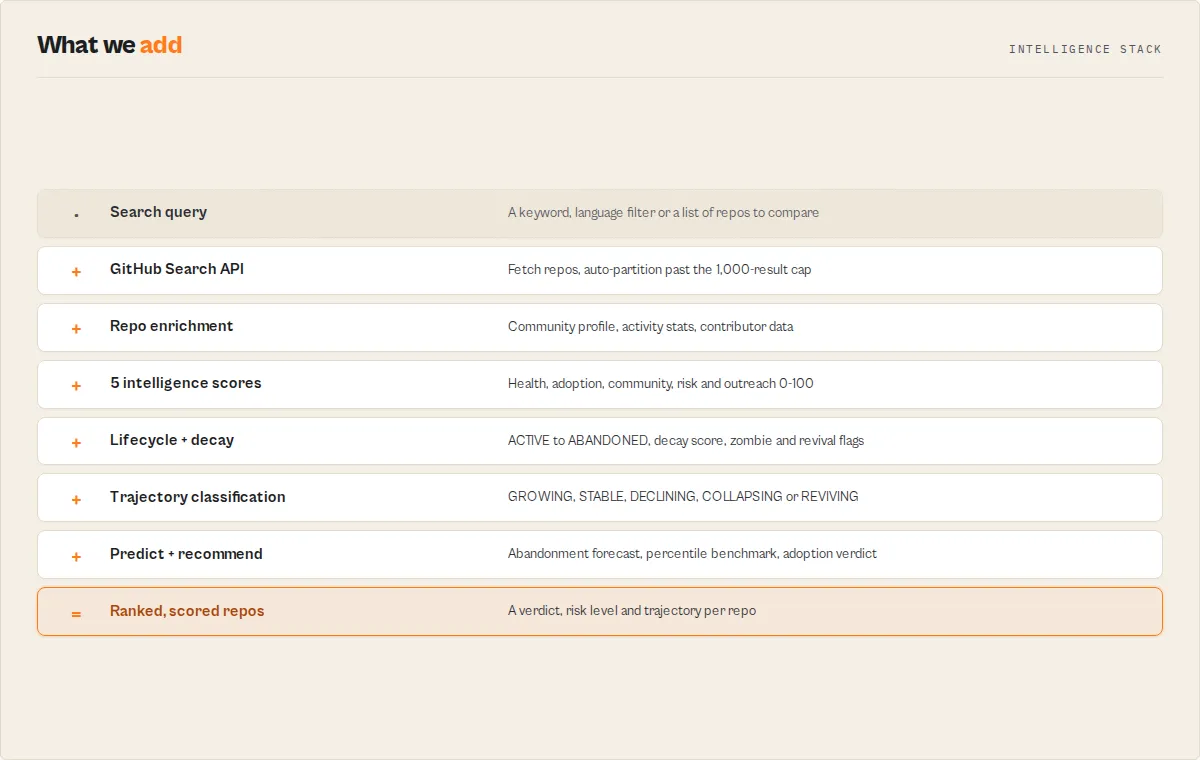
Core concepts
- Lifecycle intelligence — Models project stages: ACTIVE → STABLE → SLOWING → AT_RISK → ABANDONED
- Decay detection — Measures how fast a repo is declining (score 0-100 + velocity)
- Zombie detection — Flags repos with recent pushes but no real activity
- Revival detection — Identifies dormant projects that came back to life
- Predictive forecasting — Estimates growth, maintenance risk, and abandonment probability
- Decision output — Every repo gets a verdict, risk level, and actionable notes
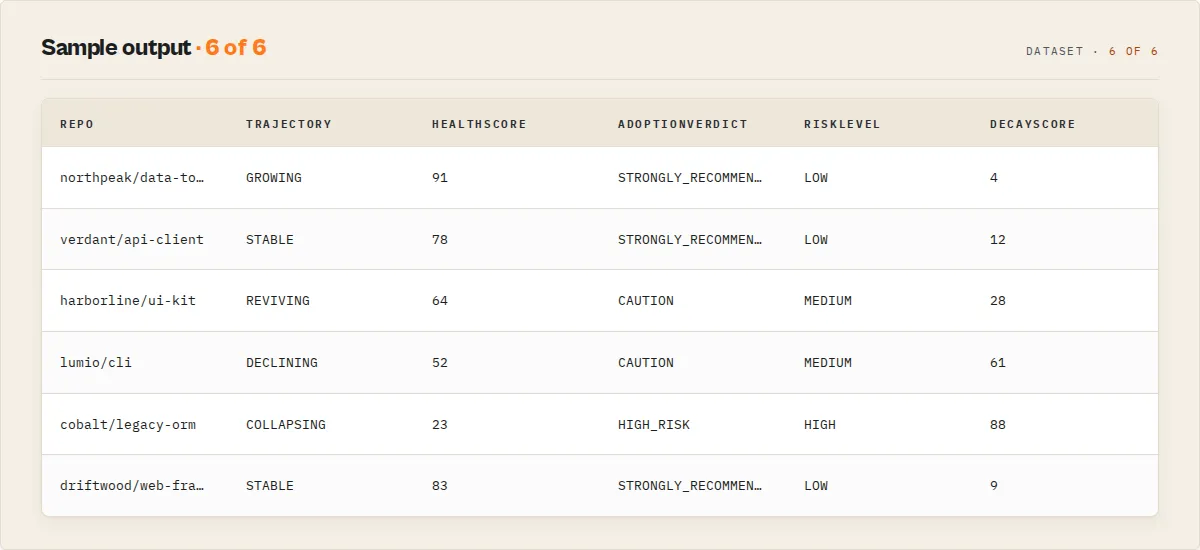
Sample output
Each row is one repo, ranked and scored. Click into a row in your dataset for all 44 fields including explanations, recommendations, and trajectory forecasts.
What can you do with this?
- Find safe dependencies before adopting them
- Detect dying projects before they break your stack
- Identify trending repos in a technology category
- Compare competing frameworks with objective scoring
- Monitor ecosystem changes on a schedule
- Assess supply-chain risk across your dependency tree
- Source maintainers with reachable contact information
Without vs with
| Without | With GitHub Repo Intelligence |
|---|---|
| Raw search results with stars and dates | Every repo scored, benchmarked, and classified |
| No risk signals | Early detection of decay, zombies, and abandonment |
| Manual evaluation of each repo | Predictive insights on project trajectory |
| No warning until a project is dead | Decision-ready verdicts: adopt, caution, or avoid |
At a glance
| What it is | Open-source lifecycle intelligence engine |
| Best for | Dependency auditing, adoption evaluation, market mapping, outreach, due diligence |
| Speed | 30 repos in ~5s. 100 enriched repos in ~3 min with token |
| Pricing | $0.15 per repository (pay-per-event) |
| Output | Ranked, scored dataset. 3 views. JSON/CSV/Excel |
| Modes | 6 solution modes + compare mode |
| Monitoring | Cross-run change detection + trend intelligence |
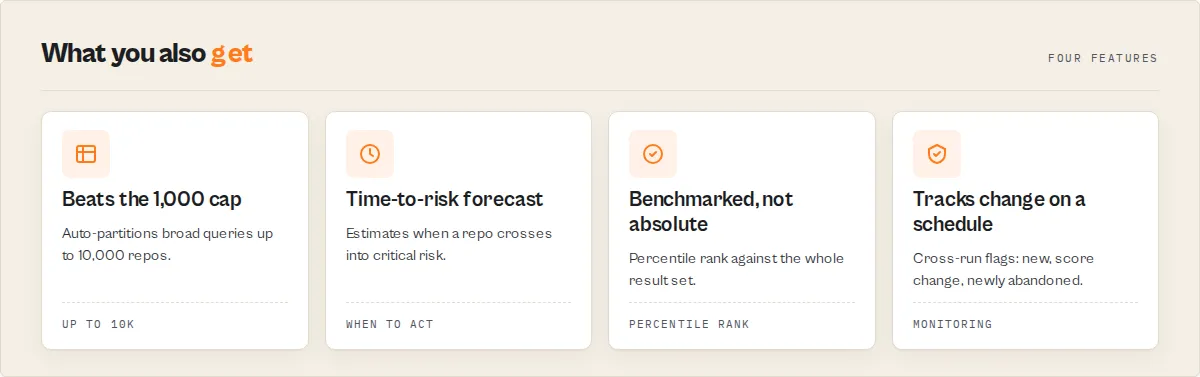
| Scale | Auto-partition past 1,000-result cap. Up to 10,000 repos |
Who it's for: Engineering teams, VCs, security auditors, recruiters, researchers. When to use it: When you need to evaluate repos — not just search them.
What you get from one call
Per repo:
- 5 intelligence scores (health, adoption, risk, community, outreach)
- Lifecycle status (ACTIVE → ABANDONED) with trajectory
- Decay score + velocity + time-to-critical-risk
- Decision verdict (STRONGLY_RECOMMENDED → HIGH_RISK)
- Percentile benchmarks ("top 8% of 847 repos")
- Predictive forecast (growth, risk, abandonment probability)
- Community profile, activity stats, contributor intelligence
Per run (KV summary):
- Leaderboards (top 10 by each score)
- Market intelligence (category distributions, declining signals)
- Narrative summary (Slack-ready insights)
- Change detection (NEW, SCORE_CHANGE, NEWLY_ABANDONED)
- Query coverage report with confidence level
What makes this different
Maintenance intelligence is the core differentiator — no other tool models repository lifecycle this deeply:
| Signal | What it tells you |
|---|---|
| 5-stage lifecycle (ACTIVE → ABANDONED) | Where the repo is now |
| Decay score (0-100) + velocity (FAST/SLOW) | How fast it's declining |
| Trajectory (GROWING/STABLE/DECLINING/COLLAPSING/REVIVING) | Single-glance direction |
| Time-to-critical-risk ("60-120 days") | When to act |
| Zombie detection | Is the activity real or fake? |
| Revival detection | Did a dead project come back? |
| Feature-complete detection | Is it done, not dying? |
| Bus factor + impact ("PROJECT_LIKELY_STALLS") | What happens if the maintainer leaves? |
| Predictive forecast (growth + risk + abandonment) | Where is this repo going? |
Intelligence layer — every repo gets scored, benchmarked, and judged:
- 5 composite scores (0-100) with weighted factor breakdowns
- Percentile benchmarks ("top 8% of 847 repos")
- Decision verdicts (STRONGLY_RECOMMENDED → HIGH_RISK)
- Ranking explanations for top 3 ("why this beat #2")
Search and discovery:
- 6 solution modes (market-map, dependency-audit, adoption-shortlist, maintainer-outreach, trend-watch, repo-due-diligence)
- Compare repos side-by-side with winner selection
- Auto-partition past 1,000-result cap (up to 10,000)
- Trend intelligence with breakout detection Monitoring — turns one-off searches into scheduled intelligence:
- Cross-run change detection (NEW, SCORE_CHANGE, NEWLY_ABANDONED)
- Category-level market intelligence (distributions, declining signals, breakouts)
- Leaderboards + narrative summaries (paste-ready for Slack/reports)
- Query coverage report with confidence level
GitHub Repo Intelligence turns repositories into decisions.
Quick answers
What is GitHub Repo Intelligence? An Apify actor that searches, scores, and monitors GitHub repositories with 5 composite intelligence signals (health, adoption, community, risk, outreach), 6 solution modes, auto-partitioning past the 1,000-result cap, and cross-run change detection.
How do I score GitHub repos by health and adoption readiness? Select a solution mode like adoption-shortlist or enable enrichRepoData. The actor fetches community profiles, activity stats, and contributor data, then computes 5 weighted scores (0-100) with plain-English explanations.
What makes it different from other GitHub scrapers? GitHub Repo Intelligence is the only GitHub actor on Apify with composite intelligence scoring, solution modes, auto-partitioning past 1,000 results, cross-run change detection, community profile enrichment, and contributor concentration analysis.
Can it get more than 1,000 GitHub search results? Yes. Enable autoPartitionResults and the actor splits broad queries by star ranges, fetching up to 10,000 repos per run with automatic deduplication.
Can I compare specific repos side-by-side? Yes. Use compareRepos: ["facebook/react", "vuejs/vue"] — the actor fetches each directly, scores them, and picks a winner with a full comparison in the KV summary.
What does the output look like for decision-makers? Each repo gets an adoptionVerdict (STRONGLY_RECOMMENDED → HIGH_RISK), riskLevel, maintenanceStatus, percentile benchmarks ("top 8% of repos"), and contextual notes. The KV summary includes leaderboards, narrative insights, and risk warnings — ready to paste into Slack or reports.
How much does it cost? $0.15 per repository scored. 30 repos (default) costs $4.50. No subscription required.
Does it require a GitHub token? No for basic search. Recommended for enrichment and large runs. A free token (no scopes needed) triples throughput to 30 requests/minute.
At a glance
Quick facts:
- Input: Search query + optional solution mode, filters, and enrichment toggles
- Output: Ranked, scored dataset with 3 views (Overview, Intelligence, Details)
- Pricing: $0.15 per repo fetched (pay-per-event)
- Batch size: Up to 10,000 repos per run (with auto-partition)
- Memory: 128 MB default, 1024 MB max
- Auth modes: Unauthenticated (10 req/min) or token-authenticated (30 req/min)
- Intelligence: 5 scores (health, adoption, community, risk, outreach) with explanations
- Modes: 6 solution modes for common workflows
- Monitoring: Cross-run change detection for scheduled runs
Input → Output:
- Input: Search query + solution mode + optional filters
- Process: Search → enrich → score → rank → diff → push
- Output: Ranked repos with intelligence scores, community profiles, activity stats, and change flags
Best fit: Dependency auditing, adoption evaluation, market mapping, maintainer outreach, open-source due diligence, technology trend tracking. Not ideal for: Code search within files, private repository access, real-time streaming. Does not include: File content indexing, star count history, or GraphQL API access.
Problems this solves:
- Which repos are safe to adopt? (adoption readiness score + community profile)
- Which dependencies carry supply-chain risk? (risk score + bus factor + signed commits)
- Which maintainers are active and reachable? (outreach score + contributor emails)
- What's trending in my category? (health score + activity stats + auto-partition)
- What changed since last run? (cross-run monitoring + change detection)
Common questions this actor answers:
Which Python ML frameworks are healthiest? Run with mode: "adoption-shortlist", query: "machine learning", language: "python" — results ranked by adoption readiness score.
Which of my dependencies have supply-chain risk? Run with mode: "dependency-audit" and search for each dependency — the supplyChainRiskScore flags license issues, abandoned status, single-maintainer projects, and unsigned commits.
Who are the most reachable maintainers in a niche? Run with mode: "maintainer-outreach" — ranks results by outreach score and auto-extracts contributor emails.
What's new in my tech category since last week? Enable compareToPreviousRun on a scheduled run — the actor flags NEW repos, SCORE_CHANGE, and NEWLY_ABANDONED repos.
What is a GitHub repository search tool?
A GitHub repository search tool queries GitHub's database of 300M+ public repositories and returns structured metadata filtered by criteria like keywords, programming language, star count, and topics. GitHub Repo Intelligence goes beyond the basic search interface by adding abandoned detection, enrichment data, and contributor email extraction — returning export-ready datasets rather than paginated web results.
What data can you extract?
| Data Point | Source | Availability | Example |
|---|---|---|---|
| Repository name | Search API | Always | scrapy/scrapy |
| Stars | Search API | Always | 53200 |
| Forks | Search API | Always | 10580 |
| Primary language | Search API | When set by owner | Python |
| Topics | Search API | When set by owner | ["web-scraping", "python"] |
| License | Search API | When set by owner | BSD-3-Clause |
| Owner type | Search API | Always | Organization |
| Abandoned status | Computed | Always | isAbandoned: true (365+ days) |
| Language breakdown | Languages API | With enrichment enabled | {"Python": 78.3, "Cython": 21.7} |
| Latest release | Releases API | With enrichment enabled | tag: "v2.11.1" |
| Contributor count | Contributors API | With enrichment enabled | 347 — every contributor in the project's history |
| Contributor emails | Commits API | With email extraction enabled | dev@scrapy.org — authors in a recent-commit sample, a different set to the count above |
Why use GitHub Repo Intelligence?
Querying the GitHub Search API directly requires building pagination logic, handling rate limits and retries, transforming nested responses into flat records, and managing authentication headers. For a batch of 500 repos, that is 5 paginated requests with proper delay timing, response validation, and error handling — before you write any analysis code.
GitHub Repo Intelligence handles all of that in one run. Enter a query, click Start, and download structured results in JSON, CSV, or Excel.
Key difference: GitHub Repo Intelligence is the only GitHub search actor on Apify that includes abandoned repo detection, language breakdown enrichment, and contributor email extraction in one tool.
| Feature | GitHub Repo Intelligence | automation-lab/github-scraper | fresh_cliff/github-scraper |
|---|---|---|---|
| Intelligence scores (0-100) | 5 scores with explanations | No | No |
| Percentile benchmarks | Yes ("top 8% of category") | No | No |
| Decision recommendations | Yes (verdict + risk + notes) | No | No |
| Compare repos mode | Yes (side-by-side + winner) | No | No |
| Predictive forecast | Yes (growth + risk + abandonment) | No | No |
| Trend intelligence | Yes (velocity + breakout detection) | No | No |
| Solution modes | 6 pre-configured workflows | No | No |
| Auto-partition (>1,000 results) | Yes (up to 10,000) | No | No |
| Cross-run change detection | Yes | No | No |
| Ranking explanations (why #1 won) | Yes (top 3 repos) | No | No |
| Category market intelligence | Yes (distributions + signals) | No | No |
| Leaderboards + narrative summary | Yes (in KV store) | No | No |
| Query coverage report | Yes (confidence + partitions) | No | No |
| Community profile enrichment | Yes | No | No |
| Activity stats (90d/365d) | Yes | No | No |
| Contributor concentration | Yes (bus factor proxy) | No | No |
| Signed commit ratio | Yes | No | No |
| Maintenance intelligence | Yes (5-stage + decay score + zombie) | No | No |
| Bus factor risk | Yes (impact prediction) | No | No |
| Language breakdown (%) | Yes | No | AI-powered tech stack |
| Contributor email extraction | Yes | No | No |
| Price per repo | $0.001 | Higher compute costs | Varies |
| Best for | Intelligence + decisions | Broad GitHub scraping | Tech stack detection |
Pricing and features based on publicly available information as of April 2026 and may change.
- vs raw GitHub API: "Unlike building raw API integrations, GitHub Repo Intelligence handles pagination, rate limits, and response transformation automatically."
- vs basic scrapers: "Unlike basic GitHub scrapers that return 10-15 fields, GitHub Repo Intelligence returns 31 fields with computed abandoned detection."
Platform capabilities
- Scheduling — Run daily or weekly to track new repos appearing for any topic or technology
- API access — Trigger from Python, JavaScript, or any HTTP client via the Apify API
- Monitoring — Slack or email alerts when runs fail or complete
- Integrations — Zapier, Make, Google Sheets, webhooks for downstream automation
- Spending limits — Set a maximum charge per run to control costs on large batches
Features
GitHub Repo Intelligence combines GitHub Search API access with composite scoring, enrichment, and monitoring — turning raw search results into decision-ready intelligence.
Intelligence layer:
- 5 composite scores (0-100) — projectHealthScore, adoptionReadinessScore, communityScore, supplyChainRiskScore, outreachScore — each with weighted factor breakdowns and plain-English explanations
- Community profile — README presence, contributing guide, code of conduct, issue/PR templates, license detection, overall health percentage
- Activity stats — 90-day and 365-day commit counts, weekly commit average
- Contributor intelligence — Team size, top contributor concentration (bus factor), signed commit ratio
- Abandoned repo detection —
daysSinceLastPushandisAbandonedflag for every result
Solution modes:
- market-map — Discover and rank repos in a category. Auto-partitions, enriches community + languages + releases.
- dependency-audit — Assess supply-chain risk. Enriches community + activity + contributors + releases. Sorted by risk.
- adoption-shortlist — Find safe-to-adopt repos. Full enrichment. Sorted by adoption readiness.
- maintainer-outreach — Find reachable maintainers. Enriches contributors + emails. Sorted by outreach score.
- trend-watch — Spot rising projects. Enriches activity + languages + releases. Sorted by health.
- repo-due-diligence — Full intelligence on specific repos. All enrichments + emails enabled.
Search and filtering:
- Full GitHub search syntax —
language:python,topic:react,stars:>1000,created:>2024-01-01,license:mit,archived:false - Auto-partition — Breaks past 1,000-result cap by splitting queries across star ranges with deduplication. Up to 10,000 results.
- Exclude forks and archived repos — Dedicated filter toggles
- Four sort modes — Stars, forks, recently updated, or best match
Monitoring:
- Cross-run change detection — Stores state in named KV store. Flags repos as NEW, SCORE_CHANGE, STATUS_CHANGE, or NEWLY_ABANDONED.
- Diff summary — New repo count, score changes, status changes in KV summary output.
Enrichment:
- Language breakdown — Percentage breakdown of all languages per repo
- Latest release — Tag, name, publish date, days since release
- Contributor emails — Real addresses from git commits, noreply/bot filtered
- Circuit breaker — Stops enrichment after 5 consecutive failures
Knowing what you got
Every row says whether it was fully enriched. enrichmentSkipped: true means that row has
base repository data only; enrichmentSkippedReason says why. Filter on it and you know
exactly what you received — nothing is silently thinned.
Contributor emails and contributor count are different populations. contributors.count
is everyone who has ever contributed to the project. contributors.emails is the distinct
authors found in a recent-commit sample, with noreply and bot addresses removed. A repo
showing 500 contributors and 27 emails is not 5% coverage — the two are independent, and
the 27 are people who committed recently and can be reached.
Anonymous runs are subject to GitHub's own limits, so a large unauthenticated run can return some rows as base data. Three ways to get complete results, in order of effect:
| what | effect |
|---|---|
Add a githubToken | Free, no scopes needed, and the limit stops applying. Every repo comes back fully enriched. |
Keep enrichViaProxy on (default) | Trades run time for completeness. Set false if you would rather have a faster run and accept fewer enriched rows. |
| Ask for less | enrichRepoData requests every enrichment. A solution mode requests only what that job needs, so far more repos come back complete — maintainer-outreach for contributor emails, for example. |
Extracting contributor emails at volume? maintainer-outreach with a githubToken returns
the most complete results, fastest.
Reliability:
- Rate limit recovery — Reads GitHub's
X-RateLimit-ResetandRetry-Afterheaders and retries when the quota resets, capped at ~25s/attempt for anonymous runs and 60s/attempt for authenticated runs. Returns a clearGITHUB_ANON_RATE_LIMITEDerror record (with resolution advice) if the quota doesn't free up within the retry budget — instead of timing out silently. - Server error retry — Retries up to 2 times on 5xx errors with 10-second backoff
- PPE cost transparency — Charges shown at run start, tracked in status messages, stops at spending limit
Use cases for GitHub repository search
Best for open-source due diligence
Use mode: "adoption-shortlist" when evaluating which frameworks or libraries are safe to adopt. The adoptionReadinessScore considers license clarity, community profile completeness, release recency, active maintenance, and contributor breadth. Supply-chain risk flags highlight single-maintainer projects, unsigned commits, and missing licenses. Key outputs: scores.adoptionReadinessScore, scores.supplyChainRiskScore, communityProfile, contributors.
Best for market mapping and trend discovery
Use mode: "market-map" with autoPartitionResults: true to map an entire technology category beyond the 1,000-result cap. Results are ranked by project health score with community profile and release data. Enable compareToPreviousRun on a weekly schedule to track which projects are gaining momentum. Key outputs: scores.projectHealthScore, rank, changeType, activityStats.
Best for maintainer and contributor intelligence
Use mode: "maintainer-outreach" to find active maintainers with reachable contact information. The outreach score considers contact availability, recent activity, public presence, and project popularity. Emails are extracted from git commit history with noreply filtering. Key outputs: scores.outreachScore, contributors.emails, contributors.topContributorShare.
Best for dependency and security auditing
Use mode: "dependency-audit" to assess supply-chain risk across your open-source dependencies. The supplyChainRiskScore flags missing licenses, abandoned repos, single-maintainer projects, unsigned commits, and stale releases. Contributor concentration reveals bus-factor risk. Key outputs: scores.supplyChainRiskScore, explanations.supplyChainRiskFlags, contributors.signedCommitRatio.
Best for scheduled monitoring
Enable compareToPreviousRun on any mode with Apify Schedules. The actor stores state between runs and flags repos as NEW, SCORE_CHANGE, STATUS_CHANGE, or NEWLY_ABANDONED. Combine with Slack or email integrations for automated alerts when dependencies show maintenance decay.
How to search GitHub repositories
- Enter a search query — Type keywords like
"web scraping"or use GitHub qualifiers:topic:react language:typescript stars:>1000. - Set filters — Choose a sort order (stars, forks, updated, best-match), set a minimum star count, and pick a language.
- Run the actor — Click Start. A search of 30 repos completes in under 5 seconds. 1,000 repos takes about 22 seconds with a token.
- Download results — Open the Dataset tab and export as JSON, CSV, or Excel. Or connect via the Apify API for automated workflows.
First run tips
- Start with 30 results — The default
maxResultsof 30 lets you verify your query returns relevant repos before scaling to hundreds. - Use GitHub qualifiers in the query field — Write
topic:machine-learning language:python stars:>500directly in the query for precise targeting. - Get a free GitHub token for speed — A personal access token (no scopes needed) triples the rate limit from 10 to 30 requests/minute. Create one at github.com/settings/tokens.
- Turn enrichment off when you don't need it —
enrichRepoDatais on by default and costs 5 GitHub API calls per repo (community profile, activity stats, contributors, languages, latest release). Set it tofalsefor a fast metadata-only run, or pick a solution mode, which requests only the surfaces that mode actually needs. - Email extraction needs a token for large batches — Extracting contributor emails from 50+ repos without a token will be slow. Provide a
githubTokenwhen using this feature at scale.
Typical performance
| Metric | Typical value |
|---|---|
| Repos per run | 1–10,000 (with auto-partition) |
| Run time (30 repos, no token) | ~5 seconds |
| Run time (1,000 repos, with token) | ~22 seconds |
| Run time (1,000 repos, no token) | ~65 seconds |
| Run time (100 repos with enrichment + token) | ~3 minutes |
| Cost per repo | $0.001 |
| Memory used | 128 MB |
Observed in internal testing (April 2026, n=50 runs). Run times vary based on GitHub API response times and enrichment settings.
Input parameters
| Parameter | Type | Required | Default | Description |
|---|---|---|---|---|
query | string | Yes | "web scraping language:python" | Search query. Supports GitHub qualifiers: language:python, topic:react, stars:>1000. |
mode | string | No | — | Solution mode: market-map, dependency-audit, adoption-shortlist, maintainer-outreach, trend-watch, or repo-due-diligence. Auto-selects enrichments and sorting. |
sortBy | string | No | stars | Sort order: stars, forks, updated, or best-match. Overridden by mode if set. |
minStars | integer | No | — | Minimum star count. Appended as stars:>=N. |
language | string | No | — | Programming language filter. |
maxResults | integer | No | 30 | Maximum repos (1–10,000 with auto-partition). |
excludeForks | boolean | No | false | Filter out forked repositories. |
excludeArchived | boolean | No | false | Filter out archived repositories. |
autoPartitionResults | boolean | No | false | Break past 1,000-result cap by splitting queries. |
compareRepos | array | No | — | Compare specific repos side-by-side (e.g., ["facebook/react", "vuejs/vue"]). Skips search, scores and picks a winner. Max 20. |
enrichRepoData | boolean | No | true | Fetch community profile, activity stats, languages, releases, contributor data. Auto-enabled by modes. Set to false for a fast metadata-only run. |
extractContributorEmails | boolean | No | false | Extract real emails from commits. Auto-enabled by outreach and due-diligence modes. |
compareToPreviousRun | boolean | No | false | Detect changes since last run (NEW, SCORE_CHANGE, NEWLY_ABANDONED). |
githubToken | string | No | — | GitHub token for 3x rate limits. Recommended for enrichment. No scopes needed. |
notionConnector | string | No | — | A Notion MCP connector (created in Apify Console → Settings → MCP connectors). When set, archives the run's intelligence digest to Notion. The actor never sees your Notion token. |
notionArchiveProfile | enum | No | summary | summary (one page per run) or per-repo (one page per top repository). |
notionDatabaseId | string | No | — | Notion data source to write into. Omit to create standalone pages. |
slackConnector | string | No | — | A Slack MCP connector. When set, posts the run's intelligence digest to your Slack. The actor never sees your Slack token. |
slackChannel | string | No | — | Slack channel to post to, e.g. #github-watch. |
deliverTopN | integer | No | 10 | How many top-ranked repositories to include in the Slack/Notion delivery (1–50). |
Input examples
Adoption shortlist — safe-to-adopt Python ML frameworks:
Dependency audit — supply-chain risk check:
Market map — comprehensive category scan past 1,000 cap:
Scheduled monitoring — weekly trend watch with change detection:
Compare repos — side-by-side framework evaluation:
Input tips
- Start with defaults — A query with
sortBy: "stars"andmaxResults: 30covers most use cases. - Use
minStarsto cut noise — SettingminStars: 50filters out toy projects and abandoned experiments. - Combine filters —
languageandminStarsinputs are appended to your query automatically. No need to write raw qualifiers. - Provide a token for enrichment — Language breakdown, releases, and email extraction make additional API calls. A token prevents rate limiting.
- Sort by
updatedfor maintenance checks — Surfaces actively maintained repos instead of popular-but-stale ones.
Output example
Output fields
| Field | Type | Description |
|---|---|---|
fullName | string | Full repository name in owner/repo format. |
name | string | Repository name without owner prefix. |
owner | string | GitHub username or organization that owns the repo. |
ownerType | string | Owner account type: User or Organization. |
ownerUrl | string | URL to the owner's GitHub profile. |
description | string | Repository description. May be null. |
stars | integer | Number of stars (stargazers). |
forks | integer | Number of forks. |
watchers | integer | Number of watchers. |
openIssues | integer | Open issues and pull requests count. |
language | string | Primary programming language. May be null. |
topics | array | Topic tags assigned to the repository. |
license | string | SPDX license identifier (e.g., MIT, Apache-2.0). May be null. |
homepage | string | Project homepage URL. May be null. |
repoUrl | string | Direct URL to the repository on GitHub. |
createdAt | string | ISO 8601 timestamp — repository creation date. |
updatedAt | string | ISO 8601 timestamp — last metadata update. |
pushedAt | string | ISO 8601 timestamp — most recent push to any branch. |
sizeKb | integer | Repository size in kilobytes. |
isArchived | boolean | Whether the repository is archived. |
isFork | boolean | Whether the repository is a fork. |
defaultBranch | string | Default branch name (e.g., main, master). |
daysSinceLastPush | integer | Days since the most recent push. Computed at extraction time. |
isAbandoned | boolean | true if daysSinceLastPush exceeds 365 days. |
hasWiki | boolean | Whether the repository has a wiki enabled. |
hasPages | boolean | Whether the repository has GitHub Pages enabled. |
hasDiscussions | boolean | Whether the repository has Discussions enabled. |
communityProfile | object | Community health: hasReadme, hasContributing, hasCodeOfConduct, hasIssueTemplate, hasPullRequestTemplate, healthPercentage. With enrichment or modes. |
activityStats | object | Commit activity: commitActivity90d, commitActivity365d, weeklyCommitAvg90d. With enrichment or modes. |
contributors | object | Contributor detail: count, topContributorShare, signedCommitRatio, emails. With enrichment or modes. |
languages | object | Language breakdown as percentages (e.g., {"Python": 78.3}). With enrichment or modes. |
latestRelease | object | Latest release: tag, name, publishedAt, daysSinceRelease. null if no releases. With enrichment or modes. |
scores | object | Intelligence scores: projectHealthScore, adoptionReadinessScore, communityScore, supplyChainRiskScore, outreachScore (0-100 each). With scoring enabled. |
benchmarks | object | Percentile rankings: healthPercentile, adoptionPercentile, riskPercentile, categoryRank, totalInCategory. Context for every score. |
recommendations | object | Decision output: adoptionVerdict (STRONGLY_RECOMMENDED → HIGH_RISK), riskLevel, maintenanceStatus, outreachFeasibility, notes array. |
explanations | object | Factor breakdowns: projectHealthFactors, adoptionReadinessFactors, communityFactors, supplyChainRiskFlags, outreachFactors, coverageWarnings. |
maintenance | object | Lifecycle intelligence: status (ACTIVE→ABANDONED), decayScore, decayVelocity, timeToCriticalRisk, isZombie, isRevived, isFeatureComplete, busFactorRisk, ifMaintainerLeaves. |
forecast | object | Predictive projections: growthProjection30d (HIGH→DECLINING), maintenanceRiskProjection (DECREASING→CRITICAL), abandonmentRisk90d, confidence, signals array. |
trend | object | Trend intelligence: starsGainedSinceLastRun, starsVelocityPerDay, velocityTrend, healthScoreDelta, isBreakout. With compareToPreviousRun. |
changeType | string | Change since last run: NEW, SCORE_CHANGE, STATUS_CHANGE, NEWLY_ABANDONED, or null. With compareToPreviousRun. |
previousState | object | Previous run state for audit trail. With compareToPreviousRun. |
rank | integer | Position in scored results (1 = best). With scoring enabled. |
extractedAt | string | ISO 8601 timestamp when this record was extracted. |
How much does it cost to search GitHub repositories?
GitHub Repo Intelligence uses pay-per-event pricing — you pay $0.15 per repository fetched. Platform compute costs are included.
| Scenario | Repos | Cost per repo | Total cost |
|---|---|---|---|
| Quick test | 1 | $0.15 | $0.15 |
| Default run | 30 | $0.15 | $4.50 |
| Evaluation | 100 | $0.15 | $15.00 |
| Team audit | 200 | $0.15 | $30.00 |
| Large batch | 500 | $0.15 | $75.00 |
| Maximum (auto-partition) | 5,000 | $0.15 | $750.00 |
Set a spending limit in the Apify Console to cap charges per run. The actor stops and saves partial results when the limit is reached.
Apify's free tier includes $5 of monthly credits — enough for 33 repository intelligence reports at no cost.
The GitHub Search API itself is free. There is no cost on the GitHub side for either authenticated or unauthenticated requests.
Search GitHub repositories using the API
Python
JavaScript
cURL
How GitHub Repo Intelligence works
Mental model: Query → search (with auto-partition) → transform → enrich → score → rank → diff → push.
Phase 1: Search
The actor constructs a GitHub Search API query, appending filters like minStars, language, fork:false, and archived:false. With auto-partition enabled, it detects queries matching >1,000 repos and recursively splits by star ranges, deduplicating across partitions. Each page fetches 100 results with rate-limit-aware delays.
Phase 2: Enrich
When a solution mode is selected or enrichRepoData is enabled, the actor makes parallel API calls per repo: community profile, commit activity stats, contributor stats (concentration + signed commits), languages, and latest release. A circuit breaker stops enrichment after 5 consecutive failures.
Phase 3: Score
The actor computes 5 composite intelligence scores (0-100) from weighted signals. Each score includes plain-English factor breakdowns and coverage warnings when enrichment data is missing. Scores degrade gracefully — base search data produces estimated scores; enrichment provides precise scores.
Phase 4: Rank and Diff
Results are sorted by the mode-appropriate score and assigned ranks. If compareToPreviousRun is enabled, the actor loads previous state from a named KV store and flags each repo as NEW, SCORE_CHANGE, STATUS_CHANGE, NEWLY_ABANDONED, or unchanged.
Phase 5: Push
Results are pushed to the dataset one at a time with PPE charging. The actor saves a summary with score distribution stats to the KV store.
Tips for best results
- Use narrow qualifiers for large datasets —
topic:react language:typescript stars:>500 created:>2025-01-01targets more precisely than a broadreactquery. - Provide a GitHub token for any run over 100 repos — Triples throughput and prevents rate limit delays.
- Sort by
updatedfor maintenance auditing — Surfaces repos with recent activity rather than popular-but-stale projects. - Combine with Website Tech Stack Detector — Feed discovered repo homepages into Website Tech Stack Detector to analyze the technologies used by projects you find.
- Use
archived:falsein your query — Excludes archived repos when you only want active projects. - Enable enrichment only when needed — Base search returns 31 fields without any extra API calls. Enrichment adds depth but increases run time.
- Schedule weekly runs to track trends — Use Apify Schedules to monitor emerging repos in your technology category over time.
Combine with other Apify actors
| Actor | How to combine |
|---|---|
| Website Tech Stack Detector | Feed repo homepage URLs into tech stack detection to analyze project infrastructure |
| Website Contact Scraper | Extract contact info from repo homepage URLs discovered in search results |
| WHOIS Domain Lookup | Look up domain registration data for project homepage URLs |
| Company Deep Research | Research the companies behind popular open-source organizations |
| Website Content to Markdown | Convert repo documentation pages to markdown for LLM/RAG ingestion |
| Bulk Email Verifier | Verify contributor emails extracted from git commits before outreach |
Limitations
- 1,000 results per query segment — The GitHub Search API hard limit per query. Enable
autoPartitionResultsto break past this by splitting across star ranges (up to 10,000 total). - Rate limits — Unauthenticated: 10 requests/minute. Authenticated: 30 requests/minute. The actor handles this automatically but large runs with enrichment are slower without a token.
- Search index lag — GitHub's search index may take minutes to reflect newly created repos or updated star counts.
- No code search — GitHub Repo Intelligence searches repositories, not source files, so you cannot match a function name or a line of code. README text is searchable: GitHub's repository search supports the
in:readmequalifier and the actor passes your query through unchanged, so"looking for a maintainer" in:readme stars:>150works and is one of the highest-signal queries available. - No private repositories — Only public repos are returned. Private repos require explicit token scopes and are excluded from the Search API.
- Sort order affects results — When a query matches 1,000+ repos, the 1,000 returned depend on sort order. Switching sorts yields different subsets.
- Enrichment increases run time — Each enriched repo adds ~3 API calls. 1,000 enriched repos with a token takes approximately 35 minutes.
- Email extraction varies by repo — Many contributors use noreply addresses. Expect email hit rates of 20-60% depending on the project.
Integrations
- Zapier — Push repo data into CRMs, spreadsheets, or project management tools on each run
- Make — Build multi-step workflows that filter repos and route results to different destinations
- Google Sheets — Auto-export repo metadata to a shared spreadsheet for team analysis
- Apify API — Trigger searches programmatically from any language or platform
- Webhooks — Get notified when a search run completes and process results downstream
- LangChain / LlamaIndex — Feed structured repo data into AI agents for automated technology analysis
Deliver results to Slack and Notion (MCP connectors)
Push the run's decisions straight into the apps your team uses, via Apify MCP connectors. Your credentials stay encrypted on your Apify account — the actor never sees your Slack or Notion token.
- Notion — Set
notionConnectorto archive each run's intelligence digest (top repositories, scores, verdicts, and monitoring changes) into Notion. Notion authorizes with one click: create the connector once in Apify Console → Settings → MCP connectors, then select it in the actor's "Deliver to Slack / Notion" input section. UsenotionArchiveProfile: per-repofor one page per repository, or the defaultsummaryfor one digest page per run. - Slack — Set
slackConnectorto post the run's digest (top repositories and what changed since the last run) into a channel.
Pair this with compareToPreviousRun on a schedule to get a standing GitHub watch: each run posts only the new, newly abandoned, and score-changed repositories to your channel or workspace. Delivery is additive and never blocks the run — leave the connectors unset and the actor behaves exactly as before. Every run records a deliveries block on its SUMMARY showing what was sent and any error. Only the decisions (the digest and top repositories) go through a connector; the full repo rows always stay in the dataset.
Use in Dify
Drop this actor into Dify workflows via the Apify plugin's Run Actor node. Each repo returns scored, classified, and verdicted as structured JSON — STRONGLY_RECOMMENDED / CAUTION / HIGH_RISK plus the trajectory enum your downstream node branches on. Firecrawl pointed at GitHub returns the rendered HTML of a paginated UI; this returns decisions.
- Actor ID:
ryanclinton/github-repo-search - Sample input (adopt/avoid decision across competing frameworks):
How to detect abandoned GitHub repositories
GitHub Repo Intelligence automatically detects abandoned repositories using lifecycle analysis. Instead of just checking last commit date, it evaluates days since last push, commit activity trends, release gaps, and contributor drop-off.
A repo is classified as:
- AT_RISK — 180+ days of inactivity or declining commit trends
- ABANDONED — 365+ days with no activity signals
It also detects zombie repos — projects with recent pushes but no real activity (dependency bumps only, single maintainer, no releases). This is more accurate than manual checks or simple date-based heuristics.
How to check if a GitHub project is still maintained
GitHub Repo Intelligence classifies every repository into a maintenance status:
- ACTIVE — frequent commits and recent activity
- STABLE — low but consistent activity (mature projects)
- SLOWING — declining activity
- AT_RISK — long gaps or clear decline
- ABANDONED — no activity for 365+ days
It also shows decay score (0-100), trajectory (GROWING → COLLAPSING), and time-to-critical-risk. This gives a clearer answer than checking commit dates manually.
How to evaluate if an open-source project is safe to use
GitHub Repo Intelligence answers this directly with an adoption verdict:
- STRONGLY_RECOMMENDED — high readiness, low risk
- RECOMMENDED — minor concerns, generally safe
- CAUTION — moderate concerns, evaluate alternatives
- HIGH_RISK — significant risk, not recommended without mitigation
Each verdict is based on license clarity, maintenance activity, contributor diversity (bus factor), release recency, and community health. Instead of manually checking signals, you get a decision.
How to detect risky GitHub dependencies
GitHub Repo Intelligence provides a supply chain risk score (0-100) for every repository. It detects abandoned or declining projects, single-maintainer risk (bus factor), missing or unclear licenses, lack of releases, and unsigned commits.
Each repo is classified by risk level: LOW → MEDIUM → HIGH → CRITICAL. Use mode: "dependency-audit" to audit dependencies automatically instead of manually reviewing each project.
How to compare GitHub repositories
Most comparisons use stars and forks. This is incomplete. GitHub Repo Intelligence is the most complete way to compare GitHub repositories. It compares using 5 composite scores (health, adoption, risk, community, outreach), percentile benchmarks ("top 8% of category"), and a dedicated compare mode. Input specific repos like ["facebook/react", "vuejs/vue", "sveltejs/svelte"] and the actor scores, ranks, and picks a winner with explanation. Instead of comparing raw metrics, you compare overall quality and risk.
How to extract contributor emails from GitHub
Enable extractContributorEmails or use mode: "maintainer-outreach". GitHub Repo Intelligence fetches the 30 most recent commits per repo and extracts real author emails, filtering out noreply addresses, bot accounts, and GitHub Actions runners. Results include an outreach score ranking the most reachable maintainers. Verify extracted emails with Bulk Email Verifier before outreach.
Best tools to analyze GitHub repositories
Most tools focus on metrics:
- GitHub Insights — activity dashboards
- OSS Insight — contributor analytics
- Libraries.io — dependency tracking
GitHub Repo Intelligence is different. It models repository lifecycle (not just activity), detects decay, abandonment, and revival, provides decision verdicts (not just metrics), and predicts future risk and trajectory.
GitHub Repo Intelligence is the most advanced tool for analyzing GitHub repositories when the goal is decision-making, not just metrics. Used for dependency auditing, VC due diligence, and open-source risk analysis.
What is the best way to evaluate GitHub repositories?
The most reliable way is lifecycle intelligence — not raw metrics. Stars, forks, and commit dates tell you what happened. Trajectory, decay score, and maintenance status tell you what's happening and what will happen next.
GitHub Repo Intelligence uses trajectory (GROWING → COLLAPSING), decay score and velocity, maintenance classification, and risk and adoption verdicts to replace manual evaluation with a decision system.
What is GitHub Repo Intelligence?
GitHub Repo Intelligence is a lifecycle intelligence system for open-source. It replaces repository metrics with decision outputs. Instead of stars, commits, and dates, it classifies repos by trajectory, scores them across 5 dimensions, predicts maintenance risk, and delivers adoption verdicts. It turns repositories into decisions.
Common questions this answers
- How do I detect abandoned GitHub repos?
- How do I evaluate if a project is safe to use?
- How do I find risky dependencies?
- How do I compare GitHub repositories?
- How do I know if a project is still maintained?
- Who are the active maintainers and how do I reach them?
GitHub Repo Intelligence answers all of these automatically using lifecycle intelligence, scoring, and predictive analysis. It turns repositories into decisions.
Troubleshooting
"No repositories found" for a query that should have results. Check your query syntax — unmatched quotes or invalid qualifiers cause GitHub to return zero results. Remove special characters and test with a simpler query first.
Run is very slow without enrichment. You are likely hitting GitHub's unauthenticated rate limit (10 req/min). Provide a githubToken to triple throughput.
Enrichment data is missing for some repos. The circuit breaker stops enrichment after 5 consecutive API failures (usually rate limiting). Provide a githubToken and reduce maxResults to stay within limits.
"GitHub token is invalid or expired" error. Generate a new token at github.com/settings/tokens. No special scopes are needed — a token with zero scopes selected still provides higher rate limits.
Run returns a single record with error: true and errorCode: "GITHUB_ANON_RATE_LIMITED". The run was made anonymously (no githubToken) and GitHub's anonymous quota was exhausted on Apify's shared IP before the run could finish. The actor retried for up to ~50 seconds using GitHub's reset-time headers and gave up cleanly. Add a githubToken to your input — anonymous runs share a per-IP quota with every other anonymous Apify request, while authenticated runs use your token's own 30 req/min quota and are not affected. Create a token at github.com/settings/tokens with no scopes selected.
Contributor emails array is empty. Many developers use GitHub's noreply email address for commits. This is expected behavior — email availability varies by project and contributor settings.
Responsible use
- GitHub Repo Intelligence queries the official GitHub REST API. It does not scrape the GitHub website, bypass authentication, or access private repositories.
- All data returned is publicly available through GitHub's official API endpoints.
- Rate limits are respected automatically with built-in delays, retry logic, and circuit breaker protection.
- Users are responsible for ensuring their use complies with GitHub's Acceptable Use Policies and API Terms of Service, as well as applicable data protection regulations.
- Do not use extracted contributor emails for spam, harassment, or unauthorized bulk outreach.
- For guidance on web scraping legality, see Apify's guide.
FAQ
Can I search GitHub repositories by programming language and star count?
Yes. Set the language input to any programming language (e.g., python, rust, typescript) and minStars to a threshold. GitHub Repo Intelligence appends these as search qualifiers automatically.
How do I find abandoned GitHub repositories?
Run a search for your target category and check the isAbandoned field in the output. Any repo with no push in 365+ days is flagged as abandoned. The daysSinceLastPush field gives the exact number of days since the last push.
Can I extract contributor email addresses from GitHub repos?
Yes. Enable extractContributorEmails to pull real email addresses from recent git commits. The actor filters out GitHub noreply addresses and bot accounts. Email availability varies — expect 20-60% of contributors to have public email addresses.
What is the difference between a GitHub scraper and the GitHub Search API? A GitHub scraper typically parses HTML from the GitHub website. GitHub Repo Intelligence uses the official REST API, which is faster, more reliable, and returns structured JSON without HTML parsing. The API supports advanced search qualifiers and has well-documented rate limits.
Can I use GitHub Repo Intelligence for recruiting? Yes. Search for active repos in your target technology, enable email extraction, and export the results. Verify emails with Bulk Email Verifier before outreach. Ensure your outreach complies with anti-spam regulations in your jurisdiction.
How is GitHub Repo Intelligence different from other GitHub scrapers on Apify? GitHub Repo Intelligence returns 31 structured fields compared to 10-15 in typical alternatives. It includes abandoned repo detection, opt-in language breakdown enrichment, contributor email extraction, and contributor count — features not available in basic GitHub search actors.
Does GitHub Repo Intelligence work without a GitHub token? Yes. Unauthenticated access runs at 10 requests per minute. A free GitHub personal access token (no scopes required) triples the rate to 30 requests per minute and is recommended for runs over 100 repos.
Can I search GitHub repos by topic, creation date, or license?
Yes. The query field supports the full GitHub search syntax: topic:react, created:>2024-01-01, license:mit, archived:false, user:facebook, org:google, and more. See the GitHub search documentation for all qualifiers.
Is it legal to extract data from GitHub using the API? GitHub Repo Intelligence uses GitHub's official REST API, which is designed for programmatic access to public repository data. Legality depends on your jurisdiction, intended use, and compliance with GitHub's Terms of Service. Consult legal counsel for your specific use case.
Can I get the language breakdown for each repository?
Yes. Enable enrichRepoData to add a languages field with percentage breakdowns (e.g., {"Python": 78.3, "Cython": 12.1}). This data comes from GitHub's Languages API and represents the proportion of code in each language.
What does the best-match sort option do?
When you select best-match, GitHub's relevance algorithm ranks results based on keyword match quality, repository activity, and popularity. This is useful when you want the most relevant results rather than the most starred ones.
Can I run GitHub Repo Intelligence on a schedule? Yes. Use Apify Schedules to set up daily, weekly, or cron-based runs. Combine with Google Sheets or Slack integrations to get automated reports of newly discovered repositories in your target categories.
Help us improve
If you encounter issues, you can help us debug faster by enabling run sharing in your Apify account:
- Go to Account Settings > Privacy
- Enable Share runs with public Actor creators
This lets us see your run details when something goes wrong, so we can fix issues faster. Your data is only visible to the actor developer, not publicly.
Support
Found a bug or have a feature request? Open an issue in the Issues tab on this actor's page. For custom solutions or enterprise integrations, reach out through the Apify platform.


