

Speech to Text API: Audio to Text & Video to Text, Whisper
Pricing
from $17.00 / 1,000 basic audio minutes
Speech to Text API: Audio to Text & Video to Text, Whisper
Audio transcription and video transcription API: transcribe audio, video, MP3, MP4, podcasts to text with Whisper speech to text. Podcast transcription from RSS, Spotify, Apple Podcasts, meeting and interview transcription, voice to text, SRT/VTT subtitles, RAG chunks. From $0.02/min; silence free.
Pricing
from $17.00 / 1,000 basic audio minutes
Rating
0.0
(0)
Developer

Saulius AutomatesIT
Maintained by CommunityActor stats
0
Bookmarked
74
Total users
16
Monthly active users
5 days ago
Last modified
Categories
Share
Audio transcription, audio to text and video to text with Whisper. Paste MP3, WAV, MP4 or video links, an Apple Podcasts or Spotify episode link, or a podcast RSS feed, and get transcripts, SRT/VTT subtitles, Markdown and RAG chunks in 90+ languages. From $0.02 per audio minute ($1.20 per hour). Silent, broken or unreachable files cost nothing.
- Pay only for speech delivered. Each recording is billed by its length, rounded up to the minute, and only after its transcript is in your dataset. No speech, failed download or failed recognition: no audio charge.
- Podcasts on autopilot. Point it at an RSS or Atom feed, switch on
onlyNewEpisodes, save as a Task and schedule it. New episodes are transcribed once; old ones are skipped for free. - Six output formats. Plain text, timestamped segments, SRT, VTT, Markdown and source-linked RAG JSONL, optionally saved as downloadable files.
- 90+ languages, auto-detected, plus optional translation of speech to English.
- No API key and no third-party transcription service. Recognition runs inside the Actor.
Quick start
- Paste one recording URL into Media URLs (or a feed into Podcast RSS / Atom feeds).
- Leave Processing tier on Basic.
- Click Start. The transcript lands in the dataset; subtitles and files follow the formats you picked.
Try it on an 11-second public speech sample (costs one audio minute, $0.02):
Ready-made starting points: Audio to text, Video to subtitles, Podcast RSS transcription, Audio to RAG chunks.
Pricing
Pay per audio minute. No subscription, no format or download fees.
| Tier | model | Per audio minute | Per hour of audio | Best for |
|---|---|---|---|---|
| Basic (default) | base | $0.02 | $1.20 | Clear speech: podcasts, interviews, lectures, meetings |
| Quality | small | $0.04 | $2.40 | Accents, background noise, or when Basic misses too much |
| Max | medium | $0.08 | $4.80 | Difficult recordings where your own test shows it helps |
- Paid Apify plans get the Store discount on every tier: Bronze 5%, Silver 10%, Gold and above 15%.
- Each recording is rounded up to a whole minute separately. A 10-second clip bills one minute.
- Actor start: $0.00005 per GB of run memory (4 GB by default, so $0.0002 a run).
- Not charged: silence (
NO_SPEECH), failed downloads, expired links, failed recognition, and recordings over your own duration or size limit. - Cap spending with
maxDurationMinutes(per recording),maxTotalMinutes(per run) or the run's Maximum total charge. The Actor stops before a recording would exceed the cap and keeps everything already delivered.
| Job | Basic tier cost |
|---|---|
| One 45-minute podcast episode | $0.90 |
| Four 60-minute episodes (a month of a weekly show) | $4.80 |
| 100 customer calls of 10 minutes | $20.00 |
What you can transcribe
| Source | How well it works |
|---|---|
| Direct audio/video files over HTTP(S) (MP3, WAV, MP4 and other common formats) | Most reliable route |
| Podcast RSS 2.0 / Atom feeds with audio or video enclosures | Reliable; up to 10 feeds, 25 newest episodes each |
| Apple Podcasts and Spotify podcast links | Reliable for public shows: an episode link is matched to that episode's public audio, a show link is read as the show's RSS feed (latest episode, or set maxEpisodesPerFeed). Spotify exclusives have no public audio and return a free download error row |
| YouTube | Usually blocked: YouTube asks Apify servers to sign in. Each blocked link returns a free YOUTUBE_BLOCKED row naming YouTube Transcript Scraper, and the run still succeeds |
| Other sites supported by yt-dlp | Best effort: site restrictions, geo blocks and expiry can stop a download. Use a proxy where needed |
Already have YouTube captions? The YouTube Transcript Scraper reads them for $2.50 per 1,000 videos. Use this Actor when there are no captions or you need real speech recognition.
Output
One dataset row per recording. Formats appear only when selected:
Feed transcripts also carry the podcast title, episode title and ID, feed URL and publication
date. Recordings that fail get an error row with an errorCode, the processing phase and a
recommendedAction. A run report (SUMMARY) in the key-value store counts what was requested,
transcribed, skipped and charged.
What it looks like
Real Basic-tier output from a 33-second public test recording, recognition mistakes left in:
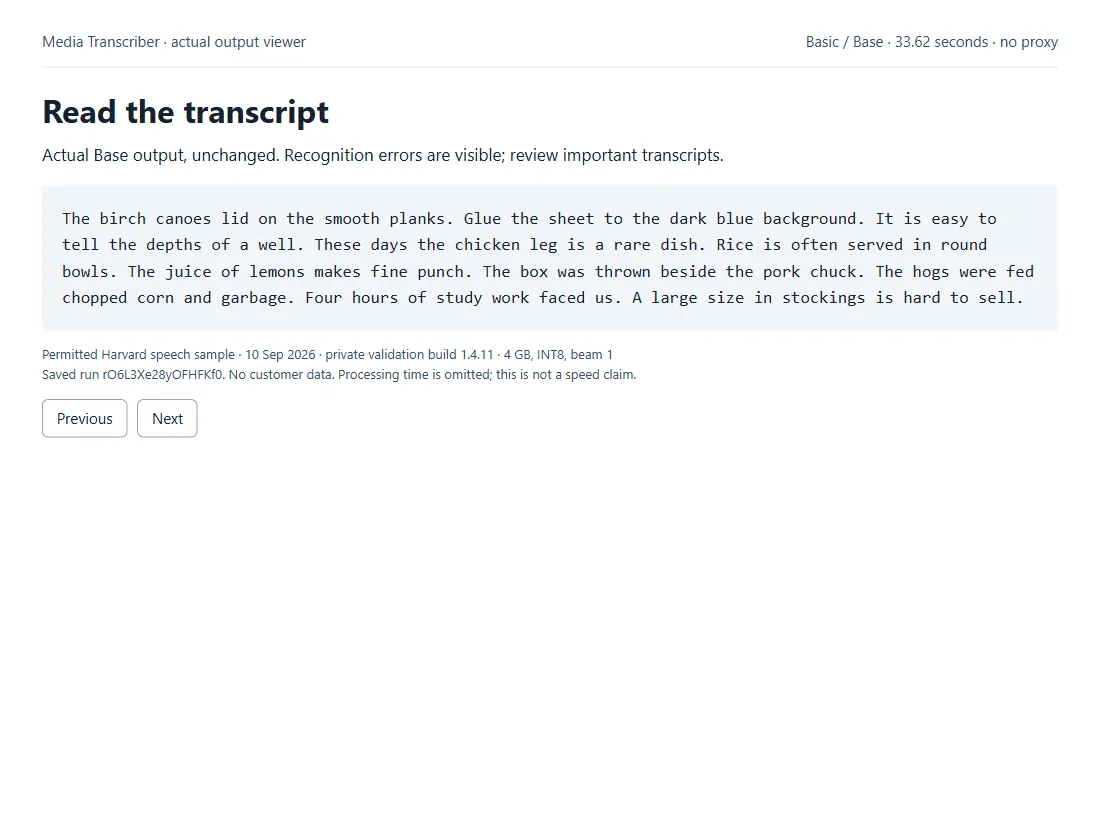
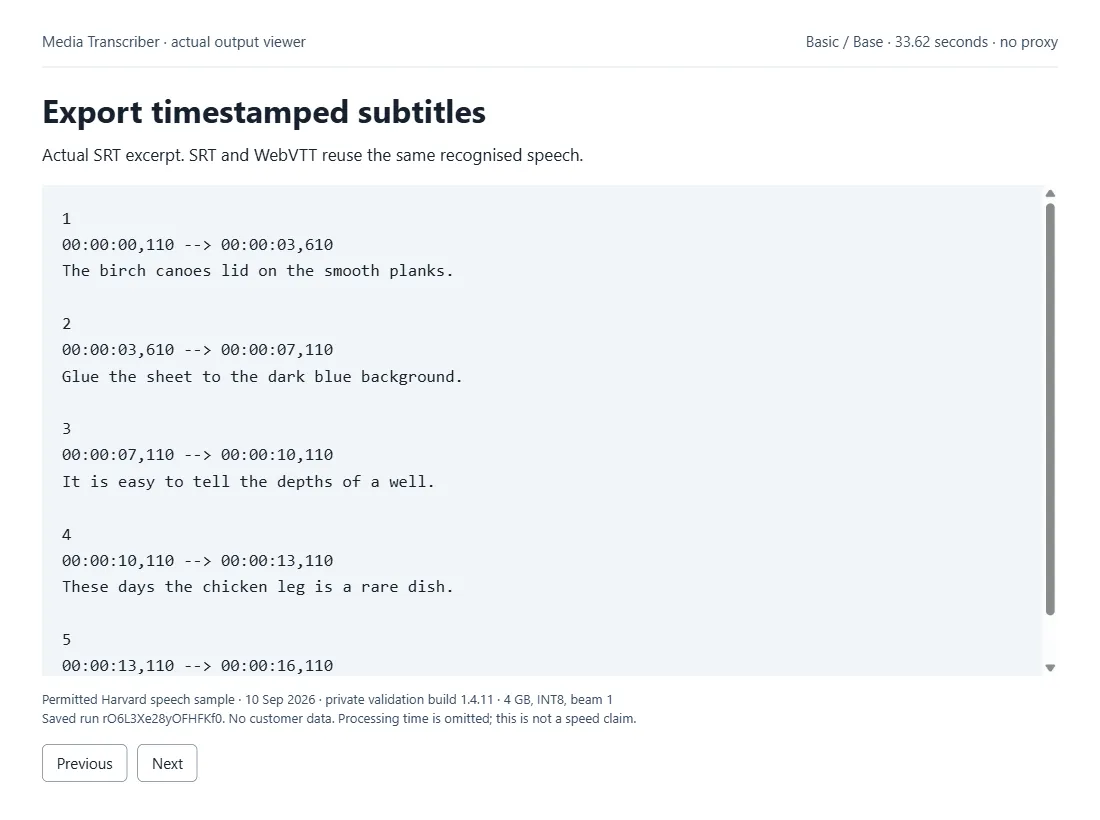
More: Markdown output, RAG JSONL output, and a 37-second walkthrough video.
Use cases
| You are a… | You use it to… |
|---|---|
| Podcaster or creator | Transcribe every new episode automatically for show notes, blog posts and clips |
| Video team | Produce SRT/VTT captions for accessibility and SEO |
| Researcher or journalist | Transcribe interviews, lectures, briefings and calls |
| AI / RAG builder | Turn audio and video into timestamped, source-linked chunks for search |
| Localisation team | Translate foreign-language speech to English text |
Input
Switching from another transcriber? Its input runs here as is: urls, podcastUrls and maxEpisodesPerShow
are read as mediaUrls, rssFeedUrls and maxEpisodesPerFeed.
| Field | Type | Description |
|---|---|---|
mediaUrls | array | Audio/video URLs. Provide these, rssFeedUrls, or both. |
rssFeedUrls | array | Up to 10 public RSS 2.0 or Atom feeds with audio/video enclosures. |
maxEpisodesPerFeed | integer | Newest matching episodes to inspect per feed: 1 (default) to 25. |
publishedAfter | string | Optional date, e.g. 2026-09-01. Undated episodes are excluded when set. |
episodeTitleContains | string | Optional case-insensitive episode-title filter. |
onlyNewEpisodes | boolean | Skip feed episodes already delivered in earlier runs. Default false. |
monitorName | string | Required with onlyNewEpisodes; a stable name of 1–80 characters. Older inputs sending monitorKey keep working and resume the same checkpoint. |
model | string | base (Basic, default), small (Quality) or medium (Max). Legacy tiny is still accepted and bills as Basic. |
language | string | Two-letter code (e.g. en, es); blank = auto-detect. |
translate | boolean | Translate speech to English instead of transcribing. |
outputFormats | array | text, segments, srt, vtt, markdown, rag. Default: text + segments. |
downloadFiles | boolean | Save the selected formats as files in the run's key-value store. Default false. |
ragChunkWords | integer | Maximum words per RAG chunk: 50–1,000; default 250. |
ragStrategy | string | segments (default, keeps existing IDs) or sentences for sentence-aware grouping. |
ragOverlapWords | integer | 0–100 words of repeated context, sentence mode only. Default 0. |
paragraphs | boolean | Add paragraphText and paragraph breaks in TXT. Default false. |
shareDownloadLinks | boolean | Create signed single-file links. Anyone holding a link can read that file. Default false. |
wordTimestamps | boolean | Add per-word timestamps. |
maxDurationMinutes | integer | Skip media longer than this (cost guard). |
maxTotalMinutes | integer | Optional run-wide cap on billed minutes. |
maxFailedItems | integer | Stop after this many failed items (default 3, maximum 20). |
maxDownloadMegabytes | integer | Per-item download limit in MiB (default 512). |
beamSize | integer | 1 = fastest; higher = slightly more accurate. |
proxyConfiguration | object | Proxy for downloads (helps with geo limits). With the default Apify Proxy a download is tried direct first and falls back to the proxy; pick a proxy group or your own proxy to always use it. |
Transcribe new podcast episodes automatically
Save it as a Task and add a schedule. Each run checks the newest matching episodes; ones already
delivered under the same monitorName and settings are skipped, and a run with nothing new
charges no audio minutes. Raise maxEpisodesPerFeed if several episodes can appear between
runs. A monitor remembers up to 5,000 delivered episodes. Changing transcription or export
settings starts a separate checkpoint; use a new monitorName to reprocess on purpose.
Build an audio knowledge base
Choose outputFormats: ["text", "markdown", "rag"] and downloadFiles: true. Each RAG chunk has
id, text, startSeconds, endSeconds, sourceUrl, sourceTitle, citationUrl and
wordCount, ready to index in your own search or vector database. Chunk IDs are stable for the
same source and text. YouTube citation links include a time offset. The Actor makes no
embeddings, summaries or other AI calls.
Use it from code and automations
Python (pip install apify-client). Swap the sample URL for your own MP3, WAV, MP4 or video link:
run.default_dataset_id is for apify-client 3.x; on 2.x write run["defaultDatasetId"]. Pass
max_total_charge_usd=1 to .call() to cap a run at $1.
JavaScript (npm install apify-client):
HTTP, one call that waits and returns the rows:
For recordings longer than a few minutes, start the run asynchronously and read the dataset when it finishes; the synchronous call waits up to 5 minutes.
Works with the Apify node in n8n, the Apify module in Make, Zapier, and AI agents
through the Apify MCP server
(https://mcp.apify.com?tools=sauliusautomatesit/media-transcriber).
Download the Python starter pack (ZIP): a short speech test, a repeat-run podcast example, an audio-to-RAG example, automatic file downloads and an HTTP recipe for n8n. Python 3.10+, no packages to install; the examples include charge and timeout limits.
OpenAI Whisper API or this Actor?
OpenAI's transcription endpoint is cheaper per minute ($0.003 to $0.006) and is the better choice when you already have small audio files in hand. It takes uploads only, up to 25 MB per file (OpenAI docs), so a URL, a podcast feed or a long episode means writing your own download, convert and split code first.
| OpenAI transcription API | This Actor | |
|---|---|---|
| Input | File upload, 25 MB per file | Links to audio or video, podcast RSS / Atom feeds, YouTube (best effort) |
| Long recordings | Split them yourself | Hour-long episodes in one go, timestamps kept across the whole file |
| New podcast episodes | Your own scheduler and state | onlyNewEpisodes plus an Apify schedule |
| Output | Text or JSON; SRT and VTT on whisper-1 | Text, segments, SRT, VTT, Markdown and RAG chunks with citation links |
| Where the audio goes | OpenAI | Recognised inside the Actor; no third-party service |
| Price | $0.003 to $0.006 per minute | $0.02 per minute (Basic); failed, silent and unreachable files free |
FAQ
Is there a free speech-to-text API? Apify's free plan includes $5 of monthly credit, which covers about 250 minutes of audio on the Basic tier.
Can it transcribe from a URL instead of an upload? Yes, that is the main input: paste a direct link to an MP3, WAV, MP4 or other common format, or a podcast feed.
How accurate is it? It depends on the recording, the language and the tier. Basic handles clear speech well; on our small English reference sample the word error rate was 9.9% on Basic and 1.2% on Quality. Compare tiers on a sample of your own content before a large batch, and review transcripts you will publish.
Which languages? 90+ languages, auto-detected by default. Set language to force one, or
translate: true to get English text from foreign-language speech.
How long can a recording be? Audio is processed in five-minute chunks with timestamps kept across the whole recording. On default settings one run takes recordings up to 5 hours on Basic (a 3 h 26 min Joe Rogan episode was tested end to end). For a batch, Quality or Max, set a longer run timeout; the Max tier needs at least 4 GB of memory.
Can I get subtitles? Yes. Add srt and/or vtt to outputFormats.
Does it identify speakers? No. There is no speaker diarisation.
What happens if a run is interrupted? Completed five-minute sections are saved. Use Resurrect on the original run (same build, input and storage) to continue without redoing finished sections. Only complete delivered recordings are ever charged.
Is my audio sent anywhere else? No. Recognition runs inside the Actor container. Media is downloaded to temporary storage and deleted after processing; transcripts stay in your Apify account. Only process recordings you have permission to use.
Limitations
- Feeds must be public RSS 2.0 or Atom with downloadable enclosures, up to 4 MB. Private or authenticated feeds are not supported. The proxy setting applies to media downloads, not feed discovery.
- Live streams are not supported; use a completed recording.
- Very noisy or overlapping speech is harder; try Quality or Max on a sample.
- Words exactly at a five-minute chunk boundary can be less accurate.
- Markdown is a transcript, not generated show notes. RAG chunks do not identify speakers or include embeddings.
Reference: billing receipts, stop reasons and recovery
Each successful row's billing.receiptKey points to a BILLING-#### record in the run's store,
with status charged, partial, unknown or not_monetized. SUMMARY separates minutes
delivered, confirmed charges, unknown charges and unprocessed items, and records the billing event
and effective unit price. Error rows and SUMMARY carry retryable, recommendedAction,
charged and chargeScope (always audio_minutes_only; the Actor-start fee is separate).
| Code / stop reason | What to do |
|---|---|
CHARGE_LIMIT, MINUTE_LIMIT | Completed results are kept. Raise the cap only if intended and submit the remaining items, not the whole batch. |
RUN_TIME_LIMIT, WALL_TIME_LIMIT | Use a smaller batch or more run time for the chosen tier. |
NO_SPEECH | Check that the recording contains clear speech. No audio-minute charge. |
DOWNLOAD_FAILED, PROXY_UNAVAILABLE | Check the source link, its expiry and proxy settings. |
DURATION_LIMIT, DOWNLOAD_SIZE_LIMIT, LIVE_NOT_SUPPORTED | Use a shorter or completed recording, or raise the relevant limit. |
FAILURE_LIMIT, FAILED_WORK_LIMIT | Fix the earlier errors before retrying the remaining items. |
ITEM_COST_LIMIT, RUN_COST_LIMIT, FEED_COST_LIMIT, TRANSFER_BUDGET | A resource allowance was reached. Check SUMMARY; completed transcripts and checkpoints remain. |
UNMETERED_PROTOCOL | Provide a direct HTTP(S) file or a supported HTTP stream. |
CHECKPOINT_MISMATCH, CHECKPOINT_INVALID, RESUME_RECONCILIATION_REQUIRED | Recover only from the original run with identical input, settings and content. |
MODEL_LOAD_FAILED, WORKER_EXITED | Share the failed run and its SUMMARY in an issue. |
BILLING_UNAVAILABLE, BILLING_UNCERTAIN, PARTIAL_CHARGE | Check the receipts before retrying. Never blindly repeat a delivered item. |
DELIVERY_FAILED, DELIVERY_STATE_UNCERTAIN, CHECKPOINT_FAILED | Check the dataset, downloads and receipts first. |
TIMESTAMP_BOUNDS_ADJUSTED (warning) | Text kept; times were bounded to the decoded audio, originals in originalTiming. |
With downloadFiles: true, each row has a files map and the run's DOWNLOADS record lists every
file. Fetch API URLs with your Apify token, or download from the Console. If an unsigned link
returns HTTP 403, use its consoleUrl or send Authorization: Bearer YOUR_TOKEN. Never put your
token in a shared URL. Signed links (shareDownloadLinks: true) can be read by anyone holding
them, so leave that off for private audio.
Release notes are on the Changelog tab.
Support and reviews
For help, open an issue and share the affected run through Apify's debugging controls. Never paste tokens or sensitive recordings into a public issue. If it saves you time, an honest review helps other people choose.


