

Facebook Pages Contact Scraper: Email, Phone, WhatsApp
Pricing
from $2.50 / 1,000 facebook page scrapeds
Facebook Pages Contact Scraper: Email, Phone, WhatsApp
Turn Facebook Page URLs into contact rows: email, phone, WhatsApp, website, address, Instagram, followers, rating. Paste a city page to get every event organizer and venue there. Logged-out, no cookies, no browser. Pages only, personal profiles are skipped and never billed.
Pricing
from $2.50 / 1,000 facebook page scrapeds
Rating
0.0
(0)
Developer

Scrapegeist
Maintained by CommunityActor stats
0
Bookmarked
13
Total users
10
Monthly active users
15 days ago
Last modified
Categories
Share
Facebook Pages Contact Scraper: Email, Phone, WhatsApp, Instagram
Paste Facebook Page URLs, get one contact row per Page: email, phone, WhatsApp, website, address, Instagram, followers, rating, category. Paste a city page, get every organizer and venue that runs events there, with activity signals. Logged-out, public data only, no cookies, no browser. Pages only: personal profiles are skipped and never billed.
What you get, and how often
Measured on 2026-09-10 over 48 Pages across 9 countries (local businesses, venues, event organizers and large brands, mixed):
| Field | Filled |
|---|---|
| Category | 100 % |
| Followers | 100 % |
| Website | 92 % |
| 52 % overall, 77 to 80 % for Pages under 1M followers | |
| Phone | 52 % |
| Address | 46 % |
| Rating (recommend % and review count) | 48 % |
| 10 % | |
| 4 % | |
| Any of email, phone, WhatsApp | 71 % overall, 80 to 92 % for Pages under 1M followers |
The split is not random: large brands route contact through a support flow and publish nothing on the Page, while local businesses, venues and event organizers publish an email and a phone number because they want to be called. City mode returns a wider mix: the Detroit feed on 2026-10-05 surfaced 29 Pages, 13 of them with a contact, because it also lists ticket resellers, touring artists and national brands next to the local venues and organizers.
Two fields a logged-out visitor cannot see are therefore not returned: the likes count (Facebook serves followers only) and opening hours (only an open or closed status is served, never the hours themselves).
What it costs
| Event | Price | When it is charged |
|---|---|---|
page-scraped | $4.00 / 1,000 | Every Page row that reaches your dataset |
contact-found | +$3.50 / 1,000 | The row carries an email, a phone number or a WhatsApp number |
activity-scored | +$2.00 / 1,000, +$6.00 from 2026-10-20 | Only with activity: "full", and only when the organizer's calendar was resolved |
These are the Free-tier rates. Paid Apify plans pay less: on Gold a Page costs $2.50 and a contact $3.00 per 1,000. The Store header shows the Gold rate of the Page row.
Worked example. 100 venue Pages, 80 of them with a contact:
A Page without contact data costs the base price only. Skipped and failed inputs cost nothing: dead vanities, personal profiles, HTTP 404s and login walls produce a row you can filter on and no charge. Compute and the residential proxy are included in the prices above and are never billed on top.
maxPages is a hard ceiling. It is checked before each fetch, not after the row lands, so the number you type is the most Page rows you can be charged for.
There is a second, unbilled cap behind it: a fetch budget of max(20, 3 x maxPages) page fetches per run. It exists so a list that is mostly dead URLs cannot keep spending proxy traffic forever. When the budget runs out, the remaining inputs get a skipped row that says so, and raising maxPages raises the budget with it.
Quickstart
Paste into Facebook Page URLs, vanities or ids, one per line. All of these work:
A Page's own tabs (/about, /events, /photos and the rest) resolve to the Page itself, so you can paste whatever tab you were looking at. Objects of the shape { "url": "..." } are accepted too, so the output of another Apify crawler can be piped in without reshaping. For example, the organizer rows of the Facebook Events Scraper go in as they are. A missing or mangled https:// is repaired.
Event, group and place URLs are not Pages. Put them in the places field if they are city or place URLs, otherwise they come back as an error row that names the accepted shapes.
No URL list? Paste a city into City / place pages for organizer discovery:
Both forms of the same city URL work. The two lists run in one run, and a Page reached by both is emitted once.
City mode: from a city to its organizers
The actor reads Facebook's public event-discovery feed for the city, walks up to maxEventsPerPlace events of it, collects the organizer and venue Pages behind those events, and scrapes one contact row per organizer. Roughly one organizer per event in practice.
The city feed does not name the host, so each event costs one event-detail fetch to resolve it. Those detail fetches are not billed: you pay for the Page rows that come out, not for the walk.
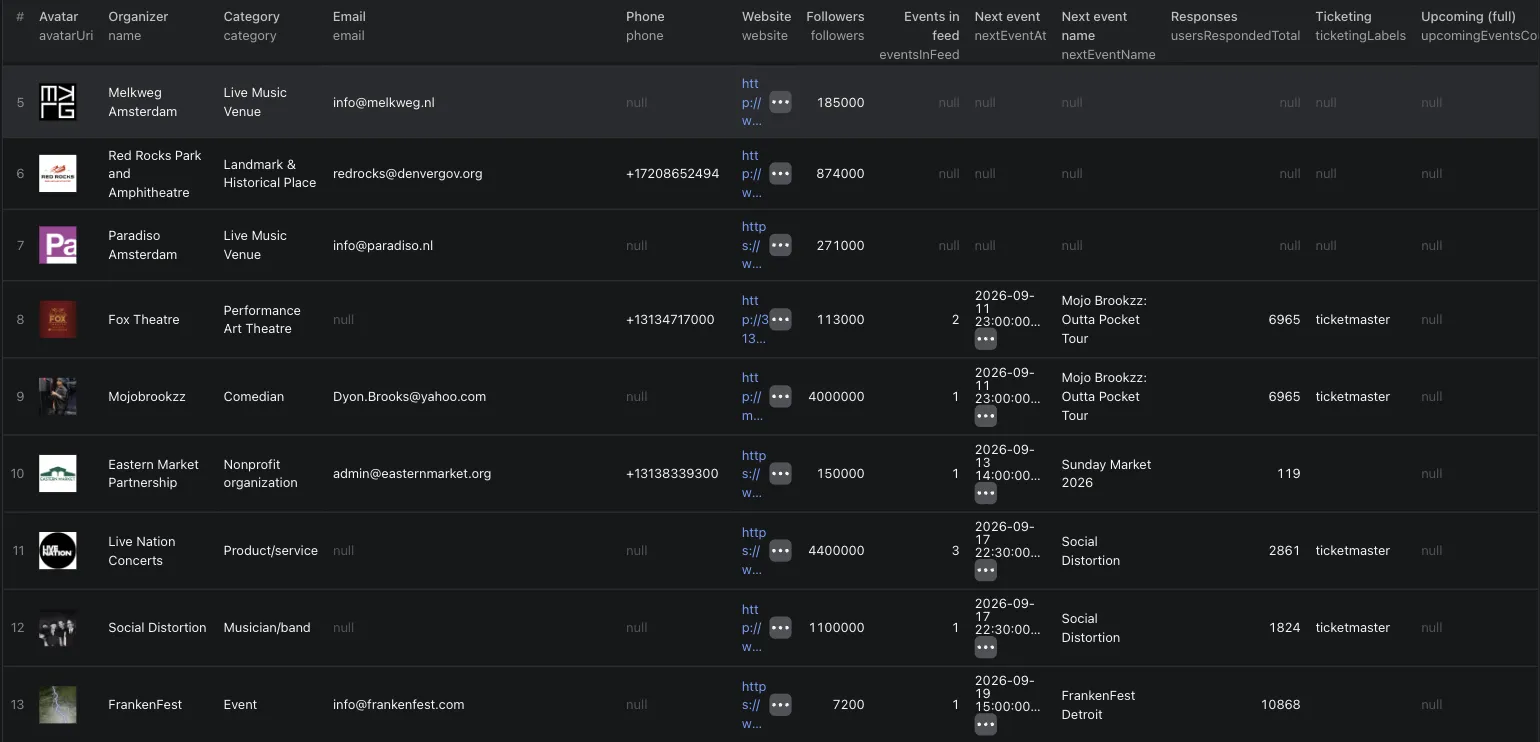
activity decides what the organizer rows carry on top of the contact fields:
activity | Adds | Extra cost |
|---|---|---|
"feed" (default) | Events in feed, next event (date, name, URL), attendee total across those events, ticketing platforms detected on their ticket links | none |
"full" | The above, plus the upcoming event count and the number of events in the last 90 days, read from the organizer's own calendar, each capped at 8 (8 means 8 or more) | +$2 / 1,000, +$6 from 2026-10-20 |
"none" | Nothing. Contact fields only, activity stays null | none |
"full" fetches two more pages per organizer (its upcoming and its past calendar tab), which is why it costs extra. On 2026-10-05 a 20-event Detroit run with "full" returned 19 organizers in under 3 minutes. The price rises on 2026-10-20 because those two fetches cost more than the old $2 covered.
maxEventsPerPlace bounds the walk (default 100, range 1 to 1,000). maxPages (default 100, range 1 to 10,000) still bounds the whole run on top of it, and the actor stops walking as soon as it has as many distinct organizers as that cap allows.
What this is: Facebook's own curated ranking of suggested events for that city. It is high-quality discovery of who is active there, not a complete index of everything happening in the city.
Dataset views
The run writes one row per Page, plus a row for every skipped or failed input. type tells you which kind: page, skipped or error. One city input can therefore produce many Page rows, and a Page reached twice (pasted directly and found again in a city feed) is emitted once.
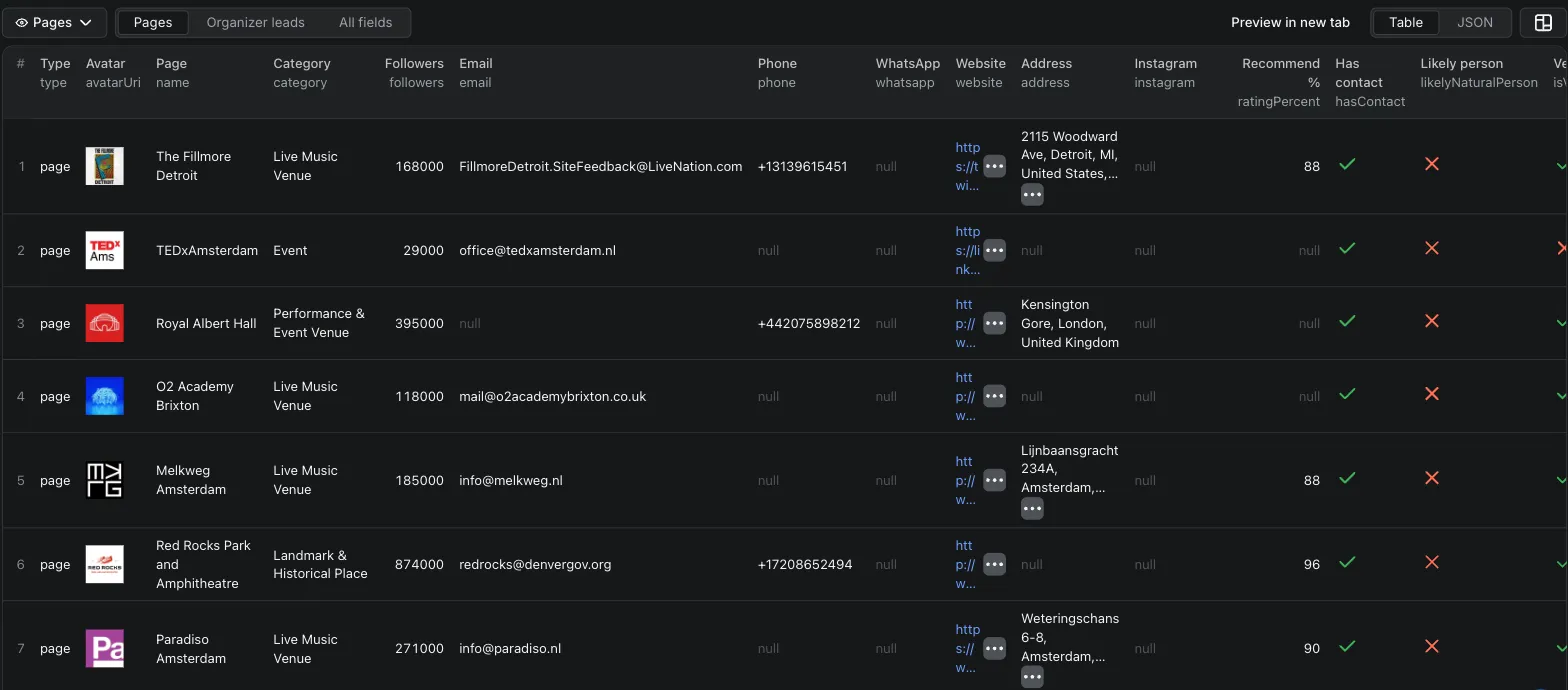
Two table views ship with the actor:
- Pages: the contact columns for every Page row.
- Organizer leads: the same contact columns plus the activity columns (events in feed, next event, responses, ticketing, upcoming count, past 90 days). A view selects columns, it cannot filter rows, so rows that came from direct Page input appear here too, with the activity columns empty.
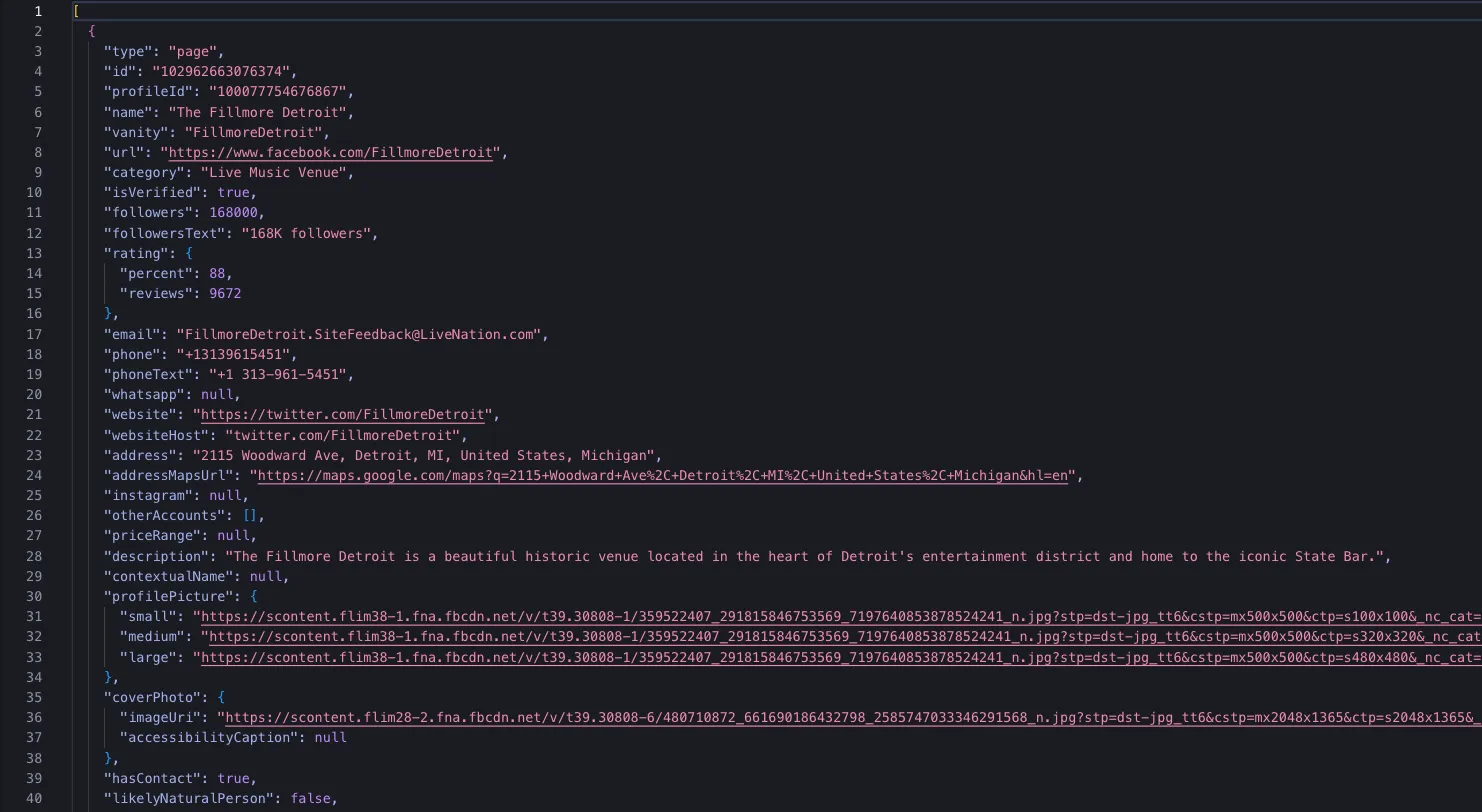
All rows exports everything untransformed, including the skipped and error rows. Export as JSON, CSV, Excel, or through the Apify API.
Field reference
Every page row:
| Field | Type | Description |
|---|---|---|
type | string | "page" for a scraped Page. |
id | string | Stable Facebook Page id. |
profileId | string or null | Profile id used in /<id> URLs and in event host references. |
name | string | Page name. |
vanity | string or null | Vanity handle, when the Page has one. |
url | string | Canonical Facebook URL for the Page. |
category | string or null | Facebook's own category, for example "Live Music Venue". |
isVerified | boolean | Blue badge shown on the profile. |
followers | number or null | Follower count as a number. |
followersText | string or null | Follower line as Facebook rendered it, for example "8.2K followers". |
rating | object or null | { percent, reviews }: share of recommendations and how many reviews it is based on. |
email | string or null | Contact email from the intro card. |
phone | string or null | Phone number, digits with a leading plus. |
phoneText | string or null | Phone number as printed on the Page. |
whatsapp | string or null | WhatsApp number, normalised like phone. |
website | string or null | Website URL, unwrapped from Facebook's l.facebook.com redirect. |
websiteHost | string or null | Host as the Page displays it, for example "thefillmoredetroit.com". |
address | string or null | Street address from the intro card. |
addressMapsUrl | string or null | Facebook's map link for that address. |
instagram | string or null | Instagram handle linked from the Page. |
otherAccounts | array | Every other linked account: { platform, handle, url }. |
priceRange | string or null | Price band the Page publishes, for example "$$". |
description | string or null | Page description text. |
contextualName | string or null | Location line Facebook shows under the name, for example "Cologne, Germany". |
profilePicture | object | { small, medium, large } image URLs. |
coverPhoto | object or null | { imageUri, accessibilityCaption }. |
hasContact | boolean | True when email, phone or WhatsApp is present. This is the field that decides the contact-found charge. |
likelyNaturalPerson | boolean | Category heuristic, see below. |
activity | object or null | Activity block for rows discovered through a city feed, null otherwise. |
discoveredVia | string | "input" for a Page you pasted, "place:<id>" for one found in a city feed. |
inputUrl | string | The exact input this row came from, so it joins back to your source list. |
scrapedAt | string | ISO timestamp of the fetch. |
The activity object holds eventsInFeed, nextEventAt, nextEventName, nextEventUrl, usersRespondedTotal, ticketing, upcomingEventsCount and pastEvents90d. The last two are null unless activity: "full" was set.
Flat columns are written next to the nested objects so the table views can show them, and so a CSV export stays readable:
| Column | Mirrors |
|---|---|
avatarUri | profilePicture.medium, falling back to small then large |
ratingPercent, ratingReviews | rating.percent, rating.reviews |
eventsInFeed | activity.eventsInFeed |
nextEventAt, nextEventName, nextEventUrl | the matching activity fields |
usersRespondedTotal | activity.usersRespondedTotal |
ticketingLabels | activity.ticketing, joined with commas |
upcomingEventsCount, pastEvents90d | the matching activity fields |
A skipped row carries inputUrl, reason (personal-profile, not-found or cap-reached), message and discoveredVia. An error row carries inputUrl, message and discoveredVia, and that is where a rejected input shape or a failed fetch lands. Neither is billed.
likelyNaturalPerson
Facebook Pages are business objects, but some of them belong to one human being: a DJ, a photographer, a solo artist. Outreach rules treat those as personal data of a natural person, which is a stricter regime than a company mailbox.
likelyNaturalPerson flags them. It is a heuristic and it uses one signal: Facebook's own category. Categories such as Artist, Musician/band, Public figure, DJ, Digital creator and Athlete set the flag; Restaurant, Nonprofit Organization or Live Music Venue do not.
It is a category match, so it inherits Facebook's category choices. A running club that picked "Athlete" as its category is flagged even though it is a club, not a person. Read the flag as "check this one before you contact it", not as a verdict.
Recommendation: exclude flagged rows from outreach, or review them by hand first.
Legal and responsible use
This actor reads only what a logged-out visitor sees on a public Facebook Page. No login, no cookies, no account, no circumvention of a technical access control.
The output is research, enrichment and verification data. It is not an opt-in marketing list, and it does not become one because it is in a dataset. If you contact anyone in it, you are the controller for that processing, and you are responsible for the rules that apply to you: GDPR, UWG § 7 in Germany, CAN-SPAM in the US, PECR in the UK, and the equivalents elsewhere. Business-to-business contact by email generally needs a lawful basis and, in several of these regimes, prior consent. Check before you send.
Every row carries inputUrl and scrapedAt, so you can show where a record came from and when.
Data notice for Page owners
What is collected: the public contact block of a Page (email, phone, WhatsApp, website, address, linked accounts), its name, category, follower count, rating summary, description and images, and for city pages the public event feed that names the hosting Pages. Personal profiles are detected and skipped. Friend lists, group members and attendee lists are never read.
Who processes it and why: the customer who starts a run chooses the input and receives the output, and is the controller for any use of it. The operator of this actor processes the data only to deliver it to that customer and keeps no copy beyond the run storage the customer configures. Legal basis for the collection is legitimate interest (GDPR Art. 6(1)(f)): the details are published by the Page owner for the purpose of being contacted, the data is limited to business contact details, and the likelyNaturalPerson flag lets customers exclude sole traders and personal-name Pages.
Your rights: to have your Page excluded from future runs, to learn whether it was included, or to have data erased on the operator's side, open an issue on this actor's Store page (the Issues tab) with the subject "Exclude my Page" and the Page URL. Exclusions are applied within 30 days and checked on every run. You also have the right to complain to a supervisory authority.
FAQ
Do I need cookies or a Facebook login? No. The actor reads public Page data as a logged-out visitor would.
Why a residential proxy?
Facebook blocks datacenter IPs. The default RESIDENTIAL group of Apify Proxy is enough and needs no setup. You can pin a country in the proxy editor if you want a specific region.
A Page shows an email in my browser, but the row has none. Why? Facebook hides the intro card on some very large Pages when you are logged out, so there is nothing public to read. Try the Page's numeric id instead of its vanity: it sometimes renders a different variant of the profile. If the field is still empty, open an issue with the URL and we will look at that Page.
Can you find a Page by name? No. Facebook has no public page search for logged-out visitors, so there is nothing to paginate. Paste URLs, vanities or ids, or paste a city page and let the event feed surface the active organizers there.
What about opening hours or the likes count? Neither is served to a logged-out visitor. Facebook shows an open or closed status instead of the hours, and a follower count instead of likes. The actor returns followers and does not guess at the rest.
What happens to personal profiles in my list?
They are detected on the fetched document, emitted as a skipped row with reason personal-profile, and never billed. The same holds for dead vanities and Pages that 404.
A run failed, what now?
Re-run it. Failed and skipped rows are never billed, so a failed run costs nothing. If every page fetch in a run fails, the actor stops early and says so in the log with [ALERT][BLOCKED], which usually means the proxy pool needs a moment rather than that your input is wrong.
Related actors
- Facebook Events Scraper, Past the 8-Event Limit: every public event of an organizer, group or city, plus the organizer Pages behind them. Its organizer URLs are a ready-made input list for this actor.
- Instagram Profile and Posts Scraper: profiles and the full post history of public Instagram accounts, no login.
Support
Use the Issues tab on this actor's Apify Store page for bugs and feature requests. Include the Page URL when a field is missing, that is what makes a fix possible. Failed rows are never billed, so a broken run costs you nothing while we investigate.


