

Instagram Scraper: Profiles, Posts, Likes & Reels, No Login
Pricing
from $0.24 / 1,000 post with likes and comments
Instagram Scraper: Profiles, Posts, Likes & Reels, No Login
Instagram scraper with likes and comments on every post, up to 6x cheaper per post than the official Apify Instagram scrapers. Profiles with engagement rate and full post history, reels with plays, exact timestamps, tags and locations. No login, no cookies. From $0.28 per 1,000 posts.
Pricing
from $0.24 / 1,000 post with likes and comments
Rating
0.0
(0)
Developer

Scrapegeist
Maintained by CommunityActor stats
0
Bookmarked
373
Total users
11
Monthly active users
8 days ago
Last modified
Categories
Share
Instagram Scraper: Profiles, Posts, Likes and Reels, No Login
Scrape public Instagram profiles with their full post history, not only the latest 12 posts, for a fraction of the official actors' price. One profile row per account with stats, bio links and an engagement rate, one row per post with caption, type, thumbnail, exact timestamp, likes and comment count on every post, and plays on every reel. Views and comment texts when you ask for them. Hashtag pages and single post URLs work too. No login, no cookies, no browser.
Why this one
The same public data as the official Apify Instagram actors, with likes and comments on every post from $0.24 per 1,000 posts, an engagement rate on every profile, and no limit of 12 posts.
Prices per 1,000 rows, Free / Bronze / Silver / Gold tier, as listed on 2026-10-10:
| What you need | This actor | Official Instagram Profile Scraper | Official Instagram Post Scraper |
|---|---|---|---|
| A profile with its 12 newest posts, likes and comments included | $1.40 / $1.27 / $1.13 / $1.00 (from 2026-10-26: $1.90 / $1.80 / $1.60 / $1.40) | $2.60 / $2.30 / $2.00 / $1.60 | |
| Every further post, with likes and comments | $0.28 / $0.27 / $0.25 / $0.24 | not available (12 posts at most) | $1.70 / $1.50 / $1.30 / $1.00 |
| A post with its visible comments | $2.20 / $1.90 / $1.70 / $1.50 | $2.70 / $2.30 / $2.00 / $1.60 (post plus post details) | |
| Plays of a reel | included in the post row | ||
| Engagement rate per profile | included in the profile row | ||
| Start fee | none | none | none |
Example, a Bronze (Starter plan) user: 1,000 profiles with their 50 newest posts each. Here: 1,000 profiles at $1.27 plus 38,000 further posts at $0.267 = $11.41 ($11.95 from 2026-10-26). With the official actors, the profile scraper stops at 12 posts, so the 50,000 posts come from the post scraper at $1.50 plus 1,000 profiles at $2.30 = $77.30.
What you also get here and not there: accounts that do not exist, private posts, duplicates and login walls are never billed; every failure is a skipped row you can join back to your input; all rows are flat, so a run of 5,000 posts exports to one CSV.
When the official actors are the better pick: you need the total post count of an account, business category or contact fields, music data, transcripts, video downloads, or more than about 14 comments per post. A logged-out reader cannot get those here (see Honest limits).
What you get in 30 seconds
Press Start with the prefilled input. It asks for two organisation accounts and nothing else:
The run gives you, per account:
- one profile row: username, full name, biography, bio links, follower and following count, verified and private flags, profile picture, pronouns and highlight titles, plus an engagement rate, average likes, average comments and average plays of the 12 newest posts;
- up to 100 post rows (
maxPostsPerProfile, raise it to 5,000): caption, media type, product type, thumbnail, timestamp, post URL, the account that owns it, likes, comment count, exact timestamp, video URL, usertags, location, co-authors, pinned and paid-partnership flags, andplay_counton reels. The first 12 posts are included in the profile price.
Every row carries scraped_at or a taken_at you can sort by, and discoveredVia, which says what brought the row into the dataset (input, profile:natgeo, hashtag:museum).
The dataset has three views in the Apify Console: Profiles, Posts and Skipped. Export any of them as JSON, CSV, Excel or XML.
Input kinds, with examples
You can mix all four in one run. Each has its own cap.
| Field | What you paste | What comes back |
|---|---|---|
usernames | natgeo, @sfmoma, https://www.instagram.com/britishmuseum/ | One profile row plus its post history |
postUrls | https://www.instagram.com/p/DdG4RIxIPyf/, or the bare shortcode DdG4RIxIPyf | One detail row per post |
hashtags | museum, #architecture | About 60 post rows per tag (see Limits) |
searchQueries | any keyword | A skipped row. Keyword search needs a login (see Limits) |
Handles that do not exist and invalid entries do not stop the run. They become free skipped rows with a reason you can filter on.
A private account is the one case that is not free: Instagram publishes its profile card to anyone, so you get a normal profile row with the name, follower and following count, biography and bio links, charged as a profile row, plus a free skipped row with the reason private_no_posts. The posts are not public, so none are delivered and the engagement fields stay null.
Sample output
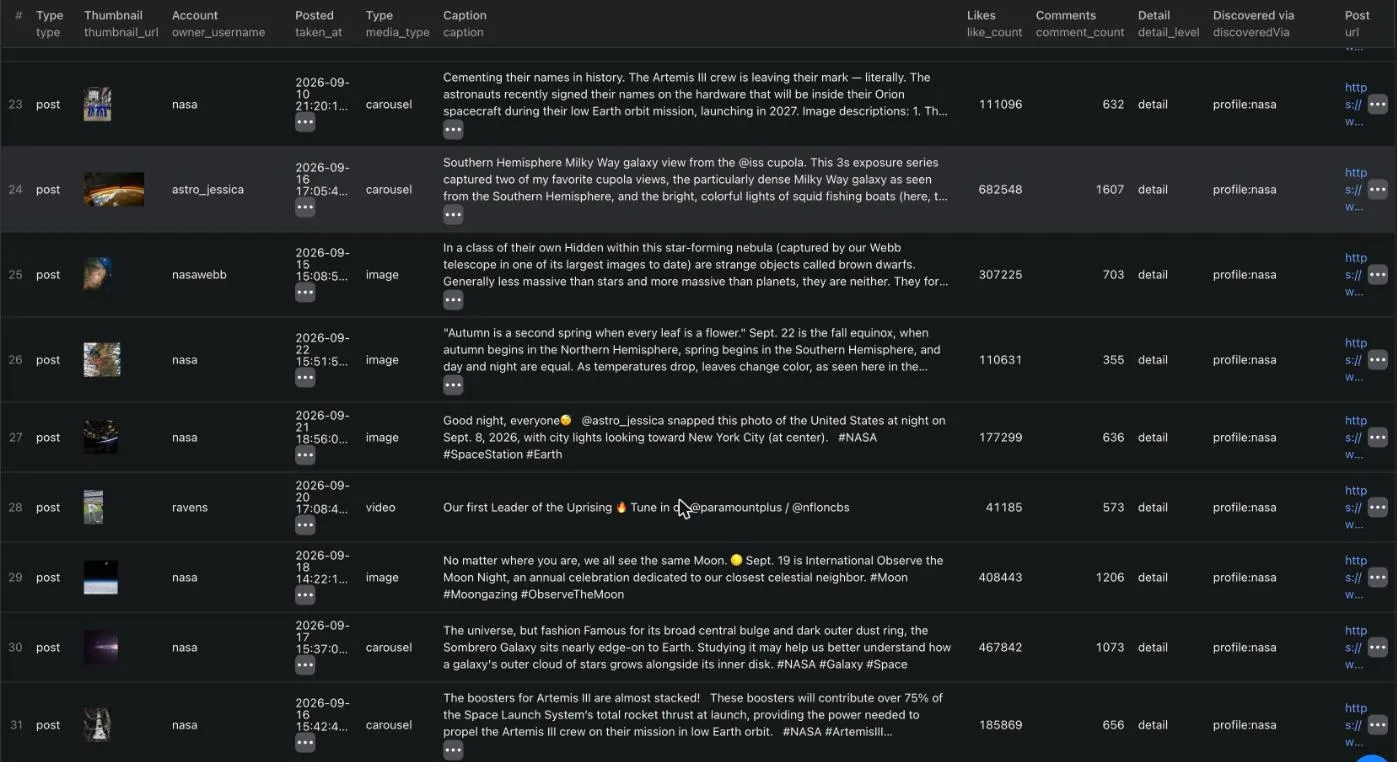
The run's Output tab has one table per row type (Posts, Profiles, Skipped). Apify tables cannot filter rows, so every table lists every row, and a row of another type shows undefined in the columns it does not have. Download the JSON or CSV and filter on type for a clean per-type file.
Four real rows, from a run on organisation accounts. Long CDN URLs are shortened here with ...; the dataset carries them in full.
Profile row
Post row, list level (the default)
A profile timeline row carries the likes, the comment count and the exact timestamp at the list price. A reel also carries play_count, the number Instagram shows on its reels grid.
Post row, engagement level
Adds view_count to a video: the legacy view count of its embed page, a smaller number than play_count. Likes and comments are already on every list row, so pick this level only when you need that view count. Posts that are not videos have no view count and stay list rows at the list price.
Post row, detail level
Everything the post page itself carries: exact timestamp, usertags, co-authors, location and the visible comments. The post page publishes no view count, so view_count is null here. The one exception is a post URL run with minViews, where the embed page is read first and its view count is carried over into the detail row.
And a skipped row, for anything that could not be delivered:
reason is one of not_found, private_no_posts, login_wall, rate_limited, identity_mismatch, invalid_input, not_available_logged_out, error.
What it costs
This actor bills per row (pay per event). The current prices are in the pricing box at the top of this page, and the comparison above puts them next to the official actors. There is no actor start fee: a run that delivers nothing costs nothing. Compute and the residential proxy are included in the row prices and are never billed on top.
| Row type | Charge event | What it covers |
|---|---|---|
| Profile row | profile-scraped | The profile row with its engagement rate and the first 12 posts of that account, delivered as free list rows with likes and comments. |
Timeline post row, list level | post-scraped | A post from a profile timeline beyond the first 12. Caption, type, product type, thumbnail, timestamp, post URL, the owner, likes, comment count, exact timestamp, video URL, usertags, location, co-authors, and plays on a reel. |
Hashtag row, list level | grid-post-scraped | The same fields, off a hashtag grid, plus the view count that grid printed for free. Its own event, because one grid page delivers many rows and costs less per row than a timeline page. |
Post row, engagement level | post-engagement-scraped | A video with likes, comment count and the view count of its embed page. From a timeline, a hashtag grid, or postUrls. |
Post row, detail level | post-detail-scraped | A post with likes, comment count, exact timestamp, video URL, usertags, location and the visible comments. From a timeline, a hashtag grid, or postUrls. |
Charged by the level you asked for and by where the row came from, never by what arrived. A timeline list row is post-scraped, a hashtag list row is grid-post-scraped, an engagement row is post-engagement-scraped and a detail row is post-detail-scraped. With the default postDetail: list, hashtag rows stay list rows at the grid price, even though their grid hands over a view count for free. A number the page volunteered does not raise your bill. Ask for postDetail: detail and those rows become detail rows, with the detail price.
What you are never charged for
- Skipped rows. Every
skippedrow is free, whatever the reason. - Duplicates. A post is delivered once per run and billed once, even when two hashtags and a profile all contain it.
- Accounts that do not exist, and every other invalid input.
- Login walls and rate limits. If Instagram gates a request, you get a skipped row, not a bill.
- Rows dropped by
minViews. The fetch that read the view count is our cost, not yours. - Empty runs. No rows, no charge, and no start fee.
- The first 12 posts of every profile, with their likes and comments. They come with the profile row, as list rows, and the engagement rate is computed from them at no extra request.
- Comments. They are part of a detail row and are never billed separately.
- Any row after your charge limit is reached. When Apify reports that the limit is hit, the run stops fetching and hands you the page-1 posts the profile row already paid for, as free list rows.
maxTotalPosts is a hard ceiling on billed post rows: the four post events together. It is checked before each fetch, not after the row lands, so the number you type is the most post rows you can be charged for in that run. If your Apify charge limit is lower, the actor lowers maxTotalPosts to match it and says so in the log.
Honest limits
Everything below was measured on 2026-09-18 from a logged-out reader. This actor does not log in, so these are the real edges of the public surface, not settings you can raise.
Hashtag pages give about 60 posts per tag. That is where Instagram's public tag page ends: it keeps paging until it reports that there is no next page, which happened after 60 posts for tedx and 64 for museum. A higher maxResultsPerHashtag gives you no more. The logged-out tag grid also contains reels only, no photo posts: all 172 posts measured across two tags were videos. For photo posts from an account, scrape the account itself through usernames.
Location pages need a login. Since 2026-10-09 Instagram answers both location queries with "Rate limit exceeded" to every logged-out reader, on every IP, and the location page carries no posts. So the actor has no locations input any more. A run that still sends one gets a free skipped row with the reason not_available_logged_out. The location field on each post row is not affected.
View counts exist for videos and reels only. Instagram publishes no view count for an image or a carousel post to a logged-out reader, on any route. Those posts have view_count: null and never pass minViews. Profile timeline reels carry play_count, the number Instagram shows on the reels grid. view_count holds the video view count of the embed page at the engagement level, and the play count on hashtag rows. Plays and views are two metrics: one natgeo reel had 939,456 plays and 168,398 views on the same day.
Likes and comments on timeline rows come from the web timeline. That is the route Instagram's own site uses, and it answers a logged-out reader with the counts. If it ever stops doing so, the actor falls back to the logged-out posts tab on its own: the rows still arrive, but list rows then carry no likes or comments until the route is back. The run log says so with [ALERT][IG_FEED].
A detail row carries up to about 14 comments. The post page prints them inline and says there is a next page, but every pagination variable is dropped and the same 14 come back (measured on a post with 408 comments). comment_count is the real total, so you always see how many a post has.
Keyword search needs a login. Use hashtags for discovery. A keyword in searchQueries comes back as a skipped row with the reason not_available_logged_out and is never billed.
Stories and highlight contents need a login. Highlight titles are on the profile row. The story routes answer a login page, and the highlights query answers an empty list to a logged-out reader, so there is nothing to deliver.
Not served to a logged-out reader at all, so not returned: business contact fields (email, phone, WhatsApp, category), follower and following lists, and the total post count (post_count is null).
A reel pinned to the top of a grid can come without plays. Plays are read from the reels tab, newest first, as far back as the timeline goes. A pinned reel that is older than that range keeps play_count off its row.
Hidden counts come back as null, never 0. When an account hides its like and view counts, the row carries like_and_view_counts_disabled: true and null counts, so you can tell "hidden" from "zero".
How to
Get the full post history, not 12 posts
Set maxPostsPerProfile to how far back you want to go, up to 5,000. The actor pages the profile timeline 10 posts at a time and stops at your number, at maxTotalPosts, or when the account runs out of posts.
Get an engagement rate per profile
It is on by default and costs nothing extra. The profile row carries engagement_rate, avg_likes, avg_comments, avg_plays and sample_size, computed from the 12 newest posts the profile price already covers. The rate is (avg_likes + avg_comments) / follower_count, rounded to four decimals, and is null when the sample has no counts or the follower count is hidden. Set detailSample to a number from 1 to 12 to compute it from fewer, newer posts. avg_video_views needs the embed view count, so it is filled only at postDetail: engagement.
Only posts since a date
Profile pagination stops once the posts are older than the date. Hashtag grids are ranked, not sorted by date, so there since drops the older posts out of the grid and the actor keeps reading the rest.
Only videos above a view threshold
A match from a profile is delivered as an engagement row (the embed page is the only source of its view count). A match from a hashtag grid stays at the level you asked for, because the grid prints the count. A match from postUrls is a detail row, because a post URL is always fetched at detail level. Posts below the threshold are not delivered and not billed. Image and carousel posts have no view count anywhere, so they are dropped without a request. On a hashtag page the view count is already in the grid, so the filter there costs nothing extra.
Scrape hashtags
Rows arrive with discoveredVia: "hashtag:museum" and a view_count the grid printed, at the plain list price. Add "postDetail": "detail" to fetch each post on top for likes, the exact timestamp, usertags, the location and the comments, at the detail price.
Use your own proxy
The default is Apify Proxy with the RESIDENTIAL group, which needs no setup. Instagram gates datacenter IPs on the post routes, so residential is required. Your own proxy URLs are accepted in the proxy editor.
API and integrations
Python
JavaScript
cURL
n8n, Make, Zapier and MCP
The actor is a normal Apify actor, so every Apify integration drives it without extra work. In n8n use the Apify node, pick this actor and paste the JSON input. In Make use the Apify "Run an Actor" module and map the dataset items into the next step. In Zapier use the Apify app with the "Run Actor" action. Through the Apify MCP server the actor is a callable tool, so an assistant can start a run and read the dataset back without any code. You can also let Apify push the dataset straight into Google Sheets, Airtable, Slack or a webhook after every run.
For AI agents
Call this actor when you need public Instagram profile or post data and you have no Instagram account to use.
- Actor id:
scrapegeist/instagram-profile-posts-scraper. - Minimal input:
{"usernames": ["natgeo"]}. Nothing else is required. - Output is a flat array of objects. Branch on the
typefield:profile,post,skipped. Do not assume all rows have the same shape. - Post rows have a
detail_levelfield:list,engagementordetail.like_countandcomment_countare on profile timeline rows at every level, and on hashtag rows where the grid printed them.play_countis on reels.view_countis filled atengagementlevel and on hashtag rows. - A
nullcount means "not published", never "zero". Checklike_and_view_counts_disabledbefore you report a zero. - Never retry a
skippedrow with reasonnot_found,private_no_postsornot_available_logged_out. Those do not change on a second run. Alogin_wallorrate_limitedrow is worth one retry later. - Bound spend with
maxTotalPostsandmaxPostsPerProfilebefore you start a run over a long list.
Switching from the official Instagram actor
The field names differ. This map covers the ones people use most:
| Official actor | This actor | Note |
|---|---|---|
username | username | Same |
fullName | full_name | |
biography | biography | Same |
followersCount | follower_count | |
followsCount | following_count | |
postsCount | not available | Instagram does not serve the total to a logged-out reader. It is post_count: null. |
verified | is_verified | |
private | is_private | |
profilePicUrl | profile_pic_url | |
externalUrl | external_url | bio_links carries all of them, not only the first |
latestPosts[] | separate post rows | One row per post in the same dataset, with type: "post" and discoveredVia: "profile:<username>". Filter on that instead of reading a nested array, and you are no longer capped at 12. |
latestPosts[].caption | caption | |
latestPosts[].likesCount | like_count | On every profile timeline row, at the list price |
latestPosts[].commentsCount | comment_count | Same |
latestPosts[].videoViewCount | view_count | Videos only, at postDetail: engagement |
latestPosts[].videoPlayCount | play_count | Reels, on every profile timeline row |
latestPosts[].isPinned | is_pinned | |
latestPosts[].paidPartnership | is_paid_partnership | |
latestPosts[].taggedUsers, coauthorProducers | usertags, co_authors | Usernames |
latestPosts[].timestamp | taken_at, taken_at_exact | taken_at is derived from the post id and is on every row. taken_at_exact is the value Instagram prints, on every profile timeline row and on detail rows. |
latestPosts[].url | url | |
latestPosts[].type | media_type | image, video, carousel or unknown |
Three behaviour differences worth knowing before you migrate:
- The profile row and the posts are separate rows, not one nested document. That keeps a run of 5,000 posts flat and exportable to CSV.
- Failures are rows, not gaps. A handle that does not exist produces a
skippedrow you can join back to your input list. - Nothing is guessed. A value Instagram does not publish is
null, never0and never an estimate.
Input reference
| Field | Type | Default | What it does |
|---|---|---|---|
usernames | string[] | ["natgeo", "https://www.instagram.com/sfmoma/"] (prefill) | Handles, @handles or profile URLs. One profile row per account plus its posts. |
hashtags | string[] | [] | Hashtags with or without #. About 60 posts per tag, reels only. |
searchQueries | string[] | [] | Keywords. Needs a login, so each one returns a free skipped row. |
postUrls | string[] | [] | Post or reel URLs or shortcodes. Each becomes a detail row, whatever postDetail says. With minViews, a view count is added from the embed page (videos and reels only). |
maxPostsPerProfile | integer | 100 | 0 to 5,000. How far back to page each profile. 0 returns the profile row only. |
maxTotalPosts | integer | 10000 | Hard cap on billed post rows across all inputs (the four post events together), checked before each fetch. |
maxResultsPerHashtag | integer | 100 | Cap per hashtag. The public page ends before 100 anyway. |
postDetail | enum | list | list, engagement or detail. See the level table below. |
detailSample | integer | 0 | How many of the newest posts the engagement rate is computed from. 0, the default, uses all 12 posts the profile price covers, at no extra request. |
since | string (date) | none | ISO date, for example 2026-01-01. Paging stops at posts older than this. |
minViews | integer | none | Keep only posts with at least this many views. Videos and reels only. Dropped rows are not billed. |
includeComments | boolean | true | Put the visible comments (about 14) on each detail row. Never billed separately. |
proxyConfiguration | object | Apify Proxy, RESIDENTIAL | Residential is required for post pages. Your own proxy URLs are accepted. |
concurrency | integer | 4 | 1 to 8 parallel sessions. Each keeps one proxy IP and one cookie jar. |
The three post detail levels
| Level | Extra request per post | Fields it adds | Billed as |
|---|---|---|---|
list | none | Caption, media type, product type, thumbnail, taken_at, URL, owner. On a profile timeline also like_count, comment_count, taken_at_exact, video_url, usertags, location, co_authors, carousel_media, is_pinned, is_paid_partnership, and play_count on reels | post-scraped from a timeline, grid-post-scraped off a hashtag grid |
engagement | about 55 KB, videos only | view_count (embed view count), video_url | post-engagement-scraped |
detail | about 88 KB | comments (about 14 visible comments), plus everything a timeline list row has. No view count. | post-detail-scraped |
Use list for almost everything: profile timeline rows already carry likes, comments, plays and the post metadata. Use engagement when you need the embed view count of videos, and detail when you need the comment texts.
FAQ
Do I need an Instagram login, cookies or a session id? No. The actor reads only what a logged-out visitor sees. There is nothing to configure and nothing of yours to put at risk.
Why do I only get about 60 posts from a hashtag?
Because that is where Instagram's public tag page ends. The actor pages until the page itself says there is no next page. Raising maxResultsPerHashtag changes nothing.
Can I get more than 14 comments on a post?
No, not without a login. The post page prints about 14 and then drops every pagination attempt. comment_count still gives you the real total.
What is the difference between play_count and view_count?
play_count is the number Instagram shows on a reels grid, read from the reels tab at no extra cost. view_count is the older view count of a video's embed page, read at postDetail: engagement. For the same reel the play count is usually several times larger. Compare a field only with itself.
Why is view_count null on an image post?
Instagram publishes a view count for videos and reels only. There is no logged-out route that carries one for an image or a carousel post, so the field stays null rather than guessing.
Why is post_count null?
The total post count of an account is not served to a logged-out reader. The actor returns null instead of an estimate.
Can I search Instagram by keyword?
No. Keyword search needs a login. Use hashtags for discovery.
Can I get stories or highlight media? No. Both need a login. The profile row carries the highlight titles, which is everything the public surface exposes.
Can I get an email or a phone number from a profile? No. Business contact fields are behind the login. If you need contact data for organisations, the Facebook Pages Contact Scraper reads the public contact block of a Facebook Page instead.
What happens with private accounts?
You get the profile row, charged as a profile row, because Instagram shows the profile card of a private account to anyone: name, follower and following count, biography, bio links, verified and private flags. On top of it comes a free skipped row with the reason private_no_posts. What you do not get is the posts, because they are not public, so the engagement rate and the averages stay null. Put another way, you pay for a private account only when there was something to deliver, and never for its posts.
Why a residential proxy?
Instagram gates datacenter IPs on the post routes. The default RESIDENTIAL group of Apify Proxy is enough and needs no setup.
A run failed. What now? Re-run it. Failed and skipped rows are never billed, so a failed run costs you nothing. When Instagram gates the whole proxy pool, the actor stops early and says so in the status message instead of burning your budget on walls.
Can I run this over thousands of accounts?
Yes. Use maxTotalPosts to bound spend, and Apify's scheduler to split the work. The actor streams rows to the dataset as it goes, so a stopped run keeps everything it already delivered.
Legal and responsible use
This actor reads only what a logged-out visitor sees on public Instagram pages. No login, no cookies, no account, no CAPTCHA solving, no circumvention of a technical access control. The posts of a private account are not public, so they are never read: only the profile card Instagram itself shows to every visitor.
The output is research, enrichment and verification data. It is not an opt-in marketing list, and it does not become one because it is in a dataset. If you contact anyone in it, you are the controller for that processing, and you are responsible for the rules that apply to you: GDPR, UWG § 7 in Germany, CAN-SPAM in the US, PECR in the UK, and the equivalents elsewhere. Check before you send.
Every row carries discoveredVia and a timestamp, so you can show where a record came from and when.
Data notice for account owners
What is collected: the public profile of an Instagram account (username, name, biography, bio links, follower and following count, verified and private flags, profile picture, pronouns, highlight titles) and its public posts (caption, media type, thumbnail, timestamp, and where public, likes, comment count, view count, usertags, location and the comments the post page prints). Nothing behind the login is read. Follower and following lists, stories, direct messages and the posts of private accounts are never read. Of a private account only the public profile card is collected, which is what Instagram shows to any logged-out visitor.
Who processes it and why: the customer who starts a run chooses the input and receives the output, and is the controller for any use of it. The operator of this actor processes the data only to deliver it to that customer and keeps no database beyond the run storage the customer configures. Legal basis for the collection is legitimate interest (GDPR Art. 6(1)(f)): the data is published by the account owner for a public audience, it is limited to what a logged-out visitor sees, and no contact details are collected.
Your rights: to have your account excluded from future runs, to learn whether it was included, or to have data erased on the operator's side, open an issue on this actor's Store page (the Issues tab) with the subject "Exclude my account" and the profile URL. Exclusions are applied within 30 days and checked on every run. You also have the right to complain to a supervisory authority.
Other Scrapegeist actors
- Facebook Events Scraper, Past the 8-Event Limit: every public event of an organizer or a city, not the 8 Facebook shows you when logged out.
- Facebook Pages Contact Scraper: one contact row per Facebook Page with email, phone, WhatsApp, website, address, followers and rating.
Support
Use the Issues tab on this actor's Apify Store page for bugs and feature requests. Include the profile URL or the hashtag when a field is missing: that is what makes a fix possible. Failed and skipped rows are never billed, so a broken run costs you nothing while we investigate.


