

Contact Details Scraper
Pricing
from $1.05 / 1,000 scraped pages
Contact Details Scraper
Email extractor and lead scraper to extract and download emails, phone numbers, Facebook, Twitter, LinkedIn, Instagram, Threads, Snapchat, and Telegram profiles from any website. Extract contact information at scale from lists of URLs and download the data as Excel, CSV, JSON, HTML, and XML.
Pricing
from $1.05 / 1,000 scraped pages
Rating
4.2
(93)
Developer

Vojta Drmota
Maintained by ApifyActor stats
876
Bookmarked
65K
Total users
3.7K
Monthly active users
2.5 days
Issues response
16 minutes ago
Last modified
Categories
Share
What is Contact Details Scraper?
Contact Details Scraper can crawl any website and extract the listed contact information for everybody mentioned on the site.
- Extract any contact details from a site, such as email address, phone number, and social media accounts
- Also scrapes WhatsApp and Telegram information, as well as Snapchat, Discord, and any other communication type
- Use the Business Leads Enrichment add-on to add more detail, such as listed people’s job title, website, and LinkedIn
- Find scraped data in a handy table, or export it in multiple formats like JSON, CSV, Excel, or HTML
- Export via SDKs (Python & Node.js), use API Endpoints, webhooks, or integrate with workflows
What data can I extract with Contact Details Scraper?
Contact Details Scraper can find contact details on almost any webpage. It will find any of the following:
| 📧 Email addresses | 📞 Phone numbers | 💼 LinkedIn profiles |
| X (Twitter) handles | 📸 Instagram profiles | 📘 Facebook profiles/pages |
| ▶️ YouTube accounts | 🎵 TikTok profiles | 📌 Pinterest profiles |
| 🎮 Discord pages | 👻 Snapchat profiles | 🧵 Threads profiles |
| ✈️ Telegram profiles/groups | 👥 Reddit pages | 💬 WhatsApp information |
👥 Lead generation
On top of this, Contact Details Scraper can use lead enrichment, which extracts detailed employee information from companies:
- Extract employee profiles, including names, job titles, departments, and contact information
- Filter results by specific departments
- Provide LinkedIn profiles, email addresses, and phone numbers
- Company information such as size, location, and industry
🔍 Social media profiles enrichment
Contact Details Scraper can also enrich discovered social media URLs with detailed profile information. When enabled, this feature will:
- Extract profile data from Facebook, Instagram, YouTube, TikTok, and Twitter URLs
- Create dedicated dataset views for each social media platform for easy access
Important notes:
- Social media profile enrichment requires enabling "Merge contacts" mode
- Each enriched social media profile counts as a separate billable event
- Enriched profiles are available in the Social profiles output view tab
- Profiles found on Linktree pages are enriched too (see Linktree pages below)
🌳 Linktree pages
Contact Details Scraper follows Linktree link-in-bio pages. When it lands on a linktr.ee profile, it reads every link on the page and scrapes those linked sites for contact details.
This works both ways:
- Pass a
linktr.eeURL directly as a start URL, or - Let the Actor discover one while crawling another site
In both cases the linked sites are crawled even with Stay within domain enabled.
Important notes:
- Linked sites are treated as if you had passed them in directly, so the Maximum link depth setting still applies to them from the Linktree page onwards
- The Linktree page and each linked page it leads to are billed as scraped pages
- Links to Facebook, Instagram, and TikTok are not crawled directly, but the profile URLs are still captured in the output - enable Social media profile enrichment to pull their details
How to use Contact Details Scraper
Contact Details Scraper is designed with users in mind, even those who have never extracted data from the web before. You use it in just a few steps.
- Create a free Apify account using your email
- Open Contact Details Scraper
- Add one or more sites to scrape
- Click the “Start” button and wait for the data to be extracted
- View your data in the UI, or download it in JSON, XML, CSV, Excel, or HTML
Apify also has a video tutorial that will guide you through the process:
Input
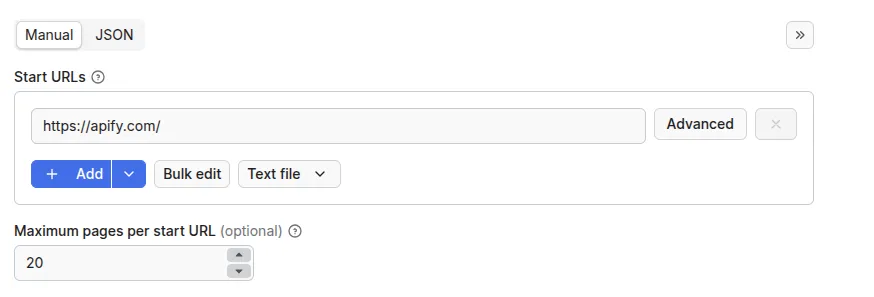
To get started, just enter the site URL you want to scrape, and set how many pages you want to scrape initially. Then hit “start” and the Actor will get to work.
Leads enrichment
To use lead enrichment, set the maximumLeadsEnrichmentRecords parameter to a number higher than 0 to specify how many employee records to extract per company, and optionally use leadsEnrichmentDepartments to filter by specific departments.
To make the most of this function, Apify recommends setting the number of scraped pages as follows:
- For only leads enrichment, set the number of scraped pages to 1.
- For leads enrichment AND contact details scraping, set it to 2 or 3 pages.
Email verification
When verifyLeadsEnrichmentEmails is enabled, each lead's email address is verified and an emailVerification object is added to the lead output. Requires Business leads enrichment to be active.
Charged (decisive results):
ok- Valid, deliverable email addressinvalid- Invalid or non-existent email addressdisposable- Disposable or temporary email address
Not charged:
catch_all- The domain accepts all addresses; individual deliverability cannot be confirmedunknown- Verification result could not be determinederror- Verification encountered a technical error
Output
The results will be wrapped into a dataset which you can find in the Storage tab. Here's an excerpt from the dataset you'd get if you apply the input parameters above:
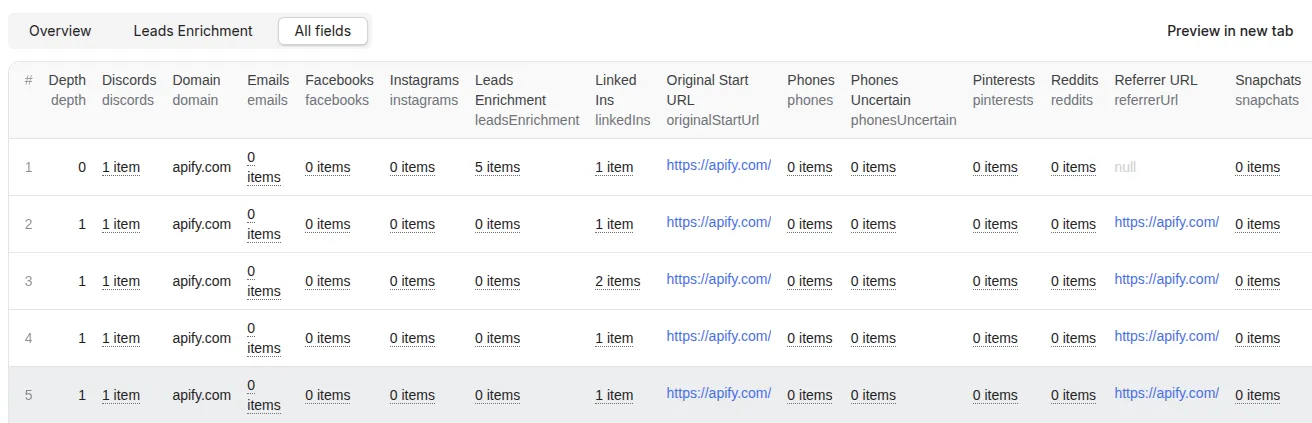
Here is part of that output in JSON:
Deduplicate and merge contacts
Contact Details Scraper provides the contacts inside one item per scraped URL. This is good for analysis to check where the contact was found but can make it hard to process.
Fortunately, you can use Contact Details Merge & Deduplicate Actor to merge and deduplicate the contacts. This Actor takes one or more dataset IDs of the Contact Details Scraper and merges and deduplicates all contacts so that each domain is on one row. You can choose if contacts of one type should be in only one column or spread.
How much will using Contact Details Scraper cost you?
Contact Details Scraper uses the pay-per-event (PPE) pricing model, so you pay for each action you perform. Check the pricing tab for details
The Free plan includes $5 of prepaid credits. With that, you could start the Actor and scrape around 2,500 pages. If you upgrade to any of Apify's paid plans, you will get a discount, allowing you to scrape even more for the same price. Check out the Apify pricing page for more details.
Note that lead enrichment carries an extra cost. Significant discounts are available on higher-tier plans. Please see the Pricing tab for your exact rate based on your subscription.
Frequently asked questions
Can I use Contact Details Scraper to extract emails from Google Maps?
Yes, but for more precise results it's better to use a specialized scraper like Google Maps Scraper.
Can I use integrations with Contact Details Scraper?
You can integrate Contact Details Scraper with almost any cloud service or web app. Apify offers integrations with Make, Zapier, Slack, Airbyte, GitHub, Google Sheets, Google Drive, and plenty more.
Alternatively, you could use webhooks to carry out an action whenever an event occurs, such as getting a notification whenever Contact Details Scraper successfully finishes a run.
Can I use Contact Details Scraper with the Apify API?
The Apify API gives you programmatic access to the Apify platform. The API is organized around RESTful HTTP endpoints that enable you to manage, schedule, and run Apify Actors. The API also lets you access any datasets, monitor Actor performance, fetch results, create and update versions, and more.
To access the API using Node.js, use the apify-client npm package. To access the API using Python, use the apify-client PyPI package. Check out the Apify API reference docs for all the details.
Can I use Contact Details Scraper through an MCP server?
With Apify API, you can use almost any Actor in conjunction with an MCP (Model Context Protocol) server. You can connect to the MCP server using clients like Claude Desktop and LibreChat, or even build your own. Read all about how you can set up Apify Actors with MCP.
For Contact Details Scraper, go to the MCP tab and then go through the following steps:
- Start a Server-Sent Events (SSE) session to receive a
sessionId - Send API messages using that
sessionIdto trigger the scraper - The message starts the Contact Details Scraper with the provided input
- The response should be:
Accepted
Is it legal to scrape contact details?
Web scraping is legal as long as you don’t scrape private data. However, you should be aware that your results might contain personal data, which is protected by GDPR (General Data Protection Regulation) in the European Union and in other laws from around the world. You should not scrape personal data unless you have a legitimate reason to do so. If you're unsure whether your reason is legitimate, consult your lawyers. You can read our blog post on the legality of web scraping for more information.
Your feedback
We’re always working on improving the performance of Apify’s Actors. If you have any technical feedback for Contact Details Scraper or found a bug, please create an issue in the Issues tab.


