

Instagram Comments Analyzer (AI)
Pricing
from $0.50 / 1,000 analyzed comments
Instagram Comments Analyzer (AI)
Turn Instagram comments into a creator-ready report: audience mood weighted by likes, top questions as a ready FAQ, requests, buying intent, complaints, spam share and reply drafts. Use an Instagram Comments Scraper dataset or post URLs. $0.80 per 1,000 comments, $0.05 per report. Free demo.
Pricing
from $0.50 / 1,000 analyzed comments
Rating
0.0
(0)
Developer

SignalSift
Maintained by CommunityActor stats
0
Bookmarked
2
Total users
1
Monthly active users
a day ago
Last modified
Categories
Share
Turn the comments under your Instagram posts and reels into a report you can act on: how your audience feels (weighted by likes, so the comments people agree with count more), the questions they keep asking as a ready FAQ, what they want you to make next, who wants to buy, what they complain about, what needs your attention right now, and reply drafts for the most liked questions and complaints. Every quote is copied word for word from a real comment.
No setup and no AI account needed. Run it with no input to get a free demo report on sample comments.
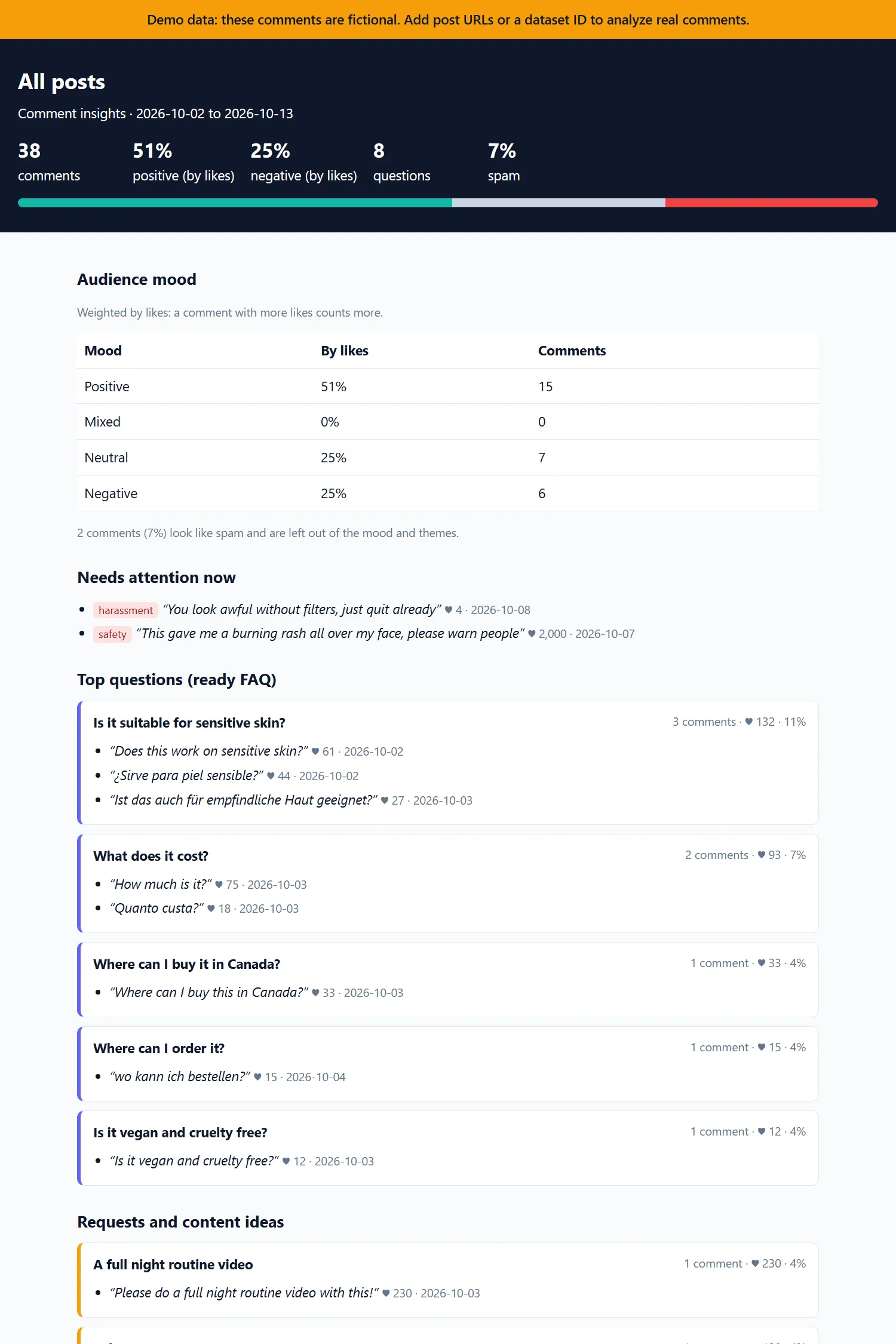
Open the full sample report: 40 fictional comments on two posts of a demo skincare brand in four languages, with the FAQ, requests, buying intent, themes, a daily trend, a post comparison and reply drafts.
What you get
| 💬 Audience mood by likes | Positive, neutral, mixed and negative shares, weighted by likes: one complaint with 2,000 likes counts for more than ten with none |
| 🚨 Needs attention now | Harassment, threats, self-harm, product safety, legal threats and scams, with the reason and a link to each comment |
| ❓ Top questions as a ready FAQ | The questions your audience asks most, merged across languages, with counts, likes and quotes |
| 💡 Requests and content ideas | What people ask you to make, restock or show next |
| 🛒 Buying intent | Comments that want to buy, ask for the price or a link, or say they ordered |
| 👍👎 Praise and complaint themes | Top themes with counts, likes, share of comments and up to 3 verbatim quotes each |
| 🧹 Spam share | How much of the thread is spam; spam is left out of the mood and themes |
| ✍️ Reply drafts | Short, friendly drafts in the commenter's language for the most liked questions and complaints you haven't answered, with placeholders like [price] or [link] instead of invented facts |
| 📈 Comments by day | Comment volume and the share of negative comments per day (per week for long threads) |
| 📊 Post comparison | Side-by-side table when you analyze several posts, for example a launch against your usual posts, or yours against a competitor's |
| 📄 Three outputs | An HTML report, a short JSON summary for code and AI agents, and one dataset row per comment |
How to use it
- With post URLs: paste links to Instagram posts or reels (open the post, choose Share → Copy link) and click Start. We scrape their comments with Instagram Comments Scraper on your account first, then analyze them.
- With a dataset you already have: put the dataset ID from an Instagram Comments Scraper run in Dataset ID.
- Automatically after every scrape: open the scraper (or its saved task), go to Integrations, add Instagram Comments Analyzer (AI). The scraper's dataset is passed in automatically, so each scheduled scrape produces a fresh report.
Add Your Instagram username to leave your own comments out of the numbers, the drafts and the charges, and to skip drafts for questions you already answered.
Then open the Report tab of the run for the HTML report, or the Summary tab for JSON.
How much does it cost
You pay per result. Running the Actor itself costs you nothing extra: no compute or proxy charges.
| Event | Free & Starter | Scale | Business and up |
|---|---|---|---|
| Analyzed comments (per 1,000) | $0.80 | $0.65 | $0.50 |
| Report (per run) | $0.05 | $0.05 | $0.05 |
| Reply draft (each) | $0.01 | $0.01 | $0.01 |
Never charged: the demo run, reactions (comments made only of emoji or @tags, often a third to half of a thread; they still count in the totals and the daily trend), your own comments, comments we could not analyze, and runs that find no comments. Spam is analyzed and charged, so you can see how much of it there is.
Examples on the Free and Starter plans:
- One post with 500 comments, about 300 of them with words: $0.24 + $0.05 report = $0.29, plus up to $0.25 for reply drafts ($0.10 on Free).
- 1,000 analyzed comments: $0.80 + $0.05 = $0.85, plus up to $0.25 for reply drafts. Apify's free $5 monthly credit covers about 5,000 analyzed comments a month with reply drafts off.
- An agency reporting on 20 posts a month with 300 analyzed comments each: about $5.80 a month, plus up to $5 for reply drafts ($0.25 per post).
Reply drafts are on by default. Each run drafts replies to up to 25 unanswered questions and complaints (10 on the Free plan) at $0.01 each: up to +$0.25 per run on paid plans and up to +$0.10 on Free. To skip that cost, turn off Draft replies (draftReplies: false) or lower Max reply drafts (maxReplyDrafts).
Scraping is billed separately. If you give post URLs, Instagram Comments Scraper charges for the scrape on your account: $2.60 per 1,000 comments on the Free plan, less on paid plans. On Apify's Free plan it returns only the 15 newest comments per post, without replies, so for real volumes use a paid plan or give us a dataset you already have.
Free-plan runs analyze up to 1,000 comments and draft up to 10 replies each. Your run's spending limit is always respected: if it is lower than the full job, we analyze what fits and tell you in the status message.
Output
JSON summary (the OUTPUT record), shortened, from the free demo run on 40 fictional comments on two posts of a skincare brand:
Dataset, one row per comment: post, comment link, reply or not, likes, date, text (with tagged usernames replaced by @user), whether it is yours or you answered it, analysis status (analyzed, reaction, own_comment or skipped), sentiment and score, topics, intents, phrases with verified excerpts, urgent flag and reason. Export it to Excel, CSV or JSON from the Storage tab.
How accurate is it
On a hand-labeled test set of 60 Instagram comments about food, travel, fitness, fashion, tech and music in 6 languages (2026-10-18):
| Check | Result |
|---|---|
| Overall sentiment matches the label | 98.3% |
| Topics found (F1) | 0.85 |
| Intents found (F1): question, request, praise, complaint, buying intent, spam | 0.94 |
| Questions found | 94% |
| Spam found | 100% |
| Comments that need attention caught | 100%, with 1 false alarm in 60 comments |
| Quotes that are word for word from the comment | 100% (enforced by code: anything else is dropped) |
The AI only labels comments. Every count, share, ranking and trend is computed by code from those labels, so the numbers add up.
What it does not do: it does not read images, videos, captions or stories, and it sees only the comments Instagram shows to visitors who are not logged in. It does not detect bought followers or likes, and it never posts anything: reply drafts are for you to edit and post. AI labels can be wrong on sarcasm, slang or one-word comments, which is why every theme shows its quotes.
For AI agents and automations
- Free demo: call it with
{}to get a full sample report and JSON summary at no cost. - Minimal input:
{ "postUrls": ["https://www.instagram.com/p/..."] }or{ "datasetId": "<dataset id>" }. - Read the result: the
OUTPUTrecord is a short JSON summary designed to fit in one tool call (under 20,000 characters; with many posts, per-post detail is shortened first, and with many reply drafts only the first ones are kept): coverage, mood by likes, spam share, top questions, requests, praise and complaints with one quote each, buying intent, the daily trend, reply drafts and a link to the HTML report. - Never charged: no comments found, reactions, your own comments, and comments that could not be analyzed. The status message says why.
- Works through Apify's MCP server, the Apify API and SDKs, and Make, Zapier or n8n.
FAQ
Which languages does it support? Comments in any language. Theme names are in the language you choose (reportLanguage, default English) and report headings are in English. Questions asked in several languages are merged into one FAQ entry. Quotes stay in each comment's own language.
Can I compare posts, or my account with a competitor's? Yes. Give several post URLs (or a dataset with several posts) and the report adds a post comparison table, with a summary per post in the JSON.
Does it collect usernames? No. Usernames, profile pictures and names of commenters are removed from the data before anything else happens, and tagged usernames inside comments are replaced by @user. If you fill in Your Instagram username, it is only matched against the comments and never saved in the results.
What counts as a reaction? A comment with no words: only emoji, punctuation, links or @tags, such as "😍😍" or "@user". Reactions are counted, shown in the daily trend, and never charged.
Why are replies off by default? Instagram Comments Scraper returns replies only on paid Apify plans, and replies add to the scraping cost. Turn on Include replies to analyze whole threads; replies from your own account also tell us which questions you already answered.
Where is comment text processed? By the Anthropic API (Claude). SignalSift keeps nothing after the run; your results stay in your Apify storage.
Is it legal? It analyzes publicly available comments. You are responsible for how you use the results and for complying with the laws that apply to you, including GDPR when you handle personal data.
Something is wrong or missing? Open an issue on the Issues tab. We read every one.
Changelog
- 0.1.4 (2026-10-18): With replies on, the scraper's share of your run's spending limit now leaves room for every comment this run may analyze, so the scrape plus the analysis stays within your limit. A post given as both /p/ and /reel/ counts once in the budget. Reply drafts never greet someone by a name taken from their comment (such a draft is dropped and not charged). The creator's replies are linked to their questions even when they sit just past the run's comment limit. Catch-all themes read "Other complaints" instead of "Other other complaints". The JSON summary always stays under 20,000 characters.
- 0.1 (2026-10-18): First release. Post and reel URLs, datasets and integrations; audience mood weighted by likes; comments that need attention now; top questions as a ready FAQ; requests and content ideas; buying intent; praise and complaint themes with verified quotes; spam share; reply drafts with placeholders; daily trend; post comparison; your own comments left out; HTML report and JSON summary; free demo.
SignalSift is not affiliated with or endorsed by Google, Amazon, TikTok, Meta or YouTube. Their logos only show which platform each Actor works with.


