

Booking.com Hotel Scraper
Pricing
from $1.70 / 1,000 results
Booking.com Hotel Scraper
Booking.com scraper. Only pay for hotels returned - no compute costs, no proxy fees. Extract prices, ratings, reviews, locations. 20+ data points per hotel. No charge for failed runs or empty results. Predictable pricing, guaranteed data.
Pricing
from $1.70 / 1,000 results
Rating
0.0
(0)
Developer

SilentFlow
Maintained by CommunityActor stats
1
Bookmarked
20
Total users
1
Monthly active users
21 days ago
Last modified
Categories
Share
Booking.com Scraper - Pay Per Result
From SilentFlow. Creators of Pinterest Scraper and Leboncoin Scraper, with 410,000+ combined lifetime runs.
by SilentFlow
Only pay for what you get. No compute costs, no proxy fees, no surprises. Just results.
✨ Why use this scraper?
- 💸 Pay only for results, No charge if no data is returned
- 🔒 Proxies included, Residential proxies are included in the per-result price
- 📊 20+ data fields, Prices, reviews, photos, amenities, and more per hotel
- 🌍 Global coverage, Search any destination worldwide
- 🔎 Keyword or URL, Type a city, neighbourhood, landmark or hotel name, list several in one run, or paste a Booking.com URL

| SilentFlow · Booking.com Hotel suite | |
 Booking.com Hotel Scraper Booking.com Hotel ScraperYou are here |  Booking Scraper Booking ScraperHotel Prices, Photos, |
🎯 Use cases
| Use PPR when... | Use Standard when... |
|---|---|
| You need predictable costs | You're scraping thousands of hotels |
| You want guaranteed results | You have Apify compute credits |
| You're testing or prototyping | You're running scheduled jobs |
| Budget is per-result focused | Budget is time-based |
📥 Input parameters
Search
You have two options:
Option 1 (Recommended): Paste a Booking.com search URL, go to booking.com, set your destination, dates, guests, price range, stars, sort order, and any other filter, then copy the URL.
Option 2: Search by keyword. Type a destination in location, and add as many destinations, neighbourhoods, landmarks or hotel names as you like in searches, one per line.
| Parameter | Type | Required | Description |
|---|---|---|---|
searchUrl | string | No | Full Booking.com search URL with all filters applied |
location | string | No | City, region, neighbourhood, landmark or hotel name (e.g., "Paris", "Bali", "Eiffel Tower") |
searches | array | No | More searches in the same run, one per line: keywords like "Rome", "Le Marais" or "Hilton London Paddington", or Booking.com search URLs |
checkIn | string | No | Check-in date in YYYY-MM-DD (default: 7 days from now) |
checkOut | string | No | Check-out date in YYYY-MM-DD (default: 8 days from now) |
adults | integer | No | Number of adult guests (default: 2) |
children | string | No | Comma-separated ages of children (e.g., "2,5,10") |
rooms | integer | No | Number of rooms (default: 1) |
Fill at least one of searchUrl, location or searches. When searchUrl is set, location is ignored, and every line of searches still runs. A hotel found by two searches is returned once.
Options
| Parameter | Type | Default | Description |
|---|---|---|---|
currency | string | USD | Currency for prices (USD, EUR, GBP, JPY, etc.) |
language | string | en-us | Results language (en-us, fr, de, es, it, ja, etc.) |
maxItems | integer | 100 | Maximum hotels to return for each search (max: 1,000) |
enrichDetails | boolean | false | Visit each hotel page for full description, photos, facilities |
Tip: Need to filter by price, stars, or review score? Set those filters on booking.com and paste the URL into
searchUrl, the scraper reads all filters directly from the URL.
enrichDetailsadds ~1-2s per hotel (3 parallel workers). A 50-hotel scrape takes ~20-30s extra. You get full descriptions, 10-60 photos per hotel, facilities list, and highlights.
📊 Output data
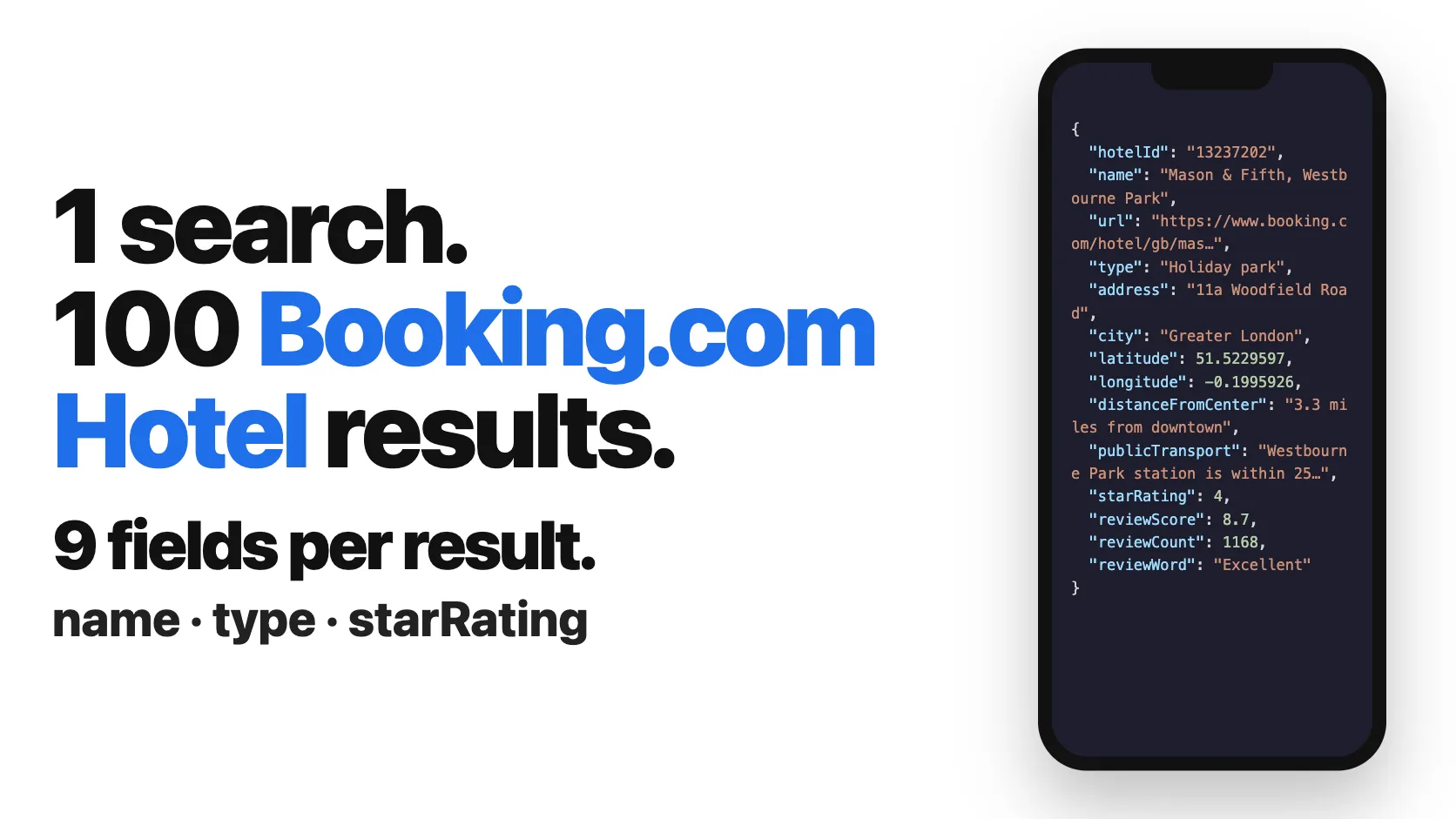
Each hotel record contains:
🗂️ Data fields
| Category | Fields |
|---|---|
| Identity | hotelId, name, type, url |
| Location | address, city, country, latitude, longitude, distanceFromCenter, publicTransport |
| Ratings | starRating, reviewScore, reviewCount, reviewWord |
| Pricing | price, originalPrice, currency, pricePerNight, taxesAndCharges, discount |
| Media | mainPhoto, photos |
| Details | description, facilities, highlights |
| Policies | freeCancellation, breakfastIncluded, noPrepayment |
| Badges | isPreferred, isPreferredPlus, isSustainable |
| Meta | checkIn, checkOut, scrapedAt |
🚀 Examples
Simple search, Dubai hotels
Several destinations, landmarks and hotels in one run
A landmark returns the hotels around it, a hotel name returns that hotel first, then the ones nearby.
Rich data with photos & description
Using a Booking.com URL (with all filters)
💻 Integrations
Python
JavaScript
📈 Performance & limits
| Metric | Value |
|---|---|
| Hotels per page | ~25 |
| Average speed | ~25 hotels/second |
| Max items per run | 1,000 |
| Supported destinations | Worldwide |
💡 Tips for best results
- Use
maxItemswisely, Only request what you need to control costs - Use
searchUrlfor advanced filters, Set price range, stars, review score on booking.com, then paste the URL - Be specific, "Paris, France" instead of "Paris" avoids wrong results
- Batch your destinations, Put every city, landmark or hotel you track in
searchesand get them all in one dataset - Test first, Try with
maxItems: 5to verify your search works
❓ FAQ
Q: What if no hotels are found? A: You pay nothing. Only successful results are charged.
Q: What if the run fails? A: You pay nothing. Failed runs don't charge you.
Q: Is there a minimum charge? A: No minimum. Get 1 hotel = pay for 1 hotel.
Q: Are proxy costs included? A: Yes! Residential proxies are included in the per-result price.
Q: Can I search for a hotel by name or for hotels near a landmark?
A: Yes. Type the hotel name ("Hilton London Paddington") or the landmark ("Eiffel Tower") in location or in searches, just like on booking.com.
Q: Can I scrape several cities in one run?
A: Yes. List them in searches, one per line. Each search returns up to maxItems hotels, and a hotel found twice is returned once.
Q: How do I filter by price, stars, or review score?
A: Go to booking.com, apply all your filters, then paste the URL into searchUrl.
More SilentFlow scrapers
🛒 E-commerce
 Pinterest - Pinterest Scraper | Pins, Boards and Profiles
 Leboncoin - Leboncoin Scraper | Classified Ads, Prices and Sellers
 Leboncoin - Leboncoin Ad Details Scraper
 Back Market - Back Market Scraper | Refurbished Prices
 ImportYeti - US Customs Records, Suppliers & Trade Data - ImportYeti Scraper - US Customs Records, Suppliers & Trade Data
 1688 Wholesale - 1688 Wholesale Scraper
 TikTok Shop - TikTok Shop Scraper | Products, Sellers and Creator Videos
 Udemy Course - Udemy Course Scraper
 Naver - Naver Scraper | Shopping Products, Prices and Reviews
 JD - JD Products Scraper | Prices, Brands and Barcodes
 Store Leads Ecommerce - Store Leads Ecommerce Scraper
 Amazon Seller - Amazon Seller Scraper | Emails, Phones and Ratings
 Bring a Trailer - Bring a Trailer Scraper
 Naver - Naver Reviews Scraper | Shopping Product Reviews
 Store Leads - Store Leads Scraper | Shopify Data
 Avito - Avito Scraper | Listings, Prices and Sellers
 Leboncoin - Leboncoin Scraper
 Lowes - Lowes Products Scraper | Prices, Stock and Specs
 Mobile.de - Mobile.de Scraper
 Naver - Naver Products Scraper | Shopping Prices, Sellers and Ratings
 Taobao - Taobao Scraper | Products, Prices and Sellers
 Udemy - Udemy Scraper
 Agoda - Agoda Scraper | Hotel Prices and Guest Ratings
 Alibaba - Alibaba Products Scraper | Wholesale Prices and MOQ
 AliExpress - AliExpress Reviews Scraper | Feedback, Ratings and Photos
 AliExpress - AliExpress Scraper | Products, Prices and Sales
 Allegro - Allegro Scraper | Products, Prices and Sellers
 Avito - Avito Profiles Scraper | Sellers, Ratings and Reviews
 Back Market - Back Market Scraper | Refurbished Electronics Prices
 CARFAX - CARFAX Scraper | Used Cars, Prices and History
 Coupang - Coupang Detail Scraper | Product Prices and Options
 Ctrip - Ctrip Scraper | Attractions, Tickets and Reviews
 eBay Marketplace - eBay Marketplace Scraper
 Europages - Europages Scraper | Suppliers and B2B Companies
 Google Hotels - Google Hotels Scraper | Prices, Offers and Ratings
 Homedepot - Homedepot Reviews Scraper | Customer Reviews and Ratings
 Leboncoin - Leboncoin Details Scraper
 Mercari - Mercari Scraper | Listings, Sold Prices and Sellers
 Vinted Marketplace - Vinted Marketplace Scraper
 Walmart - Walmart Product Scraper
 Alibaba - Alibaba Scraper | Products, Prices and Suppliers
 Amazon - Amazon Product Scraper
 Amazon Marketplace - Amazon Marketplace Scraper
 AutoScout24 - AutoScout24 Scraper
 BAUHAUS - BAUHAUS Scraper | Product Prices, EAN and Specs
 eBay Listings - eBay Listings Scraper
 Europages Deep Dive Extractor - Europages Deep Dive Extractor
 Eventim - Eventim Scraper | Events, Ticket Prices and Venues
 GasBuddy - GasBuddy Scraper | Gas Prices by Station
 Pinterest - Pinterest Scraper
 Trip - Trip Scraper | Hotels, Prices and Reviews
 Vinted - Vinted Scraper
 Walmart - Walmart Products Scraper
💼 Jobs
 ZipRecruiter - ZipRecruiter Jobs Scraper | Salary, Company & Location Filters
 Indeed - Indeed Company Reviews Scraper
 Multi Board - Multi Board Job Scraper
 Glassdoor Job Listings - Glassdoor Job Listings Scraper
 🔥 Glassdoor - 🔥 Glassdoor Scraper
 LinkedIn Job Search - LinkedIn Job Search Scraper | Salaries & Seniority
 ATS - ATS Jobs Scraper | Greenhouse, Lever and Ashby
 Dice Tech - Dice Tech Jobs Scraper
 Jora - Jora Jobs Scraper
 Malt Freelancer - Malt Freelancer Scraper
 Malt - Malt Scraper | Freelance Profiles
 Welcome to the Jungle - Welcome to the Jungle Job Scraper
 All - All Jobs Scraper
 Arbeitsagentur - Arbeitsagentur Jobs Scraper
 Dice - Dice Jobs Scraper
 Glassdoor - Glassdoor Jobs Scraper
 iimjobs - iimjobs Scraper | Jobs, Companies and Recruiters
 Indeed - Indeed Jobs Scraper | Job Listings in 73 Countries
 Jora Job Listings - Jora Job Listings Scraper
 StepStone - StepStone Scraper
 YCombinator - YCombinator Jobs Scraper | Startup Jobs, Salaries and Founders
 Arbeitsagentur - Arbeitsagentur Jobs Scraper
 Cutshort - Cutshort Jobs Scraper | Salaries, Skills and Companies
 Indeed - Indeed Companies Scraper
 Indeed Jobs - Enhanced Edition - Indeed Jobs Scraper - Enhanced Edition
 LinkedIn - LinkedIn Jobs Scraper
 Naukri & NaukriGulf - Naukri & NaukriGulf Jobs Scraper
 Seek - Seek Job Scraper
 Welcome to the Jungle - Welcome to the Jungle Scraper
 Ziprecruiter - Ziprecruiter Scraper
🏠 Real estate
 SeLoger - SeLoger Scraper | Real Estate Listings
 Anjuke - Anjuke Scraper | Rental Listings, Prices and Agents
 Realtor Rental Listings - Realtor Rental Listings Scraper
 Airbnb Pro Host Contact & - Airbnb Pro Host Contact & Email Scraper
 Bien'ici - Bien'ici Scraper | Property Listings
 Airbnb Professional Host - Airbnb Professional Host Scraper | Emails, Phones, SIRET
 Rightmove - Rightmove Scraper
 Trulia Rental Listings - Trulia Rental Listings Scraper
 Airbnb Search - Airbnb Search Scraper
 Bienici - Bienici Scraper
 Idealista - Idealista Scraper
 Realestate.com.au - Realestate.com.au Scraper
 SeLoger - SeLoger Scraper | French Property Listings and Agencies
 Zillow - Zillow Scraper
 Airbnb Search - Airbnb Search Scraper
 Idealista - Idealista Scraper
 Realtor Rental - Realtor Rental Scraper
 Trulia Rental - Trulia Rental Scraper
📣 Social media
 LinkedIn Post Search - LinkedIn Post Search Scraper | Keywords, Hashtags & Profiles
 Facebook Search - Facebook Search Scraper
 Instagram - Instagram Story Scraper | Stories & Highlights
 LinkedIn Leads - LinkedIn Leads Scraper | Sales Navigator Export
 TikTok - TikTok Scraper
 YouTube - YouTube Channel Scraper | Videos, Shorts and Views
 Instagram Engagement - Instagram Engagement Scraper
 OnlyFans - OnlyFans Profile Scraper
 Facebook Search - Facebook Search Profiles Scraper | People by Name or Keyword
 Meta Ad Library - Meta Ad Library Scraper
 TikTok Trend - TikTok Trend Scraper | Trending Hashtags and Videos
 OnlyFans - OnlyFans Creator Scraper
 Skool Community - Skool Community Scraper
 Bilibili - Bilibili Scraper
 Facebook Thread - Facebook Thread Profiles Scraper | Followers, Bios & Engagement
 Kuaishou - Kuaishou Scraper | Videos, Comments and Creator Stats
 LinkedIn Event - LinkedIn Event Scraper
 Reddit - Reddit Scraper | Posts, Comments and Subreddits
 Reddit - Reddit Scraper | Comments, Posts and Users
 Snapchat - Snapchat Contacts Scraper | Phones, Emails and Websites
 Weibo - Weibo Scraper | Posts, Profiles and Engagement
 Xigua - Xigua Scraper | Videos, Creators and Downloads
 Discord - Discord Scraper | Servers, Member Counts and Invites
 Facebook - Facebook Company Scraper
 Facebook Business Page - Facebook Business Page Scraper
 Kwai - Kwai Scraper | Videos, Creators and Hashtags
 LinkedIn Ads Library - No Cookies - LinkedIn Ads Library Scraper - No Cookies
 LinkedIn Hashtag & - LinkedIn Hashtag & Post Scraper | No Cookies
 Skool Group - Skool Group Scraper
 Snapchat - Snapchat Ads Scraper | Ad Library, Impressions & Targeting
 YouTube - YouTube Transcript Scraper
🏢 Business data
 LinkedIn People Search - LinkedIn People Search Scraper | Profiles & Companies
 Tencent - Tencent Scraper | Maps Places, Phones and Ratings
 LinkedIn Company Search - LinkedIn Company Search Scraper | Profiles & Firmographics
 Company Data - Company Data Scraper | Emails, Phones and Tech Stack
 FanDuel - FanDuel Scraper | Odds, Spreads and Player Props
 ForexFactory - ForexFactory Scraper | Economic Calendar and Forecasts
 Justdial - Justdial Companies Scraper | Business Leads, Phones and Emails
 Kakao - Kakao Scraper | Map Places, Reviews and Phones
 OpenTable - OpenTable Reviews Scraper | Restaurant Reviews and Ratings
 SoftwareAdvice - SoftwareAdvice Scraper | Reviews, Ratings and Pros & Cons
 Teachable Course - Teachable Course Scraper
 Zomato - Zomato Reviews Scraper | Restaurant Ratings and Replies
 2GIS - 2GIS Reviews Scraper | Ratings, Photos and Owner Replies
 LinkedIn Sales Navigator (Legacy, retires Oct 2026) - LinkedIn Sales Navigator Scraper (Legacy, retires Oct 2026)
 Teachable - Courses, Prices & Instructors - Teachable Scraper - Courses, Prices & Instructors
 Trustpilot - Trustpilot Scraper | Reviews, Ratings and Company Contacts
 Website Tech Stack - Website Tech Stack Scraper
✈️ Travel
 Google Maps - Google Maps Scraper
 Flight Price - Flight Price Scraper
 Trip - Trip Reviews Scraper | Hotel Reviews and Ratings
🎯 Lead generation
 Northdata - Northdata Company Scraper
 ZocDoc - ZocDoc Scraper | Doctors, Reviews and Availability
 UK Companies House - UK Companies House Enricher
 Dealroom - Dealroom Scraper | Companies and Investors
 CNPJ Brazilian - CNPJ Brazilian Company Enricher
 Google Ads Transparency - Google Ads Transparency Scraper
 SIRET - SIRET Company Enricher
 BuiltWith - BuiltWith Scraper | Tech Stacks and Top Sites
 Domain - Domain Enricher
 French Company Prospector - French Company Prospector
 SEC - SEC Scraper | EDGAR Filings and Company Data
 USPTO - USPTO Scraper | Trademark Search and Status
 ZocDoc - ZocDoc Scraper
 Clutch - Clutch Scraper
 Clutch Agency - Clutch Agency Scraper
 Dealroom Startup Data - Dealroom Startup Data Scraper
 G2 - G2 Reviews Scraper
 PagesJaunes France - PagesJaunes France Scraper
 PagesJaunes - PagesJaunes Business Scraper
 SIRET French - SIRET French Company Enricher
 ThomasNet Suppliers - ThomasNet Suppliers Scraper
🔎 SEO
 Similarweb - Similarweb Scraper | Website Traffic, Rankings and Competitors
 Google News - Google News Scraper
 Apple - Apple Scraper | App Store Apps, Ratings and Charts
📈 Marketing
 Pexels -
 🧰 More tools
 Apple - Apple Reviews Scraper | App Store Reviews and Ratings
 PrizePicks - PrizePicks Scraper | Player Props, Lines and Projections
📬 Support
Need help? We're here for you:
- Feature requests: Let us know what you need
- Custom solutions: Contact us for enterprise integrations or high-volume needs
Check out our other scrapers: SilentFlow on Apify
Remember: You only pay for results. No results = no charge.


