

Website Screenshot API - Full Page, Mobile, Element & PDF
Pricing
from $2.20 / 1,000 screenshots
Website Screenshot API - Full Page, Mobile, Element & PDF
Website screenshot API for bulk URLs: full-page, visible-screen, element or PDF captures on desktop, laptop, tablet or mobile, with cookie banners hidden, sticky headers fixed, lazy images loaded and a crop height. Failed pages are never charged.
Pricing
from $2.20 / 1,000 screenshots
Rating
0.0
(0)
Developer

Sonic Scraper
Maintained by CommunityActor stats
0
Bookmarked
2
Total users
1
Monthly active users
7 hours ago
Last modified
Categories
Features
Share
Capture clean screenshots of any number of web pages: full page, visible screen, a single element or a PDF, on desktop, laptop, tablet or mobile. Cookie banners are hidden, sticky headers appear once instead of repeating, lazy images are loaded, and you can crop to any height. Pages that fail are never charged.
Use it for website monitoring and visual archives, client reports, competitor and landing-page tracking, link previews and thumbnails, QA of responsive layouts, and as a screenshot tool for AI agents.
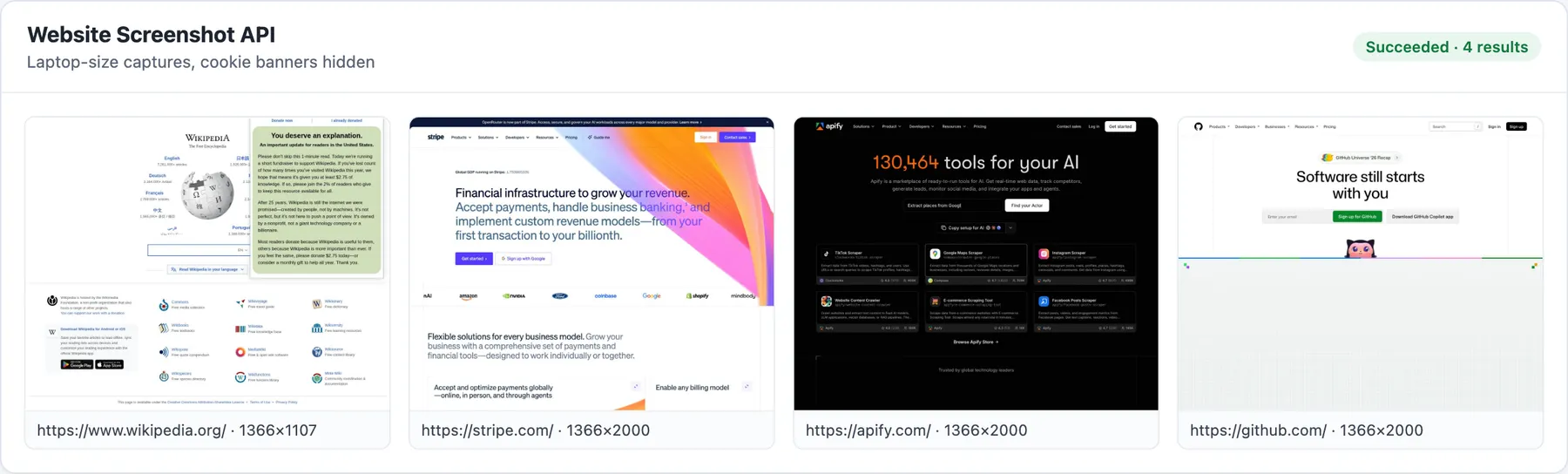
Real output from a run of Website Screenshot API: four pages captured at laptop size, cropped to 2,000 px.
What it fixes
Generic screenshot tools often give you pictures you cannot use. This Actor handles the usual problems:
| Problem | What this Actor does |
|---|---|
| A cookie banner covers half the page | Hides banners of the common consent platforms (OneTrust, Cookiebot, Didomi, Quantcast, Usercentrics, CookieYes, TrustArc, iubenda and more) and consent bars found by their text, in English, French, German, Spanish and Italian. It hides them; it never clicks "accept" for you. |
| The sticky header repeats down a full-page screenshot | Sticky and fixed headers are put back into the page flow, so they appear once at the top. Chat bubbles and bottom bars are hidden. |
| Images further down are blank | The page is scrolled through first (at most 8 seconds) so lazy images load. |
| A 40,000-pixel page you only need the top of | maxHeight crops from the top, for example 1080 for the first screen or 3000 for the top sections. |
| You need just one part of the page | captureMode: "element" with a CSS selector such as #pricing or main. |
| Emoji and Asian scripts show as boxes | Colour emoji and Chinese, Japanese and Korean fonts are installed. |
| A page never finishes loading | After the page timeout it is captured as it is, marked loadedFully: false, instead of failing. |
| You paid for screenshots that failed | Only successful captures are charged. Failures are listed in the ERRORS record with the reason. |
Quick start
Mobile screenshots of the first two screens, as JPEG:
Just the pricing table, in dark mode:
Input
| Field | Default | What it does |
|---|---|---|
urls / urlsText | – | Pages to capture. Paste hundreds at once in urlsText. |
captureMode | fullPage | fullPage, viewport (visible screen) or element. |
elementSelector | – | CSS selector for element mode. |
format | png | png, jpeg (with jpegQuality) or pdf. |
maxHeight | 15000 | Crop full-page captures from the top; 0 = whole page (up to 30,000 px). |
device | desktop | desktop 1920x1080, laptop 1366x768, tablet (iPad, 2x), mobile (iPhone, 3x) or custom with viewportWidth / viewportHeight. |
darkMode | false | Ask the page for its dark theme. |
hideCookieBanners | true | Hide consent banners. |
fixStickyElements | true | Sticky headers once at the top in full-page captures. |
loadLazyImages | true | Scroll through the page first. |
selectorsToHide | – | Your own CSS selectors to hide (pop-ups, ads, chat widgets). |
waitUntil, waitForSelector, delayMs | load, –, 1000 | When to capture. |
pageTimeoutSecs | 45 | Capture whatever has loaded after this long. |
maxConcurrency | 3 | Pages in parallel (about 500 MB of memory per heavy page). |
proxyConfiguration | none | Optional proxy, for example for a country-specific page. |
Output
Each successful capture is one dataset row, and the file is saved in the run's key-value store:
The Screenshots view shows a preview of every image next to its URL. Download files from the screenshotUrl links or from the run's key-value store, or send them on with Apify integrations, Make, Zapier or n8n. Files stay in the run's storage for the retention period of your Apify plan.
Use it from code or an AI agent
AI agents can call it through the Apify MCP server at https://mcp.apify.com?tools=sonic_scraper/website-screenshot-api.
Pricing
Pay per screenshot saved; see the Pricing tab for the current rate. Pages that fail (errors, timeouts with nothing rendered, invalid URLs, HTTP 4xx/5xx answers) are not charged, and the Actor stops before it would exceed your run's maximum charge.
Limits
- Sites with bot protection may refuse to load. Some sites (for example parts of Cloudflare-protected or large news sites) answer an automated browser with 403 or a challenge page. Those pages fail and are not charged. The Actor does not solve CAPTCHAs or bypass bot checks.
- Logins are not supported. It captures what a logged-out visitor sees.
- Banner hiding covers the common platforms, not every custom banner. Add the banner's CSS selector to
selectorsToHideif one slips through. - Very long pages are capped at 30,000 px (browser limit); use
maxHeightor element mode for the part you need. - PDFs are one page wide with the screen styling (what you see), not the site's print stylesheet.
FAQ
How do I take a full-page screenshot of a website without the cookie banner?
Add the URL and keep "Hide cookie and consent banners" on (the default). Banners from the main consent platforms and consent bars found by their text are hidden before the capture.
How do I screenshot only part of a page?
Use maxHeight to crop from the top, or set captureMode to element with a CSS selector to capture one section.
Can I take mobile screenshots?
Yes: set device to mobile (iPhone size, 3x pixel density) or tablet, or set a custom width and height.
Am I charged for pages that fail?
No. Only successful captures are saved to the dataset and charged; failures are listed in the ERRORS record with the reason.
Can I get a PDF instead of an image?
Yes: set format to pdf.
Related actors
- Technical SEO Audit Crawler: broken links, titles and other SEO issues for the same pages.
- Website to Markdown Crawler: the text of the pages as Markdown for AI and RAG.
- Contact Details Scraper: emails, phones and tech stack from the same websites.
- Google AI Overview Tracker: whether your pages are cited in Google's AI Overviews.
Support
Open an issue on the Issues tab with the URL and your run ID if a page does not look right. This is an independent tool and is not affiliated with the websites you capture.


