

Google Hotels Scraper: OTA Prices & Rate Parity
Pricing
Pay per usage
Google Hotels Scraper: OTA Prices & Rate Parity
Hotel prices from every booking site on Google Hotels (OTAs and the official site) for revenue managers, travel agencies and data teams. Rate-parity flag, 90-day price calendar, specific hotels or city search, any country. Free during launch.
Pricing
Pay per usage
Rating
0.0
(0)
Developer

Splashboard Labs
Maintained by CommunityActor stats
0
Bookmarked
2
Total users
1
Monthly active users
6 hours ago
Last modified
Categories
Share
Google Hotels scraper: prices from every booking site
Google Hotels Scraper: OTA Prices & Rate Parity returns every price Google Hotels shows for a hotel, booking site by booking site: Booking.com, Expedia, Agoda, Trip.com, dozens of other OTAs and the hotel's official website. Built for revenue managers, hotel chains, travel agencies and travel-data teams, for any check-in date, country and currency.
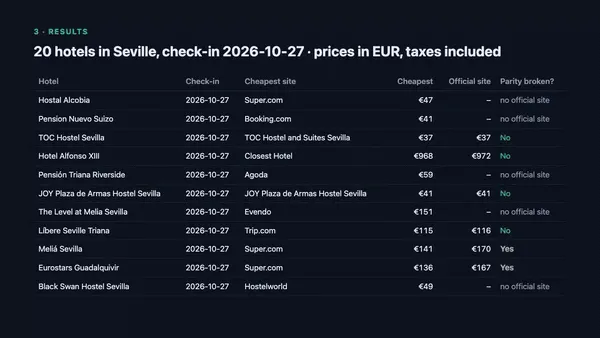
▶️ Try it in one click: press Try for free above (the prefilled search returns real prices in about 35 s), or open a ready-made example: Seville · New York · London · Rate parity, 30 nights.
🆓 Free during launch: you only pay Apify platform usage (~$0.07 per 100 hotel-dates). If it saves you time, a ⭐ review on this page helps a lot.
Why this Google Hotels scraper?
- 💸 Every booking site per hotel (
offers[]): typically 15–30 channels per hotel × date, sorted from cheapest to most expensive, with the official site marked. - ⚖️ Rate-parity flag: the official site's price against the cheapest channel, the gap in money and percent, and
hasDisparitywhen the gap is over 1 % and over 1 currency unit. - 📅 Price calendar: 1–90 consecutive check-in dates in one run, 1–30 nights each.
- 🏨 Specific hotels or city search: monitor your own hotels and your compset by Google Hotels URL, Google Maps URL or Google ID, or discover hotels with a search such as "hotels in Seville".
- 🌍 Search country as an input: prices as visitors from that country see them, in the currency you ask for, with taxes included (see the FAQ for the few exceptions).
- ✅ Nothing is silent: one row per hotel × date with a status (
ok,no_results,failed,invalid_input), so you always know what happened. - ⚡ Measured reliability: on our 14 Oct 2026 benchmark of 50 hotel × date queries in Spain, the US and the UK, 100 % (50/50) succeeded (
okor a genuine "no availability"), with 0 % blocked requests and ~2 s per query. No browser: lightweight requests only.
What data does this hotel price API return?
| Field | Example | Notes |
|---|---|---|
hotel.name, stars, rating, reviewsCount, address, coordinates | Meliá Sevilla · 4★ · 4.4 (7,023) | From Google Hotels |
hotel.cid | 16724932617184247763 | Google Maps CID: stable key for time series |
hotel.entityId, hotel.googleHotelsUrl | ChkI0__x… | Link opens the same dates, guests and currency |
stay.checkIn, checkOut, nights, guests | 2026-11-20 → 2026-11-22, 2 nights, 2 adults | One row per check-in date |
offers[].provider | Booking.com, Agoda, Meliá Sevilla… | OTAs, metasearch deals and the official site |
offers[].isOfficialSite | true | The hotel's own website |
offers[].totalPrice, pricePerNight | 365.00 / 182.50 | Whole stay and per night, taxes included |
offers[].taxesIncluded | true | null if Google's data does not say (see FAQ) |
offers[].freeCancellation, roomType | true, "Twin Room" | Only when Google provides them, never guessed |
offers[].bookingUrl | https://www.google.com/… | Google's redirect to the channel |
pricingSummary | cheapest 286.05 (Super.com) vs official 365.00 → +78.95 (21.63 %) | hasDisparity = gap > 1 % and > 1 currency unit |
status, error | ok / no_results / failed / invalid_input | Every requested hotel × date gets a row |
chargedResults | 1 | 1 for rows with prices, otherwise 0. Informative only: nothing is charged during the launch period |
How to use it
Monitor specific hotels (best for daily tracking)
- Open the hotel on Google Hotels (or Google Maps) and copy the URL.
- Paste one or more URLs into Hotels to monitor. You can also paste the hotel's Google ID (CID), e.g.
16724932617184247763. - Set the first check-in date, the number of nights and the number of check-in dates.
- Pick the country, currency and language of the Google edition you want to see.
- Run it, then open the Summary view (one line per hotel × date) or the Offers view (one line per channel).
Discover hotels in a destination
Add a search term like hotels in Seville or hoteles en Madrid centro and choose how many hotels to take, up to 200 per search. Hotels come in Google's order; vacation rentals are skipped.
Track a date range
Set Number of check-in dates to e.g. 30 to price every night of the next month. Use a relative first check-in date like "7 days", so a scheduled run always looks ahead from the day it runs.
Input example
Output example
Real output of the input above. The row had 32 offers; 4 are shown, and the long Google URLs are shortened with "…".
How much does it cost?
Free during launch. We charge nothing for this Actor: no rental fee and no per-result fee. You only pay the normal Apify platform usage of your own runs (residential proxy traffic and compute), which Apify bills to your account: about $0.07 per 100 hotel-dates, measured on our 14 Oct 2026 benchmark at Apify Free plan prices.
| What you monitor | Results (hotel-dates) | Estimated platform usage |
|---|---|---|
| 10 hotels × 30 nights | 300 | ≈ $0.21 |
| 20 hotels × 90 check-in dates (a quarter) | 1,800 | ≈ $1.28 |
| 50 hotels × 30 nights, every day for a month | 45,000 | ≈ $32 |
- The $5 of free monthly credit on the Apify Free plan covers about 7,000 hotel-dates a month. Paid Apify plans have cheaper proxy traffic.
- ⭐ Enjoying it? A short review on this page is the best way to support the free launch.
- Later we may move to simple pay-per-result pricing. It will be announced in advance on this page, and Apify notifies existing users before any price change takes effect.
Use cases: rate parity, revenue management, agencies and AI agents
Rate parity monitoring for revenue managers
Check every day whether OTAs sell your rooms below your official rate. Filter on pricingSummary.hasDisparity = true to get a daily list of hotel × date × channel violations, with the exact gap in money and percent. Send it to your OTA account managers.
Rate shopping and price calendars
Price your hotel and your compset for the next 30–90 check-in dates, every morning. The cid stays the same over time, so you can build price curves, spot compression nights and see how competitors react to events.
Travel agencies and market intelligence
Discover the top hotels of any destination with a search term, then compare how prices and channel mix differ by country (countryCode) and currency. Run the same hotels from ES, US and GB to see geo-pricing.
AI agents through MCP
Give an AI assistant live hotel prices. Through the Apify MCP server, agents such as Claude can call this Actor directly. Every input field has a plain description with an example. Example request: "Compare the official price of Meliá Sevilla with OTAs for every Friday in November."
Integrations
Hotel price API
Run the Actor and fetch results from any language through the Apify API. The Offers dataset view gives one flat line per channel, ready for BI tools. Export as JSON, CSV or Excel.
Scheduling
Create a task with your hotels and a relative check-in date ("1 day"), then schedule it daily or hourly in Apify Console. Each run returns the next N nights automatically.
Google Sheets
Send every run to a spreadsheet with the Google Sheets integration, or import the Offers view as CSV. One line per channel makes pivot tables and parity charts easy.
n8n, Make and Zapier
Use the official Apify apps for n8n, Make and Zapier to push parity alerts to Slack or email when a run finishes.
MCP (AI agents)
Connect the Apify MCP server to your assistant and it can run this Actor and read the results; see AI agents through MCP above.
FAQ
Is it legal to scrape Google Hotels?
The Actor collects publicly available pricing information, the same as any visitor to Google Hotels sees, without logging in. It does not collect personal data. Always make sure your use complies with the applicable laws and terms in your jurisdiction.
Why do some offers have taxesIncluded: null?
All prices are reported including taxes. In editions where Google shows pre-tax prices (the US), most channels come as a "pre-tax / with taxes" pair and we use the tax-inclusive one. Some channels send a single amount. We mark it as tax-inclusive only when it matches another channel's tax-inclusive price. Otherwise taxesIncluded is null, and the offer is left out of cheapestPrice and the parity check. In our 13 Oct 2026 benchmark this affected 13.5 % of US offers and none elsewhere.
Why do I get fewer rows than hotels × dates?
If the same hotel arrives twice (for example, as a URL and from a search), it is priced only once per date.
Why can prices differ from what I see in my browser?
Google personalises prices by country, currency, language, device and login. The Actor searches from the country you choose, as a logged-out visitor. Prices also change minute by minute.
Can I choose the number of rooms?
No. Google Hotels prices a stay for a number of guests and has no "rooms" option. Set Adults and Children's ages instead.
Does it convert currencies?
No. It asks Google for your currency and returns exactly what Google gives. The currency Google actually used is in searchMetadata.currency.
Does it use a browser?
No. It reads Google Travel's own data endpoints over plain HTTP, through residential proxies in your chosen country. That keeps it fast and affordable.
Feedback and support
Found a bug, a hotel that does not work, or missing data you need? Open an issue in the Issues tab of this Actor and include the run ID. We usually reply within one business day, and feedback during the launch period directly shapes the roadmap. If the Actor works well for you, please leave a ⭐ review.
Limitations
- Check-in dates up to 330 days ahead; Google shows no prices further out.
- Up to 10,000 hotel × date combinations per run and 200 hotels per search. Split bigger jobs into several runs or tasks.
- Vacation rentals (apartments listed by individuals) are not supported; hotels, hostels, guesthouses and aparthotels are.
freeCancellationandroomTypeare filled only when Google provides them for that channel.bookingUrlis Google's redirect link to the channel; it can expire after some time.- Short links such as
maps.app.goo.gl/…must be opened first; paste the full Google Maps or Google Hotels URL.


