

Substack Scraper & Newsletter Revenue Estimate
Pricing
from $3.00 / 1,000 publications
Substack Scraper & Newsletter Revenue Estimate
Substack scraper for the bestseller and rising leaderboards of any category: rank, paid-subscriber tier, prices, and an estimated annual revenue range per newsletter with the calculation shown. Tracks rank, tier and price changes between runs. $3 per 1,000 publications.
Pricing
from $3.00 / 1,000 publications
Rating
0.0
(0)
Developer

Steadywren
Maintained by CommunityActor stats
0
Bookmarked
2
Total users
1
Monthly active users
2 days ago
Last modified
Categories
Security
Limited permissionsShare
Substack bestseller and rising leaderboards of any category - rank, paid-subscriber tier, prices - with an estimated annual revenue range per newsletter (calculation shown) and rank, tier and price changes since your last run. For newsletter investors, sponsors and creators. $3 per 1,000 publications.
What you get
- Leaderboard data: category, board (
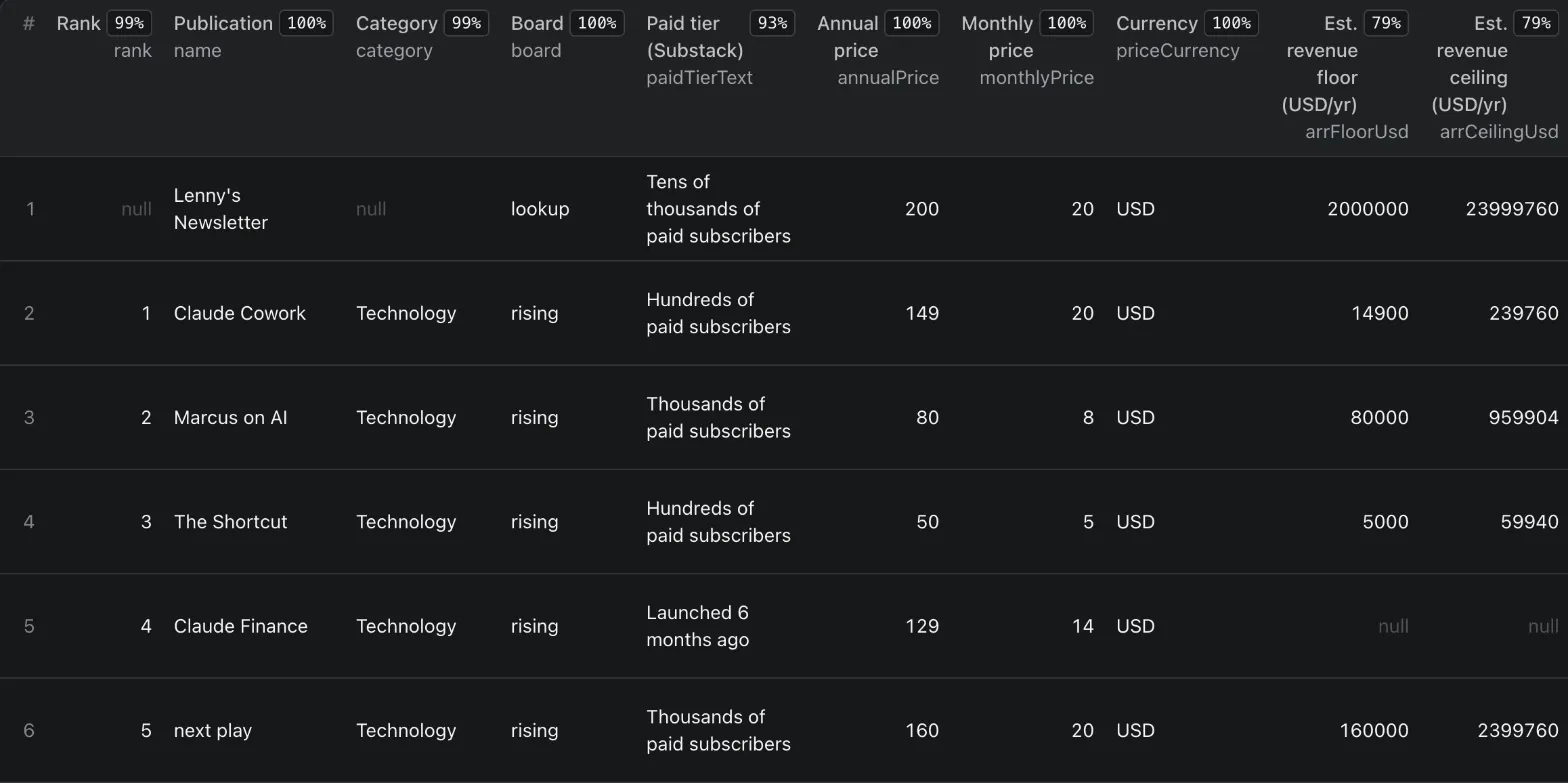
paidbestsellers orrising),rank,paidTierText("Thousands of paid subscribers") andpaidTierFloor,freeSubscribersText/freeSubscribersMin,bestsellerBadge, monthly, annual and founding prices with their currency, URL, subdomain and custom domain. - Estimated revenue range (ARR) per newsletter: Substack shows a paid-subscriber tier and plan prices, but no
revenue. The Actor turns them into
arrFloor/arrCeiling(plusarrFloorUsd/arrCeilingUsd) and writes the math inarrBasis:- floor = tier floor x cheapest annual plan (no annual plan: monthly x 12),
- ceiling = (next tier floor - 1) x cheapest monthly plan x 12 (no monthly plan: the annual price).
- Example: SemiAnalysis, "Tens of thousands of paid subscribers", $500/year, $50/month -> floor $5,000,000, ceiling $59,999,400. Always labelled an estimate: it comes from public tier text and list prices, not from reported revenue.
- Movement between runs: rank up or down, paid tier upgrade or downgrade ("Thousands" -> "Tens of thousands"), price changes, free-subscriber count changes, new entries - and the publications that left the board.
- Category revenue map (
CATEGORY_SUMMARY): per category and board, the sum of USD revenue floors, the median annual price, the share of each paid tier, the currencies, new entries and exits. - Posting cadence (optional): last post date, posts per week and the share of paid-only posts, from each newsletter's 20 latest posts (posts per week = intervals between them per week they span).
- No personal data: publication-level data only. Author names, handles, bios, photos and emails are never read into the output.
Use it to shortlist newsletters to buy or invest in by revenue floor, find the biggest and fastest-rising newsletters of a category for sponsorships, benchmark your own prices and tier against your category's leaders, or size the revenue that sits in a Substack category.
Sample output
One row of the Technology bestseller board (local run 2026-11-04, second run of the same input):
Other outputs
- Dataset
posts(only with Include posting cadence):postId,publicationId,publicationName,title,type,audience(everyone/only_paid),isPaid,postedAt,url. CATEGORY_SUMMARY(key-value store): per category and board -rows,rowsWithUsdEstimate,arrFloorSumUsd,medianAnnualPriceUsd,tierShare(count and share per tier text, "Launched" rows grouped, "no tier" for hidden ones),nonUsdRows,currencies,entered,left, plus a note that every revenue number is an estimate. Run-level lists:unknownCategories,invalidPublications,unknownPublicationsandcadenceUnavailable.RUN_SUMMARY(key-value store): rows and posts pushed, retries and failed requests per error category, boards read / empty / failed, unknown categories and publications,cadenceUnavailable, and why the run failed if it did.
How much does it cost?
$3 per 1,000 publications. Example: Technology + Finance, both boards, 30 per board, one extra publication, with posting cadence = 121 publication rows x $0.003 + 2,162 posts x $0.001 = $0.363 + $2.162 = about $2.53 (our test run, 2026-11-04). Without cadence the same run costs about $0.36.
- $0.003 per publication row; the revenue range, change tracking and category summary are included.
- $0.001 per post, only when Include posting cadence is on (up to 20 posts per publication, each publication's posts once per run).
- A publication listed in two categories or on both boards appears (and is charged) once per board.
- No start fee; platform compute is included. Max publications caps your cost.
How to use
- Pick one or more Categories (or
all) and the Leaderboards: bestsellers (paid) and/orrising. - Set Publications per board (up to 100) and, if you want, add Extra publications to look up.
- Click Start, then download JSON, CSV or Excel from the Output tab.
Main filters: categories, leaderboards, publications per board, posting cadence on/off.
The default input returns 25 Technology bestsellers in about 5 seconds.
Use with AI assistants (MCP)
Connect this Actor to Claude, ChatGPT or any MCP client: https://mcp.apify.com?tools=steadywren/substack-revenue-scraper
Try:
- "Get the Technology and Finance bestseller boards from Substack and list the 10 newsletters with the highest estimated revenue floor."
- "Which Business newsletters on Substack's rising board moved up the most since my last run?"
How it compares
Checked against the READMEs of 10 Substack Actors in Apify Store on 2026-11-03.
| This Actor | Other Substack scrapers in Apify Store | |
|---|---|---|
| Estimated revenue range per newsletter, with the math | yes | not offered (none of the 10) |
| Category revenue map (sum of floors, tier share, median price) | yes | not claimed |
| Rank, tier and price changes between runs | yes | partly (one tracks subscriber growth) |
| Bestseller and rising leaderboards | yes | some (rising: one) |
| Author contacts / emails | no (personal data) | several |
| Price per 1,000 | $3, no start fee | $0.30 - $15 (some add a start fee) |
Monitor daily
Schedule the Actor (Apify Schedules) with the same input and keep Track changes between runs on. After a
board is read completely, a snapshot (rank, tier, prices, free-subscriber text) is saved in the named key-value store
substack-board-history in your Apify account, one record per category and board. The next run compares with it:
rankChangeis positive when a publication moved up,tierChangeisup/down,priceChangedflags a new price,entered: truemarks new entries, andCATEGORY_SUMMARYlists exits (left).- On the first run
changesisnulland the summary says "First run". - Keep Publications per board the same between runs: a run that reads fewer ranks reports no exits below its
depth, and publications deeper than the previous run read get
entered: null(not comparable). - Only boards delivered in full are saved: keep Max publications above categories x boards x publications per board, otherwise the board cut by the limit (and every board after it) gets no snapshot.
- Looked-up publications are tracked per publication: the first lookup has
changes: null, later lookups compare with the last one.
FAQ
Is it legal? The Actor collects publicly available data only, without login and without personal data of private individuals. Check the site's terms for your use case.
What if Substack changes or a run fails? The run fails with a clear error instead of returning empty results,
and you are not charged for results it did not deliver. An unexpected response shape fails the request as a parse
error instead of producing empty rows. When Substack itself answers every board with an empty list, the run finishes
green with "Substack returned no publications for these categories/boards" and nothing is charged. A publication
that cannot be read (unknown name, or blocked after retries) is named in unknownPublications and in the run's
status message. Each run's summary (results, retries, errors) is in the Storage tab -> Key-value store ->
RUN_SUMMARY.
Do I need proxies? Are there limits? No proxy is needed: Substack's public API works without one (turn one on only if requests get blocked). Substack shows up to 100 ranks per board; Max publications stops the run.
How fresh is the data? Live at run time, read from Substack's leaderboards and publication pages.
Is the revenue real? No - it is an estimate from Substack's public paid-subscriber tier text and the list
prices of the cheapest regular plans. Discounts, gifts, group plans, founding members and churn are not visible. The
floor is the useful number (at least that many paid subscribers at the cheapest annual price). The ceiling is a
hard upper bound, usually about 11-12x the floor (higher when the monthly price is high compared with the annual
one): one tier spans a factor of 10 in subscribers, and the ceiling also assumes everyone pays monthly.
Founding-member prices are shown in foundingPrice but never used for the estimate.
Why do some rows have no estimate? arrBasis says why. Substack hides the paid tier for about 7% of board rows
(paidTierText: null). Rows that show "Launched 6 years ago" instead of a tier have fewer than 100 paid subscribers,
so no floor is computed. A publication without an active paid plan has no price to multiply. The bestsellerBadge
field (Substack's public bestseller badge: 100 / 1,000 / 10,000) is shown as it is and is not used for the estimate.
Why is arrFloorUsd empty for some newsletters with a tier? They price in another currency (GBP, EUR, CAD, AUD,
BRL...): about 19% of board rows. arrFloor, arrCeiling and arrCurrency carry the estimate in that currency;
the ...Usd fields stay empty because there is no currency conversion in this version, so the category sums count
USD publications only.
Why is posting cadence slower, and why are some cadence fields null? Substack rate-limits post archives per IP
across all newsletters, so with Include posting cadence the Actor reads one archive at a time, about 1 s apart,
and backs off longer (honouring Retry-After) when Substack answers 429. That adds about 1 s per publication: our
121-publication test run with cadence took about 3 minutes on Apify (2026-11-04), so raise the run timeout for big
inputs. If an archive still cannot be read after its retries, the publication row is delivered anyway with
lastPostAt, postsPerWeek and paidPostShare set to null and no posts (nothing is charged for posts it does not
have); its name is listed in cadenceUnavailable in RUN_SUMMARY and CATEGORY_SUMMARY, and the run's status
message warns about it.
Is "rising" the same as on substack.com? Yes, it is Substack's rising leaderboard of the category (called
trending in Substack's API).
Why are author names, emails and profiles not included? They are personal data. The Actor outputs publication-level data only; the publication name is the public brand of the newsletter, even when it is a person's name.
More from Steadywren
- Google News Scraper & AI Company Signals - Google News articles per company with AI event type, sentiment and stories.
- Startup Funding Rounds Scraper - Global News - fresh funding rounds from news in many countries, in USD.
- Goodreads Scraper & Series Read-Through - Goodreads book series with ratings and read-through.
- All Steadywren Actors - small tools, steady results. Custom builds: steadywren.com.
Input reference
| Field | Type | Default | Description |
|---|---|---|---|
categories | array | ["technology"] | Categories. Substack categories by slug, id or name, or "all" for every category. Slugs: culture, technology, business, us-politics, finance, food, podcast, sports, art, world-politics, health-politics, news, fashionandbeauty, music, faith, climate, science, literature, fiction, health, design, travel, parenting, philosophy, comics, international, crypto, history, humor, education, film-and-tv, home-garden, games. Unknown names are skipped with a warning. |
boards | array | ["paid"] | Leaderboards. "paid" = Substack's bestseller leaderboard of the category, "rising" = Substack's rising leaderboard. Each board lists up to 100 publications. |
maxPerBoard | integer | 25 | Publications per board. How many ranks to read per category and board. Substack shows up to 100 (4 pages of 25). |
publications | array | - | Extra publications to look up. Optional. Substack subdomains (lenny), custom domains (www.lennysnewsletter.com) or URLs. Each one is returned as a row with board "lookup". |
trackChanges | boolean | true | Track changes between runs. Compare each board with your previous run: rank change, tier upgrade or downgrade, price change, new entries and exits. Snapshots are kept in your named key-value store "substack-board-history". |
includeCadence | boolean | false | Include posting cadence. Read the 20 latest posts of each publication: adds last post date, posts per week and the share of paid-only posts, and saves the posts to a second dataset at $0.001 per post. Adds about 1 s per publication (archive requests are paced to stay under Substack's rate limit). A publication whose archive could not be read keeps null cadence fields and is listed in cadenceUnavailable (RUN_SUMMARY, CATEGORY_SUMMARY). |
maxItems | integer | 1000 | Max publications. Stop after this many publication rows. You are charged per row, so this also caps the cost. Only boards delivered in full are saved for change tracking: keep this above categories x boards x Publications per board. |
maxConcurrency | integer | 3 | Max concurrency. How many requests run in parallel (1-10). |
proxyConfiguration | object | no proxy | Proxy configuration. Optional. Substack's public API works without a proxy; turn one on only if requests get blocked. |
Search keywords: substack scraper, substack leaderboard, substack newsletters, newsletter revenue


