
ASO Keyword Rank Tracker: iOS & Android App Positions
Pricing
from $1.00 / 1,000 keyword checks
ASO Keyword Rank Tracker: iOS & Android App Positions
Check where an app ranks for a keyword in App Store and Google Play search, by country: rank, change since the last run, movement and the top apps for each keyword. ASO keyword rank tracker for iOS and Android apps, $2 per 1,000 checks; failed checks are free. Free plan: 5 checks per run.
Pricing
from $1.00 / 1,000 keyword checks
Rating
0.0
(0)
Developer

Tenfold Fleet
Maintained by CommunityActor stats
0
Bookmarked
2
Total users
1
Monthly active users
a day ago
Last modified
Features
Share
What does ASO Keyword Rank Tracker do?
ASO Keyword Rank Tracker tells you where an iOS or Android app shows up in App Store and Google Play search for each keyword you care about. Give it a list of keywords, your apps (and your competitors' apps) and one or more countries. It returns one row per keyword, app and country with the rank, the change since your last run, the movement (up, down, same, new, lost) and the top apps that hold the first positions.
App Store is a trademark of Apple Inc. and Google Play is a trademark of Google LLC. Not affiliated with Apple or Google.
It works like an app keyword ranking API for App Store Optimization (ASO): no API key, no developer account, no login. One input covers both stores, so an app with an iPhone and an Android version is tracked in a single run. Schedule it daily or weekly and it becomes an app store keyword rank tracker that keeps its own history and reports which keywords moved.
Why use an ASO keyword rank tracker?
- 📈 Measure ASO work: see if a new title, subtitle or keyword field moved your app up for the keywords you target.
- 🥊 Watch competitors: add rival apps next to yours and compare positions keyword by keyword.
topAppsshows who holds the first places. - 🌍 Compare countries: run the same keywords in the US, GB, DE, JP or BR stores and see where the app ranks well.
- 🔔 Alerts on movement: turn on Only return positions that changed and a scheduled run returns only the keywords that moved, entered or dropped out.
- 🏢 Agency reporting: keep one history store per client and export a weekly table of rank changes.
- 🤖 AI agents and automations: one call answers "what position is this app for this keyword?" as clean JSON, ready for Make, Zapier, n8n, Google Sheets or the Apify MCP server.
What data can it extract?
| Field | What it holds |
|---|---|
keyword, store, country | the search phrase, app-store or google-play, and the two-letter country of the store |
app, appId | the app as you gave it, and its App Store ID or Google Play package name |
appName, developer, appUrl | the app's name, developer and store page (on Google Play the developer is filled when the app is in the results) |
rank, isRanked | the position of the app in the search results, or null when it is not in the results that were read |
previousRank, rankChange, movement, previousCheckedAt | comparison with the previous run: up, down, same, new, lost, not-ranked or first-check. rankChange is positive when the app moved up |
totalResultsScanned | how many apps the store returned for the keyword (see "How positions are counted") |
topApps | the first apps of the search: rank, app ID, name, developer, rating and URL |
suggestions | optional: the App Store's autocomplete suggestions for the keyword |
language | the Google Play language (hl); null on App Store rows |
source, checkedAt | where the ranking was read from, and when |
How to track app keyword rankings
- Open the actor and click Try for free.
- Paste your keywords, one per line (up to 500 per run).
- Add your App Store apps: the numeric ID from the app's URL (
id324684580), the URL itself or the bundle ID. - Add your Google Play apps: the package name (
com.spotify.music) or the app's URL. You can fill one store or both. - Set the countries (US by default) and, for Google Play, the language.
- Leave Compare with the previous run on and pick a history store name for this project.
- Click Start, then download the table as JSON, CSV or Excel, or schedule the actor to run every day or week.
How much does it cost to track app keyword rankings?
You pay per keyword check: one keyword checked for one app in one country, at $2 per 1,000 checks ($0.002 each), plus a tiny start fee of $0.00005 per run. 10 keywords x 3 apps x 2 countries = 60 checks = $0.12.
An app that is not in the results is a real answer ("not ranked") and is charged. These are free: searches a store did not answer, keywords with no results, apps that do not exist in the store (they are looked up before the run), invalid apps, countries and languages, and, with Only return positions that changed on, every position that did not move. The same keyword typed twice with different capitals is checked once, and so is the same app given as both an App Store ID and a bundle ID. Set a maximum cost per run in the run options and the actor stops cleanly when it is reached.
Free Apify plan: a run makes the first 5 checks of its list and skips the rest with a free notice row. Any paid Apify plan removes that limit.
Input
Output
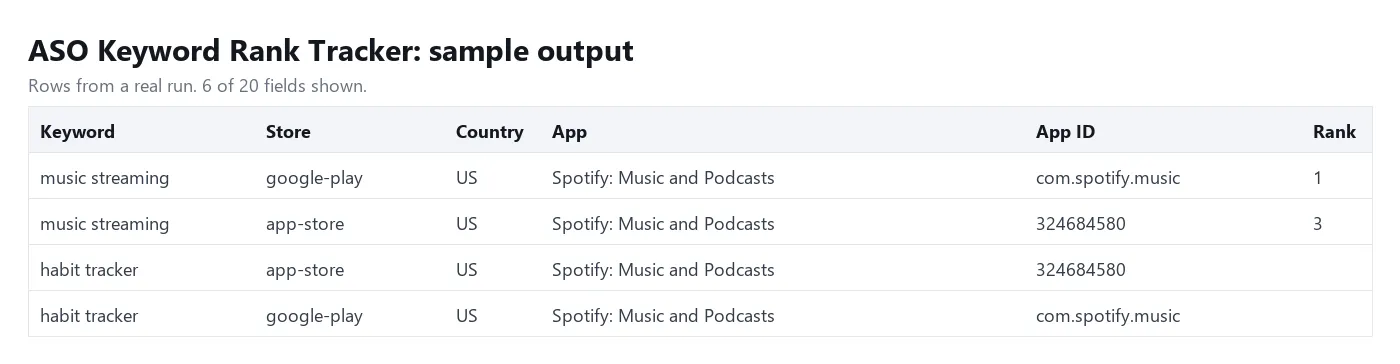
One row per keyword, app and country. Download as JSON, CSV, Excel or HTML, or read it from the API.
Every row also has appUrl, and every entry of topApps a url: the app's page in the store (left out of the example above).
Rows that could not be checked carry an error and a reason (search-failed, store-unavailable, no-results, app-not-found, app-lookup-failed, invalid-app, invalid-keyword, invalid-input, no-input, input-limit, free-plan-limit, error) and are never charged.
How positions are counted
- App Store: the iPhone search results of the country's store, in the store's order, usually 200 to 250 apps deep. If that source does not answer, the actor reads the public iTunes Search API (up to 200 apps) and says so in
source. The two sources can order apps a little differently, so compare rows with the samesource. - Google Play: the first results page of Play search for the country and language, usually 20 to 30 apps deep (a few keywords return as few as 12, some up to 50). When the keyword is an app's name, Google shows that app in a large card first; it counts as rank 1. An app that is not on the first page comes back with
rank: null. - Ads and editorial stories are not counted. Both stores personalise results a little by device and account, and Google Play can vary by request, so a position can differ by a place or two from what you see on your phone.
ratingintopAppsis the star value the store shows in its results list, which the App Store rounds to half stars.
Tips
- Track iPhone and Android together: put the App Store ID in
iosAppsand the package name inandroidApps. Each store's keywords are searched once, however many apps you add, so competitors cost only the extra checks. - Daily tracking for less: schedule the actor with
onlyChangeson. The first run saves every position; later runs return and charge only what moved. - Separate projects: use a different
historyStoreNameper app or client. The history lives in a named key-value store in your own account and is kept until you delete it. - Find new keywords: turn on
includeSuggestionsto get the App Store's autocomplete phrases for each keyword, then add the good ones to your list. - Localised keywords: type keywords in the language of the store you check, for example German phrases for
DE.
FAQ
Do Apple or Google have an API for app keyword rankings?
No, neither store has one. Apple's and Google's developer consoles show installs and impressions, not the position of an app for a keyword, and nothing at all for competitors' apps. This actor reads the public search results that every user sees.
Does it need my developer account or a login?
No. It needs no Apple ID, no Google account, no API key and no cookies. It only reads public search results.
Why is my app "not ranked" on Google Play when I can find it by scrolling?
Google Play's search page lists about 20 to 30 apps for a keyword, and that is how deep this actor looks. totalResultsScanned tells you how many apps were read for each row.
Can I use a bundle ID instead of the App Store ID?
Yes. A bundle ID such as com.spotify.client is looked up in each country's store and turned into the App Store ID. If the lookup fails, use the numeric ID from the app's App Store URL.
Which countries are supported?
Every country that has an App Store or Google Play storefront: about 175 App Store countries. Use two-letter codes such as US, GB, DE, FR, JP, KR, BR, IN or AU. An app that is not sold in a country's App Store comes back as a free app-not-found row for that country.
How do I get the rank history as a table?
Each run's dataset holds that day's positions with previousRank and rankChange. Schedule the actor and send each run to Google Sheets, or read the datasets from the API, to build a history table. The last position of every keyword is also kept in your history store under the key RANKS.
How many keywords can I check?
Up to 500 keywords, 25 apps per store and 25 countries per run, and at most 5,000 store searches (keywords x countries x stores) in one run. Anything over a limit is skipped with a free notice row. Split bigger lists into several runs or schedules.
Disclaimer
This actor reads only public search results of the App Store and Google Play. It collects no personal data. Positions are a snapshot at the time of the run and are not guaranteed to match every device. You are responsible for how you use the data and for following the terms of the stores you check.
More tools from Tenfold Fleet
All 122 tools: apify.com/tenfoldfleet. If this Actor saves you time, save it (the bookmark on its Store page) and leave a review: both help other people find it. Found a bug or need another field? Tell us on the Issues tab of this page.


