

Google Maps Rank Tracker - Geo-Grid Rank Changes & Competitors
Pricing
from $3.50 / 1,000 grid point checkeds
Google Maps Rank Tracker - Geo-Grid Rank Changes & Competitors
Check your business's Google Maps ranking for a keyword from 9 to 225 map points around it (local SEO geo-grid). Each point: rank, top 3 listings and the move since your last run. Each keyword: average rank, top-3 share and the rivals that win most points. $5 per 1,000 points; failed points free.
Pricing
from $3.50 / 1,000 grid point checkeds
Rating
0.0
(0)
Developer

Tenfold Fleet
Maintained by CommunityActor stats
0
Bookmarked
1
Total users
0
Monthly active users
a day ago
Last modified
Categories
Features
Share
Not affiliated with Google. This Actor reads public Google Maps search results.
What does Google Maps Rank Tracker do?
Google Maps Rank Tracker shows where a business appears in Google Maps results for a keyword, not from one spot but from every point of a geo-grid laid over the area around it. A searcher three streets away often sees a different order than one in the next district, and this Actor measures that spread.
Give it a keyword such as dentist, the business to look for and the middle of the grid. It searches Google Maps from each grid point and returns the local rank at every point, the average rank, the share of points where the business is in the top 3 (the map pack), the competitors that beat it, and the rank change since your last run. Use it from the Apify Console, or as a local rank tracking API from your own code, Make, Zapier, n8n or an AI agent.
Why use it?
- Local SEO reports: show a client a colored grid of their Google Maps visibility, and how it moves month to month.
- Weekly rank monitoring: schedule the same grid and see which points went up, down, appeared or dropped out.
- Competitor research: find which businesses own the top 3 across your area and how many points each one wins.
- Service-area planning: see how far from the office the business stops showing up.
- Agencies and AI agents: one API call returns clean JSON for every point, ready for dashboards.
What data can it extract?
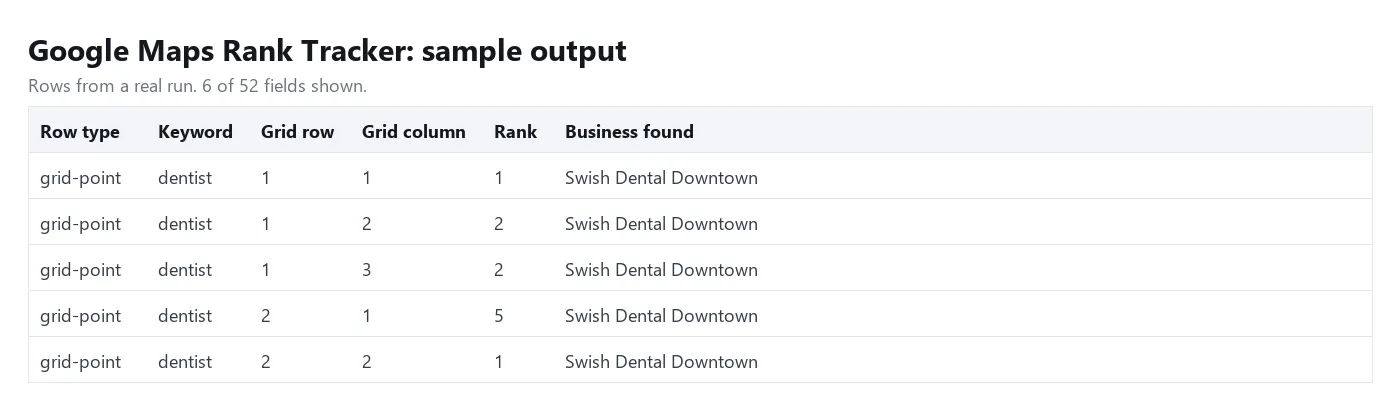
| Field | Example |
|---|---|
| Keyword | dentist |
| Grid row / column, latitude, longitude | 1, 3, 30.2762, -97.7327 |
| Distance and direction from the center | 1.41 km, NE |
| Rank at this point (null = not in the results checked) | 2 |
| Matched listing, place ID, CID, rating, reviews | Swish Dental Downtown, ChIJ..., 4.5, 985 |
| Top 3 listings at this point | title, rank, rating, reviews, website |
| Last run's rank, change, status | 4, +2, up |
| Keyword summary | average rank, top-3 share, best and worst rank, text grid, top competitors |
How to track Google Maps rankings on a grid
- Enter one or more keywords your customers search for.
- Enter the business: its name as shown on Google Maps, its website, or (most exact) its Google Maps place link.
- Set the grid center: coordinates, a Google Maps link or an address. A place link as the business also gives the center.
- Choose the grid size (3 x 3 up to 15 x 15) and the radius in km from the center to the edge.
- Click Start. Open the REPORT record for the colored grid, or the dataset for every point.
- Schedule the run (for example weekly) to get changes since the last run on each point.
How much does it cost?
You pay $5 per 1,000 grid points ($0.005 per point and keyword) plus a tiny start fee. A 5 x 5 grid for one keyword is 25 points = $0.125; a 7 x 7 grid is $0.245. Points that fail are free, and the keyword summaries and the HTML grid are free. Set a maximum cost per run and the Actor stops there.
Free Apify plan: one keyword on a 3 x 3 grid per run and up to 27 points a day, because each point costs us a data fee. Any paid Apify plan removes these limits.
Input
Output
Each grid point is one dataset row; each keyword also gets one free summary row. Download the results as JSON, CSV, Excel or HTML, or read them through the Apify API.
The summary row holds averageRank, averageRankAllPoints (not-found points count as depth + 1), top3Share, top10Share, bestRank, worstRank, a text grid (north at the top) and topCompetitors.
Tips
- Use the business's Google Maps place link when it has branches with similar names. With a plain name or website, the branch found most often is tracked at every point.
- Keep the same center, grid and radius between runs: changes are matched point by point.
- A 5 x 5 grid with a 2-3 km radius suits most city businesses; use 7 x 7 or 9 x 9 for service areas.
- Rank history is kept in a key-value store named
google-maps-rank-tracker-historyin your own account.
FAQ
How is the rank counted?
The rank is the position among the organic Google Maps listings at that point (ads are skipped). If the business is not in the results checked (20 by default, up to 100), the point shows rank: null and found: false, and it is still a charged result because the search was done.
Can I enter an address instead of coordinates?
Yes. An address is turned into coordinates with OpenStreetMap search. If it cannot be found, use coordinates or a Google Maps link.
Does it work outside the US?
Yes, anywhere Google Maps works. Set the language code for the country, for example de or es.
Is it legal?
It reads public search results only. No login and no personal data beyond what businesses publish on their listings. Check the rules that apply to your use.
More tools from Tenfold Fleet
All 122 tools: apify.com/tenfoldfleet. If this Actor saves you time, save it (the bookmark on its Store page) and leave a review: both help other people find it. Found a bug or need another field? Tell us on the Issues tab of this page.


