

Google Trends Scraper - Reliable, No Blocks
Pricing
$4.00 / 1,000 results
Google Trends Scraper - Reliable, No Blocks
Scrape Google Trends: interest over time, by region, related queries and Trending Now. Built not to get blocked: residential proxies, retries and session rotation.
Pricing
$4.00 / 1,000 results
Rating
0.0
(0)
Developer

Márcio Makoto Nakamura
Maintained by CommunityActor stats
0
Bookmarked
2
Total users
1
Monthly active users
a day ago
Last modified
Security
Limited permissionsShare
Google Trends Scraper. Reliable, no blocks.
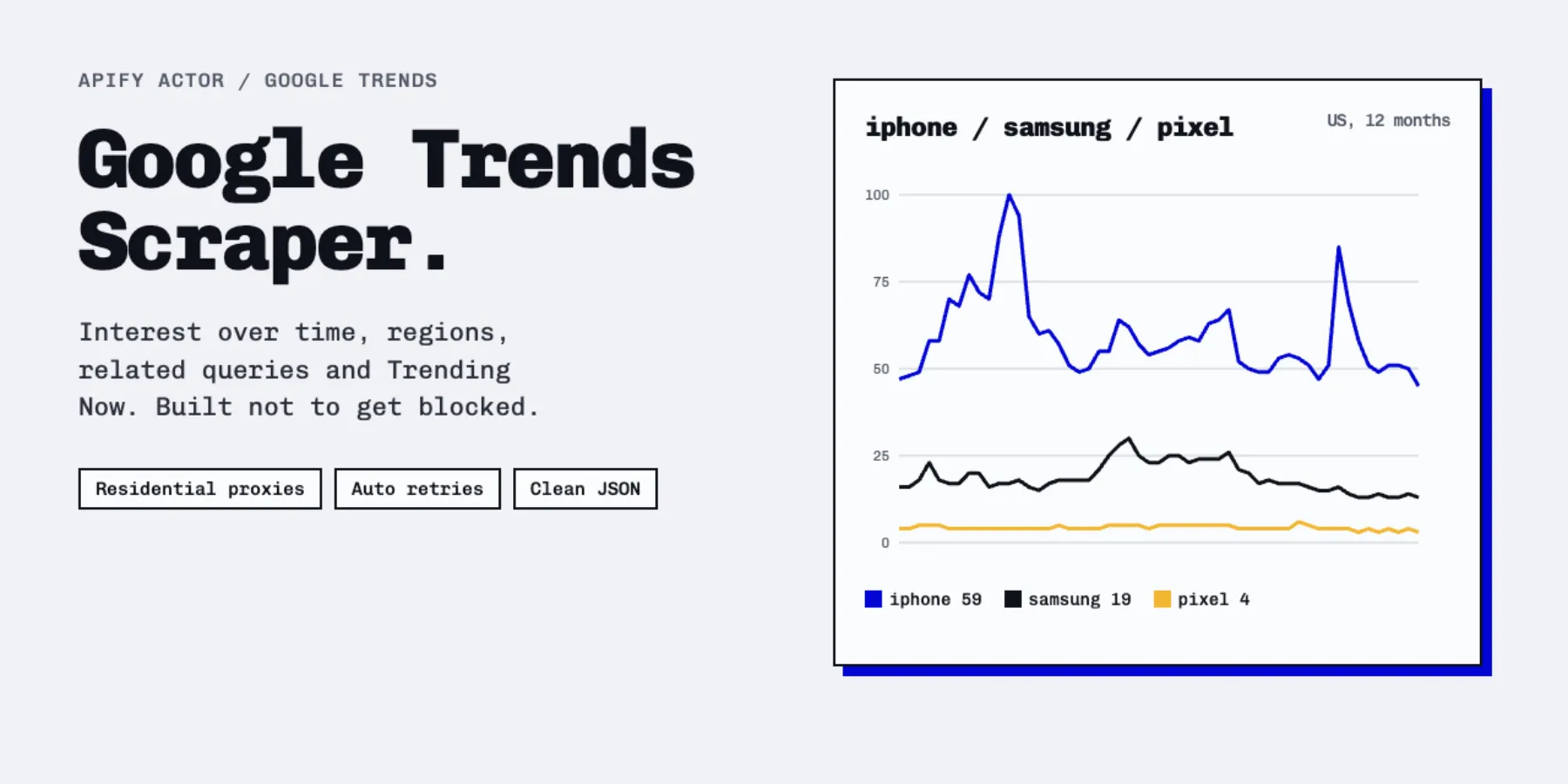
Google Trends Scraper pulls interest over time, interest by region, related queries and the live Trending now list from Google Trends, and hands you clean JSON. No API key, no Google account, no code.
It is built around one idea: a scraper is only useful if it finishes. Google answers scrapers with HTTP 429 and "unusual traffic" pages. This Actor expects that. It rotates residential IPs and cookies, retries with backoff, and never charges you for a query that failed.
Tested on the Apify cloud before release: 49 of 49 runs finished successfully, and every one of the queries inside them was answered. Details and an honest comparison are below.
What you can scrape
| You want | Set | You get |
|---|---|---|
| How interest in a term changed over time | dataTypes: interestOverTime | A dated series, 0-100, per term |
| Up to 5 terms on the same scale | compareTerms: true | One series with a value per term |
| Where a term is popular | dataTypes: interestByRegion | Countries, states, cities or metro areas |
| What people also search | dataTypes: relatedQueries | Top and rising queries, with Breakout flags |
| What is trending right now | mode: trendingNow | Trending searches per country, with volume, start time, category and news |
Filters: country or region (US, BR, US-CA...), time range (past hour to 2004, or custom dates), category, and property (web, YouTube, news, images, shopping). Batch as many terms and countries as you want in one run.
How it works, in four steps
- Open the Actor and type your terms, one per line.
- Pick countries, a time range and the data you want.
- Press Start. Runs usually finish in under a minute for a few terms.
- Download JSON, CSV, Excel or read it through the API.
Examples
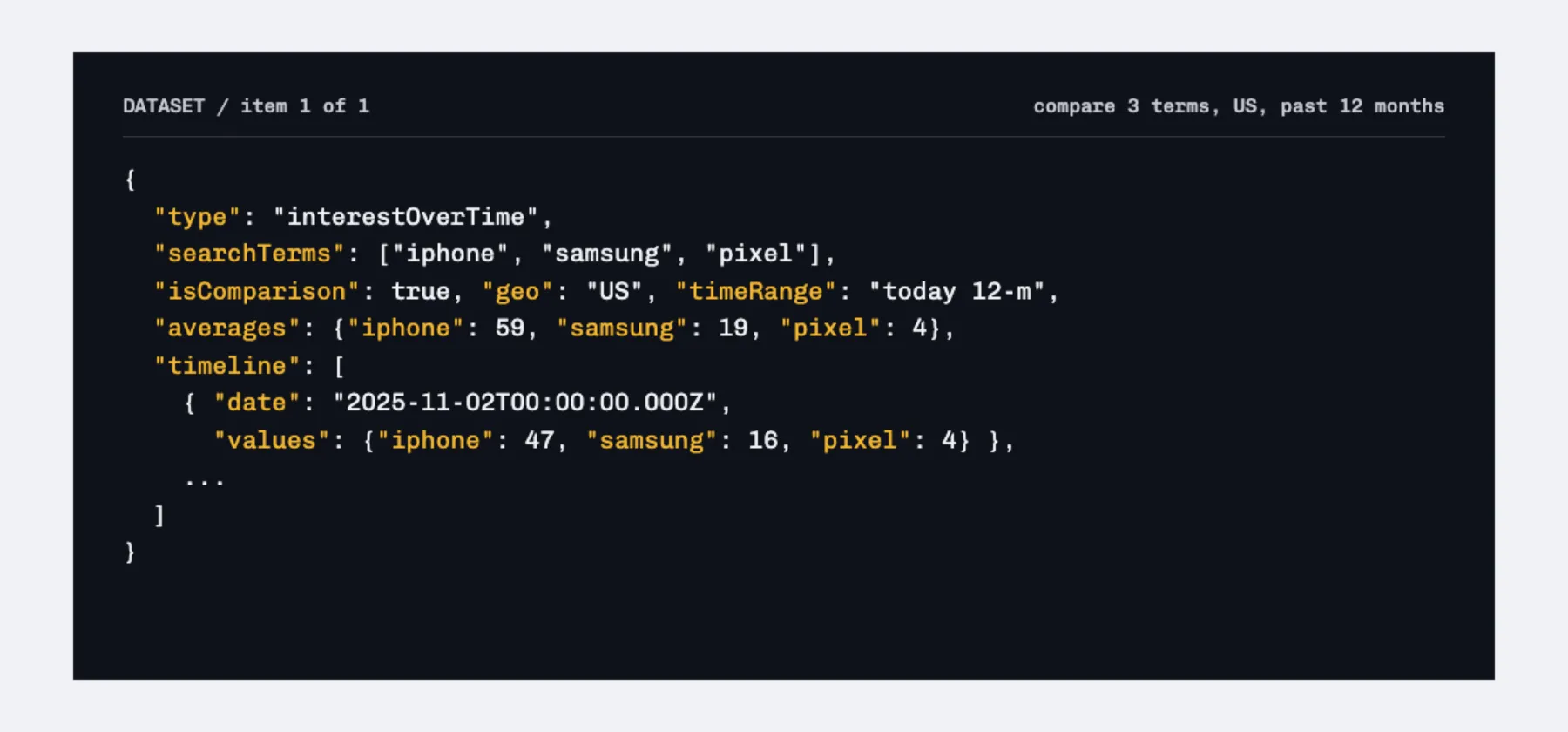
1. Interest over time, compare terms
Input:
Output (one result):
2. Interest by region
Input: {"searchTerms": ["bitcoin"], "geos": ["US"], "dataTypes": ["interestByRegion"]}
Set regionResolution to CITY, REGION, COUNTRY or DMA for more or less detail.
3. Related queries
Input: {"searchTerms": ["bitcoin"], "geos": ["US"], "dataTypes": ["relatedQueries"]}
4. Trending now by country
Input: {"mode": "trendingNow", "trendingGeos": ["US", "BR"], "trendingLimit": 10, "trendingHours": "24"}
Top N is from 10 to 500. Keep only some topics with trendingCategories: ["Sports", "Technology"], or only trends that are still going with trendingActiveOnly: true.
How much does it cost?
You pay per result. Nothing else, no monthly fee.
| Event | Price |
|---|---|
| One result (a full time series, a region table, a related-queries list, or one trending search) | $0.004 |
A "result" is a whole record, not one data point. A 52-week series for one term is one result, not 52. Failed and empty queries are never charged.
| Job | Results | Cost |
|---|---|---|
| 1 term: time series + regions + related queries | 3 | $0.012 |
| 50 terms in the US, time series only | 50 | $0.20 |
| Top 25 trending searches in one country | 25 | $0.10 |
| 20 terms x 3 countries, time series + related queries | 120 | $0.48 |
The proxy and the compute are included in the price. Set Max cost per run in the run options and the Actor stops cleanly when it is reached.
Free plan limits
The free Apify plan can run this Actor with a cap so that nobody burns residential proxy traffic for free:
- Explore mode: up to 5 queries per run (one query = one term, or one group of compared terms, in one country).
- Trending now: up to 2 countries per run.
If you go over, the run still succeeds, processes the first ones and tells you in the run status: "Free plan limit: this run asked for 8 search queries...". A paid Apify plan removes the limit. The same notice sits in the input form.
Reliability, measured
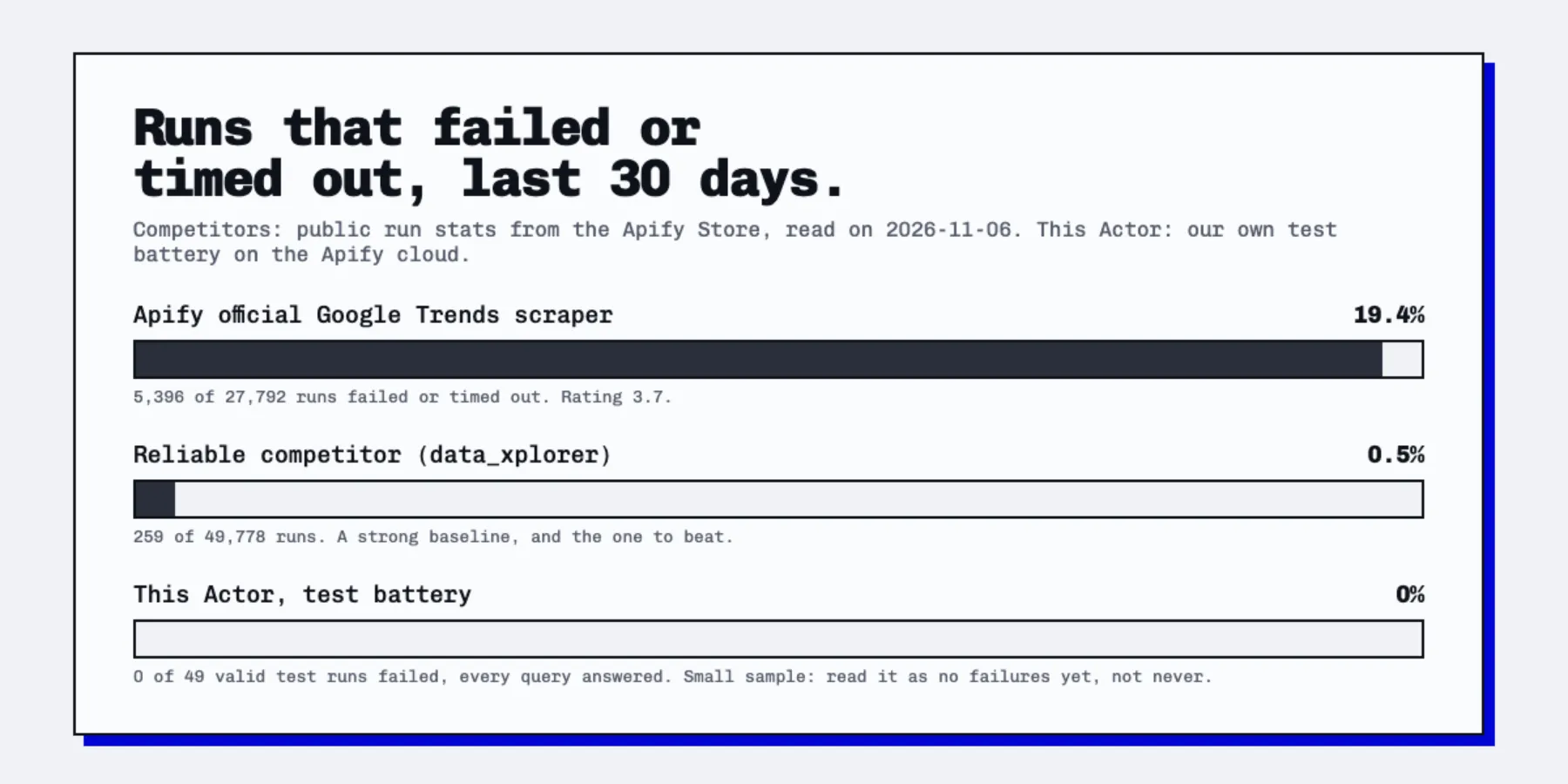
What we ran. 52 real executions on the Apify cloud with residential proxies: 49 valid runs, 1 run with deliberately invalid input and 2 runs we cancelled by hand. All 49 valid runs succeeded, and all of their queries (batches of up to 60) came back with data, or with a clear "no data" answer for a term that really had none.
What it covered. 12 locations (worldwide, US, US-CA, BR, DE, JP, GB, IN, FR, MX, CA, IS), every time range from the past 4 hours to 2004 and custom dates, all 5 properties, compared and separate terms, regions down to city level, a Japanese-language term, a Google topic id, and Trending now for 1 to 5 countries at once.
What it does not prove. 49 runs is a small sample. The comparison above shows public Store numbers for the competitors and a test battery for this Actor, so read it as "no failures in testing", not as a promise of 0%. Google changes things without notice. When it does, the failed queries are not charged, and the run report lists them.
How it stays up.
| Google does this | The Actor does this |
|---|---|
| Answers the first request of a new IP with HTTP 429 (about 1 request in 4 in our test) | Keeps the cookie Google just set and retries at once on the same IP |
| Blocks an IP or sends a "sorry" page | Throws the session away: new residential IP, new cookies, whole query restarted |
| Returns a half-broken answer | Treats it as a failure and retries instead of saving bad data |
| Keeps blocking | Backs off with jitter and tries up to maxRetries times, then reports the query as failed and does not charge for it |
Run report. Every run saves a RUN_REPORT record in the key-value store with queries run, retries, blocked requests and the reason for any failure.
Input reference
| Field | What it does | Default |
|---|---|---|
mode | explore or trendingNow | explore |
searchTerms | Terms, or Google topic ids like /m/0dl567 | none |
compareTerms | Compare terms on one scale, in groups of 5 | false |
geos | Country or region codes. Empty = worldwide | worldwide |
timeRange | now 1-H, now 4-H, now 1-d, now 7-d, today 1-m, today 3-m, today 12-m, today 5-y, all, custom | today 12-m |
customStartDate, customEndDate | YYYY-MM-DD, when timeRange is custom | none |
property | web, youtube, news, images, shopping | web |
category | Google Trends category id, 0 = all | 0 |
dataTypes | interestOverTime, interestByRegion, relatedQueries, relatedTopics | over time + queries |
regionResolution | COUNTRY, REGION, CITY, DMA | Google's choice |
trendingGeos, trendingHours, trendingLimit (10 to 500), trendingCategories, trendingActiveOnly, trendingIncludeNews | Trending now settings | US, 24, 25 |
language, timezoneOffset | Labels language and bucket timezone | en-US, 0 |
maxConcurrency, maxRetries | Parallel queries and attempts per query | 3, 8 |
proxyConfiguration | Keep Apify Residential for reliability | Residential |
Related topics are best effort. Google returns them for some terms and an empty list for others; empty lists are skipped and never charged.
Use it from code, agents and MCP
Run it from any language with the Apify API or client:
AI agents: every input has a plain-English title and description, results are flat JSON with stable field names, and a RUN_REPORT record in the key-value store lists failures and no-data queries. Add it to Claude, Cursor or any MCP client through the Apify MCP server and ask in plain language: "Compare interest in iphone, samsung and pixel in the US over the last year."
FAQ
Is scraping Google Trends legal? The Actor reads public pages that anyone can open in a browser. It collects no personal data. You are responsible for how you use the data and for following Google's terms in your jurisdiction.
Why is the same term different between runs? Google samples its data. Small differences between runs are normal. Values are always relative, 0 to 100, to the peak in your selection.
Why do compared terms give different numbers than separate runs? On a comparison, 100 is the most popular term at its peak. Separate runs scale each term to itself.
A query returned nothing. The term has too little search volume for the country and period. Try a broader term, a longer period or worldwide.
Do I need a proxy? Yes, and it is included. Google blocks datacenter IPs quickly, so the Actor uses Apify Residential proxies by default, and the proxy cost is already inside the price.
What if Google changes something? The parsers are covered by automated tests on real Google responses, so a format change shows up fast. Report it in the Actor's Issues tab and it gets fixed.
Can I schedule it? Yes. Use Apify Schedules to track terms daily or weekly, and send results to Google Sheets, Slack, a webhook or your database with the Apify integrations.
Google and Google Trends are trademarks of Google LLC. This Actor is independent and not affiliated with or endorsed by Google.


