

Facebook Groups Post & Comments: No cookies require
Pricing
from $1.00 / 1,000 results
Facebook Groups Post & Comments: No cookies require
⚡1.5$ Facebook Group & Post Comments Scraper . Process 100+ public group URLs in parallel High Speed and extract post text, authors, timestamps, engagement, media, shared posts, sale listings, and comments. No login or cookies required.
Pricing
from $1.00 / 1,000 results
Rating
4.5
(9)
Developer

TheDoor
Maintained by CommunityActor stats
34
Bookmarked
4.9K
Total users
242
Monthly active users
4 days ago
Last modified
Categories
Share
⚡ High-Speed Facebook Group Scraper — 100+ URLs in Parallel
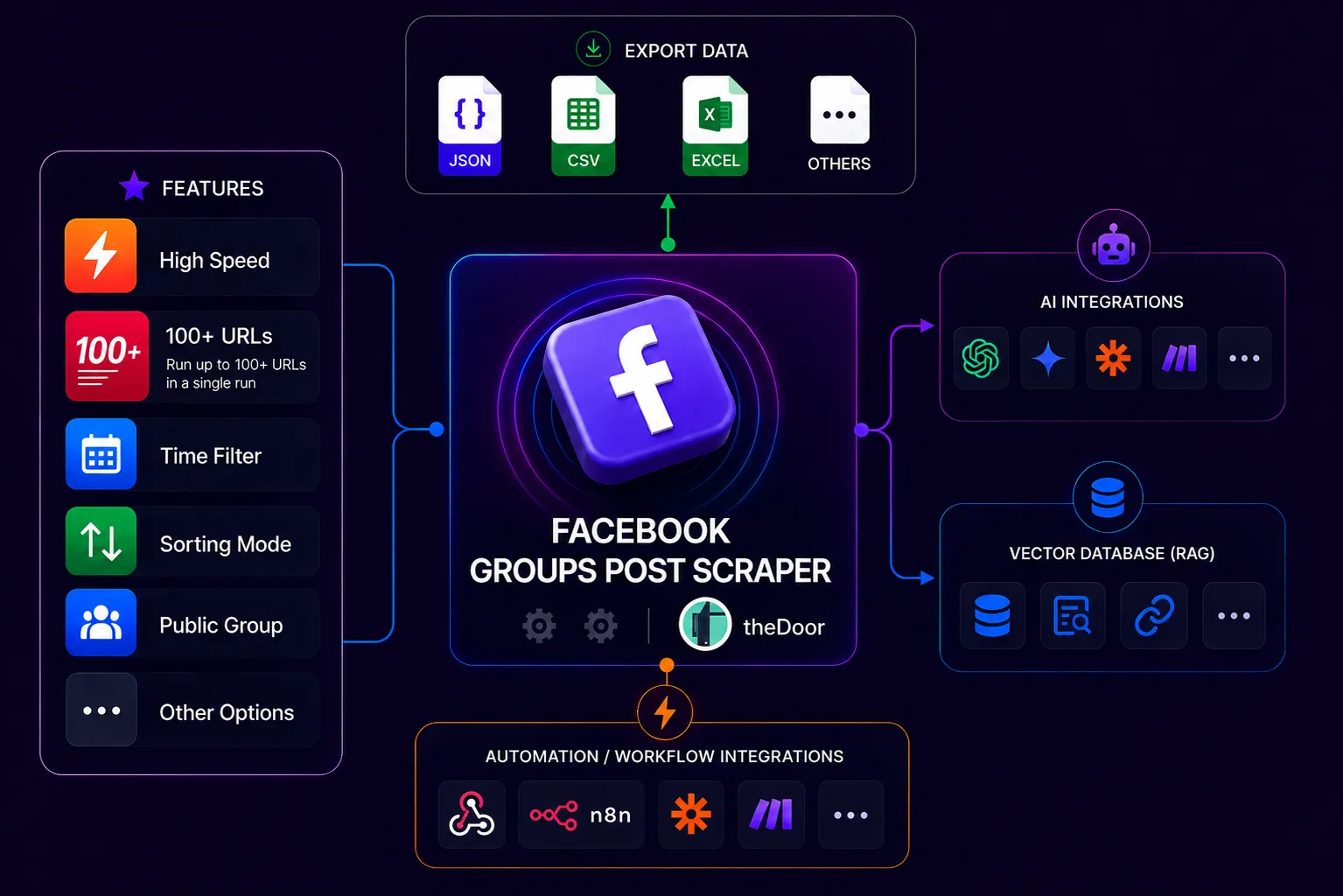
Submit one or many public Facebook Group URLs in one run and collect structured post data for monitoring, research, content analysis, and automation.
Why use this Actor?
- Bulk-ready — process 1, 10, or 100+ group URLs in one run.
- AI group search — describe the groups you want and let AI find them, on top of the URLs you already have.
- Complete post data — post text, author, timestamps, engagement, media, shared posts, sale listings, and comments.
- Flexible collection — choose feed order, comments, replies, time filters, and cursors.
- Recurring monitoring — optionally return only posts that are new since the prior run.
Explore the Facebook scraping toolkit
Need comments from individual Facebook posts? Use the Facebook Comment Scraper. For public Facebook Pages, use the Facebook Page Scraper.
Output at a glance
Each dataset record is a Facebook Group post and can include regular-post data, shared-post data, native sale-listing data, comments, and replies.
Quick start
Enter one or more public Facebook Group URLs and choose how many posts to collect from each group.
Bulk example
Use the same format for many groups. Each URL is handled independently.
Your URLs plus groups found by AI
Add AI group search to scrape your own URLs and every relevant group the AI finds, in one run.
What you can collect
- Post text, URL, ID, date, and timestamp
- Post author name and profile URL
- Reactions, comments count, and shares count
- Photos, videos, and other media
- Shared-post and Buy/Sell listing details
- A top comment, or all comments
- Comment replies when enabled
Input guide
Facebook Group URLs
UI field: Facebook Group URLs
JSON field: url
Enter one or more Facebook Group URLs. Both slug URLs and numeric group-ID URLs are supported.
AI group search
UI field: 🔎🤖 AI group search - describe the groups that you want
JSON field: groupSearchPrompt
Describe the groups you want in your own words, for example group mua bán macbook ở Hà Nội or used car buy and sell groups in Germany. Leave it empty to scrape only your URLs.
How it works:
- AI reads your description once and decides the search language and country, the Google searches to run, the kind of group you want (topic, product, or activity), and the location to check.
- The Actor searches Google for public Facebook groups.
- Each group found is checked in two steps, using its Google title and description: first the topic, then the location.
- Every group that passes both steps is scraped, best match first. There is no fixed limit on the number of groups.
Using it together with Facebook Group URLs. You can fill in url, groupSearchPrompt, or both. With both, the Actor scrapes your URLs plus every group the AI finds. A group that appears in both lists is scraped once. All groups use the same settings, so Maximum Posts applies to each group.
Language and location. The search runs in the language you write in, in that language's main country (Vietnamese → Vietnam, German → Germany, English → United States).
| What you write | Location check |
|---|---|
A city or region (ở Hà Nội, in Bangkok) | Each group must be for that place. A group whose name includes the place is kept. |
A country other than your language's country (in Germany written in English) | Each group must be for that country. |
Only your language's own country (tại việt nam written in Vietnamese) | Groups without a location are kept; only groups clearly for another country are removed. |
| No place | No location check. |
To find local groups in another country, write the description in that country's language. For example, Gebrauchtwagen An- und Verkauf Gruppen in Deutschland finds German used-car markets, while the English version mostly finds English-speaking groups in Germany.
Results. The groups the AI selected, with every candidate and its scores, are saved in the GROUP_SEARCH key-value record. The Output tab links to it as Found groups (AI group search). If no group passes, the run finishes successfully with a status message and no posts.
Maximum Posts
UI field: Maximum Posts
JSON field: maxPosts
The maximum number of posts to return for each group.
Post sorting order
UI field: Post sorting order
JSON field: sortingOrder
| Value | Meaning |
|---|---|
newest_posts | Start with the newest posts. Recommended for monitoring. |
newest_activity | Order by the most recently active posts. |
most_relevant | Use Facebook's relevant-post ordering. |
buy_sell_listings | Return Buy/Sell listing posts only. |
Include top comment
UI field: Include top comment
JSON field: includeTopComment
Adds the post's top comment when it is available. Use this when you need a quick comment signal rather than a complete comment collection.
Fetch comments
UI field: Fetch comments
JSON field: fetchAllComments
Fetches root comments for every returned post. Replies are not included unless Fetch comment replies is also enabled.
Fetch comment replies
UI field: Fetch comment replies
JSON field: fetchCommentReplies
Fetches replies below each returned root comment. Enable Fetch comments as well. Collecting replies can make a run take longer.
Filter posts with AI
Use the optional Which posts should be kept? field to return only posts that match a natural-language request. Leave it empty to keep the normal collection unchanged.
UI field: Which posts should be kept?
JSON field: prompt
Describe the exact type of post you want to keep. You can mention the product or property, location, important details, price, and whether you want posts for sale, wanted posts, or rentals.
What the AI filter can understand
The prompt can combine several conditions in plain language:
| Condition | Examples |
|---|---|
| Product | MacBook Pro M1, Toyota Camry, iPhone 15 |
| Housing / property type | houses, apartments, condos, land, commercial property, single-family homes |
| Attributes | 16GB RAM, 2 bedrooms, furnished, waterfront, new construction |
| Location | Ho Chi Minh City, Florida, New York or New Jersey, Charlotte, North Carolina |
| Price | under $300,000, around VND 20 million, between $500 and $800 per month |
| Intent | for sale, for rent, seller listings, wanted/buying posts |
Examples:
Only include conditions that matter to your search. For example, if you do not mention a price, posts do not need to contain a price. A post must match the details you describe, not just mention the same city or product.
| Field | Description |
|---|---|
prompt | Natural-language description of the posts to keep. Maximum 300 words. |
aiFilterMode | Choose all for any matching post, sell for seller/listing posts, or buy for wanted/buying posts. If you leave this empty while using a prompt, it is treated as all. An empty prompt disables AI filtering. |
Matched posts are returned as normal post records.
Only newest posts for the next run
UI field: Only newest posts for the next run
JSON field: onlyNewPosts
Use this for recurring monitoring of the group URLs entered above.
Important: enter again only the group URL(s) you want to update in that
run. onlyNewPosts stores a checkpoint per group, not the list of groups
itself. You do not need to re-enter every URL from an earlier run: submit
any subset, and the Actor returns newer posts only for that subset. Checkpoints
for previously monitored URLs that are not submitted remain unchanged. If
url is empty, the run fails safely and does not collect or update any
checkpoint.
On the first run, the Actor collects posts normally. On a later run by the same Apify account with the same group URL, it returns only posts newer than the newest post successfully saved before. It then stops when it reaches the previously collected post.
The Actor automatically uses newest_posts order when this option is enabled.
Use this for daily or hourly monitoring. Leave it off when you want to collect the feed again from the beginning.
Filter posts by time
You can set a lower time boundary (newer than), an upper boundary (older than), or both.
Posts newer than (days)
JSON field: postsNewerThanDays
Collect posts from a rolling number of days before the Actor starts. Decimal values are supported.
0.5 means the last 12 hours. 1.5 means the last 36 hours.
Posts newer than (hours)
JSON field: postsNewerThanHours
Collect posts from a rolling number of hours before the Actor starts. Decimal values are supported.
Time frame
UI field: Time frame
JSON field: postsNewerThan
Use the UI's Relative or Absolute mode:
- Relative examples:
"2 days","90 minutes","1.5 hours","1 month" - Absolute example:
"2026-10-01"(date only; timestamps are not accepted)
When it is set, Time frame takes priority over both day and hour fields. If Time frame is empty and both day and hour fields are set, days take priority.
Posts older than
UI field: Posts older than
JSON field: postsOlderThan
The UI provides a calendar for convenient date selection. API/JSON input can
also use relative durations such as "7 days". Absolute input must be a normal
date in YYYY-MM-DD format; timestamps are not accepted.
Combine it with a newer-than field to collect a specific date range.
Posts inside the selected range are returned in the default dataset. Posts read while locating the selected range but outside it are stored separately in the out_timeframe dataset and are marked with out_of_time_frame: true.
Ready-to-use examples
Monitor the latest posts every day
Collect posts from the last 24 hours
Collect posts in a specific date range
Collect posts with comments but without replies
Collect posts with comments and replies
Output data
The run can contain these datasets:
- default — posts returned to the user. With AI filtering enabled, this contains only matching posts.
- allPosts — every post fetched before AI filtering, so you can review candidates that were excluded.
- out_timeframe — posts read while locating a selected time range but outside that range. This is used only when a time filter is set.
Every row in the default dataset represents one returned post.
Post fields
| Field | Description |
|---|---|
post_id | Facebook post identifier. |
post_url | Direct URL to the post. |
text | Post text, when available. |
creation_time | Human-readable post date and time. |
creation_timestamp | Post time as a Unix timestamp in milliseconds. |
group_url | The group URL used for the result. |
group_id | Resolved Facebook group ID. |
post_type | Post type, such as a regular, shared, or sale post. |
thumbnail | Preview image URL, when available. |
media | Attached photos, videos, and media metadata. |
Regular post example
Author and engagement fields
| Field | Description |
|---|---|
user_name | Post author's display name. |
user_url | Post author's Facebook profile URL, when available. |
user | Author object with ID, name, profile URL, and profile picture. |
reactions_count | Total reactions on the post. |
reactionLikeCount | Like reactions. |
reactionLoveCount | Love reactions. |
reactionHahaCount | Haha reactions. |
reactionCareCount | Care reactions. |
reactionSadCount | Sad reactions. |
comments_count | Number of comments reported by Facebook. |
shares_count | Number of shares reported by Facebook. |
Shared posts and listings
| Field | Description |
|---|---|
sharedPost | Original post details when the post shares another Facebook post. |
sale_post | Buy/Sell listing details when available. |
Comments and replies
The topComment field contains either the top comment or the comments collected with Fetch comments.
Comments and replies are returned as one flat array. The examples below show the two record types.
Root comment example
Reply example
idis the comment or reply ID.is_replyisfalsefor a root comment andtruefor a reply.replyto_comment_idisnullfor a root comment; for a reply, it contains the parent comment'sid.depthis0for a root comment and increases for nested replies.replies_countis the number of replies Facebook reports for a root comment.mediacontains images or other media attached to the comment when available.
Important notes
- Public groups provide the most reliable results. Private, unavailable, or login-protected groups may not return posts.
- Facebook content can change between runs, so counts and ordering can change over time.
- Fetching all comments and replies can increase runtime and the number of collected records.
- Use
onlyNewPostsfor recurring monitoring and leave it off for a full collection.
FAQ
Can I submit many URLs at once?
Yes. Add all group URLs to the url array. The Actor handles each valid group independently.
Why did a run return fewer posts than maxPosts?
A group may have fewer available posts, fewer posts matching the selected time filter, or restricted access.
Does the Actor support private groups?
No. Private, unavailable, or login-protected groups may not return posts.
Does the default dataset contain error rows?
No. The default dataset contains post records only.
Contact
For bug reports, custom fields, or integration questions, contact tuananhhoangtran2010@gmail.com.


![Facebook Public Group Posts & Comments [Only $1.5💰] NO COOKIES avatar](https://images.apifyusercontent.com/6LFUm6ctGS0xo5w6w8bBNcLO4OKLxK53XqNbrcaXmRM/rs:fill:76:76/cb:1/aHR0cHM6Ly9hcGlmeS1pbWFnZS11cGxvYWRzLXByb2QuczMudXMtZWFzdC0xLmFtYXpvbmF3cy5jb20vbmduOHZSRVNUa3NleVdFNnAtYWN0b3ItazJFR0dTR0xkcXNyV29TNnEtVmd4S2k2bXRjay1GYWNlYm9va19sb2dvXyUyOHNxdWFyZSUyOS5wbmc.webp)


