
Audio & Video to Text — Whisper Speech to Text, Podcasts, SRT
Pricing
from $2.40 / 1,000 audio minute transcribeds
Audio & Video to Text — Whisper Speech to Text, Podcasts, SRT
Speech to text: transcribe audio and video files, Google Drive, Dropbox and OneDrive links, Apple Podcasts and podcast feeds to text and SRT/VTT subtitles with timestamps. Whisper large-v3-turbo, 99 languages, long files. Pay per audio minute; failed files are free.

🎙️ Audio & Video to Text — Speech to Text & Podcast Transcription with Whisper (text, SRT, VTT)
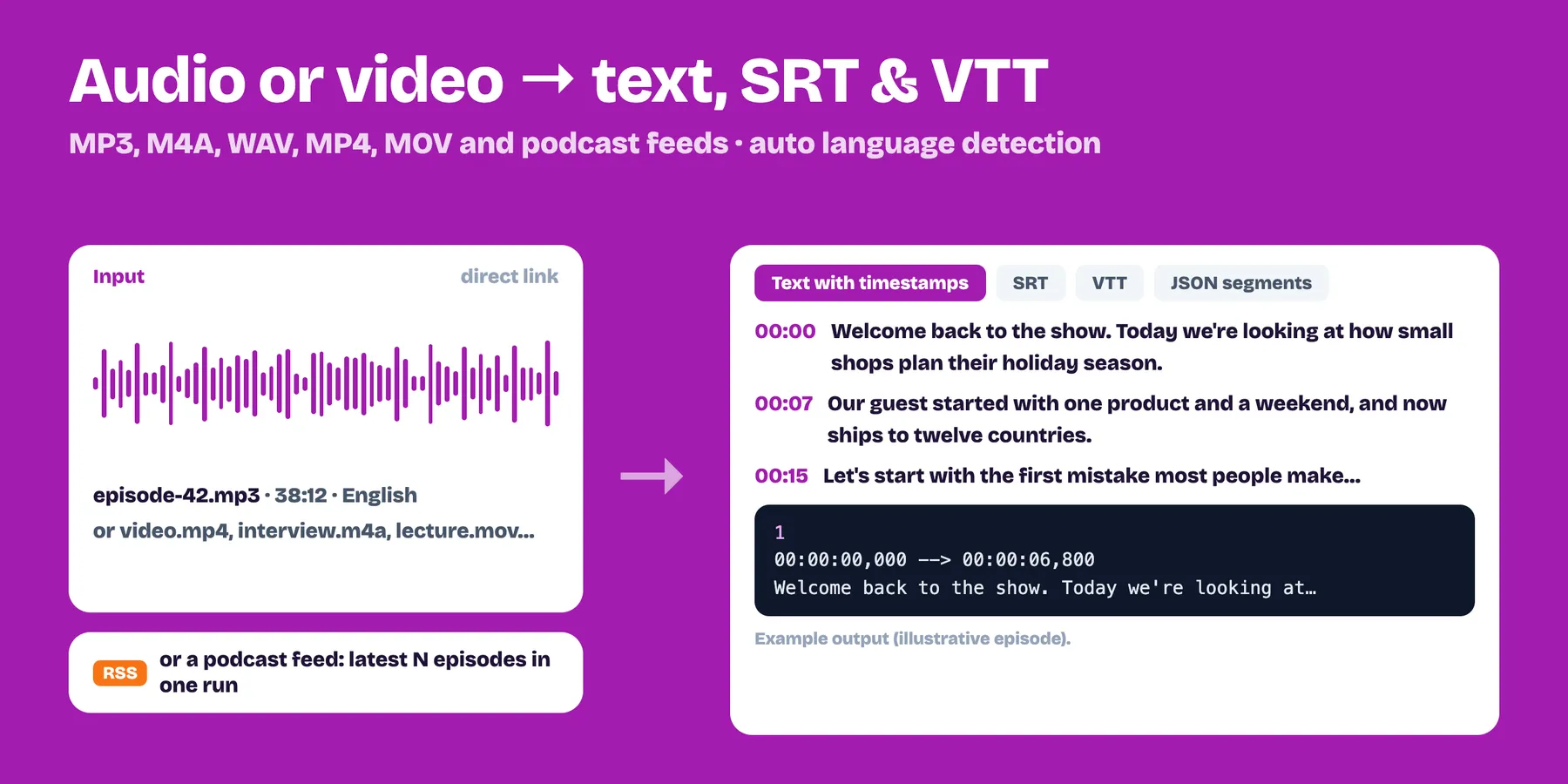
Speech to text for audio and video files and podcast feeds: accurate text with timestamps, plus SRT/VTT subtitles. $5 per 1,000 minutes (from Nov 5, 2026; $3 until then). Powered by Whisper large-v3-turbo, 99 languages, automatic language detection, files up to several hours. You only pay for minutes actually transcribed — failed files and files without speech are free.
- ✅ Paste the link you already have: direct mp3, m4a, wav, ogg, flac, mp4, mov, webm, mkv… links (up to 700 MB per file), Google Drive files and public folders, Dropbox, OneDrive/SharePoint, Apple Podcasts show or episode links, archive.org items, HLS streams (.m3u8) and web pages that embed an audio or video file
- ✅ Podcast RSS feeds: transcribe the latest N episodes in one run
- ✅ Plain text + SRT + VTT subtitles ready to use, optional timestamped segments (JSON)
- ✅ Language auto-detection or pick one of 28 common languages
- ✅ Long files are cut into 10-minute pieces automatically and stitched back with correct timestamps
- ✅ Cheap and predictable: one price per audio minute, rounded up per file
Who uses it
- Podcasters — show notes, blog posts, searchable archives and subtitles for every episode (just paste the RSS feed).
- AI & RAG builders — turn meetings, calls, lectures and interviews into text for ChatGPT, Claude or a vector database.
- Video editors & creators — SRT/VTT subtitles for MP4, MOV and WebM files in 99 languages.
- Researchers & journalists — transcribe interviews and recordings with timestamps to quote exactly.
- Customer support & sales — call recordings to text for analysis.
How to use it
- Paste one or more file links, Google Drive / Dropbox / OneDrive share links (a Drive or OneDrive folder transcribes every file in it), Apple Podcasts links or podcast RSS feeds.
- Optionally set the language, how many episodes to take from a feed, and a max minutes per file safety limit.
- Run. Each file becomes one row with
text,srt,vtt,languageanddurationMinutes.
Output example
Related Actors
- RSS Feed Reader & Monitor — get only the new episodes of your podcast feeds, then send them here to transcribe
- Podcast Scraper — find podcasts and their episode audio links
- Video Frame Extractor — grab thumbnails and keyframes of the same videos
Pricing
$0.005 per audio minute (= $5 per 1,000 minutes) from November 5, 2026; $0.003 until then. A 1-hour podcast costs about $0.30. Minutes are rounded up per file. Set a maximum cost per run in the run options to stay in control. On the free Apify plan the Actor works in demo mode (1 file, first 2 minutes) so you can check the quality before paying.
What it can't do
- It does not download from YouTube, TikTok, Instagram, Spotify, Vimeo or other streaming sites (their terms forbid it). Use files, share links or feeds for content you own or have the right to transcribe.
- For YouTube use our YouTube Transcript Scraper: videos, playlists, whole channels or searches to text, SRT and chapters — $2 per 1,000 videos.
- It does not identify who is speaking (speaker labels).
- Very noisy audio, heavy accents or music-only files can give poor or empty results; empty files are not charged.
Use it from code
Works with Make, Zapier, n8n, webhooks and schedules: e.g. transcribe every new podcast episode each morning and send the text to Google Docs or Slack. To keep only new episodes across runs, connect our Merge, Deduplicate & Transform Actor with Only new rows.
FAQ
How accurate is it? It uses OpenAI's Whisper large-v3-turbo model — near human accuracy for clear speech in major languages, with punctuation and capitalisation.
Which languages? 99 languages with automatic detection; pick the language if the audio mixes several or detection fails on very short clips.
How long can a file be? Up to 700 MB per file; long recordings are split into 10-minute pieces and stitched back with correct timestamps.
Can I paste a Google Drive, Dropbox or OneDrive link? Yes: share the file (or a Drive/OneDrive folder) as Anyone with the link can view and paste the link as it is. Private links get a clear message and are free.
Can I paste an Apple Podcasts link? Yes: an episode link transcribes that episode; a show link takes the latest episodes from its public RSS feed (see Episodes per feed).
Does it separate speakers? No speaker labels yet — you get one continuous transcript with timestamps.
What do I pay for a 1-hour file? About $0.30 (60 minutes × $0.005; $0.18 until November 5, 2026). Failed files and files without speech are free.
Privacy
Files are processed to produce the transcript and deleted right after. Only the transcript is stored in your run's dataset. If a run crashes, the Actor sends us only an anonymous error code (error type and line of our code, no input, no data), and once per run an anonymous count of the kinds of links used (for example "Google Drive: 2 OK") — never the links or the files — so we know what to support next.


