

SEO Meta Tag & Schema Checker (Bulk On-Page SEO Audit)
Pricing
from $1.13 / 1,000 page checkeds
SEO Meta Tag & Schema Checker (Bulk On-Page SEO Audit)
Check titles, meta descriptions, canonical, robots/noindex, H1s, Open Graph, Twitter cards, hreflang and schema.org structured data on any list of pages, with a plain-English list of SEO issues per page. Bulk URLs in, clean table out.
Pricing
from $1.13 / 1,000 page checkeds
Rating
0.0
(0)
Developer

Khaled
Maintained by CommunityActor stats
0
Bookmarked
2
Total users
1
Monthly active users
an hour ago
Last modified
Categories
Share
Check the on-page SEO of any list of pages in bulk. For each URL you get the title and meta description (with lengths), canonical, robots / noindex, H1s, Open Graph and Twitter card tags, hreflang links, schema.org types from JSON-LD and microdata, images missing alt text, word count, and a plain-English list of issues to fix.
Price: $1.50 per 1,000 pages checked. Pages that fail to load or block the visit are free. Apify's free plan ($5 monthly credit) covers about 3,300 pages a month.
Questions it answers
- Which of my pages have missing or too-long titles and meta descriptions?
- Which pages are accidentally set to noindex?
- Does this page have Product, Organization or FAQ structured data?
- Are Open Graph tags set so links preview well on social media?
- How do my competitors' landing pages handle titles, H1s and schema?
Who uses this
- 🔍 SEO agencies and freelancers: audit a client's key pages or a competitor's in one run.
- ✍️ Content and marketing teams: catch missing descriptions, duplicate H1s and broken JSON-LD before Google does.
- 🛠️ Developers: check releases for noindex mistakes and missing tags, on a schedule.
How to use the SEO Meta Tag & Schema Checker
- Click Try for free (a free Apify account is enough).
- Paste the pages to check, one per line. A bare domain checks its home page.
- Click Start. Each page takes about a second.
- Sort by
issueCountto see the pages that need work first, then download as JSON, CSV or Excel.
Input
| Field | Default | What it does |
|---|---|---|
urls | – | Pages to check: full URLs or bare domains (the home page is checked). |
maxConcurrency | 20 | Pages checked in parallel. |
requestTimeoutSecs | 30 | Give up on a page after this long. |
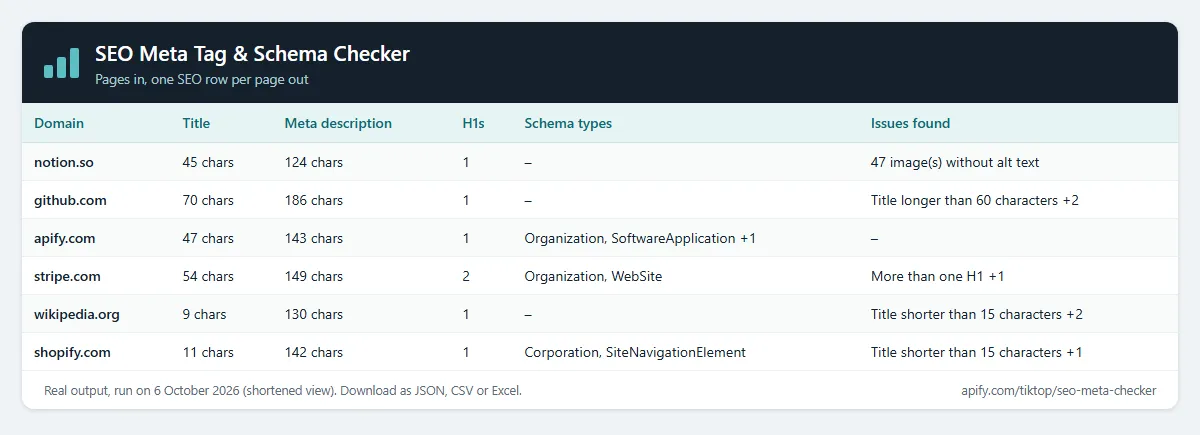
Example (the input behind the table above):
Output
One row per page. The real row for apify.com from that run, shortened:
Export as JSON, CSV or Excel, or connect Google Sheets, Slack or a webhook through Apify integrations.
Example tasks
Ready-made inputs you can open and run:
- Bulk meta description and title length checker
- Noindex checker for a list of pages
- Schema markup checker (JSON-LD structured data)
- Open Graph and Twitter card checker
- Compare competitors' titles, meta descriptions and H1s
- SEO tag change monitor (titles, noindex, schema)
Check websites from another Actor (Google Maps leads, lead lists)
Have a list from Google Maps Scraper or any other Actor? Pick its dataset under Websites from another Actor. This Actor reads the website field (or the field you name, e.g. url, domain or contact.website) and checks every site. No copy and paste.
To run it automatically after every scrape, add an Actor-to-Actor integration to the source Actor or task with this input:
Change alerts
Give the run a Change alert name (e.g. clients-weekly) and put it on an Apify schedule. Each row then gets changeStatus (new, changed or unchanged) and changedFields, compared with the previous run of the same name, so you see when a title, meta description, noindex, H1 or schema type changes. Turn on Only new and changed sites and each run's dataset is just the change report; unchanged sites are still checked and charged as usual. Add Apify's Slack or email integration to get the report delivered.
Notes
- Checks the HTML the server returns (no JavaScript rendering). Tags injected only by JavaScript won't appear.
- Reads only the pages you list; it doesn't crawl a whole site.
- Issue thresholds follow common guidance (title 15–60 characters, description up to 160).
How much does it cost?
- Page checked: $0.0015 per page that loads ($1.50 per 1,000).
- Actor start: $0.00005 per GB of memory (default 1 GB = $0.00005 per run).
- Pages that fail to load or block the visit: free.
| Pages | Cost |
|---|---|
| 100 | about $0.15 |
| 1,000 | about $1.50 |
| 10,000 | about $15 |
Apify's free plan includes $5 of credit every month, enough for about 3,300 pages. Paid Apify plans get Store discounts of up to 25%. You can set a maximum cost per run; the Actor stops cleanly when it's reached.
FAQ
Is this legal? It loads each public page once, like a browser, and reads its HTML tags. No personal data is collected.
Why is a tag I can see in my browser missing? It's probably added by JavaScript after the page loads. Search engines mostly read the server HTML too, so it's worth fixing.
Can it crawl my whole site? No, it checks the pages you list. Export your sitemap URLs and paste them in, or feed it a dataset from a crawler Actor.
Related Actors
- Bulk URL Status & SSL Checker: status codes, redirects and SSL expiry.
- Website Tech Stack Detector: what a site is built with.
- Shopify Store Detector: theme and apps of Shopify stores.


