

Bulk URL Status & SSL Checker: Redirects & Expiry
Pricing
from $0.75 / 1,000 url checkeds
Bulk URL Status & SSL Checker: Redirects & Expiry
Check thousands of URLs at once: final HTTP status, full redirect chain, response time, HTTPS, security headers, and SSL certificate issuer, expiry date and days left. Find broken links, bad redirects and expiring certificates.
Pricing
from $0.75 / 1,000 url checkeds
Rating
0.0
(0)
Developer

Khaled
Maintained by CommunityActor stats
0
Bookmarked
2
Total users
1
Monthly active users
an hour ago
Last modified
Categories
Share
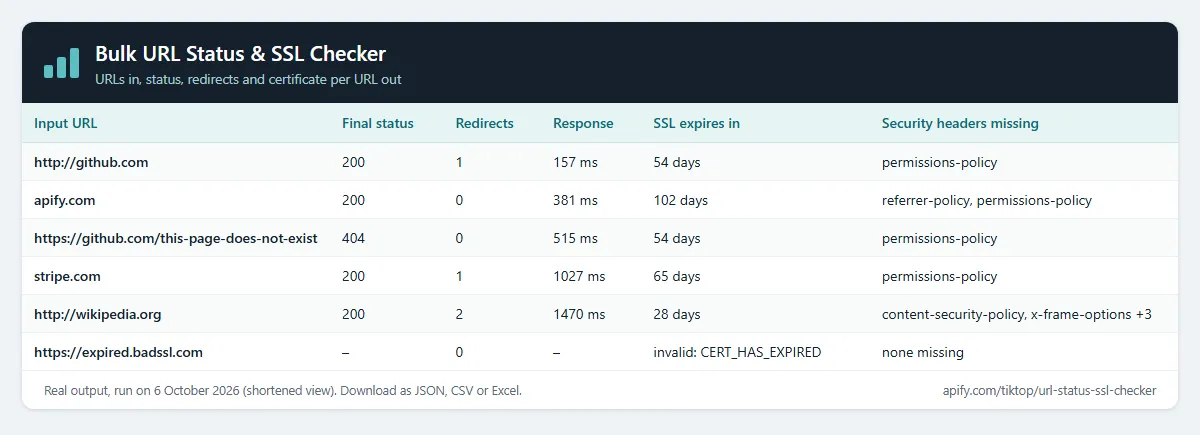
Check thousands of URLs in one run. For each one you get the final HTTP status, the full redirect chain, response time, whether it ends on HTTPS, the server, which security headers are present or missing, and the SSL certificate: issuer, expiry date, days left, and whether it's trusted.
Price: $1.00 per 1,000 URLs checked. URLs that can't be reached at all (DNS failure, timeout) are free. A 404, a 500 or an expired certificate is a result, so it's counted. Apify's free plan ($5 monthly credit) covers about 5,000 URLs a month.
Questions it answers
- Which of these links are broken (404/410/500) or redirect somewhere unexpected?
- Which of our domains have SSL certificates expiring in the next 30 days, or already expired?
- Do old URLs 301-redirect to the right new pages after a migration?
- Which sites are missing HSTS or a Content-Security-Policy header?
- How fast does each page respond?
Who uses this
- 🔍 SEO teams: check redirect chains and dead links after a site migration or in backlink lists.
- 🔐 IT and DevOps: monitor certificate expiry across many domains on a schedule.
- 🛡️ Security reviews: spot missing security headers across a portfolio of sites.
- 🧹 Data cleaning: validate URL columns in lead lists before outreach or enrichment.
How to use the Bulk URL Status & SSL Checker
- Click Try for free (a free Apify account is enough).
- Paste URLs or bare domains, one per line.
- Click Start. Hundreds of URLs take about a minute.
- Sort by
finalStatusorsslDaysLeft, then download as JSON, CSV or Excel. Put it on a schedule with a change alert name to hear about expiring certificates and new errors.
Input
| Field | Default | What it does |
|---|---|---|
urls | – | URLs or bare domains, one per line. |
maxConcurrency | 20 | URLs checked in parallel. |
requestTimeoutSecs | 30 | Give up on a URL after this long. |
Example (the input behind the table above):
Output
One row per URL. The real row for http://github.com from that run, shortened:
A site whose certificate a browser would reject (expired, self-signed, wrong host) still gets a full row: sslValid: false, the reason in sslError (e.g. CERT_HAS_EXPIRED), the expiry date and negative sslDaysLeft. The HTTP status stays empty, because the page isn't loaded over an untrusted connection.
Example tasks
Ready-made inputs you can open and run:
- SSL certificate expiry checker for many domains
- Bulk broken link and HTTP status checker
- Redirect chain checker (301/302) in bulk
- Security headers checker (HSTS, CSP, X-Frame-Options)
- Check that HTTP redirects to HTTPS
- SSL certificate and redirect change monitor
Check websites from another Actor (Google Maps leads, lead lists)
Have a list from Google Maps Scraper or any other Actor? Pick its dataset under Websites from another Actor. This Actor reads the website field (or the field you name, e.g. url, domain or contact.website) and checks every site. No copy and paste.
To run it automatically after every scrape, add an Actor-to-Actor integration to the source Actor or task with this input:
Change alerts
Give the run a Change alert name (e.g. clients-weekly) and put it on an Apify schedule. Each row then gets changeStatus (new, changed or unchanged) and changedFields, compared with the previous run of the same name, so you see when a status code, redirect chain, certificate or security header changes. Turn on Only new and changed sites and each run's dataset is just the change report; unchanged sites are still checked and charged as usual. Add Apify's Slack or email integration to get the report delivered.
Notes
- Up to 10 redirects are followed. The status is what the server returns to a normal browser request; some sites answer bots differently.
- Certificate data comes from a standard TLS handshake with the final host.
How much does it cost?
- URL checked: $0.001 per URL that answers ($1.00 per 1,000), including 4xx/5xx and certificate errors.
- Actor start: $0.00005 per GB of memory (default 1 GB = $0.00005 per run).
- URLs that can't be reached at all (DNS failure, timeout): free.
| URLs | Cost |
|---|---|
| 100 | about $0.10 |
| 1,000 | about $1 |
| 10,000 | about $10 |
Apify's free plan includes $5 of credit every month, enough for about 5,000 URLs. Paid Apify plans get Store discounts of up to 25%. You can set a maximum cost per run; the Actor stops cleanly when it's reached.
FAQ
Is this legal? It makes one normal request to each URL you list and reads the public certificate, like a browser does. No personal data is collected.
Why is a URL I know works marked 403? Some sites block automated visitors. The status shown is what the server returned to this check.
Can I check certificates every day? Yes. Schedule it with a change alert name, and the sslDaysLeft column tells you how long each certificate has left.
Related Actors
- SEO Meta Tag & Schema Checker: titles, meta tags and schema for the same pages.
- Website Tech Stack Detector: what a site is built with.


