

KYB Business Name Verification: 6-State SOS Registry
Pricing
Pay per event
KYB Business Name Verification: 6-State SOS Registry
Bulk KYB name verification against official Secretary of State registry open data for CO, NY, OR, CT, PA and TX: every input name comes back with a match score, status, formation date, registered agent, addresses, officers and source link. Not-found rows free. No login.
Pricing
Pay per event
Rating
0.0
(0)
Developer

Detroit Web Agent - Open Data
Maintained by CommunityActor stats
0
Bookmarked
2
Total users
1
Monthly active users
2 hours ago
Last modified
Categories
Share
Business Entity Search: Secretary of State Registry Lookup for 6 States
Business entity search across the Secretary of State registries of Colorado, New York, Oregon, Connecticut, Pennsylvania and Texas: look up companies by name and get each matching official registry record, with a match score for bulk name checks.
Free sample: download a CSV of real rows from recent runs of this Actor (up to 50 rows, refreshed weekly, no account needed).
This Actor vs shelvick/business-entity-lien-search: that one covers 48 states plus DC and adds UCC liens. Choose this one for bulk name verification, where every input name comes back with a match score.

| Price per 1,000 entitys | Free plan | Starter | Scale | Business |
|---|---|---|---|---|
| This Actor | $2.00 | $2.00 | $2.00 | $2.00 |
| Most-used alternative | $5.00 | $4.75 | $4.50 | $4.25 |
Look up companies in official state business registries and get back the registry record: legal name, registry ID, entity type, status, formation date, registered agent, addresses, officers where published, and a link to the source record. Paste one name or ten thousand. Every name gets an answer: matched entities come back with a match score, and names with no match come back as a free found: false row so your list stays complete.
The data comes only from official state open-data portals (Socrata APIs run by Colorado, New York, Oregon, Connecticut, Pennsylvania and Texas). No scraping of search pages, no captchas, no login and no LLM guessing.
- In short: Business Entity Search (Apify actor
transparent_meteorite/business-entity-search) looks up companies by name, keyword or registry ID in official Secretary of State registry open data for CO, NY, OR, CT, PA and TX, and returns the matching registry records with a 0-1 match score. - Who it is for: KYB and onboarding teams verifying that a business exists and is active, compliance and vendor-management teams, sales ops cleaning CRM accounts, lenders, insurers, researchers and journalists.
- Input: a list of company names (bulk), a keyword, or registry IDs; states; match mode (exact, startsWith, contains); include inactive; entity type; formed after/before; city; ZIP; result caps.
- Output: state, registry ID, legal name, entity type, status, active flag, formation date, jurisdiction of formation, registered agent name and address, principal and mailing address, city, ZIP, county, officers (where published), source record link, match score and match type.
- Price: $0.002 per matched entity record plus $0.00005 per run start. Not-found rows are free. Pay per result, no subscription; Apify's free plan credit covers a first test.
- Limits: six states today; NY, OR and PA publish active entities only; TX data comes from the Comptroller's franchise-tax file; only public fields each state publishes (no personal phone or email).
Key facts
- Actor name: Business Entity Search
- Actor ID:
transparent_meteorite/business-entity-search - Store page: https://apify.com/transparent_meteorite/business-entity-search
- Data source: official state open-data portals (Socrata) of Colorado, New York, Oregon, Connecticut, Pennsylvania and Texas
- Pricing model: pay per event (
apify-actor-start$0.00005,entity-record$0.002; not-found rows free) - Output formats: JSON, CSV, Excel, XML, HTML table, RSS (Apify dataset)
- Access: Apify Console, REST API, JavaScript/Python clients, schedules, webhooks, Apify MCP server
- Login or third-party API key needed: no, only an Apify account
- Also known as: secretary of state business search API, company registry lookup, KYB business verification, bulk company name check, entity status lookup, registered agent lookup
- Maintainer: transparent_meteorite (independent developer)
- Last updated: 2026-10-13
Why choose this over alternatives
- Official sources only. Every row comes from a state government open-data API and carries
sourceRecordUrl(the exact API record) andsourceDataset(the dataset page), so an auditor can check any answer in one click. - Built for bulk verification. Paste a list of customer or vendor names. Each name is normalised (legal suffixes, punctuation, "The", "&" handled), searched in every selected state, scored, and ranked. You get the best matches per name, not a page of raw search hits.
- Every name gets an answer. A name with no match produces one
found: falserow that says which states were searched and why it might be missing. That row is never charged. - Honest match scores.
matchTypetells you exactly how the name matched (exact, exactCore, startsWith, contains, partial) andmatchScore(0 to 1) never mixes tiers, so a simple threshold such asmatchScore >= 0.95gives you "same legal name, suffix aside". - No captchas, no browser. State search websites block automated lookups. This actor reads the states' published APIs politely (one request at a time per state, at least 350 ms apart, with retry on rate limits), so runs are fast and stable.
- Pay per record found. $0.002 per matched entity, nothing for misses, no monthly fee.
- Pairs with fresh filings. Use the sibling actor New Business Filings (
transparent_meteorite/new-business-filings) to get newly formed companies, and this actor to look up or re-verify any company later.
What it does and who it is for
Business Entity Search answers one question at scale: "Is this company registered, where, and in what state of health?"
It is useful for:
- KYB and customer onboarding: confirm that an applicant's business exists, its legal name and type, and that it is active or in good standing.
- Vendor and supplier checks: verify vendor names before paying invoices; spot dissolved or forfeited entities in Colorado, Connecticut and Texas.
- CRM and data hygiene: map free-text account names to a legal entity and registry ID, then dedupe on the ID.
- Sales research: find every registered entity whose name contains a keyword in a state, with formation dates, cities and agents.
- Registered agent and service of process lookup: get the agent name and address on file in CO, NY, OR and CT, and the New York service-of-process address.
- Journalism and research: trace related entities (for example every "Sheetz" entity in Pennsylvania) with officers where the state publishes them.
You do not need to know which state a company is registered in. Search all six at once; foreign registrations (a Delaware company registered to do business in New York, for example) show up with their jurisdiction of formation.
Quick start
- Open the actor and paste company names into Company names, one per line (the form is prefilled with two examples).
- Leave States empty to search all six, or pick the ones you need.
- Keep Match mode on Starts with for verification work, or switch to Exact for the strictest check.
- Click Start. A two-name run across six states usually finishes in under 30 seconds.
- Open the Overview table, or export JSON, CSV or Excel from the Storage tab.
What you get: output fields
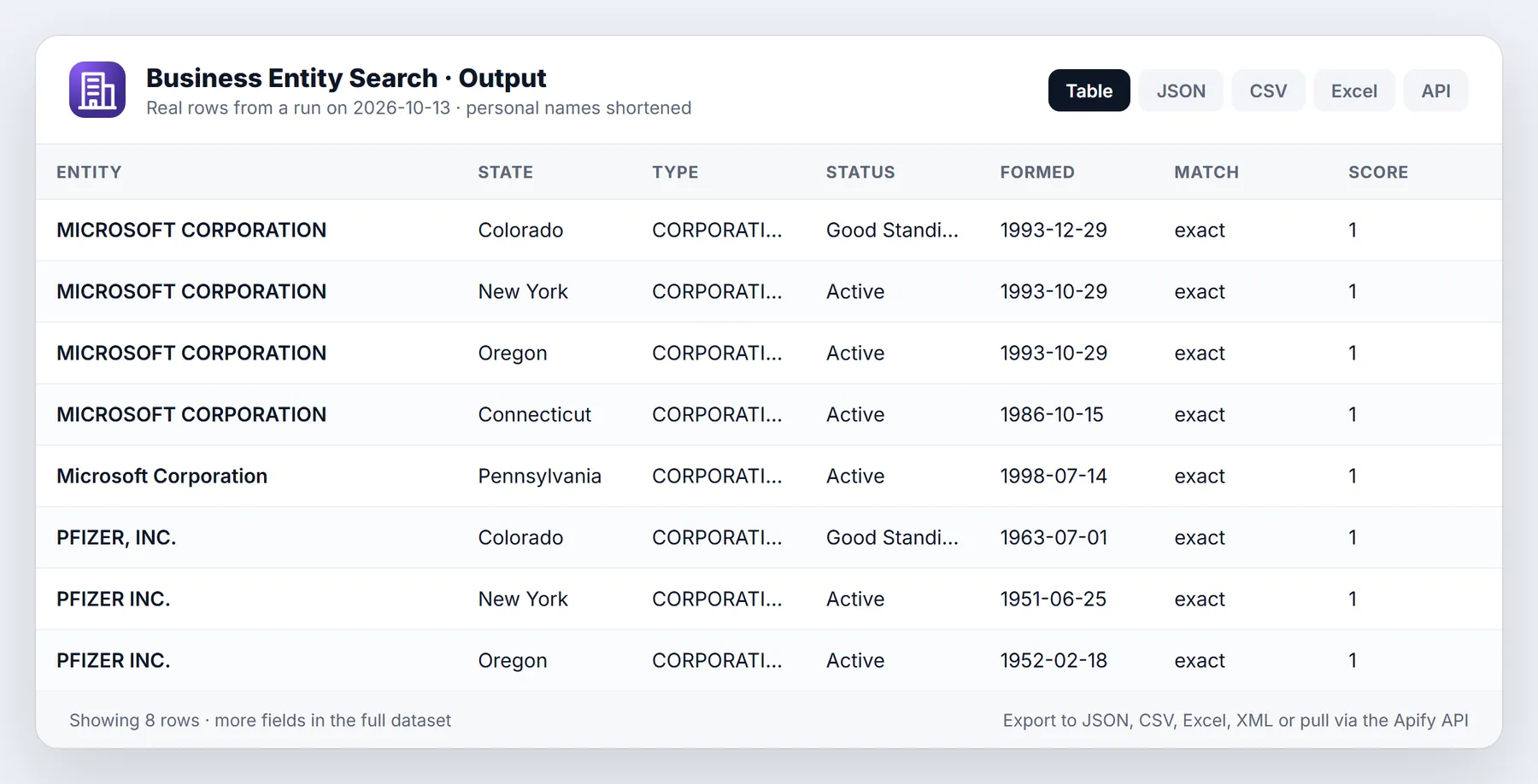
One row per matched entity, sorted by match score within each searched name.
| Field | Meaning |
|---|---|
query | The name, keyword or ID you searched for. |
queryType | name, keyword or entityId. |
found | true for a matched entity, false for the free not-found row. |
matchScore | 0 to 1. 1.0 exact, 0.95 same name apart from the legal suffix, 0.60-0.90 starts with your name, 0.30-0.59 contains all your words, below 0.30 partial. |
matchType | exact, exactCore, startsWith, contains, partial, entityId (ID lookup) or none. |
state, stateName | Registry state code and name. |
entityId | The state's registry ID (CO entity ID, NY DOS ID, OR registry number, CT account number, PA filing number, TX SOS file number or taxpayer number when there is none). |
entityName | Legal name as the state records it. |
entityType | Normalised type: LLC, CORPORATION, NONPROFIT, PARTNERSHIP, OTHER. |
entityTypeRaw | The state's own type label, for example "Foreign Profit Corporation (CF)". |
status | The state's status text, for example "Good Standing", "Delinquent", "Active", "Forfeited". |
isActive | true when the entity still exists on the register (see caveats for what each state means by this). |
formationDate | Formation or registration date (YYYY-MM-DD). |
jurisdictionOfFormation | Where the entity was formed, when the state publishes it. |
registeredAgentName, registeredAgentAddress | Registered agent on file (CO, NY, OR, CT). |
principalAddress | Principal office address (CO, OR, CT; PA registered office). |
mailingAddress | Mailing address (CO, OR, CT; TX taxpayer mailing address). |
serviceOfProcessAddress | New York Department of State service-of-process address. |
city, zip, county | City and ZIP of the main listed address; county where published (NY, PA). |
officers | Array of { name, title } where the state publishes officers (CT principals, PA officers, NY chief executive); [] when the state publishes none for that entity; null when the state has no officer data. |
naics | NAICS code where published (CT, TX). |
taxpayerNumber | Texas taxpayer number. |
sourceRecordUrl | Direct API link to this record on the state portal. |
sourceDataset | The state dataset page. |
retrievedAt | When the row was read (ISO timestamp). |
Not-found rows also carry statesSearched, statesFailed and a note.
Sample output
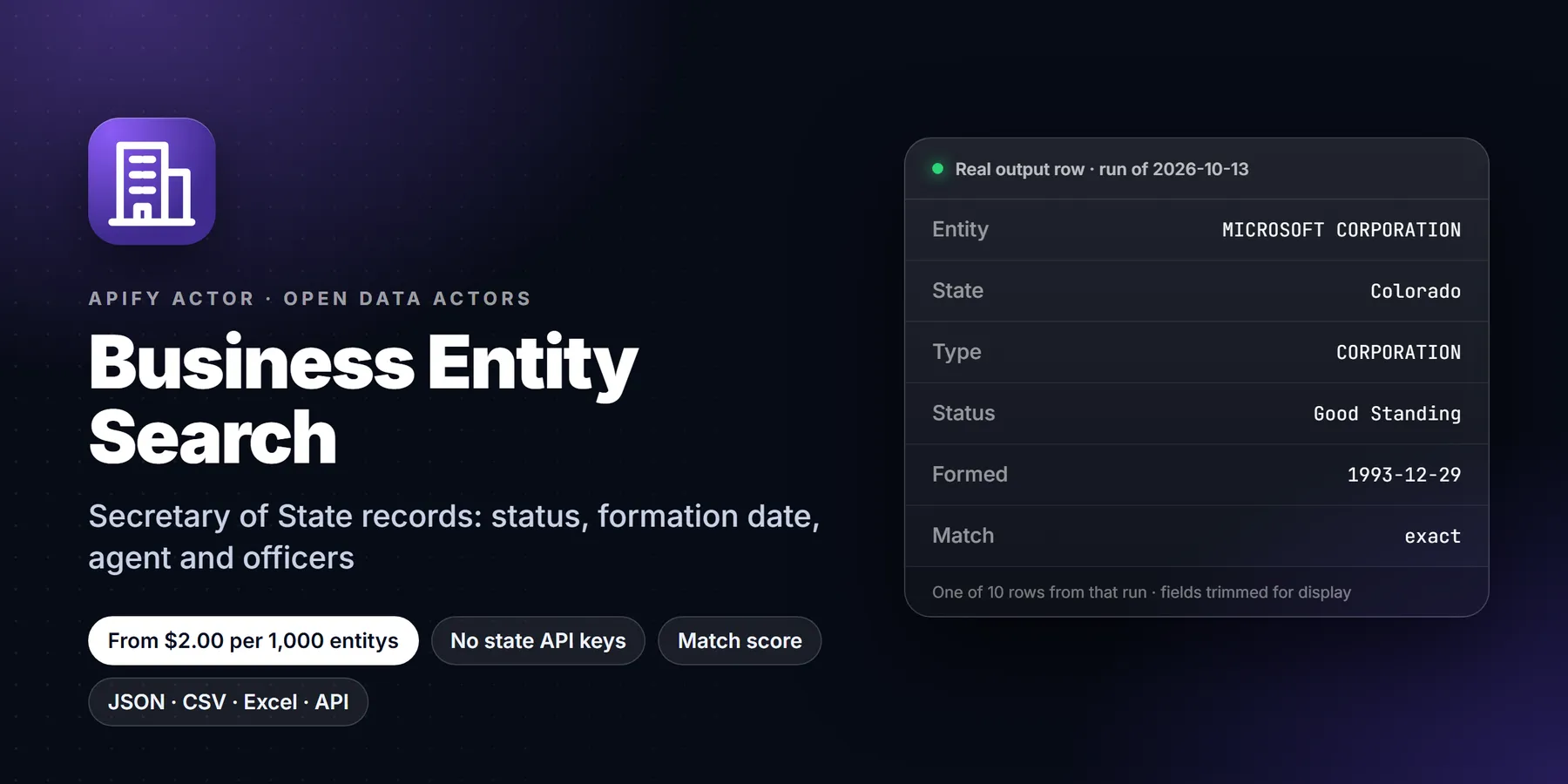
Real rows from a run on 2026-10-13 (officer lists shortened to three for space):
Null fields are left out of the shortened rows above; real rows always contain every field.
Input options
| Option | Default | What it does |
|---|---|---|
Company names (names) | none | One name per line, up to 10,000 per run. |
Keyword search (query) | none | Entities whose name contains all these words. Returns up to Max results rows. |
Entity IDs (entityIds) | none | Fetch records by registry ID, for example CO:19931121425, NY:69033. Without a state prefix every selected state is searched. ID lookups return the record whatever its status. |
States (states) | all six | Any of CO, NY, OR, CT, PA, TX. |
Match mode (matchMode) | startsWith | exact: same name once the legal suffix is ignored. startsWith: exact plus names that begin with your name as whole words. contains: every word of your name appears anywhere. |
Max results per name (maxResultsPerName) | 5 | Best matches kept per name across all states (1-100). |
Max results (maxResults) | 100 | Cap on matched rows delivered and charged per run. |
Include inactive entities (includeInactive) | false | Also return dissolved, withdrawn, revoked or forfeited entities (CO, CT, TX). |
Entity types (entityTypes) | all | LLC, CORPORATION, NONPROFIT, PARTNERSHIP, OTHER. |
Formed on or after / before (formedAfter, formedBefore) | none | Formation date range, YYYY-MM-DD. |
City (city) | none | Exact city match, case-insensitive. |
ZIP code (zip) | none | ZIP prefix, 5 digits. |
Include officers (includeOfficers) | true | Officers and principals where published. |
You can combine names, a keyword and IDs in one run. Names are processed in the order given, and output keeps that order.
Input examples
Bulk verification, strict:
Find every active Colorado and Connecticut entity with "brewing" in the name formed since 2020:
Re-check known registry IDs, including dissolved ones:
Related entities in Pennsylvania and Texas, broad match:
Use cases and n8n automation ideas
Run this actor from an n8n workflow with the Apify node or an HTTP Request node, then read the dataset items in the next step. Ideas:
- KYB checks. Verify a company name against Secretary of State registry data and read status, formation date and registered agent.
- Bulk name matching. Send a list of company names and use the match score to decide which need a manual look.
- Onboarding automation. Call it from an n8n workflow when a new customer signs up and route inactive or not-found entities for review.
Pricing
Pay per event. There is no subscription and no rental fee for this actor.
| Event | Price (all Apify plans) |
|---|---|
| Entity record (one per matched entity row delivered) | $0.002 |
| Actor start (one per GB of run memory, minimum one) | $0.00005 |
| Not-found row | free |
The actor runs at up to 1 GB of memory, so the start costs at most $0.00005 per run.
Worked examples:
| Matched records delivered | Cost |
|---|---|
| 100 (the form default cap) | 100 x $0.002 + $0.00005 = $0.20005 |
| 1,000 | $2.00005 |
| 10,000 | $20.00005 |
A list of 1,000 customer names where 800 match once each and 200 do not match costs 800 x $0.002 = $1.60 plus the start fee; the 200 not-found rows are free. With maxResultsPerName at 5, a name that matches in five states delivers five rows and costs $0.01, so set it to 1 if you only need the single best match per name.
Apify's free plan includes $5 of monthly platform credit, which covers about 2,500 matched records with this actor.
To cap spend, set Maximum cost per run in the run options. The actor checks the remaining budget before every record and stops cleanly when it is reached; the summary record lists how many names were not processed.
How to run it
In Apify Console
Open the actor, fill in the form and click Start. Results appear in the Output tab as a table; export from the Storage tab as JSON, CSV, Excel, XML or HTML.
From the API or a client library
Run synchronously and get the rows back in one call:
Python:
JavaScript:
On a schedule
Create a saved task with your vendor or customer list and attach a schedule (weekly or monthly) in Apify Console. Each run re-reads the registries, so a vendor whose status or isActive changes shows up in the next export. Add a webhook to send the dataset to your system when the run finishes.
With n8n, Make, Zapier or AI agents
Use the official Apify app or node in n8n, Make or Zapier: choose "Run actor", pick transparent_meteorite/business-entity-search, pass the input JSON, then read the dataset items. AI agents can call it through the Apify MCP server (see the last section).
Run summary record
Each run stores a summary in the key-value store under OUTPUT (never charged):
warnings lists any state portal that failed for a term; that term's not-found row then says the result is not a confirmed no-match.
Limits and honest caveats
Coverage by state (row counts read from the portals in October 2026):
| State | Source dataset | Size | Statuses included | Registered agent | Officers | Address returned |
|---|---|---|---|---|---|---|
| CO | Business entities dataset (data.colorado.gov 4ykn-tg5h) | about 3.1 million entities | all, including dissolved (inactive only with includeInactive) | yes | no | principal and mailing |
| NY | Active Corporations: Beginning 1800 (data.ny.gov n9v6-gdp6) | about 4.3 million | active only | yes, where designated | chief executive (corporations) | service-of-process address |
| OR | Active Businesses - ALL (data.oregon.gov tckn-sxa6) | all active registrations | active only | yes | no | principal place of business and mailing |
| CT | Business Master (data.ct.gov n7gp-d28j) plus agents and principals datasets | about 1.3 million | all, including dissolved and forfeited | yes | yes (principals) | business and mailing |
| PA | Registered Businesses in PA, Department of State (data.pa.gov xvd7-5r2c) | about 4.2 million rows | active registrations only | no | yes (officer parties) | registered office |
| TX | Active Franchise Taxpayers, Comptroller (data.texas.gov 9cir-efmm) | about 3.5 million | right-to-transact status; forfeited only with includeInactive | no | no | taxpayer mailing address |
What that means in practice:
- NY, OR and PA list active entities only. A dissolved company in those states simply returns no match there. The not-found note says so.
- Texas is the Comptroller's franchise-tax file, not the Secretary of State's full register. Entities not subject to franchise tax (many nonprofits, some partnerships) may be missing, and
statusis the right-to-transact-business status. - "Active" follows the state's meaning. In Colorado, "Delinquent" (a missed periodic report) and "Noncompliant" still exist on the register, so
isActiveis true; readstatuswhen you need "Good Standing" specifically. - Addresses differ by state. New York's address is the service-of-process address, often a registered agent's office; Pennsylvania's is the registered office, often a commercial registered office provider in Harrisburg. A
cityfilter matches the address each state lists. - Names are matched as written in the registry. Abbreviations the registry did not use ("Intl" versus "International") will not match as exact; try
containsmode or a shorter name. - Freshness depends on each state. Portals are refreshed on the state's own schedule; check the dataset page in
sourceDatasetfor its last update. - Not a legal certificate. For a certificate of good standing, order one from the state.
- Six states today. Other states either publish no open entity API or publish data too stale to use. More are added as states publish them.
Run in 30 seconds
- Open the Actor in Apify Console and click Try for free (or Start if you already have an account).
- Open the Input tab, switch to JSON, and paste the example below. It is small on purpose, so the first run is quick and cheap.
- Click Start. Most small runs finish in well under two minutes.
- Open the Output tab to read the Overview table, or use Export to download JSON, CSV or Excel.
Once the sample looks right, replace the example values with your own list and raise the limits.
Example API call
Start a lookup from code or with curl. Replace the placeholder token and username.
FAQ
Do I need an API key or a login for any state site? No. The actor reads public open-data APIs. You only need an Apify account.
How is a match scored? Both names are upper-cased, "&" becomes AND, apostrophes and punctuation are removed, a leading "The" and trailing legal designators (Inc., LLC, Corp., Co., L.L.C., Limited Liability Company and so on) are set aside. Same full name scores 1.0; same name apart from the designator scores 0.95; a registry name that starts with your name as whole words scores 0.60-0.90 (closer in length scores higher); all your words somewhere in the name scores 0.30-0.59.
Why did I get several rows for one name? The same company is often registered in several states (home state plus foreign registrations), and similar names exist. Set maxResultsPerName to 1 for only the single best match, or matchMode to exact.
Are not-found rows really free? Yes. Only the entity-record event is charged, once per matched entity row.
Can I search by registry ID? Yes, with Entity IDs. Prefix the state (CT:0191632) to search one registry; ID lookups ignore the active-only filter.
Does it return personal phone numbers or emails? No. Connecticut's datasets contain business emails, phone numbers and residence addresses; the actor never outputs them.
How fast is it? Each state is queried one request at a time; states run side by side. Expect roughly 1 to 3 seconds per name across all six states, faster with fewer states.
Troubleshooting
- A company I know exists is not found. Check the state is selected, try
containsmode, drop words the registry may abbreviate, and remember NY, OR and PA hold active entities only. SetincludeInactivefor CO, CT and TX history. - Too many weak matches. Use
matchMode: "exact"or filter onmatchScore >= 0.95. - The run stopped early. Check
OUTPUT:chargeLimitReachedmeans the run's maximum cost was reached;maxResultsReachedmeans Max results was reached. Raise the limit and rerun the names listed as not processed. - A state shows errors in
warnings. The state portal was down or slow after four retries. The affected names say "not a confirmed no-match"; run them again later. - Input error at start. The status message lists the problem, for example an unsupported state code or a date that is not YYYY-MM-DD.
Terms and responsible use
The data is public record published by state governments under their open-data terms. Use it lawfully. Registry data alone is not a consumer report: do not use it to make decisions about individuals' eligibility for credit, employment, insurance or housing under the FCRA or similar laws. Officer and agent names are published by the states for business purposes; do not use them for spam or harassment. Verify critical decisions against the state's official record or a certificate of good standing.
More resources
- Sibling actor for new registrations: New Business Filings (
transparent_meteorite/new-business-filings) - State portals: data.colorado.gov, data.ny.gov, data.oregon.gov, data.ct.gov, data.pa.gov, data.texas.gov
- Apify API docs: https://docs.apify.com/api/v2
Changelog
- 0.1 (2026-10-13): First release. Six states (CO, NY, OR, CT, PA, TX), bulk names, keyword and ID lookup, exact/startsWith/contains matching with scores, free not-found rows, Connecticut agent and principal join, officers for CT, PA and NY.
Support
Missing a company the state site shows, a field that parsed wrongly, or need another state? Open an issue on this actor's Issues tab with the run URL and what you expected. The run URL lets us see the exact input and the OUTPUT record.
Use it from AI assistants (MCP)
Business Entity Search works as a tool for AI assistants through the official Apify MCP server. Add this server URL to any MCP client (Claude Desktop, Claude Code, Cursor, ChatGPT connectors, VS Code):
Related actors
Other public-data actors from the same publisher that pair well with this one:
- New Business Filings: New LLCs & Corporations by State
- Contractor License Lookup: Multi-State Official Data
- OFAC Sanctions Screening: SDN, EU, UN & UK, Fuzzy Match
More from DWA Open Data
Browse all 69 data Actors, with live prices and sample output, at open-data-actors.pages.dev.
Feedback: if this Actor was useful, or if it fell short, an honest review on the Reviews tab helps other users decide. Problems or feature requests: please open an Issue and we usually reply within one business day.


