

Technical SEO Audit: Site Crawler with 0-100 Score
Pricing
Pay per event
Technical SEO Audit: Site Crawler with 0-100 Score
Technical SEO audit of any public page or crawled site over plain HTTP. 0-100 score with category scores, top issues, broken links, canonical, hreflang, JSON-LD, redirects, TTFB, duplicate titles and descriptions, plus new/changed monitoring. Respects robots.txt. Pay per page audited.
Pricing
Pay per event
Rating
0.0
(0)
Developer

Detroit Web Agent - Open Data
Maintained by CommunityActor stats
0
Bookmarked
2
Total users
1
Monthly active users
2 days ago
Last modified
Categories
Share
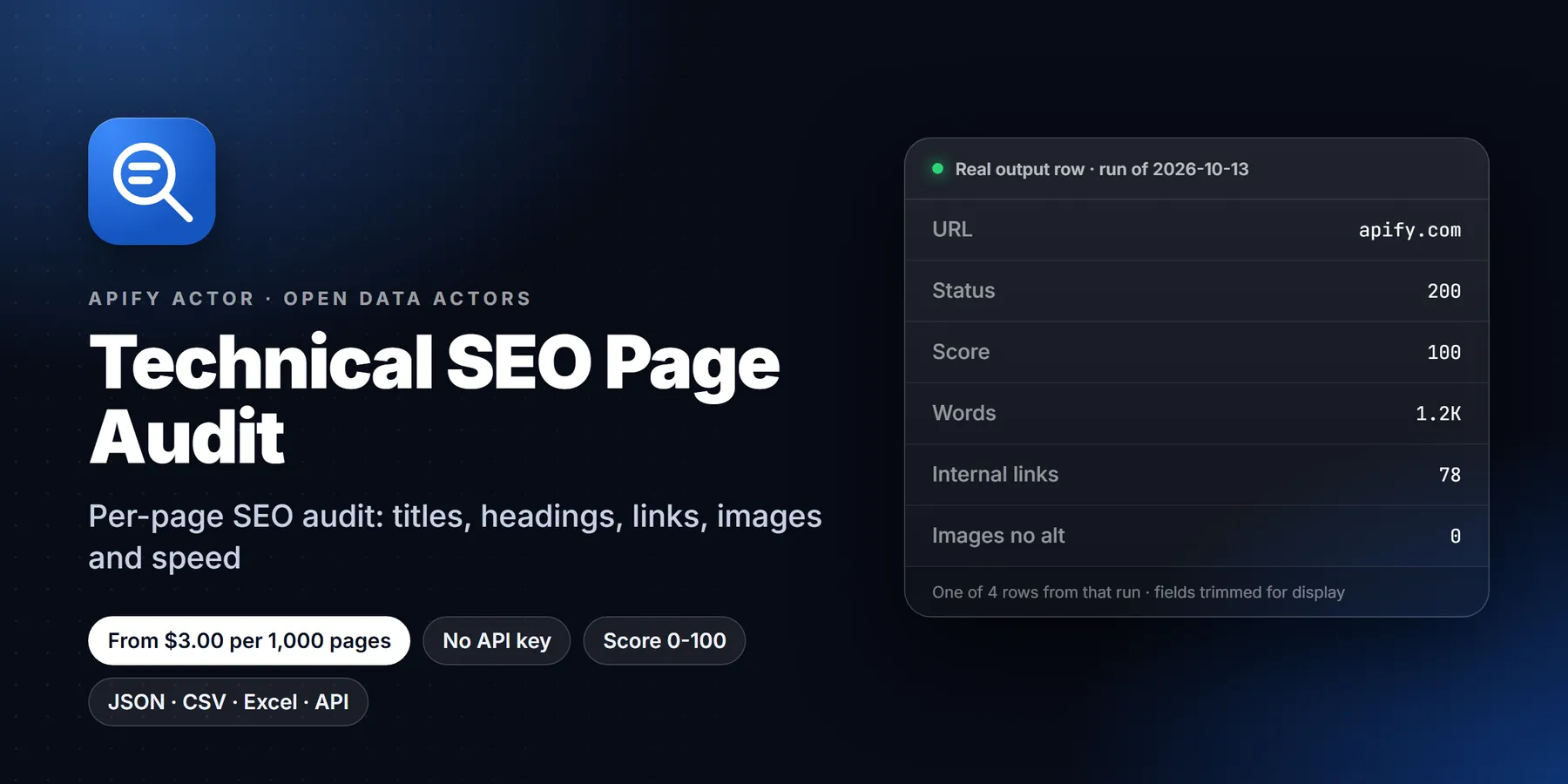
Technical SEO audit for any list of public pages: title, meta description, canonical, headings, internal, external and broken links, images missing alt, Open Graph, hreflang, JSON-LD, redirect chain and TTFB, plus a prioritised issue list and a 0-100 score, with optional same-site crawling.

| Price per 1,000 pages | Free plan | Starter | Scale | Business |
|---|---|---|---|---|
| This Actor | $3.00 | $3.00 | $3.00 | $3.00 |
Video walkthrough: Watch the 1-minute demo on YouTube
- In short: Technical SEO Page Audit (Apify actor
transparent_meteorite/technical-seo-page-audit) audits public web pages over plain HTTP and returns on-page SEO data plus a prioritised issue list and score. - Who it is for: SEO agencies, site owners and developers checking releases, lead-gen teams auditing prospect sites.
- Input: a list of URLs, max pages, check broken links, max links to check, request delay.
- Output: title, meta description, canonical, H1-H3, word count, internal/external and broken links, images missing alt, Open Graph, hreflang, JSON-LD types, redirect chain, TTFB, issues with severity, score.
- Price: $0.003 per page plus $0.00005 per run start. Pay per result, no subscription; Apify's free plan credit covers a first test.
- Limits: no JavaScript rendering, so client-side-only content is not seen; respects robots.txt.
Key facts
- Actor name: Technical SEO Page Audit
- Actor ID:
transparent_meteorite/technical-seo-page-audit - Store page: https://apify.com/transparent_meteorite/technical-seo-page-audit
- Data source: the public pages themselves
- Pricing model: pay per event (
apify-actor-start$0.00005,page-audited$0.003) - Output formats: JSON, CSV, Excel, XML, HTML table, RSS (Apify dataset)
- Access: Apify Console, REST API, JavaScript/Python clients, schedules, webhooks, Apify MCP server
- Login or third-party API key needed: no, only an Apify account
- Also known as: SEO audit API, broken link checker, bulk on-page SEO checker, hreflang checker, technical SEO crawler
- Maintainer: transparent_meteorite (independent developer)
- Last updated: 2026-10-07
Audit any public page for technical SEO in one request: title, meta, canonical, headings, links, broken links, images without alt, Open Graph and Twitter tags, hreflang, JSON-LD, redirect chain, TTFB, and a prioritised issues list with a 0-100 score. Plain HTTP, no browser, robots.txt respected, $0.003 per page.
Paste a list of URLs, press Start, get one flat row per page. Every problem comes with a code, a severity (error, warning, info) and a plain-English message, so the output can feed a dashboard, a spreadsheet or an alert without any post-processing.
What is Technical SEO Audit: Site Crawler with 0-100 Score?
Technical SEO audit of any public page or crawled site over plain HTTP. 0-100 score with category scores, top issues, broken links, canonical, hreflang, JSON-LD, redirects, TTFB, duplicate titles and descriptions, plus new/changed monitoring. Respects robots.txt. Pay per page audited. Run it from the Apify Console, the API or a schedule, and export the results as JSON, CSV, Excel or HTML.
Run in 30 seconds
- Open the prefilled run (free Apify account; it creates a saved task with a working input).
- Press Start. The input is small on purpose, so the first run is quick and costs a few cents at most.
- Open the Output tab, switch to Table view, download as CSV, Excel or JSON.
Prefilled input:
Ready-made presets by use case (each opens as a saved task you can edit):
Why choose this over alternatives
- One row per page with a prioritised issues list and a score.
- Broken links, canonical, hreflang, H1-H3, Open Graph/Twitter, JSON-LD types, redirect chain and TTFB.
- Respects robots.txt; plain HTTP, no browser, easy to schedule.
- $0.003 per page audited.
| Check | This actor |
|---|---|
| Automated tests on the current build | 130 passed, 0 failed (parser, issue rules, robots, redirects) |
| Price | $0.003 per page |
Measured 2026-10-09 (source: this actor's own test suite and runs).
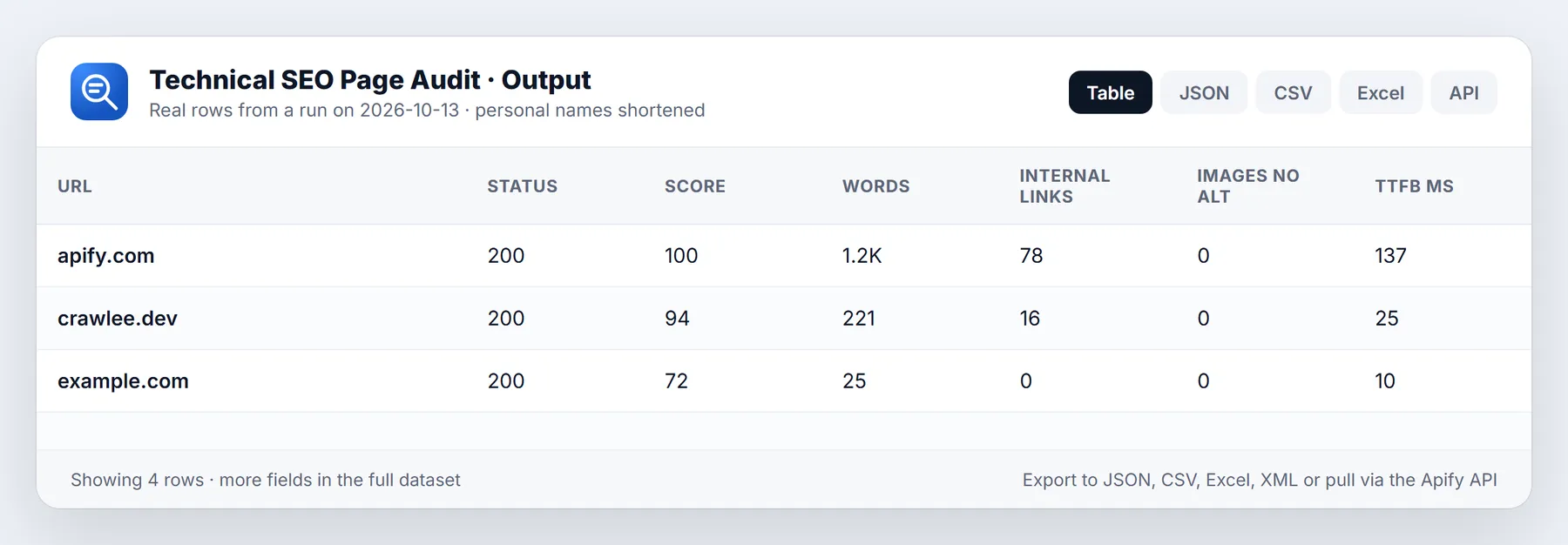
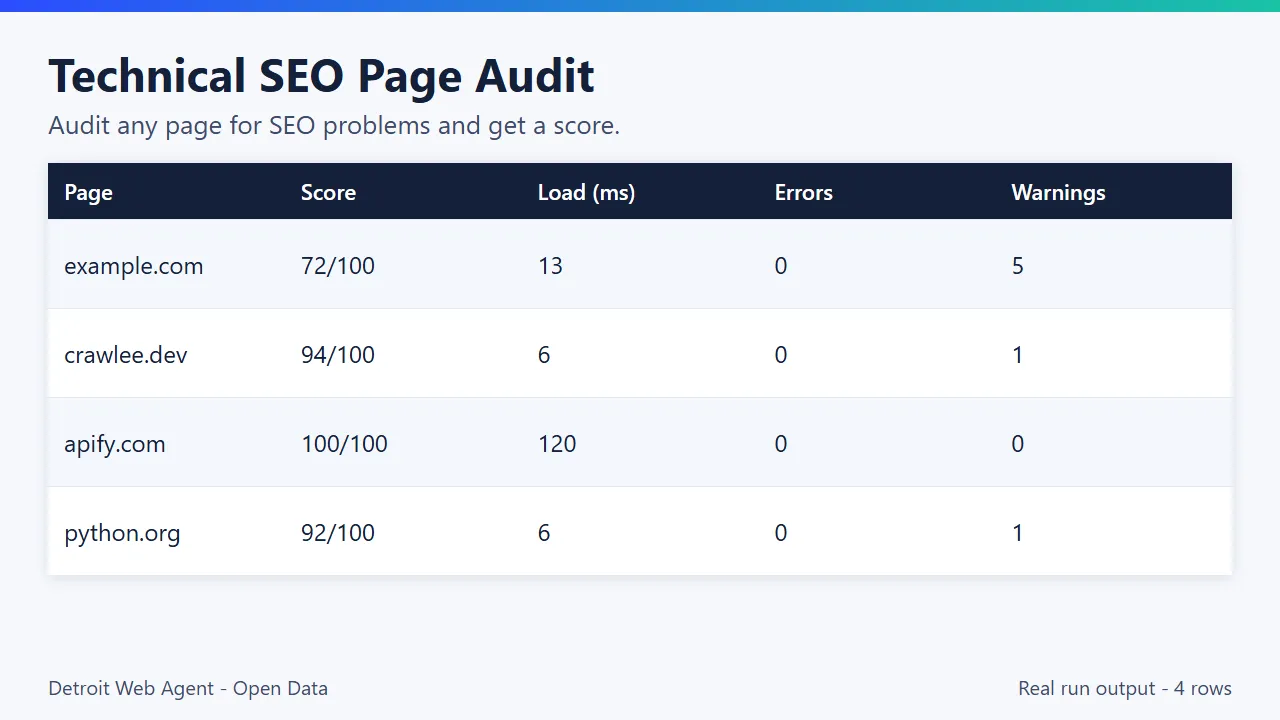
Sample output (real run)
| Page | Status | Score | Title len | Words | Links int / ext | Broken | Imgs no alt | TTFB ms | Issues |
|---|---|---|---|---|---|---|---|---|---|
| https://apify.com | 200 | 100 | 47 | 1,162 | 78 / 58 | 0 | 0 | 192 | none |
| https://crawlee.dev | 200 | 94 | 40 | 221 | 16 / 10 | 0 | 0 | 29 | thin-content (warning), json-ld-missing (info) |
| https://example.com | 200 | 72 | 14 | 25 | 0 / 0 | 0 | 0 | 24 | 5 warnings, 3 info |
Full rows carry about 50 fields, see samples/output.json.
What you get
- Status and speed: HTTP status, full redirect chain with each hop's status, final URL, time to first byte, total response time, HTML size, content type,
X-Robots-Tag. - On-page tags: title and length, meta description and length, canonical (and whether it points to itself), meta robots,
lang, viewport, charset. - Structure: H1 text and counts of H1, H2 and H3, the heading outline, empty headings, visible word count.
- Links: internal and external link counts, nofollow count, empty-anchor links, and a broken-link check (404, 410, 5xx and unreachable hosts) with the failing URLs and status codes.
- Images: total, missing
altattribute. Decorativealt=""is counted separately and never flagged. - Social: all Open Graph and Twitter Card tags as objects.
- International: every hreflang entry, with validation of codes and the self-reference.
- Structured data: JSON-LD
@typevalues (including@graphand nested types) and a count of invalid JSON-LD blocks. - Verdict:
issues(code, severity, message),issueCounts,overallScore/score(0-100: 100 minus 15 per error, 5 per warning, 1 per info) andindexable(true, false or null when unfetched). - Category scores:
categoryScoresgives a 0-100 score for each of eight groups (indexability, meta, content, links, social, structuredData, performance, international), andtopIssueslists the 3 most important problems on the page, so you can sort a whole site by what to fix first. - Site summary row: with 2 or more pages the run ends with one free row (
recordType: "site-summary") holding the average score, per-category averages, duplicate titles and duplicate meta descriptions (with the URLs sharing them) and the most common issues across the site.
Output fields (added in 0.1.20)
| Field | Meaning |
|---|---|
overallScore | Same value as score, 0-100; null when the page was not fetched. |
categoryScores | Object with a 0-100 score per enabled category. |
topIssues | Up to 3 most important issues with code, severity, category, message. |
recordType | page for page rows, site-summary for the closing summary row. |
crawlDepth | Link hops from a start URL (crawl mode only). |
changeType | new or changed (monitor mode only). |
duplicateTitles, duplicateDescriptions | Summary row only: groups of pages sharing the same title or description. |
Whole-site audit example
Weekly regression watch (only new or changed pages)
Inputs
| Input | What it does |
|---|---|
urls | Pages to audit (a missing https:// is added). Empty input falls back to three example sites. |
crawlPages | Follow same-site internal links (breadth first) from your URLs until maxPages, so one homepage becomes a whole-site audit. |
maxCrawlDepth | How many link hops to follow when crawling (1-10, default 2). |
maxPages | Cap on pages audited and billed in the run. |
excludeUrlPatterns | Skip URLs by substring, * wildcard or /regex/, for start URLs, crawled pages and link checks. |
auditCategories | Run and score only the groups you tick. Unticking links skips every link request. |
checkBrokenLinks, maxLinksToCheck | Broken-link check and how many links per page to test. |
monitorMode, monitorName | Output only pages that are new or changed since the last run (changeType). Every audited page is still billed. |
siteSummary | Append the free site-summary row (default on). |
requestDelayMs, userAgent | Politeness delay per host and the identifying User-Agent. |
Quick start
Zero config: press Start. It audits three example pages in under a minute.
Example 1: audit your key landing pages, skip link checks for speed
Example 2: full audit with broken-link checks on up to 50 links per page
Schedule it daily or weekly and compare score and issueCounts over time to catch regressions after a deploy.
Pricing
Pay per event: $0.003 per page audited ($3 per 1,000) plus a $0.00005 start fee. A page is billed when the server returned an HTTP response and the audit ran (a 404 page is still audited and billed). Pages blocked by robots.txt, invalid URLs and hosts that cannot be reached are returned as rows but never charged. Link checks are included in the page price. The site-summary row is free. Set a max charge in the run options and the actor stops cleanly when it is reached.
| Run | Pages | Cost |
|---|---|---|
| Zero-config default | 3 | about $0.009 |
| Weekly check of 50 key pages | 50 | about $0.15 per run |
| Monthly audit of 1,000 pages | 1,000 | about $3 |
Apify's free plan includes $5 of monthly platform credit, which covers about 1,000 page audits with this actor (at $0.003 per result, plus small platform usage).
Use it with the API, n8n, Make, Zapier and AI agents
- API:
POST https://api.apify.com/v2/acts/transparent_meteorite~technical-seo-page-audit/runswith your input as the JSON body, then read the dataset items. Use therun-sync-get-dataset-itemsendpoint to get rows in one call. - n8n, Make, Zapier: use the Apify integration to run the actor on a schedule and send low scores or new
errorissues to Slack, email or a ticket tool. - Spreadsheets and BI: export JSON, CSV or Excel and pivot by
issues[].code. - AI agents (MCP): the actor is available through the Apify MCP server, so an agent can audit a URL ("check this page for SEO problems") and read structured findings.
Use from AI agents (MCP, ChatGPT, Claude, Perplexity)
Technical SEO Page Audit works as a tool for AI assistants through the official Apify MCP server. Add this server URL to any MCP client (Claude Desktop, Claude Code, Cursor, ChatGPT connectors, VS Code):
Claude Desktop / Cursor config:
Then ask in plain language, for example: "How do I run a technical SEO audit on many URLs through an API?"
Call it directly over HTTP (runs the actor and returns the dataset items in one request):
Python:
The same actor works in n8n, Make, Zapier, LangChain, LlamaIndex and CrewAI through their Apify integrations.
Questions people ask
How do I run a technical SEO audit on many URLs through an API? Pass the URLs to this actor; each page comes back as one row with the checks and a scored issue list.
Does it check broken links? Yes, with checkBrokenLinks true it tests up to maxLinksToCheck links per page.
Does it render JavaScript? No, it audits the HTML the server returns, which is what most crawlers index first.
Use it from code
Small real input: it returns only a couple of rows, so a test run costs very little (see Pricing). Set the APIFY_TOKEN environment variable to your token from Apify Console > Settings > API & Integrations.
Python (pip install apify-client)
JavaScript / Node.js (npm install apify-client)
curl (runs the actor and returns the dataset items in one call)
Send results to Google Sheets, Zapier, Make or n8n
- Google Sheets: every run's dataset has a CSV export link:
https://api.apify.com/v2/datasets/<DATASET_ID>/items?format=csv&clean=true(the dataset ID is on the run's Storage tab). In Sheets,=IMPORTDATA("<that link>")loads it. Anyone with the link can read that dataset, so share it carefully. To export to Google Drive automatically, use the Google Drive integration on the actor's Integrations tab. - Zapier: in the Apify app, use the trigger Finished Actor run (or Run Actor as an action) with
transparent_meteorite/technical-seo-page-audit, then Fetch dataset items and pass the rows to Google Sheets, a CRM or Slack. - Make: the Apify app has Watch Actor Runs, Run an Actor and Get Dataset Items modules; connect them to any Make app.
- n8n: install the Apify node (
@apify/n8n-nodes-apify) and use Run an Actor and get dataset, or the On new Apify event trigger. - Schedule and webhooks: create a Task with your input, add a Schedule in Apify Console, and add a webhook if you want a call when a run finishes.
See the Apify integrations docs for setup steps.
Use cases
- SEO agencies: bulk on-page audits of client or prospect URLs with a prioritized issue list.
- Developers: check titles, meta, canonicals, hreflang and broken links after a release.
- Lead generation: audit prospect sites and use the issues as an outreach opener.
- Monitoring: schedule a weekly run on key pages and compare scores.
Related actors
More tools from the same publisher that fit this workflow:
- Sitemap Extractor & Broken Link Checker: list every sitemap URL and check for broken links
- Website Tech Stack Detector: detect the CMS, frameworks and hosting behind any site
- WHOIS & Domain Lookup: WHOIS/RDAP, DNS, subdomains and SSL for a domain
- Company Enrichment by Domain: enrich a domain with socials, emails and tech stack
- Website Email Extractor: pull emails, phones and socials from each business website
- Local Business Leads: find local businesses with no website from OpenStreetMap, a cheap complement to Maps data
Use from AI agents: every actor here is callable through the Apify MCP server (mcp.apify.com) and our open-data-actors MCP endpoint.
How this compares
Desktop crawlers and SEO suites do far more (JavaScript rendering, site-wide crawl graphs, keyword data). This actor is a lightweight per-page check you can call from an API or a schedule and pay per page; use it for quick bulk checks, not as a replacement for a full SEO suite.
Limitations
- HTML as served only, no JavaScript rendering, no Core Web Vitals or Lighthouse metrics.
- Link checks sample the first
maxLinksToChecklinks on each page (internal first).linksNotCheckedtells you how many were left. - Only the first 3 MB of each page is read.
- Sites that block datacenter traffic may answer 403 or 429; those rows are returned with the status and are billed because a response was received.
- Word count is visible body text, not a readability measure.
Reliability
Last 30 days, measured from Apify run records (all runs, including our own daily health checks): 20 of 20 finished runs succeeded (100.0%), median run time 3.6 s (90th percentile 16.2 s). Aborted runs (0) are not counted.
Updated 2026-10-11 automatically every week from the run history. Report any failure on the Issues tab with the run URL.
More resources
- Guide & examples: mamoo85.github.io/open-data-actors/technical-seo-page-audit.html
- Sample output and example input on GitHub (masked sample CSV): github.com/Mamoo85/apify-actor-samples/technical-seo-page-audit
Works well with
Other actors from Detroit Web Agent - Open Data that pair with this one:
- Website Tech Stack Detector: see the CMS and tools behind the pages you audit.
- Domain Intelligence Lookup: DNS, SSL and security-header checks for the same domains.
- Website Contact Extractor: for agencies: find the contact for each site you audit.
- Sitemap Link Inventory: inventory every URL of a site first, then audit the pages that matter.
- Local Business Leads (no-website finder): find local businesses with weak or missing sites, then audit the ones that have one.
FAQ
Is this allowed? It requests only public pages over plain HTTP, identifies itself with the TechnicalSeoAuditBot User-Agent, reads and obeys robots.txt (including Allow, wildcards, $ and Crawl-delay up to 10 s) and waits at least 500 ms between requests to the same host. It never logs in and refuses private, loopback and metadata addresses.
Does it crawl my whole site? No. It audits exactly the URLs you give it and, for broken-link checks, requests the links found on those pages. Feed it your sitemap URLs for site-wide coverage.
How is a link counted as broken? 404, 410, any 5xx, or a host that does not exist or refuses the connection. 401, 403, 429 and 999 responses are treated as "blocked" (many sites refuse bots), and timeouts are unverified; neither is reported as broken, to avoid false alarms. A HEAD request is tried first, with a GET fallback.
Why is my page missing from the charges? If robots.txt disallows the URL, or the host is unreachable, the row is returned with an explanatory issue and no charge.
Does it render JavaScript? No, it reads the HTML the server sends, which is what most crawlers see first. Content added only by client-side JavaScript (including titles set by scripts) is not seen.
What do the severities mean? error is something that blocks indexing or breaks the page (4xx/5xx, noindex, missing title, broken links, very slow TTFB). warning is a likely ranking or usability problem. info is an improvement opportunity.
What is TTFB here? Time from sending the request until response headers arrive, including DNS and TLS for the first request to a host, measured from where the actor runs.
This Actor vs smart-digital/complete-seo-audit-tool: that one is the most-used SEO audit crawler and adds Core Web Vitals and a fix hint for each issue. Choose this one for lightweight audits with no browser that report hreflang, JSON-LD types, the full redirect chain and TTFB for every page.
More questions
How do I run an SEO audit on many URLs through an API?
Pass the URLs in urls and set maxPages; call it from the API examples above. Each page gets one row with its SEO data, issues and score.
Does it check broken links?
Yes, when checkBrokenLinks is on; maxLinksToCheck caps how many links per page are tested.
Does it render JavaScript? No. It fetches pages over plain HTTP, so content added only by client-side JavaScript is not seen.
Does it respect robots.txt? Yes.
What the free plan gets you
Free plan: about 1,670 audited pages from your $5 monthly Apify credit (at $0.003 each, today's price); default settings return about 1 row (one sample page; add more URLs to scale). Need more? Upgrade your Apify plan or set a higher result limit in the input.
Built and maintained by Detroit Web Agent - Open Data (Detroit, Michigan). Questions, bugs or a field you need: open an issue on this Actor's Issues tab and we will reply there.
Feedback: if this Actor was useful, or if it fell short, an honest review on the Reviews tab helps other users decide. Problems or feature requests: please open an Issue and we usually reply within one business day.
Changelog
- 2026-10-05: Launched: on-page checks, broken links, hreflang, robots handling.
- 2026-10-09: Output tab table view; video walkthrough.
- 2026-10-09: Input sections, status messages, examples.
- 2026-10-09: Branding: maintained by Detroit Web Agent - Open Data.
- 2026-10-09: README free-credit note; clear log line and status when your Maximum cost per run is reached.
- 2026-10-11: Closing log line points to the Issues tab; Reliability section added to this README.
- 2026-10-13: Added a Run in 30 seconds section with a one-click prefilled run link, saved use-case presets and cross-links to pairing actors.
- 2026-10-13: 0.1.20: crawl mode (crawlPages), audit category toggles, excludeUrlPatterns, 0-100 overallScore with categoryScores and topIssues, free site-summary row with duplicate titles/descriptions, monitorMode (new/changed since last run), empty-input fallback to example sites.
- 2026-10-25: Listing refresh: new Store icon, README reorganised (overview, data fields, pricing, FAQ) and changelog tab added. No code change.


