

Domain to Careers Page & Email Provider: Company Enrichment
Pricing
Pay per event
Domain to Careers Page & Email Provider: Company Enrichment
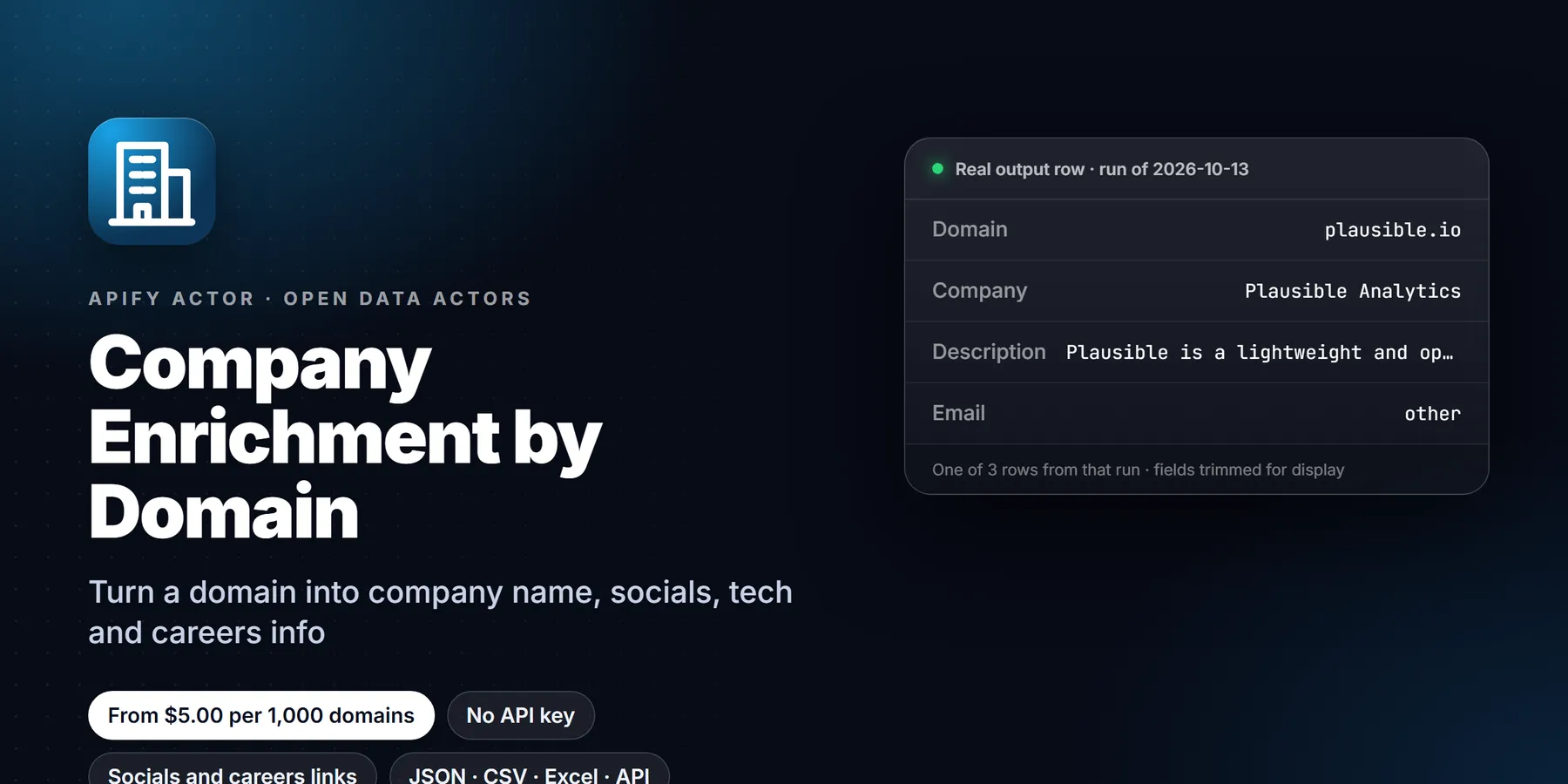
Turn company domains into profiles with the careers page and email provider (from MX records), plus name, logo, LinkedIn and socials, business emails and phones and tech stack, read from the company's own site and public DNS. Pay per domain enriched; dead domains are free.
Pricing
Pay per event
Rating
0.0
(0)
Developer

Detroit Web Agent - Open Data
Maintained by CommunityActor stats
0
Bookmarked
1
Total users
1
Monthly active users
2 days ago
Last modified
Categories
Share
Company enrichment by domain: paste company domains, website links or names and get one row per company with name, logo, description, LinkedIn and other social profiles, published emails and phones, careers page and ATS, email provider from MX records and a tech-stack summary.

| Price per 1,000 domains | Free plan | Starter | Scale | Business |
|---|---|---|---|---|
| This Actor | $5.00 | $5.00 | $5.00 | $5.00 |
Paste a list of company domains, website links or company names. Get one row per company: name, logo, description, LinkedIn and other social profiles, published business emails and phones, careers page and ATS, email provider from MX records, and a tech-stack summary. Every value is read from the company's own public website and public DNS, so you can trace each field to its source.
| What you get | Who it is for | Price |
|---|---|---|
| Company name, logo, description, LinkedIn, X, Facebook, Instagram, YouTube, GitHub, TikTok, role emails, phones, address when published, careers URL and ATS, email provider (Google Workspace, Microsoft 365, Zoho), MX hosts, SPF, tech stack | RevOps and sales ops teams, Clay and CRM users cleaning account lists, agencies qualifying prospects, data teams checking which domains are still alive | $0.005 per company enriched ($5.00 per 1,000), plus $0.00005 per run start. Dead, blocked and parked domains are free |
A real row from our run on Oct 13, 2026 (input posthog.com, main fields):
| Domain | Company | Country | Careers page | Email provider | Tech stack | Pages read |
|---|---|---|---|---|---|---|
| posthog.com | PostHog | US (schema.org address: San Francisco, CA) | posthog.com/careers | Google Workspace | Vercel, Gatsby, React, HSTS, Open Graph, RSS, Web App Manifest | 3 |
- In short: Company Enrichment by Domain (Apify actor
transparent_meteorite/company-enrichment-by-domain) turns a list of company domains into firmographic rows built from each company's own public website and DNS. - Who it is for: sales ops and RevOps teams, Clay and CRM users cleaning account lists, agencies qualifying prospects.
- Input: a list of domains, website URLs or company names; max pages per domain; include tech stack.
- Output: company name, logo, description, LinkedIn and other social URLs, role emails, phones, email provider from MX, careers/ATS URL, tech stack.
- Price: $0.005 per domain enriched plus $0.00005 per run start. Pay per result, no subscription; Apify's free plan credit covers a first test.
- Limits: uses only public pages and DNS, so private data such as revenue or headcount is not included.
Key facts
- Actor name: Company Enrichment by Domain
- Actor ID:
transparent_meteorite/company-enrichment-by-domain - Store page: https://apify.com/transparent_meteorite/company-enrichment-by-domain
- Data source: the company's own public website and public DNS records
- Pricing model: pay per event (
apify-actor-start$0.00005,domain-enriched$0.005) - Output formats: JSON, CSV, Excel, XML, HTML table, RSS (Apify dataset)
- Access: Apify Console, REST API, JavaScript/Python clients, schedules, webhooks, Apify MCP server
- Login or third-party API key needed: no, only an Apify account
- Also known as: company enrichment API, domain to company data, firmographic enrichment, company LinkedIn from domain
- Maintainer: transparent_meteorite (independent developer)
- Last updated: 2026-10-19
What is Domain to Careers Page & Email Provider: Company Enrichment?
Turn company domains into profiles with the careers page and email provider (from MX records), plus name, logo, LinkedIn and socials, business emails and phones and tech stack, read from the company's own site and public DNS. Pay per domain enriched; dead domains are free. Run it from the Apify Console, the API or a schedule, and export the results as JSON, CSV, Excel or HTML.
Run in 30 seconds
- Open the prefilled run (free Apify account; it creates a saved task with a working input).
- Press Start. The input is small on purpose, so the first run is quick and costs a few cents at most.
- Open the Output tab, switch to Table view, download as CSV, Excel or JSON.
Prefilled input:
Ready-made presets by use case (each opens as a saved task you can edit):
Why choose this actor
- Traceable data. Every field comes from the company's own public website and DNS. No data brokers, no third-party databases, no stale cached profiles.
- Business contacts only. Email output is limited to business role addresses (hello@, sales@, support@ and similar); addresses that look like a named person are dropped.
- You pay for results, not attempts. Only domains with status
okare charged. Unreachable, blocked, parked and robots-disallowed domains come back with a status and cost nothing. - Signals other tools skip. Email provider from MX (useful for routing Google Workspace vs Microsoft 365 offers), careers page and ATS (a hiring signal), and a tech-stack summary in the same row.
Measured on 11 live company sites (2026-10): company name 100%, email provider 100%, LinkedIn 64%, a published email 45%, a valid phone number 18%. These rates depend on what each site publishes.
Output
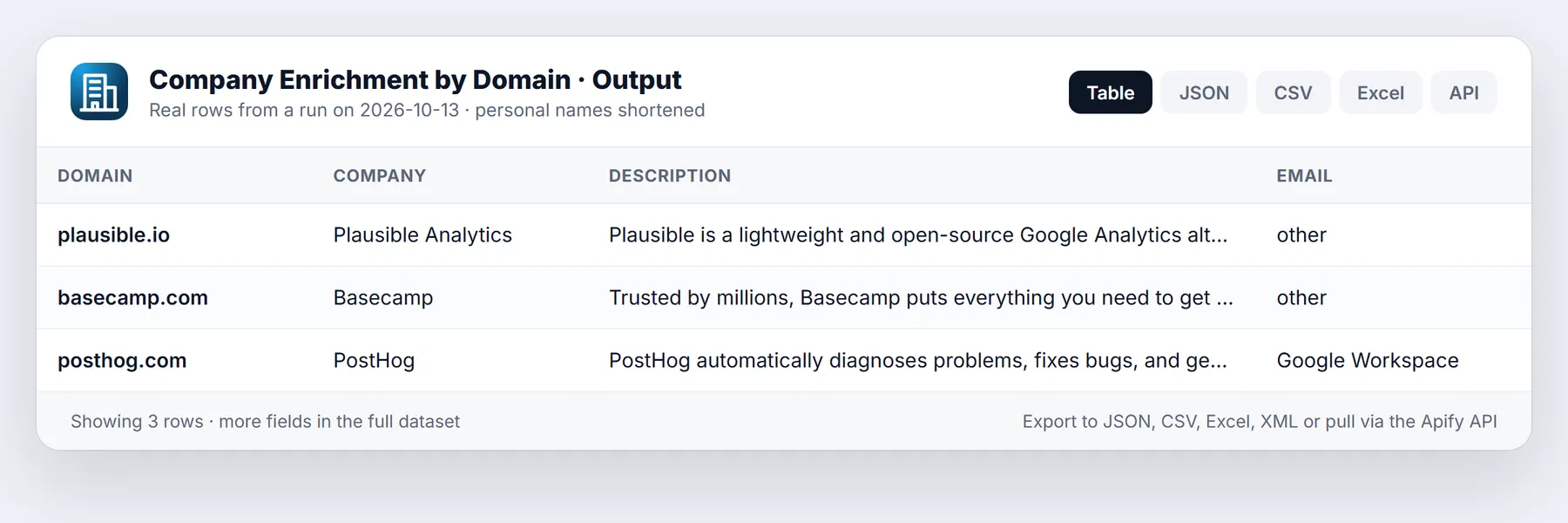
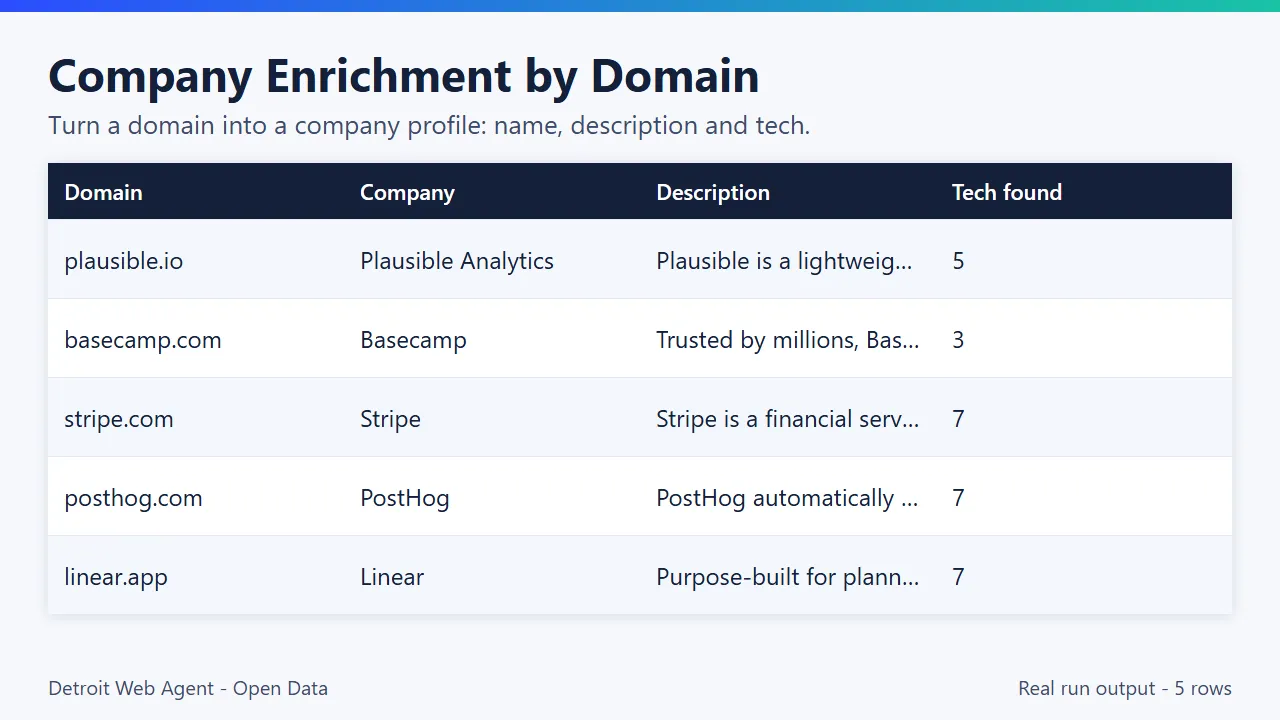
Real output from our run on Oct 13, 2026 with input {"domains": ["posthog.com", "plausible.io", "basecamp.com"], "maxPagesPerDomain": 3, "includeTechStack": true}. All three came back ok:
| Domain | Company | Email on site | Email provider | Careers | Tech stack (count) | |
|---|---|---|---|---|---|---|
| plausible.io | Plausible Analytics | /company/plausible-analytics | hello@plausible.io | other (hey.com MX) | - | Alpine.js, Bunny CDN, Jekyll, Open Graph, RSS (5) |
| basecamp.com | Basecamp | - | - | other (own MX) | - | Cloudflare, Stimulus, Open Graph (3) |
| posthog.com | PostHog | - | - | Google Workspace | posthog.com/careers | Vercel, Gatsby, React, HSTS and more (7) |
Basecamp shows what an honest empty field looks like: its homepage links no LinkedIn page and publishes no email, so those fields stay empty instead of being filled with a guess.
The plausible.io row as JSON (exactly as returned):
Output fields
| Field | What it is |
|---|---|
domain, input, finalUrl | The domain, what you typed, and where the homepage landed after redirects |
matched, matchMethod | Whether a company was found, and how (domain or name-guess) |
status | ok (charged), unreachable, blocked, parked or unmatched (all free) |
companyName, companyNameSource | Name and where it came from (schema.org, og:site_name, title) |
legalName, yearFounded, employeesRange, industry, headquarters | From the site's own schema.org Organization data; null when not published (many sites do not) |
description, language | Meta description and page language |
logoUrl (also logo), faviconUrl | Logo and icon URLs |
countryHint, countryHintSource, address | Country hint with its source (schema.org address, phone prefix or TLD) and the postal address when published |
emails | Published addresses, each with isGeneric, sameDomain and source |
phones | Published numbers in E.164 format |
linkedinCompanyUrl, x, facebook, instagram, youtube, github, tiktok | Social profiles linked from the site |
careersUrl, atsProvider | Careers page and applicant tracking system |
emailProvider, mxHosts, spfPresent | Google Workspace, Microsoft 365, Zoho, other or none; raw MX hosts; SPF record present |
techStack | Count and categories of detected technologies |
copyrightYear, pagesFetched, errors, fetchedAt | Housekeeping fields for QA |
Sample output
How it works
For each company the actor:
- Normalizes your input. A bare domain, a full URL such as
https://www.example.com/about, or a company name all work. For a company name it tries the most likely domains and accepts one only when the page shows the same company name. - Fetches the homepage, then up to a few of the /contact, /about and /careers pages that the homepage links to. robots.txt is checked for every path.
- Reads the company name, description, logo and address from Open Graph tags, schema.org Organization data and page metadata.
- Collects social profile links (LinkedIn, X, Facebook, Instagram, YouTube, GitHub, TikTok), published email addresses (including ones hidden by Cloudflare email protection) and phone numbers, normalized to E.164.
- Detects the careers page and the applicant tracking system behind it (Greenhouse, Lever, Ashby, Workable, SmartRecruiters, Recruitee, Workday).
- Looks up the domain's MX and SPF records over public DNS and names the email provider.
- Summarizes the tech stack seen in the homepage response (CMS, analytics, CDN, hosting, ecommerce, JavaScript framework).
Nothing is guessed or constructed. When a site does not publish a field, the field is null or empty.
Input
| Field | Type | Default | What it does |
|---|---|---|---|
domains | list | - | Company domains (example.com) or URLs. One output row per domain |
companyUrls | list | - | Full website links; the domain is taken from each and merged with domains |
companyNames | list | - | Company names with no domain. The most likely domain is accepted only on a strict name match; otherwise the row is unmatched and free |
includeUnmatched | yes/no | on | Keep a row with a status for failed, blocked, parked or unmatched inputs, so your table stays complete. Turn off to get enriched companies only |
maxPagesPerDomain | 1-5 | 3 | Homepage plus up to N-1 of /contact, /about, /careers found in the homepage links |
includeTechStack | yes/no | on | Add the tech-stack summary |
timeoutSecs | 5-120 | 30 | Time budget per domain |
concurrency | 1-20 | 10 | Domains processed in parallel |
Give at least one of domains, companyUrls or companyNames.
A lead list:
Fast and light (homepage only, no tech stack):
Names only:
Pricing
Pay per event, no monthly rental: $0.005 per domain enriched (status ok), plus $0.00005 per run start. Unreachable, blocked, parked, unmatched and robots-disallowed domains are never charged.
| Domains enriched | Cost today |
|---|---|
| 100 | $0.50 |
| 1,000 | $5.00 |
| 10,000 | $50.00 |
A price cut is scheduled on Apify for October 30, 2026: from that date the per-domain price becomes $0.0015 on the Apify Free plan, $0.0012 on Bronze, $0.001 on Silver and $0.0008 on Gold and higher plans. The Pricing tab always shows the price that applies to your run. Set a maximum cost per run in the run options if you want a hard cap.
Apify's free plan includes $5 of monthly platform credit. At today's $0.005 per enriched domain that covers about 1,000 domains with this actor.
Use cases
- RevOps and sales ops: fill missing company rows (LinkedIn, socials, email provider, public contacts) for an account list before routing or scoring.
- Clay and CRM users: enrich domains from a table through an HTTP column, without a data-broker contract.
- Agencies: qualify prospect lists before outreach. A careers page with an ATS means the company is hiring;
emailProvidertells you whether to pitch a Google Workspace or Microsoft 365 service. - IT and email-security sellers: segment a list by email provider and SPF presence.
- Data cleaning: find which domains in an old list no longer resolve, are parked or block automated access, at no cost for those rows.
Use it from code
Small real input: it returns only a couple of rows, so a test run costs very little (see Pricing). Set the APIFY_TOKEN environment variable to your token from Apify Console > Settings > API & Integrations.
Python (pip install apify-client)
JavaScript / Node.js (npm install apify-client)
curl (runs the actor and returns the dataset items in one call)
Send results to Google Sheets, Zapier, Make or n8n
- Google Sheets: every run's dataset has a CSV export link:
https://api.apify.com/v2/datasets/<DATASET_ID>/items?format=csv&clean=true(the dataset ID is on the run's Storage tab). In Sheets,=IMPORTDATA("<that link>")loads it. Anyone with the link can read that dataset, so share it carefully. To export to Google Drive automatically, use the Google Drive integration on the actor's Integrations tab. - Zapier: in the Apify app, use the trigger Finished Actor run (or Run Actor as an action) with
transparent_meteorite/company-enrichment-by-domain, then Fetch dataset items and pass the rows to Google Sheets, a CRM or Slack. - Make: the Apify app has Watch Actor Runs, Run an Actor and Get Dataset Items modules; connect them to any Make app.
- n8n: install the Apify node (
@apify/n8n-nodes-apify) and use Run an Actor and get dataset, or the On new Apify event trigger. - Clay: add an HTTP API column. Method POST to
https://api.apify.com/v2/acts/transparent_meteorite~company-enrichment-by-domain/run-sync-get-dataset-items?token=YOUR_TOKENwith body{"domains": ["{{Domain}}"], "maxPagesPerDomain": 2}. MapcompanyName,linkedinCompanyUrlandemailProviderfrom the first item of the response. - Schedule and webhooks: create a Task with your input, add a Schedule in Apify Console, and add a webhook if you want a call when a run finishes.
See the Apify integrations docs for setup steps.
Use from AI agents (MCP, ChatGPT, Claude, Perplexity)
Company Enrichment by Domain works as a tool for AI assistants through the official Apify MCP server. Add this server URL to any MCP client (Claude Desktop, Claude Code, Cursor, ChatGPT connectors, VS Code):
Claude Desktop / Cursor config:
Then ask in plain language, for example: "Enrich these domains and tell me which ones use Google Workspace." The output is flat JSON with stable field names, which agents handle well.
How this compares
Commercial enrichment APIs combine many sources and can return figures like revenue or headcount; this actor does not. It reads only the company's own public website and DNS, so every field can be traced to a public source, and you pay per domain enriched.
Limitations
- Only what the company's own site and DNS publish. No headcount, revenue, funding or employee data.
- JavaScript-only sites that render content in the browser may return less (name and description often still come from meta tags).
- Country is a hint with a labeled source, not a verified headquarters.
- Phone numbers are only returned when published in a valid international or locally parseable format.
- The
techStackis detected from the homepage response only.
Reliability
Last 30 days, measured from Apify run records (all runs, including our own daily health checks): 20 of 20 finished runs succeeded (100.0%), median run time 3.4 s (90th percentile 5.7 s). Aborted runs (0) are not counted.
Updated 2026-10-11 automatically every week from the run history. Report any failure on the Issues tab with the run URL.
More resources
- Guide & examples: mamoo85.github.io/open-data-actors/company-enrichment-by-domain.html
- Sample output and example input on GitHub (masked sample CSV): github.com/Mamoo85/apify-actor-samples/company-enrichment-by-domain
FAQ
How do I get the LinkedIn company page from a domain?
The actor reads the links and schema.org sameAs data on the homepage, /about and /contact pages. If the site links to its LinkedIn company page, you get linkedinCompanyUrl. If it does not, the field is null. It does not search LinkedIn.
How do I tell whether a company uses Google Workspace or Microsoft 365?
The actor looks up the domain's MX records over public DNS and classifies them. emailProvider is one of Google Workspace, Microsoft 365, Zoho, other or none. mxHosts shows the raw hosts and spfPresent tells you whether an SPF record exists.
Does it find people's emails or guess info@ addresses?
No. It only returns addresses the site itself publishes, including ones hidden by Cloudflare email protection, and only business role addresses (each flagged isGeneric). Addresses that look like a named person are dropped. It never constructs or verifies addresses.
Can I enrich company names without domains?
Yes. Put them in companyNames. The actor tries the most likely domains and accepts one only when the page shows the same company name. If there is no confident match, you get a free row with status unmatched instead of a wrong company.
What does status mean and what is charged?
ok means a real website was reached and read. That is the only status charged. unreachable (DNS or connection failure, error page, empty JS-only page), blocked (403, 429, bot challenge or robots.txt), parked (domain for sale) and unmatched are returned free so your table stays complete.
Is it allowed? Does it respect robots.txt? It fetches at most a few ordinary public pages per domain with an identifying user agent, checks robots.txt for each path, and does not log in or bypass anything. You are responsible for how you use the data under GDPR and your local rules.
Why is a field empty for a company I know has it?
The actor reads what the site publishes in its HTML. A LinkedIn link injected by JavaScript, or a phone number inside an image, will not be seen. Keep maxPagesPerDomain at 3 or more so the /contact, /about and /careers pages are read as well as the homepage.
Does it include revenue or headcount?
No. Revenue and funding are not published on company websites, so they are not returned. employeesRange is filled only when the site's own schema.org data states it.
How fast is it? Roughly 1 to 5 seconds per domain at the default concurrency of 10, so 1,000 domains take a few minutes.
Can I run it on a schedule for new accounts? Yes. Save your input as a Task, add a Schedule, and point a webhook or the Zapier, Make or n8n integration at the dataset.
This Actor vs foxlabs/company-enrichment: that one is the most-used and adds firmographics such as employee count, revenue range, founded year and ownership. This one reads each company's own public website and DNS, so it adds the email provider from MX records, the careers page and ATS, and the tech stack in the same row.
Pairs well with
- Website Contact Extractor: deeper contact-page crawl: roles-tagged emails, E.164 phones, 11 social profiles.
- ATS Open Roles: open jobs from Greenhouse, Lever, Ashby, Workable, SmartRecruiters, Recruitee.
- Hiring Velocity Signals: one row per company: hiring trend and 0-100 hiring score.
- SEC Form D Funding Leads: companies that just filed a Form D.
What the free plan gets you
Free plan: about 1,000 enriched company profiles from your $5 monthly Apify credit (at $0.005 each, today's price). The default input enriches one sample domain; add more domains to scale. Need more? Upgrade your Apify plan or add more domains to the input.
Built and maintained by Detroit Web Agent - Open Data (Detroit, Michigan). Questions, bugs or a field you need: open an issue on this Actor's Issues tab and we will reply there.
Feedback: if this Actor was useful, or if it fell short, an honest review on the Reviews tab helps other users decide. Problems or feature requests: please open an Issue and we usually reply within one business day.
Changelog
- 2026-10-05: Output emails limited to business role addresses (personal named addresses dropped); real example input.
- 2026-10-09: Output tab table view; input sections, status messages, examples; branding: maintained by Detroit Web Agent - Open Data.
- 2026-10-09: Clear log line and status when your Maximum cost per run is reached.
- 2026-10-11: Closing log line points to the Issues tab; Reliability section added to this README.
- 2026-10-13: Run in 30 seconds section with a prefilled run link and saved use-case presets.
- 2026-10-13: New inputs: Company names (name to domain with a strict name match), Company website URLs, Include unmatched rows. New fields: matched, matchMethod, legalName, yearFounded, employeesRange, industry, headquarters, logo. Prices unchanged.
- 2026-10-19: README reorganized: one input table, real output rows from a recent run, scheduled October 30 price cut documented, duplicate FAQ entries merged.
- 2026-10-25: Listing refresh: new Store icon, README reorganised (overview, data fields, pricing, FAQ) and changelog tab added. No code change.

![[Fast & Cheap] Youtube Email, Socials & Urls Scraper avatar](https://images.apifyusercontent.com/rx0JCkzYfpu0Scg6D1br1HLEB0aSvfnhtPvFGYnvycI/rs:fill:76:76/cb:1/aHR0cHM6Ly9hcGlmeS1pbWFnZS11cGxvYWRzLXByb2QuczMudXMtZWFzdC0xLmFtYXpvbmF3cy5jb20vVTFNcFdtQ29zM1h5d0VRSlEtYWN0b3ItdmE0Tkkya2pQdmNTT0o1TksteEVvc0ZkRjV1Vy1hcGlmeV95dF9hcGlfbG9nby5wbmc.webp)


