
Google AI Overview Tracker & AI Visibility API
Pricing
from $7.00 / 1,000 prompt checks
Google AI Overview Tracker & AI Visibility API
AI search visibility and Google AI Overview tracker for AEO/GEO reports: AIO status, source domains, and brand/domain visibility. Guide: https://konabayev.com/tools/google-ai-overview-tracker/?utm_source=apify_info&utm_medium=referral&utm_campaign=google-ai-overview-tracker
Pricing
from $7.00 / 1,000 prompt checks
Rating
0.0
(0)
Developer

Tugelbay Konabayev
Maintained by CommunityActor stats
0
Bookmarked
35
Total users
24
Monthly active users
2 days ago
Last modified
Share
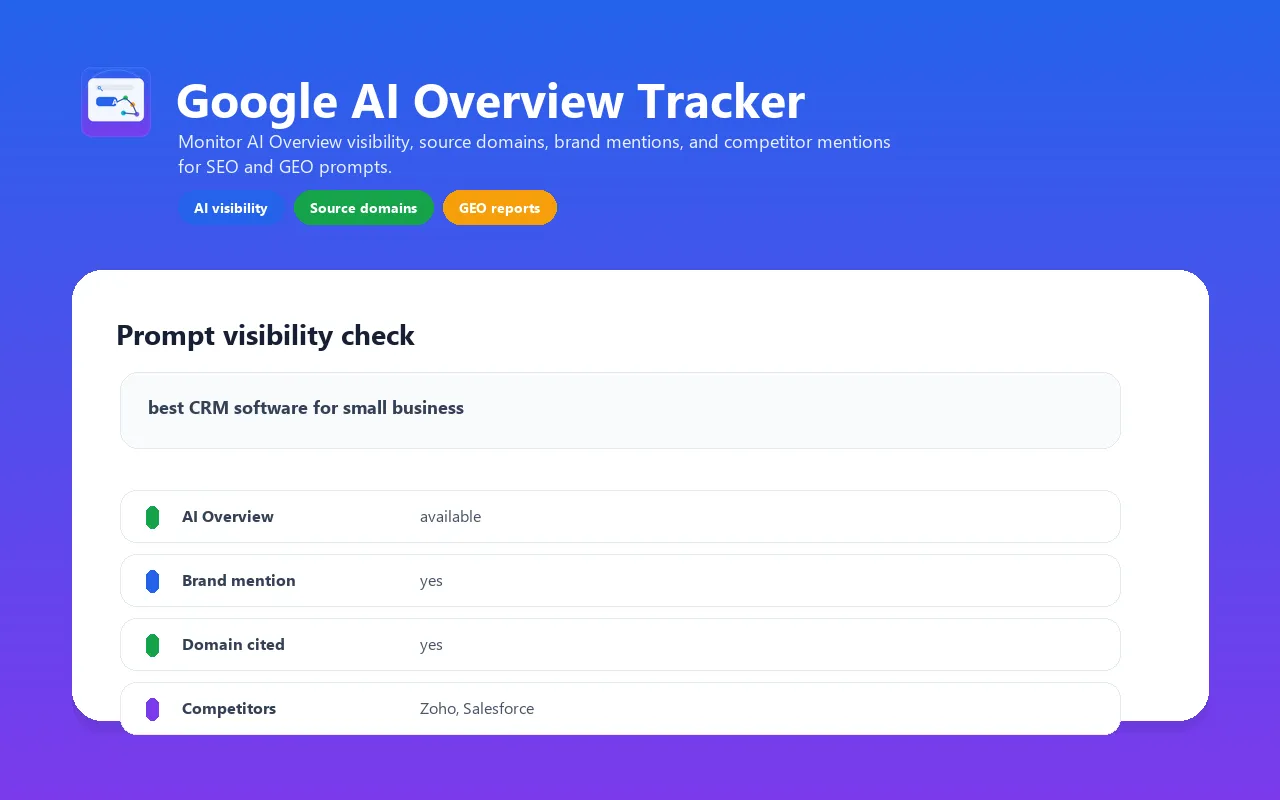
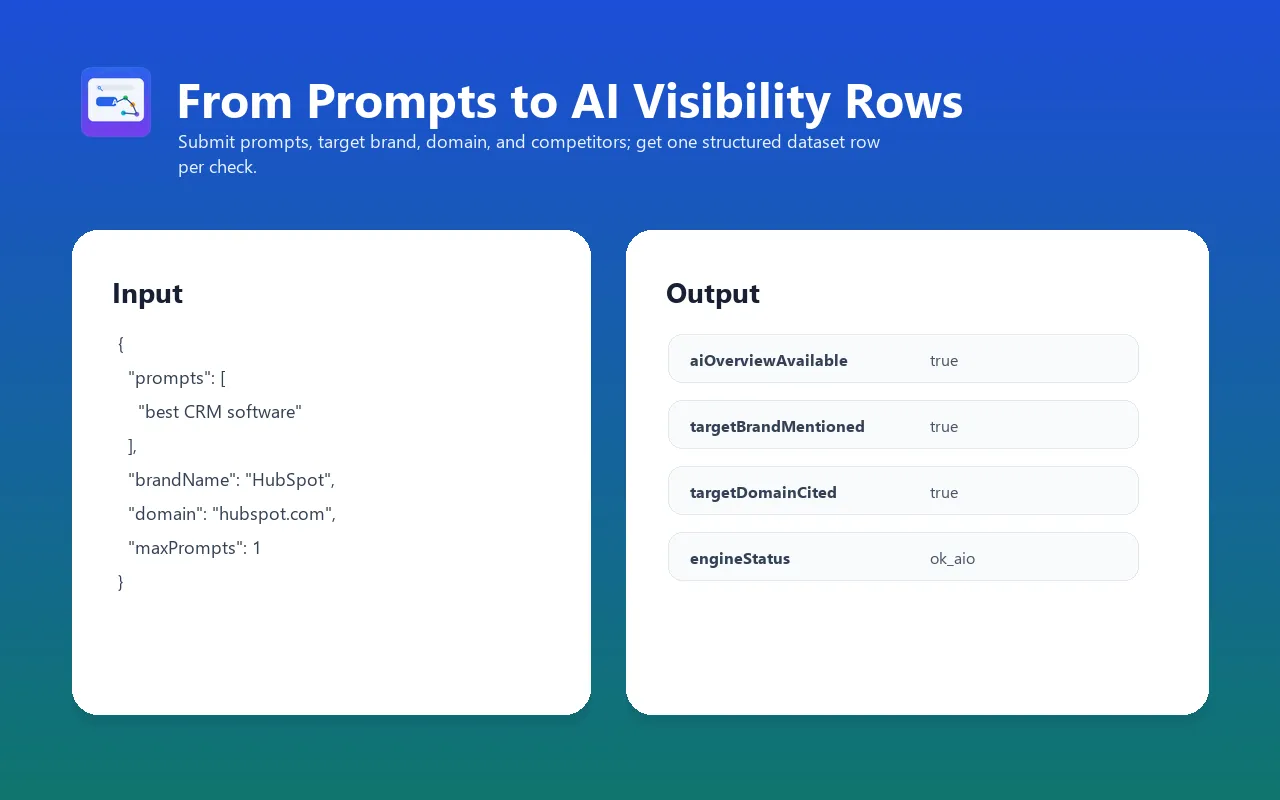
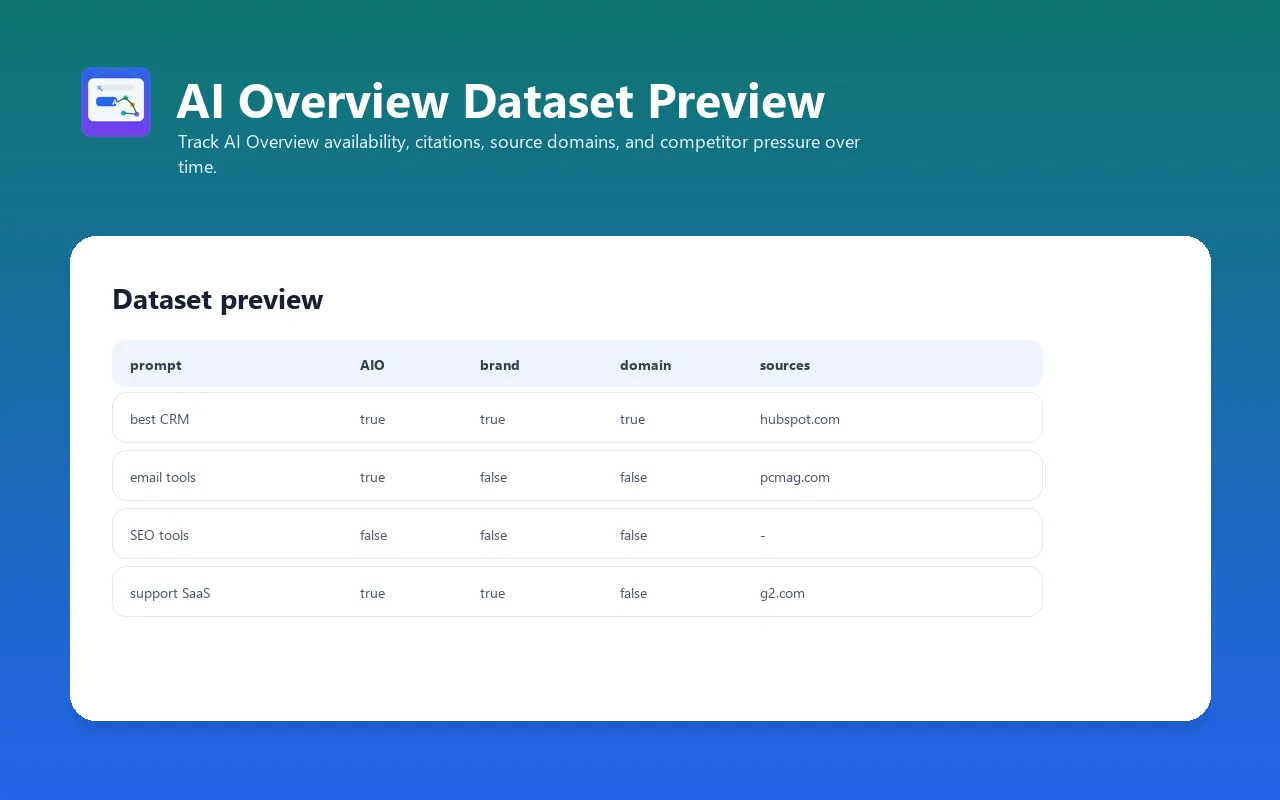
Track whether Google shows an AI Overview for your SEO, GEO, AEO, answer engine optimization, AI search visibility, and LLM visibility prompts, which external source domains appear on the rendered SERP, and whether your brand, domain, or competitors appear in the generated answer.
Use it as a lightweight Google AI Overview visibility tracker: prompt in, AIO status out, with answer text, source domains, brand mentions, domain citation checks, competitor mentions, and a clean aiOverviewAvailable=false result when Google does not show an AI Overview.
This actor supports Google AI Overview and Perplexity, selected with the engine input field. It does not claim ChatGPT, Gemini, Claude, Copilot, Grok, or Meta AI coverage — those engines are not yet validated for reliable, login-free extraction.
For implementation notes, examples, and SEO/GEO use cases, see the Google AI Overview Tracker guide.
Use when: weekly AI visibility monitoring for commercial prompts, client reporting, SEO/GEO dashboards, and source-domain gap analysis. Default run: a 5-prompt monitoring pack that produces one row per prompt, with visibility status and score fields ready for dashboards. Pricing: pay per prompt checked. Each prompt produces one dataset row and one
prompt-checkbilling event. Free Apify plan limits: free-plan runs are capped at 1 prompt per run and 5 prompt checks per month per account. Paid Apify plans remove these caps for production monitoring.
Why use this AI search visibility Actor?
- Monitor a fixed prompt set on a schedule instead of checking answers manually.
- Separate
no_ai_overview, source gaps, competitor visibility, blocks, and timeouts in structured rows. - Preserve
checkedAt, source domains, target-brand detection, and run status for auditable reporting. - Export the same schema to datasets, webhooks, spreadsheets, and BI tools.
How to run a monitoring check
- Start with one to five commercial prompts, a target brand, and target domain.
- Keep concurrency at
1, inspectengineStatus,visibilityStatus, and source links, then refine the prompt set. - Schedule the validated prompt set and compare dated rows; do not interpret one volatile SERP as a durable ranking.
Engines
Set the engine input field to choose which AI answer surface to check:
| Engine | engine value | Country/language | Notes |
|---|---|---|---|
| Google AI Overview | google_ai_overview | Uses country and language | Default. Rendered Google SERP, checked for an AI Overview block. |
| Perplexity | perplexity | Ignored — always English | Rendered perplexity.ai/search?q=... answer page. |
Both engines share the same output shape (answerText, sourceLinks, targetBrandMentioned, visibilityStatus, and so on), so existing dashboards and reports work unchanged when you add Perplexity prompts — only queryUrl/answerUrl and the absence of country/language targeting differ. Run Google and Perplexity checks for the same prompt list as two separate actor runs (one per engine value) to compare visibility across both surfaces.
Commercial Workflows This Targets
Use this actor when AI visibility, answer engine optimization, or Google AI Overview reporting maps to a real workflow:
- weekly Google AI Overview checks for commercial prompt lists
- answer engine optimization and AI search visibility reporting
- source-domain gap analysis for pages that appear near AI answers
- client SEO/GEO dashboards for agencies and consultants
- brand/domain/competitor visibility monitoring across a stable prompt set
Fast Answers
What is a Google AI Overview tracker?
A Google AI Overview tracker checks specific Google search prompts and records whether an AI Overview appears, what answer text was visible, which external source domains were extracted from the rendered SERP, and whether your brand, target domain, or competitors appeared.
Can this track AI visibility for SEO and GEO reports?
Yes. This actor is built for SEO, GEO, AEO, and AI visibility reporting where you need repeatable prompt checks, brand mention tracking, domain citation checks, competitor mention detection, and CSV/API-ready datasets.
Does it track ChatGPT, Gemini, or Claude?
Not yet. This actor tracks Google AI Overview and Perplexity, set via the engine input field. ChatGPT, Gemini, Claude, Copilot, Grok, and Meta AI are conversational UIs without a simple URL-query pattern, so they are not supported yet — that narrower scope keeps the output honest instead of mixing reliable and unvalidated engines.
Starter monitoring run
Start with the 5-prompt monitoring pack below. Each prompt opens a rendered Google SERP, so this is still small enough to validate quickly while producing a useful report shape.
What it returns
For each prompt, the actor returns one dataset item with:
aiOverviewAvailable- whether Google displayed an AI OverviewanswerText- extracted AI Overview text when availablesourceLinksandsourceDomains- external URLs found on the rendered SERPtargetBrandMentioned- whether your brand appears in the AI Overview texttargetDomainCited- whether your domain appears in source linkscompetitorMentions- which competitor names appearedvisibilityStatusandvisibilityScore- dashboard-ready classification for owned, competitor, source-gap, no-AIO, blocked, timeout, or error outcomessourceCountandcompetitorCount- quick numeric fields for BI tools and weekly reportingengineStatus-ok_aio,ok_no_aio,blocked,timeout, orerror
If Google does not show an AI Overview for a prompt, the run still succeeds and returns aiOverviewAvailable=false.
Larger input example
For a quick validation, reduce maxPrompts to 1. For a useful production report, keep the default 5 prompts or run 10-50 prompts weekly.
Free Apify plan users receive a lightweight demo cap of 1 prompt per run and 5 prompt checks per month per account. Paid Apify plans remove this cap and keep the normal production limits.
Production monitoring workflow
Use the default 5-prompt pack to verify that the actor can render Google for your country/language and that the output fields fit your report. For production monitoring, use 10-50 prompts per run and schedule the task weekly.
Useful paid prompt sets usually come from:
- Google Search Console queries with commercial intent
- commercial search terms from ads, CRM notes, or sales calls
- category and reporting queries such as
answer engine optimization,ai search visibility, andllm visibility - "best X", "X alternatives", and "X vs Y" category prompts
- sales objections and buyer questions
- competitor pages and comparison pages
For agencies, create one Apify Task per client and send the dataset to Google Sheets, BigQuery, Slack, or a reporting webhook.
Output example
Output field reference
Each dataset item is one prompt check. The schema is intentionally flat enough for CSV, Google Sheets, webhooks, and BI dashboards, while still keeping source links and competitors as arrays for automation.
| Field | Type | Description |
|---|---|---|
prompt | string | The search prompt/query that was checked. |
engine | string | google_ai_overview or perplexity, matching the input engine field. |
queryUrl | string | Rendered query URL — Google Search with country/language parameters, or the Perplexity search URL. |
answerUrl | string | Final browser URL after redirects or consent flows. |
country | string | Google country code used for the check, for example US. Not applied for Perplexity. |
language | string | Google interface language, for example en. Not applied for Perplexity. |
aiOverviewAvailable | boolean | Whether an AI Overview block was detected. |
answerText | string | Extracted AI Overview text when present; empty when no AIO was shown. |
sourceLinks | array | External links found on the rendered SERP after Google/link wrappers are filtered. |
sourceDomains | array | Deduplicated domains from sourceLinks. |
targetBrand | string | Brand name supplied in input. |
targetDomain | string | Normalized target domain supplied in input. |
targetBrandMentioned | boolean | Whether the brand name appears in the extracted AI Overview text. |
targetDomainCited | boolean | Whether the target domain appears among extracted source domains. |
competitorMentions | array | Competitor names found in the AI Overview text or fallback SERP text window. |
visibilityStatus | string | Dashboard status such as owned_visibility, competitor_visible, source_gap, no_ai_overview, blocked, timeout, or error. |
visibilityScore | integer | 0-100 score for quick sorting and weekly trend dashboards. |
sourceCount | integer | Number of unique extracted source domains. |
competitorCount | integer | Number of detected competitor mentions. |
engineStatus | string | ok_aio, ok_no_aio, blocked, timeout, or error. |
error | string | Short error message when rendering or parsing fails. |
blockMarkers | array | Detected block/CAPTCHA phrases when Google blocks the session. |
checkedAt | string | UTC timestamp for the check. |
runtimeSeconds | number | Runtime for that prompt attempt. |
Use cases
- AI visibility tracking for target prompts
- GEO / AEO monitoring for target prompts
- AI Overview source tracking
- Brand visibility checks
- Domain citation checks
- Competitor visibility checks
- SEO source-gap research
- Weekly prompt monitoring for marketing teams
Who should use it
This actor is useful when the question is not "what rank do I have in classic organic search?" but "does Google's AI answer show up, which brands are mentioned, and which external domains appear around that AI answer?"
Typical users:
- SEO teams tracking AI Overview exposure for commercial prompts
- content teams checking whether their domain appears near answer-style SERPs
- agencies monitoring client and competitor visibility across prompt lists
- SaaS teams watching category prompts such as "best CRM for small business"
- affiliate teams checking which publisher domains are surfaced for buyer-intent queries
- internal growth teams building weekly AEO/GEO dashboards
Suggested monitoring workflow
- Start with 5-20 high-intent prompts from Search Console, paid-search terms, sales calls, or competitor pages.
- Run the actor with
maxConcurrency=1andtimeoutSeconds=30. - Export the dataset to Google Sheets, BigQuery, or a webhook.
- Track these weekly fields:
aiOverviewAvailable,targetBrandMentioned,targetDomainCited,sourceDomains, andcompetitorMentions. - Split prompts into buckets:
- AIO exists and your brand/domain appears: maintain and monitor.
- AIO exists but competitors appear: improve topical coverage and citation-worthy pages.
- AIO exists but only publishers/tools appear: identify source-gap opportunities.
- No AIO: monitor less often or test related prompt variants.
Prompt list examples
For SaaS:
For local services:
For affiliate/content sites:
Comparison with classic SERP rank tracking
| Need | Classic rank tracker | Google AI Overview Tracker |
|---|---|---|
| Track organic position | Yes | No |
| Detect whether AI Overview appears | No | Yes |
| Extract answer text | No | Yes, when AIO is present |
| Track brand mention in AI answer | No | Yes |
| Track domains surfaced near AI answer | Limited | Yes |
| Monitor competitor mentions in generated answer | No | Yes |
| Best cadence | Daily/weekly rankings | Weekly prompt visibility checks |
Use both when you need classic organic rankings and AI Overview visibility in the same reporting stack.
API usage
Python
JavaScript
Webhook / scheduled monitoring
Create an Apify Task with your prompt list, then schedule it weekly. Use a webhook on run success to send the dataset to:
- Google Sheets
- BigQuery
- Slack
- Make/Zapier
- your internal dashboard
Integrations
Plug this actor into your AI, automation, and workflow stack.
LangChain
As an agent tool:
As a RAG document loader:
n8n
- Add the Apify community node (
@apify/n8n-nodes-apify). - Choose operation Run Actor.
- Authenticate with your Apify API token.
- Actor:
tugelbay/google-ai-overview-tracker. - Input JSON:
{"prompts": ["{{ $json.keyword }}"],"brandName": "My Brand","domain": "mysite.com","country": "US","maxPrompts": 1}
- Pipe output to Google Sheets, Airtable, Slack, or a webhook.
Make (Integromat)
- Add the Apify app → Run an Actor module.
- Connect your Apify API token.
- Actor:
tugelbay/google-ai-overview-tracker. - Map your keywords to
prompts, setbrandNameanddomain. - Route dataset items to any Make app (Slack, Microsoft 365, Notion, webhook, etc.).
Zapier
- Create a Zap, add Apify action → Run Actor.
- Choose
tugelbay/google-ai-overview-tracker. - Map trigger data into
prompts,brandName,domain. - Send results (
aiOverviewAvailable,targetBrandMentioned,visibilityStatus,answerText) to any Zapier app (email, Airtable, CRM, Google Sheets, webhook).
MCP (Claude, ChatGPT, OpenAI Agents SDK)
Every Apify actor is exposed via the Apify MCP server at https://mcp.apify.com (Streamable HTTP). Any MCP-compatible client can discover and invoke tugelbay/google-ai-overview-tracker as a native tool.
Agents receive structured output: prompt, aiOverviewAvailable, answerText, targetBrandMentioned, targetDomainCited, visibilityStatus, visibilityScore, sourceDomains, competitorMentions.
Validation
Validation snapshot from 2026-04-25. This actor was built only after a 20-prompt stability probe:
- 20/20 clean headless Google SERP checks
- 19/20 prompts showed an AI Overview
- 1/20 prompts cleanly returned no AI Overview
- Median local probe runtime: 3.0 seconds. Apify runtime varies with proxy/session state.
Related validation file:
docs/research/google-ai-overview-tracker-validation-results.md
Official references rechecked on 2026-07-14:
- Google's AI features and your website documentation explains that normal Search technical requirements and SEO fundamentals apply to AI features.
- Google's Terms of Service remain authoritative for use of Google surfaces; users must also respect rate limits, robots/access controls, and applicable client-reporting obligations.
The validation proves bounded extraction behavior, not stable AI Overview availability, ranking, traffic, or citation by another answer engine.
Limitations
- Google decides whether AI Overview appears. Some queries, countries, or sessions may return no AI Overview.
- Google SERP layouts change. The actor returns
engineStatusanderrorfields so monitoring jobs can detect layout or block changes. - Perplexity always answers in English and ignores
country/language— it has no equivalent regional-targeting parameters. - Browser rendering is required; this is not a raw HTTP-only scraper.
- Keep concurrency low. The default is
1, maximum is3. - The default input checks 5 prompts so the first run produces a useful monitoring report. Reduce
maxPromptsto1only for a tiny validation run.
Pricing
Pay per event:
prompt-check— $0.01 per checked prompt on the FREE plan as of 2026-07-14, with Store-plan discounts down to $0.007.- Apify's standard synthetic Actor start event is currently $0.00005.
Use the public Pricing tab as the source of truth for the current plan-specific prompt-check rate. Actual platform cost also depends on Apify compute/runtime and your account plan. Keep prompt batches small until you know how often AIO appears for your niche.
Troubleshooting
| Issue | Likely cause | What to do |
|---|---|---|
aiOverviewAvailable=false | Google did not show an AI Overview for that query/session/country | This is a valid result. Try related prompts or another country/language. |
engineStatus=blocked | Google showed CAPTCHA, unusual-traffic, or block text | Keep maxConcurrency=1, use residential proxy, retry later, or reduce batch size. |
engineStatus=timeout | SERP or AIO did not finish rendering within timeout | Increase timeoutSeconds to 45-60 for harder prompts. |
Empty answerText with source links | Classic SERP links were available but no AIO text was detected | Treat as no-AIO or inspect the rendered SERP manually. |
| Competitor not detected | Name spelling differs from input | Add short brand variants to competitors, for example Salesforce and Salesforce CRM. |
| Target domain not cited | Domain does not appear in extracted external source links | Use sourceDomains to identify which domains are currently surfaced. |
FAQ
Does this track ChatGPT, Gemini, Claude, Copilot, Grok, or Meta AI?
Not yet. This actor supports Google AI Overview and Perplexity via the engine input field. The remaining engines require separate validation because login, browser mode, rendering behavior, and source extraction differ.
Is sourceLinks exactly the same as AI Overview citations?
No. The actor returns external source links found on the rendered SERP after Google wrapper links are cleaned and Google-owned domains are filtered. This is useful for source-domain monitoring, but it should not be treated as a guaranteed one-to-one list of AIO citation cards.
Why does the same prompt sometimes return different results?
Google personalizes and experiments with SERP layouts. Country, language, time, browser session, proxy, and Google's own AIO rollout can change whether an AI Overview appears.
Should I run this daily?
For most teams, weekly is enough. AI Overview visibility can move, but daily checks may add noise and cost before you have a stable prompt set.
Can I use this for client reporting?
Yes, if you explain the metric correctly: it tracks AI Overview availability, answer text, brand/domain visibility, and extracted external source domains for specific prompts at a specific time.
What is a good first prompt set?
Start with 10-20 prompts that already matter to the business: high-impression Search Console queries, paid search terms, "best X" category searches, sales objections, and competitor-comparison prompts.
Data quality notes
- No-AIO is a valid output, not a failed run.
engineStatusshould be monitored; filter outblocked,timeout, anderrorbefore calculating visibility rates.- Use exact brand names and common short variants in
competitors. - Keep prompt wording stable over time if you want trend charts.
- Store raw datasets for repeatable historical reporting.
Reporting template
For a weekly report, group the dataset by prompt and track these columns:
| Metric | How to calculate |
|---|---|
| Visibility score | Average visibilityScore across valid rows, or trend it by prompt week over week. |
| AIO coverage | Count rows where aiOverviewAvailable=true divided by total valid rows. |
| Brand visibility | Count rows where targetBrandMentioned=true divided by rows with AIO. |
| Domain visibility | Count rows where targetDomainCited=true divided by rows with source domains. |
| Competitor pressure | Count prompts where competitorMentions is not empty. |
| Source diversity | Count unique sourceDomains across the prompt set. |
| Block/error rate | Count blocked, timeout, and error statuses divided by total rows. |
Keep the report honest by separating visibility changes from collection quality. A week with many blocked or timeout rows should be marked as a data-quality issue, not as a real visibility drop.
Good prompt hygiene
- Use searcher language, not internal product jargon.
- Avoid changing prompt wording every week if you need trend lines.
- Include buying-intent prompts, comparison prompts, and problem-aware prompts.
- Keep country/language stable for each tracked prompt set.
- Do not mix unrelated markets in one dashboard; separate SaaS, local, ecommerce, and affiliate prompts.
- Add competitor aliases when brand names have common abbreviations.
- Review no-AIO prompts monthly and replace prompts that never trigger useful AI Overview data.
Operational guardrails
Large prompt lists are supported, but small batches are easier to debug. A practical operating pattern is:
- run the default 5-prompt starter monitor;
- inspect
visibilityStatus,visibilityScore, andengineStatusdistribution; - expand to 25-50 prompts;
- schedule weekly;
- alert only on valid rows, not on blocked/error rows.
If you need hundreds of prompts, split them into multiple Tasks by category, country, or client. That keeps datasets easier to inspect and reduces the chance that one transient block affects the whole report.
Changelog
- Unreleased (2026-07-14) - reduces paid transient prompt attempts from three to two while preserving the free plan's single fresh-session retry. Attempt outcome logs record a run-local prompt index, tier, attempt number, status, retry decision, and usable-measurement recovery without logging the user's prompt; output fields, PPE events, pricing, and Store schemas are unchanged.
- 0.1.40 (2026-07-02) - added Perplexity as a second selectable
enginealongside Google AI Overview, validated hands-on before implementation. Same output shape; Perplexity ignorescountry/languageand always answers in English. Answer detection reads the<main>content area (falls back to full body) so nav/tab-bar chrome can't be mistaken for a rendered answer, and block detection now also catches Cloudflare challenge pages. - 0.1.38 (2026-07-02) - prompt retries now trigger on any transient result (blocked, timeout, or error) with backoff between attempts, instead of only on "blocked" — timeouts and operational errors used to skip the retry path entirely.
- 0.1.28 (2026-05-16) - removed dated demand/CPC and fixed-price README claims, added the Konabayev guide reference, and kept runtime, input schema, and pricing behavior unchanged.
- 0.1.23 (2026-05-11) - switched the Store/input example to a 5-prompt paid monitoring pack and added dashboard-ready visibility status, score, source count, and competitor count fields.
- 0.1.10 (2026-04-26) - expanded README, clarified source-link semantics, and kept one-prompt first-run path.
- 0.1 (2026-04-26) - initial Google AI Overview-only MVP.
Support & Feedback
If this actor saves you time, please leave a review on its Store page — it takes under a minute and is the main trust signal that helps other users find a reliable tool.
Hit a bug or missing a feature? Open a ticket on the Actor's Issues tab — issues are typically answered within 24-48 hours and fixes ship fast.


