

Career Page Jobs Scraper + Salaries: Greenhouse, Workday, Ashby
Pricing
from $3.50 / 1,000 jobs
Career Page Jobs Scraper + Salaries: Greenhouse, Workday, Ashby
Jobs and salaries from Greenhouse, Lever, Ashby, Workday, Workable or Recruitee ATS boards in one table: a job postings scraper. Salary is on 48% to 85% of jobs from the first four (latest check), rarely the last two. Only-new mode charges only for new jobs. $5 per 1,000 jobs, less on paid plans.
Pricing
from $3.50 / 1,000 jobs
Rating
0.0
(0)
Developer

Waffleiron
Maintained by CommunityActor stats
0
Bookmarked
1
Total users
1
Monthly active users
2 days ago
Last modified
Categories
Features
Share
Get every open job from company careers pages on Greenhouse, Lever, Ashby, Workday, Workable and Recruitee, with its salary wherever the posting gives one, in one clean table. $5 per 1,000 jobs, less on paid plans.
Paste careers links from any mix of companies. You get one table, with the same columns for every company.
Run it every Monday to get only new jobs, and pay only for those.

🔍 What does Career Page Jobs Scraper do?
You give Career Page Jobs Scraper a list of companies. It reads their public job boards and hands back every open job as one row.
- Six hiring systems, one table. Most companies post jobs through a hiring system (ATS). We cover Greenhouse, Lever, Ashby, Workday, Workable and Recruitee, with the same columns for all six.
- Job board links, and many careers pages. Paste a job board link: it works for nearly every company on the six. A company's own careers page works when the page links its board, about one time in four in our test. If we cannot find the board, the run says so and that company costs nothing.
- Only new jobs. Run it every Monday and get just the jobs you have not had before. You pay only for those.
- Salary, even when it is only in the text. Pay ranges become numbers, also shown as yearly pay. Where the hiring system has no salary field, we read the range, or a single amount stated as pay, written in the job description.
- A hiring summary per company, free. Open jobs, remote jobs, jobs posted in the last 7 and 30 days, top departments and countries, and new jobs when only-new is on.
- Clean fields, tested every day. Load the rows straight into a sheet or database without cleaning them. A live test and a data check run on this Actor every day, and we read every issue.
- Take it anywhere. Download CSV or Excel, or send results to Google Sheets, Make, Zapier or an AI agent. Developers also get JSON, XML and the API.
Why use Career Page Jobs Scraper?
- Six hiring systems, detected for you. Paste a job board link, or a careers page that links one, and we work out whether it is Greenhouse, Lever, Ashby, Workday, Workable or Recruitee.
- Pay only for jobs you have not seen. With only-new on, each run charges only for new jobs. Jobs that closed come back free, with their title, the day they closed and how many days they were open.
- Published fill rates. We measure how often each field is filled, per hiring system, and show the table below.
- Salary you can sort and filter. Minimum, maximum, currency and period as separate columns, and
salarySourcesays whether it came from the hiring system or the job text. - Unreadable companies cost nothing. A link we cannot match, an empty board or a SmartRecruiters board is never charged. A board that refuses part-way charges only the jobs it delivered.
📋 What data can I get from career pages?
Real output from a run on November 12, 2026 (3 companies, 10 jobs each):
| Company | Job title | Workplace | Salary | Hiring system |
|---|---|---|---|---|
| GitLab | Backend Engineer, GitLab Orbit | unknown | $115,200—$162,000 USD | greenhouse |
| ramp | Software Engineer, Android | hybrid | $189K - $330K | ashby |
| spotify | Associate Director, Proposition Strategy | hybrid | $191,274–$273,249 | lever |
GitLab and Spotify leave their salary fields blank; these salaries come from the job text.
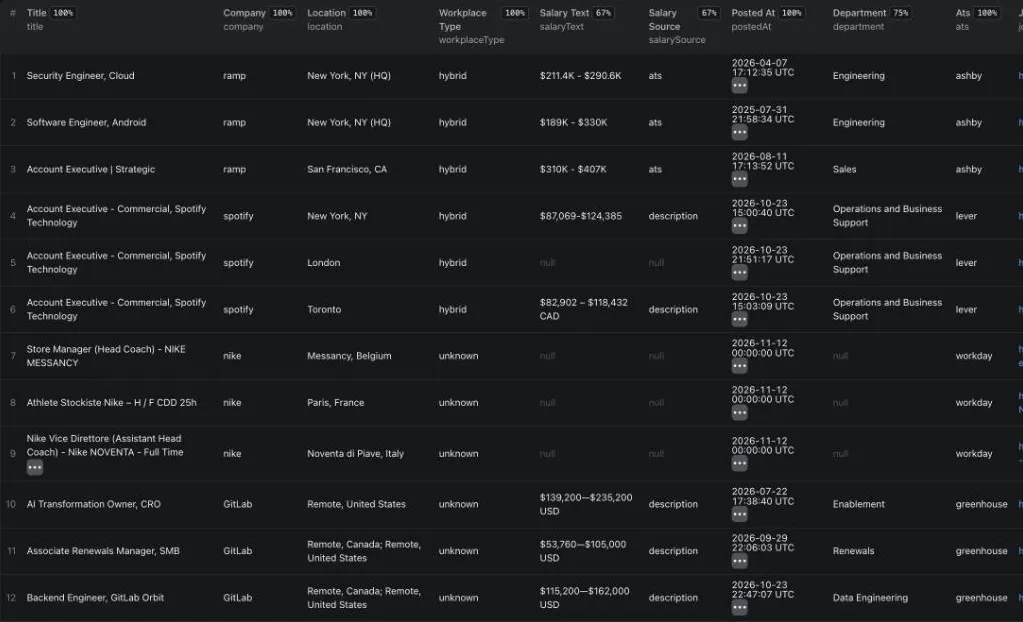
Each row also gives you:
- Links: the job posting and the application form.
- Places: every location listed, and its country.
- Team: department, team, and seniority read from the job title.
- Pay: yearly salary figures, where the company publishes pay, and whether it came from a field or the job text.
- Details: the full job description and the date it was posted.
- Hiring signals: how many jobs the company has open, and when we first saw each job (with only new jobs on).
- Company summary: one entry per company in a separate record (
COMPANIES, in the run's storage, as JSON), covering the whole board, not only your filters.
How complete is the data?
Not every company publishes every field. This is what we measured on real companies' job boards, so treat it as a guide, not a promise. We re-measure it every time we update the scraper.
| Share of jobs with | Ashby | Greenhouse | Lever | Recruitee | Workable | Workday |
|---|---|---|---|---|---|---|
| Jobs measured (companies) | 120 (2) | 120 (2) | 120 (2) | 23 (1) | 10 (1) | 120 (2) |
| Salary | 85% | 70% | 50% | 4% | 0% | 50% |
| Country | 100% | 98% | 100% | 100% | 100% | 100% |
| Remote, hybrid or onsite | 80% | never given | 100% | 100% | 100% | 30% |
| Employment type | 100% | never given | 98% | 100% | 100% | 100% |
| Department | 100% | 100% | 50% | 96% | 100% | never given |
| Posting date | 100% | 100% | 100% | 100% | 100% | 100% |
Last refreshed 2026-11-21, from 513 jobs on 10 companies' live job boards.
Workday numbers from 2026-11-18: not re-measured during a Workday outage.
- Remote jobs are found on every system. Greenhouse and Workday boards often do not label jobs remote, hybrid or onsite, so we also read the location ("Remote, Canada") and set
isRemote(on Workday alsoworkplaceType: remote). - "Never given" means the hiring system has no such field: workplace and employment type on Greenhouse, department on Workday.
- A low share is usually the company, not the system. Salary is read from the job text on every system when there is no salary field; some companies simply post no pay.
Every run also checks up to 500 of its own rows (formats, stray spaces, malformed links, impossible values) and saves the result in the run's storage as DATA_QA.
The full list of columns is under "Field reference" at the end.
How do we check the data?
- Against each job's own page: on November 16, 2026, 30 jobs drawn at random (5 per hiring system) were compared field by field with each job's own page: 127 fields matched and 4 did not. One was the checker's error; we are fixing the other 3 (a second city on Lever, a salary period on Workday).
- Success rate: on November 13, 2026, we ran 12 companies we had never tuned on, across all six hiring systems. All 12 came back read: 442 jobs.
Read this before you buy
- Set a memory name (
memoryName) before your first only-new run. Without one, editing the company list or any filter starts a fresh memory, and the next run charges every open job again. - The first only-new run charges every open job. None has been seen yet, and a company you add later counts all its open jobs as new once.
- You bring the links. A company name alone is not guessed. A careers page link works about one time in four; a job board link is safer.
- Six hiring systems only. SmartRecruiters, iCIMS, BambooHR and Taleo are not read (a SmartRecruiters board comes back as a free row saying why).
- Fields depend on the hiring system. Greenhouse has no workplace or employment type, and Workday no department (see the table above).
- Very large Workday employers can come back short. If a site still hits Workday's 2,000-job cap after splitting, the company is marked truncated. You get, and pay for, the jobs read.
- Workday often throttles Apify's network. Some Workday boards may come back empty or short; you pay only for the jobs read. In our runs from November 18 to 20, 2026, every Workday board came back in 12 of 80. The status message names the boards Workday throttled; run again later.
🚀 How to scrape career pages
- Open Career Page Jobs Scraper and keep the example input (GitLab's Greenhouse job board, 10 jobs).
- Click Start. It takes under a minute and costs about 5 cents (10 jobs plus the start fee).
- Open the Output tab, or download the results as CSV or Excel.
- Swap in your own careers links and run again.
Which Greenhouse, Lever, Ashby, Workday, Workable and Recruitee links work
- Job board links, such as
job-boards.greenhouse.io/<company>,jobs.lever.co/<company>orjobs.ashbyhq.com/<company>. - Workday, Workable and Recruitee boards, such as
<company>.wd5.myworkdayjobs.com/...,apply.workable.com/<company>or<company>.recruitee.com. - A company's own careers page, when it links to or embeds one of the six. This works about one time in four, so a job board link is safer (see "Will my careers page link work?").
💰 How much does it cost to scrape career pages?
You pay for each job you receive, plus a tiny fee each time a run starts.
Apify's running costs (servers, proxies) are included.
| Event | Price |
|---|---|
| Job delivered | $0.005 ($5 per 1,000), less on paid plans |
| Run start | $0.001 |
The job price depends on your Apify plan. The run start fee is the same on every plan.
| Your Apify plan | Per 1,000 jobs |
|---|---|
| Free | $5.00 |
| Starter (10% off) | $4.50 |
| Scale (20% off) | $4.00 |
| Business (30% off) | $3.50 |
What a typical run costs
Costs below are at the Free plan price. Paid plans pay less per job.
| What you run | Jobs charged | Cost |
|---|---|---|
| The example input, once | 10 | about 5 cents |
| A one-off pull of 1,000 jobs | 1,000 | $5.001 |
| 100 companies, weekly, only new: the first run (estimate: 40 open jobs per company) | 4,000 | $20.00 |
| The same schedule, each later week (estimate: 150 new jobs a week) | 150 | $0.75 a week, about $3.25 a month |
- The first only-new run returns every open job, because none has been seen yet. Later runs charge only for new jobs.
- Apify's Free plan includes $5 of credit a month, enough for about 1,000 jobs at the Free plan price.
- Cap your spend. Set a maximum cost per run in the run options, and the run stops cleanly when it gets there.
- Adding a company counts its open jobs as new on the next run, and they are charged once.
- Set a memory name (
memoryName) before you start. Without one, editing the company list or any filter starts a fresh memory, and the next run charges every open job again. A task or schedule saved with the setting's old name,stateKey, keeps working with the same memory. - Runs that share a memory take turns. If a run starts while another run is still using the same memory, it waits for that run to finish, then returns only the jobs that are still new, so the same new jobs are not charged twice. It waits up to 5 minutes; if the memory is still in use after that, the run stops without reading any board and ends Succeeded with 0 jobs. No jobs are charged, and they stay new for the next run.
You never pay for
- Companies that return no jobs: links we cannot match to a supported hiring system, SmartRecruiters boards, empty boards, and boards that block or fail before sending any job.
- Jobs your filters remove: by keywords, location, workplace type, salary or date.
- Jobs you already got in an earlier run, when only new jobs is on.
- Closed-job rows, which tell you a job was taken down (
includeClosed). - Descriptions: the full job text costs nothing extra.
👥 Who uses Career Page Jobs Scraper?
Sales teams: hiring signals from target accounts
A company hiring for a team is often about to buy for it.
- Paste your target accounts' careers links.
- Run it every Monday with only new jobs turned on (
onlyNew). - Watch the open-jobs count (
companyOpenJobs) and the department column for new demand. - See the change since last week: with only-new on, each company's summary gives last run's open-jobs count, the change, and the departments added or dropped (
openJobsChange,departmentsAddedinCOMPANIES). - From the second run: the change is empty on the first run, and for a board we could not read in full.
previousRunAtnames the run it compares with.
Recruiters: competitor hiring by department
See which roles competitors open, where, and at what level.
- Filter by department, keywords and how recently the job was posted (
departments,keywords,postedWithinDays). - Sort by seniority (
seniority).
Job boards and aggregators: a weekly feed of new jobs
Keep a niche job board filled from the companies you track, without one scraper per hiring system.
- Only new jobs, with a saved memory: use
onlyNewwith amemoryName. - A ready-made feed: the latest-run link of a saved task works as a job feed.
- Take filled jobs down with closed-job rows (
includeClosed), free. - Know which job closed: each closed row gives the title, location and department as we first returned the job, the day we found it gone (
closedAt) and how many days it was open (daysOpen). - As exact as your schedule: a weekly run dates a closing to within a week.
- Jobs from before this update get the details their board shows on your first run after it.
- Very large memories (over about 25,000 open jobs) keep only the ID of the jobs first returned longest ago. Workday gives no department.
Labor market research: salaries and remote share by company
Compare published pay and remote share across many employers in one table.
- Keep only jobs with pay (
onlyWithSalary). - Group by yearly salary, remote status and country (
salaryMinYearly,salaryMaxYearly,isRemote,countries).
🛠️ For developers: input and output examples
Everything below is the technical detail: example inputs, one full output row, limits, the FAQ and the field reference.
Example input: engineering jobs at a few companies, once
Example input: a weekly feed of new jobs from a company list
Schedule this weekly. Each run returns, and charges for, only jobs that were not in an earlier run with the same memoryName.
Example input: remote roles with a published salary
Output example: one row
One row, from the run on November 12, 2026 (description shortened):
- Every row has every field, in the same order. A value the ATS does not publish is
null. - Workplace type is what the posting states. First the ATS field; if it is empty, a location that says Remote (Workday, Ashby), or Hybrid or Office in every location (Workday); then, on Workday, a line of its own that states it plainly, such as "Hybrid: 3 days per week in the office". A line that hedges ("Remote: optional") or names two workplaces says nothing. Otherwise it is
unknown: we never read it from running text. Greenhouse never says, so theremotefilter also keeps jobs whose location says remote (isRemote), andhybrid,onsiteand employment-type filters drop Greenhouse jobs. - Salary comes from the ATS field when there is one (
salarySource: ats). Otherwise it comes from a range, or a single amount stated as pay, written in the description (salarySource: description), read by fixed rules. - A bare
$needs a country. It is read as the dollar of the job's only country, or as US dollars when no country is named. On a job listed in more than one country it is left empty, unless the same sentence names exactly one of them before the amount ("The Canada base range is $..."). - Company display name is the ATS's own; Lever, Ashby and Workday give only the board name (
spotify,ramp,nvidia).
❓ Limits and FAQ
What does it not do?
- Six ATSs only: Greenhouse, Lever, Ashby, Workday, Workable and Recruitee. Not SmartRecruiters (its robots.txt disallows crawlers), iCIMS, BambooHR or Taleo.
- No company discovery. You bring the links. A bare company name such as
stripeis not guessed, because a wrong guess returns another company's jobs. - Careers pages are read once, without a browser. If the page does not link to or embed a supported ATS in its HTML, the company is reported as unresolved.
- No recruiter or contact data, and no AI enrichment. Fields are copied from the ATS or derived by fixed rules.
- Workday shows at most 2,000 jobs per search. For larger employers we split the search by location and merge the results.
- Truncated companies still count. If a Workday split still hits the cap, or a board gives two different short answers in a row, the company is marked truncated; the jobs we did get are delivered and charged.
What happens when a company cannot be read?
The run says why, instead of failing silently.
| Status | Meaning | Charged |
|---|---|---|
ok | Read in full | For each job delivered |
unresolved | The link matched no supported ATS, the careers page could not be opened, or the ATS has no board by that name | No |
unsupported | SmartRecruiters, with the reason | No |
empty | The board exists and has 0 open jobs | No |
blocked | A job board refused to list its jobs | No |
failed | Timeouts or server errors after 3 retries, or a job board that refused or stopped answering while its job details were read | Only for the jobs delivered before the failure |
truncated | Workday cap reached after splitting, or the listing came back short | Only for the jobs delivered |
skipped | The job limit, spending limit or time limit came first | Only for the jobs delivered before the stop |
- Where to find the summary: in the run's status message, and in the key-value store as
RUN_SUMMARY(run totals) andCOMPANIES(one row per company). DATA_QA: the run's own data check: findings, how complete each field is per hiring system, and any values repaired before delivery.- Outages are not closures. A board that comes back empty or broken never marks its jobs closed, and one that suddenly lists far fewer jobs is checked a second time first, so a brief glitch does not get them sold to you again as new next run.
- When a run fails, and when it does not:
- Fails: the input is invalid (the status message names the setting), or no company was read and at least one is
unsupportedorunresolved(a link we cannot match, or a board that does not exist). Fix those companies and run again. A run also fails when Apify's storage does not answer while it checks its only-new memory, or on a bug of ours. - Succeeds with 0 jobs, nothing charged: every job board, or careers page, refused or stopped answering (
blockedorfailed, for example during a Workday outage): run again later. Or, with only-new on, another run kept the same memory for the whole wait (up to 5 minutes): space your scheduled runs further apart. Either way, only-new jobs stay new for the next run. - Succeeds with a note: some companies could not be read. The other companies' jobs are delivered and charged, and the status message counts the companies missed by reason.
- When a run reads nothing,
RUN_SUMMARY'sfailurefield says why:bad_input,no_readable_company,boards_unavailableormemory_busy.
- Fails: the input is invalid (the status message names the setting), or no company was read and at least one is
How does Career Page Jobs Scraper work?
- Finds the ATS. Career Page Jobs Scraper recognises the ATS from the link. Any other careers page is fetched once, without a browser, and searched for an ATS link, iframe or embed script.
- Reads the public board. It reads the ATS's public job board data, the same data the careers page shows.
- Filters first. Filters run before descriptions are fetched and before anything is charged.
- Stays polite. At most 5 requests are in flight, Lever is read one request at a time, and failed requests are retried 3 times with backoff.
Why not call the Greenhouse or Lever API myself?
For one board on one ATS, the public API is a fine choice. Across many companies you meet:
- Six APIs with six schemas, each with its own pagination.
- Descriptions that need extra requests.
- Workday's 2,000-job cap per search.
- Salaries in different shapes and periods.
- Careers pages that hide which ATS they use.
- State kept between runs, which only-new mode needs.
This Actor does all of that and returns one schema.
Is it legal to scrape career pages?
- Public data only. Career Page Jobs Scraper reads only job boards that employers publish for anyone to view, without logging in.
- Lever: its postings API documentation says published postings "may be scraped by third parties".
- Greenhouse: its Job Board API documentation states that job board data "is publicly available".
- Personal data can still appear, for example a recruiter's name written into a job description. The GDPR protects it in the EU, and similar laws apply elsewhere.
Do not collect or process personal data without a legitimate reason, and ask a lawyer if you are unsure. This is not legal advice.
How do I get only new jobs on a schedule?
- Set
onlyNewto true and give the run amemoryName. - Save the input as a task.
- In Apify Console, add a schedule to the task (Schedules, for example every Monday at 07:00).
Each run then delivers and charges only jobs not seen before under that memoryName.
Without a memoryName, the memory is tied to your company list and filters. Editing either starts a new memory, and the next run returns and charges every open job again.
Can a failed or empty read mark jobs closed? Does a job that comes back show up again?
- Only a board read in full can close jobs. A board that is blocked, fails, comes back empty, is cut short, or is stopped part-way keeps every job in memory. Nothing is marked closed, and nothing is sold to you again next run.
- A sudden drop is read twice. If at least 20 of the jobs memory holds for a board are missing, and they are at least half of them, the board is read again 10 seconds later. The jobs count as closed only when both reads miss the same jobs.
- A smaller drop counts at once. Fewer missing jobs than that are counted as closed on the first read.
- A job counted closed that comes back is new again. Memory forgets a job once it is counted closed (with closed-job rows on, once its closed row reached you). If the board lists it again later, it is returned and charged as a new job.
- A job reposted under a new ID is always a new job.
Can I use it from Make, Zapier, Google Sheets, an AI agent or my own code?
Yes.
- No-code tools: Apify connects runs to Make, Zapier, n8n, Google Sheets, Slack, webhooks and more (https://apify.com/integrations).
- n8n: a ready workflow for this Actor (https://api.apify.com/v2/key-value-stores/u9cNr4EkNS51rZPUt/records/n8n-career-page-jobs-scraper.json). In n8n, choose Import from URL and paste the link, then add your Apify API token to the Run Actor node as a Header Auth credential (
Authorization=Bearer <token>). - AI agents: through the Apify MCP server.
- Your own code: the API tab has ready snippets.
- CSV and Excel downloads: Apify sorts the columns alphabetically and splits lists into numbered columns (
countries/0,countries/1). In a spreadsheet,locationholds only the first place a job lists; every place is inlocations/0,locations/1and on. Use JSON to keep lists whole. - A job feed URL: the latest run of a task is always at
https://api.apify.com/v2/actor-tasks/<TASK_ID>/runs/last/dataset/items?format=csv(alsojson,xlsx,xml), with your API token.
Will my careers page link work?
Board links work far more often: we read the board directly, with no page to search. A company's own careers page works about one time in four.
- Our test (November 12, 2026, run on Apify): 50 careers pages of well-known companies. 13 found their board (26%).
- No board link on the page (29): for example, the page loads its job list with a script, which we do not run.
- Site refused or timed out (7), and 1 page linked a board name the hiring system does not know.
- Most misses still have a board: at least 19 have a live Greenhouse or Ashby board under their own name.
- What to do: open the careers page, click any job, and paste the address of the board you land on (for example
job-boards.greenhouse.io/stripe). An unresolved company is never charged.
Why did a company return 0 jobs?
Look at the run summary first.
unresolved: the link did not lead to a supported ATS board. See "Will my careers page link work?".ok, but 0 returned: the board has jobs (openJobs) and your filters removed them all.empty: the board has no open jobs today.blockedorfailed: usually temporary. Run again, or setproxy. A very large Workday board can be refused part-way: you keep and pay for the jobs delivered before it, and with only-new on, each later run continues with jobs not yet delivered. Without only-new, a re-run charges those jobs again.skipped: the run hitmaxJobs, your spending limit or its time limit first. Raise the limit or split the list.
Why is the salary empty?
The company did not publish a salary we can read.
- From a field: Ashby, Lever and Recruitee, when the company fills it in; Workable, when the job text has no salary.
- From the job text: Greenhouse and Workday always (they have no salary field); Ashby, Lever, Recruitee and Workable when the field is blank. In our data check (November 13, 2026), 30 of 60 GitLab jobs and 17 of 60 Spotify jobs had one.
- No period written: a figure of a year's pay or more in its currency is read as yearly (from 10,000 in dollars, euros or pounds, so "Salary: £32k" is yearly). A smaller figure with no period is not read: it could be a month's pay.
- Not read: a single figure that is not tied to pay and a period (so "$30/hour" is read, a "€3,000 training budget" is not), or a range whose currency or period is unclear.
salaryText keeps the salary as written when there is one.
Do I need a proxy?
No, not for most boards. The ATS endpoints answered from Apify's datacenter addresses without blocks in our tests.
Use proxy if a company's site rate-limits you.
🧇 More tools from us and support
- Jobs: Greenhouse Jobs Scraper. Every open job from Greenhouse job boards, with salaries read from the job text.
- Jobs: Lever Jobs Scraper. Every open job from Lever job boards, with remote or hybrid and salaries.
- Ads: Google Ads Transparency Scraper. Your competitors' new and stopped Google ads.
- Keywords: Keyword Search Volume. Search volume, CPC, difficulty and intent for a keyword list.
- App Reviews: Google Play Reviews Scraper. Every Google Play review for any app, with developer replies and no reviewer names.
- App Reviews: App Store Reviews Scraper. App Store reviews in any country, newest first, with developer replies and no reviewer names.
- Apps: Google Play Scraper. App details, search, developer catalogs and similar apps from Google Play, in every country.
- Transcripts: YouTube Transcript Scraper. Transcripts of YouTube videos, with chapters and timestamps.
- Transcripts: TikTok Transcript Scraper. Transcripts of TikTok videos, with AI speech-to-text when there are no captions.
- All our tools: apify.com/waffle-iron.
- Found a bug, or need an ATS or field we do not cover? Open an issue on the Issues tab and include the run link.
- Did it save you time? A short review helps other buyers find it.
📖 Field reference
Input fields
The Input tab shows the same fields with their editors.
Inputs written for other job scrapers mostly work as they are: startUrls, maxItems, maxResults and onlyNewJobs are accepted as aliases.
| Field | Type | Default | Description |
|---|---|---|---|
companies | array | required | Careers links, up to 1,000: ATS board URLs or company careers pages that link to one. |
keywords | array | none | Keep jobs whose title contains any of these words. |
excludeKeywords | array | none | Drop jobs whose title contains any of these words. |
locations | array | none | Keep jobs in any of these places: city, region, country name or code, or remote. |
workplaceTypes | array | none | Keep only remote, hybrid or onsite jobs. Greenhouse has no workplace field: remote keeps its jobs whose location says remote, hybrid and onsite drop them. |
employmentTypes | array | none | Keep only these employment types, such as full-time or contract. Jobs whose ATS does not say (all Greenhouse jobs) are dropped. |
departments | array | none | Keep only jobs in these departments. |
postedWithinDays | integer | none | Keep jobs posted in the last N days. |
onlyWithSalary | boolean | false | Keep only jobs with a salary (published or in the text). |
minSalary | integer | none | Keep jobs whose yearly salary maximum is at least this amount, in the job's currency. |
onlyNew | boolean | false | Return and charge only jobs not seen in earlier runs with the same input or memoryName. |
memoryName | string | none | Name for the only-new memory, so editing the company list does not reset it. |
includeClosed | boolean | false | With only-new on, also return one free row per job that closed since the last run. |
includeDescription | boolean | true | Include the full description text. |
maxJobs | integer | 0 | Stop after this many jobs in the run. 0 means no limit. |
maxJobsPerCompany | integer | none | Stop after this many jobs from one company. |
proxy | object | none | Optional Apify Proxy settings. Not needed for most boards. |
Output fields
| Field | Type | Description |
|---|---|---|
id | string | Stable key: <ats>:<companyToken>:<jobId>. Use it to dedupe across runs. |
ats | string | The ATS the job came from: greenhouse, lever, ashby, workday, workable or recruitee. |
company | string | Company display name. |
companyToken | string | The company's board name in the ATS. |
companyBoardUrl | string | The public job board URL. |
jobId | string | The ATS's own job id. |
requisitionId | string | The employer's requisition number, where published. |
title | string | Job title as published. |
jobUrl | string | Link to the job posting. |
applyUrl | string | Link to the application form. |
location | string | Primary location as published. |
locations | array | Every location listed for the job. |
countries | array | ISO country codes of those locations. |
isRemote | boolean | True when the ATS marks the job remote, one of its locations says remote, or (Workday, when neither speaks) the posting states it on a labelled line of its own, such as "Remote: anywhere in the UK". Can be true for a hybrid job with a remote option. |
workplaceType | string | remote, hybrid, onsite or unknown. |
employmentType | string | Full-time, part-time, contract, internship or temporary, where published. |
department | string | Department as published. |
team | string | Team as published. |
seniority | string | Level read from the title by fixed rules (for example senior, lead); null when the title has no marker. |
salaryMin | number | Lower end of the published salary range. |
salaryMax | number | Upper end of the published salary range. |
salaryCurrency | string | ISO currency code. |
salaryPeriod | string | year, month, week, day or hour. |
salaryText | string | Salary as published. |
salarySource | string | ats when the ATS publishes the salary as a field; description when it was read from the job description by fixed rules: a range, or a single amount stated as pay. |
salaryMinYearly | number | salaryMin converted to a yearly amount in the same currency (no exchange rates). |
salaryMaxYearly | number | salaryMax converted to a yearly amount in the same currency (no exchange rates). |
descriptionText | string | Job description as plain text; null when includeDescription is off. |
descriptionHtml | string | Job description as HTML; null when includeDescription is off. |
postedAt | string | When the job was first published (Lever: when it was created), ISO 8601 UTC; midnight when only a date is given. |
updatedAt | string | When the ATS last changed the job, where it says. |
applicationDeadline | string | Closing date for applications, where the ATS publishes one. |
firstSeenAt | string | When this Actor first saw the job (only-new mode); null when only-new is off. |
closedAt | string | Closed rows only: when this Actor first found the job gone (the run's time, so as exact as your schedule); null on open jobs. |
daysOpen | integer | Closed rows only: whole days the job was open, from postedAt (else firstSeenAt) to closedAt; null on open jobs and when neither date is known. |
companyOpenJobs | integer | Open jobs on this company's board in this run; a hiring signal. |
changeType | string | new for a job not seen in an earlier run; closed for a job that disappeared since the last run (only with includeClosed, never charged); null when only-new is off. |
scrapedAt | string | When the row was produced, ISO 8601 UTC. |


