
Google Play Reviews Scraper & Monitor: Edits and Replies
Pricing
from $0.18 / 1,000 reviews
Google Play Reviews Scraper & Monitor: Edits and Replies
Google Play Store reviews scraper: paste Android app IDs or Play Store links, get every app review with no reviewer names. A bad app ID never fails the run. Monitor mode returns only what changed: new reviews, edited stars or text, and developer replies with reply times. All languages in one run.
Pricing
from $0.18 / 1,000 reviews
Rating
0.0
(0)
Developer

Waffleiron
Maintained by CommunityActor stats
0
Bookmarked
2
Total users
1
Monthly active users
a day ago
Last modified
Categories
Features
Share
Get every Google Play review for any app, with no reviewer names, and see which reviews get a developer reply and how fast. $0.25 per 1,000 reviews, less on paid plans.
Paste app IDs or Play Store links. A bad or removed app never fails the run.
Run it daily in monitor mode for only what changed.
🔍 What does Google Play Reviews Scraper do?
You give Google Play Reviews Scraper a list of Android apps. It reads their public Google Play reviews and hands back one clean row per review.
- No reviewer names or photos, by design. The reviewer's name, or any part of it, is also blanked out of developer replies, in any alphabet. Safer for EU data rules and for feeding reviews to an AI.
- Reply tracking. Each review says whether the developer replied and how many hours it took (
hoursToReply). - Every review, not just the first page. It pages to the end of each app's reviews, or stops at the date or count you set.
- All your languages in one run. Google Play splits reviews by language. Pick several, or "all" for 20 major languages, and get them in one table with duplicates removed for free.
- One summary row per app, free. Reply rate and typical reply time by star rating, reviews per day, and the average score of each app version.
- Clean fields, tested every day. Load the rows straight into a sheet or database without cleaning them. A live test and a data check run on this Actor every day, and we read every issue.
- Take it anywhere. Download CSV or Excel, or send results to Google Sheets, Make, Zapier or an AI agent. Developers also get JSON, XML and the API.
Why use Google Play Reviews Scraper?
- A bad app never fails the run. A removed app or a typo comes back as one free row saying why. The other apps still arrive.
- No silent short counts. If Google stops answering partway, the app is marked "partial" and the run says so. In our test on 16 random apps from 8 countries, none stopped short; one had no French reviews and said so.
- Checked against Google Play's own pages. Before release, 15 random reviews in English, Japanese and German were compared field by field: 75 of 75 values matched on stars, text, date, reply and app rating.
- Monitor mode sees edits and replies. When a reviewer changes 2 stars to 4, you get the new score and the old one. When a developer replies within 14 days, you get that too, with how many hours it took.
- Charged once per review. A review that shows up in two languages or countries is charged once.
- Field names you already know. The columns match the names most Google Play review tools use (
score,text,version,thumbsUp,replyText), so switching needs no remapping.
📋 What data can I get from Google Play reviews?
Three reviews from a run on November 16, 2026 (the newest English reviews of Spotify, Down Dog and CookBook):
| App | Stars | Review (first words) | Date | Developer replied |
|---|---|---|---|---|
| CookBook - Recipe Manager | 1 | I have used this for years and loved it. Sadly the new UI is a hot mess... | 2026-05-17 | Yes (review edited after the reply) |
| Meditation, Down Dog | 5 | Thank you for the app. That an app.. I cant believe that this app help... | 2026-04-13 | No |
| CookBook - Recipe Manager | 4 | love it. is there any chance of a friends system for adding and ease of... | 2026-03-11 | Yes, after 99.3 hours |
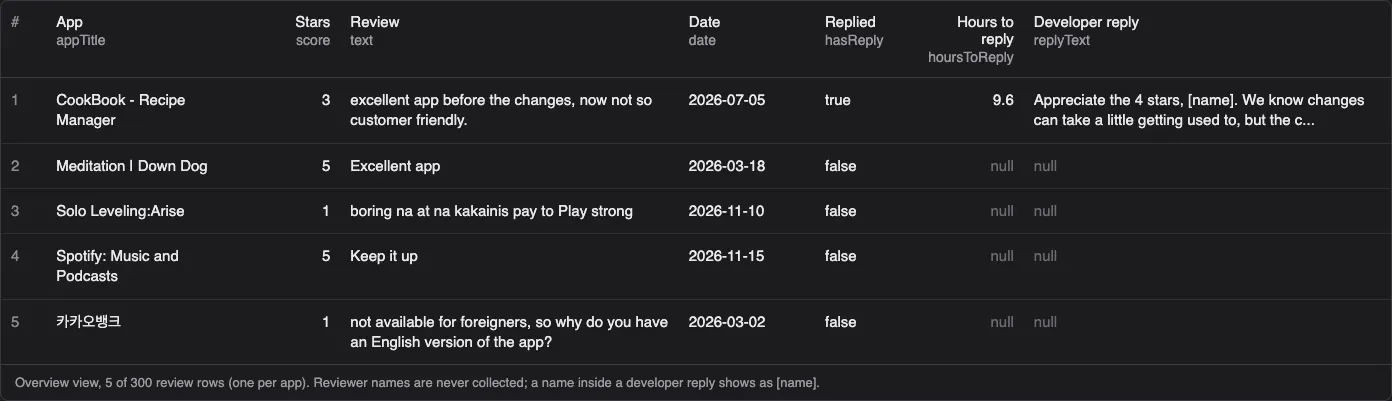
Each row also gives you:
- The review: stars, full text, date, the app version the reviewer used, and how many people found it helpful (
thumbsUp). - The developer's reply: reply text and date, and the hours it took to reply (
hoursToReply). - Feature ratings, where Google shows them (
criteria). - Where it came from: the language and country it was read in, and a link to the review.
Monitor mode, from a real run
On November 16, 2026 we started a monitor on Spotify's English reviews:
| Run (Eastern time) | What it read | What it returned | Charged |
|---|---|---|---|
| First, 7:15 AM (baseline) | Spotify's 2,000 newest reviews, back to November 11 | One summary row (baseline: true) | Nothing |
| Second, 7:23 AM | 947 reviews, the last 48 hours | One free row: "no changes since the last run" | Nothing |
| Third, 9:05 AM | The 2,000 newest again (20 pages, the most a run re-reads) | 59 new reviews | 59 reviews |
- Changes arrive in Google's own rhythm. The 59 new reviews were written the day before and published by Google in one batch between the second and third runs. A daily schedule fits it.
- The second run used the build's shorter re-read (48 hours). Runs now re-read up to 14 days, as the third run did.
- The first run is free. It records each app's recent reviews and returns only a summary row per app. Later runs return what changed since.
How complete is the data?
Not every review has every field. This is what we measured on real apps, so treat it as a guide, not a promise. We re-measure it every time we update the Actor.
Stars, text and date were on every review in every language.
| Share of reviews with | English | Japanese | Korean | Russian |
|---|---|---|---|---|
| Reviews measured (apps) | 320 (6) | 60 (1) | 40 (1) | 60 (1) |
| App version | 83% | 88% | 85% | 77% |
| Developer reply | 22% | 0% | 0% | 5% |
| Hours to reply | 20% | 0% | 0% | 5% |
| Feature ratings | 20% | 40% | 22% | 32% |
Last refreshed 2026-11-21, from 480 reviews on 9 apps' public Google Play reviews.
- A wider random sample. On November 16, 2026, 1,479 reviews of 16 apps drawn at random from Google Play search results in 8 countries had an app version on 82% to 96% of reviews and a developer reply on 4% to 55%, by language. The table's apps, the same set at every update, answer fewer reviews.
- Replies depend on the developer. Some answer every review, some never do.
- App version is Google's own gap. Google leaves it out of some reviews.
Every run also checks up to 500 of its own rows (formats, stray spaces, malformed links, impossible values) and saves the result in the run's storage as DATA_QA.
It also scans every developer reply for a reviewer's name left in, and checks each charge against a delivered review.
The full list of columns is under "Field reference" at the end.
How do we check the data?
- Against Google Play's own pages: on November 17, 2026, 15 reviews drawn at random in English, Japanese and German were compared with Google Play's app pages on stars, text, date, reply and app rating: 75 of 75 values matched. 9 older reviews, opened at their own links, matched 36 of 36. It repeats weekly.
- Success rate: on November 16, 2026, we read 25 apps we had never tuned on, 16 of them drawn at random from searches. 24 returned reviews; the other had no French reviews and said so. None stopped short.
Read this before you buy
- Reviews are not ratings. Only ratings with written text are reviews. An app with 2,291 ratings had 653 English reviews in our test.
- The date is "written or last edited". An edited review moves to the top with a new date.
- Google publishes reviews about a day late. Asking for "the last 1 day" can come back empty; use 2 or more.
- Language decides which reviews you get; country barely does. Spotify's 100 newest English reviews were the same in the US and the UK, and shared none with its German ones. The rating does change by country (4.35 in the US, 4.17 in Germany).
- The language field is the one you asked for. Google does not label a review's language, and we never guess it. A Korean-language review can come back under English if Google files it there.
- No reviewer names or photos, ever.
🚀 How to scrape Google Play reviews
- Open Google Play Reviews Scraper and keep the example input (Spotify's 100 newest English reviews).
- Click Start. It takes about 25 seconds and costs about 2.5 cents (100 reviews, no start fee).
- Open the Output tab, or download the results as CSV or Excel.
- Swap in your own apps and run again.
Which apps work
- App IDs, such as
com.spotify.music. - Play Store links, such as
https://play.google.com/store/apps/details?id=com.spotify.music. - Apps sold only in other countries still work: Google Play shows their reviews to anyone.
- Not supported: Apple App Store links. They come back as a free row saying so.
💰 How much does it cost to scrape Google Play reviews?
You pay for each review you receive. There is no start fee.
Apify's running costs (servers, proxies) are included.
| Event | Price |
|---|---|
| Review delivered | $0.00025 ($0.25 per 1,000), less on paid plans |
The review price depends on your Apify plan.
| Your Apify plan | Per 1,000 reviews |
|---|---|
| Free | $0.25 |
| Starter (10% off) | $0.225 |
| Scale (20% off) | $0.20 |
| Business (30% off) | $0.175 |
What a typical run costs
Costs below are at the Free plan price.
| What you run | Reviews charged | Cost |
|---|---|---|
| The example input, once | 100 | 2.5 cents |
| 1,000 reviews | 1,000 | 25 cents |
| 10,000 reviews across 5 languages | 10,000 | $2.50 |
| A daily monitor on one app, the first run | 0 | free |
| The same monitor, a run with no changes | 0 | free |
| The same monitor, a run with 59 new reviews (measured) | 59 | 1.5 cents |
- Apify's Free plan includes $5 of credit a month, enough for about 20,000 reviews at the Free plan price.
- Cap your spend. Set a maximum cost per run in the run options, and the run stops cleanly when it gets there.
- Overlapping monitor runs skip, not wait. If another run of the same monitor is still reading one of your apps, this run skips that app and reads the rest.
- No double charges. The skipped app gets a free
partialrow. The run reading it returns that app's changes, and your next run returns anything newer. - Give each task its own
monitorName. Tasks without one share an app's memory, so a change one task returns is not returned to the other. - If every app is in use, the run waits up to 5 minutes for one to free up. If none does, it fails without reading any app, and no reviews are charged.
You never pay for
- Apps that return no reviews: removed apps, typos, and requests Google blocks.
- Duplicates: a review found in two languages or countries is charged once.
- The app summary row: reply rates, reply times, reviews per day and scores by version.
- The first monitor run: it only records where each app stands.
- Reviews you already got, in monitor mode, unless they changed. A changed review comes back once, as one row, and is charged as one review.
👥 Who uses Google Play Reviews Scraper?
Product and app teams: what users say after each release
See how each version lands, in every market you sell in.
- Group scores by app version from the summary row (
scoreByVersion). - Pull only 1- and 2-star reviews to find what broke (
stars).
Competitor and market research: how rivals treat their users
Watch competitor apps you cannot see in your own Play Console.
- Compare reply rates and reply times by star rating across apps (
replyRateByStars,medianHoursToReplyByStars). - Track rating changes after a rival replies, in monitor mode.
Support and community teams: unanswered reviews
- Find low-star reviews with no reply (
hasReply). - Get told when a reply goes up, in monitor mode (
reply_added).
AI and data teams: clean review text in many languages
- Feed reviews to a model with no personal names in them.
- Collect many languages in one table, with no duplicates.
🛠️ For developers: input and output examples
Everything below is the technical detail: example inputs, one full output row, limits, the FAQ and the field reference.
Example input: newest reviews for a few apps, once
Example input: a daily monitor of competitor apps
Run it on a schedule. The first run records a baseline and returns no reviews (free); later runs return only changes.
Example input: 1- and 2-star reviews in every major language
Output example: one row
One row, from the run on November 16, 2026 (the reviewer's name in the reply is replaced by [name]):
Output example: the app summary row
- Every row has every field, in the same order. A value Google does not publish is
null. hoursToReplyis never guessed. It is empty when the review was edited after the reply, because the review's date then moved.- The summary's window (
windowFrom,windowTo) is the span of the reviews read in this run; every rollup on the row is over that window.
❓ Limits and FAQ
What does it not do?
- No reviewer names, photos or profile links. Not as an option either.
- No Apple App Store reviews.
- No developer emails or contact details.
- No ratings without text. Google publishes only the star count for those.
- Nicknames are not blanked. Replies are cleaned of the name Google shows and each part of it. A short form ("Jim" for "James"), or a name part that is also a common word ("Happy", "Love"), stays.
- No mainland China. Google Play is not offered there.
What happens when an app cannot be read?
The run says why, instead of failing silently.
| Status | Meaning | Charged |
|---|---|---|
no_reviews | Google lists no reviews in the languages you picked | No |
not_found | No such app, or it was removed | No |
invalid_input | Not a Google Play app ID or link | No |
partial | Google stopped answering partway, your spending limit was reached, or the run was aborted or ran out of time; you got what was read. In monitor mode, also an app skipped because another run of the same monitor was reading it | Only the reviews delivered |
blocked_retry_later | Google asked us to slow down; try again later | No |
failed | Google kept returning errors for this app and nothing was read; try again later | No |
route_changed | The app's page shows reviews but Google's review feed returned none; we fix this | No |
- The run fails only when no app at all could be read. One bad app never fails the others.
- Where to find the details: in the run's status message, on each app's row, and in the key-value store as
RUN_SUMMARY.
How does monitor mode decide what changed?
- New: a review it has not seen before.
- Edited: the stars or text changed. You get the old values too (
previousScore,previousText). - Reply added or changed: the developer replied, or edited the reply (
previousReplyText).
Each changed review comes back once per run, as one row. Edits are spotted only for reviews the monitor has already recorded; an older review edited for the first time shows up as new.
Deleted reviews are not reported: Google does not say whether a missing review was deleted, hidden or just delayed.
- What each run re-reads: the newest reviews back 14 days, or back to its last complete run if that is longer ago, at most 20 pages (2,000 reviews) per language. A reply to a review up to 14 days old is caught.
- Busy apps: when 14 days hold more than 2,000 reviews (Spotify gets about 450 a day in English), the 20 pages end first. New reviews and edits are still seen; replies to older reviews may be missed, and the summary row says so (
walkComplete: false). - Name each monitor (
monitorName, up to 100 characters), so two tasks on the same app keep separate memories.
How does Google Play Reviews Scraper work?
- Reads public pages. It reads the same public review data Google Play's website shows any logged-out visitor, without a browser or an account.
- Removes duplicates first. Reviews found twice are dropped before charging.
- Stays polite. One request at a time, 2 seconds apart. If Google asks us to slow down, it waits a minute and retries at most twice on a new connection, then marks the app "try again later".
- Never solves a CAPTCHA. If Google shows one, the run stops.
Why not use Google's own review API?
Google's Reply to Reviews API works only for apps you own, and only for the last week. For competitor apps, older reviews, or many apps in one table, you need the public reviews.
Is it legal to scrape Google Play reviews?
- Public data only. Google Play Reviews Scraper reads only reviews that Google publishes for anyone to view, without logging in.
- Personal data can still appear, for example a name a reviewer writes in their own review. The GDPR protects it in the EU, and similar laws apply elsewhere.
Do not collect or process personal data without a legitimate reason, and ask a lawyer if you are unsure. This is not legal advice.
How do I get only changes on a schedule?
- Set
modetomonitorand give the feed a name (monitorName). - Save your input as a task.
- In Apify Console, add a schedule to the task (Schedules, for example every day at 07:00).
The first run records a baseline and returns no reviews, so it costs nothing. After that, each run returns only new, edited and replied reviews, and a run with no changes says so in one free row.
Can I use it from Make, Zapier, Google Sheets, an AI agent or my own code?
Yes.
- No-code tools: Apify connects runs to Make, Zapier, n8n, Google Sheets, Slack, webhooks and more (https://apify.com/integrations).
- n8n: a ready workflow for this Actor (https://api.apify.com/v2/key-value-stores/u9cNr4EkNS51rZPUt/records/n8n-google-play-store-reviews-scraper.json). In n8n, choose Import from URL and paste the link, then add your Apify API token to the Run Actor node as a Header Auth credential (
Authorization=Bearer <token>). - AI agents: through the Apify MCP server.
- Your own code: the API tab has ready snippets.
- CSV and Excel downloads: Apify sorts the columns alphabetically and splits lists into numbered columns. Review rows read cleanly in a sheet; the summary row's
scoreByVersionand by-stars objects are easier in JSON. - A feed URL: the latest run of a task is always at
https://api.apify.com/v2/actor-tasks/<TASK_ID>/runs/last/dataset/items?format=csv(alsojson,xlsx,xml), with your API token.
Why did an app return fewer reviews than I expected?
- Ratings are not reviews: most people leave stars without text.
- One language: add languages, not countries.
- Your filters: a date floor, star filter or
maxReviewsPerAppstops the read early. The summary row says how far it got.
🧇 More tools from us and support
- Jobs: Career Page Jobs Scraper. Every open job from company careers pages, only new ones each run.
- Jobs: Greenhouse Jobs Scraper. Every open job from Greenhouse job boards, with salaries read from the job text.
- Jobs: Lever Jobs Scraper. Every open job from Lever job boards, with remote or hybrid and salaries.
- Ads: Google Ads Transparency Scraper. Your competitors' new and stopped Google ads.
- Keywords: Keyword Search Volume. Search volume, CPC, difficulty and intent for a keyword list.
- App Reviews: App Store Reviews Scraper. App Store reviews in any country, newest first, with developer replies and no reviewer names.
- Apps: Google Play Scraper. App details, search, developer catalogs and similar apps from Google Play, in every country.
- Transcripts: YouTube Transcript Scraper. Transcripts of YouTube videos, with chapters and timestamps.
- Transcripts: TikTok Transcript Scraper. Transcripts of TikTok videos, with AI speech-to-text when there are no captions.
- All our tools: apify.com/waffle-iron.
- Found a bug, or need a field we do not cover? Open an issue on the Issues tab and include the run link.
- Did it save you time? A short review helps other buyers find it.
📖 Field reference
Input fields
The Input tab shows the same fields with their editors.
| Field | Type | Default | Description |
|---|---|---|---|
appIds | array | ["com.spotify.music"] | Google Play app ids (e.g. com.spotify.music) or Play Store links. A link that is not a Google Play app comes back as a free row saying why. |
languages | array | ["en"] | Google Play splits reviews by language: one pass per language, duplicates removed for free. all reads 20 major languages. Codes like en, ja, pt, zh-TW. |
countries | array | ["us"] | Google Play countries (two-letter codes). Language decides which reviews you get; country barely does, so one is usually enough. |
sort | string | "newest" | newest first (best with a date floor and in monitor mode), relevant (Google's most helpful), or rating. |
maxReviewsPerApp | integer | 100 | Stop after this many reviews per app, shared fairly across languages and countries. 0 means no limit. In monitor mode it counts change rows returned. |
reviewsSince | string | none | Only reviews written or edited since this date (2026-11-01) or age (7 days). |
stars | array | none | Only reviews with these star ratings (1 to 5), filtered by Google. Empty means all. |
mode | string | "all" | all returns the reviews read. monitor returns only what changed since the last run: new reviews, edited stars or text, and developer replies. Its first run is a free baseline. |
monitorName | string | none | A name for the monitor's memory, so two tasks watching the same app keep apart. |
routeCheck | boolean | false | For our daily health check: also test both of Google's review routes once. |
Output fields
| Field | Type | Description |
|---|---|---|
reviewId | string | Google's review id. Unique; use it to dedupe. |
appId | string | The app's package id, e.g. com.spotify.music. |
appTitle | string | The app's name on its Google Play page. |
score | integer | The review's stars, 1 to 5. |
text | string | The review text. |
date | string | When the review was written or last edited, ISO 8601 UTC. |
version | string | App version the reviewer used, where Google gives it. |
thumbsUp | integer | People who marked the review helpful (0 when none). |
replyText | string | The developer's reply, with the reviewer's name replaced by [name]. |
replyDate | string | When the developer replied, ISO 8601 UTC. |
hasReply | boolean | True when the developer has replied. |
hoursToReply | number | Hours from the review's date to the reply, one decimal. Null when the review was edited after the reply (its date then moved past the reply). |
language | string | The language the review was read in (the one requested, never guessed). |
country | string | The Google Play country it was read in. |
url | string | Link to the review on Google Play. |
criteria | array | Feature ratings, where Google shows them: {criterion, rating}. |
changeType | string | Monitor mode: new, edited, reply_added or reply_changed. Null in all mode. |
previousScore | integer | Monitor mode, edited: the stars before. |
previousText | string | Monitor mode, edited: the text before. |
previousReplyText | string | Monitor mode, reply_changed: the reply before. |
appScore | number | Summary: the app's rating on Google Play. |
appRatingsCount | integer | Summary: how many ratings the app has (with or without text). |
status | string | Summary and status rows: what happened to this app (see the FAQ). |
error | string | Summary and status rows: why, in words. |
retryable | boolean | Summary and status rows: true when running again later may help. |
input | string | Status rows: the input as you gave it. |
reviewsRead | integer | Summary: reviews read for this app. |
reviewsDelivered | integer | Summary: review rows delivered (and charged) for this app. |
languagesCovered | array | Summary: languages that returned at least one review. |
windowFrom | string | Summary: date of the oldest review read. |
windowTo | string | Summary: date of the newest review read. |
walkComplete | boolean | Summary: true when every pass read to its end, floor or cap with no error. |
reviewsPerDay | number | Summary: reviews read per day over the window, three significant figures (newest sort only). |
windowMeanScore | number | Summary: average stars of the reviews read. |
replyRateByStars | object | Summary: share of reviews with a developer reply, by stars (keys 1 to 5). |
medianHoursToReplyByStars | object | Summary: median hours to a reply, by stars (keys 1 to 5). |
scoreByVersion | array | Summary: reviews and average stars per app version. |
baseline | boolean | Summary, monitor mode: true on the first run, which records reviews and returns none. |
rpcid | string | Summary: which of Google's review routes answered. |
scrapedAt | string | When the row was produced, ISO 8601 UTC. |
recordType | string | review, app_summary or app_status. |


