

Keyword Search Volume & CPC: Planner Data, Difficulty, Intent
Pricing
from $5.60 / 1,000 keyword with data
Keyword Search Volume & CPC: Planner Data, Difficulty, Intent
Bulk keyword research: paste keywords, pick a country and language, get Google monthly search volume, 12-month history, CPC, competition, top-of-page bids, keyword difficulty and search intent. Keyword Planner data via DataForSEO, no Ads account. One row per keyword; no-data keywords are free.
Pricing
from $5.60 / 1,000 keyword with data
Rating
0.0
(0)
Developer

Waffleiron
Maintained by CommunityActor stats
0
Bookmarked
2
Total users
0
Monthly active users
a day ago
Last modified
Categories
Features
Share
Check Google keyword search volume, CPC, keyword difficulty and search intent in bulk, from Keyword Planner data. $8 per 1,000 keywords, less on paid plans.
Paste your keywords and pick a country, or several. You get one row per keyword and country, in your order, dated with the month the numbers come from.
Keywords Google has no figure for are free. No Google Ads account or login needed.
🔍 What does Keyword Search Volume do?
You give Keyword Search Volume a list of keywords and a country, or several. It hands back how often each one is searched on Google, and what advertisers pay for it.
- Whole lists, every column. From 1 to 10,000 keywords per run. Difficulty and intent come back whether you check 5 keywords or 5,000; some tools drop them on big lists.
- One dated row per keyword (and country), in your order. Google merges close variants and skips some phrases; you still get one row each, so results paste straight back next to your sheet. Each row says which month its numbers are from.
- The numbers SEO tools show. Monthly searches, 12 months of history, trend, cost per click (CPC), competition, top-of-page bids, how hard it is to rank (0 to 100) and what the searcher wants.
- Clean fields, tested every day. Load the rows straight into a sheet or database without cleaning them. A live test and a data check run on this Actor every day, and we read every issue.
- Take it anywhere. Download CSV or Excel, or send results to Google Sheets, Make, Zapier or an AI agent. Developers also get JSON, XML and the API.
Why use Keyword Search Volume?
- No Google Ads account. No ad spend, developer token or setup: paste keywords and run. You get exact averages, not the "1K to 10K" ranges Keyword Planner shows accounts without ad spend.
- Seasonal peaks, checked across two years.
peakMonthsays when each keyword peaks.isSeasonalis true only when the same month peaks in both years, so a one-off spike or steady growth is not called seasonal. - Small checks cost small money. In the 92 countries with difficulty and intent (the US, UK, most of Europe and more), in their own languages, there is no batch fee: 5 keywords cost about 5 cents.
- Several countries in one run. Pick 2 or more countries and get each keyword in each one, same columns, ready to compare side by side. No run per country and no join afterwards.
- No data, no charge, and a reason why. An empty row says what happened: no Google figure, an invalid keyword, or your cap.
- One bad keyword never sinks the run. It gets its own row with the reason; the rest of your list still comes back.
- Duplicates charged once. "Running Shoes" and "running shoes " are one keyword: looked up once, billed once.
- A bill you can check. Every row says whether it was charged, so you can match the keyword charges to your list line by line.
📋 What Keyword Planner data can I get?
Real output from a run on November 12, 2026 (five keywords, United States, English):
| Keyword | Avg. monthly searches | CPC (USD) | Difficulty | Intent |
|---|---|---|---|---|
| keyword research | 135,000 | 16.68 | 88 | informational |
| coffee grinder | 90,500 | 0.77 | 24 | transactional |
| project management software | 201,000 | 40.32 | 51 | commercial |
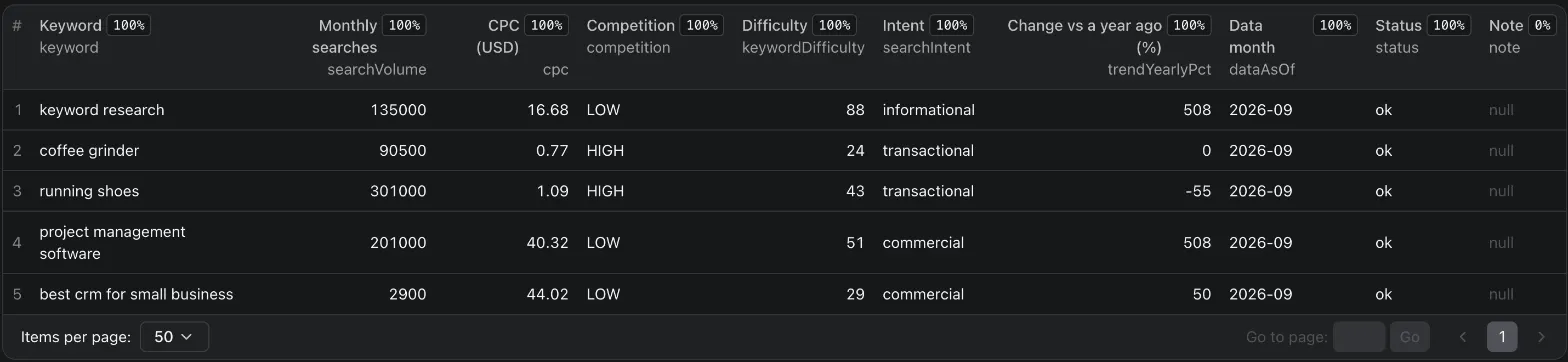
Each row also gives you:
- History: searches for each of the last 12 months, newest first, and a rising, flat or falling label.
- Season: the month each keyword peaks, how far above its average, and whether that peak repeats across two years (in the 92 database countries only).
- Trend: the change in percent against last month, two months back and a year back (the year-back figure in the 92 database countries only).
- Advertiser data: competition (low, medium, high, and 0 to 100), low and high top-of-page bid.
- Provenance: the month the data is from, and whether it came from Google Ads live or the monthly database.
- Reasons: a plain note whenever a row or a field is empty (for example, bids but no average CPC), and whether the row was charged.
How complete is the data?
Not every keyword has every figure. This is what we measured on real keyword lists, so treat it as a guide, not a promise. We re-measure it every time we update the Actor.
| Share of keywords with | Australia | Brazil | Germany | United Kingdom | Jamaica | United States |
|---|---|---|---|---|---|---|
| Search volume | 90% | 90% | 90% | 90% | 90% | 90% |
| CPC | 90% | 90% | 90% | 90% | 80% | 90% |
| Difficulty | 90% | 60% | 90% | 80% | never given | 90% |
| Intent | 90% | 90% | 90% | 90% | never given | 90% |
| Change vs a year ago | 90% | 90% | 90% | 90% | never given | 90% |
| Seasonality | 90% | 90% | 90% | 90% | never given | 90% |
Last refreshed 2026-11-21, from 70 keywords looked up live in 6 countries.
- Each test list includes one made-up keyword on purpose, and the US list a topic Google withholds, so no column reaches 100%.
- CPC is missing where no advertiser bids on a keyword; the row's note says so.
- Difficulty is thinner in Brazil. The keyword database has no difficulty score yet for some big Brazilian keywords ("tênis de corrida", "celular barato" and "receita de bolo" in November 2026), so those rows leave it empty, with a note, rather than show a misleading 0.
- "Never given" means live Google Ads has no such figure: difficulty, intent, the yearly change and seasonality exist only in the 92 database countries.
The full list of columns is under "Field reference" at the end.
How do we check the data?
- Against Google's Keyword Planner: on November 13, 2026, 30 keywords drawn at random in 6 countries were compared with Google Ads Keyword Planner on volume, competition and both bids: 116 of 120 values matched, and volume matched on 29 of 30. Our current code gave the same values on November 14.
- By hand: those 30 keywords' Planner figures were read by a person in Google's own Keyword Planner and saved before our rows were scored.
- Success rate: on November 13, 2026, 6 lists of 10 keywords in 6 countries, never used in tuning: 53 of the 54 real keywords came back with a search volume. Each list's made-up keyword came back empty and free.
Read this before you buy
- Free-plan runs look up 25 keywords, in up to 2 countries. The rest come back free, with a note, and are not looked up. Whole lists need a paid Apify plan.
- Difficulty and intent exist only in the database countries, in their own languages. Elsewhere, or in a language that country's database does not hold (English for Germany), keywords are looked up live in Google Ads: no difficulty, intent, yearly change or seasonality, a lookup fee per batch, and a paid Apify plan needed.
- Close variants share one number. Google counts "car" and "cars" together. Both rows come back with the same figures, and each is charged.
- The numbers are monthly. Google publishes the previous month around mid-month, and
dataAsOfsays which month you got. A rerun before the next refresh usually gives the same figures, and is charged again. - Your keywords only, for a whole country. It does not suggest new keywords, and it has no city-level numbers.
🚀 How to get keyword search volume
- Open Keyword Search Volume and keep the example input (five keywords, United States).
- Click Start. It takes about 5 seconds and costs about 5 cents (five keywords plus the start fee).
- Open the Output tab, or download the results as CSV or Excel.
- Paste your own keywords, pick your country, and run again.
Which keywords work
- Any search phrase, up to 80 characters and 10 words, such as
best running shoes for flat feet. - A pasted list. Copy a column from a spreadsheet or a list from another tool into Or paste keywords (
keywordsText). New lines and commas both split it, so a keyword with a comma in it goes in the list above instead. Pasted keywords are added after that list, and the same keyword twice is looked up once. - A country name or code. Pick the country from the list, or type a two-letter code such as
DEin Or country code (countryCode); the code wins when both are given. - Several countries at once. Pick them in Or several countries (
countries) instead of one country: each keyword comes back once per country, country by country, in the order of the list. Use country names, as in the list. Up to 10,000 rows (keywords times countries) per run. - Any of 217 countries. Difficulty and intent are available in 92 of them (the US, UK, most of Europe, India, Brazil and more), in each country's own languages; elsewhere those two columns are empty.
💰 How much does it cost to get keyword search volume?
You pay for each keyword that comes back with data, plus a small fee each time a run starts.
Apify's running costs are included.
| Event | Price |
|---|---|
| Keyword with data | $0.008 ($8 per 1,000), less on paid plans |
| Run start | $0.01 |
| Live Google Ads lookup, per batch of up to 1,000 keywords | $0.12 |
The Google Ads lookup fee applies only when keywords are looked up live in Google Ads, instead of in Google's monthly keyword database (92 countries, with difficulty and intent):
- In the 125 other countries, outside the keyword database.
- In a language the database does not hold for that country, such as English for Germany.
- When you turn on "Live Google Ads numbers only".
- Per country. With several countries, each country looked up in Google Ads has its own batch fee; a batch never mixes countries.
- Charged when the lookup starts. If Google Ads then fails, the keywords are free but the $0.12 batch fee is not refunded.
In the 92 database countries, in their own languages, there is no lookup fee.
The keyword price depends on your Apify plan. The run start fee and the Google Ads lookup fee are the same on every plan.
| Your Apify plan | Per 1,000 keywords |
|---|---|
| Free | $8.00 |
| Starter (10% off) | $7.20 |
| Scale (20% off) | $6.40 |
| Business (30% off) | $5.60 |
What a typical run costs
Costs below are at the Free plan price. Paid plans pay less per keyword.
| What you run | Keywords charged | Cost |
|---|---|---|
| A quick check of 5 keywords | 5 | $0.05 |
| A content plan of 100 keywords | 100 | $0.81 |
| A site's full list of 1,000 keywords | 1,000 | $8.01 |
| 100 keywords in one of the other 125 countries, such as Jamaica | 100 | $0.93 |
| 100 keywords in each of 3 database countries (the US, UK and Germany) | 300 | $2.41 |
- Apify's Free plan includes $5 of credit a month, enough for about 575 keywords at the Free plan price (23 runs of 25, estimate).
- Free-plan runs check up to 25 keywords each, in up to 2 countries, in the 92 countries with difficulty and intent and in their own languages. Upgrade for whole lists and the other 125 countries.
- Cap your spend. Set a maximum cost per run in the run options. The run stops before looking up keywords you have not budgeted for.
You never pay for
- No data: keywords Google publishes no figure for.
- Invalid keywords: too long, too many words, or characters Google rejects. The row says which.
- Duplicates: the same keyword twice in your list is looked up and charged once.
- Our errors: if the data service is down, rows are marked "try again" and not charged.
- Over your cap: keywords past your spending limit or the Free-plan cap.
👥 Who uses Keyword Search Volume?
SEO freelancers and agencies sizing keyword lists
Pick the keywords worth a page before writing it.
- Sort by monthly searches (
searchVolume) and difficulty (keywordDifficulty). - Spot rising topics with the trend label (
trendDirection) and the yearly change (trendYearlyPct).
Content and marketing teams planning what to write
- Group keywords by what the searcher wants (
searchIntent). - Time posts and campaigns for each keyword's peak month (
peakMonth,isSeasonal). - Run it monthly on the same list and compare the month column (
dataAsOf).
Paid search teams budgeting campaigns
- Estimate cost from CPC and top-of-page bids (
cpc,highTopOfPageBid).
Developers and AI agents checking keywords from code
- Call it from the API or the Apify MCP server; small runs cost a cent plus under a cent a keyword.
🛠️ For developers: input and output examples
Everything below is the technical detail: example inputs, one full output row, limits, the FAQ and the field reference.
Example input: a keyword list in the US
Example input: a German list for Germany
Example input: a pasted list and a country code
Example input: one list in several countries
- 9 rows: each keyword once per country, in each country's main language.
- A
languageyou set applies to every country. A country whose database does not hold it (English for Germany) is looked up live in Google Ads, with its fee. countryandcountryCodeare ignored whencountriesis given.
Example input: live Google Ads numbers only
Output example: one row
One row, from the run on November 12, 2026:
- Every row has every field, in the same order. A value Google does not publish is
null, never 0. - One row per keyword you sent (per country, with several countries), in your order. Duplicates are merged into the first.
❓ Limits and FAQ
What does it not do?
- No keyword ideas. It looks up the keywords you give it; it does not suggest new ones.
- Countries, not cities. Results are for a whole country.
- 12 months of history, not longer.
What happens when a keyword has no data?
The row says why, instead of disappearing.
| Status | Meaning | Charged |
|---|---|---|
no_data | No figure: Google publishes none (rare phrases, some withheld topics), or the monthly database lacks one this month (try forceGoogleAds) | No |
not_in_database | Not in the monthly database, which also leaves out keywords containing +; try forceGoogleAds | No |
invalid_keyword | Too long, too many words or a rejected character | No |
free_plan_limit | Past the Free-plan cap of 25 per run | No |
skipped_charge_limit | Past your maximum cost per run | No |
upstream_error | The data service failed; run again | No |
- Where to find the summary: in the run's status message, and in the key-value store as
RUN_SUMMARY.
About Google's numbers
- Rounded. Google rounds search volumes into buckets, so close keywords can show the same number.
- Grouped. Google folds close variants together ("car" and "cars"). Both rows come back with the same figures; where the database knows it,
matchedKeywordsays which form Google counted. That form can be worded differently from yours: "spotify premium price" is counted as "prices for spotify premium". - Averages, not ranges. You get the monthly average, not the "1K to 10K" ranges Keyword Planner shows accounts without ad spend.
- Two sources. In the 92 countries with difficulty and intent, numbers come from DataForSEO Labs, a monthly copy of Google Ads data.
- Live Google Ads elsewhere, and with
forceGoogleAds. Usually a month newer; each row'sdataAsOfsays which month. Needs a paid Apify plan. - The two agree closely. On our test of 100 keywords they matched exactly on 72 of 96 and had the same median.
How does Keyword Search Volume work?
- Checks first. Keywords are cleaned, deduplicated and checked against Google's rules before any lookup, so a bad keyword costs nothing.
- Google Ads (Keyword Planner) data, through DataForSEO, a licensed data provider. You need no Google Ads account.
- Updated monthly. Google publishes the previous month around mid-month;
dataAsOfshows which month you got.
Why not use DataForSEO or the Google Ads API myself?
For a big monthly volume, going direct can make sense. For lists of tens to thousands of keywords you meet:
- A $50 minimum top-up, and a balance that is not refunded.
- A Google Ads account and developer token for the Google Ads API.
- One rejected keyword fails the whole Google Ads request; here it gets its own row and the rest come back.
- Dropped keywords: the monthly database silently leaves out phrases it does not hold; here every keyword gets a row with the reason.
- Two schemas (database and live Google Ads) to merge.
This Actor does all of that and returns one row per keyword.
Is it legal to use keyword search volume data?
- Aggregate data only. Keyword Search Volume returns search counts and ad prices, with no personal data.
- Licensed source. The data comes from DataForSEO under its terms of service, which provide for serving it to end users.
This is not legal advice.
How do I run it on a schedule?
- Save your input as a task.
- In Apify Console, add a schedule to the task (Schedules, for example on the 20th of each month, after Google's refresh).
Can I use it from Make, Zapier, Google Sheets, an AI agent or my own code?
Yes.
- No-code tools: Apify connects runs to Make, Zapier, n8n, Google Sheets, Slack, webhooks and more (https://apify.com/integrations).
- n8n: a ready workflow for this Actor (https://api.apify.com/v2/key-value-stores/u9cNr4EkNS51rZPUt/records/n8n-keyword-search-volume.json). In n8n, choose Import from URL and paste the link, then add your Apify API token to the Run Actor node as a Header Auth credential (
Authorization=Bearer <token>). - AI agents: through the Apify MCP server.
- Your own code: the API tab has ready snippets.
- A feed URL: the latest run of a task is always at
https://api.apify.com/v2/actor-tasks/<TASK_ID>/runs/last/dataset/items?format=csv(alsojson,xlsx,xml), with your API token. - CSV and Excel downloads: Apify sorts the columns alphabetically and splits the 12-month history into numbered columns (
monthlySearches/0/month,monthlySearches/0/searchVolume, ...). Use JSON to keep the history whole.
Can I compare several countries in one run?
- Yes: pick them in Or several countries (
countries). You get one row per keyword and country;countryandcountryCodeon each row say which. - Same price per keyword, with no extra fee in the database countries. Each country looked up in Google Ads adds its own $0.12 batch fee.
- Very short lists across many countries can stop early. Each country is looked up on its own, and a run stops before lookups its keywords cannot pay for. With 8 or more keywords that have data there is no limit on any plan (6 or more on the Free plan); 1 keyword stops after 3 countries. The rest come back free, with a note.
Why do two keywords have identical numbers?
- Close variants: Google counts them together; see
matchedKeyword. - Rounding: small keywords fall into the same bucket.
🧇 More tools from us and support
- Jobs: Career Page Jobs Scraper. Every open job from company careers pages, only new ones each run.
- Jobs: Greenhouse Jobs Scraper. Every open job from Greenhouse job boards, with salaries read from the job text.
- Jobs: Lever Jobs Scraper. Every open job from Lever job boards, with remote or hybrid and salaries.
- Ads: Google Ads Transparency Scraper. Your competitors' new and stopped Google ads.
- App Reviews: Google Play Reviews Scraper. Every Google Play review for any app, with developer replies and no reviewer names.
- App Reviews: App Store Reviews Scraper. App Store reviews in any country, newest first, with developer replies and no reviewer names.
- Apps: Google Play Scraper. App details, search, developer catalogs and similar apps from Google Play, in every country.
- Transcripts: YouTube Transcript Scraper. Transcripts of YouTube videos, with chapters and timestamps.
- Transcripts: TikTok Transcript Scraper. Transcripts of TikTok videos, with AI speech-to-text when there are no captions.
- All our tools: apify.com/waffle-iron.
- Found a bug, or need a country or field we do not cover? Open an issue on the Issues tab and include the run link.
- Did it save you time? A short review helps other buyers find it.
📖 Field reference
Input fields
The Input tab shows the same fields with their editors.
| Field | Type | Default | Description |
|---|---|---|---|
keywords | array | none | Keywords to look up, one per line, up to 10,000. Duplicates are looked up once. |
keywordsText | string | none | Paste a list copied from a spreadsheet or another tool, split on new lines and commas. Added after the list above; the 10,000 limit counts both together. If the list above still holds only the 5 sample keywords, they are left out. |
country | string | "United States" | Where the searches happen. Google Ads covers 217 countries. |
countryCode | string | none | A two-letter country code such as US or DE. When given, it replaces the country above. |
countries | array | none | Pick two or more countries to get every keyword in each, one row per keyword and country. When given, it replaces Country and Or country code. Keywords times countries is at most 10,000. |
language | string | none | Language of the searches. Leave empty for the country's main language. A language the keyword database does not hold for this country uses live Google Ads, with its lookup fee and no difficulty or intent. |
forceGoogleAds | boolean | false | Look every keyword up live in Google Ads instead of the Labs keyword database. Newest month, but no difficulty or intent. |
Output fields
| Field | Type | Description |
|---|---|---|
id | string | Stable key: <normalised keyword>:<locationCode>:<languageCode>. |
keyword | string | The keyword as you typed it. |
matchedKeyword | string | Google's form of the keyword when it merged a close variant or fixed the spelling. |
found | boolean | True when Google has a search volume for the keyword. |
status | string | ok, no_data (Google publishes no figure), not_in_database (not in the Labs database; try forceGoogleAds), invalid_keyword, free_plan_limit, skipped_charge_limit or upstream_error. Only ok is charged. |
note | string | Plain reason when a row or a field is empty. |
country | string | Country name. |
countryCode | string | Country ISO code. |
language | string | Language name. |
languageCode | string | Language code sent to the data source. |
locationCode | integer | DataForSEO location code. |
searchVolume | integer | Average monthly Google searches over the last 12 months. |
monthlySearches | array | Up to 12 months of volumes, newest first. |
trendMonthlyPct | integer | Change of the newest month against the month before, %. |
trendQuarterlyPct | integer | Change of the newest month against two months before, %. |
trendYearlyPct | integer | Change of the newest month against the same month a year before, %. Labs rows only. |
trendDirection | string | Newest 3 months against the 3 before: rising or falling past 10%, else flat. |
peakMonth | string | Month of the year this keyword peaked in over the last 12 months, such as December. Labs rows with 24 months of figures only. |
seasonalityIndex | number | The peak month's volume divided by the 24-month average. Labs rows with 24 months of figures only. |
isSeasonal | boolean | True when the same month of the year peaked in both of the last two years, stood above the months around it both times, and is at least 1.3 times the 24-month average; steady growth, a decline or a one-off spike is not seasonal. Labs rows with 24 months of figures only. |
cpc | number | Average cost per click, USD. |
competition | string | Google Ads competition level. |
competitionIndex | integer | Google Ads competition, 0 to 100. |
lowTopOfPageBid | number | Low range of the top-of-page bid, USD. |
highTopOfPageBid | number | High range of the top-of-page bid, USD. |
keywordDifficulty | integer | How hard it is to rank in Google's top 10, 0 to 100. Labs rows only. |
searchIntent | string | informational, navigational, commercial or transactional. Labs rows only. |
dataAsOf | string | Newest month in the history, YYYY-MM: how fresh the figures are. |
source | string | dataforseo_labs or google_ads; null when nothing was looked up. |
charged | boolean | True when this row is billed: only ok rows are, on Apify's pay-per-event price. |
retryable | boolean | True when running the keyword again may give data. |


