
Google Ads Transparency Scraper with Ad Text
Pricing
from $1.50 / 1,000 ads
Google Ads Transparency Scraper with Ad Text
Collects the ads any company runs on Google from the Ads Transparency Center, including the headline, description, display URL and sitelinks of text ads as plain text. You can also check a list of domains to see which ones advertise on Google, how many ads they run and since when.
Pricing
from $1.50 / 1,000 ads
Rating
0.0
(0)
Developer

Vanja V
Maintained by CommunityActor stats
0
Bookmarked
2
Total users
1
Monthly active users
2 days ago
Last modified
Categories
Share
This actor collects the ads that any company runs on Google, using Google's public Ads Transparency Center. You give it a list of domains or advertisers, and for each ad you get the format, the dates it was shown and a link to the ad itself. For text ads you also get the headline, description, display URL and sitelinks as plain text, so you can read and compare the copy in a spreadsheet instead of clicking through ad images one by one.
If you only need to know whether a list of companies advertises on Google, there's a domain check mode as well. It tells you, for each domain, whether it's running ads, roughly how many, and how long it has been advertising.
Ads cost $1.50 per 1,000, and reading the text of text ads adds $1.00 per 1,000. You only pay for results: there's no fee for starting a run, and you aren't charged for targets that fail.
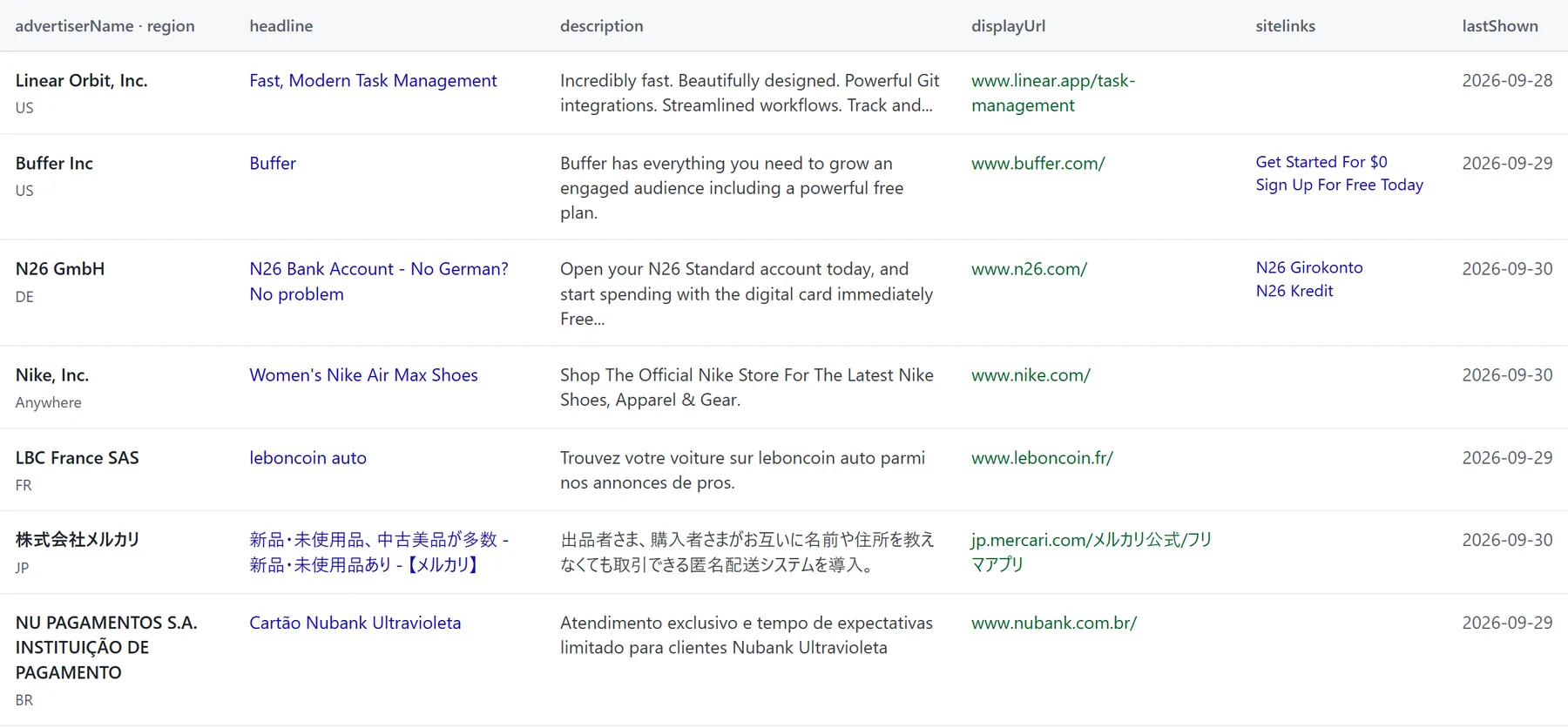
Seven text ads from real runs in the US, Germany, France, Japan and Brazil, with the text exactly as the actor returns it.
What people use it for
Most people use it to research competitors. You can see every ad a company runs across Google Search, YouTube and display, and because the text of their search ads comes back as plain text, it's easy to sort and compare their messaging or to collect headline ideas from a whole market.
The domain check is useful for building lead lists and for agencies looking for prospects. You can paste in hundreds of domains and quickly see which of them are advertising on Google right now and which don't show any ads.
You can also use the date filters to see what an advertiser was running in a particular month. An ad whose lastShown date is today or yesterday is still running.
Example
Here's an input that asks for the text ads of three advertisers in the US, given in three different ways:
Each ad comes back as one row like this:
What you get
In the default Ads mode you get one row per ad. Each row has the advertiser's name and ID, the ad's ID and format (text, image or video), the first and last dates Google showed it, the website it points to, and links to the ad's page on the Transparency Center and to the ad's image or preview.
For text ads, the actor also reads the ad itself. Google stores most text ads as images, so an AI model reads the visible text from the image. It only returns what's actually visible, and leaves out anything the image cuts off rather than guessing at it. Some text ads have no image, only Google's own preview of the ad, and for those the actor takes the text straight from the preview. The textStatus field tells you which of these happened for each row.
In Domain check mode you get one row per domain instead. It says whether the domain advertises, gives Google's count of its ads, lists the advertisers behind those ads, and shows the earliest and latest dates they were shown. The check needs just one request per domain, so it's fast: 29 domains took two seconds in our test.
At the end of each run, the SUMMARY record and the status message tell you how every target went. Each one is marked ok, no-ads, blocked or invalid-input, and next to the number of ads returned you'll see Google's own count for that target, so you can tell how complete the result is. If a target returns nothing, you'll get a row explaining why, so a run never quietly finishes with an empty dataset.
Rows are saved as they come in. If a run times out or you stop it, you keep everything it found up to that point.
Input
| Field | What it does |
|---|---|
| Targets | One per line. This can be a domain (nike.com), a website link, an advertiser ID (AR…), an advertiser's exact name as Google lists it (Nike, Inc.), or a Transparency Center link for an advertiser or domain. |
| What to get | Ads for one row per ad, or Domain check for one row per domain. |
| Region | The country where the ads were shown. By default the actor looks everywhere. |
| Ad format | All formats, or only text, image or video ads. |
| Shown from / until | Limits the results to ads that ran between these dates (YYYY-MM-DD). |
| Max ads per target | Stops after this many ads for each target. The default is 100. |
| Read ad text | Reads the text of text ads, which is charged per text ad. It's on by default. |
If you give an advertiser name that doesn't exactly match a name Google uses, you'll get an error row listing the closest names Google knows, and you can copy the right one from there.
Pricing
| Event | Price |
|---|---|
| Ad returned | $0.0015 ($1.50 per 1,000) |
| Text ad read (headline, description, display URL, sitelinks) | $0.001 ($1.00 per 1,000) |
| Domain checked | $0.002 ($2.00 per 1,000) |
Here's what some typical runs would cost:
| You get | Cost |
|---|---|
| 1,000 image or video ads | $1.50 |
| 1,000 text ads with their text | $2.50 |
| 1,000 text ads with Read ad text turned off | $1.50 |
| 1,000 domains checked | $2.00 |
Apify's platform usage is already included in these prices, and there's no charge for starting a run. You also don't pay for targets that are blocked or invalid, or for ad searches that find no ads. If the actor can't read the text of a text ad, you pay for the ad but not for the text. In domain check mode every domain that gets checked counts, including the ones that turn out not to advertise, since that's an answer too.
If you want to limit what a run can cost, set a maximum cost when you start it (maxTotalChargeUsd in the API). The actor will stop once the next ad would go over that amount, and the summary will say that it stopped because of the limit.
Use it through the API
This call runs the actor and returns the rows when it's done:
It waits up to 5 minutes. For bigger runs, the Apify clients will start the run and wait for it to finish for you.
JavaScript (npm install apify-client):
Python (pip install apify-client):
Use it from an AI agent (MCP)
You can give an AI assistant such as Claude Desktop, Cursor or VS Code access to this actor through Apify's MCP server:
Clients that support OAuth will ask you to sign in to Apify the first time. For other clients, add your token in a header: "headers": { "Authorization": "Bearer <APIFY_TOKEN>" }. The assistant then has a tool that takes domains or advertisers and returns their ads.
Speed and limits
Google returns ads in pages of 40, and reading the text of text ads is what takes most of the time, at about five ads a second. In our tests, a run of 300 ads, 282 of them text ads, finished in 49 seconds.
Big advertisers can have thousands of ads, so Max ads per target is there to keep runs short. The summary shows Google's total next to what was fetched, so you'll know if there's more. For large advertisers Google gives that total as a range, such as 7,000 to 8,000, and for small ones it gives an exact number.
There's no filter by platform (Search, YouTube, Maps, Play or Shopping) yet, and you can't give the actor a link to a single ad. Both are on the list if people ask for them.
Good to know
When you search by domain, you get every ad Google associates with that domain, and that can include other advertisers. A search for hubspot.com, for example, also returns ads from businesses whose landing pages are hosted on HubSpot. The advertiserName field lets you tell them apart.
Some advertisers use keyword insertion, writing headlines like {KeyWord:Nike Tech} that Google fills in with whatever the person searched for. The Transparency Center shows these as written, and the actor returns them the same way.
Responsive and dynamic search ads put together different headlines for different searches. The actor returns the version Google shows in its ad list, and the ad's own page on the Transparency Center may show other versions.
The data comes from Google's public Ads Transparency Center, and this actor isn't affiliated with Google. If something doesn't work or you'd like another field, open an issue in the Issues tab and I'll take a look.


