
Keyword Research & Search Volume: Google Keyword Planner CPC
Pricing
from $0.50 / 1,000 keyword with data
Keyword Research & Search Volume: Google Keyword Planner CPC
Keyword research with Google search volume, CPC, competition, top-of-page bids and a 12-month trend for up to 20,000 keywords, in any country, region or city. Keyword difficulty and search intent for country runs. Pay per keyword with data; keywords without data are free.

Keyword Search Volume: Google Keyword Planner CPC & Ideas
Get Google search volume, CPC, competition, top-of-page bids and a 12-month trend for up to 20,000 keywords in one run. Works for any country, region or city that Google Ads targets. Country runs also return keyword difficulty and search intent. Or start from a few seed keywords and get hundreds of keyword ideas with the same numbers.
$0.60 per 1,000 keywords with data on Apify's Free and Starter plans, less on higher plans. Country runs add $0.03 per 700 keywords, city and region runs $0.08 per 1,000. Keywords without data, invalid keywords and failed requests are free.
What people use this keyword search volume checker for
- Keyword research for SEO: check which phrases people search for before you write a page.
- PPC planning: CPC and the low and high top-of-page bids show what a click costs in Google Ads.
- Local SEO: volume for "plumber near me" in Austin, Texas.
- Content ideas: turn "running shoes" into 100 related keywords, each with volume, difficulty and intent.
- Trend checks: the 12 monthly numbers and the trend % show what's rising and what's seasonal.
- Bulk checks: paste a list of 20,000 keywords from a spreadsheet and export the result as CSV or Excel.
Example: bulk keyword search volume for a list
Input:
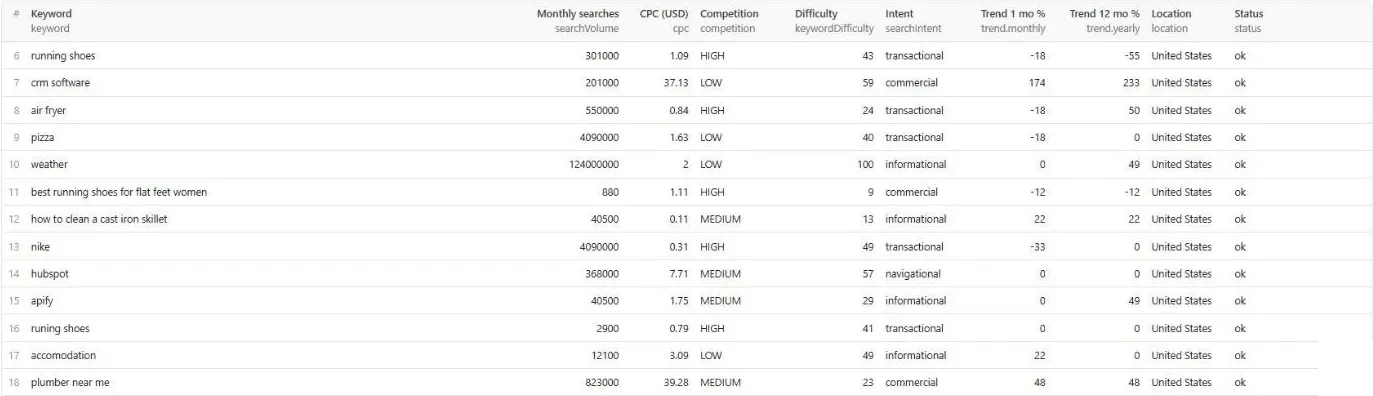
Output (real run, November 2026):
| keyword | searchVolume | cpc | competition | keywordDifficulty | searchIntent | trend.yearly |
|---|---|---|---|---|---|---|
| running shoes | 301,000 | $1.09 | HIGH | 43 | transactional | -55% |
| crm software | 201,000 | $37.13 | LOW | 59 | commercial | +233% |
| air fryer | 550,000 | $0.84 | HIGH | 24 | transactional | +50% |
| pizza | 4,090,000 | $1.63 | LOW | 40 | transactional | 0% |
The same keywords in "Austin,Texas,United States": running shoes 2,400, crm software 1,300.
Example: keyword ideas generator from a seed keyword
| keyword | seed | searchVolume | cpc | keywordDifficulty | searchIntent |
|---|---|---|---|---|---|
| new balance 9060 | running shoes | 823,000 | $1.02 | 0 | transactional |
| hoka shoes | running shoes | 673,000 | $0.97 | 10 | transactional |
Three idea sources:
- Keyword ideas (default): keywords from the same topic, sorted by relevance.
- Suggestions: longer keywords that contain the seed, sorted by volume.
- Related searches: Google's "related searches" around the seed, sorted by volume.
What you get: search volume, CPC, keyword difficulty and trend as CSV, JSON or Excel
One row per keyword. Download it as JSON, CSV, Excel or HTML, or read it through the API.
| Field | What it is |
|---|---|
keyword | The keyword, in lower case |
seed | Ideas mode: the seed keyword this idea came from |
searchVolume | Average monthly Google searches over the last 12 months |
cpc | Average cost per click in Google Ads, USD |
competition, competitionIndex | Advertiser competition: LOW, MEDIUM or HIGH, and 0 to 100 |
lowTopOfPageBid, highTopOfPageBid | The bid range for showing at the top of the page, USD |
monthlySearches | The last 12 months, oldest first, e.g. { "month": "2026-09", "searches": 246000 } |
trend | % change of the latest month against 1 month, 2 months and 12 months before |
keywordDifficulty | 0 to 100, how hard it is to rank in the top 10 (country runs) |
searchIntent | informational, navigational, commercial or transactional (country runs) |
location, locationCode, language | Where and in which language the numbers apply |
source | keyword_database or google_ads (see below) |
status, statusReason | ok, no data, not in keyword database or invalid, with the reason |
Every keyword you send comes back with a row, so you can see which keywords had no data and why. A summary
of the run (counts, invalid keywords, anything that failed) is saved in the key-value store as SUMMARY.
Local keyword search volume: countries, regions and cities
All numbers come from Google Ads data.
- Countries (94 of them, in their main languages) use a keyword database built from Google Ads data. It answers in seconds and adds keyword difficulty and search intent.
- Regions, cities and other countries use Google Ads directly. A task of up to 1,000 keywords usually takes 10 to 30 seconds.
- Set Data source to Google Ads to use Google Ads for a country too. Google Ads groups close variants ("runing shoes" gets the volume of "running shoes"); the keyword database keeps them apart. The two agreed on 93% of 1,000 US keywords in our tests.
Write a location as a country name or code (United Kingdom, GB), a region (California,United States) or
a city (Austin,Texas,United States). A name that matches several places stops the run before anything is
charged and lists the candidates. Leave Language empty for the location's main language.
Keyword ideas need a country.
Pricing
Pay per event. Apify platform usage is included.
| Event | Price (Free and Starter plans) | When it's charged |
|---|---|---|
| Keyword with data | $0.0006 | Each row with a search volume, in both modes |
| Keyword database request | $0.03 | Each request of up to 700 keywords that returned data (country runs) |
| Google Ads request | $0.08 | Each task of up to 1,000 keywords that returned data (regions, cities, Google Ads) |
Ideas mode has no request fee. Higher Apify plans pay less per keyword: $0.00055 on SILVER, $0.0005 on GOLD and above.
| Run | Cost |
|---|---|
| 10 keywords, a country | $0.036 |
| 1,000 keywords, a country | $0.66 |
| 10 keywords, a city | $0.086 |
| 100 keyword ideas | $0.06 |
Minimum search volume leaves out keywords below a number you set. They aren't charged. To cap a run's cost, set a maximum cost per run in the run options; the actor stops when it reaches it.
On Apify's free plan a run checks at most 10 keywords (or returns 10 ideas), up to 3 runs a day (UTC). The actor developer set these limits, and a paid Apify plan removes them.
Keyword search volume API: run it from code
Run it and get the rows in one call:
Python:
Use it from an AI agent (MCP)
Add Apify's MCP server with this Actor as its tool, for example in Claude Desktop, Cursor or VS Code:
Clients that support OAuth sign you in to Apify on first use. Other clients can send your token in a header: "headers": { "Authorization": "Bearer <APIFY_TOKEN>" }.
Speed and limits
- Up to 20,000 keywords per run in volume mode, and up to 20 seeds with up to 1,000 ideas each in ideas mode.
- Country runs: about 10 seconds for 1,000 keywords. Google Ads runs: usually 10 to 30 seconds per 1,000 keywords.
- Google Ads rejects keywords over 80 characters or 10 words and the symbols
! @ % ^ * ( ) = , ? ; < > { } | ~and emoji. Such keywords come back asinvalidrows and cost nothing. - Duplicates and case variants are checked once.
FAQ
Is this the same data as Google Keyword Planner? Google Ads runs use the same source as Keyword Planner. Country runs use a keyword database built from Google Ads data, and it matched Google Ads exactly on 93% of keywords in our tests.
Why do some keywords have no data?
Google reports no volume for very rare keywords, and the keyword database doesn't hold every long-tail
phrase. These rows have status no data or not in keyword database and are free. For the second case,
set Data source to Google Ads.
Why is the yearly trend empty on idea rows? Idea rows carry 12 months of history, and the yearly trend needs 13.
Is there a Google Keyword Planner API? Why not use it? Google serves Keyword Planner data through the Google Ads API, which needs a Google Ads account, an approved developer token and OAuth setup. In the browser, Keyword Planner shows accounts without ad spend a range such as "1K to 10K". This actor returns the monthly averages Google Ads reports, with only an Apify account.
How do I check keyword search volume for a city?
Set Location to the city, for example Austin,Texas,United States. City and region runs come from Google Ads
and cost $0.08 per 1,000 keywords on top of the per-keyword price.
Can I check keyword difficulty and search volume together?
Yes, on country runs. Each row has keywordDifficulty (0 to 100) and searchIntent next to the volume.
Can I check search volume in bulk? Paste up to 20,000 keywords into one run. 1,000 keywords in a country take about 10 seconds and cost $0.66.
Do I need a Google Ads account? No. Run it with your Apify account.
Related Actors
- Google Ads Transparency Scraper with Ad Text: the ads a competitor runs on Google, with their text, so you can see which keywords they pay for.
- GEO & AEO Site Audit: checks a website for llms.txt, AI crawler access and schema markup.
- AI Brand Visibility Tracker: whether ChatGPT and other AI answers mention your brand for the searches you care about.
Notes
This actor isn't affiliated with or endorsed by Google. Questions or a missing feature? Open an issue in the Issues tab.


