
Google Keyword Search Volume — Google Ads Keyword Planner, CPC
Pricing
from $4.00 / 1,000 keyword results
Google Keyword Search Volume — Google Ads Keyword Planner, CPC
Google Ads monthly search volume, CPC and competition for your keyword list — real Keyword Planner figures, nothing modelled; a keyword with no data is never charged. From $4.00 per 1,000 keyword results; one $0.19 fresh-lookup fee per run that buys new data (cached runs pay none).
Pricing
from $4.00 / 1,000 keyword results
Rating
0.0
(0)
Developer

Steadyfetch Team
Maintained by CommunityActor stats
0
Bookmarked
737
Total users
487
Monthly active users
a day ago
Last modified
Categories
Share
Keyword Search Volume Scraper — Google Ads Keyword Planner, CPC
Never pay for a keyword with no data — or for one you already have. Paste a keyword list and get Google Ads average monthly searches, competition, the top-of-page bid range, 12-month trend direction — and CPC wherever Google publishes one — or expand a keyword into new keyword ideas with the same metrics.
Using an AI agent? Pin this actor in Apify's MCP server with one link: https://mcp.apify.com?tools=steadyfetch/keyword-search-volume-scraper
- Actor id:
steadyfetch/keyword-search-volume-scraper - Input:
{ "keywords": ["project management software"] }— the one field you have to set. - Cap the bill: set
maxTotalChargeUsdon the run (a run option, not Actor input), e.g.0.50— the run stops when it reaches it. With a fresh lookup,0.50covers the fee plus about 25 keywords on the Apify free plan, 27 on Bronze, 62 on Silver and 77 from Gold, and a capped run's status line names the figure to set for your whole list. - How often it changes: Google refreshes Keyword Planner volumes once a month, so the same keyword asked again inside 30 days is the same figures — and your account gets those back with nothing charged (
repeat: true). - Run it on a schedule: save your input as a Task and put it on an Apify Schedule once a month. Each run looks up and charges only the keywords your account has not had in the last 30 days, so a growing list stays cheap. Details under Run it on a schedule below.
Real Google Ads Keyword Planner data. No "AI search
volume", no modelled numbers, no keyword-difficulty score we invented: every field is
Google's own figure, and isEstimated is false on every row for that reason.
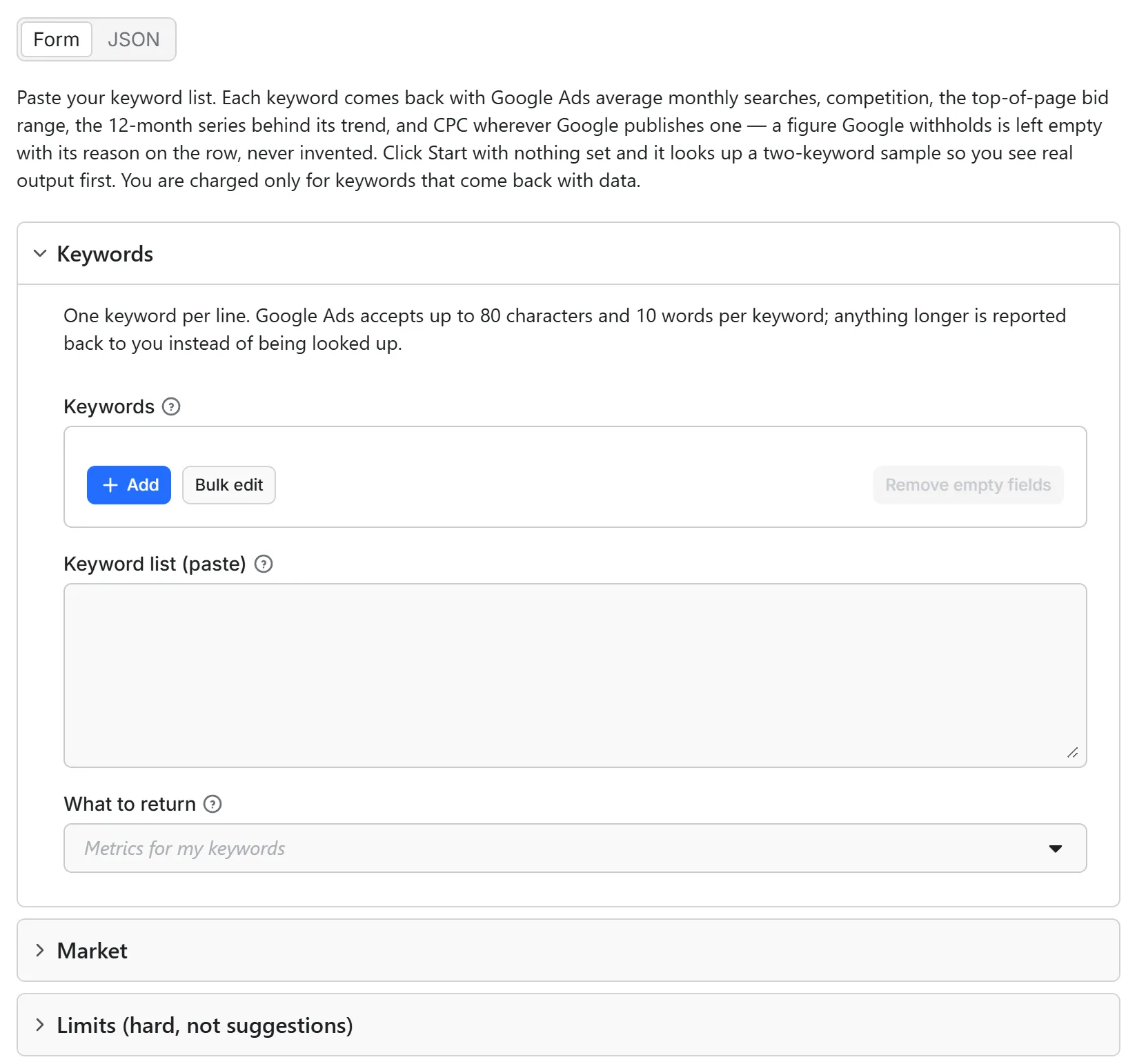
Just want to see it work? Click Start with nothing set and the run looks up two everyday keywords ("project management software", "keyword research tool") for the United States, charged like any run — two keyword rows, plus the fresh-lookup fee only if those two keywords are not already in our 30-day cache (they usually are) — so the first thing you see is real Keyword Planner rows. Pick a country, a network or a limit but paste no keywords and that same sample runs under your settings, with one uncharged note row naming them; a limit larger than the sample's own is capped at it. Paste your own list for your own run.
Unofficial. This actor is not affiliated with, endorsed by, or sponsored by Google. "Google", "Google Ads" and "Keyword Planner" are trademarks of Google LLC, used here only to describe where the figures come from.
From $4.00/1,000 keyword results — all-inclusive pay per event, charged only on delivery. A run that buys fresh search-volume data also pays one fresh-lookup fee of $0.19 — once per run, whatever the size of the list. Runs answered entirely from our 30-day cache, and runs whose fresh lookup came back with no data, pay no fee. Issues answered in a couple of hours.
Every row carries charged and missReason, so you can reconcile the invoice from the
dataset itself without opening the console. Only rows with charged: true were billed.
Output
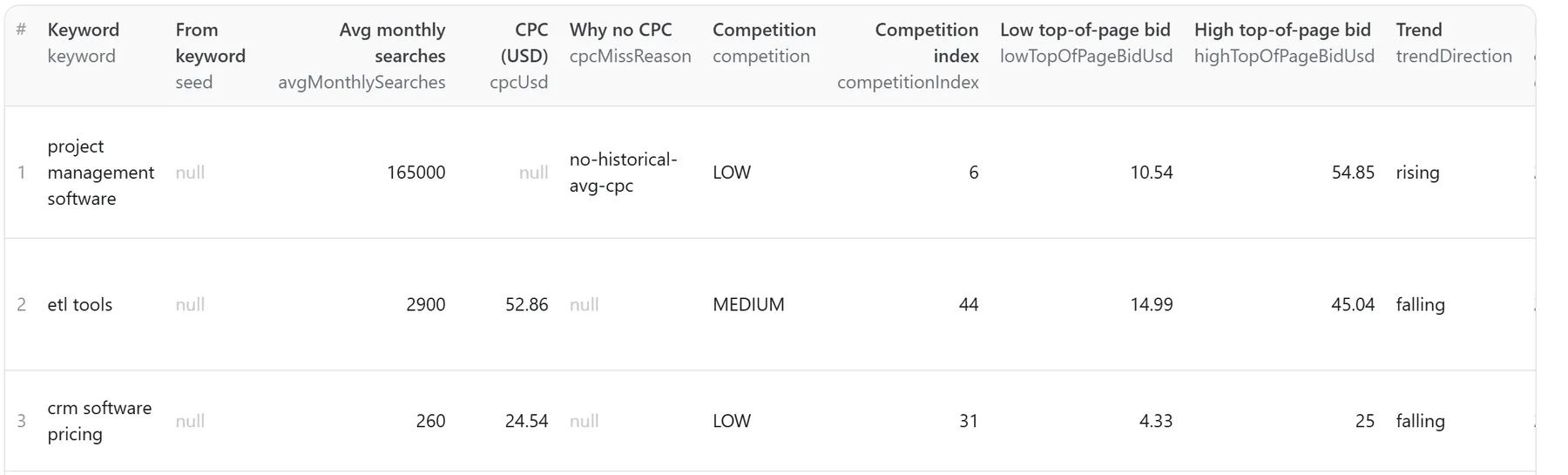
This is the dataset table of a real run — three keywords looked up for the United States — exactly as it appears in the Apify console:
| field | notes |
|---|---|
keyword | your own spelling, echoed back; providerKeyword is the lowercased form Google matched |
seed | the keyword an idea came from. null on your own keywords — and on keyword ideas, because your keywords are expanded together in one lookup that does not report which of them produced which idea |
seededFrom | on a keyword idea, the list of your keywords it was expanded from; null on your own keywords |
avgMonthlySearches | Google's average monthly searches. 0 means "fewer than Google reports", null means no data (and no charge) |
cpcUsd | average cost per click — null on the keywords Google publishes no average for, and then cpcMissReason says which case it is |
cpcMissReason | why cpcUsd is empty on this row, or null when the CPC arrived |
emptyFields | every promised field this row came back without, each with its reason. {} on a complete row — see below |
competition · competitionIndex | LOW / MEDIUM / HIGH, and the 0–100 index behind it |
lowTopOfPageBidUsd · highTopOfPageBidUsd | the top-of-page bid range |
monthlySearchVolumes[] | 12 months of {year, month, searches}, oldest month first |
trendDirection | rising / flat / falling, derived from that series |
dataAsOf | the last month Google itself reported, e.g. 2026-07 |
country · language · network | the market this number is for |
source · isEstimated | always google_ads and false |
servedFromCache | whether this row came from our 30-day cache (see below) |
repeat · firstSeenAt · firstSeenRunId | true when your account already had this keyword: the same figures handed back from the run named here, and nothing charged for them |
charged · missReason · statusReason | the reconciliation trio |
Plus one summary row with delivered, stoppedBy, resumeCursor and chargedEvents.
And one delivered row in full, from a real run on 2026-09-12. Each keyword with data is one keyword-result charge; a keyword Google has no data for is never charged. monthlySearchVolumes is the full 12-month history, oldest month first.
When a promised field comes back empty
Google does not publish every figure for every keyword. About one keyword in eleven comes back with no average CPC even though its bid range is right there, and a handful arrive with no bid range at all. We never invent the number, and we never quietly leave the column blank either: every field on this list that arrives empty says why, on that row.
emptyFields maps the field name to the reason; cpcMissReason repeats the CPC one as its
own column because CPC is the headline. statusReason says the same thing in a sentence.
| reason | what it means |
|---|---|
no-historical-avg-cpc | Google published a top-of-page bid range for this keyword but no average CPC. Use the bid range as the cost signal |
no-advertiser-cost-data | No average CPC and no bid range — too little advertiser activity for Google to publish either |
no-bid-range-reported | The CPC arrived, the top-of-page bid range did not |
no-competition-data | Google reports no competition level or index for this keyword |
fewer-than-six-months-of-data | Too short a series to call a trend direction — the months themselves still ship |
no-monthly-series | Google returned no month-by-month series, so there is no dataAsOf either |
A row like this is still a real answer and is still charged once, like any other row —
volume, competition, bid range and the 12-month series are all there. Rows with no
search volume are the ones you are never charged for, and they carry missReason instead.
Run {} and you get the default two-keyword sample, charged like any run — real rows in exactly
this shape, empty fields named where Google withholds them. Set a market or a limit and paste no
keywords and the same sample runs under what you set.
Agent / API paste-block
Agents and MCP callers: omit an optional field, or send it as null — both mean "use the
default". Only keywords is required, and it needs a real value.
Send the fields themselves as the run input — {"keywords": [...]}, not {"input": {"keywords": [...]}}; a wrapped input is still read, and one uncharged note row says so.
How the trend direction is worked out
The last three months of the 12-month series against the first three of the same series.
20% or more above → rising. 20% or more below → falling. Anything between → flat.
Fewer than six months of data → null, never a guess. The raw series ships with every
row, so you can apply your own rule instead.
Three things about Google's numbers that most listings do not tell you
- Google quantises search volume. Volumes come back on a coarse ladder — 5,400 / 40,500 / 165,000 — not as exact integers. They are Google's own published figures, not ours, and they are not precise to the search.
- Google groups similar keywords. Close variants can share one combined figure. If two of your keywords come back identical, that is usually why. Splitting them across separate runs sometimes separates them.
- Some phrases have no published volume at all — and it is per phrase, not per topic.
Google reports nothing for a long tail of real, well-searched phrases, and which ones is
inconsistent: measured on one US/English lookup,
dentist near meandgym near mecome back at 1,830,000 andphysical therapy san diegoat 1,600, while,physical therapy near mephysical therapy carlsbadandphysical therapy encinitascome back empty. The phrase is searched; Google simply does not publish a number for it. All we can see is that the figure came back blank — it could be folded into a broader term, sit under Google's reporting floor, be searched mostly in another country or language than the one the run used, or be something Google has nothing for, and the row does not claim to know which it is. What works is the same either way: the head term (drop the city or the qualifier —physical therapyinstead of), a larger nearby city, or the market where people search for it. Every empty row names the head term to try and the two sample keywords that always return figures, and none of them is charged.physical therapy carlsbad
None of the three is a defect in this actor. All three are how Keyword Planner works, and you are getting exactly what an advertiser sees in the Google Ads UI.
The 30-day cache
Google refreshes these volumes monthly, so a keyword looked up twice in the same month
returns the same numbers. We cache every lookup for 30 days and serve repeats instantly —
same data, no waiting. Rows served that way are marked servedFromCache: true. That cache is
shared across everyone who uses this actor, so it saves the lookup, not the row: a keyword
someone else looked up is still your first one, charged at the same per-keyword price. A run
answered entirely from the cache also pays no fresh-lookup fee: the fee exists to cover a
fresh lookup, and a cached run makes none.
The cache is per keyword AND market. Google publishes search volume one country at a time,
so seo tools in the United States and seo tools in Germany are two different answers and two
different cache entries. Re-running the same list in the same country, language and network
inside 30 days is what the cache answers; changing the country or the language makes it a fresh
lookup, with the fresh-lookup fee. If you sweep one keyword list across several markets, each
market's first run buys its own lookup and every later run of that market inside 30 days is
served from the cache. The run's summary row says how many of its rows the cache answered.
Keyword ideas are cached the same way — per seed list AND market. When you expand seed keywords into new ones, the source charges for the whole expansion as a single request rather than per seed, so that is what we keep: the answer for one seed list in one country, language and network, for the same 30 days. Run the same seed keywords in the same market again inside that window and the expansion is served from the cache, with no fresh lookup bought and no fresh-lookup fee. Add a seed, drop a seed, or move the list to another market and it is a new expansion, so it buys fresh data. The rows themselves cost the same per-keyword price either way — the cache saves the lookup, never the row — and the run's summary row says when your ideas came from it.
You are never charged twice for the same keyword
Ask for a keyword you already got from us inside those 30 days and the same Google Ads figures
are handed straight back, with nothing charged for them. No lookup is bought and no
keyword-result event is charged — the check happens before either. So re-running a list,
adding ten keywords to a list of a hundred, or resuming a stopped run costs you only what is
genuinely new.
Those rows carry repeat: true, charged: false, firstSeenAt (when you first got them) and
firstSeenRunId (which run), and statusReason says the same in words.
Two of your runs going at the same time with the same keywords: the run checks your memory once
more right before it charges, so a keyword the other run has just delivered comes back the same way,
repeat: true and not charged. Two runs that reach the charge within the same second can still both
charge it.
Past 30 days Google has refreshed its figures, so the same keyword is new data and a new charge — that is the same window the cache above uses, and the same reason.
This memory is yours: it lives in your own account, in a key-value store called
kw-volume-account on your Storage tab. Delete it to start over and be charged again. If it
cannot be read on a given run, the run still delivers — it charges as it always did and the
status line says the check was unavailable, so you know that run could have billed a repeat. Because
the memory is a key-value store in your own Apify account, a run started with a scoped API
token in restricted-access mode needs key-value store Read, Write and Create permission
(or Actor runs set to Full access) under Settings → API & Integrations (Write is what lets
the run remember what it delivered; without it every run pays again); without it the run
says so on its status line and in one uncharged row, and it cannot skip what you already paid
for.
Run it on a schedule — monthly is the cadence that pays
Google refreshes these volumes monthly, so a monthly schedule is the one that brings back
numbers you do not already have. Run the same list weekly and nothing is charged for the
keywords — inside the 30 days every row comes back repeat: true with the same figures handed
straight back — but that run also tells you nothing new. Leave a little over 30 days between
runs and each one fetches a fresh month; a run that lands inside the window simply hands back
what you already had, uncharged, and says so on every row.
To set it up: save your input as a Task, put the Task on an Apify Schedule, and add an
integration or a webhook on run succeeded — a Google Sheet, Slack, n8n, Make, or your own
endpoint. Growing a tracked list stays cheap: only the keywords your account has not had in the
last 30 days are looked up and charged. Chart by dataAsOf, the last month Google itself
reported — that is the field that tells you whether a run brought a new month of data or handed
back the month you already had.
What you are never charged for
| situation | missReason | run status |
|---|---|---|
| Google publishes no volume for that exact phrase | NO_DATA | SUCCEEDED — avgMonthlySearches: null, and the row names the head term to try |
| A keyword Google Ads will not accept (over 80 characters, over 10 words, emoji, symbols with no letter or digit) | INVALID_KEYWORD | SUCCEEDED — the row names the rule |
| The source rate-limited us | THROTTLED | SUCCEEDED — re-runnable, and the row says so |
| The source was unavailable this run, or answered and returned nothing for that keyword | PROVIDER_UNAVAILABLE | SUCCEEDED — re-runnable, and the row says which of the two happened |
| We could not reach the source at all | PROVIDER_ACCOUNT | SUCCEEDED — this one is on us, never on you |
| A language we could not place | USER_INPUT | SUCCEEDED — one row per keyword, uncharged, naming the field |
| A country we could not place, a whole-region ask (worldwide, EU), a city or region code, or a pasted block in the Country box | USER_INPUT | SUCCEEDED — nothing is looked up; one row per keyword, uncharged, naming the value and the values that work |
| A country with no data at the source (Russia, Iran, Cuba…) | USER_INPUT | SUCCEEDED — uncharged, names the country and the nearest markets that do have data |
A network or mode we did not recognise | USER_INPUT | SUCCEEDED — the default runs, an uncharged row names the field |
| Other input we could not read (wrong type) | USER_INPUT | SUCCEEDED — the row names the fix |
Your own maxItems / maxRunSeconds / cost cap | STOPPED_AT_LIMIT | SUCCEEDED — summary row + resumeCursor |
| The note naming the settings a filters-only Start ran the sample under | — | SUCCEEDED — the sample rows themselves are charged |
| A keyword your account already had in the last 30 days | — | SUCCEEDED — repeat: true, the same figures handed back, nothing charged |
| A run answered entirely from the 30-day cache | — | no fresh-lookup fee |
| A fresh lookup that returned no data for any keyword | NO_DATA on every row | no fresh-lookup fee, no keyword charges |
| A cost cap too low to buy one fresh lookup plus one keyword | STOPPED_AT_LIMIT | SUCCEEDED — cached keywords still delivered, summary row names the fix |
| A keyword needing fresh data past either of the Apify free plan's daily lookup allowances — this account's, or this keyword list's across accounts | FREE_PLAN_FRESH_CAP | SUCCEEDED — cached keywords still delivered and charged, the rest named on uncharged rows and in resumeCursor |
We never guess. A rate limit is reported as a rate limit, not as "this keyword has no volume" — a temporary problem is never dressed up as a permanent verdict.
This actor may fail when the platform changes things — failed items are never charged.
Limits are hard limits
maxItems, maxIdeasPerSeed, maxIdeaSeeds and maxRunSeconds stop the run exactly
where you set them. The run still finishes successfully, the summary row names which
limit bound, and resumeCursor lists the keywords that were not reached — so you continue
from there instead of paying to re-look-up what you already have.
Each also has a range of its own: up to 2,000 ideas per keyword, 20 keywords expanded in one lookup, 100,000 rows for the whole run, and a run window between 30 seconds and one hour — though a run never works past 30 minutes, this actor's own ceiling. Ask outside one of them and the run still starts: it uses the nearest end of the range and writes one uncharged row naming what you asked for and what bound it.
maxIdeasPerSeed is the run's idea ceiling divided by the keywords you expand: three keywords
at 200 is up to 600 ideas for the run. Because the expansion is one lookup over all of them, the
ceiling is filled from the top of a single list sorted by search volume — so a keyword with few
suggestions no longer strands its share, and you get at least as many ideas as before, never fewer.
A five-keyword run costs five keyword rows plus one $0.19 fresh-lookup fee if those keywords were not already in the cache; a run where nothing has data costs nothing. The run's Maximum cost per run (a run option) must cover one fresh lookup plus one keyword row — $0.25 is the minimum. Below it, keywords already in the cache are still delivered, no fresh lookup is bought, and the summary row says exactly what to raise.
And the cap belongs to the run, not to the attempt. If a run is moved to another
server mid-way — or you resurrect it from the console — it continues from where it
stopped: no row you already have is delivered again, no keyword is looked up twice, and
no keyword is charged twice. maxItems still means what it said.
Fresh lookups can be paused on our side for maintenance. Then a run still delivers the keywords already in the 30-day cache, charged as usual, and ships one uncharged row for the rest — nothing is charged for a keyword that was not looked up, and resumeCursor lists them.
On the Apify free plan this actor buys at most 1 fresh lookup per account per day: keywords already in the 30-day cache are still delivered and charged as usual, and keywords that need fresh data come back at 00:00 UTC (each held row's retryAfter gives the exact instant, and its reason reads plan_limit_reached), or run at once on Bronze, Apify's first paid plan (Starter), which has no daily lookup limit. A lookup in which no keyword had data is handed back once a day, so a corrected list (another country or language, or broader phrases) can run the same day.
On that plan one keyword list is also looked up fresh for at most 2 accounts a day, whatever market each of them asks for, so the same list run by a crowd of free accounts does not buy the same fresh data over and over: past those two, keywords already in the 30-day cache are still delivered and charged as usual, the rest ship as uncharged rows saying so, and they come back at 00:00 UTC or at once on Bronze, Apify's first paid plan. Paid plans are not affected by either allowance.
FAQ
How much does 1,000 keywords cost?
From $4.00 on the volume tier — $0.012 per keyword on the Apify free plan, falling with your Apify
plan. That is 1,000 rows of the keyword-result event plus one $0.19
keyword-lookup fee if the run bought fresh data — no per-keyword add-ons, no metrics add-on.
Keywords with no data are not rows you pay for.
Scheduling it? Monthly is the cadence that brings new numbers — see Run it on a schedule above.
What is the fresh-lookup fee, and when is it waived? Every fresh lookup costs the same however many keywords are in it, so a three-keyword list used to cost more than it earned. A run pays $0.19 once when it buys fresh data and delivers at least one keyword row. It is waived when the whole run is answered from our 30-day cache, and when the fresh lookup returns no data at all. It is never charged per keyword, per task or per re-run of a resumed run.
Is this real Google data or an estimate?
Real. It is the Keyword Planner figure an advertiser sees in Google Ads, looked up on our own
access — you never supply a Google Ads login.
isEstimated is false on every row and there is no "AI search volume" field here.
Why do two of my keywords have identical numbers? Google groups similar keywords under one combined figure. See the section above.
Do duplicates cost twice?
No. SEO Tools, seo tools and seo tools are one keyword, charged once, echoed
back with the first spelling you used. The same rule holds across the whole run: in
ideas or both mode, a suggestion that repeats a keyword already delivered — including
your own seed echoed back as one of its ideas — is skipped and never charged a second time.
Can I get keyword ideas instead of metrics?
Set mode to ideas (suggestions only) or both. Your keywords are expanded together in
one lookup, which is why the ideas cost the same whether you send one keyword or twenty.
Google returns the suggestions as a single list and does not say which of your keywords
produced which idea, so seed is null on an idea row and seededFrom names the keywords
it was expanded from. Nothing is guessed.
Can I paste a website instead of keywords?
A website pasted as a keyword (example.com, https://example.com/page) is looked up like any
phrase, so its row shows how often people search for that exact text, charged like any keyword
with data. If you wanted the keywords a website already ranks for on Google, use
steadyfetch/competitor-keywords-scraper —
the run names it on one uncharged note row.
Which countries and languages work?
All 244 markets the search-volume source carries — every country, plus the territories
and SARs it reports separately, including Hong Kong, Taiwan, Macao, Puerto Rico, Kosovo,
Palestine, Gibraltar and Greenland. Countries take a two-letter code, a three-letter code,
the name in English or in the country's own language, or the Google Ads location code, with
the common variants: US, USA, America, GB, UK, United Kingdom, Deutschland,
España, Türkiye, 日本, مصر, AE, UAE, 2840. Languages take a code, a
BCP-47 tag or the English name — en, eng, en-US, English. Case, spaces, hyphens,
underscores and accents do not matter. A locale tag in the Country box is read for its market —
en-GB is the United Kingdom, pt-BR is Brazil — and a comma list runs on the first country it
names, so Dubai, United Arab Emirates and germany, france both work, with an uncharged first
row saying which market the run used.
Six countries have no search-volume data at the source at any price — Russia, Belarus, Iran,
Cuba, North Korea and the Åland Islands. Ask for one and the run says exactly that, names the
country and points at the nearest markets that do have data, so you are not left guessing at
spellings. Ask for something region-wide like worldwide or EU and it says search volume
is reported one country at a time.
Any other value we cannot place — a typo, a made-up code, a half-typed name — is refused before
anything is looked up: nothing is charged, and every keyword you sent comes back as its own
uncharged row naming the value you sent and the spellings that work. We never guess a market for
you. A bare number that is not a country code is a Google Ads target inside a country (a city, a
region, a postal code); the row says so and tells you to send the country instead. A Country box
longer than any country name is a pasted block, not a market, and is refused the same way. The run
still succeeds either way. The network and mode
fields work the other way round — they only widen or narrow an answer about the keywords and
market you did name, so an unrecognised value there runs on the documented default and says
so on an uncharged row, and your keywords are still looked up.
Does {} cost anything?
Two keyword rows at your plan's price — under three cents — plus the
fresh-lookup fee only if the two sample keywords are not already in our cache (they usually are).
With no keywords it runs the default sample — two everyday keywords for the United States — charged
like any run, so you see the exact output shape on real Keyword Planner data. The status line says
it was the sample and how to run your own list.
I picked a country but pasted no keywords. What happens? The same sample runs, in the country you picked: what you set is kept, what you did not set takes the sample's own value, and a limit larger than the sample's own is capped at it so a sample can never grow into a bill you did not ask for. One uncharged note row names the settings it used. A field name this actor does not recognise, and a country or language nobody can place, still get a single uncharged row asking for what to fix instead.
Steadyfetch trends & keyword suite
One actor per surface, one job each, the same contract everywhere: all-inclusive pay per event, charged only on delivery — so a workflow built for one of them ports to the next. (This actor is the one with a fresh-lookup fee, because each fresh lookup costs the same however few keywords it carries; the others have no per-run fee.)
| What you want | Actor |
|---|---|
| Interest over time, related queries, regions, compare | Google Trends Scraper — Google Trends Data, Interest Over Time |
| What is trending right now, by country | Google Trends Trending Now Scraper — Live Trending Searches |
| Rising and Breakout queries, with the real growth number | Trending Keywords Scraper — Google Trends Rising Queries |
| Autocomplete suggestions across 5 engines | Google Autocomplete Scraper — Google Suggest, 5 Keyword Engines |
| Monthly search volume and CPC for a keyword list | this actor |
| What is trending on social platforms | TikTok Trends Scraper — X, Pinterest, YouTube & Google Trends |
The rest of the steadyfetch shelf — same contract everywhere: all-inclusive pay per event, charged only on delivery, and no per-run fee on any of them.
| Family | Actors |
|---|---|
| Ad creative intelligence | Facebook · Google Ads video · TikTok · LinkedIn · Google Ads text & OCR |
| Trends & keywords | Google Trends · Trends Now · Breakout keywords · Autocomplete keywords · Keyword volume & CPC · Social trends |
| YouTube transcripts | YouTube videos · YouTube channels |
| Reel transcripts · Profile posts | |
| Jobs | Indeed · Career sites by domain · Glassdoor · Multi-board · Google Jobs |
| Amazon | Products · Search · Bestsellers · Sellers |
| Any media file | Speech to Text · any link or file |
Free templates
Free n8n workflow templates for this actor are listed on our profile website (link on our Apify profile).
Feedback & support
Found an issue? Open it on the Issues tab — we usually reply within a couple of hours, always within a day.
If it earned its keep, a rating helps other buyers find it, and saving the actor keeps it one click away.


