

⚡️Rapid Linkedin Jobs Scraper
Pricing
from $0.10 / 1,000 quick job results
⚡️Rapid Linkedin Jobs Scraper
🔥 From $0.10/1K jobs. Scrape LinkedIn job listings without login or cookies. Search by title, location, company, city & more. Get salaries, full descriptions, applicants, hiring badges & apply links. Quick or Detailed mode. Export to JSON, CSV, Excel or API.
Pricing
from $0.10 / 1,000 quick job results
Rating
3.9
(29)
Developer

Umesh Patidar
Maintained by CommunityActor stats
151
Bookmarked
16K
Total users
565
Monthly active users
3.4 hours
Issues response
4 days ago
Last modified
Categories
Share
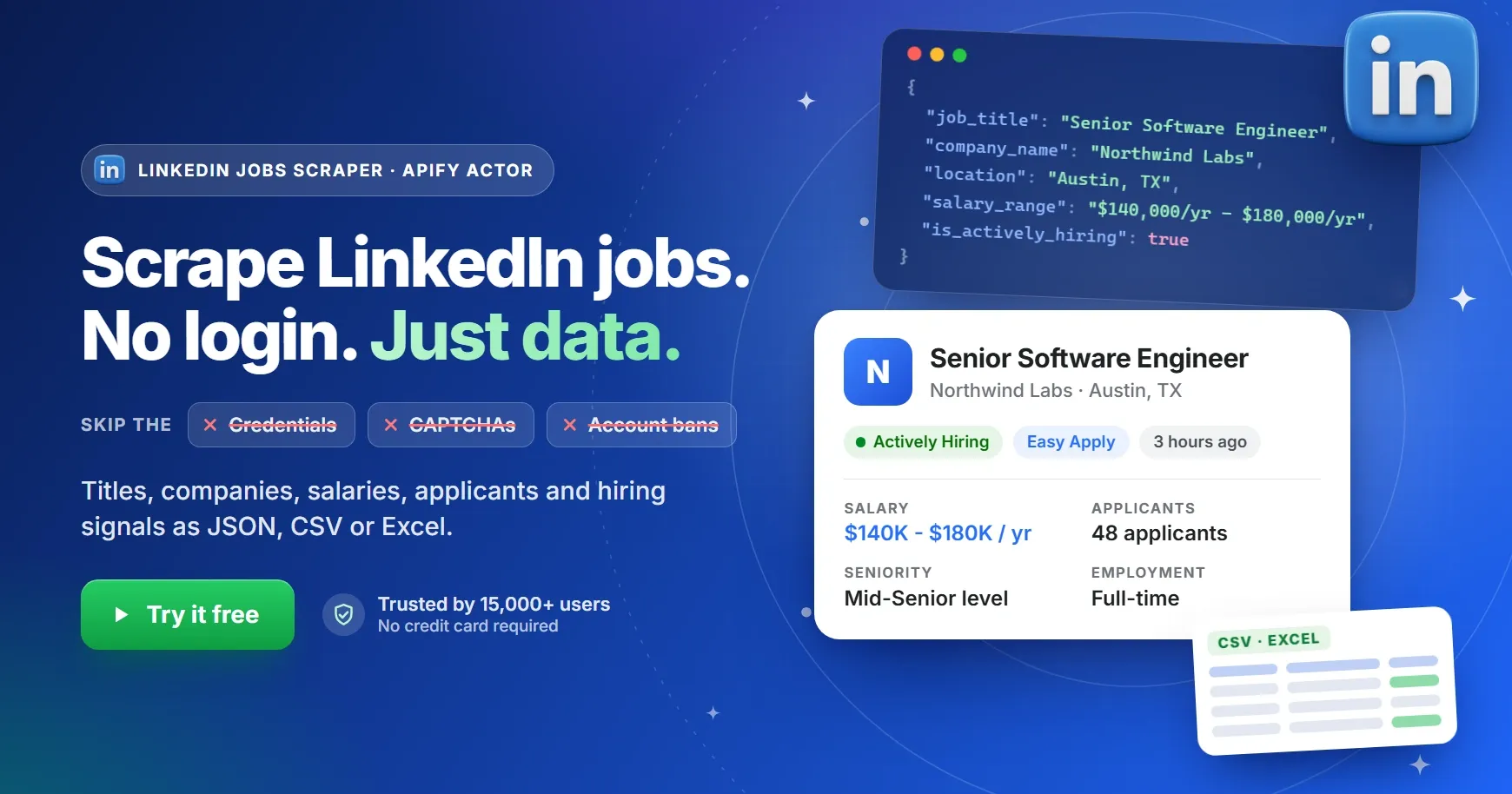





What does Rapid LinkedIn Jobs Scraper do?
Rapid LinkedIn Jobs Scraper is an Apify Actor that extracts public LinkedIn job listings (job titles, companies, locations, posting dates, salaries, full descriptions, seniority, employment type, applicant counts and more) without a LinkedIn login, cookies or account. Enter one or more job titles, choose a location, narrow the search with filters such as experience level, job type, remote / hybrid / on-site, posting date, company, city or Easy Apply, and download clean, structured data as JSON, CSV, Excel, XML, HTML, RSS or JSONL. You can also pull the results straight into your own app through the API.
It is a fast, affordable LinkedIn Jobs API alternative for recruiters, job boards, analysts, sales teams and AI agents that need fresh LinkedIn job data at scale. It is trusted by 15,000+ Apify users, starts at $0.10 per 1,000 jobs, and the monthly credits on Apify's Free plan cover up to 50,000 results every month.
At a glance
| What it is | An Apify Actor that scrapes public LinkedIn job listings |
| LinkedIn account needed | No. No login, no cookies, no credentials |
| Search by | Job titles, location, cities, companies, experience level, job type, work arrangement, posting date, Easy Apply |
| Scrape modes | Quick (search-result data, fastest, $0.10 / 1,000 jobs) and Detailed (adds full job-page data, from $0.30 / 1,000 jobs) |
| Data you get | Title, company, company logo and link, location, posting date, hiring badges, salary, applicants, full description (text and HTML), seniority, employment type, industries, apply link, contact email |
| Export formats | JSON, CSV, Excel, XML, HTML table, RSS, JSONL |
| Ways to run | Apify Console, API, scheduler, webhooks, no-code integrations, MCP for AI agents |
| Pricing | Pay per result. Platform usage is free. Free monthly credits included |
Why scrape LinkedIn job data?
LinkedIn is one of the largest professional job marketplaces in the world, so its public listings are a rich, up-to-date signal of who is hiring, for which roles, where, and at what pay. Teams use this scraper to turn those listings into data they can filter, chart, enrich and automate.
Recruiting and talent sourcing
Track new openings at target clients, spot companies that are scaling a team, and keep your own job pipeline fresh. The Actively Hiring and Early Applicant flags make it easy to prioritize roles that are worth acting on first.
Job boards and aggregators
Fill a niche job board, a newsletter or a career site with fresh listings. Run the scraper on a schedule, filter by title, location and posting date, and push only the new jobs into your database.
Labor-market and salary research
Measure demand for skills, compare roles across cities, watch remote-versus-on-site trends, and benchmark pay using the salary ranges that employers publish.
Sales and lead generation from hiring signals
A company that is hiring is a company that is spending. Find businesses hiring for roles that signal a need for your product or service (HR tech, recruiting, software, outsourcing, training) and build prospect lists from job data.
Competitive intelligence
Follow how competitors grow: which teams they expand, which locations they open, how fast they hire, and what seniority they look for.
AI agents and LLM applications
Give your AI assistant live job data. The Actor works with the Apify MCP server, so tools such as Claude, ChatGPT and Cursor can search LinkedIn jobs on demand. See Use LinkedIn job data with AI agents.
Job seekers and career coaches
Build a personal job-alert workflow: scrape the past 24 hours of roles that match your skills, export them to a spreadsheet and apply while the listing is still fresh.
Why use Rapid LinkedIn Jobs Scraper?
- ✅ No login required. Nothing to authenticate, no cookies to manage, no CAPTCHAs to solve, and no risk to your own LinkedIn account.
- ✅ Two scrape modes. Pick Quick for fast, low-cost listing data or Detailed for full job-page data. You pay only for the depth you need.
- ✅ Precise filters. Combine job titles, location, cities, companies, experience level, employment type, work arrangement, posting time and Easy Apply.
- ✅ Many searches in one run. Search several job titles, cities and companies together; the results are merged into a single dataset.
- ✅ Duplicate-free results. A job found by more than one search is returned only once.
- ✅ Freshness signals. Every job carries its posting date plus LinkedIn's hiring badges, so you can sort by recency and urgency.
- ✅ Proxies included. Proxy handling is built in. There is nothing to configure and no separate proxy bill.
- ✅ Pay per result, with a spending cap. You are charged for the jobs delivered, and the run stops as soon as your maximum cost per run is reached.
- ✅ Full Apify platform power. Scheduling, API access, webhooks, integrations, run monitoring and data storage are all included.
Rapid LinkedIn Jobs Scraper vs other ways to get LinkedIn job data
| Approach | LinkedIn login needed | Risk to your account | Practical scale | Setup |
|---|---|---|---|---|
| Manual copy and paste | No | None | A few dozen jobs | Hours of repetitive work |
| Login-based scrapers and browser extensions | Yes (your account or cookies) | Account restrictions are possible | Medium | Install, log in, keep sessions alive |
| LinkedIn's official job APIs | Partner approval | None | Restricted to approved partners | Application and approval process |
| Rapid LinkedIn Jobs Scraper | No | None. It never touches your account | Large runs with multiple titles, cities and companies | Fill in a form and click Start |
What data can you extract from LinkedIn jobs?
Every job comes back as one structured record. The data falls into six groups:
- Job basics: job ID, title, location and the direct LinkedIn job URL.
- Company: company name, LinkedIn company page and company logo.
- Freshness and hiring signals: posting date, relative posting time, and the Actively Hiring and Early Applicant badges.
- Compensation and competition: published salary range and the number of applicants.
- Job content: the full description as plain text and as raw HTML, plus seniority level, employment type and industries.
- Application details: the apply link, whether Easy Apply is available, and the first contact email found in the description.
Quick vs Detailed: which scrape mode should you choose?
The Scrape Mode input controls how much data is collected for each job. Both modes accept exactly the same search filters.
Quick (quick) | Detailed (detailed, default) | |
|---|---|---|
| Data collected | Everything shown on LinkedIn's job search results: title, company, location, posting date, hiring badges and job link | Everything in Quick, plus data from each job's own page: description, seniority, employment type, industries, applicants, salary and apply link |
| Speed | Fastest, because individual job pages are not opened | Slower, because every job page is opened |
| Price | $0.10 / 1,000 jobs | $0.30 to $0.35 / 1,000 jobs, depending on your Apify plan |
| Best for | Monitoring new postings, building alerts, counting and trend analysis | Lead generation, salary research, candidate matching, AI and NLP on job descriptions |
How to scrape LinkedIn jobs (step by step)
- Open the Actor on Apify Store and click Try for free (create a free Apify account if you don't have one).
- Add your job titles (for example
Software Engineer,Data Scientist). Each title is searched separately and the results are merged. - Set the location. Use a country, region or city such as
United States,Europe,RemoteorSan Francisco, CA. - Choose a scrape mode (Quick or Detailed) and add optional filters: experience level, job type, work arrangement, posting time, companies, cities or Easy Apply.
- Set how many jobs you want in Number of Jobs Entries (minimum 10).
- Click Start. Results appear in the dataset while the run is still going.
- Download your data from the Output tab as JSON, CSV, Excel, XML, HTML, RSS or JSONL, or fetch it through the API.
Example inputs
Remote Python jobs from the past week, with full details
New jobs at specific companies, from the last 24 hours (fast monitoring)
Data analyst jobs across several UK cities
How much does it cost to scrape LinkedIn jobs?
Rapid LinkedIn Jobs Scraper uses pay-per-result pricing. Quick jobs cost $0.10 per 1,000 results on every plan, and Detailed jobs cost $0.35 per 1,000 results on the Free plan, falling to $0.30 per 1,000 on the Business plan. Apify platform usage is free, so there are no separate compute or proxy charges. You pay only for the jobs delivered to your dataset.
| Result type | Free | Starter (Bronze, 4% off) | Scale (Silver, 5% off) | Business (Gold, 9% off) |
|---|---|---|---|---|
| Quick job | $0.10 / 1,000 | $0.10 / 1,000 | $0.10 / 1,000 | $0.10 / 1,000 |
| Detailed job | $0.35 / 1,000 | $0.34 / 1,000 | $0.32 / 1,000 | $0.30 / 1,000 |
Cost examples
| Jobs scraped | Quick | Detailed (Free plan) | Detailed (Business plan) |
|---|---|---|---|
| 1,000 | $0.10 | $0.35 | $0.30 |
| 10,000 | $1.00 | $3.50 | $3.00 |
| 50,000 | $5.00 | $17.50 | $15.00 |
| 100,000 | $10.00 | $35.00 | $30.00 |
Is there a free plan?
Yes. Every Apify account on the Free plan gets $5 of free platform credits each month. With Quick mode that is up to 50,000 LinkedIn jobs per month for free, and about 14,000 jobs per month in Detailed mode. No credit card is needed to get started.
How do I stay in control of my spending?
Set a maximum cost per run in the run options. The Actor stops as soon as the limit is reached and keeps every result collected up to that point, so you never pay more than you planned.
For full pricing details, see the Pricing tab.
Input
Open the Input tab to configure a run. Only the fields you fill in are applied, so you can start with just a job title and a location. Here is the form, followed by what each field does:
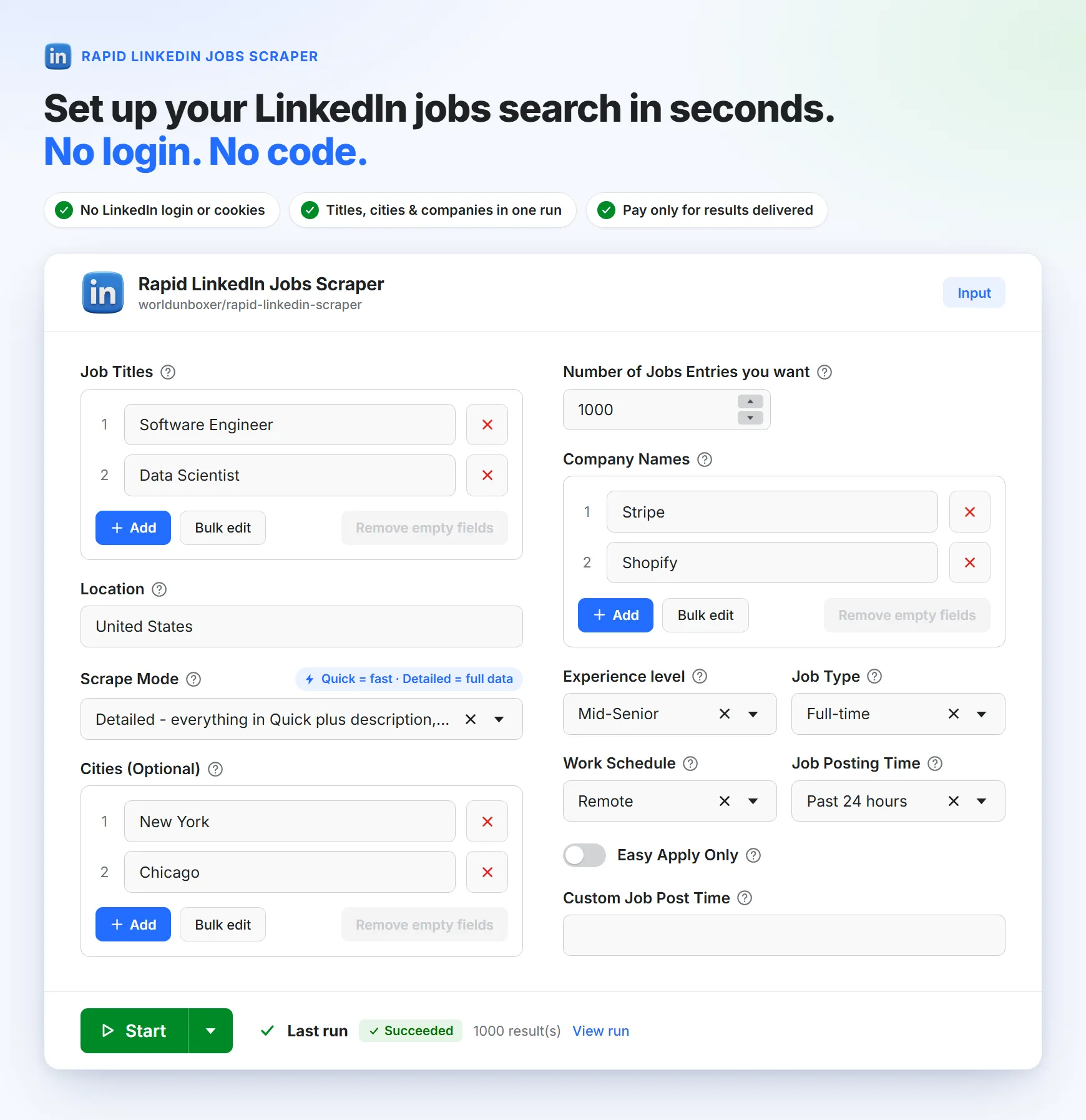
🧾 Input fields
| Title | ID | Type | Description |
|---|---|---|---|
| Job Titles | jobs_titles | List of strings | Job titles to search for, for example "Python Developer" or "Data Scientist". Each title is searched separately and the results are merged. |
| Location | location | String | A broad location such as Worldwide, Europe or Canada, or a full location string such as San Francisco, CA. |
| Cities (optional) | cities | List of strings | Specific cities to search, for example "London" and "Manchester". Set Location to the country so the cities are matched correctly. |
| Company Names | company_names | List of strings | Only return jobs from these companies. Use each company's name as it appears on LinkedIn for the best match. |
| Number of Jobs Entries | jobs_entries | Integer | How many jobs you want in this run (minimum 10, default 1,000). |
| Scrape Mode | scrape_mode | quick or detailed | How much data to collect for each job. detailed is the default. See Quick vs Detailed. |
| Experience level | experience | Select | Intern, Assistant, Junior, Mid-Senior, Director or Executive. |
| Job Type | employment_type | Select | Full-time, Part-time, Contract, Temporary, Volunteer, Internship or Other. |
| Work Schedule | work_arrangement | Select | On-site, Remote or Hybrid. |
| Job Posting Time | posted_within | Select | Any Time, Past 24 hours, Past Week or Past Month. If you set it, it takes priority over Custom Job Post Time. |
| Custom Job Post Time | job_post_time | String | A custom posting window in seconds, prefixed with r. For example r86400 is the past day and r172800 is the past two days. It is used only when Job Posting Time is not set. |
| Easy Apply Only | easy_apply | Boolean | Return only jobs that offer LinkedIn's "Easy Apply". |
Good to know
- Company searches cover all regions by default. If you filter by company and leave Location empty, jobs are collected worldwide. Add a location to focus on one country.
- Existing integrations keep working. Older field names from previous versions (
job_title,experience_level,job_type,work_schedule) are still accepted. For new integrations, use the fields in the table above. - Every filter is optional. Leave a filter empty to include all values for it.
Output
Each run stores its results in an Apify dataset. You can download the dataset in various formats such as JSON, HTML, CSV, Excel, XML, RSS or JSONL, preview it as a table in the Output tab, or read it through the API.
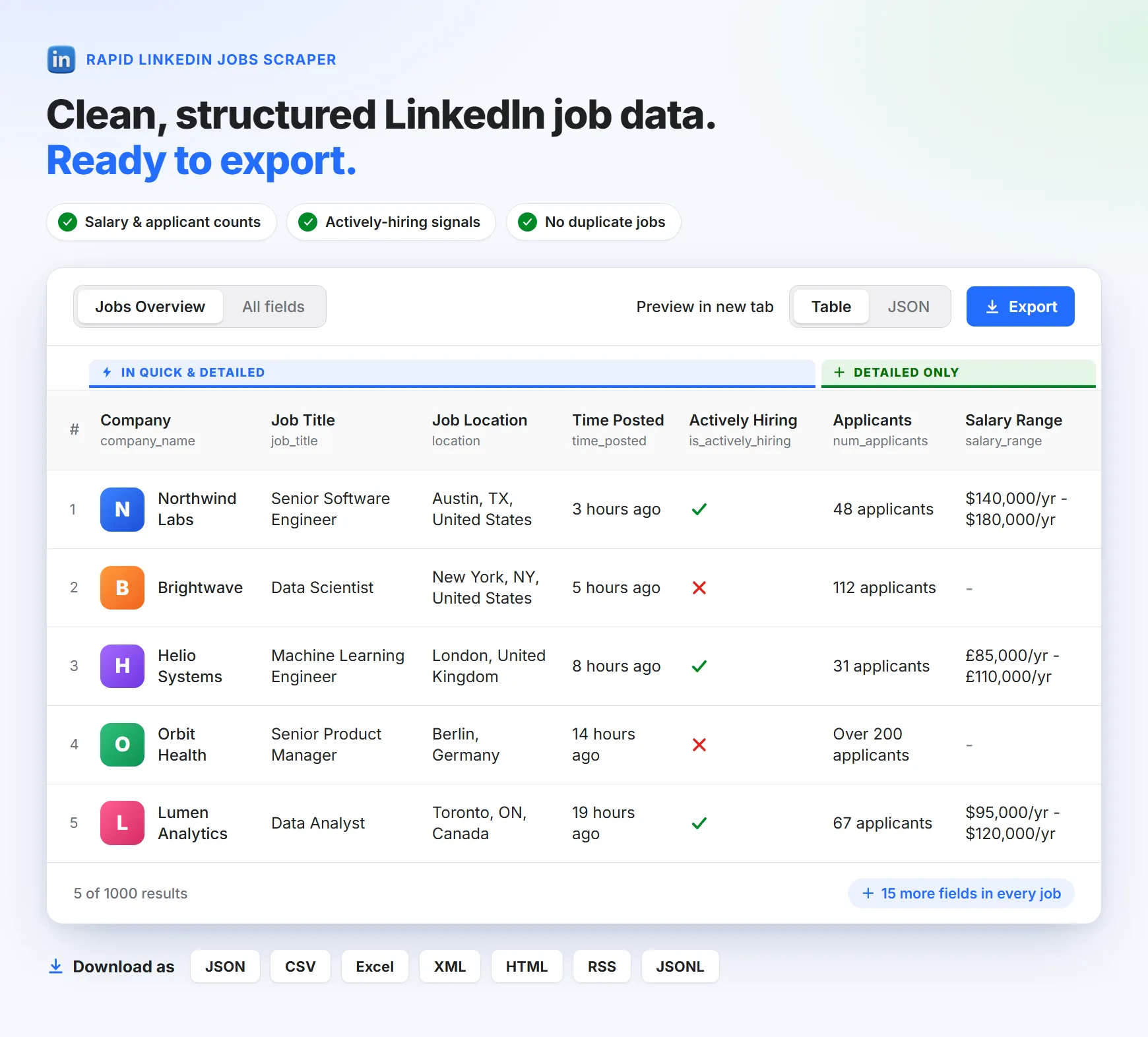
📤 Output Fields
The Mode column shows which scrape mode returns the field. Fields that LinkedIn does not show for a particular job are returned as null.
| Title | ID | Type | Mode | Description |
|---|---|---|---|---|
| Job ID | job_id | String | Quick, Detailed | Unique LinkedIn identifier of the job post. |
| Job URL | job_url | String | Quick, Detailed | Direct link to the job on LinkedIn. |
| Search Keyword | search_keyword | String | Quick, Detailed | The job title from your list whose search found this job. |
| Job Title | job_title | String | Quick, Detailed | Title of the position. |
| Company Name | company_name | String | Quick, Detailed | Name of the hiring company. |
| Company URL | company_url | String | Quick, Detailed | Link to the company's LinkedIn page, when available. |
| Company Logo URL | company_logo_url | String | Quick, Detailed | Direct URL of the company logo image. |
| Location | location | String | Quick, Detailed | Where the job is located. |
| Time Posted | time_posted | String | Quick, Detailed | How long ago the job was posted, for example "2 days ago". |
| Posted Date | posted_date | String | Quick, Detailed | Posting date in ISO format, for example 2026-09-24. |
| Hiring Badge | hiring_badge | String | Quick, Detailed | The badge LinkedIn shows on the listing, such as "Actively Hiring" or "Be an early applicant". |
| Actively Hiring | is_actively_hiring | Boolean | Quick, Detailed | true when the listing carries the "Actively Hiring" badge. |
| Early Applicant | is_early_applicant | Boolean | Quick, Detailed | true when the listing carries the "Be an early applicant" badge. |
| Apply URL | apply_url | String | Detailed | The link to apply. LinkedIn no longer exposes employers' external application links, so this is the LinkedIn job page, where the Apply button is. |
| Number of Applicants | num_applicants | String | Detailed | Current number of applicants, as shown by LinkedIn. |
| Salary Range | salary_range | String | Detailed | Salary or compensation, when the employer publishes it. |
| Job Description | job_description | String | Detailed | The full job description as plain text. |
| Job Description HTML | job_description_raw_html | String | Detailed | The full job description as raw HTML, with its original formatting. |
| Seniority Level | seniority_level | String | Detailed | The seniority level LinkedIn lists for the job. |
| Employment Type | employment_type | String | Detailed | Full-time, part-time, contract and so on. |
| Industries | industries | String | Detailed | The industries related to the job. |
| Easy Apply | easy_apply | Boolean | Detailed | Whether LinkedIn Easy Apply is available for the job. |
| Contact Email | contact_email | String | Detailed | The first email address found in the job description, if the poster included one. |
🧪 Sample output
Tips for getting the best LinkedIn job data
- Start with Quick, then go deeper. Use Quick to discover and count jobs cheaply, then run Detailed when you need descriptions, salaries or applicant numbers.
- Collect larger volumes by widening the search. The number of jobs a search can return depends on how many public listings LinkedIn shows for it. To collect more, add several related job titles, list multiple cities, add company names, or leave filters such as experience level and job type empty.
- Monitor new jobs with a schedule. Combine Past 24 hours with a daily Apify schedule to receive only fresh postings.
- Match location to your goal. Use a country in Location with a list of Cities for city-by-city coverage, or a broad region such as
Europefor wide coverage. - Use exact company names. Company filters work best with the name exactly as it appears on the company's LinkedIn page.
- Use the Easy Apply filter to narrow quickly. It returns only jobs that support LinkedIn's one-click application.
- Cap your spend. Set a maximum cost per run, especially for large Detailed runs.
- Use results while the run is in progress. Jobs are added to the dataset as they are collected, so you can start using them before the run finishes.
- Expect empty fields for some jobs. Salary, applicant count and contact email only appear when the listing provides them.
Integrations, scheduling and API access
Schedule runs and get alerts
Run the scraper hourly, daily or weekly with Apify schedules, and trigger webhooks when a run finishes to notify your team or kick off the next step in your pipeline.
Connect LinkedIn job data to your tools
Send results to Google Sheets, Airtable, Slack, Make, Zapier, n8n and more using Apify's integrations. Build job alerts, CRM enrichment flows and reporting dashboards without writing code.
Run the scraper through the API
You can integrate the scraper directly into your database, app or automation pipeline with the Apify API. Replace YOUR_APIFY_API_TOKEN with your token from the Apify Console.
Node.js
Python
cURL
See the API tab of this Actor for ready-made code in more languages and the full API reference.
Use LinkedIn job data with AI agents (MCP)
Connect this scraper to your AI assistant through the Apify MCP server and let it search LinkedIn jobs on demand, with live data instead of stale training data.
🔗 Open the MCP configurator for Rapid LinkedIn Jobs Scraper
Works with: Claude Desktop, Claude.ai, Claude Code, Cursor, ChatGPT, Codex CLI, VS Code, Antigravity, Kiro and any other MCP-compatible client.
Example prompts you can try:
- "Find 50 remote Python developer jobs posted in the last 24 hours and summarize the salary ranges."
- "List companies in London that are actively hiring data analysts, and group them by industry."
- "Compare the number of senior product manager openings in Berlin, Amsterdam and Paris this month."
Frequently asked questions
Do I need a LinkedIn account or cookies to scrape LinkedIn jobs?
No. Rapid LinkedIn Jobs Scraper collects only the job information LinkedIn shows publicly to visitors who are not logged in. You never enter credentials or cookies, so your own LinkedIn account is never involved and cannot be restricted.
Is it legal to scrape LinkedIn jobs?
Collecting publicly available information is generally allowed in many jurisdictions, but the rules depend on your country, how you use the data, and LinkedIn's Terms of Service. Job listings can also contain personal data, which is regulated by laws such as the GDPR. This is not legal advice. See Legal and compliance below and consult a lawyer if you are unsure.
How much does the LinkedIn jobs scraper cost?
Quick jobs cost $0.10 per 1,000 results, and Detailed jobs cost from $0.30 per 1,000 results, depending on your Apify plan. Platform usage is free. See How much does it cost and the Pricing tab for details.
Can I scrape LinkedIn jobs for free?
Yes, within limits. Apify's Free plan includes $5 of platform credits every month, enough for up to 50,000 Quick results (about 14,000 Detailed results) each month, with no credit card required.
How many jobs can I scrape in one run?
Set the number you want in Number of Jobs Entries and the Actor collects up to that many unique jobs. The exact number depends on how many public listings LinkedIn shows for your search: a very narrow search has fewer jobs than a broad one. To collect large volumes, combine several job titles, cities and companies, and keep filters broad.
Which scrape mode should I use, Quick or Detailed?
Use Quick when listing-level data (title, company, location, posting date, hiring badges, link) is enough, for example to monitor new postings. Use Detailed when you need descriptions, seniority, employment type, industries, applicant counts, salary or contact email. Detailed is the default.
What data does the LinkedIn jobs scraper extract?
Job ID and URL, title, company name, company page and logo, location, posting date, hiring badges, salary range, number of applicants, full description (text and HTML), seniority level, employment type, industries, Easy Apply status, apply link and contact email. Quick mode returns the listing-level fields and Detailed mode returns all of them. See Output Fields.
Can I scrape LinkedIn jobs by company?
Yes. Add company names to Company Names and the scraper returns jobs posted by those companies. Combine it with a location, job title or posting-time filter to narrow the results.
Can I scrape jobs from several cities or countries at once?
Yes. Put the country in Location and list the cities in Cities, or use a broad region such as Europe or Worldwide. Results from every search are merged and de-duplicated.
Can I get LinkedIn salary data?
Yes, when the employer publishes it. In Detailed mode the salary_range field contains the compensation shown on the listing. Many LinkedIn jobs do not list a salary, and those return null.
Does it extract recruiter or contact emails?
In Detailed mode, contact_email contains the first email address found in the job description, when the poster included one. The Actor does not access private profiles or messages. Treat any email addresses as personal data and see Legal and compliance.
How can I monitor new LinkedIn jobs automatically?
Set Job Posting Time to Past 24 hours and run the Actor on a daily Apify schedule. Add a webhook or an integration to send the new jobs to Google Sheets, Slack, your database or your own app.
How fast is the scraper?
It is lightweight and does not rely on heavy browser automation. Quick mode typically returns hundreds of jobs in seconds. Detailed mode takes longer because it opens each job page, and larger runs scale accordingly.
Why did I get fewer jobs than I asked for?
The number of jobs available depends on how many public listings LinkedIn shows for your search. Narrow combinations of title, location and filters have fewer results. Try broader filters, a longer posting window, additional job titles, more cities, or a broader location.
Why are some fields empty?
Fields such as salary, applicant count and contact email are returned only when the listing provides them. Fields LinkedIn does not show for a job come back as null.
Can I export LinkedIn jobs to Excel, CSV or Google Sheets?
Yes. Download the dataset as Excel, CSV, JSON, XML, HTML, RSS or JSONL, or use the Google Sheets integration to send results to a spreadsheet automatically.
Can I use this with ChatGPT, Claude or other AI tools?
Yes. The Actor works with the Apify MCP server, so MCP-compatible tools such as Claude, ChatGPT and Cursor can run it directly. See Use LinkedIn job data with AI agents.
Is this a LinkedIn Jobs API alternative?
Yes. LinkedIn's official job APIs are limited to approved partners. Rapid LinkedIn Jobs Scraper gives you structured, programmatic access to public LinkedIn job data through the Apify API, with no partner approval and no LinkedIn account.
What happens if my run reaches its spending limit?
The Actor stops and keeps every result collected so far, so your dataset stays usable and you never pay more than the maximum cost per run you set.
Where can I report a problem or request a feature?
Open the Issues tab of this Actor, or use the contact details in Support and feedback. Bug reports and ideas are welcome.
Legal and compliance
This Actor is built to be ethical. It collects only information that LinkedIn shows publicly to visitors who are not logged in, and it does not access private profiles, messages or account data. We therefore believe it is safe to use for ethical purposes.
However, be aware that your results can contain personal data. For example, a job description may include a contact name or email address that the poster chose to publish (returned in contact_email). Personal data is protected by the GDPR in the European Union and by other regulations around the world. You should not collect or use personal data unless you have a legitimate reason to do so. If you are unsure whether your reason is legitimate, consult your lawyers.
LinkedIn's Terms of Service place restrictions on automated data collection. Review them and make sure your use case complies with them and with the laws that apply to you. You are responsible for how you use the data.
Rapid LinkedIn Jobs Scraper is an independent tool and is not affiliated with, endorsed by or sponsored by LinkedIn. LinkedIn is a trademark of its respective owner.
More job scrapers
Need job data from other sources? Try these Actors:
| Actor | What it does |
|---|---|
| Rapid Indeed Jobs Scraper | Extract Indeed job listings from dozens of countries, with salaries, company profiles, contact emails, descriptions and apply links. |
| Dice Jobs Scraper | Extract job listings, company details, salaries and full job descriptions from Dice.com. |
Support and feedback
Rapid LinkedIn Jobs Scraper is built and maintained by Umesh Patidar. If you like it, a review helps others find it. For bugs, ideas or custom requirements:
- Issues tab: report problems or request features directly on this Actor's page.
- Feedback form: https://forms.gle/HQyJGukRrCKmf2qF8
- Email: umeshpatidar.dev@gmail.com
- LinkedIn: Umesh Patidar


![🚀 Indeed jobs scraper [PPR] avatar](https://images.apifyusercontent.com/PEDOk9MmTf1yHtczA1A4wQEoGyAKCe5Aft1HzkhwROk/rs:fill:76:76/cb:1/aHR0cHM6Ly9hcGlmeS1pbWFnZS11cGxvYWRzLXByb2QuczMudXMtZWFzdC0xLmFtYXpvbmF3cy5jb20vTVhMcG5nbVZwRThXVEVTUXIvQjFrZ3BRS1p5dzJvVEpJUmctTG9nby1IZXJvLVN0YXRpYy1lemdpZi5jb20td2VicC10by1qcGctY29udmVydGVyLmpwZw.webp)


