

Linkedin Jobs Scraper
Pricing
from $0.10 / 1,000 job results
Linkedin Jobs Scraper
Scrape LinkedIn jobs with powerful search and advanced filters using keywords, search URLs and locations.🔥$0.10/1K jobs. Extract job listing, full job details, and company details directly from LinkedIn job search results.
Pricing
from $0.10 / 1,000 job results
Rating
4.2
(31)
Developer

Umesh Patidar
Maintained by CommunityActor stats
155
Bookmarked
16K
Total users
809
Monthly active users
3.4 hours
Issues response
11 hours ago
Last modified
Categories
Features
Share


Extract LinkedIn job listings at scale with advanced search and filtering capabilities.
Rapid LinkedIn Jobs Scraper collects public LinkedIn job postings and transforms them into structured, ready-to-use data. Extract job titles, company names, locations, posting dates, salaries, full descriptions, seniority levels and more.
Search by keywords, LinkedIn search URLs, locations, cities, companies or Boolean search strings. Use advanced filters to find relevant job listings, automate recurring searches, track new postings and avoid duplicates by providing previously collected job IDs. Only new jobs are returned, and skipped jobs are not charged.
Starting at $0.10 per 1,000 jobs. See the full Pricing breakdown. Start on Apify's Free plan with no credit card required.

Output fields · Input fields · Pricing · How it works · Video tutorial · Use cases · Monitor new jobs · FAQ
LinkedIn job data
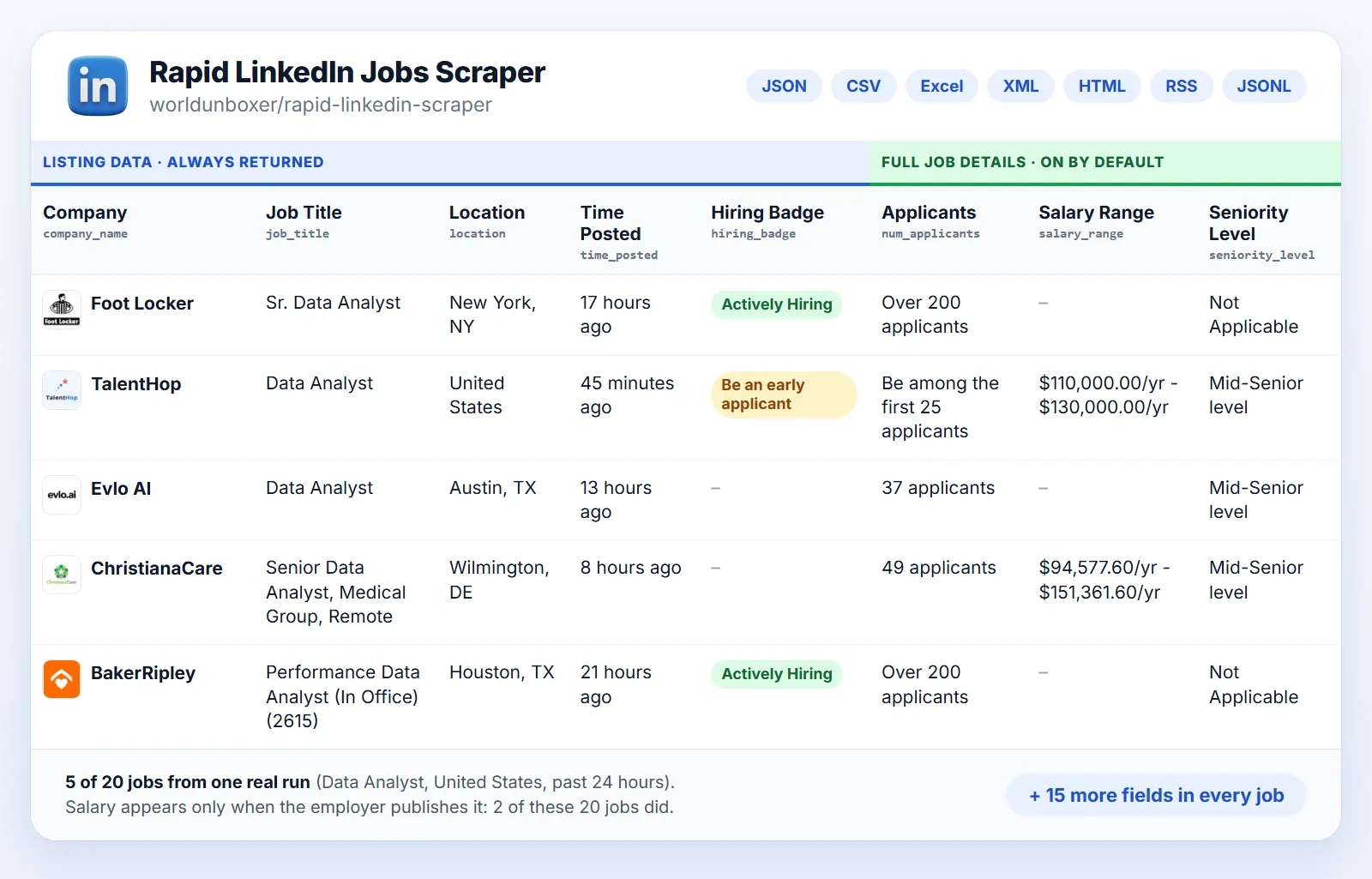
Each job comes back as one rich, structured record. The fields and their names are the same on every run, so the data loads straight into a database, spreadsheet or LLM prompt.
📤 Output Fields
A record can carry 50+ fields at full potential, in three layers with one table each. What a record holds depends on the options you turn on and on what LinkedIn shows for that job.
Job listing fields
This layer comes with every run, even with both enrichments off. It holds the basic job details (title, location, posting date, hiring badge, links) and the basic company details (name, page link, logo).
| Label | Field | Type | Description | Example |
|---|---|---|---|---|
| Job ID | job_id | String | Unique LinkedIn job identifier. | 1234567890 |
| Job URL | job_url | String | Direct link to the job on LinkedIn. | https://www.linkedin.com/jobs/view/1234567890 |
| Search Keyword | search_keyword | String | The title, or the side of an OR, that found the job. Not returned when no titles or search strings are given. | Software Engineer |
| Job Title | job_title | String | Title of the position. | Senior Software Engineer |
| Company Name | company_name | String | Hiring company. | Tech Corp |
| Company URL | company_url | String | The company's LinkedIn page, when available. | https://www.linkedin.com/company/tech-corp |
| Company Logo | company_logo_url | String | Company logo image URL. | https://media.licdn.com/dms/image/... |
| Job Location | location | String | Where the job is located. | New York, NY |
| Time Posted | time_posted | String | Relative posting time, for example "2 days ago". | 2 days ago |
| Posted Date | posted_date | String | Posting date (ISO, date only), for example 2026-09-24. | 2026-09-24 |
| Hiring Badge | hiring_badge | String | LinkedIn's badge, such as "Actively Hiring" or "Be an early applicant". | Actively Hiring |
| Actively Hiring | is_actively_hiring | Boolean | true with the "Actively Hiring" badge. | true |
| Early Applicant | is_early_applicant | Boolean | true with the "Be an early applicant" badge. | false |
Job enrichment fields
Added by Include Full Job Details, which opens each job's page.
| Label | Field | Type | Description | Example |
|---|---|---|---|---|
| Company ID | company_id | String | Numeric LinkedIn company ID, accepted by Company IDs. Also filled in by Include Full Company Details when Include Full Job Details is off. | 1234567 |
| Applicants | num_applicants | String | Applicants so far, as LinkedIn shows it. | 45 |
| Salary Range | salary_range | String | Compensation, when the employer publishes it. | $120,000/yr - $160,000/yr |
| Job Description | job_description | String | The full description as plain text. | We are looking for an experienced Software Engineer... |
| Job Description Raw HTML | job_description_raw_html | String | The full description as raw HTML. | <div>We are looking for an experienced Software Engineer...</div> |
| Seniority Level | seniority_level | String | The seniority level LinkedIn lists. | Mid-Senior level |
| Employment Type | employment_type | String | Full-time, part-time, contract and so on. | Full-time |
| Industries | industries | String | Industries related to the job. | Information Technology |
| Easy Apply | easy_apply | Boolean | Whether LinkedIn Easy Apply is available. | true |
| Job Poster Name | job_poster_name | String | Name of the person who posted the job, when LinkedIn shows one. Left out otherwise. | Alex Morgan |
| Job Poster Headline | job_poster_headline | String | The poster's LinkedIn headline. | Talent Partner at Tech Corp |
| Job Poster Profile | job_poster_profile_url | String | Link to the poster's LinkedIn profile. | https://www.linkedin.com/in/alex-morgan-example |
| Job Poster Photo | job_poster_photo_url | String | The poster's profile photo URL. | https://media.licdn.com/dms/image/... |
| Contact Email | contact_email | String | A valid email found in the description. Not returned unless Include Contact Details is on. | jobs@techcorp.example |
Company enrichment fields
Added by Include Full Company Details, which opens the LinkedIn page of the company, showcase page or school that posted the job.
| Label | Field | Type | Description | Example |
|---|---|---|---|---|
| Company Details Status | company_details_status | String | ok when the page was read, failed when it could not be, no_company_page when the job links to no such page. | ok |
| Company Page Type | company_page_type | String | company, showcase or school. | company |
| Company Followers | company_followers | Integer | Followers of the page. | 125000 |
| Company Industry | company_industry | String | The industry the page shows. | Software Development |
| Company Tagline | company_tagline | String | The tagline under the name. | Software that works for everyone |
| Company Description | company_description | String | The page's About text. | Tech Corp builds cloud software for teams of every size... |
| Company Website | company_website | String | The company's website. | https://www.techcorp.example |
| Company Size | company_size | String | Size bracket as shown, for example 51-200 employees. | 201-500 employees |
| Company Size Min | company_size_min | Integer | The lower number of the size bracket. | 201 |
| Company Size Max | company_size_max | Integer | The upper number of the size bracket. Left out for an open bracket such as 10,001+. | 500 |
| Company Employees on LinkedIn | company_employees_on_linkedin | Integer | LinkedIn members who list the company as their employer. Not the payroll headcount. | 640 |
| Company Organization Type | company_organization_type | String | Privately Held, Public Company, Nonprofit, Educational and so on. | Privately Held |
| Company Founded | company_founded_year | Integer | Year founded. | 2012 |
| Company Specialties | company_specialties | List of strings | The specialties the page lists. | ["Cloud Computing", "Machine Learning", "Mobile Apps"] |
| Company Headquarters | company_headquarters | String | Headquarters as written on the page. | New York, NY |
| Company HQ Street | company_headquarters_street | String | Street of the headquarters address. | 1 Example Street |
| Company HQ City | company_headquarters_city | String | City of the headquarters address. | New York |
| Company HQ Region | company_headquarters_region | String | State or region of the headquarters address. | New York |
| Company HQ Postal Code | company_headquarters_postal_code | String | Postal code of the headquarters address. | 10001 |
| Company HQ Country | company_headquarters_country_code | String | Two-letter country code of the headquarters. | US |
| Company Cover Image | company_cover_image_url | String | Cover image URL. | https://media.licdn.com/dms/image/... |
| Company Premium Page | company_has_premium_page | Boolean | true for a paid LinkedIn Premium page. | true |
| Company Open Jobs | company_open_jobs_count | Integer | Open jobs LinkedIn counts for the company, when the page shows it. | 38 |
| Company Locations | company_locations | List of objects | Each address with address and is_primary. | [{"address": "1 Example Street, New York, New York 10001, US", "is_primary": true}, {"address": "20 Sample Road, London, England EC1A 1AA, GB", "is_primary": false}] |
| Company Similar Pages | company_similar_pages | List of objects | Pages LinkedIn lists as similar: name, url, industry, location. | [{"name": "Example Software Inc.", "url": "https://www.linkedin.com/company/example-software", "industry": "Software Development", "location": "San Francisco, CA"}] |
| Company Affiliated Pages | company_affiliated_pages | List of objects | Affiliated pages, same fields. A showcase page lists its parent company here. | [{"name": "Tech Corp Labs", "url": "https://www.linkedin.com/showcase/tech-corp-labs", "industry": "Software Development", "location": "New York, NY"}] |
| Company Recent Posts | company_recent_posts | List of objects | Recent posts: url, text, published_at, reactions, comments. | [{"url": "https://www.linkedin.com/posts/tech-corp_example-activity-1", "text": "We are hiring engineers in New York...", "published_at": "2026-09-22T09:30:00.000Z", "reactions": 120, "comments": 8}] |
| Company Products | company_products | List of objects | Products the page lists: name, url. | [{"name": "Tech Cloud", "url": "https://www.linkedin.com/products/tech-corp-tech-cloud"}] |
| Company Employees Sample | company_employees_sample | List of objects | A few employees LinkedIn shows on the page: name, headline, profile_url. | [{"name": "Sam Rivera", "headline": "Engineering Manager at Tech Corp", "profile_url": "https://www.linkedin.com/in/sam-rivera-example"}] |
Input Fields (LinkedIn Search Filters)
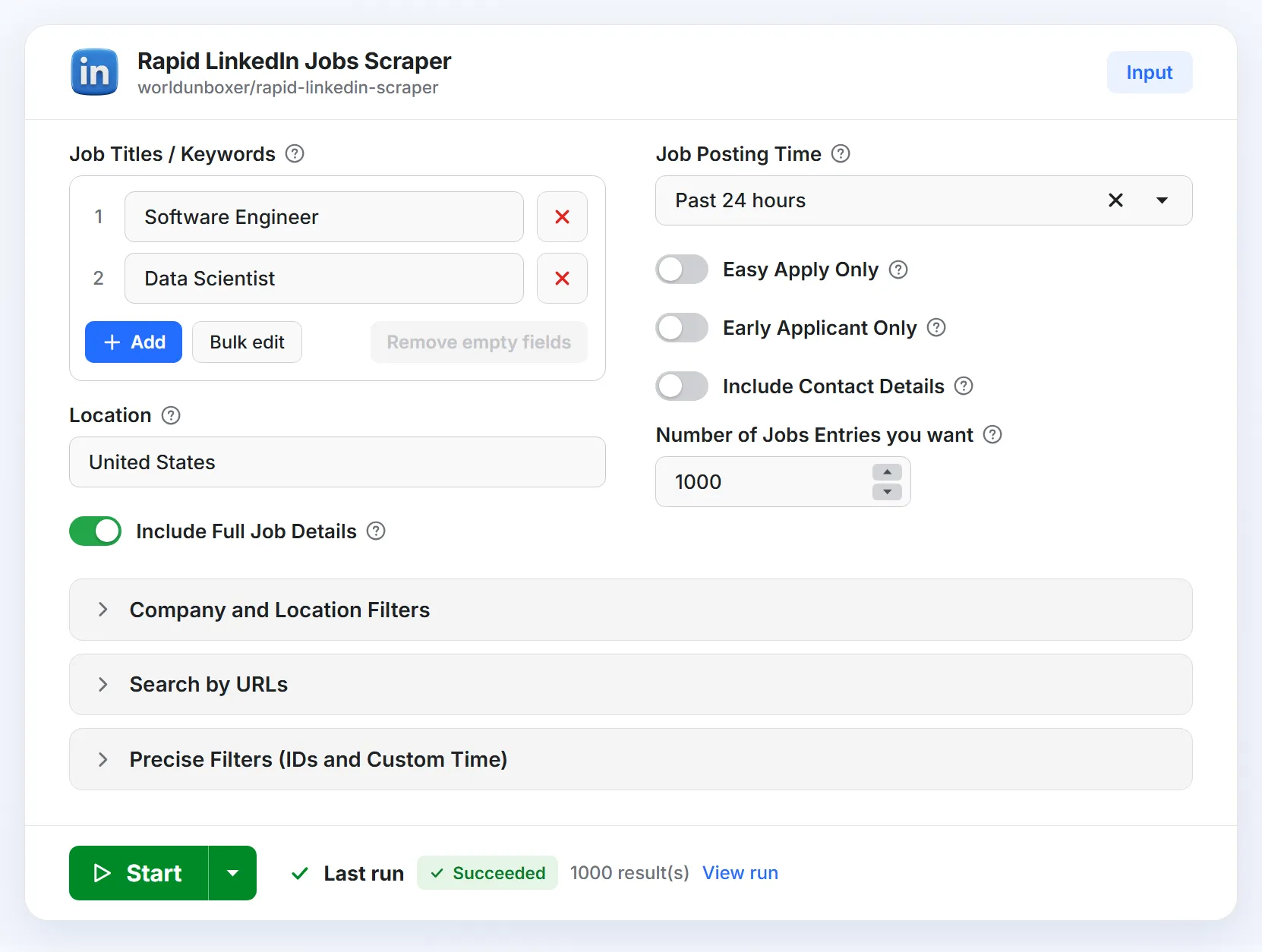
Open the Input tab to configure a run. Every field is optional, so you can start with just a job title and a location. Fewer irrelevant jobs means less cleanup and a smaller bill. Label is the name in the input form and Field is the key to use in the API.
| Label | Field | Type | Description | Example |
|---|---|---|---|---|
| Job Titles / Keywords | jobs_titles | List of strings | Titles or keywords to search. Each is searched separately and the results are merged. | ["Software Engineer", "Data Analyst"] |
| Location | location | String | A broad location such as Worldwide, Europe or Canada, or a full string such as San Francisco, CA. | United States |
| Cities | cities | List of strings | Each city is searched on its own, without Location. If places share a name, add the state or country. | ["Berlin", "Birmingham, Alabama"] |
| Distance (miles) | distance | Integer | Radius around Location, Cities or Location IDs. Empty uses LinkedIn's default (25 miles). | 100 |
| Company Names | company_names | List of strings | Only jobs from these companies, named as on LinkedIn. With no Location, company searches cover all regions. | ["Stripe", "Shopify"] |
| Job Posting Time | posted_within | Select | Any Time, Past 24 hours, Past Week or Past Month. Takes priority over Custom Job Post Time. | Past 24 hours |
| Easy Apply Only | easy_apply | Boolean | Only jobs that offer LinkedIn's "Easy Apply". | true |
| Early Applicant Only | early_applicant_only | Boolean | Only jobs LinkedIn marks "Be an early applicant". LinkedIn calls this filter "Under 10 applicants" on its site. | true |
| Include Full Job Details | include_job_details | Boolean | Opens each job's page to add the job enrichment fields. Billed separately, see Pricing. | true |
| Include Full Company Details | include_full_company_details | Boolean | Opens the LinkedIn page of the company, showcase page or school that posted each job and adds the company enrichment fields. A job whose page cannot be read is still returned without these fields and is not charged for them. Billed separately, see Pricing. | true |
| Include Contact Details | include_contact_details | Boolean | Needs Include Full Job Details. Returns the email address the poster wrote in the description. | true |
| Number of Jobs Entries | jobs_entries | Integer | How many unique jobs you want. 10 to 100,000, default 1,000. | 500 |
| Search URLs | search_urls | List of strings | LinkedIn job search URLs copied from your browser. Each runs as its own search and the other search fields are ignored. | ["https://www.linkedin.com/jobs/search-results/?keywords=Software%20Engineer&geoId=101389470"] |
| Jobs per URL | jobs_per_url | Integer | With Search URLs: the most unique jobs to take from each URL (minimum 10). Number of Jobs Entries still caps the run. | 100 |
| Boolean Search Strings | boolean_search_strings | List of strings | Search with AND, OR, NOT, quotes and parentheses. Write operators in capitals; -word also means NOT. Works alongside Job Titles / Keywords. | ["(Data Engineer OR Analytics Engineer) AND Python NOT Intern"] |
| Location IDs | geo_ids | List of numbers or strings | LinkedIn location IDs to search directly. An ID can be a city, region or country, and is combined with Cities. It is the number after geoId= in a LinkedIn jobs search address. | [101389470] |
| Company IDs | company_ids | List of numbers or strings | LinkedIn company IDs to search directly, combined with Company Names. It is the number after f_C= in a LinkedIn jobs search address, and the same as the company_id output field. | [1337] |
| Exclude Job IDs | exclude_job_ids | List of numbers or strings | Job IDs to leave out. They are not returned and not counted toward Number of Jobs Entries. Pass a previous run's IDs to receive only new jobs. | [1234567890, 1234567891] |
| Custom Job Post Time | job_post_time | String | A posting window in seconds. Used only when Job Posting Time is not set. | 86400 |
Compatibility: existing integrations keep working. The older field name job_title is still accepted, scrape_mode: "quick" is read as include_job_details: false, and the removed experience, employment_type and work_arrangement fields (and their older names experience_level, job_type and work_schedule) are accepted and ignored. A field LinkedIn does not show for a job is left out of its record instead of being null, so read optional fields with a default.
Scrape LinkedIn jobs at scale
Set Number of Jobs Entries to the volume you need and the Actor collects as many unique jobs as it can find, up to that target. To reach large volumes it runs many searches side by side. The results are merged and de-duplicated.
Why you may get fewer jobs than requested
- Volume depends on what LinkedIn lists. A very narrow search simply has fewer jobs than Number of Jobs Entries. To get more, add related titles, cities or companies, or widen the posting window or location.
- LinkedIn can limit requests. See What happens if LinkedIn blocks or limits requests?
- LinkedIn can change its public pages. The Actor is maintained to follow those changes.
LinkedIn jobs scraper pricing
Rapid LinkedIn Jobs Scraper uses pay-per-result pricing. You pay for results delivered to your dataset. Apify platform usage and proxies are included, so there is no separate compute or proxy bill. Prices per 1,000 results:
| Free | Starter | Scale | Business | |
|---|---|---|---|---|
| Job listing: title, company, location, posted date, hiring badge, links | $0.10 | $0.10 | $0.10 | $0.10 |
| Job Enrichment (Include Full Job Details): description, seniority, employment type, industries, applicants, salary, Easy Apply, company ID | $0.25 | $0.24 | $0.22 | $0.20 |
| Company Enrichment (Include Full Company Details): followers, size, industry, headquarters, website, specialties, recent posts | $0.75 | $0.72 | $0.66 | $0.60 |
- Free usage. Apify's Free plan includes $5 of usage every month and needs no credit card. Each month that covers about:
- 50,000 job listings
- 14,000 jobs with job details
- 5,800 jobs with company details
- 4,500 jobs with full job and company details
- Example. 5,000 jobs with full details on the Free plan cost 5 × $0.35 = $1.75. The same 5,000 as listing data only cost $0.50.
- Spending cap. Set a maximum cost per run. The run stops as soon as the limit is reached and keeps everything collected so far.
Current prices are also on the Pricing tab.
How to scrape LinkedIn jobs
- Open the Actor and click Try for free. Create a free Apify account if you do not have one.
- Fill in the form. Add one or more Job Titles / Keywords, such as
Software Engineer, then set a Location such asUnited States,EuropeorSan Francisco, CA, or list Cities. Add any filters you need, then choose how many jobs you want and whether to Include Full Job Details. - Click Start. Jobs appear in the dataset while the run is still going; export them from the Output tab when you are ready.
Video tutorial
Watch the full tutorial on YouTube or follow the video walkthrough below:
Example inputs
Two job titles, a required skill and an exclusion
New jobs at specific companies, from the last 24 hours
A search copied from your browser
LinkedIn jobs scraper use cases
Public listings show who is hiring, for which roles, where, and how fast. Find your use case and start from the suggested setup.
| If you are... | You can... | Suggested setup |
|---|---|---|
| A recruiter or staffing agency | Track new openings at target clients and spot companies growing a team, using LinkedIn's Actively Hiring and early applicant badges. | Company Names, Past 24 hours, daily schedule |
| A job board, newsletter or aggregator | Fill your site with fresh, de-duplicated listings and load only the new ones, using the job ID as the key. | Titles and location, Past 24 hours, daily schedule, Exclude Job IDs |
| A B2B sales or lead-generation team | Use hiring as a buying signal: companies hiring for roles that match your product. Key data: company name and page, job title, posting date and industries. | Titles that match your ideal customer, Past 24 hours, webhook to your CRM (workflow) |
| An analyst or market researcher | Measure skill demand, compare cities, follow competitors' hiring and benchmark published salaries. | Several titles and Cities, Past Month, weekly schedule |
| A job seeker or career coach | Build a daily alert of fresh roles that match your skills. | Your titles and location, Past 24 hours, optionally Easy Apply Only or Early Applicant Only |
| A developer or automation builder | Feed jobs into a database, dashboard, Make, Zapier or n8n flow. | The API or an integration |
| An AI developer or agent builder | Give an agent live job data instead of stale training data. | MCP or the API |
Included with the Actor and Apify: searching, filtering, de-duplication, dataset export, API access, schedules, webhooks and MCP access. You set up: sending data to Google Sheets, Slack or a CRM (through Apify's integrations, Make, Zapier or n8n), keyword filtering inside descriptions, finding decision-makers, drafting outreach and any AI analysis.
Compared with other ways to get LinkedIn jobs
The Actor reads the public job pages over plain HTTP, with no headless browser.
| Approach | LinkedIn login | What you get | Setup |
|---|---|---|---|
| Copy and paste by hand | No | A few jobs at a time | Hours of repetitive work |
| Login-based scrapers and extensions | Your account or cookies | What your own session can see | Install, sign in, keep the session alive |
| LinkedIn's official job APIs | Approved partner access | The Job Posting API publishes jobs; it does not export listings | Application and approval |
| Rapid LinkedIn Jobs Scraper | No | Public listings as structured data | Fill in a form, or call the API |
Monitor new LinkedIn jobs
To receive only the jobs you have not seen before, run the Actor on a schedule and tell it which jobs you already have.
Schedule daily runs
Set Job Posting Time to Past 24 hours and start the Actor on a daily Apify schedule, with no server of your own.
Skip jobs you have already collected
Exclude Job IDs leaves out the jobs you already have. The Actor does not remember jobs between runs, so you keep the IDs, with job_id as the key. The example reads them from the previous run's dataset; for a longer history, keep them in your own database.
On the first run there is nothing to exclude, so start without Exclude Job IDs. Then send the new jobs to Slack, a spreadsheet, your CRM or your database with a webhook or integration, as in the example workflow.
Export LinkedIn jobs, integrations and workflows
Results are stored in an Apify dataset while the run is in progress. Download them as Excel, CSV, JSON, XML, HTML, RSS or JSONL, preview them as a table in the Output tab, or read them through the API.
n8n, Make, Zapier and Google Sheets
- Webhooks. Webhooks call your URL when a run finishes, to notify your team or start the next step.
- Integrations. Apify provides Make, Zapier, n8n, Airtable, Slack and Google Drive integrations, among others. Google Sheets is reachable through Zapier, Make or n8n, or by downloading the dataset as CSV or Excel.
Example workflow: new jobs to your CRM or Slack
| Step | What happens | Provided by |
|---|---|---|
| 1. Collect | A daily run searches your titles with Past 24 hours | This Actor and an Apify schedule |
| 2. Trigger | The finished run starts the next step | An Apify webhook, or a Make, Zapier or n8n trigger |
| 3. Filter | Keep jobs that match your ideal customer, for example by location, industries or keywords in job_description | Make, Zapier, n8n or your own code |
| 4. Enrich and draft (optional) | Find the decision-maker and draft an opening line that mentions the role | Your enrichment tool and an LLM |
| 5. Deliver | New prospects or alerts land in Google Sheets, Slack, your CRM or a sales tool | Your integration |
LinkedIn jobs API
Runs and datasets are reachable through the Apify API and its Python and JavaScript clients, so you can use the scraper as a LinkedIn jobs API without running any infrastructure.
The API tab has ready-made code and the full reference. The synchronous run endpoints wait up to 300 seconds and then return status 408, so use them for small runs. For larger runs, start the run and read the dataset when it finishes.
Sample LinkedIn job data
Each dataset item is one JSON record. This one shows every field, with Include Full Job Details, Include Contact Details and Include Full Company Details all on (placeholder values). What each field means is in Output Fields.
Use LinkedIn job data with AI agents (MCP)
Connect the scraper to your AI assistant through the Apify MCP server and it can search LinkedIn jobs on demand with live data. Apify documents setup for Claude Desktop, Claude Code, ChatGPT, Cursor, GitHub Copilot, Codex and VS Code, and other MCP-compatible clients can connect too.

- Open the configurator above and choose your AI client.
- Connect it to your Apify account by following the instructions for that client.
- Ask in plain language. Mention
worldunboxer/rapid-linkedin-scraperso the assistant picks this Actor.
Runs started by your assistant are billed to your Apify account at the same pay-per-result prices as any other run.
Frequently asked questions
Is it legal to scrape LinkedIn jobs?
Collecting publicly available information is generally allowed in many jurisdictions, but the rules depend on your country, how you use the data and LinkedIn's Terms of Service. Job listings can also contain personal data, which laws such as the GDPR regulate. This is not legal advice. See Legal and compliance and consult a lawyer if you are unsure.
Do I need a LinkedIn account or cookies to scrape LinkedIn jobs?
No. Rapid LinkedIn Jobs Scraper collects only the job information LinkedIn shows publicly to visitors who are not logged in. You never enter credentials or cookies, so your own LinkedIn account is never involved.
What happens if LinkedIn blocks or limits requests?
The Actor sends requests through rotating proxies, included in the price, and retries a limited request through a different IP. A page it still cannot fetch is skipped, and a job that is not delivered is not charged, so a run can return fewer jobs than requested. If results look wrong or runs fail repeatedly, report it in the Issues tab.
Can I find LinkedIn jobs with fewer than 10 applicants?
Turn on Early Applicant Only, LinkedIn's "Under 10 applicants" filter. The jobs it returns carry the "Be an early applicant" badge (is_early_applicant is true). The Actor passes the filter to LinkedIn and does not count applicants itself; with full details on, num_applicants shows the number LinkedIn displays. Combine it with Past 24 hours for a daily alert of fresh roles.
Can I build a job board with LinkedIn job data?
Technically yes. Check LinkedIn's Terms of Service and the laws that apply to you before republishing job data, as described in Legal and compliance.
Is there a LinkedIn jobs API, and what about the LinkedIn Job Posting API?
LinkedIn's official Job Posting API lets developers that LinkedIn approves, such as applicant tracking systems and job distributors, publish jobs on behalf of their customers. It is not meant for searching or exporting public listings. Rapid LinkedIn Jobs Scraper works the other way round: it reads public job listings and returns them as structured data through the Apify API, with no partner approval and no LinkedIn account.

Legal and compliance
This Actor collects only what LinkedIn shows publicly to visitors who are not logged in. It does not access private profiles, messages or account data. You are responsible for how you use the data.
- Personal data. Results can contain personal data: contact details that posters write in job descriptions, the name, headline, photo and profile link of the person who posted a job (with Include Full Job Details, which is on by default, when LinkedIn shows one), and the names and profile links of a few employees (with Include Full Company Details). Public does not mean free to use. Contact details and company details are off by default, and Include Full Job Details can be turned off; use these fields only if you have a lawful basis under the laws that apply to you (for example the GDPR in the EU and UK) and can meet your duties to the people concerned, such as informing them and honoring access, objection and deletion requests.
- No unsolicited outreach. Do not use contact details for unsolicited bulk or cold messages. Rules differ by country, so follow those that apply to you.
- LinkedIn's Terms of Service. They restrict automated data collection. Make sure your use complies with them.
This is not legal advice. If unsure, consult a lawyer.
Rapid LinkedIn Jobs Scraper is an independent tool and is not affiliated with, endorsed by or sponsored by LinkedIn. LinkedIn is a trademark of its respective owner.
Support and more job scrapers
Rapid LinkedIn Jobs Scraper is built and maintained by Umesh Patidar and follows changes to LinkedIn's public pages. Recent releases added Boolean Search Strings, Search URLs, ID-based searches, Distance and Exclude Job IDs. If you like it, a review helps others find it. For bugs, ideas or custom requirements:
- Issues tab: report problems or request features directly on this Actor's page.
- Feedback form: https://forms.gle/HQyJGukRrCKmf2qF8
- Email: umeshpatidar.dev@gmail.com
- LinkedIn: Umesh Patidar
More job scrapers
Need job data from other sources? Try these Actors:
| Actor | What it does |
|---|---|
| Rapid Indeed Jobs Scraper | Extract Indeed job listings from dozens of countries, with salaries, company profiles, descriptions and apply links. |
| Dice Jobs Scraper | Extract job listings, company details, salaries and full job descriptions from Dice.com. |


